• Skip to primary navigation
  • Skip to main content
  • Skip to footer
Construction Viz

Construction Viz

Project Management Perfect

  • About
  • Features
  • Apps
  • Blog
  • Contact
  • Download Flyer
  • Get Started Today
  • Login
Show Search
Hide Search

Sharepoint

Construction Viz App Spotlight: Substantial Completion Form

Forms | August 12, 2021

We designed the Construction Viz Substantial Completion form app to streamline getting your project to the finish line with greater efficiency and consistency.

Substantial completion is the stage of the project where portions of work are sufficiently complete. In other words, it marks the point at which constructed items become assets, start depreciating, and are potentially handed off to the operations and maintenance teams for support. It’s also the time to collect warranties and ensure all punch list items are complete.

The owner and construction or general manager typically document achieving substantial completion in an email exchange. As we all know, email is the preferred communication tool on construction projects, and it will not go away soon. But email is not the most effective way to manage critical information at this phase of the project.

The Construction Viz Substantial Completion form provides a much better framework for project teams.

Construction Viz Substantial Completion form app

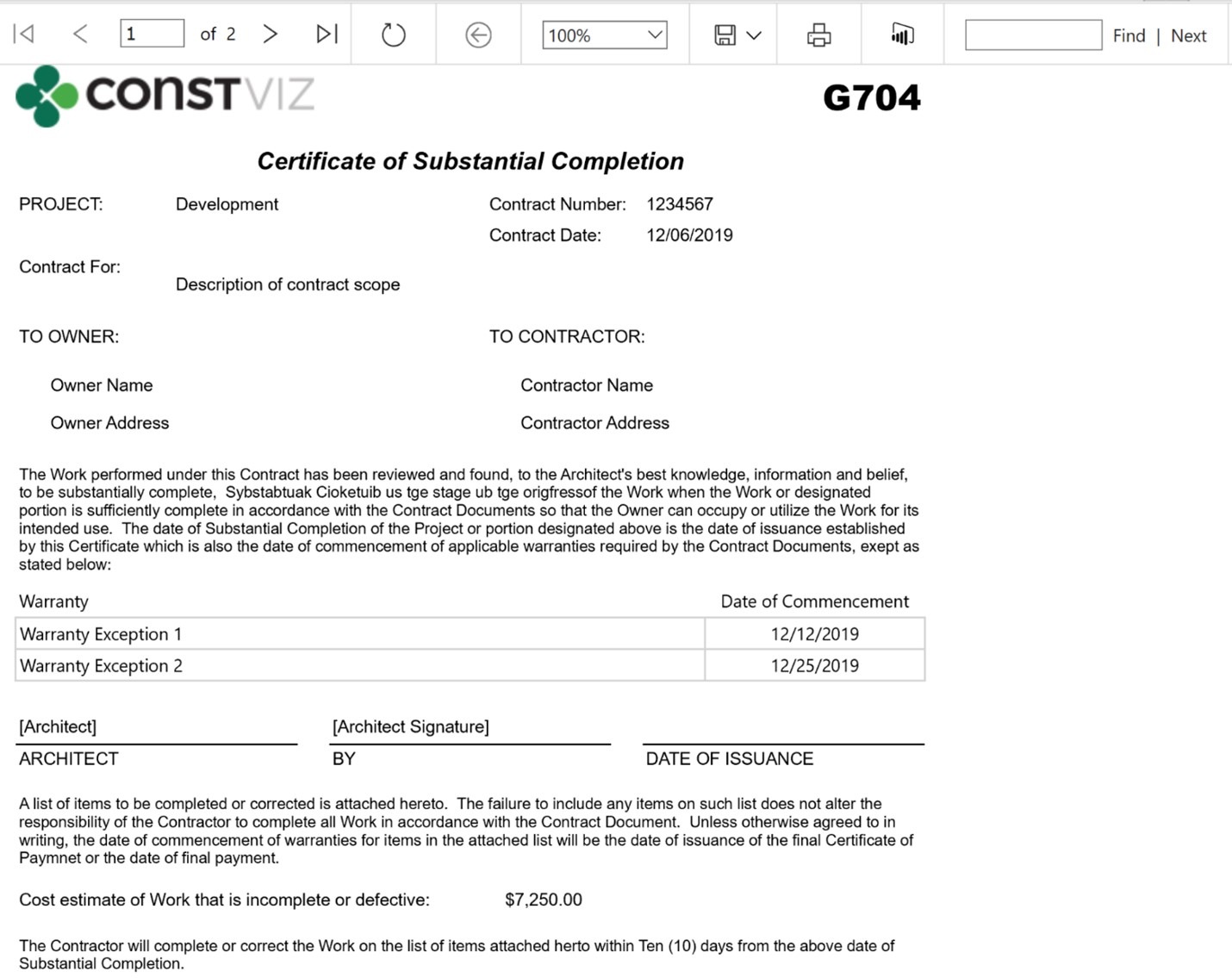
The Construction Viz Substantial Completion form app makes the turnover process more efficient and easier to manage for all parties involved. The user can track details, warranties, and punch list items for each significant area of scope, including the value outstanding and when each will be complete for turnover.  The user can run a G704 Certificate of Substation Completion report for physical signature and record retention at any time.

Construction Viz Certificate of Substantial Completion (G704) print view:
Substantial-Completion_1

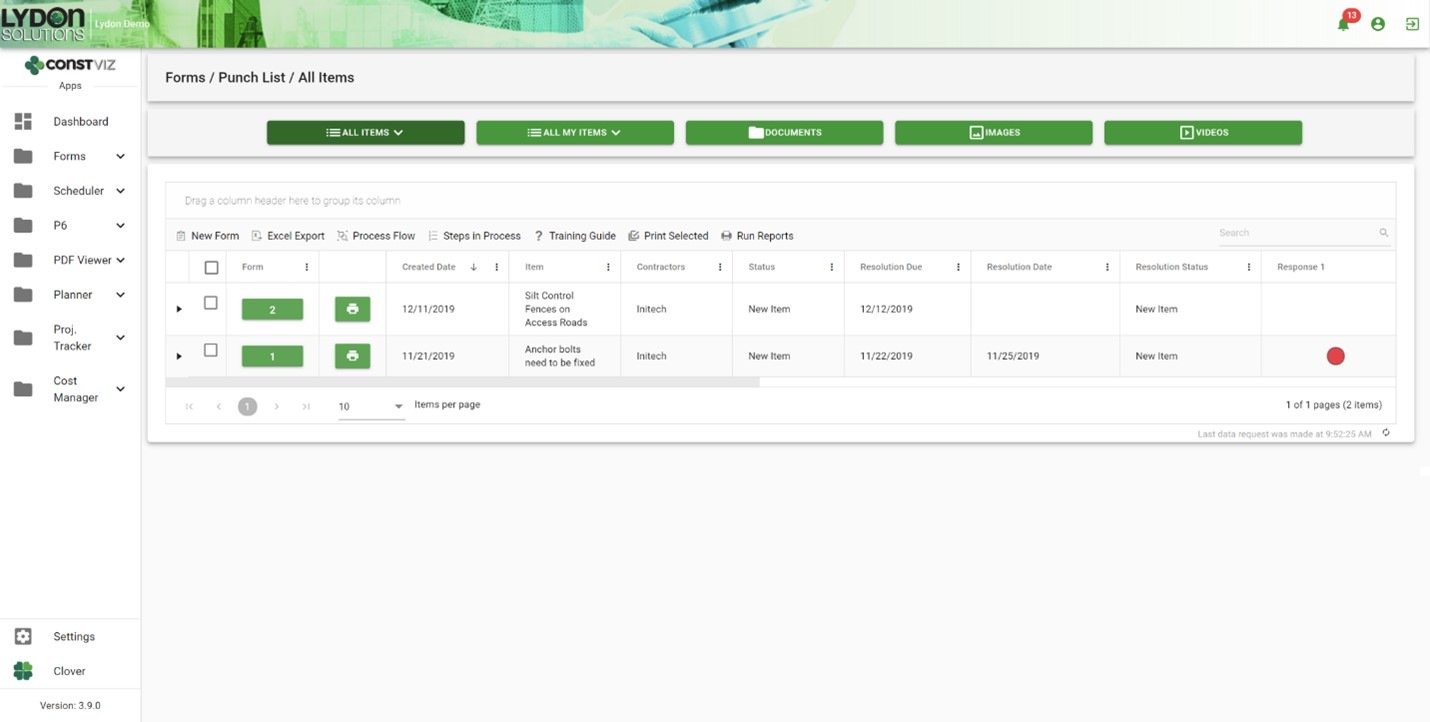
The challenge with traditional email correspondence is responsibility and progress management. Construction Viz solves this by capturing ownership within each punch list issue and displaying that information in interactive form status dashboards, ball in court grids, outstanding response log reports, and user alert notifications. And emails are automatically generated for individual users and distribution lists for review and acceptance.

Construction Viz Substantial Completion form log:
Substantial-Completion_2

Get just the construction forms you need

The Substantial Completion form is part of a full suite of construction apps available for Construction Viz. You can mix and match the forms you need for your project workflow.

All Construction Viz form apps are extendable with additional components, including:

  • Document, image, and video attachments
  • Geospatial mapping
  • WBS, specification, and asset tracking
  • Progress tracking using the Construction Viz Scheduler app and integrated P6 Scheduling
  • External links and data relationships
  • Electronic review and approval
  • Ad hoc workflow capability
  • Microsoft Power Automate workflow integration
  • Power BI reporting integration
  • Ball in court Dashboards and KPIs

Schedule a free consultation to see how we can help you get your project to the finish line with Construction Viz.
New Image Markup Feature for Construction Viz

Forms | August 5, 2021

Our latest Construction Viz feature lets project team members mark up images on any device with or without internet access.

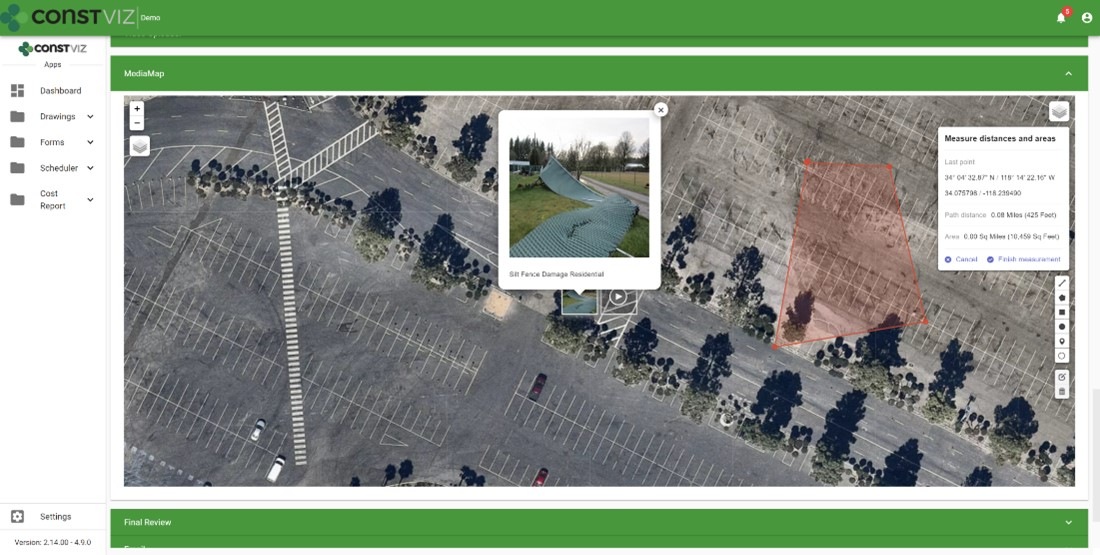
Adding images to a daily report, safety incident, or punchlist is critical to documenting work completed in the field and identifying any issues for potential corrective action. Construction Viz makes the process simple, enabling users to take photos with any device, with or without an internet connection, and attach images directly to the form. Our Media Map Component automatically plots the image and the location where it was taken on a geospatial map and adds this information to the form. Users can easily add comments, waypoints, and even measurements as a layer to the media map.

And because Construction Viz is a progressive web app (PWA), this is all done without users ever installing an app on their devices.

But what about marking up the images?  Our users told us that marking up images would be a handy feature and make Construction Viz's data capture even better. We listened. Read on to learn about his useful new capability.

Construction Viz image markup feature

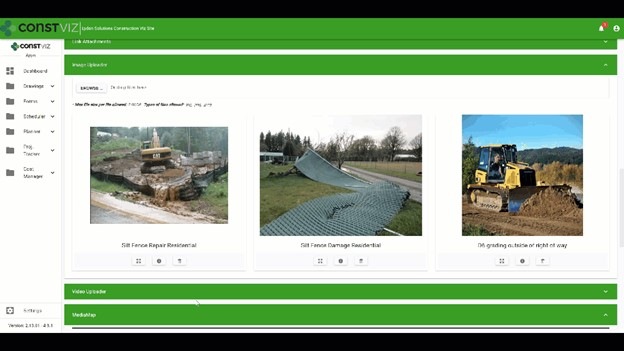
We expanded our Image Uploader Component for construction forms based on user feedback to add image markup capability and further simplify the entire process. Here is how it works:

  • After users upload images, the app displays them in interactive cards. Adding metadata such as title or description can be done in a couple of clicks.
  • The user can expand the photos from thumbnails to a full-screen mode to draw directly onto the image canvas.
  • The markup tool lets users pick from a palette of pen colors, complete with erasing and undo functionality.

The updated Image Uploader Component can be enabled in any one of our apps or can be added to a custom app as needed.

This new functionality enhances the entire data collection and documentation experience by extending what's possible for field workers. Also, since Construction Viz stores all of the data to your Microsoft 365 SharePoint, your project information is available for further reporting and workflow using the Power Platform.

The image markup tool is one of many features that we have built into Construction Viz. For an overview of the other powerful capabilities built into Construction Viz, check out our features page.

Construction Viz image markup feature

We expanded our Image Uploader Component for construction forms based on user feedback to add image markup capability and further simplify the entire process. Here is how it works:

  • After users upload images, the app displays them in interactive cards. Adding metadata such as title or description can be done in a couple of clicks.
  • The user can expand the photos from thumbnails to a full-screen mode to draw directly onto the image canvas.
  • The markup tool lets users pick from a palette of pen colors, complete with erasing and undo functionality.

The updated Image Uploader Component can be enabled in any one of our apps or can be added to a custom app as needed.

This new functionality enhances the entire data collection and documentation experience by extending what's possible for field workers. Also, since Construction Viz stores all of the data to your Microsoft 365 SharePoint, your project information is available for further reporting and workflow using the Power Platform.

The image markup tool is one of many features that we have built into Construction Viz. For an overview of the other powerful capabilities built into Construction Viz, check out our features page.

Construction Viz Media Map Component

Image-Mark-Up_1

Construction Viz Media Map Component

Image-Mark-Up_2

Get a demo of Construction Viz today

Construction Viz is an enterprise Project Management Information System (PMIS) built by construction professionals for construction professionals. We value our client's feedback and are always looking for the most efficient ways to get the job done.

Contact us for a no-obligation consultation and demo today to learn how Construction Viz can help your team better manage your construction projects.

Construction Viz Avoids the Folder Nightmare with Automated Document Controls

Document Control | June 8, 2021

Have you ever been part of a project that stores documents in an overly complicated file folder structure? You end up having to click through multiple levels of folders to get to a single item you need. Forget about moving that file to another location or even finding that document again in the future. Not very efficient.

The reality is, storing documents in a file folder structure can work well for a few scenarios, but there are some significant drawbacks across the enterprise, such as:

  • How do you best organize the folder structure – by project name, document type, or team?
  • What happens when a folder name changes? How does that affect related files, bookmarks, and overall searchability?
  • Do you use long folder names to be more descriptive? The resulting URL can become too lengthy, preventing you from sharing file links via email.
  • How do you effectively search the folders outside of using the filename?
  • Can anyone create a folder, and if so, how do you prevent duplication?

For the above reasons and many more, most project management organizations often employ document metadata instead of, or in addition to, folder structures. Metadata allows you to tag attributes about a document so you can search, filter, and group them based on that information.

However, effectively using metadata requires more upfront planning, additional user training, and, depending on your processes, adding manual tags based on where you save a file. All reasons why some organizations wind up falling back on file folders or do not consistently use metadata as their document controls team intends.

If you use Construction Viz, we have got you covered. That is because we added a built-in auto-tagging feature that takes the hassle out of metadata.

Construction Viz simplifies project metadata with auto-tagging

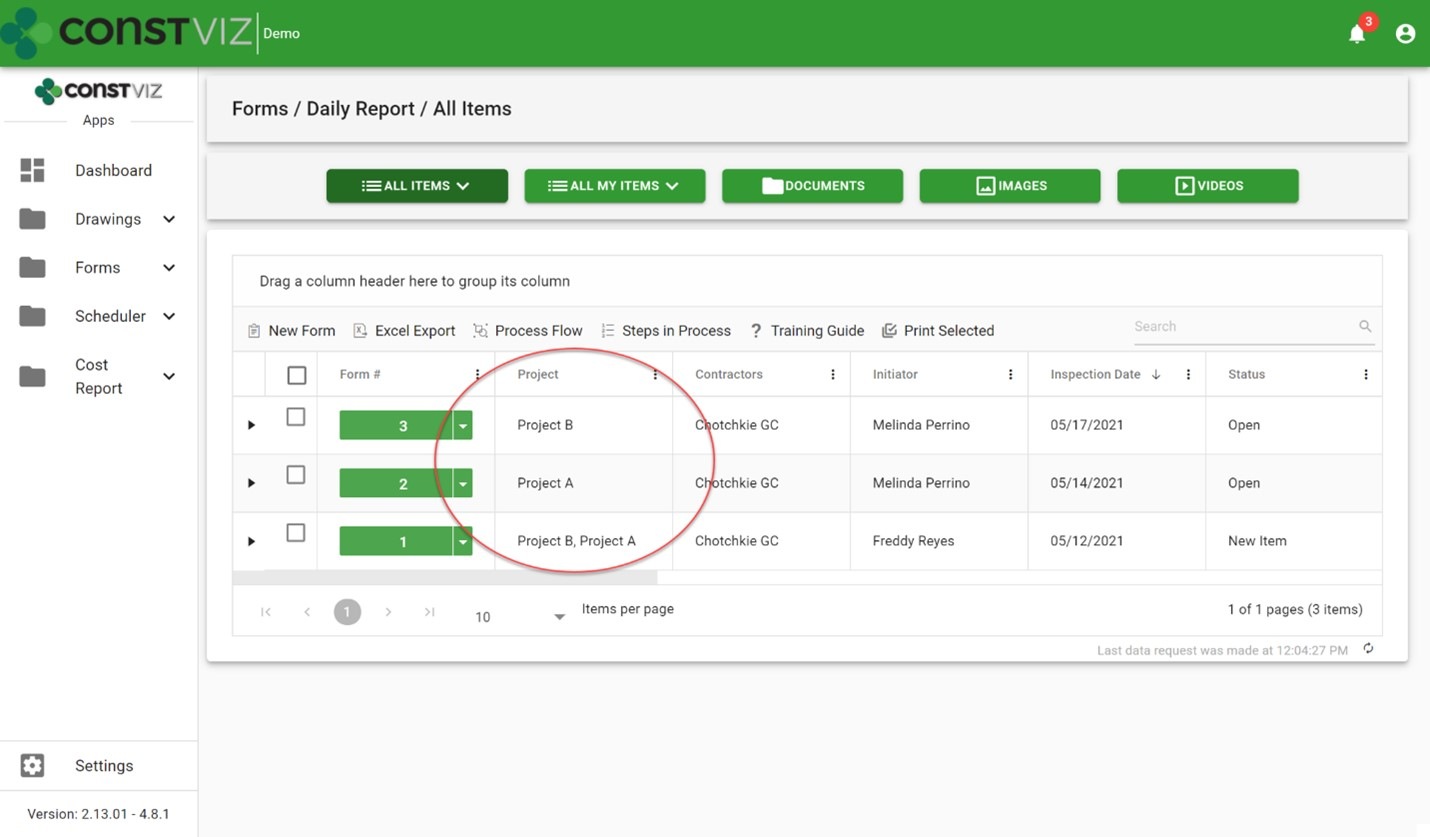
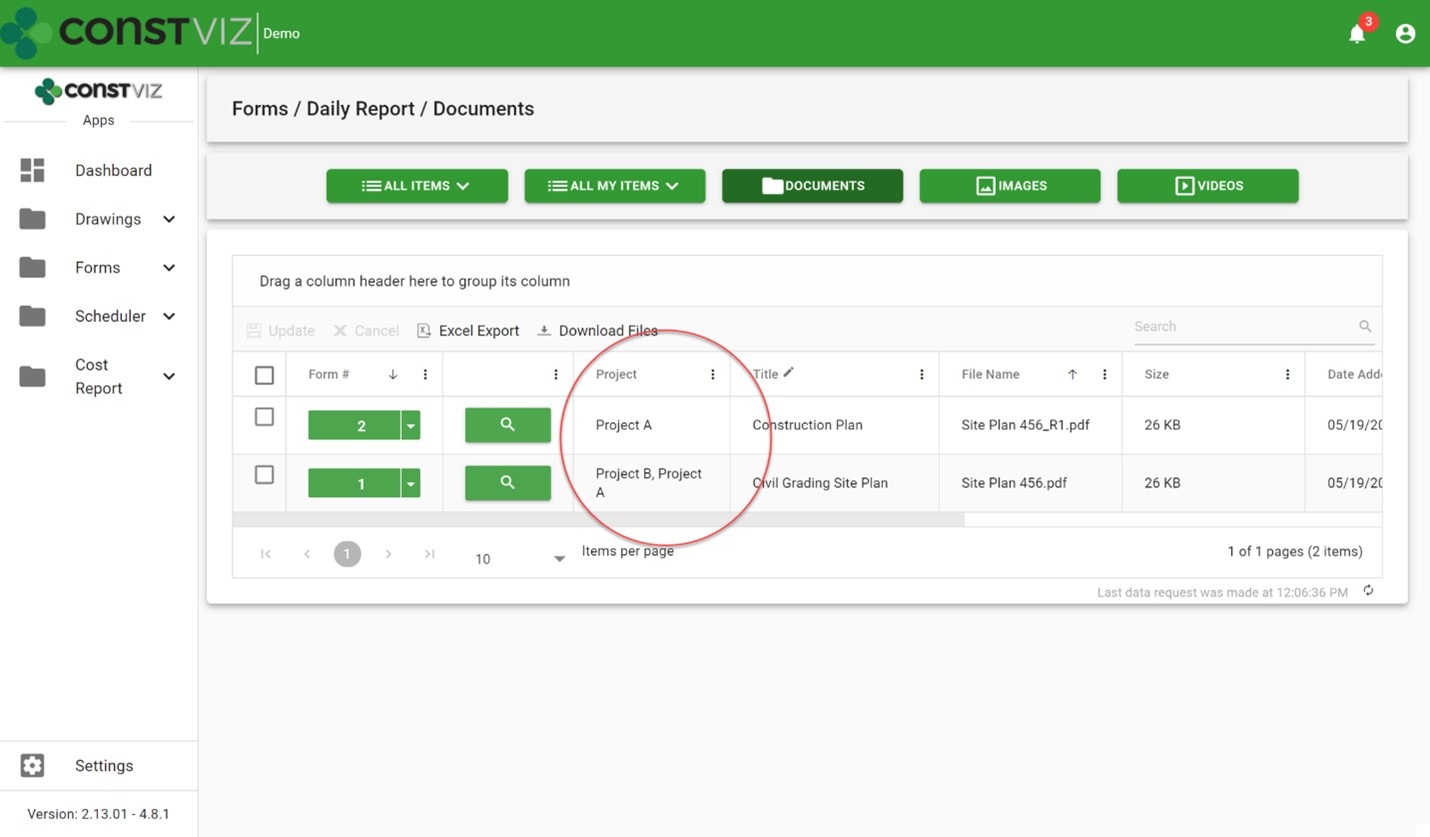
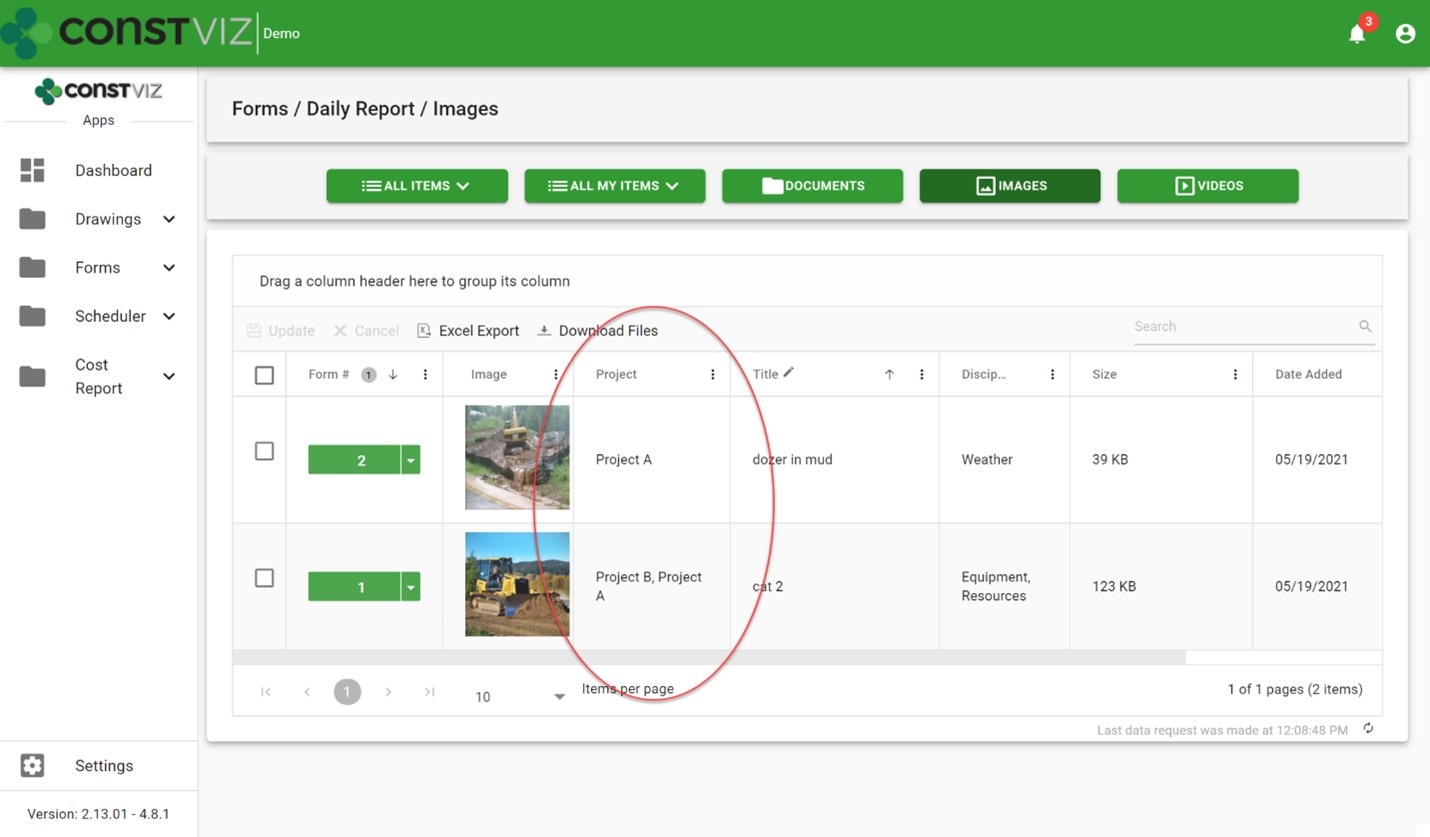
The Construction Viz auto-tagging feature automatically enriches your documents with contextual metadata. What about construction forms like RFIs, submittals, and daily reports that typically store images, drawings, documents, and other files? We built automated metadata tagging into the form apps to streamline metadata for the forms and file attachments.

So how does auto-tagging in Construction Viz work?

When attaching files (documents, images, and video) to a form, Construction Viz automatically saves the files to a SharePoint library and includes the form-specific metadata and any metadata added to the attachment. No additional metadata tagging by the user is required. Below are some example screenshots of this feature in action.

Daily report forms with project metadata tagged:

FolderNightmare_1

Daily report document attachments automatically tagged with project metadata:

FolderNightmare_2

Daily report image attachments auto-tagged with project metadata:

FolderNightmare_3

Benefits of the Construction Viz auto-tagging feature

The Construction Viz auto-tagging feature saves significant time for both the users and the document controls team. It ensures your organization's documents are stored with the proper metadata so you can find them in the future either by the associated form or by the attachment itself. For example, you can search for a specific image instead of finding the daily report that has the image as an attachment. Likewise, you can find a particular submittal package independent of the submittal form that has it as an attachment.

Also, since Construction Viz stores all the metadata with the lists and libraries in Microsoft 365 and SharePoint, you can create custom SharePoint views, Power BI reports or export the raw data to Excel.

Manage your projects with Construction Viz and Microsoft 365

Construction Viz lets you manage your projects right in Microsoft 365 with familiar tools such as Excel and SharePoint – all optimized for your construction project teams' needs. To see our catalog of our available construction apps for Microsoft 365 and SharePoint, check out the Construction Viz apps page. You can submit a free consultation and demo request to learn more.

And head over to LydonSolutions.com for more information if you are interested in a customized construction project management solution using Microsoft 365.

If you can measure it, you can manage it with Construction Viz Task Manager

Project Management Tools | February 10, 2021

Being a construction project manager is a demanding job where all responsibility for a project's success falls on your shoulders. You spend most of your time herding cats, trying to hold your team members accountable while working in a matrixed organization. It's not enough to email a team member when a deliverable is due. You need constant reminders when follow-ups are required and a simple but effective means to monitor and report progress.

We designed the Construction Viz Task Manager App for project managers like you. Construction Viz Task Manager has everything you need to plan, track, and report on your team's project and program tasks within one powerful app.

Construction Viz Task Manager Key Features

The Construction Viz Task Manager app installs easily into the Construction Viz Hub and integrates with our full lineup of construction project management apps. Task Manager provides a 360-degree approach to managing tasks, including the following features:

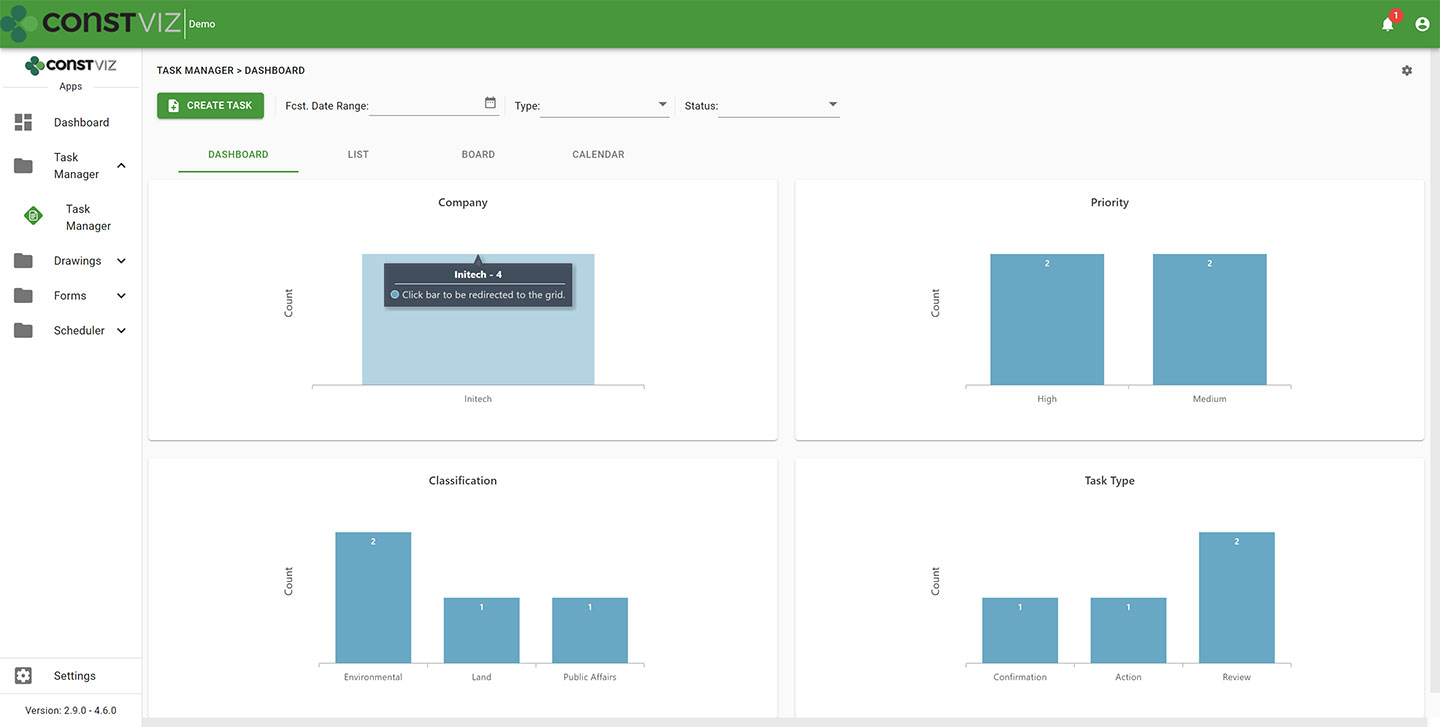
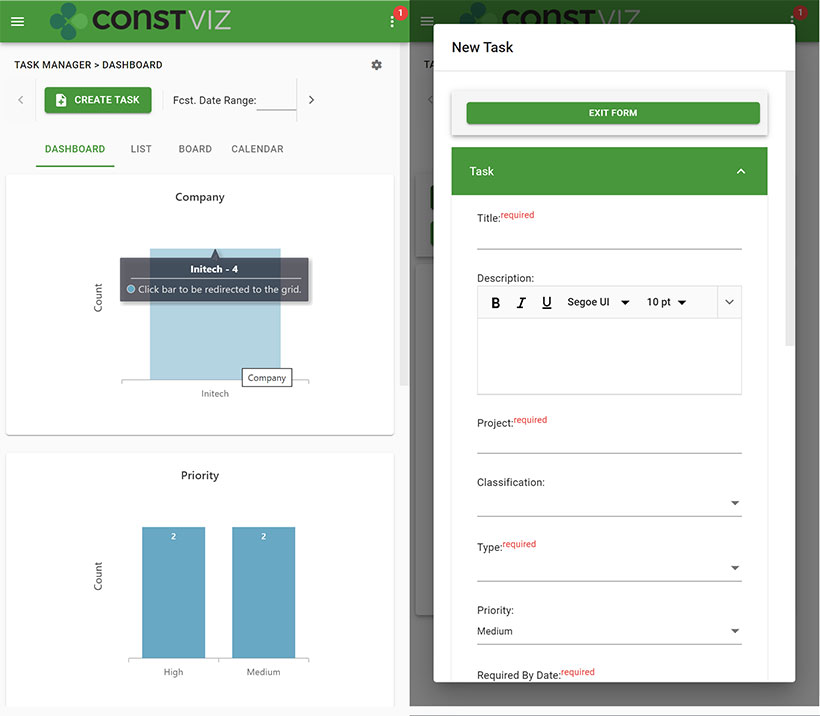
  • Dashboard summary. As a PM, your time is limited. Task Manager lets you quickly see the status of your project team's tasks in configurable dashboards with drill-down capability.
cv-tm_1
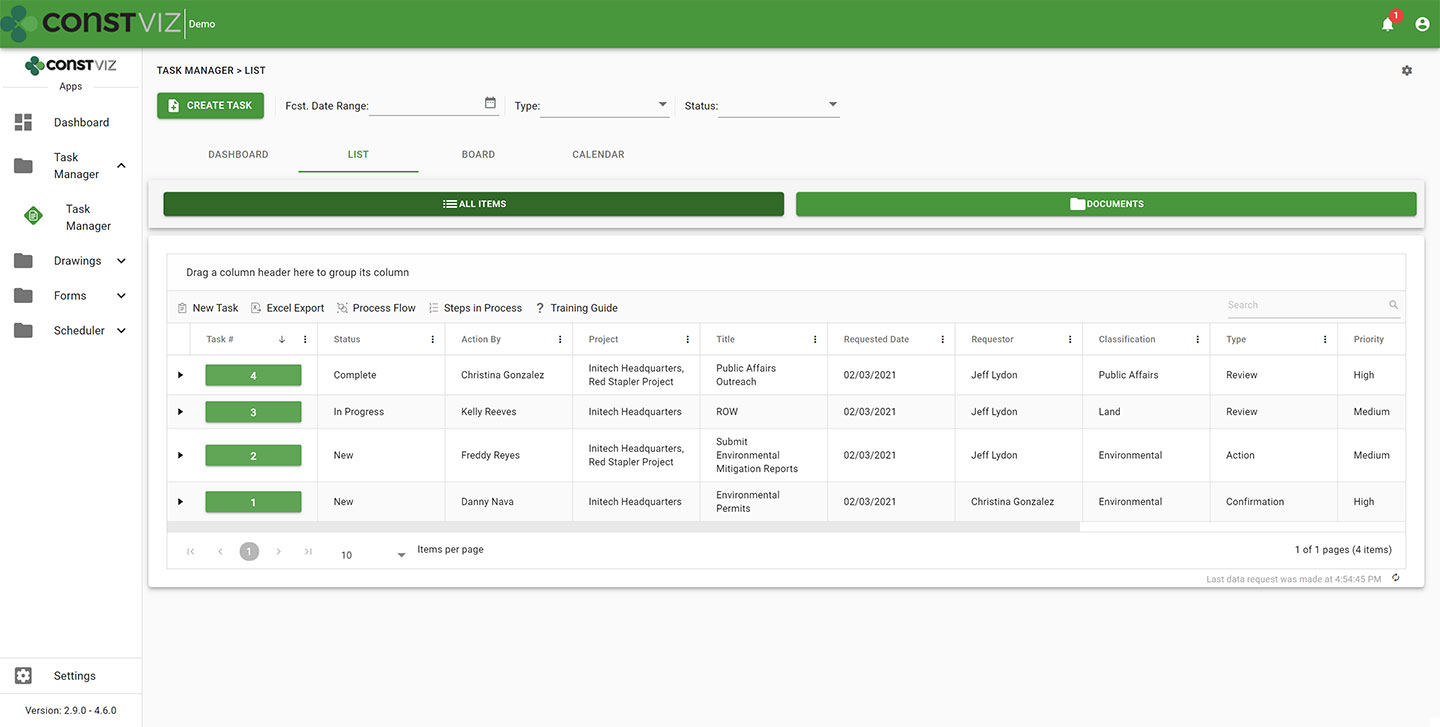
  • List view. Task Manager lets you see all your tasks consolidated into a centralized list view. You can use this pre-defined view to quickly group, filter, search, and report on your team's tasks.
cv-tm_2
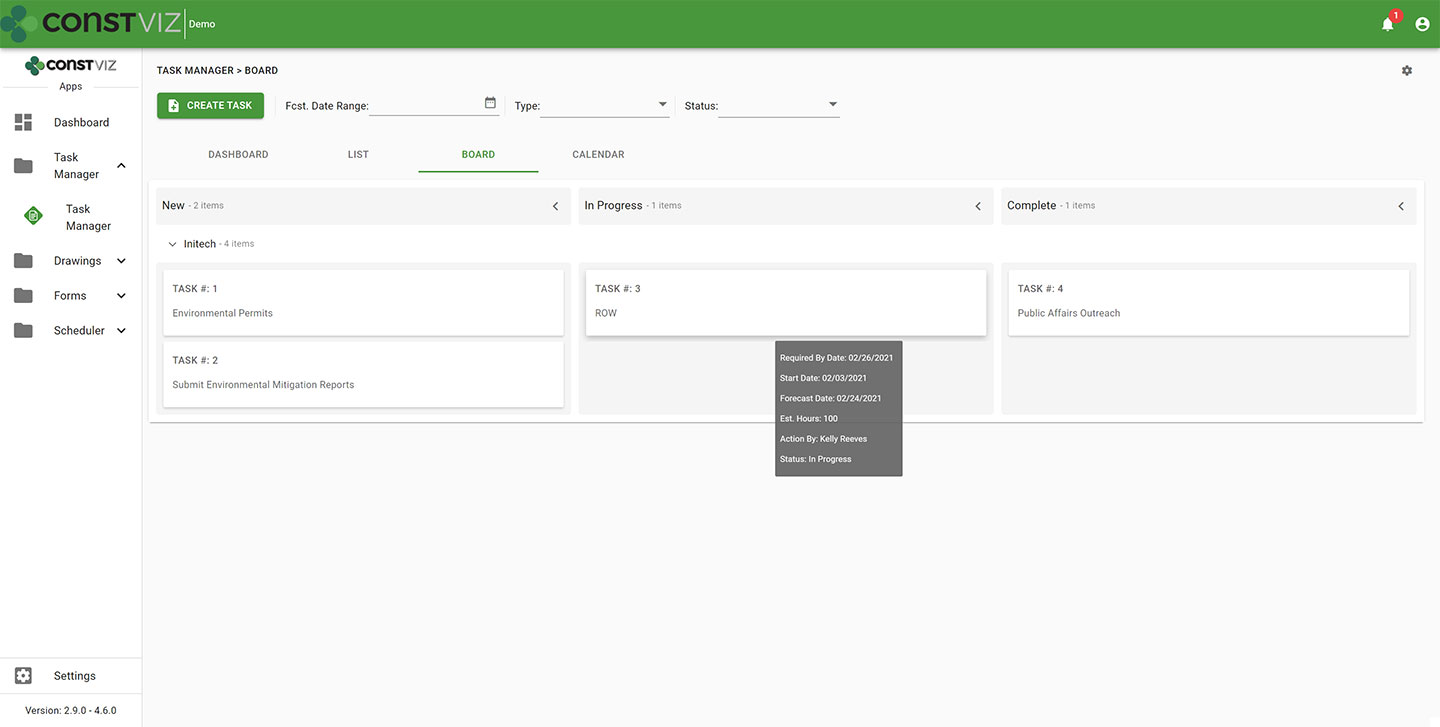
  • Board view. Want an easy way to see the progress of a task? Task Manager's board view uses a Kanban approach to managing tasks with configurable buckets and swim lanes so you can see progress made by each team member. The app highlights any behind schedule tasks in red, allowing you to target those items for immediate follow up.
cv-tm_3
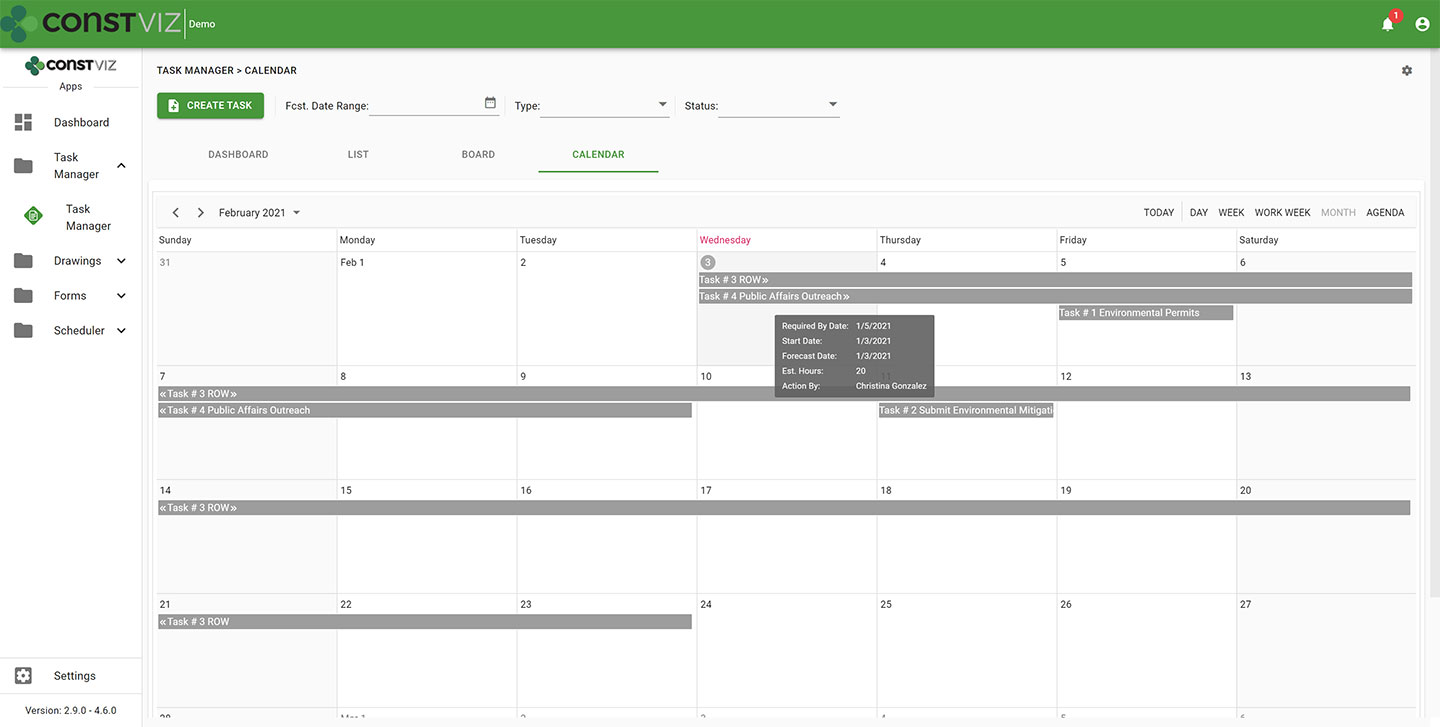
  • Calendar view. Seeing when tasks are due in a familiar calendar layout is invaluable. Task Manager's calendar allows you to proactively manage when tasks are forecast to be complete using daily, weekly, or monthly views. Since Construction Viz uses SharePoint as the backend, you can even link your Task Manager calendar to your Outlook calendar.
cv-tm_4
  • When you assign a task to someone in Task Manager, the app automatically sends the assignee an email with a link for them to take action. Task Manager integrates with Microsoft Power Automate, letting you tailor the timing and frequency of email notifications for your business processes so that frequent reminders do not go unnoticed. Like all of our apps, tasks from Task Manager also display in the Construction Viz notification center, ensuring you and your team always know about items requiring your attention.
  • Task Manager integrates with other Construction Viz forms and apps. Task Manager integrates across the suite of Construction Viz apps, streamlining your workflows. For example, if you are in a Construction Viz RFI form, you could create a task and assign it to a team member, thereby associating the two records. Now, anyone viewing the task can see the linked RFI record and vice versa. With Task Manager, you no longer have to bounce between one system to know when a task is due and another to view the work item. Everything is readily accessible and interlinked directly in all the relevant Construction Viz apps.
  • Use any device with full mobile responsive and offline support. Task Manager, like all our apps, is fully responsive on any device. You can also work offline without an internet connection.  So whether you are at the office or in the field, you can always manage your tasks.
cv-tm_5
  • Adaptive Cards integration. Task Manager takes advantage of Microsoft's Adaptive Card technology, allowing team members to work in Outlook without ever logging into any system.  Task-driven cards make it easy for team members to respond to tasks wherever they are and on any device using Microsoft Outlook. You can read more about Construction Viz and Microsoft Adaptive Cards in this blog post.

See what Construction Viz Task Manager can do for you

Construction Viz is the most flexible construction project management solution available for Microsoft 365 and SharePoint. Find out how Construction Viz and the Task Manager app can help you better manage your construction projects and programs with a free consultation and demo.

Simplifying PMIS Processes and Training with Construction Viz

Project Management Tools | February 3, 2021

You want your project teams set up for success from day one. Construction Viz makes it easy to access, update, and manage your processes and training materials so your team can focus on the project deliverables that matter.

When organizations roll out a brand new Project Management Information System (PMIS), the last step in the implementation often goes something like this: Here’s the system, attend a generic training session, start using the system, and oh by the way, here is a binder of training material that you can read up on how to use the system. These processes and training resources are often out of date and rarely tailored around how YOU do business. If your team members need training while in the system, they will have to seek out the latest training material, forcing them to lose focus on what they were doing and slow productivity. Is it any wonder no one wants to use that brand new PMIS system?

With Construction Viz, we simplify how project teams access, update, and manage processes and training, ensuring that projects are efficiently moving forward.

Construction Viz Puts Your Processes and Training Materials Front and Center

Setup. Construction Viz treats training and process documentation as an integral part of the system, not an afterthought. When you install Construction Viz in SharePoint, the software automatically creates a library for storing processes and training materials linked to each of your installed apps. You can then add custom process and training material for any app by inserting the appropriate metadata into your documents, ensuring that these materials are at your fingertips when you need them and easy to update and maintain.

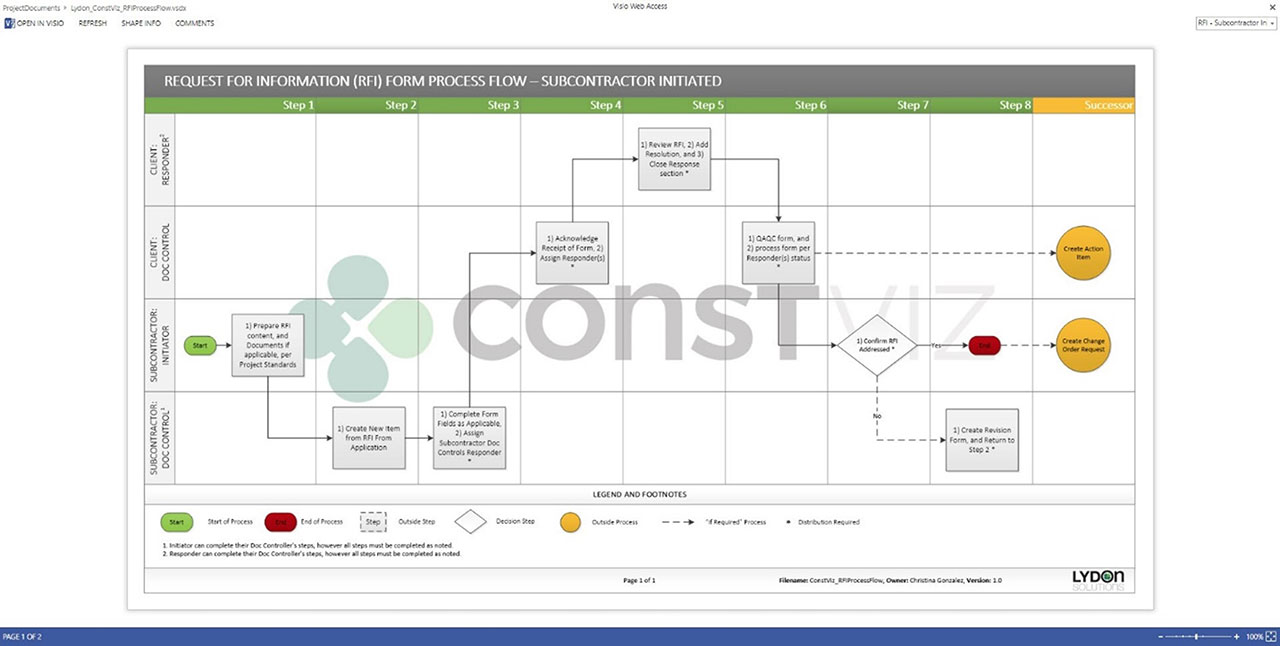
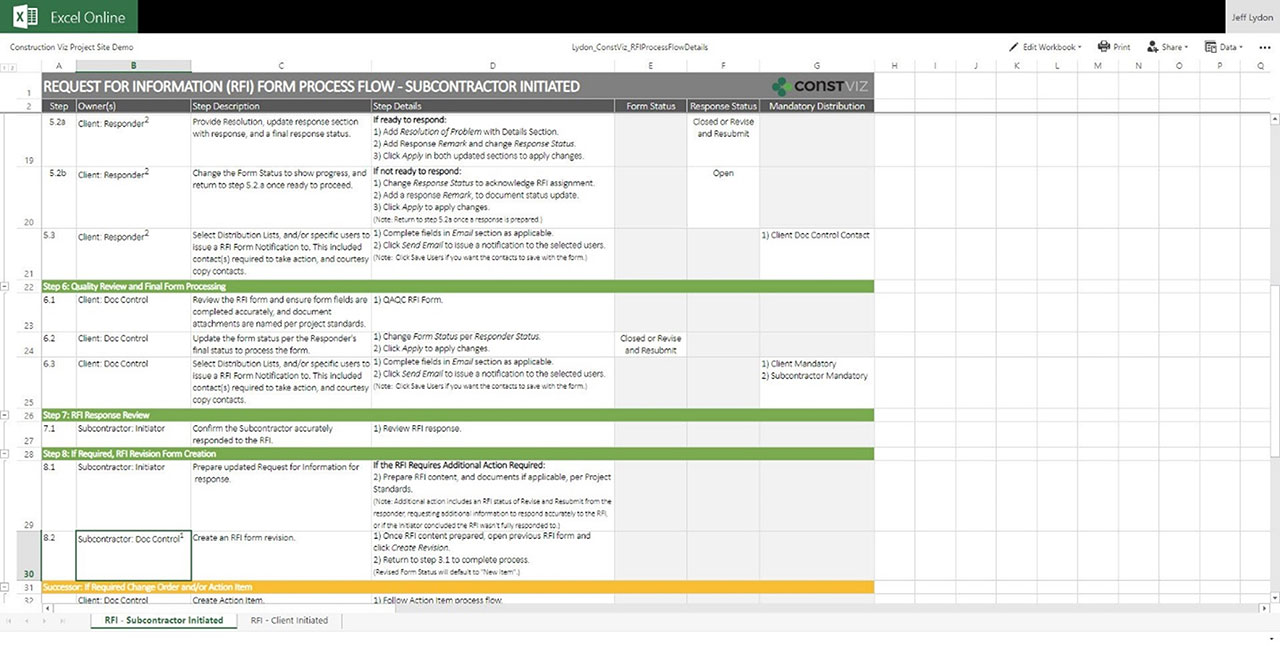
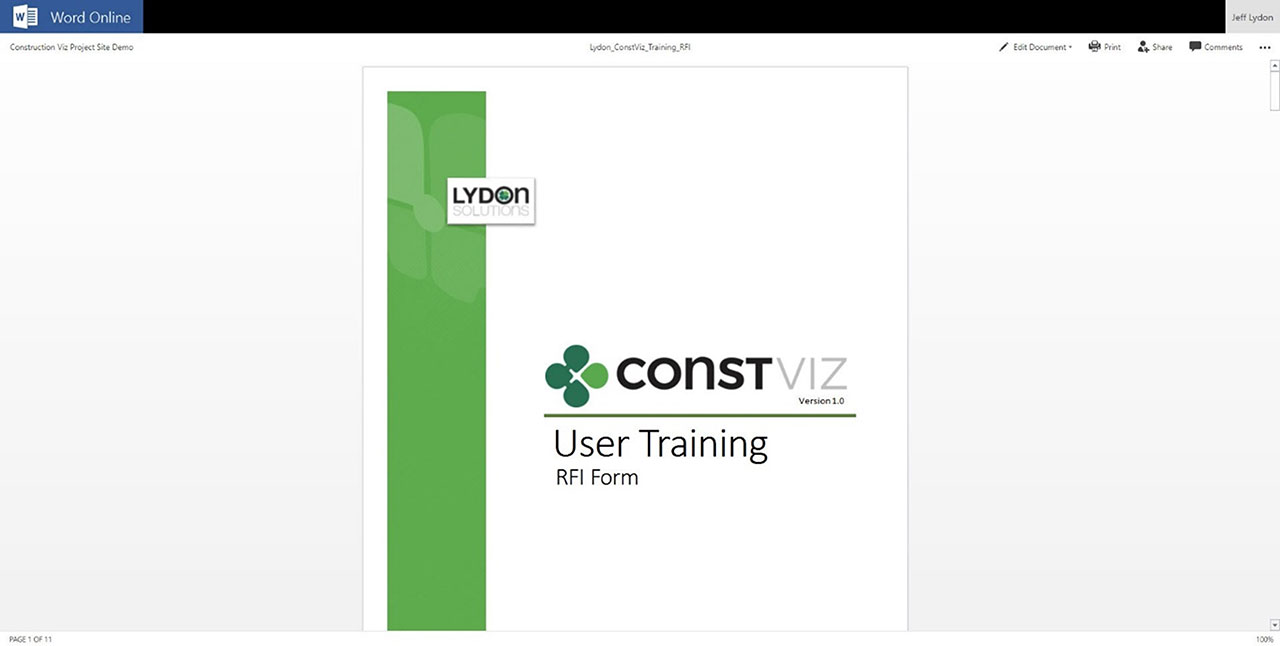
Format.  Construction Viz lets you open Microsoft Office applications (Excel, Word, Visio, One Note) in any modern browser without having to download documents to the desktop. So, regardless of which device you are on, you can open and edit your training and process documents. You can even have multiple people simultaneously edit the documents with robust permission and version controls, ensuring that you are always working off the latest materials. Construction Viz also supports all major document and media formats, including video.

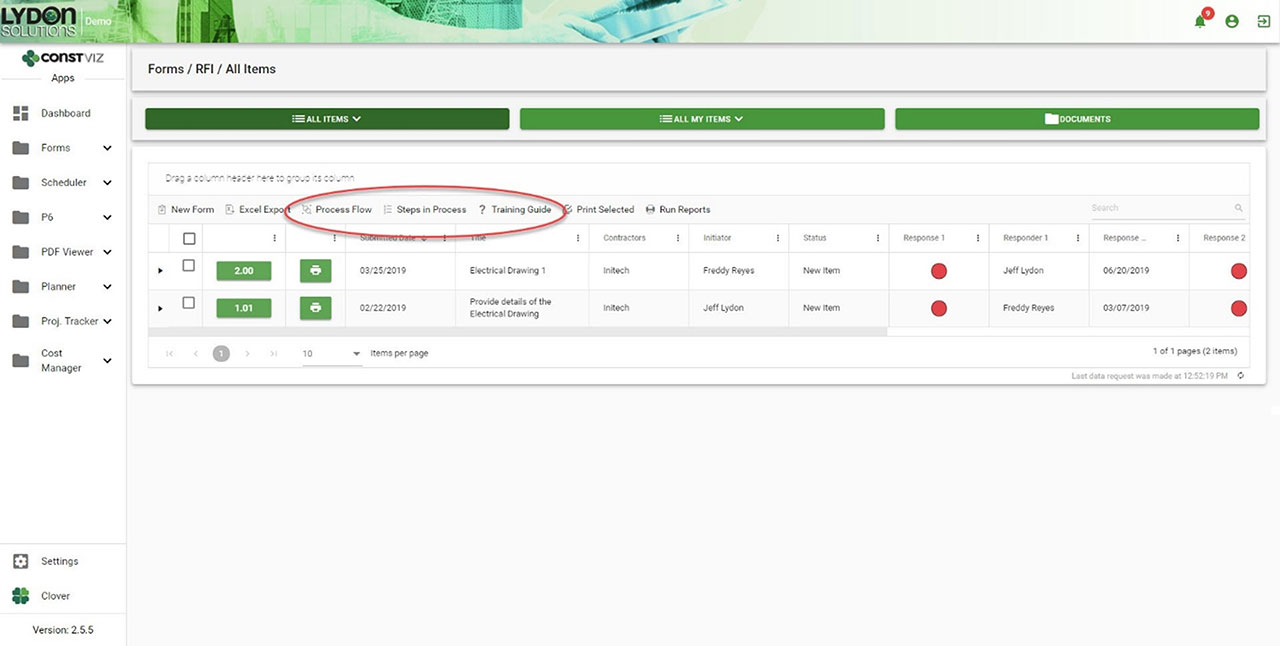
Navigation. Each Construction Viz apps includes links to the process and training resources right above the work area, giving you direct access to the information you need where you are working. Everything is right there in front of the user.

Getting Documentation And Process Right

One of the common reasons PMIS deployments can fail after deployment is low user adoption, often resulting from a lack of adequate training and documentation. With Construction Viz, we integrated training and process document tools right into the system so that your project teams can hit the ground running with everything they need from day one.

Navigation to Processes and Training within each App
Process workflow diagram in Visio Online
Steps for workflow in Excel Online
Training Manual in Word Online

Get a Free Demo and Consultation

Several major owners, construction managers, and utilities use Construction Viz every day to manage multi-billion-dollar projects and programs. Contact us now for a free demo and consultation to learn how Construction Viz can help your organization better manage your projects.

Why Access Management Matters For Your Projects

Collaboration | November 30, 2020

Construction projects involve many different stakeholders that create, edit, and review project information, making it challenging to ensure sensitive data doesn't end up in the wrong hands. Thus, using a robust Project Management Information System (PMIS) with the right access management tools is essential.

For companies utilizing Microsoft 365 or SharePoint as a PMIS, you are probably aware of these tools' powerful access level capabilities out of the box. While you can assign granular permissions at a site, library, folder, and even a specific file level, you can very quickly create a spiderweb of complexity that can be too unwieldy to manage. Construction Viz, our construction project management solution powered by Microsoft 365 and SharePoint, lets you take full control of access management for your projects.

Leveraging SharePoint Access Management with Construction Viz


For over 11 years, Lydon Solutions has been building SharePoint-based construction management solutions, including our very own PMIS, Construction Viz. One of the thorniest issues organizations encounter using SharePoint to manage construction projects is access management. This is why our goal when we built Construction Viz was to leverage SharePoint's underlying access controls while providing a simplified user interface for easier permissions administration.

What makes the Construction Viz Access Management layer so great?


Construction-centric.
With years of experience building custom solutions in SharePoint and providing document control services, we know how teams typically share and control project information. We designed Construction Viz Access Management around groups, users, apps, and specific content related to contractors and companies. For example, a project team could give certain users access to the Submittal app but only allow them to see and edit submittals from their company or for a specific project.

Simplified Management. Access Management is centralized in the Construction Viz Hub to simplify access administration. As you activate Construction Viz apps within the Hub, they are automatically added to the access management module, allowing administrators to grant users access right away. You can manage access in two ways:

  1. From Groups Management, an administrator can create access groups, assigning each different access rights - such as read, write, or none - on a per contractor, company, or app basis. From Users Management, an administrator can then assign individual users to a specific access group, thus automatically assigning the user the same rights defined under Groups Management.
  2. If the administrator needs to set special access rules for a user, they can give a user custom access rather than adding them to a specific access group.

You can display all groups or users' access levels in an interactive grid from either Groups Management or Access Management views. This data can then be exported to Excel and printed as a PDF for further analysis and reporting.

Powerful Customization. Construction Viz Access Management provides consistent access control across all apps in the suite. You can define access down to the component level (such as form header, attachments, links, reviews, and so) and even to the field level (such as initiator, status, and description) depending on your needs. For example, you could set up your RFI forms with access controls that only allow the contractor who submitted the form to edit the description field. In this same form, the general contractor reviewing this information might only have access to the response fields in their assigned review section. Similarly, the owner could have access to just their response fields in their review section.

With Construction Viz Access Management, we built in the capabilities for managing stakeholder access for construction projects of any size in a way that minimizes the level of effort required to administer.

Learn More About Construction Viz Access Management


Access Management is a feature we built into our apps to ensure access to project data can be managed easily across our suite of apps. Find out other ways that Construction Viz can help your projects be successful by contacting us for a free consultation and demo. If you need help getting your construction projects up and running quickly, Lydon Solutions also offers managed services for Microsoft 365 and SharePoint.

  • « Go to Previous Page
  • Page 1
  • Interim pages omitted …
  • Page 4
  • Page 5
  • Page 6
  • Page 7
  • Go to Next Page »

Footer

About Constructon Viz

Construction Viz is a flexible construction project management software solution powered by Microsoft SharePoint and SQL.
Read More >

Navigation

  • Home
  • About
  • Features
  • Apps
  • Blog
  • Contact
  • Login

Apps

  • Construction Viz Hub
  • Cost Report
  • Drawing Management
  • File Manager
  • GIS Maps
  • Oracle Primavera 6
  • Payment
  • Specification Management

–

  • Project Forms
  • Project Planner
  • Project Scheduler
  • Project Tracker
  • Task Manager

Connect with Us

  • This field is for validation purposes and should be left unchanged.
  • Sign up to receive helpful tips for construction project managers as well as updates about Construction Viz.

Lydon Solutions

© Lydon Solutions

  • Privacy
  • Cookies
  • Terms of Use
  • Disclaimer
  • End-user license

Click here to start a Microsoft Teams chat.

Click here to start a Microsoft Teams chat.

Contact Us
This field is for validation purposes and should be left unchanged.
Name(Required)
Join Our Newsletter

Sign up to receive helpful tips for project managers and updates about Construction Viz.

Get Started

Join Our Newsletter

Sign up to receive helpful tips for construction project managers as well as updates about Construction Viz.

  • This field is for validation purposes and should be left unchanged.
  • This site is protected by reCAPTCHA and the Google Privacy Policy and Terms of Service apply.