• Skip to primary navigation
  • Skip to main content
  • Skip to footer
Construction Viz

Construction Viz

Project Management Perfect

  • About
  • Features
  • Apps
  • Blog
  • Contact
  • Download Flyer
  • Get Started Today
  • Login
Show Search
Hide Search

construction project management

New Image Markup Feature for Construction Viz

Forms | August 5, 2021

Our latest Construction Viz feature lets project team members mark up images on any device with or without internet access.

Adding images to a daily report, safety incident, or punchlist is critical to documenting work completed in the field and identifying any issues for potential corrective action. Construction Viz makes the process simple, enabling users to take photos with any device, with or without an internet connection, and attach images directly to the form. Our Media Map Component automatically plots the image and the location where it was taken on a geospatial map and adds this information to the form. Users can easily add comments, waypoints, and even measurements as a layer to the media map.

And because Construction Viz is a progressive web app (PWA), this is all done without users ever installing an app on their devices.

But what about marking up the images?  Our users told us that marking up images would be a handy feature and make Construction Viz's data capture even better. We listened. Read on to learn about his useful new capability.

Construction Viz image markup feature

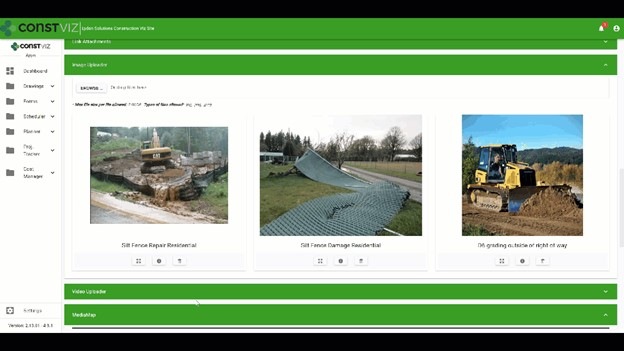
We expanded our Image Uploader Component for construction forms based on user feedback to add image markup capability and further simplify the entire process. Here is how it works:

  • After users upload images, the app displays them in interactive cards. Adding metadata such as title or description can be done in a couple of clicks.
  • The user can expand the photos from thumbnails to a full-screen mode to draw directly onto the image canvas.
  • The markup tool lets users pick from a palette of pen colors, complete with erasing and undo functionality.

The updated Image Uploader Component can be enabled in any one of our apps or can be added to a custom app as needed.

This new functionality enhances the entire data collection and documentation experience by extending what's possible for field workers. Also, since Construction Viz stores all of the data to your Microsoft 365 SharePoint, your project information is available for further reporting and workflow using the Power Platform.

The image markup tool is one of many features that we have built into Construction Viz. For an overview of the other powerful capabilities built into Construction Viz, check out our features page.

Construction Viz image markup feature

We expanded our Image Uploader Component for construction forms based on user feedback to add image markup capability and further simplify the entire process. Here is how it works:

  • After users upload images, the app displays them in interactive cards. Adding metadata such as title or description can be done in a couple of clicks.
  • The user can expand the photos from thumbnails to a full-screen mode to draw directly onto the image canvas.
  • The markup tool lets users pick from a palette of pen colors, complete with erasing and undo functionality.

The updated Image Uploader Component can be enabled in any one of our apps or can be added to a custom app as needed.

This new functionality enhances the entire data collection and documentation experience by extending what's possible for field workers. Also, since Construction Viz stores all of the data to your Microsoft 365 SharePoint, your project information is available for further reporting and workflow using the Power Platform.

The image markup tool is one of many features that we have built into Construction Viz. For an overview of the other powerful capabilities built into Construction Viz, check out our features page.

Construction Viz Media Map Component
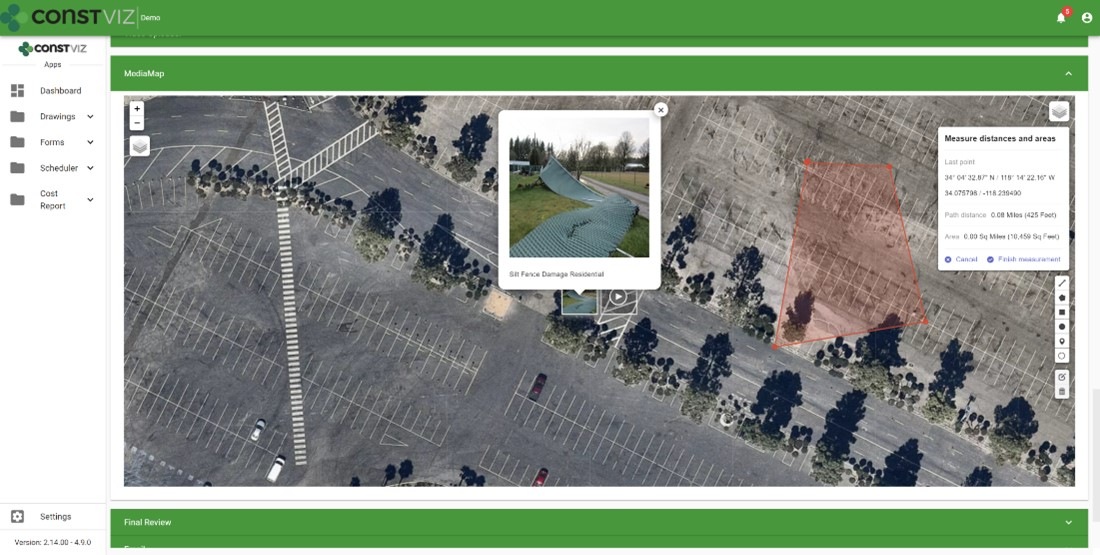
Image-Mark-Up_1

Construction Viz Media Map Component

Image-Mark-Up_2

Get a demo of Construction Viz today

Construction Viz is an enterprise Project Management Information System (PMIS) built by construction professionals for construction professionals. We value our client's feedback and are always looking for the most efficient ways to get the job done.

Contact us for a no-obligation consultation and demo today to learn how Construction Viz can help your team better manage your construction projects.


Why its Time to Rethink Where You Store Your Project Data

Storage | July 21, 2021

Over our years of working in and providing software solutions for the construction industry, we have seen dramatic shifts in how organizations deploy project management systems and where they store project data. The cloud over the last fifteen years replaced the "old way" of on-premise servers. Now, organizations have another emerging option that combines the best of on-premise and cloud servers. Read on to learn more about the benefits of client tenants and Microsoft 365.

The old way: on-premise deployments

WhereIsYourData_1

Before the last fifteen years or so, companies deployed their project management systems on client servers behind firewalls to prevent data from being accessible from the internet. While this approach ensured that the project management information systems (PMIS) and data were secure, it had several drawbacks, including:

  • extended owner IT approval process for new software
  • exorbitant capital costs to spin up and maintain physical servers
  • no access for third-party software providers and outside contractors

The new way: embracing the cloud

WhereIsYourData_2

With the rise of cloud computing over the last fifteen years, many companies moved to externally hosted solutions. The benefits of the cloud appeared to outweigh the security concerns that IT departments had with data residing outside of their firewall. Cost-conscious management pressured IT departments to outsource data hosting and software applications to save money and improve overall efficiency.

However, there are drawbacks to the cloud. Security breaches have become common, and owners have discovered that it is frustratingly difficult to get their data out of externally hosted systems for archiving and reporting. As a result, the pendulum is starting to shift away from externally hosted PMIS solutions and cloud data repositories.

Today's better solution: client tenants and Microsoft 365

WhereIsYourData_3

With today's cloud computing capabilities, owners can spin up their own data centers in AWS or Azure to manage their company's data. And with the rise of no-code/low-code development, owners have also started building custom solutions in their own Microsoft 365 tenant using the Power Platform and SharePoint. The owners that embrace this model like having their data readily available when and where they need it.

In many ways, this shift marks a return to the "old way" of owners having their systems and data behind their firewall.  But instead of maintaining physical servers, they have virtual machines (VMs) in their tenants in the cloud.

Like any other software provider, companies providing construction project management software will have to adjust to this shift to allow owners to decide where their data will ultimately reside.

Today's better solution: client tenants and Microsoft 365

WhereIsYourData_4

We saw the above shift occurring and developed our Construction Viz solution to be either externally hosted or deployed directly into a client's Microsoft 365. With the latter, now you can have the best of both worlds with your data residing in your Microsoft 365 tenant while the PMIS application runs securely in a Microsoft Azure certified app.

Construction Viz is designed for the future and provides the following benefits for a construction organization:

  • Verified Microsoft Azure app. Construction Viz utilizes Microsoft's app security technology. Apps need to be accepted into the tenant to run.
  • Data resides in SharePoint. When we deploy our Construction Viz apps, they automatically create associated SharePoint lists and libraries in the Microsoft 365 tenant. As a result, you can access and use the app data across all the Microsoft 365 services such as Power BI and Power Automate.
  • No need for Archiving. There is no need for archiving since the project data resides in your SharePoint sites.
  • Authentication. The entire solution leverages Microsoft authentication, so no additional login is required.
  • Contractor access. With Construction Viz's robust but simple access management controls, contractors can access the project data they need securely.
  • Microsoft 365 integrated. Construction Viz deeply integrates into Microsoft 365. That means if the owner wants to build a custom solution, we can easily access it inside Construction Viz.

Get a free demo and consultation

The technology journey, in a way, has come full circle with systems and data once again behind the owner's firewall. Is your PMIS keeping up with the times?

Construction Viz is a powerful and flexible construction project management solution optimized for YOU and your workflow. For maximum flexibility, Construction Viz is available in the cloud, on-premise, or as à la carte apps for Microsoft SharePoint and Microsoft 365.

Contact us today to schedule a free demo and consultation.

Tame Your Inbox with the Construction Viz Email Log Feature

Email Log | July 15, 2021

“I never received the email!”

How many times have you heard this response as a project manager on construction projects?

Email, in many cases, has become the primary form of project communication. But tracking the history of sending and receiving electronic mail is problematic, and read receipts only go so far. Another challenge is ensuring that everyone has the information they need since there is often no centralized project email inbox accessible by the entire team.

Unfortunately, as email has become more pervasive on projects, many of us find it challenging to keep up with essential project updates and information that gets lost in our overflowing inboxes.

Introducing the Construction Viz Email Log Feature

We are introducing the Construction Viz app-specific email log feature to address the above issues and consign the “I never received the email!” response to history.

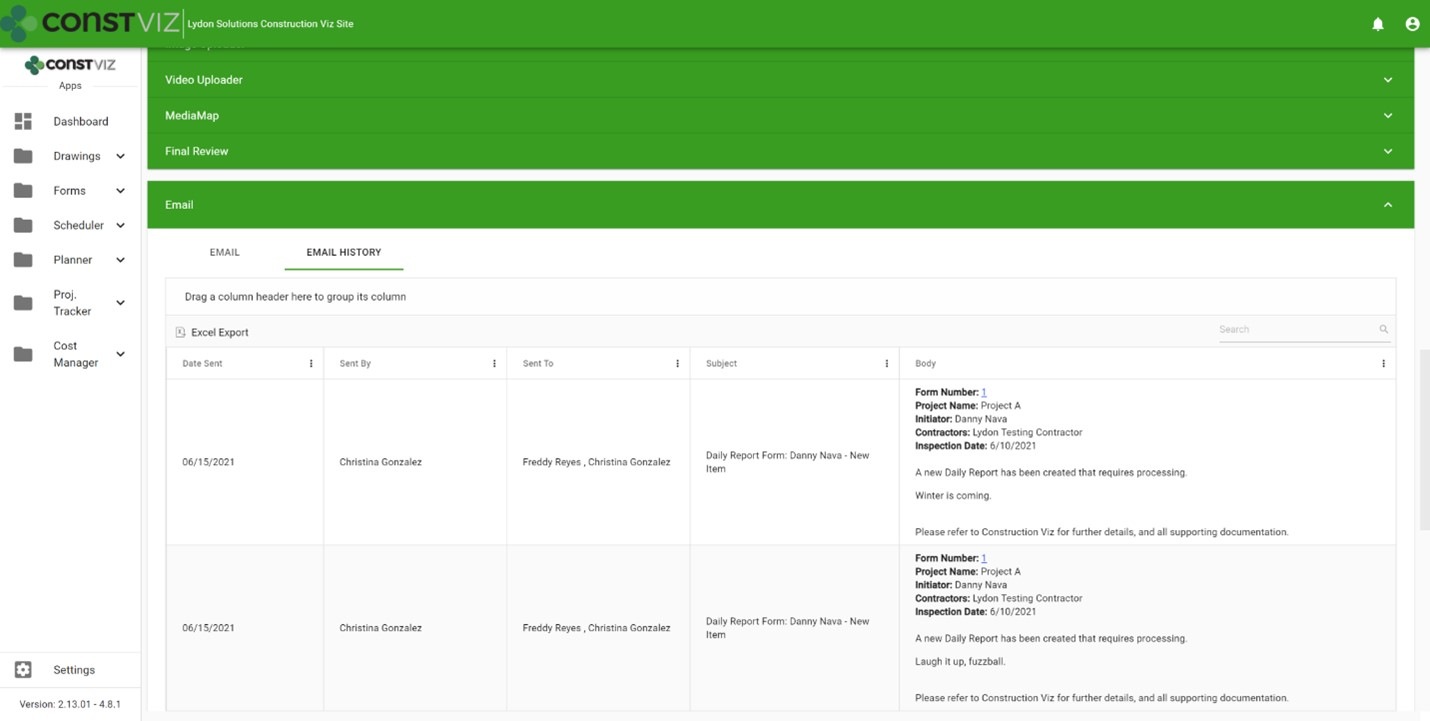
Now each Construction Viz app includes a history of every email notification that it sends. So, if you want to see all emails sent regarding an RFI, you can click the new history tab of the email component. The email notifications are organized in an interactive grid, allowing you to filter, group, and search items and providing a single source of record for the back-and-forth email communication on your projects.

And, because Construction Viz utilizes Microsoft 365, the data is available in SharePoint lists and libraries that can be easily reported on in Power BI, if needed.

Email History tab in a form app

Blog-Email-Logs_1

Email Logs is one of the many features available in our catalog of Construction Viz apps. Construction Viz is a customizable enterprise-scale project management information solution (PMIS) that can be externally hosted or deployed to your Microsoft 365 tenant. To find out how Construction Viz can help you manage your construction projects, request a free demo here.

Construction Viz Takes the Risk Out of Risk Management

Risk Management | June 14, 2021

From initiation through to project closeout, construction projects are subject to an endless array of risks. The Construction Viz Risk app helps you identify, manage, and plan for the factors that can negatively or positively impact your project's cost and schedule. 

Many construction organizations turn to Microsoft Excel as their risk management solution, using built-in risk registers and distributing spreadsheets via email to project teams. There are many shortcomings to this approach, including having multiple versions of files floating around, undocumented review processes, the inability to attach backup information, and a lack of mitigation processes. We've been in your shoes on projects, which is why we designed our Construction Viz Risk app to be a better long-term risk management solution.

Key features of the Construction Viz Risk app

The Construction Viz Risk app addresses all the shortfalls found in homegrown Excel and enterprise risk management solutions:

  • Set individual risk probabilities and impacts by the project within a single site.  Construction Viz can include one or more projects per SharePoint site.  Since every project can have a different set of risk factors, the Construction Viz Risk app allows you to set unique cost and schedule impact values, each with its own legend, by the project.  This feature enables you to consolidate risk management into a single site across your portfolio of projects.
  • Mobile ready. Our form technology works on any device with a modern browser. You can capture a risk on your phone while in a meeting or out in the field.  You can even enter a risk without an internet connection.
  • Track changes. The app features revision control, allowing you to create and manage multiple versions of your risk forms and track any edits by users.
  • Upload supporting documentation. Easily attach supporting information, including links to other forms and data repositories.
  • Get approvals. Route risks for review and approval via automated Power Automate or ad hoc workflows with ball-in-court tracking
  • Send to distribution. Email risks to your project team based on predefined distributions while enforcing strict permission controls.
  • Perform analysis. Perform risk analysis using configurable data grids. Create custom views for managing risks by value, ownership, status, or mitigation.
  • Communicate risks. Generate robust reports of risks and opportunities for management review and disposition.
RiskMgmt_1

Take the risk out of managing your project risks with Construction Viz

With the Construction Viz Risk app, you will be able to finally spend more time managing and less time trying to collect and track risks.  Contact us today for a no-obligation demo and consultation.

Dashboards Simplified with Construction Viz and Microsoft Power BI

Dashboards | March 17, 2021

We added integration between Construction Viz and Microsoft Power BI early last year to give our users another option for creating reports and dashboards. Read how you can take advantage of this integration to create customizable reporting and data visualizations for your organization.

Microsoft Power BI is rapidly becoming the reporting solution of choice for many organizations. Those with a Microsoft 365 subscription can build highly complex reports and dashboards, share them with their internal and external teammates, and even publish them to public-facing websites.

We recognize that not every company, project, or PM is the same. That is why we designed Construction Viz to be as flexible as possible, allowing for many different reporting solutions, including prebuilt SQL reports and automated dynamic dashboards. Being that Construction Viz utilizes Microsoft365 and SharePoint, adding integration with Power BI extends this flexibility further, giving construction organizations another robust reporting option that they can use alongside Construction Viz's construction project management features.

Construction Viz Integrated Reporting Using Power BI Embedded

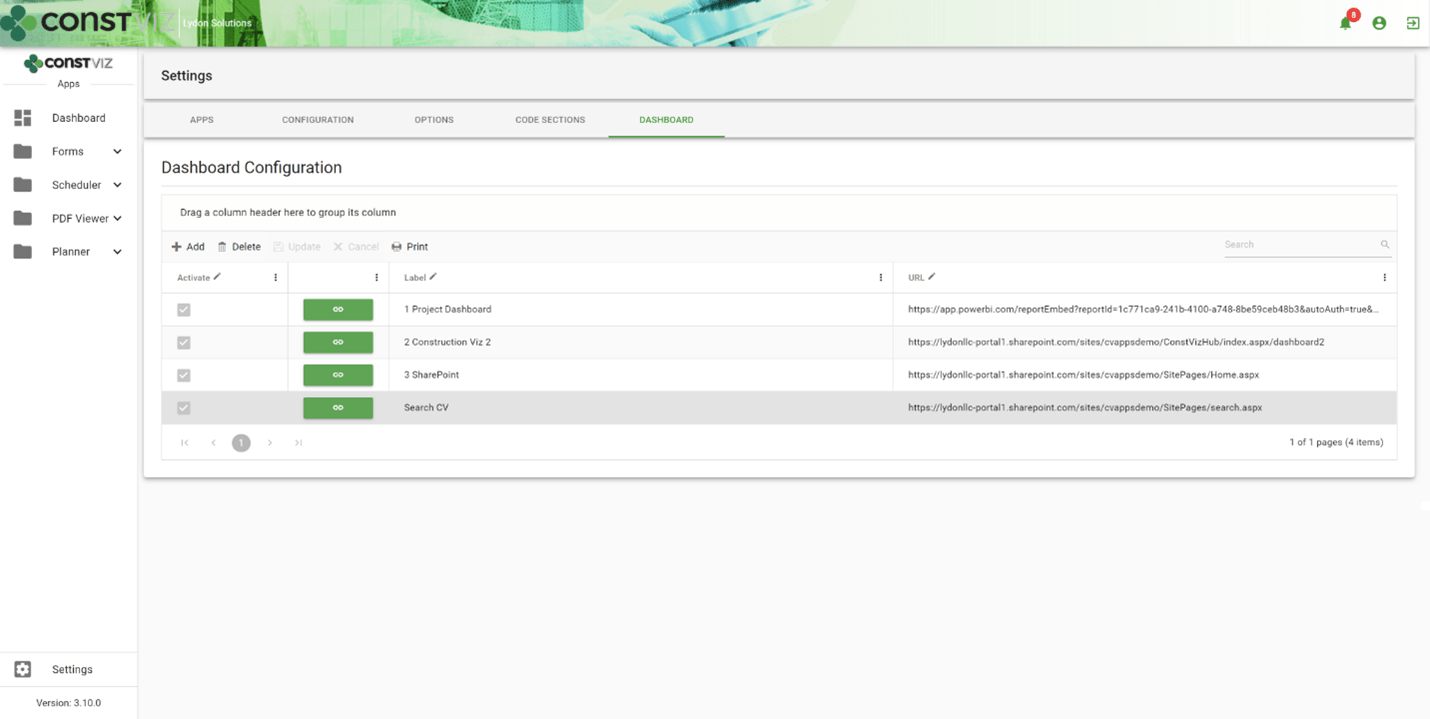
Our integration between Construction Viz and Power BI leverages the Power BI Embedded API framework provided by Microsoft. We then built a custom menu specifically for creating, deploying, and viewing your Power BI reports within the Construction Viz Hub.

The advantages of this approach are:

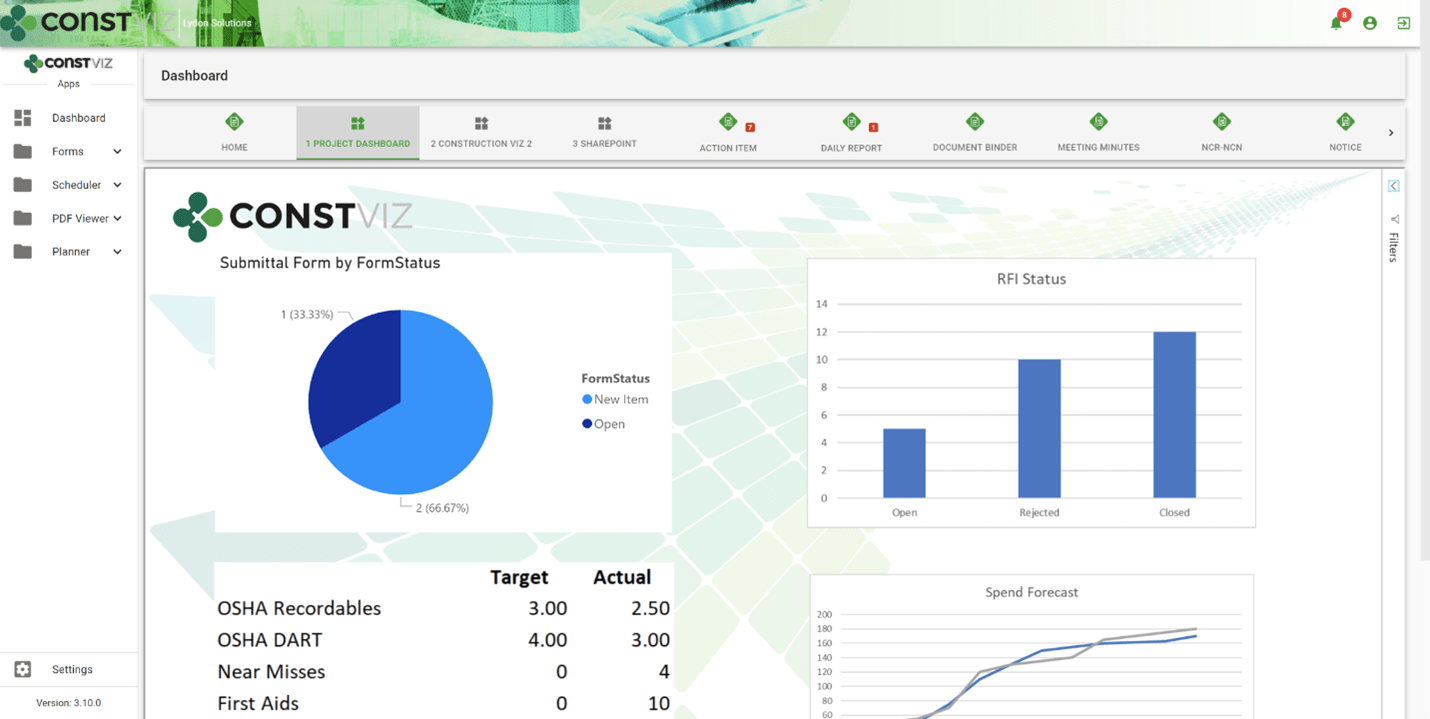
  • A single source of truth. Using Power BI with Construction Viz gives you one location to see ALL your reports, apps, and documentation for your project.
  • Create your own dashboard tabs in the Construction Viz Hub. You can easily design a custom reporting interface by creating, naming, ordering, and displaying or hiding report dashboards.
dash-powerbi_1
  • Embed your Power BI Reports alongside Construction Viz. With a simple copy and paste, you can display your Power BI reports in Construction Viz side by side with our pre-defined dashboards, allowing you to mix and match your reporting and visualization tools as needed.
dash-powerbi_2
  • Embed other Microsoft 365 applications. The dashboard creation feature also allows the user to link to SharePoint, Excel Services, other Construction Viz instances, and more without an additional login.
dash-powerbi_3
  • Import pre-defined reports. We built pre-defined Power BI reports that support our Construction Viz apps. These reports can be imported into your Power BI tenant and added as dashboard tabs as well.

Construction Project Management Powered by Microsoft 365 and SharePoint

Construction Viz is a unique construction management solution since it can be deployed into a Microsoft 365 SharePoint Online site, ensuring your data stays with you.

With Power BI and Power Automate, we continue to deeply integrate Construction Viz into the Microsoft 365 ecosystem so that you can leverage the tools you already use while keeping control of your data, allowing you to manage your projects more effectively.

Learn What Construction Viz Can Do for Your Organization

You can deploy Construction Viz as a turnkey solution or select from our lineup of construction project management apps to create a fully customized system for your organization.

Find out more with a free consultation and demo.

Solving the Action Items Dilemma with Construction Viz

Action Item | February 18, 2021

Learn how we integrated the Construction Viz Meeting Minutes and Action Item apps to turbocharge action item management for construction project teams.

Here is a common scenario for many construction organizations:

  • Your project teams hold meetings to review progress and capture action items in meeting minutes.
  • In most cases, team members probably document meeting minutes in Microsoft Word.
  • Next, someone likely re-enters action items into a separate log using Microsoft Excel.

Not only is this not a very efficient way to collect meeting information, but it is also error-prone and difficult to keep in sync. It is also challenging to ensure that your team is working off the most up-to-date versions of these documents.

We took a step back and analyzed the above process when designing the Construction Viz Meeting Minutes and Action Items apps. The result was a deep integration between these two tools to create a streamlined and always-up-to-date bidirectional connection between meeting minutes and action items.

How Construction Viz improves action item management

The bidirectional flow of data between our Construction Viz Meeting Minutes and Action items apps offers construction project teams many benefits:

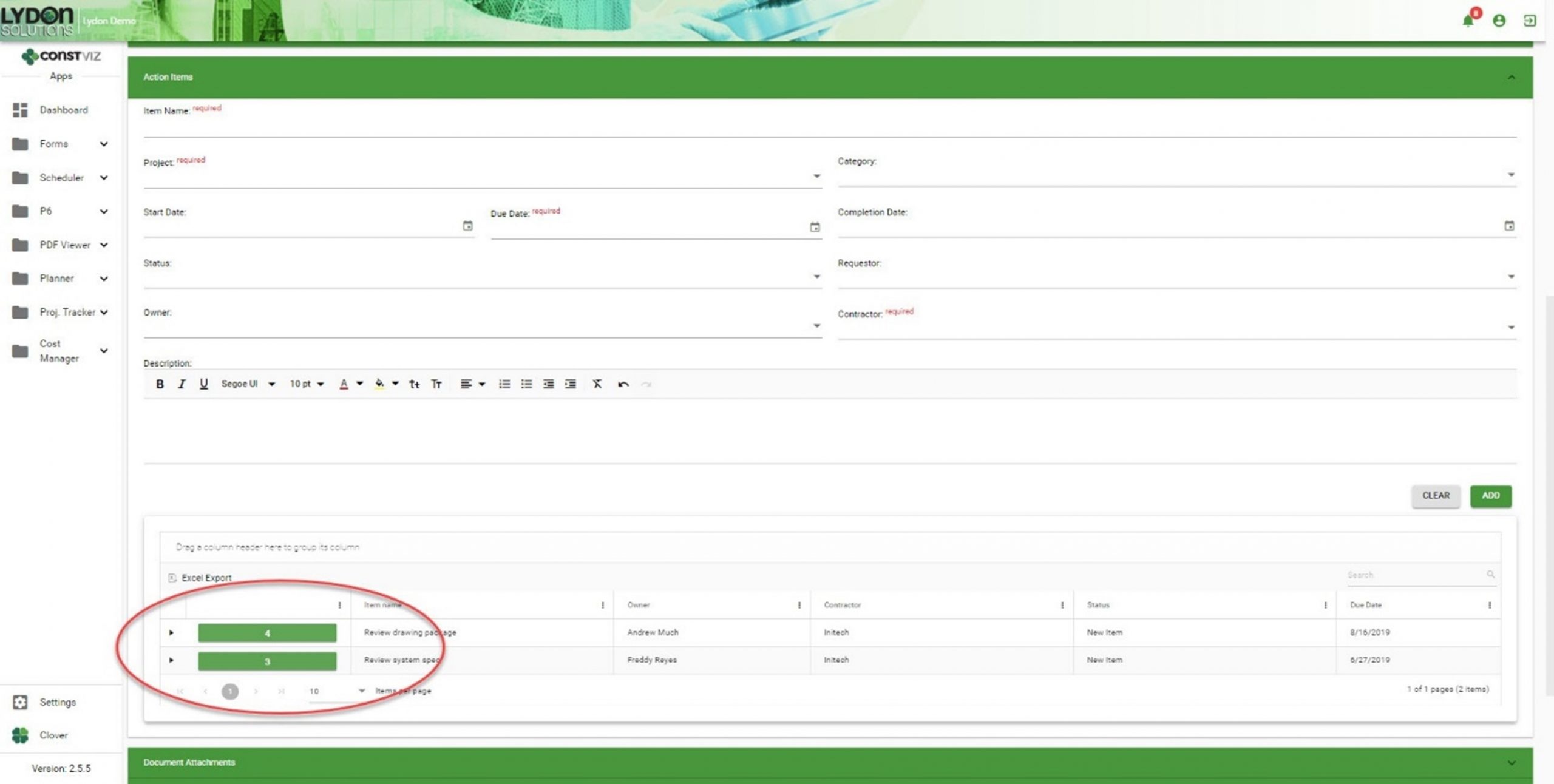
  • You can create action items directly within the Meeting Minutes app.
Solving-Action-Items-Dilemma_1
  • Action items created within a meeting minutes record automatically generate entries within the Action Items app.
Solving-Action-Items-Dilemma_2
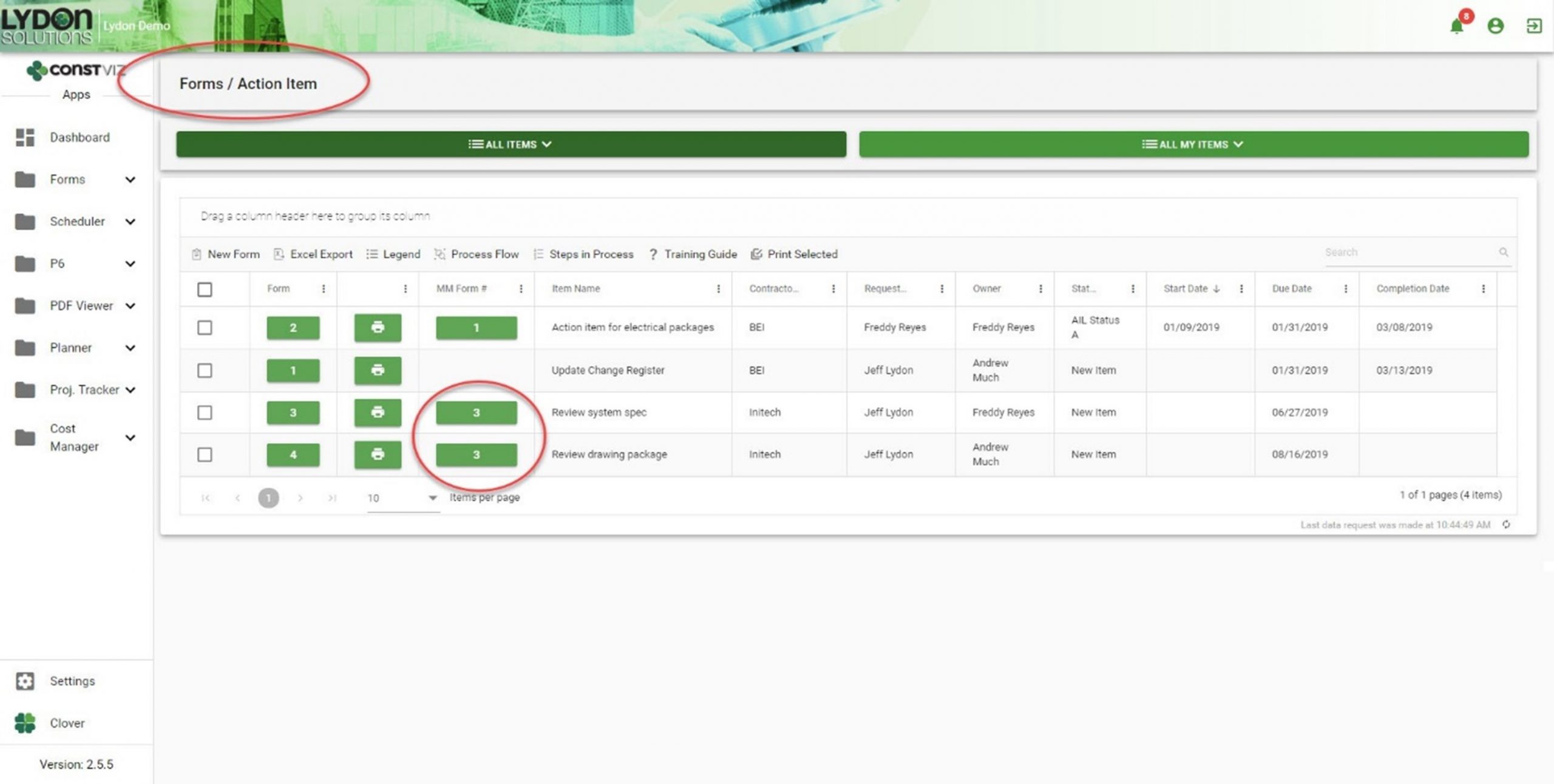
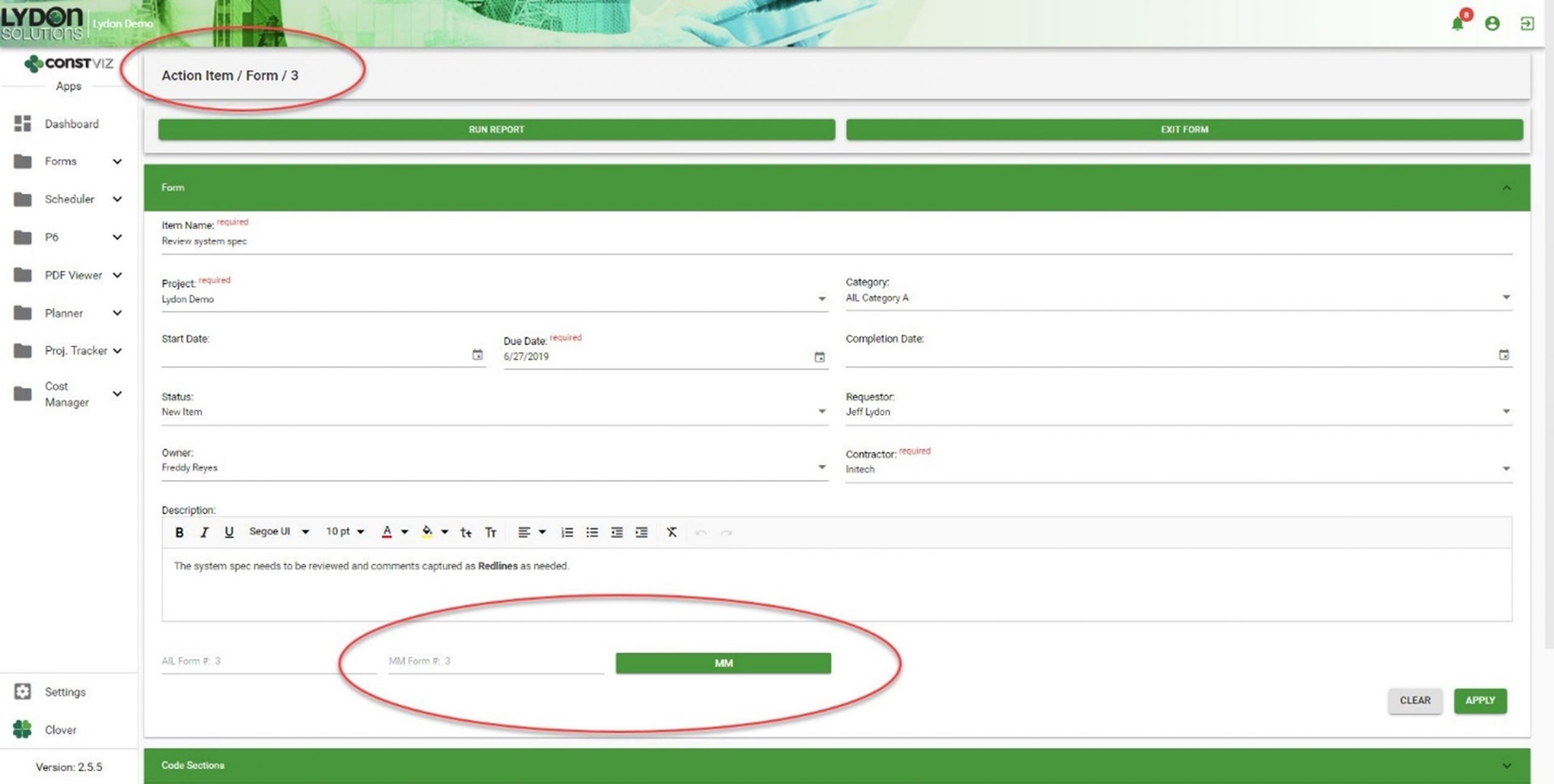
  • Both apps automatically generate cross-links, relating action items and meeting minutes records to each other. Now you can easily cross-reference action items and meetings, giving you a complete log as a single source of truth.
Solving-Action-Items-Dilemma_3
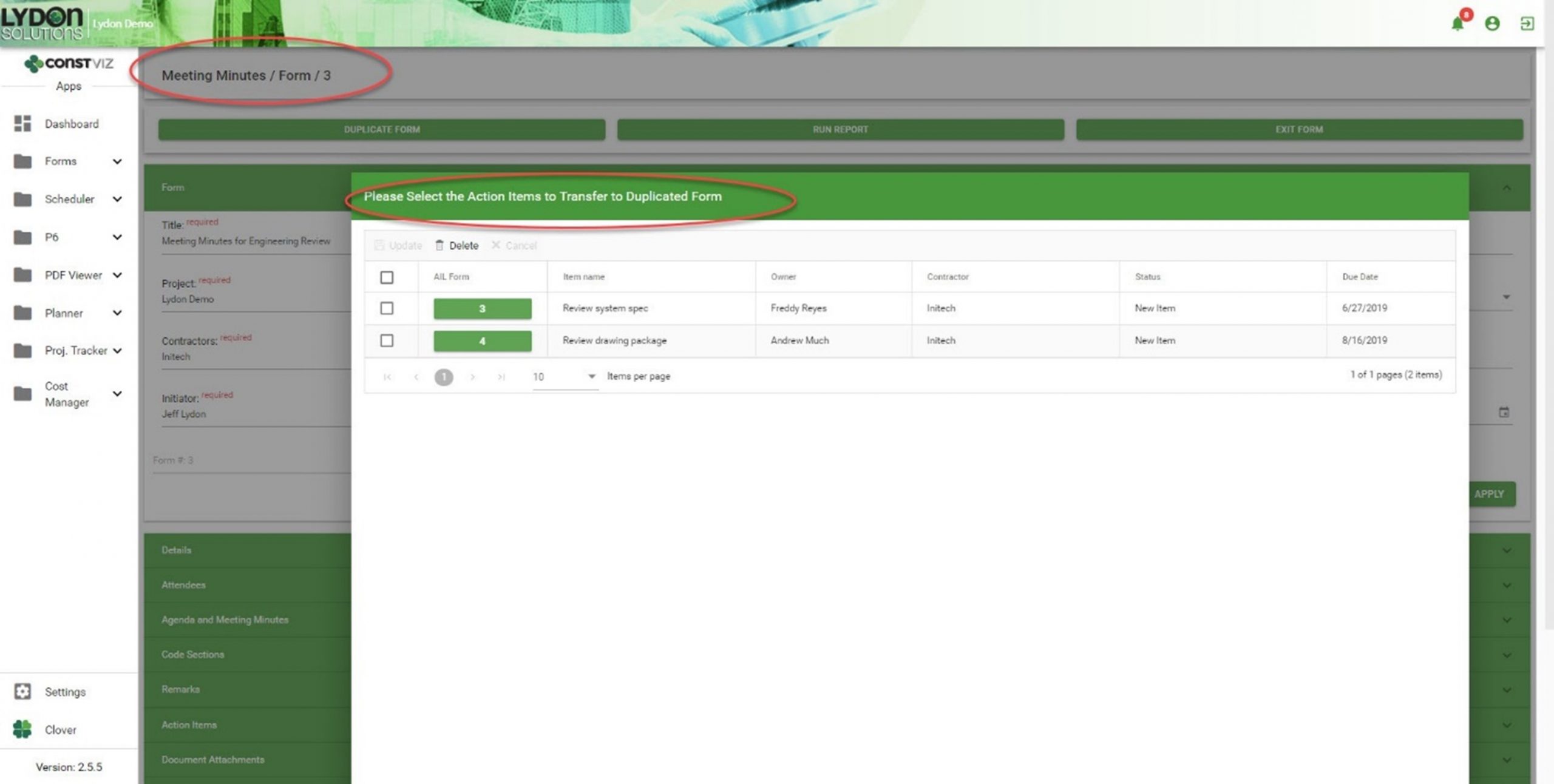
  • If you duplicate a meeting minute form, you can selectively carry forward action items, creating a history of assigned and open action items, as well as a record of the meeting in which you first entered them.
Solving-Action-Items-Dilemma_4

Get a free demo and consultation

Streamlining meeting minutes and action items is just another example of how our team applied our real-world construction project management experience to help organizations save time and cost. Find out how Construction Viz can help your team better manage your projects. Check out our full lineup of Construction Viz apps and schedule your free demo and consultation today.

  • « Go to Previous Page
  • Page 1
  • Interim pages omitted …
  • Page 8
  • Page 9
  • Page 10
  • Page 11
  • Page 12
  • Go to Next Page »

Footer

About Constructon Viz

Construction Viz is a flexible construction project management software solution powered by Microsoft SharePoint and SQL.
Read More >

Navigation

  • Home
  • About
  • Features
  • Apps
  • Blog
  • Contact
  • Login

Apps

  • Construction Viz Hub
  • Cost Report
  • Drawing Management
  • File Manager
  • GIS Maps
  • Oracle Primavera 6
  • Payment
  • Specification Management

–

  • Project Forms
  • Project Planner
  • Project Scheduler
  • Project Tracker
  • Task Manager

Connect with Us

  • This field is for validation purposes and should be left unchanged.
  • Sign up to receive helpful tips for construction project managers as well as updates about Construction Viz.

Lydon Solutions

© Lydon Solutions

  • Privacy
  • Cookies
  • Terms of Use
  • Disclaimer
  • End-user license

Click here to start a Microsoft Teams chat.

Click here to start a Microsoft Teams chat.

Contact Us
This field is for validation purposes and should be left unchanged.
Name(Required)
Join Our Newsletter

Sign up to receive helpful tips for project managers and updates about Construction Viz.

Get Started

Join Our Newsletter

Sign up to receive helpful tips for construction project managers as well as updates about Construction Viz.

  • This field is for validation purposes and should be left unchanged.
  • This site is protected by reCAPTCHA and the Google Privacy Policy and Terms of Service apply.