• Skip to primary navigation
  • Skip to main content
  • Skip to footer
Construction Viz

Construction Viz

Project Management Perfect

  • About
  • Features
  • Apps
  • Blog
  • Contact
  • Download Flyer
  • Get Started Today
  • Login
Hide Search

construction project management

Why Access Management Matters For Your Projects

Collaboration | November 30, 2020

Construction projects involve many different stakeholders that create, edit, and review project information, making it challenging to ensure sensitive data doesn't end up in the wrong hands. Thus, using a robust Project Management Information System (PMIS) with the right access management tools is essential.

For companies utilizing Microsoft 365 or SharePoint as a PMIS, you are probably aware of these tools' powerful access level capabilities out of the box. While you can assign granular permissions at a site, library, folder, and even a specific file level, you can very quickly create a spiderweb of complexity that can be too unwieldy to manage. Construction Viz, our construction project management solution powered by Microsoft 365 and SharePoint, lets you take full control of access management for your projects.

Leveraging SharePoint Access Management with Construction Viz


For over 11 years, Lydon Solutions has been building SharePoint-based construction management solutions, including our very own PMIS, Construction Viz. One of the thorniest issues organizations encounter using SharePoint to manage construction projects is access management. This is why our goal when we built Construction Viz was to leverage SharePoint's underlying access controls while providing a simplified user interface for easier permissions administration.

What makes the Construction Viz Access Management layer so great?


Construction-centric.
With years of experience building custom solutions in SharePoint and providing document control services, we know how teams typically share and control project information. We designed Construction Viz Access Management around groups, users, apps, and specific content related to contractors and companies. For example, a project team could give certain users access to the Submittal app but only allow them to see and edit submittals from their company or for a specific project.
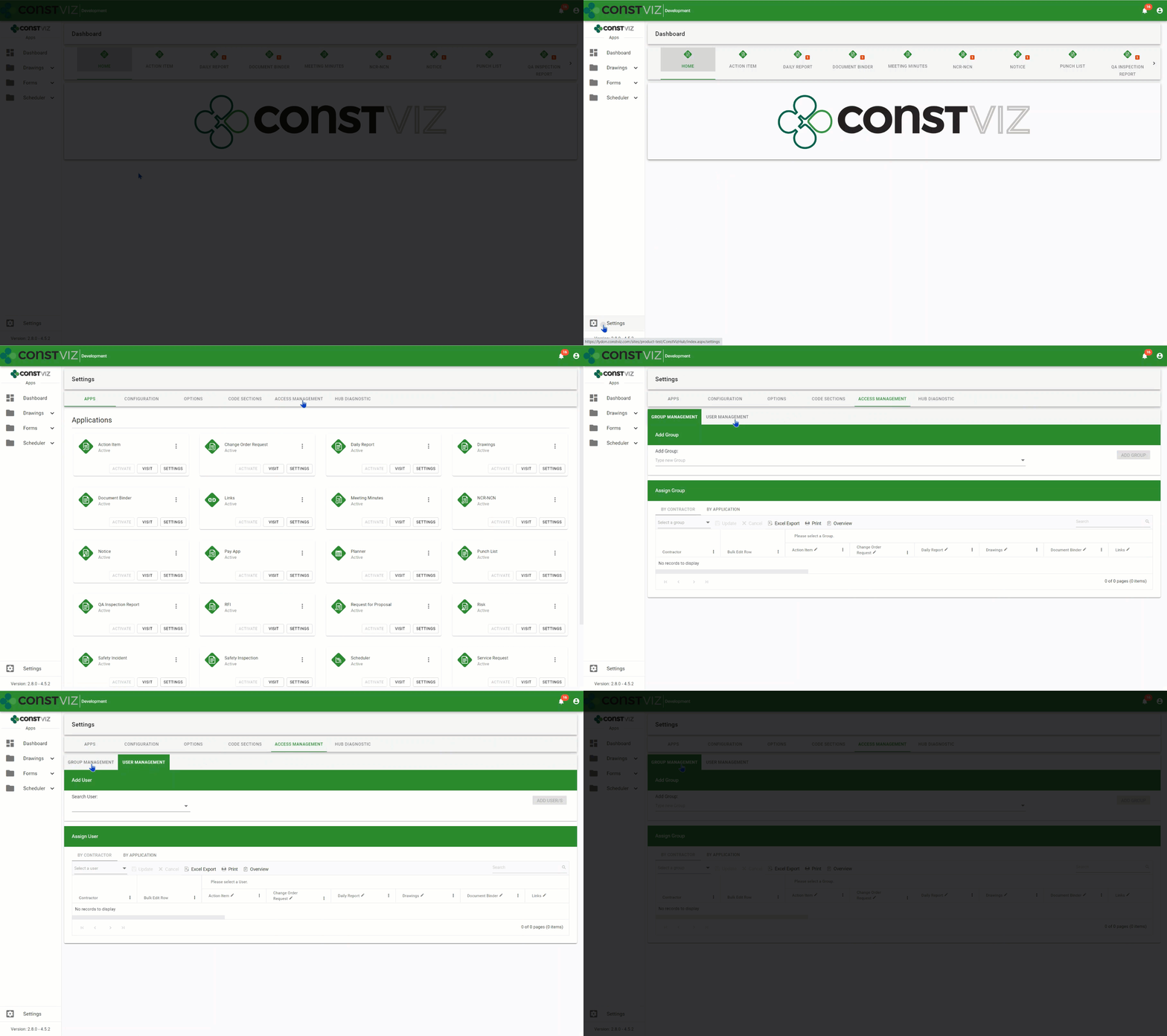
Simplified Management. Access Management is centralized in the Construction Viz Hub to simplify access administration. As you activate Construction Viz apps within the Hub, they are automatically added to the access management module, allowing administrators to grant users access right away. You can manage access in two ways:

  1. From Groups Management, an administrator can create access groups, assigning each different access rights - such as read, write, or none - on a per contractor, company, or app basis. From Users Management, an administrator can then assign individual users to a specific access group, thus automatically assigning the user the same rights defined under Groups Management.
  2. If the administrator needs to set special access rules for a user, they can give a user custom access rather than adding them to a specific access group.

You can display all groups or users' access levels in an interactive grid from either Groups Management or Access Management views. This data can then be exported to Excel and printed as a PDF for further analysis and reporting.
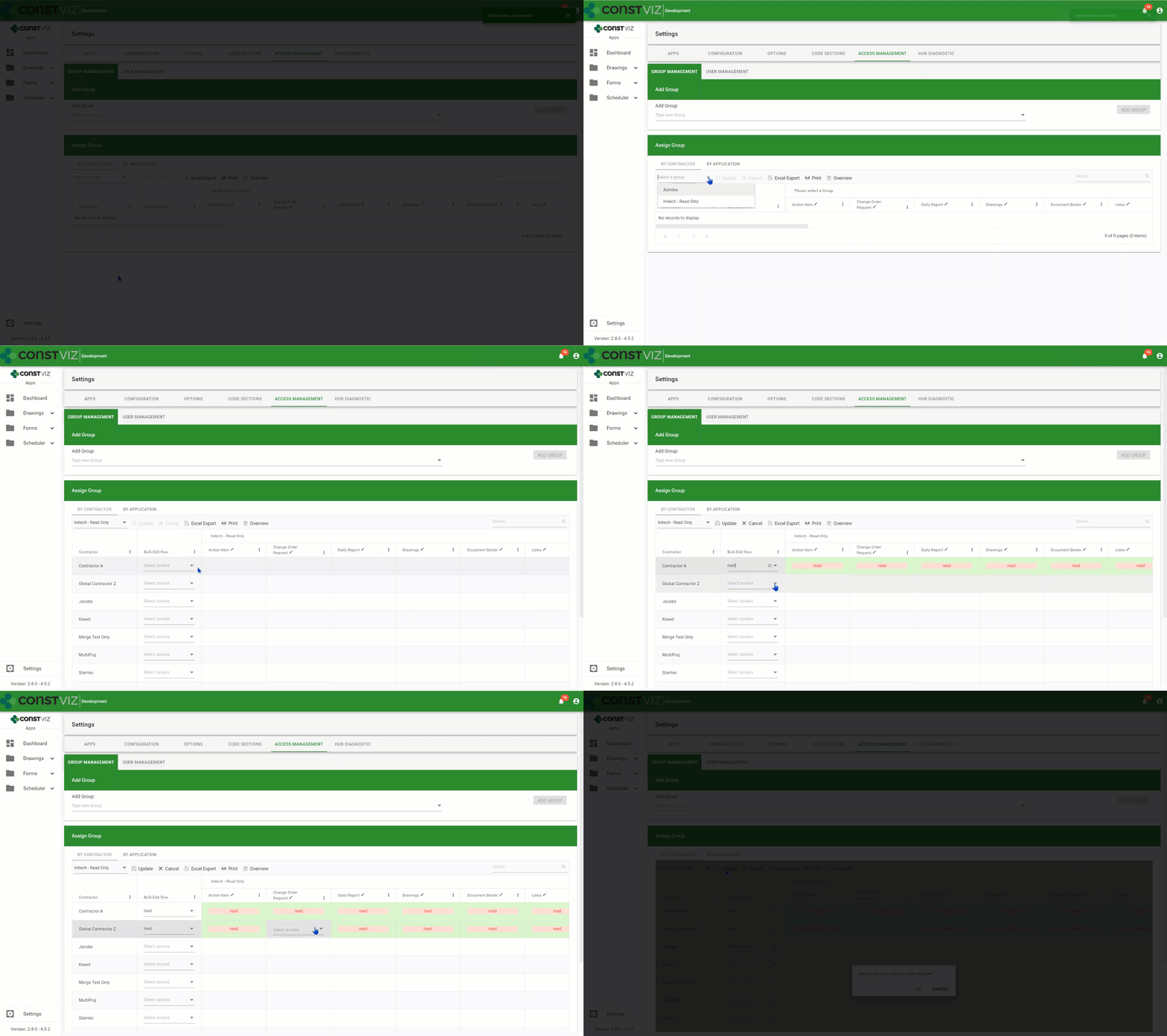
Powerful Customization. Construction Viz Access Management provides consistent access control across all apps in the suite. You can define access down to the component level (such as form header, attachments, links, reviews, and so) and even to the field level (such as initiator, status, and description) depending on your needs. For example, you could set up your RFI forms with access controls that only allow the contractor who submitted the form to edit the description field. In this same form, the general contractor reviewing this information might only have access to the response fields in their assigned review section. Similarly, the owner could have access to just their response fields in their review section.

With Construction Viz Access Management, we built in the capabilities for managing stakeholder access for construction projects of any size in a way that minimizes the level of effort required to administer.

Learn More About Construction Viz Access Management


Access Management is a feature we built into our apps to ensure access to project data can be managed easily across our suite of apps. Find out other ways that Construction Viz can help your projects be successful by contacting us for a free consultation and demo. If you need help getting your construction projects up and running quickly, Lydon Solutions also offers managed services for Microsoft 365 and SharePoint.
Keep Organized with the Construction Viz Drawing Management App

Drawing Management | September 1, 2020

Make sure your team always has access to the latest set of drawings for your projects with the Construction Viz Drawing Management app for Microsoft 365 and SharePoint.
A frequent challenge for construction project managers is finding and referencing the latest set of drawings. Part of the problem is that many organizations do not keep an updated master drawing list. Further complicating things, teams often store PDFs of the drawings for their projects without metadata in a shared drive with a complex folder structure. As a result, only employees that know the folder scheme can find and update drawing revisions correctly.

The impact of project teams not having timely access to the correct drawings can be felt from the home office to the field, resulting in lost productivity for the engineers and contractors doing the work. Effective drawing management is not just a problem for small companies. We have seen these kinds of issues happen even on multi-billion-dollar projects over the years.

With the new Construction Viz Drawing Management app, available for Microsoft 365 and SharePoint, we set out to reimagine how a system can help project teams manage construction drawings more effectively.

Six Key Features of the Construction Viz Drawing App


The Construction Viz Drawing Management app improves the entire drawing management process in six key areas:

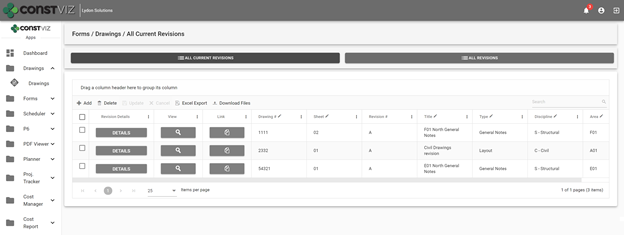
1. Creating an interactive master drawing list. The Construction Viz Drawing app includes an interactive and searchable grid of every drawing organized by ID number, sheet, title, revision, discipline, area, and drawing set. The latest revisions are listed first, so team members are always working off the most recent revision. The grid can be filtered and grouped to find any drawing easily.

Construction Viz Drawing Management App - Master Drawing List

2. Organizing drawing file storage. No more complex folder structures. As with all Construction Viz data, the Drawing Management app stores each drawing and revision as a record with a single associated file in SharePoint for easy access.

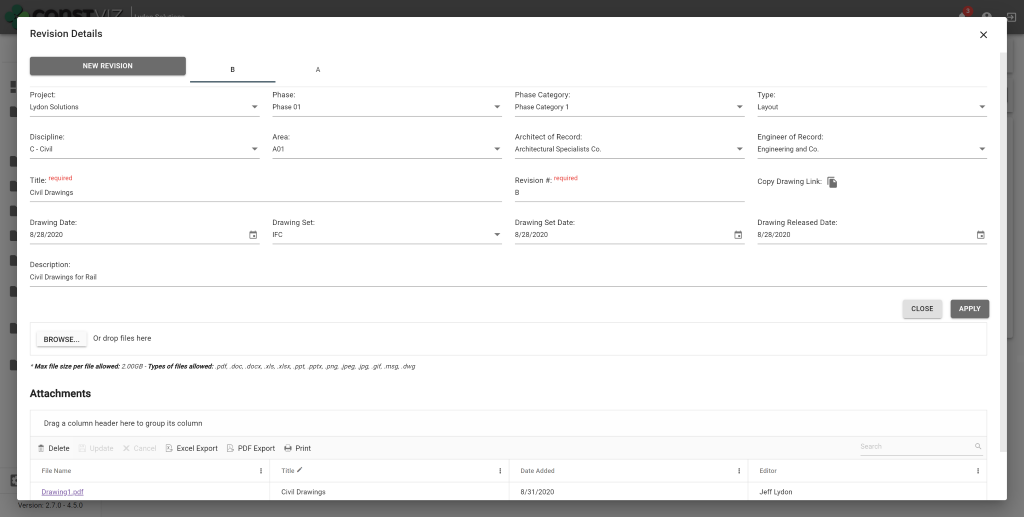
3. Improving drawing revision management. When a user uploads new drawings, the app requires them to input a user-defined revision value. Since the app displays the latest revisions first, other team members can readily find and work off of the most recent version of a drawing.

Construction Viz Drawing Management App – Revision Management

4. Adding drawing metadata. The app requires users to complete standard metadata fields when uploading new drawings. This rich metadata lets teams filter, group, and search drawings in the app’s master grid view.

5. Relating drawings to other processes. The Drawing Management app integrates with other Construction Viz apps to add a “Related Drawings” component. The component enables users working in other apps to select one or more drawings and relate them to any record, such as an RFI or other form, using the same interactive and searchable grid featured in the Document Management app. This feature makes it quick and easy for users to include related drawings on construction forms and correspondence without having to deal with attachments.

Construction Viz Drawing Management App – Related Drawings component

6. Exporting drawing PDFs to local devices. Users can export drawing PDFs for use on their local devices from within the master drawing list grid or a related app using the component feature described above.

These six features of the Construction Viz Drawing Management app will save a project team the headache that comes with trying to update and find the latest drawing revisions. Integration with other Construction Viz apps ensures that users have ready access to the right drawings when and where they need them – and can share them with a few clicks.

See What Else Construction Viz Can Do for Your Organization

Construction Viz offers a full lineup of construction management apps, including tools for project tracking, scheduling, GIS maps, cost reports, construction forms, and more. Find out how Construction Viz can help you better manage your construction project by scheduling a no-obligation demo today.

Construction Viz Punch List: A Mobile Solution for Construction

Forms | January 30, 2020

The Construction Viz Punch List App is a mobile-friendly solution for construction project management. It is used to identify open issues in the field that may still need to be completed by a contractor.

Watch our latest video to see how you can streamline the process of tracking issues without an internet connection and from any modern browser.

Key Features of the Construction Viz Punch List App

• Track issue status: Ensure that items are assigned, scheduled, and completed on-time.
• No internet? No problem: Edit forms without an internet connection, and then sync changes when you’re back online.
• Easy upload from your mobile phone: Upload as many documents, images, and videos as you need.
• Geospatial location mapping: Geospacially view images and videos using Media Map.
• Manage email distribution lists: Keep stakeholders and team members informed when changes and updates are made.

Learn more about our user-friendly, highly-configurable tracking solution for construction project management. Contact us today to schedule your free demo and consultation.

Quality Management Made Easy

Quality & Safety Inspections | December 16, 2019

Project Managers work to manage the scope, schedule, and budget of their projects. Unfortunately, quality can sometimes take a backseat to project delivery. Quality management can be further exacerbated by the lack of effective planning and management tools.  

Turnkey quality-management includes developing a quality assurance plan, planning and conducting quality inspections, identifying and correcting issues, and analyzing data to uncover areas for improvement and/or trends.  

When we approached quality management in Construction Viz, we looked at the end-to-end process to ensure that data would be captured effectively and could be easily be reported, all with the view of improving productivity and enhancing the quality of the project.  

Here is how Construction Viz helps you manage quality, from creating and managing the QA plan to analyzing results after the project is done. 

Using Construction Viz for Effective Quality Management

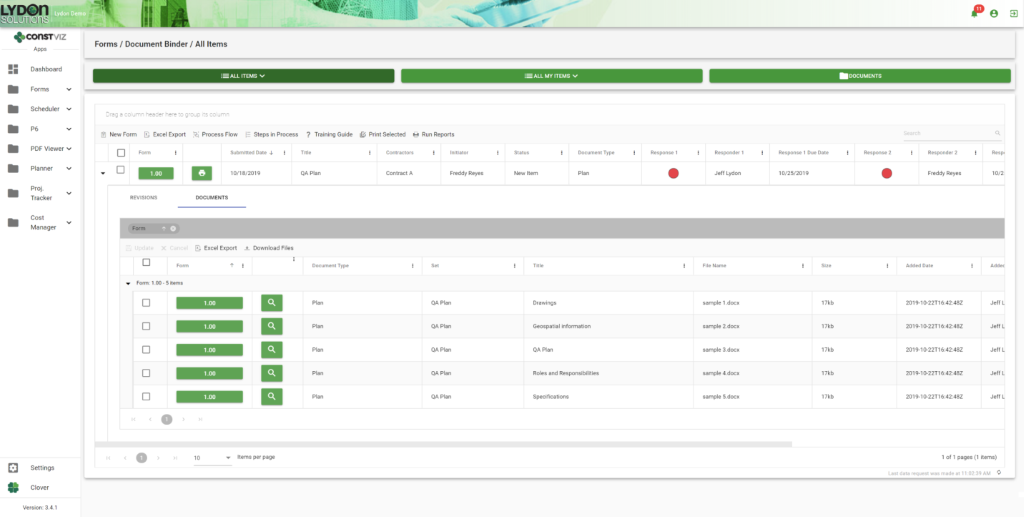
Create and Manage the QA Plan.  You can easily create and store your QA plan in our Document Binder app, which features simple drag-and-drop capabilities, revision control, and assignment of automatic meta data. Microsoft Office attachments open in Office Online Server so you can easily collaborate with your team in a web browser on any device.

blog1

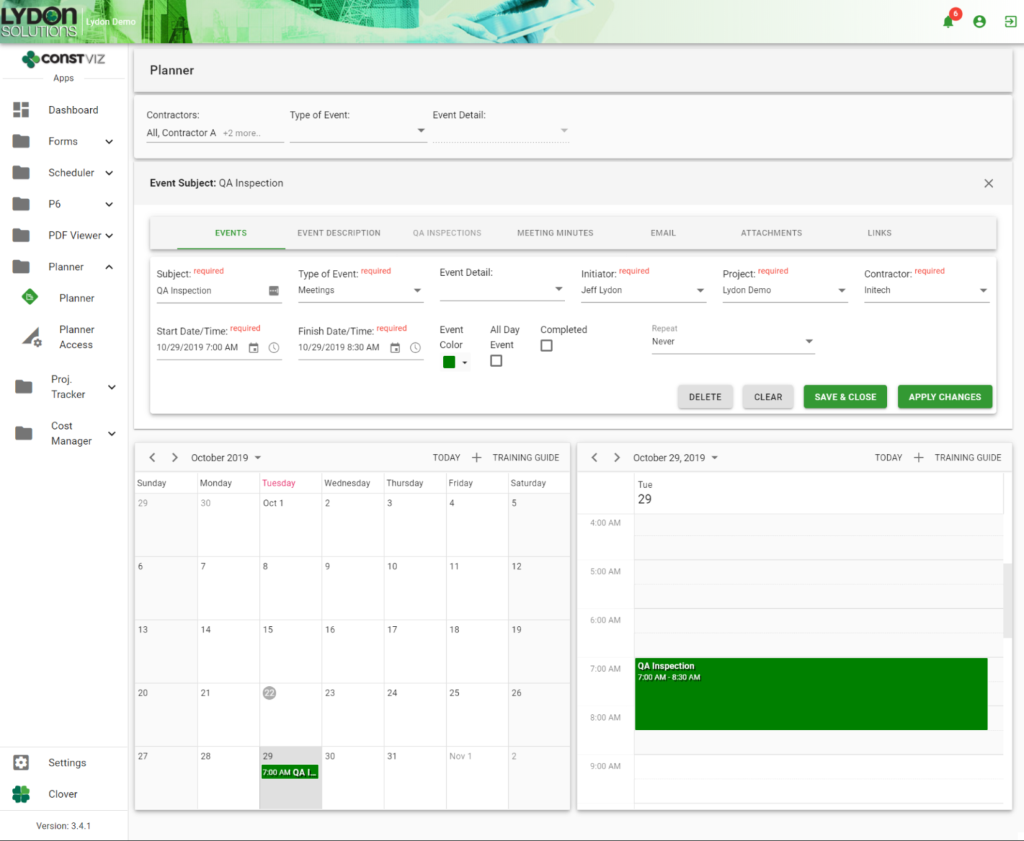
Plan Inspections. You can schedule  inspections in the Planner app, which features an easy-to-use, shared calendar that  syncs with Microsoft Outlook and Google Calendar.

blog2

Perform Inspections. The QA Inspection Form app captures inspection information in an easy-to-use, mobile-ready form. Inspection criteria can be easily added and organized in the form as criteria is added and/or changed. Field images and video, geospatial location information, attachments, and approvals can be captured and emailed to your project team

blog3

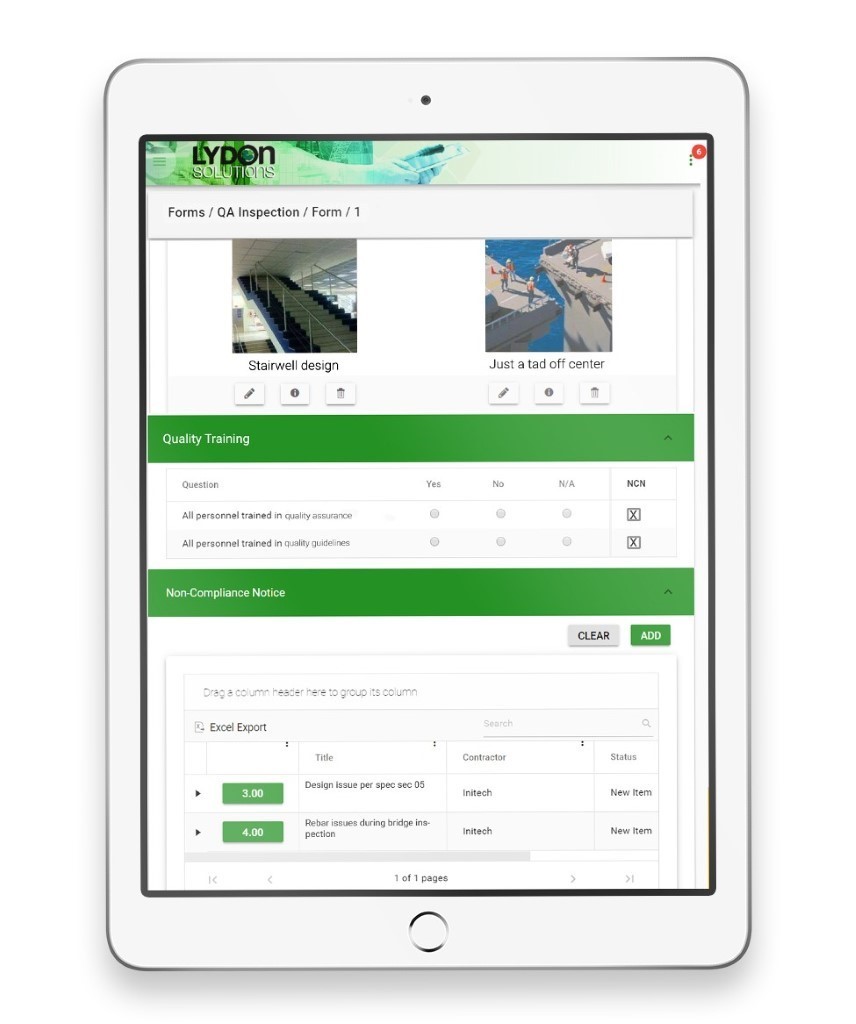
Identify Non-Complianct Issues. When you identify an issue, you don’t want to have to bounce between applications. We embedded the Non-Compliance app within the QA Inspection app, so an inspector can easily log non-compliance issues while still in the QA Inspection form. 

Analyze Performance Issues. The end step in any process is feedback. All our apps facilitate data analysis, with configurable grids and reports so that you can improve operations in the future.  

Better Quality Management with Construction Viz

Construction Viz is about choice. It is the only construction management platform designed around how you work and where you work. Contact us today to learn how we can help you better manage the quality of your projects.

Introducing No-App, Offline Forms for Construction Viz (Video)

Forms | November 21, 2019

Forms are an essential part of your construction project workflow. Construction Viz Form Apps let you and your team complete digital forms anywhere, on any device and even without an internet connection.

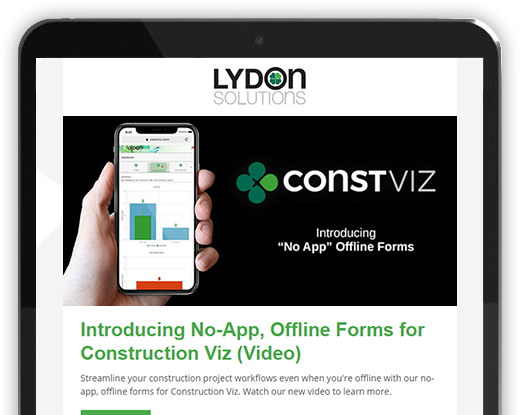
Watch our latest video to see how you can streamline your construction project workflows even when you're offline with our no-app, offline forms for Construction Viz.

Key Features of Our No-App, Offline Forms

  • No app to install: Get full access to your construction project forms right in your browser on any modern device.
  • No internet? No problem: You can edit forms without a internet connection, and then sync changes when you're back online. This allows for continuous access with the ability to make changes even in the field.
  • Full-featured construction management forms: Our library of mobile-responsive construction project forms have built-in permissions, comments, workflows, and reminders.
  • Powered by technology you trust: Construction Viz is integrated with SharePoint and Office 365.

Discover Project Management Perfected with our complete suite of offline forms designed to help you manage your projects anytime, anywhere. Contact us today to schedule a demo and receive more information about Construction Viz Apps for Microsoft SharePoint & Office 365.

Construction Viz & Revision Management

Forms | August 22, 2019

Construction management is really the management of the flow of information. It never ends from the time the bids are taken to the final close-out of the contract. Forms convey questions (RFIs) and responses, price changes (change order requests) and status reports. Ongoing design changes add to the volume of information between owners, designers and contractors.

Unfortunately, managing these changes can be difficult with most Project Management Information Systems (PMIS).

With Construction Viz, you can leverage the powerful revision-management capabilities of SharePoint. However, we took it a step further by integrating revision-management capabilities directly into our Form Apps. This feature enables you to see the different revisions so you can more easily manage the entire process—from creation to reporting—for all construction correspondence forms, including submittals, transmittals and RFIs.

Here’s how it works.

Create a Revision

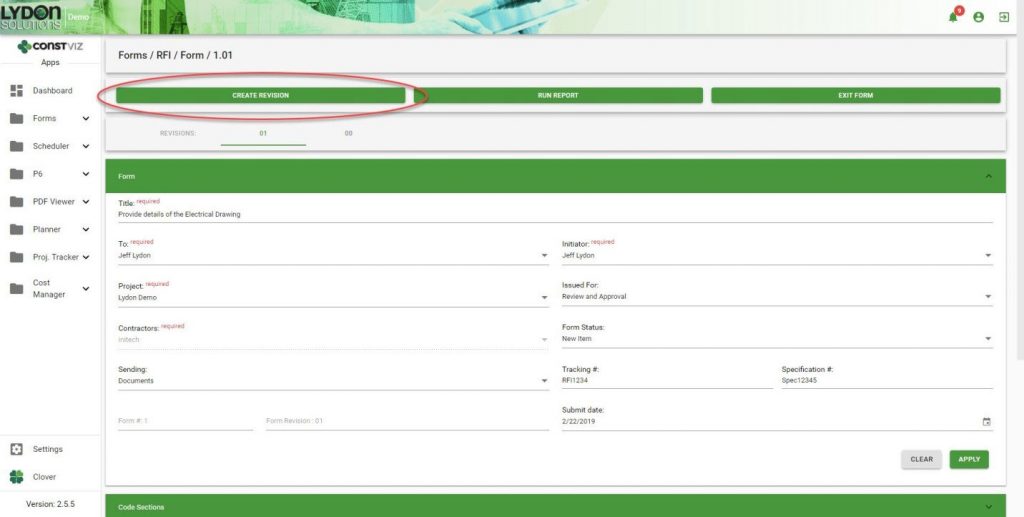
A Create Revision button within a form allows you to easily create and link form revisions together at any point in time.

SharePoint Revision Management

Duplication of Form Content

When revisions are created, important information captured in the previous revision is carried over from one form to the next. This ensures consistency and saves time because you do not have to fill in that information again.

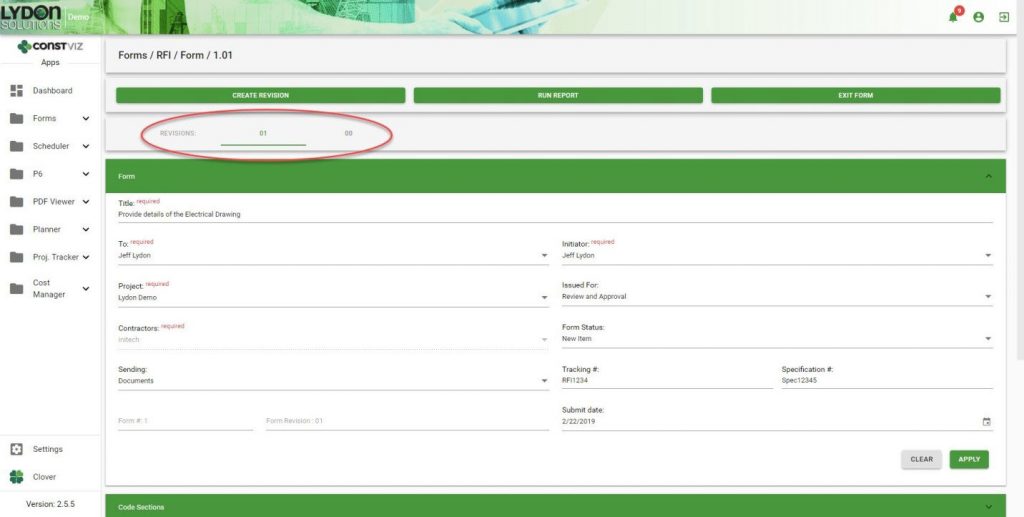
In-Form Navigation

You can easily jump back and forth between revisions as needed.

Grid/Log Navigation

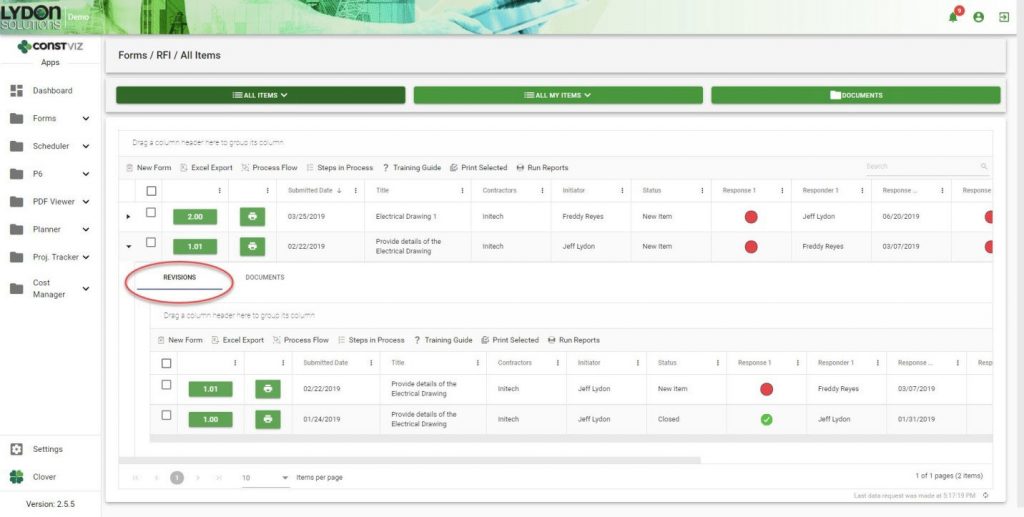
Revisions are automatically added to the form grid in descending chronological order. Simply click the form to open the sub-grid to see all the revisions related to that form.

Reporting

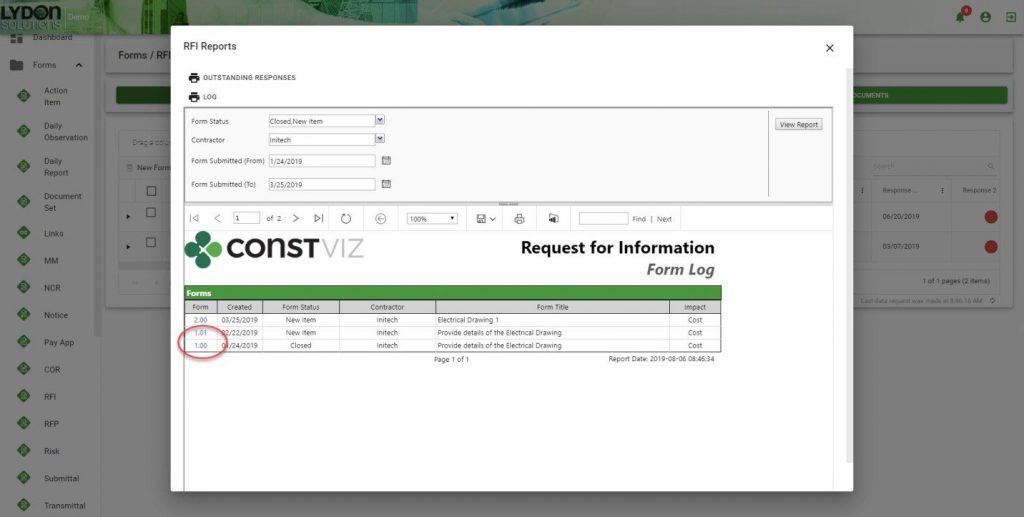
All revisions are grouped together, which makes it easier for you to find any revision. Reports can be saved in a variety of formats including PDF, Excel and PowerPoint. The form number/revision is hyperlinked, making it easy to open any form.

Revision management is just one of the many ways Construction Viz makes your job easier. Contact us for a free consultation to learn more. You can also sign up for our monthly newsletter below to get our latest blog updates, tips on using Microsoft SharePoint, and other useful info delivered directly to your inbox.

  • « Go to Previous Page
  • Page 1
  • Interim pages omitted …
  • Page 10
  • Page 11
  • Page 12
  • Page 13
  • Go to Next Page »

Footer

About Constructon Viz

Construction Viz is a flexible construction project management software solution powered by Microsoft SharePoint and SQL.
Read More >

Navigation

  • Home
  • About
  • Features
  • Apps
  • Blog
  • Contact
  • Login

Apps

  • Construction Viz Hub
  • Drawing Management
  • File Manager
  • Specification Management

–

  • Project Forms
  • Project Planner
  • Project Scheduler
  • Project Tracker
  • Task Manager

Connect with Us

This field is for validation purposes and should be left unchanged.

Sign up to receive helpful tips for construction project managers as well as updates about Construction Viz.

Lydon Solutions

© Lydon Solutions

  • Privacy
  • Cookies
  • Terms of Use
  • Disclaimer
  • End-user license

Click here to start a Microsoft Teams chat.

Click here to start a Microsoft Teams chat.

Contact Us
This field is for validation purposes and should be left unchanged.
Name(Required)
Join Our Newsletter

Sign up to receive helpful tips for project managers and updates about Construction Viz.

Get Started

Join Our Newsletter

Sign up to receive helpful tips for construction project managers as well as updates about Construction Viz.

This field is for validation purposes and should be left unchanged.