• Skip to primary navigation
  • Skip to main content
  • Skip to footer
Construction Viz

Construction Viz

Project Management Perfect

  • About
  • Features
  • Apps
  • Blog
  • Contact
  • Download Flyer
  • Get Started Today
  • Login
Hide Search

da_admin

Dashboards Simplified with Construction Viz and Microsoft Power BI

Dashboards | March 17, 2021

We added integration between Construction Viz and Microsoft Power BI early last year to give our users another option for creating reports and dashboards. Read how you can take advantage of this integration to create customizable reporting and data visualizations for your organization.

Microsoft Power BI is rapidly becoming the reporting solution of choice for many organizations. Those with a Microsoft 365 subscription can build highly complex reports and dashboards, share them with their internal and external teammates, and even publish them to public-facing websites.

We recognize that not every company, project, or PM is the same. That is why we designed Construction Viz to be as flexible as possible, allowing for many different reporting solutions, including prebuilt SQL reports and automated dynamic dashboards. Being that Construction Viz utilizes Microsoft365 and SharePoint, adding integration with Power BI extends this flexibility further, giving construction organizations another robust reporting option that they can use alongside Construction Viz's construction project management features.

Construction Viz Integrated Reporting Using Power BI Embedded

Our integration between Construction Viz and Power BI leverages the Power BI Embedded API framework provided by Microsoft. We then built a custom menu specifically for creating, deploying, and viewing your Power BI reports within the Construction Viz Hub.

The advantages of this approach are:

  • A single source of truth. Using Power BI with Construction Viz gives you one location to see ALL your reports, apps, and documentation for your project.
  • Create your own dashboard tabs in the Construction Viz Hub. You can easily design a custom reporting interface by creating, naming, ordering, and displaying or hiding report dashboards.
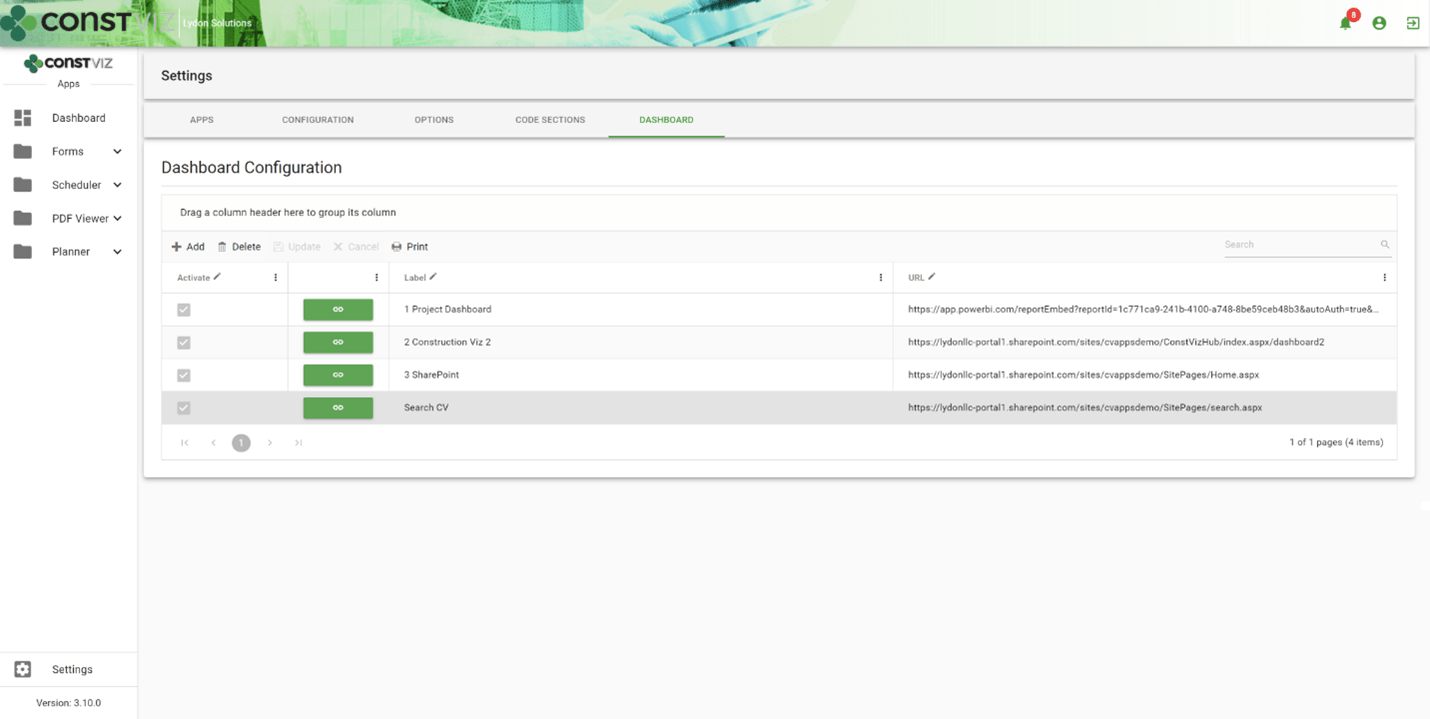
dash-powerbi_1
  • Embed your Power BI Reports alongside Construction Viz. With a simple copy and paste, you can display your Power BI reports in Construction Viz side by side with our pre-defined dashboards, allowing you to mix and match your reporting and visualization tools as needed.
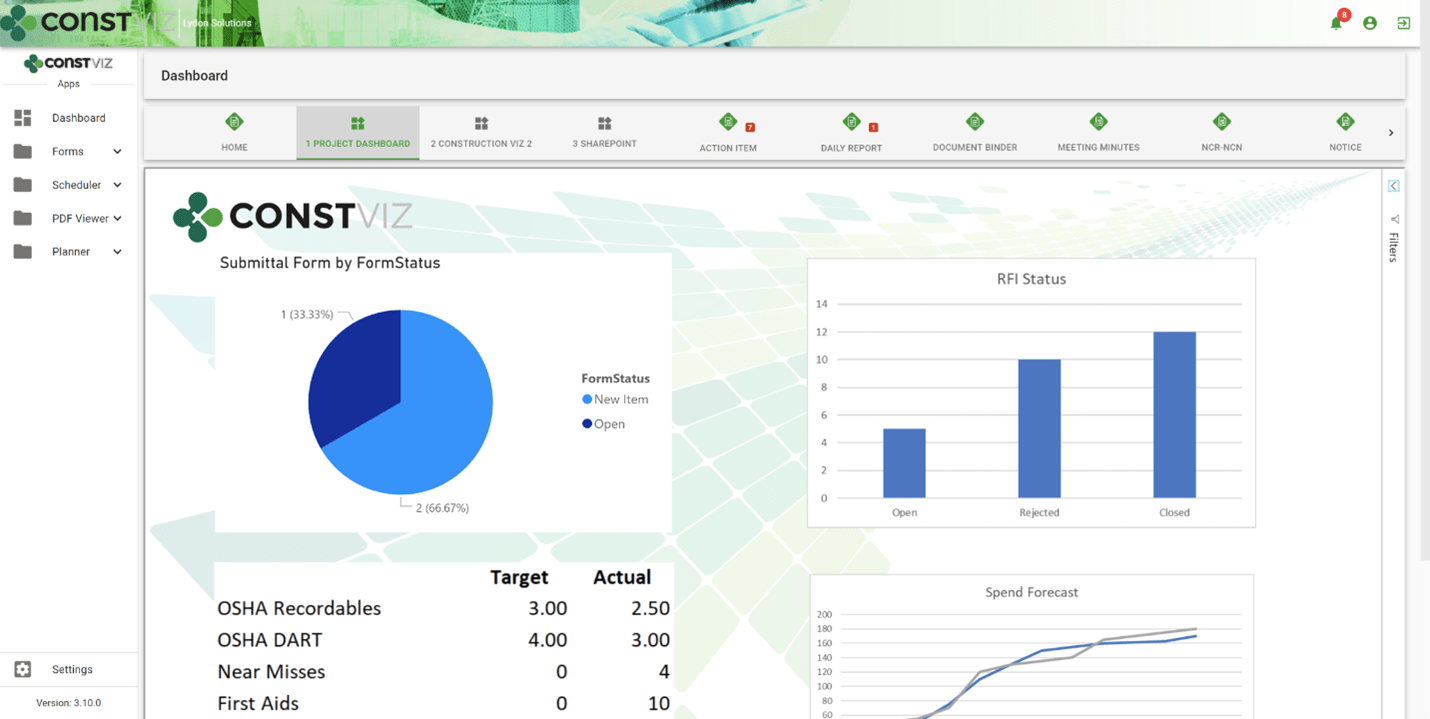
dash-powerbi_2
  • Embed other Microsoft 365 applications. The dashboard creation feature also allows the user to link to SharePoint, Excel Services, other Construction Viz instances, and more without an additional login.
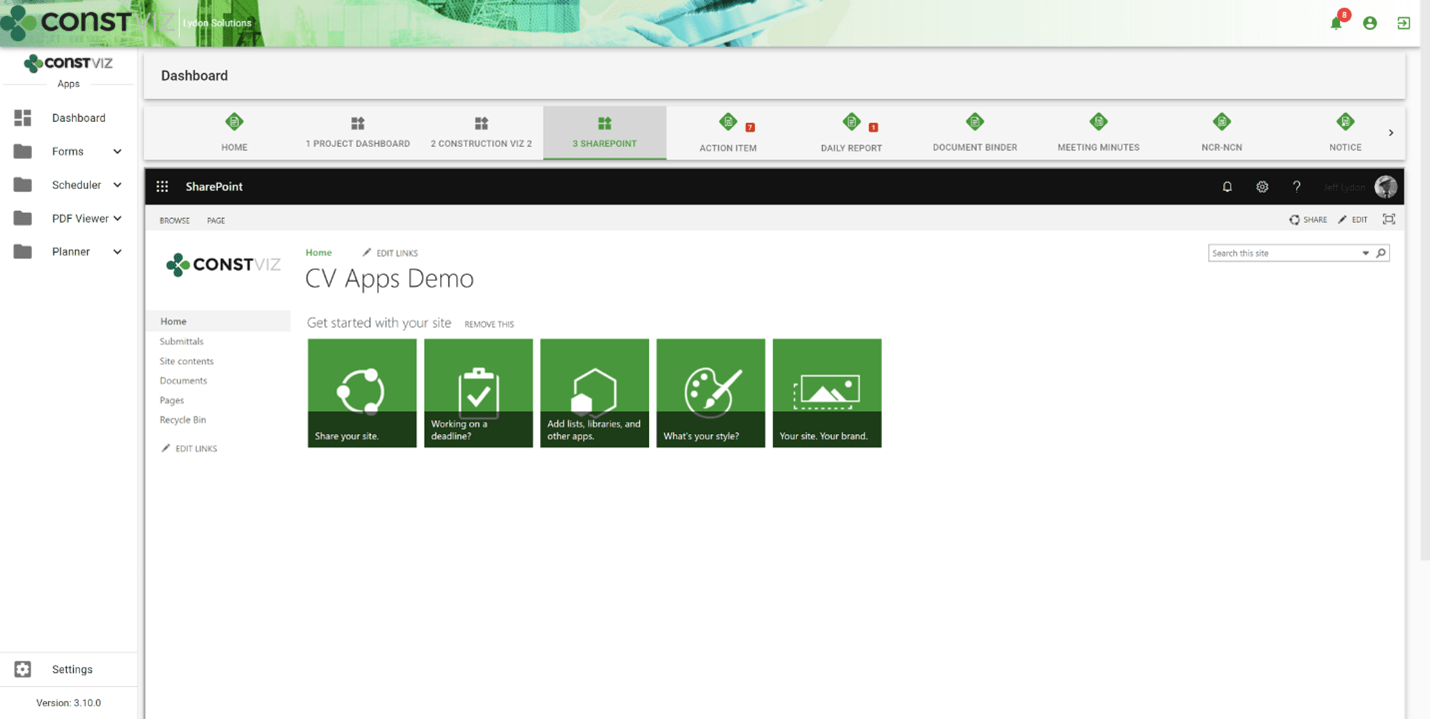
dash-powerbi_3
  • Import pre-defined reports. We built pre-defined Power BI reports that support our Construction Viz apps. These reports can be imported into your Power BI tenant and added as dashboard tabs as well.

Construction Project Management Powered by Microsoft 365 and SharePoint

Construction Viz is a unique construction management solution since it can be deployed into a Microsoft 365 SharePoint Online site, ensuring your data stays with you.

With Power BI and Power Automate, we continue to deeply integrate Construction Viz into the Microsoft 365 ecosystem so that you can leverage the tools you already use while keeping control of your data, allowing you to manage your projects more effectively.

Learn What Construction Viz Can Do for Your Organization

You can deploy Construction Viz as a turnkey solution or select from our lineup of construction project management apps to create a fully customized system for your organization.

Find out more with a free consultation and demo.
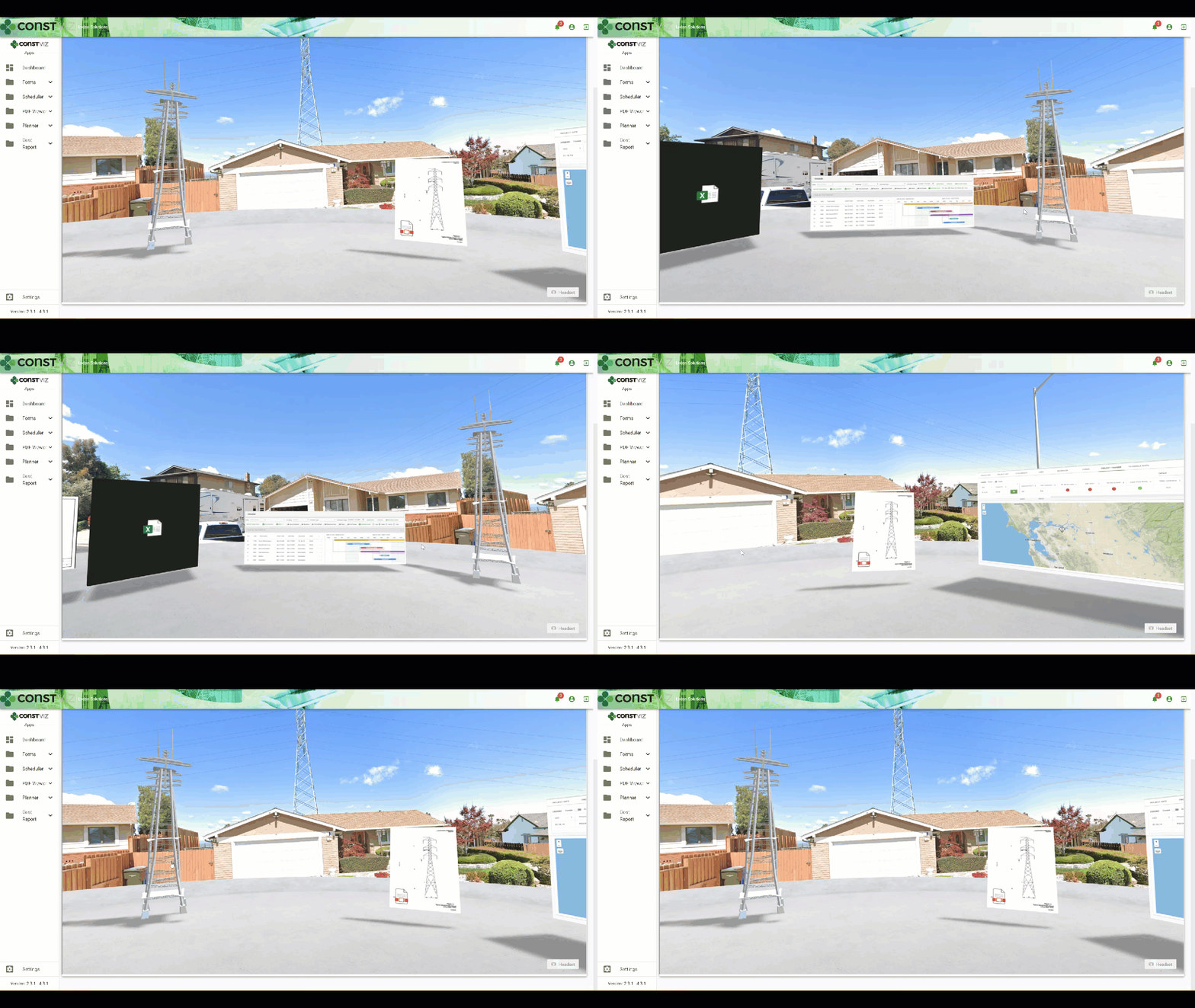
VIZualize your Construction Projects with SharePoint Spaces and Construction Viz

News | March 5, 2021

Microsoft began rolling out SharePoint Spaces for Microsoft 365 users last year. SharePoint Spaces is an immersive, web-based platform that allows you to create and share secure and extensible mixed reality experiences.

Users can build interactive mixed reality pages inside SharePoint sites to share 360-degree images and video, 3D objects, 2D images, text, document libraries, and more. You can even play ambient sounds in the background when visitors view the site.

The functionality works best when used with a virtual reality or mixed reality (VR/MR) headset to navigate the 3D space, but this is not required. Users without a headset can navigate the SharePoint Spaces on any device with a modern browser and interact with the artifacts using their keyboard and mouse.

You can find more information about getting started with SharePoint Spaces here.

Using SharePoint Spaces with Construction Viz

SharePoint Spaces' mixed reality features provide another way to navigate, share, and visualize project data. There are several benefits to using spaces for your construction organization beyond just a shared meeting room with project content. Below is a demo of how a construction project can benefit by integrating our Construction Viz apps with SharePoint Spaces. Examples integrations include:

  • Geospatial location data via the GIS Mapping app
  • Project progress using the Project Tracker app
  • Project Gantt chart scheduling using the Scheduler app
  • Document management using our Construction Form apps for submittals, transmittals, drawings, specs, and so on
VIZualize_1

Stay tuned as Spaces evolves, and we continue to integrate further and build VR/MR solutions for Construction Viz.

Do you want to add VR/MR to your construction project management toolkit?

Construction Viz and our full lineup of construction project management apps for Microsoft 365 can all integrate with this new technology from Microsoft. Schedule your free consultation and demo today to learn more about Construction Viz for your organization.

If you would like expert help using Microsoft 365 to manage your construction projects, we offer business consulting and managed services at LydonSolutions.com.

Transitioning from InfoPath to Construction Viz

Forms | February 23, 2021

Microsoft will end support for its Infopath 2013 offering in July 2026. Here is why Construction Viz is an ideal form and project management solution for construction organizations looking to transition away from Microsoft Infopath.

Microsoft released Infopath in 2003 as a standalone forms-creation and data-gathering application, and it quickly became the de facto form development tool for Microsoft SharePoint. The application, which empowered end-users to develop robust forms without needing to be an IT developer, quickly grew in popularity. With a lot of research and trial and error, you can build quite powerful forms that can also be extended with custom code, if needed.

As of 2013, Microsoft InfoPath has not received any software enhancements. Microsoft has moved in a different technology direction with the release of Power Apps and Forms, which better fit its Microsoft 365 cloud platform. Although InfoPath remains in heavy use today, Microsoft has indicated it will end support for the application in July 2026. While that date might seem far off, construction organizations need to start looking at transitioning to other form technologies.

You might assume that Microsoft Power Apps and Forms would be your organization's best bet moving forward. But a web-based form is not just an electronic version of a piece of paper. To deliver a form solution, you have to assess the business need from a 360-degree perspective. That means considering permissions, reporting, integrations, attachments, metadata, offline capability, logs, search, workflows, UI/UX, deployment, and backups. These areas must work together seamlessly to deliver an end-to-end construction solution that does not disrupt the business process, is easy to configure and implement, and can be supported and customized.

This is why our Construction Viz form apps are an ideal solution for construction organizations looking to transition from Microsoft Infopath.

The Construction Viz Form apps 

We designed our lineup of Construction Viz form apps based on our over 11 years of developing forms in InfoPath for the construction industry. Our goal was to remove any complexity in delivering forms and ensure that we had all of the bases covered from permissions to workflow in a turnkey solution.  

Each Construction Viz form is an app that can be licensed individually and deployed quickly into Microsoft 365 and SharePoint. The forms are pre-built with construction-specific fields and features but are still customizable by an administrator without coding or the need to be an IT pro. And while the forms are all standalone solutions, you can combine them to take advantage of additional features like cross-linking between related records, unified notifications and reminders, streamlined workflows, and more. 

Best of all, Construction Viz fully integrates with Microsoft 365, so if you already have solutions built in the Power Platform, Teams, or SharePoint, you can leverage them alongside our apps to create a truly customized solution for your organization. 

Construction Viz Forms lineup

form-icon_actionitems

Action Items

form-icon_change-order

Change Order Request

form-icon_daily

Daily Report

form-icon_docset

Document Binder

form-icon_minutes

Meeting Minutes

form-icon_noncompliance

NCR/NCN

form-icon_notice

Notice

form-icon_commitment

Pay App Suite: Commitment

form-icon_change

Meeting Minutes

form-icon_pay-app

Pay App Suite: Pay Application

form-icon_punchlist

Punch List Items

form-icon_qa-inspection

Quality Assurance Inspection

form-icon_rfi

Request for Information

form-icon_rfp

Request for Proposal

form-icon_risk

Risk

form-icon_incident

Safety Incident

form-icon_safety-insp

Safety Inspection

form-icon_servreq

Service Request

form-icon_submittal

Submittal

form-icon_subs-comp

Substantial Completion

transmittal

Transmittal

form-icon_work-order

Work Order

icon-more

Custom Forms

Download our catalog of Construction Viz construction form apps

Need a Construction Form and Project Management Solution?

Construction Viz is a turnkey and flexible construction project management solution powered by Microsoft 365 and SharePoint. The platform includes everything you need to manage your construction projects—document management, dashboards, reports, forms, workflows, and more— all in one place. The solution is available in the cloud, on-premise, or as à la carte apps for Microsoft SharePoint and Microsoft 365. Contact us for a free demo and consultation.

If you need help setting up Microsoft 365 for your construction organization, check out our managed services at LydonSolutions.com.

Solving the Action Items Dilemma with Construction Viz

Action Item | February 18, 2021

Learn how we integrated the Construction Viz Meeting Minutes and Action Item apps to turbocharge action item management for construction project teams.

Here is a common scenario for many construction organizations:

  • Your project teams hold meetings to review progress and capture action items in meeting minutes.
  • In most cases, team members probably document meeting minutes in Microsoft Word.
  • Next, someone likely re-enters action items into a separate log using Microsoft Excel.

Not only is this not a very efficient way to collect meeting information, but it is also error-prone and difficult to keep in sync. It is also challenging to ensure that your team is working off the most up-to-date versions of these documents.

We took a step back and analyzed the above process when designing the Construction Viz Meeting Minutes and Action Items apps. The result was a deep integration between these two tools to create a streamlined and always-up-to-date bidirectional connection between meeting minutes and action items.

How Construction Viz improves action item management

The bidirectional flow of data between our Construction Viz Meeting Minutes and Action items apps offers construction project teams many benefits:

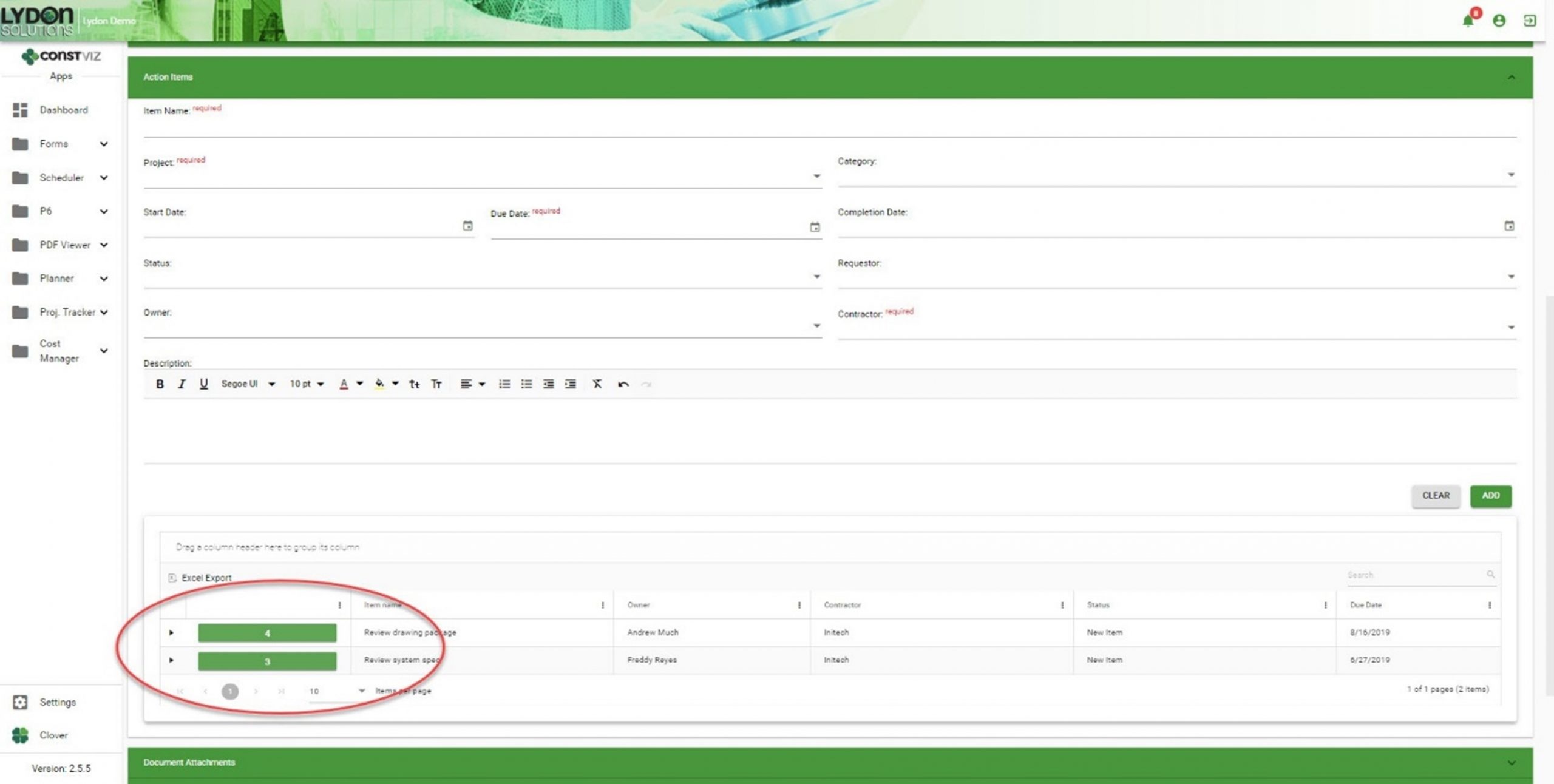
  • You can create action items directly within the Meeting Minutes app.
Solving-Action-Items-Dilemma_1
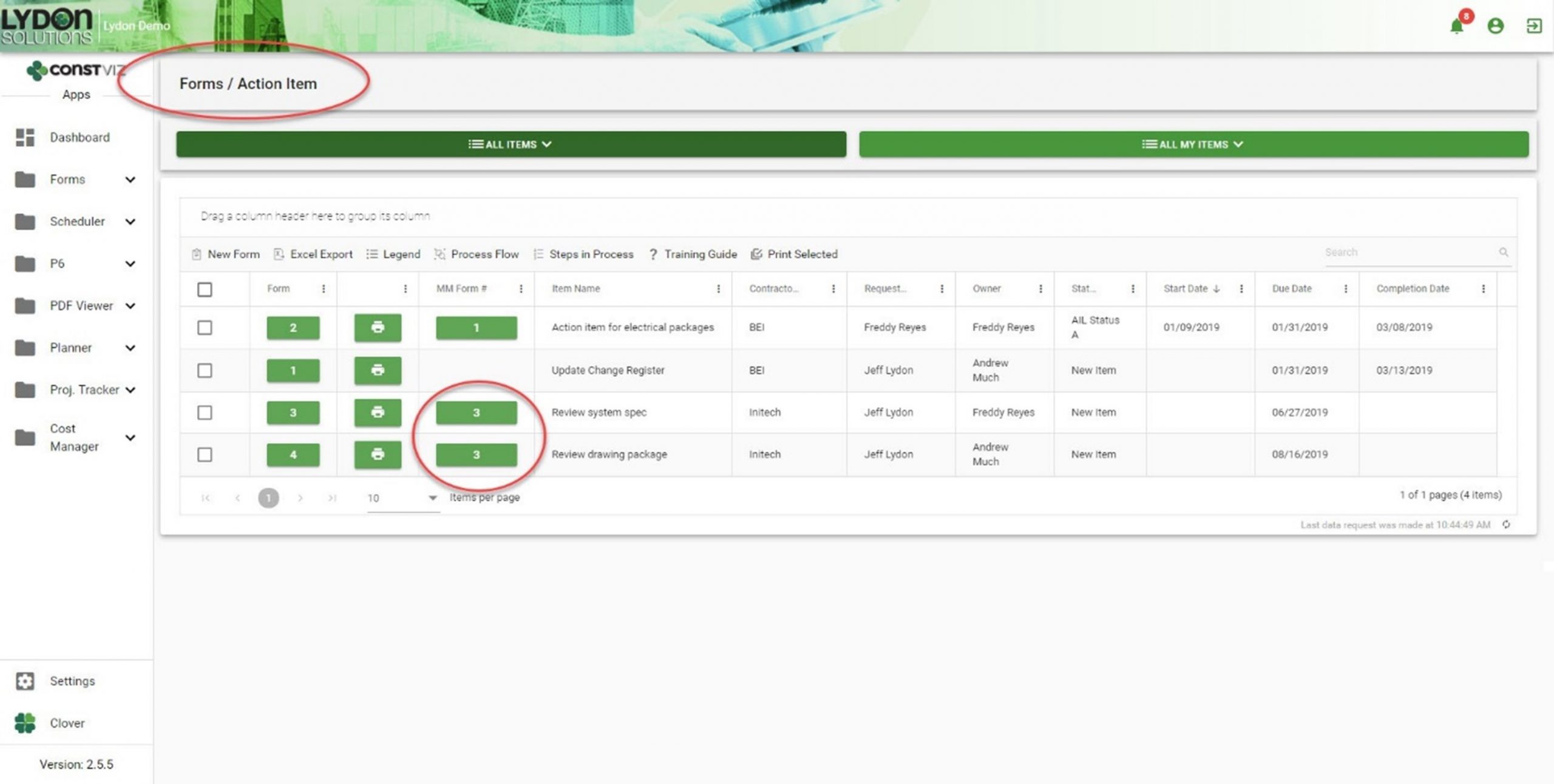
  • Action items created within a meeting minutes record automatically generate entries within the Action Items app.
Solving-Action-Items-Dilemma_2
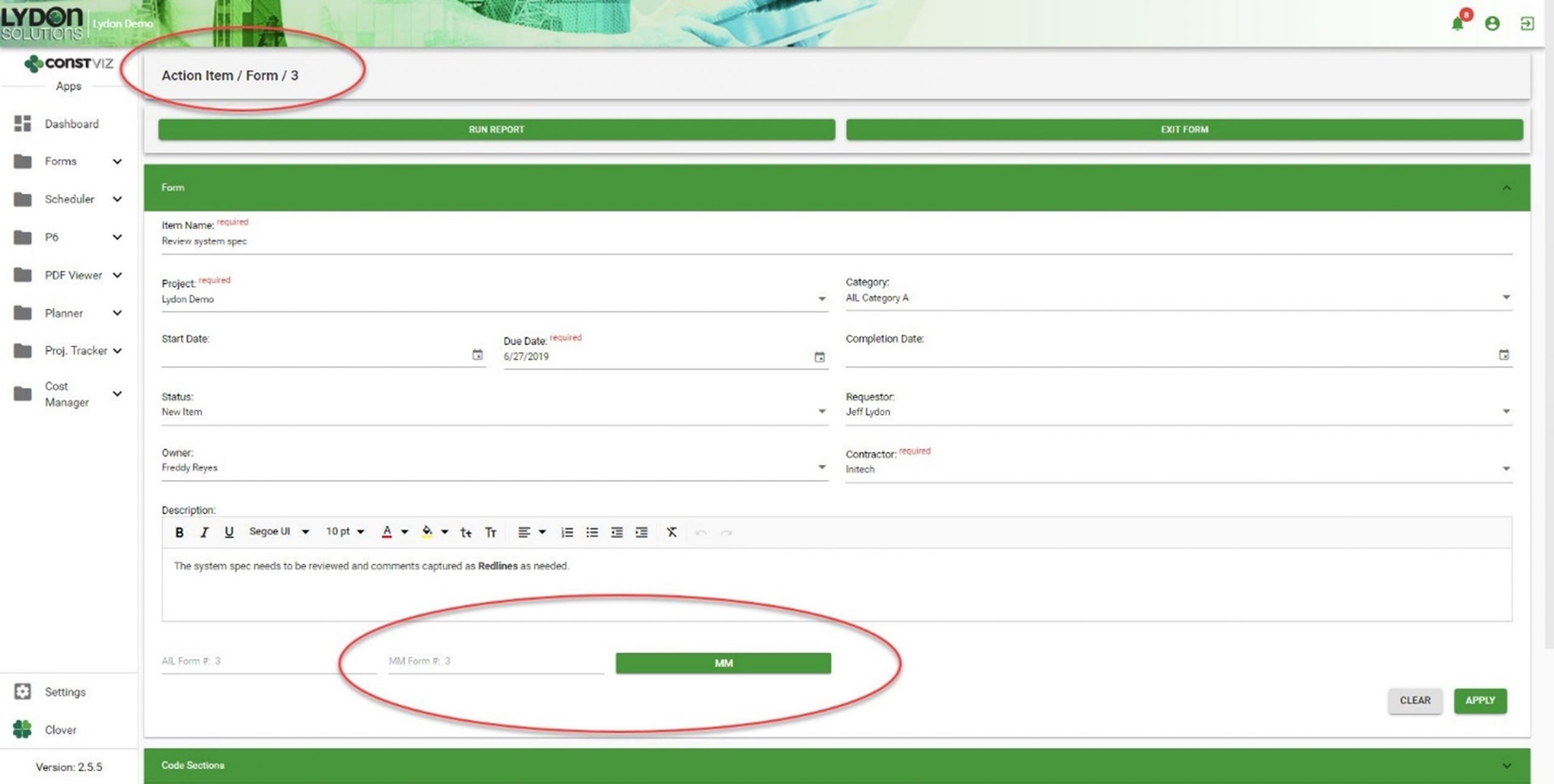
  • Both apps automatically generate cross-links, relating action items and meeting minutes records to each other. Now you can easily cross-reference action items and meetings, giving you a complete log as a single source of truth.
Solving-Action-Items-Dilemma_3
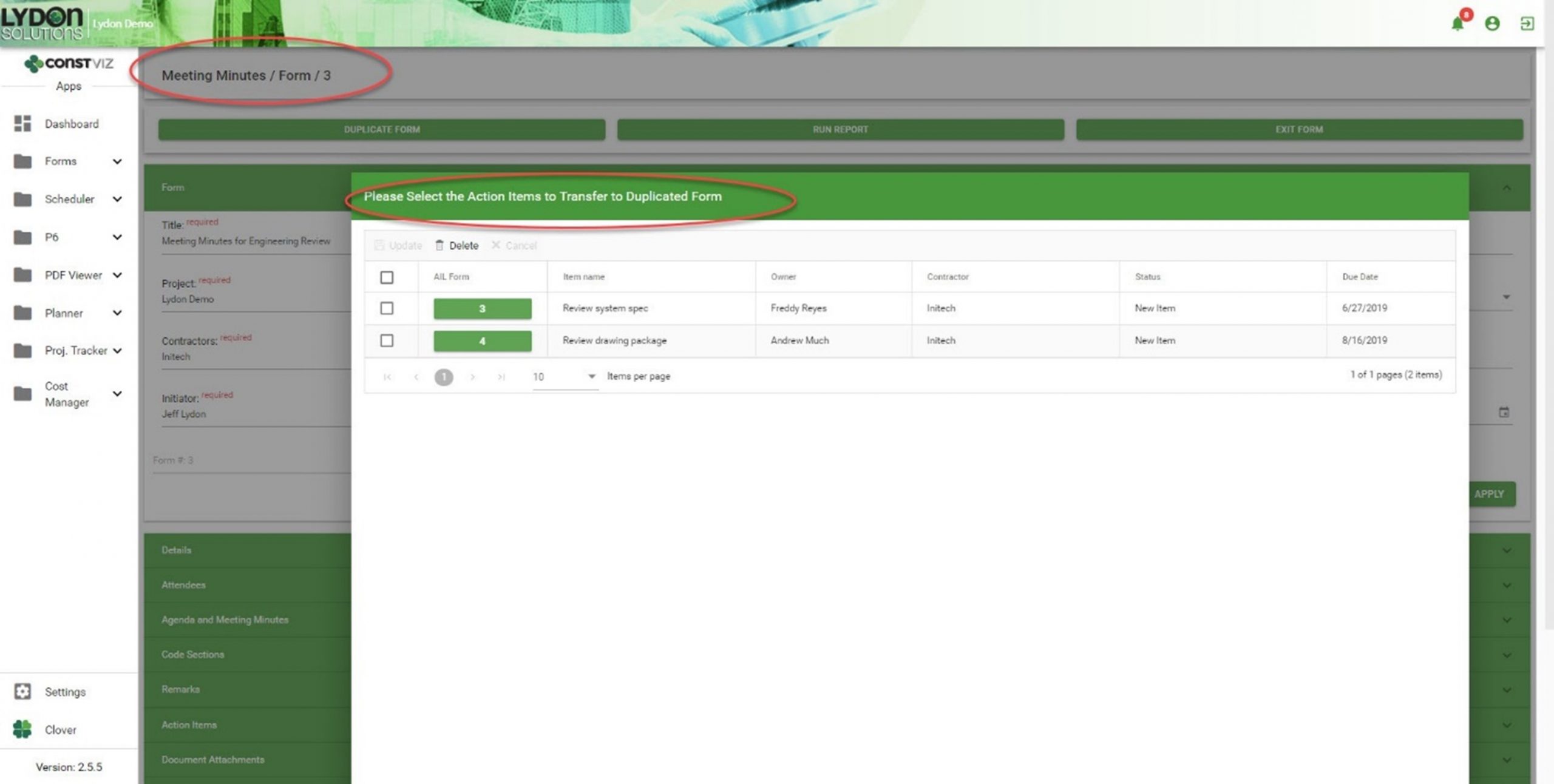
  • If you duplicate a meeting minute form, you can selectively carry forward action items, creating a history of assigned and open action items, as well as a record of the meeting in which you first entered them.
Solving-Action-Items-Dilemma_4

Get a free demo and consultation

Streamlining meeting minutes and action items is just another example of how our team applied our real-world construction project management experience to help organizations save time and cost. Find out how Construction Viz can help your team better manage your projects. Check out our full lineup of Construction Viz apps and schedule your free demo and consultation today.

If you can measure it, you can manage it with Construction Viz Task Manager

Project Management Tools | February 10, 2021

Being a construction project manager is a demanding job where all responsibility for a project's success falls on your shoulders. You spend most of your time herding cats, trying to hold your team members accountable while working in a matrixed organization. It's not enough to email a team member when a deliverable is due. You need constant reminders when follow-ups are required and a simple but effective means to monitor and report progress.

We designed the Construction Viz Task Manager App for project managers like you. Construction Viz Task Manager has everything you need to plan, track, and report on your team's project and program tasks within one powerful app.

Construction Viz Task Manager Key Features

The Construction Viz Task Manager app installs easily into the Construction Viz Hub and integrates with our full lineup of construction project management apps. Task Manager provides a 360-degree approach to managing tasks, including the following features:

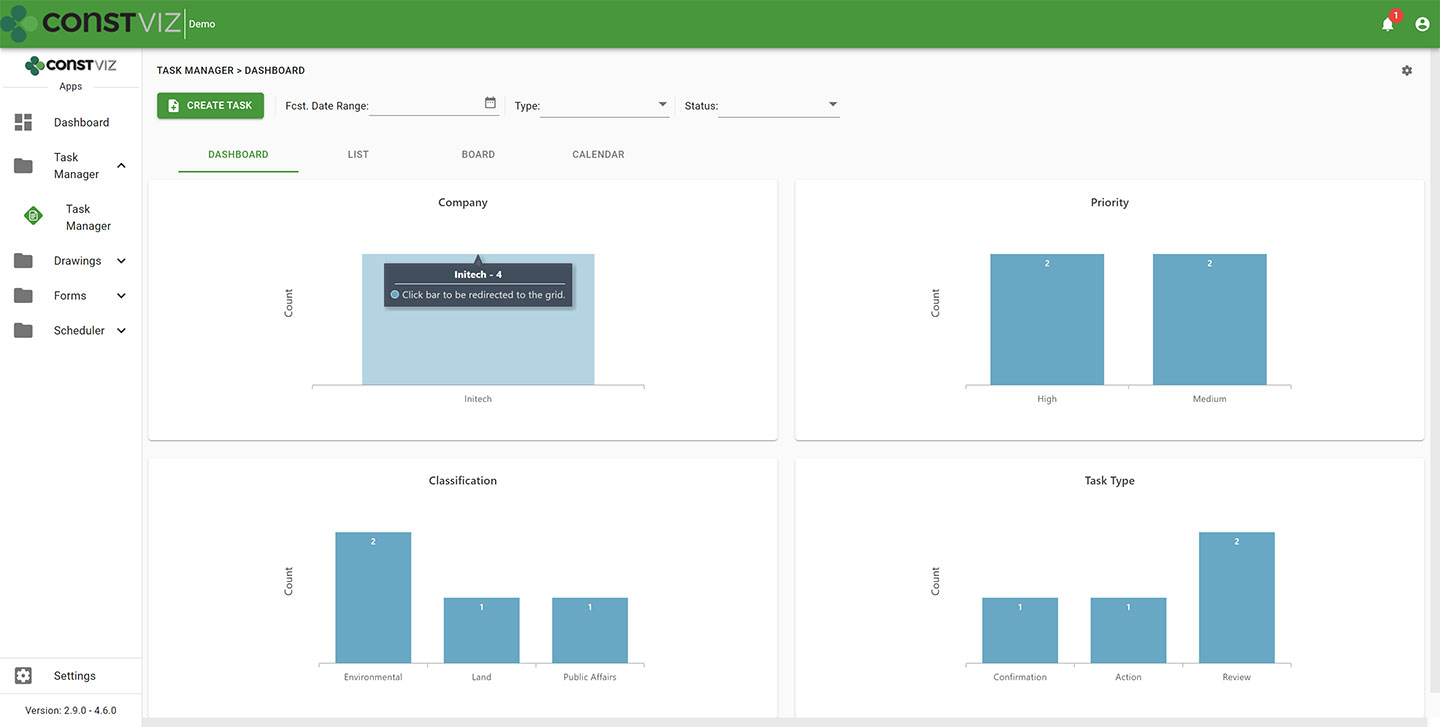
  • Dashboard summary. As a PM, your time is limited. Task Manager lets you quickly see the status of your project team's tasks in configurable dashboards with drill-down capability.
cv-tm_1
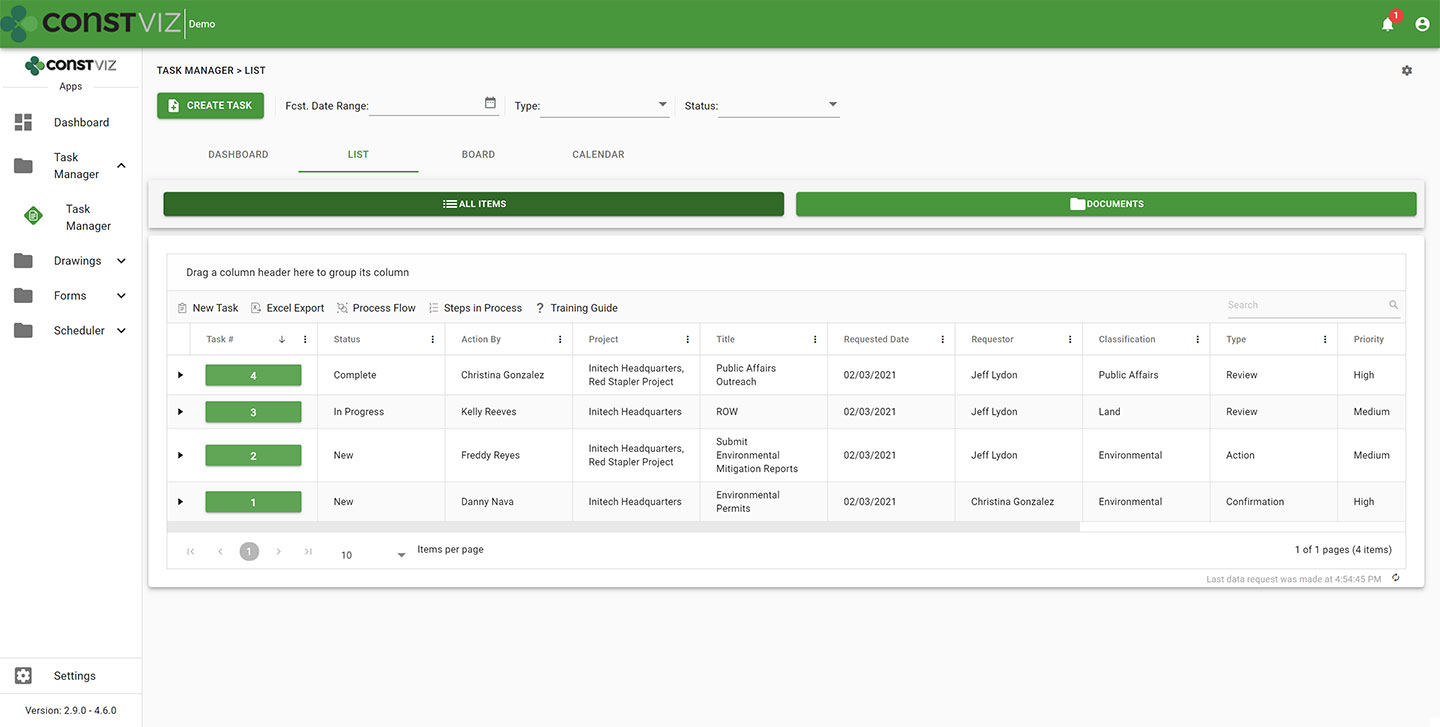
  • List view. Task Manager lets you see all your tasks consolidated into a centralized list view. You can use this pre-defined view to quickly group, filter, search, and report on your team's tasks.
cv-tm_2
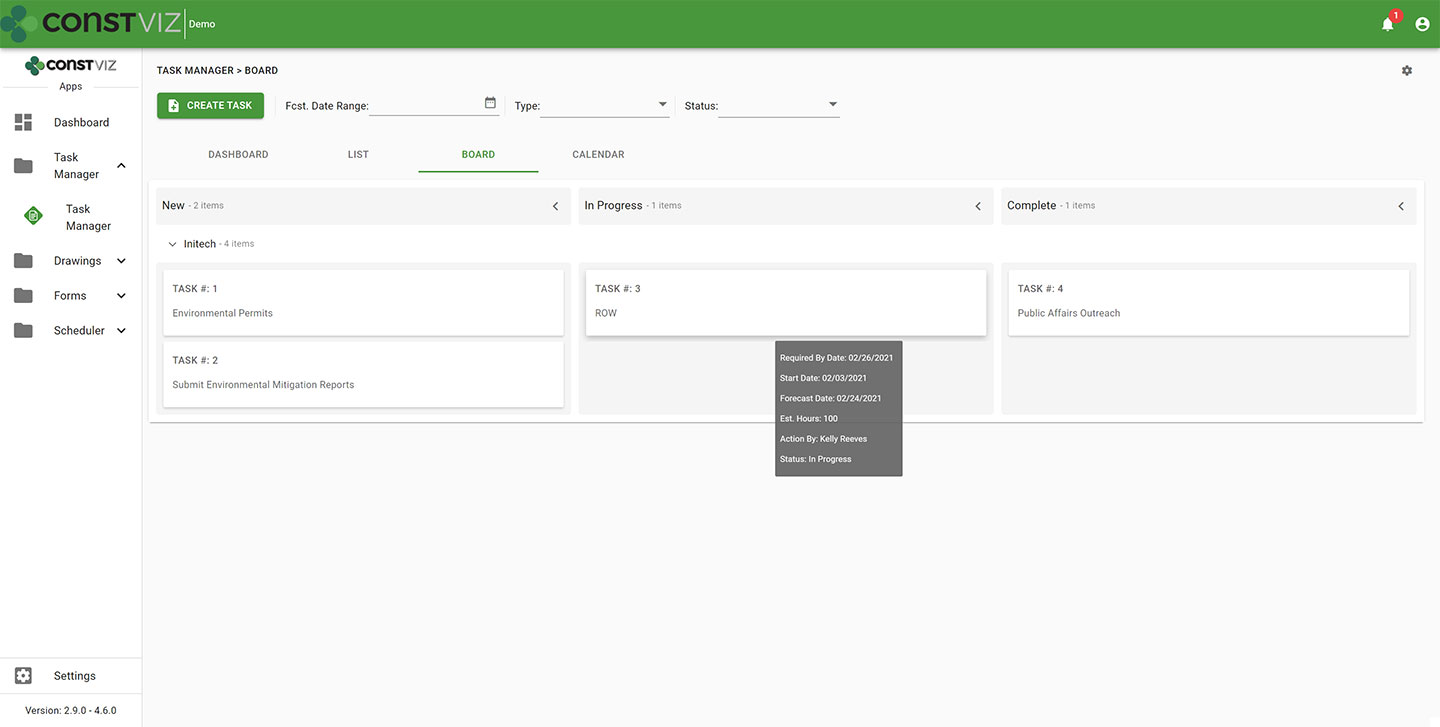
  • Board view. Want an easy way to see the progress of a task? Task Manager's board view uses a Kanban approach to managing tasks with configurable buckets and swim lanes so you can see progress made by each team member. The app highlights any behind schedule tasks in red, allowing you to target those items for immediate follow up.
cv-tm_3
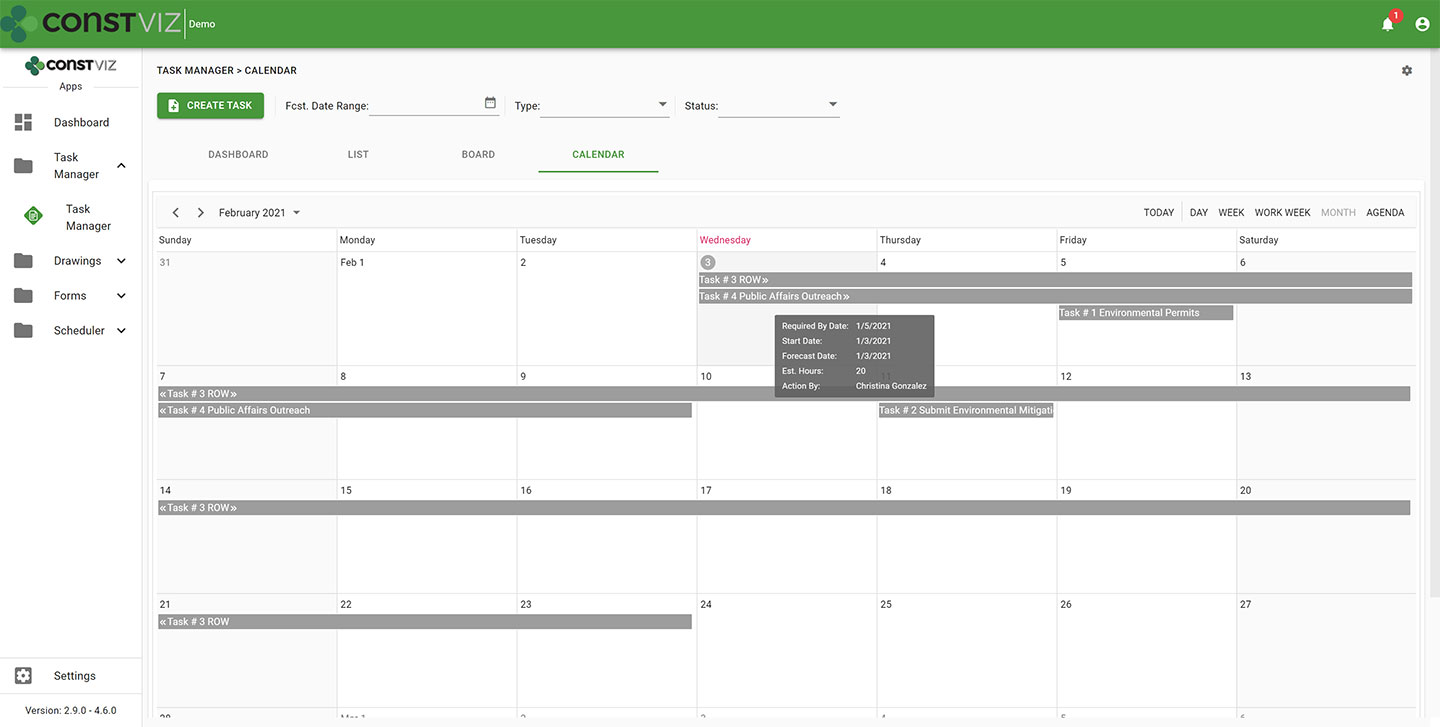
  • Calendar view. Seeing when tasks are due in a familiar calendar layout is invaluable. Task Manager's calendar allows you to proactively manage when tasks are forecast to be complete using daily, weekly, or monthly views. Since Construction Viz uses SharePoint as the backend, you can even link your Task Manager calendar to your Outlook calendar.
cv-tm_4
  • When you assign a task to someone in Task Manager, the app automatically sends the assignee an email with a link for them to take action. Task Manager integrates with Microsoft Power Automate, letting you tailor the timing and frequency of email notifications for your business processes so that frequent reminders do not go unnoticed. Like all of our apps, tasks from Task Manager also display in the Construction Viz notification center, ensuring you and your team always know about items requiring your attention.
  • Task Manager integrates with other Construction Viz forms and apps. Task Manager integrates across the suite of Construction Viz apps, streamlining your workflows. For example, if you are in a Construction Viz RFI form, you could create a task and assign it to a team member, thereby associating the two records. Now, anyone viewing the task can see the linked RFI record and vice versa. With Task Manager, you no longer have to bounce between one system to know when a task is due and another to view the work item. Everything is readily accessible and interlinked directly in all the relevant Construction Viz apps.
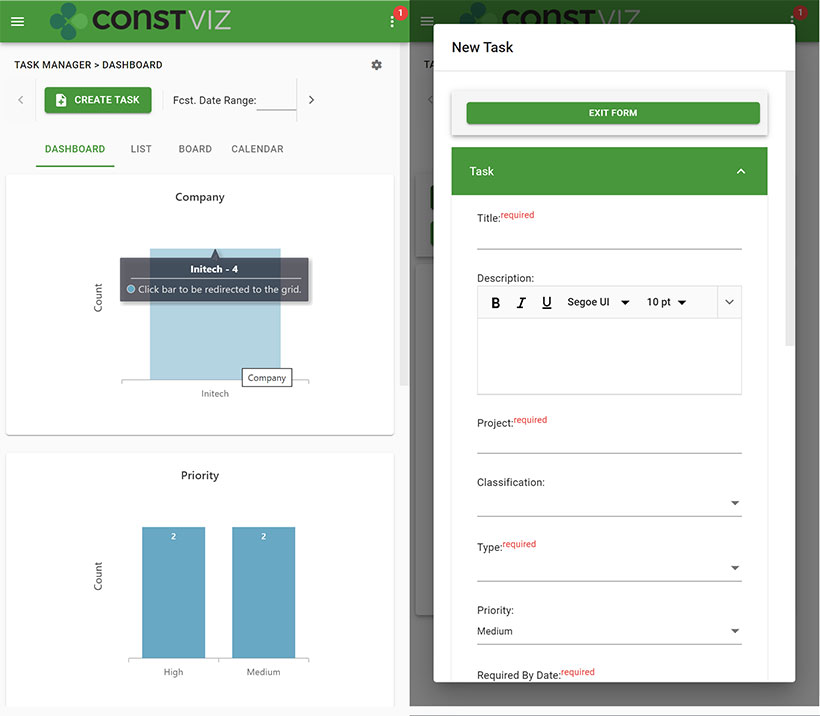
  • Use any device with full mobile responsive and offline support. Task Manager, like all our apps, is fully responsive on any device. You can also work offline without an internet connection.  So whether you are at the office or in the field, you can always manage your tasks.
cv-tm_5
  • Adaptive Cards integration. Task Manager takes advantage of Microsoft's Adaptive Card technology, allowing team members to work in Outlook without ever logging into any system.  Task-driven cards make it easy for team members to respond to tasks wherever they are and on any device using Microsoft Outlook. You can read more about Construction Viz and Microsoft Adaptive Cards in this blog post.

See what Construction Viz Task Manager can do for you

Construction Viz is the most flexible construction project management solution available for Microsoft 365 and SharePoint. Find out how Construction Viz and the Task Manager app can help you better manage your construction projects and programs with a free consultation and demo.
Simplifying PMIS Processes and Training with Construction Viz

Project Management Tools | February 3, 2021

You want your project teams set up for success from day one. Construction Viz makes it easy to access, update, and manage your processes and training materials so your team can focus on the project deliverables that matter.

When organizations roll out a brand new Project Management Information System (PMIS), the last step in the implementation often goes something like this: Here’s the system, attend a generic training session, start using the system, and oh by the way, here is a binder of training material that you can read up on how to use the system. These processes and training resources are often out of date and rarely tailored around how YOU do business. If your team members need training while in the system, they will have to seek out the latest training material, forcing them to lose focus on what they were doing and slow productivity. Is it any wonder no one wants to use that brand new PMIS system?

With Construction Viz, we simplify how project teams access, update, and manage processes and training, ensuring that projects are efficiently moving forward.

Construction Viz Puts Your Processes and Training Materials Front and Center

Setup. Construction Viz treats training and process documentation as an integral part of the system, not an afterthought. When you install Construction Viz in SharePoint, the software automatically creates a library for storing processes and training materials linked to each of your installed apps. You can then add custom process and training material for any app by inserting the appropriate metadata into your documents, ensuring that these materials are at your fingertips when you need them and easy to update and maintain.

Format.  Construction Viz lets you open Microsoft Office applications (Excel, Word, Visio, One Note) in any modern browser without having to download documents to the desktop. So, regardless of which device you are on, you can open and edit your training and process documents. You can even have multiple people simultaneously edit the documents with robust permission and version controls, ensuring that you are always working off the latest materials. Construction Viz also supports all major document and media formats, including video.
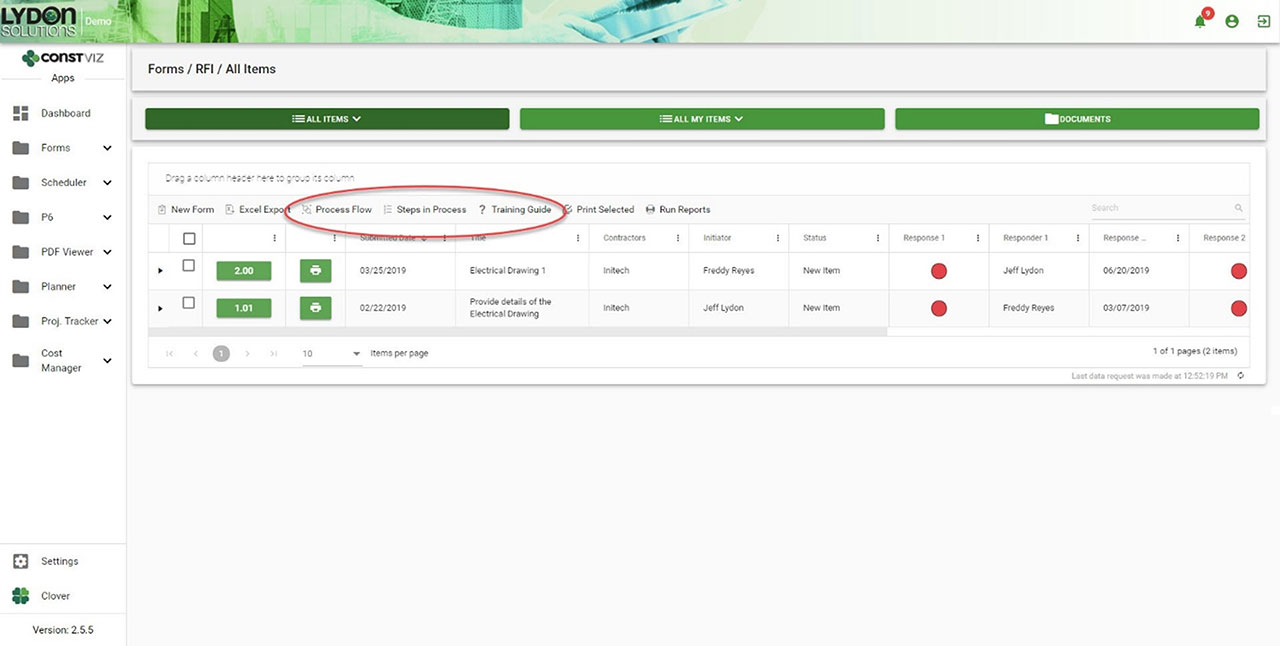
Navigation. Each Construction Viz apps includes links to the process and training resources right above the work area, giving you direct access to the information you need where you are working. Everything is right there in front of the user.

Getting Documentation And Process Right

One of the common reasons PMIS deployments can fail after deployment is low user adoption, often resulting from a lack of adequate training and documentation. With Construction Viz, we integrated training and process document tools right into the system so that your project teams can hit the ground running with everything they need from day one.

Navigation to Processes and Training within each App
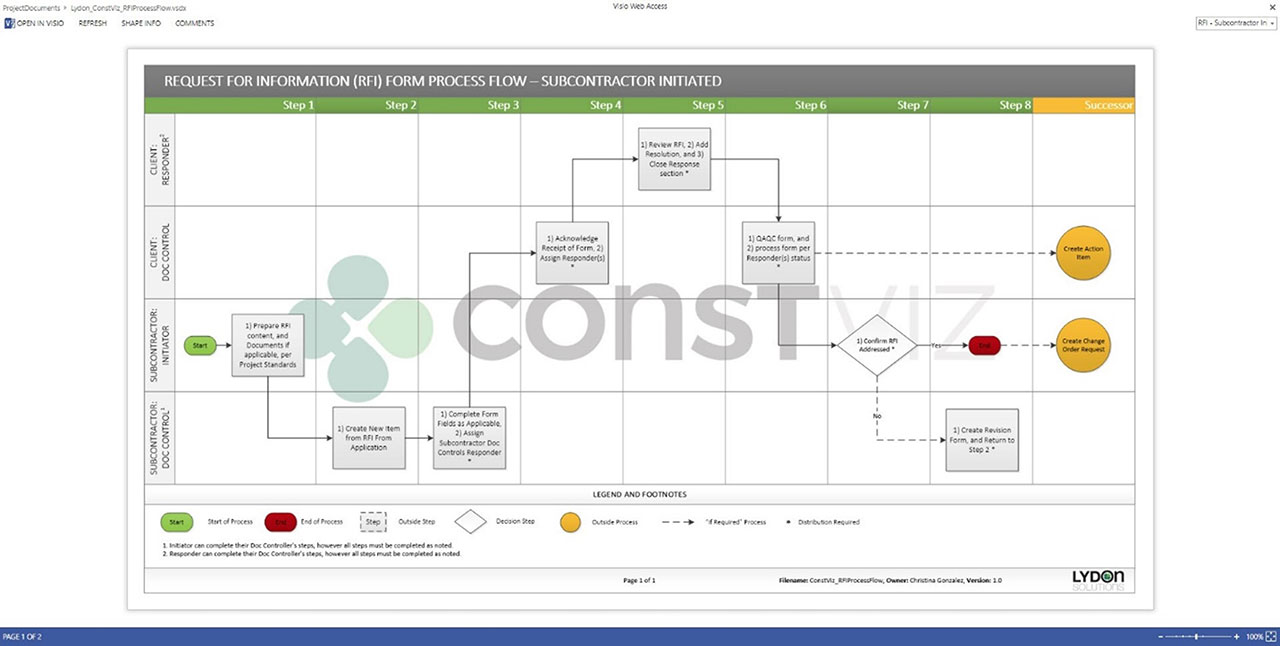
Process workflow diagram in Visio Online
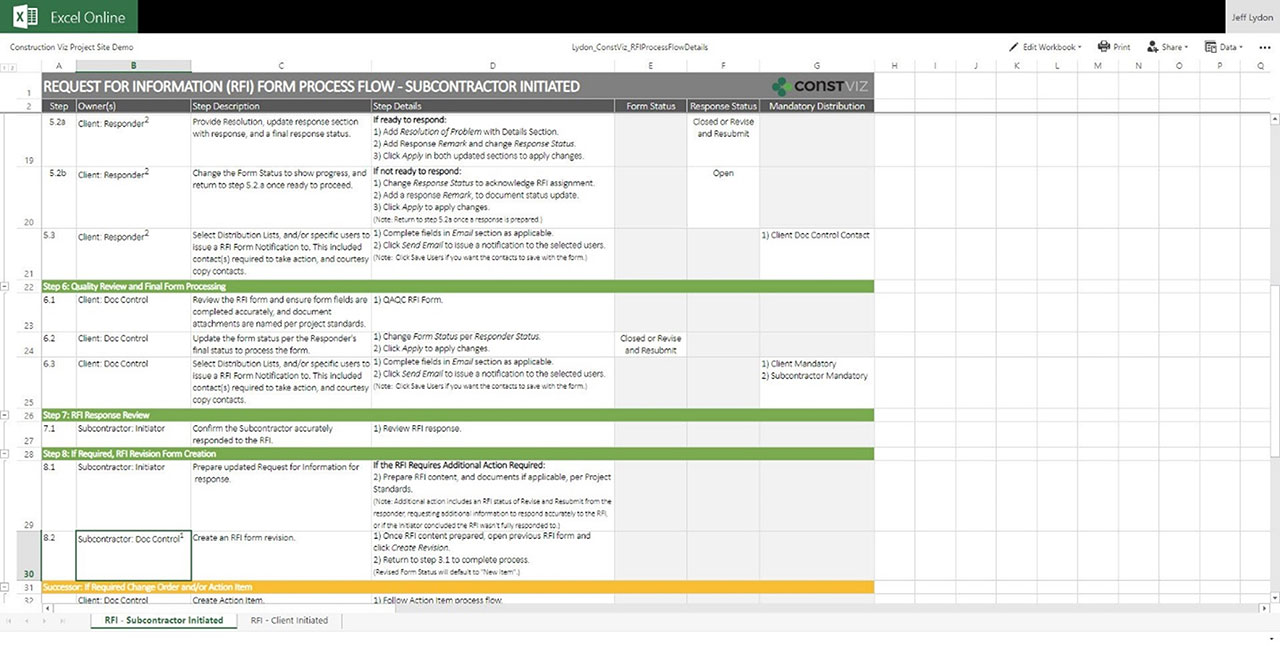
Steps for workflow in Excel Online
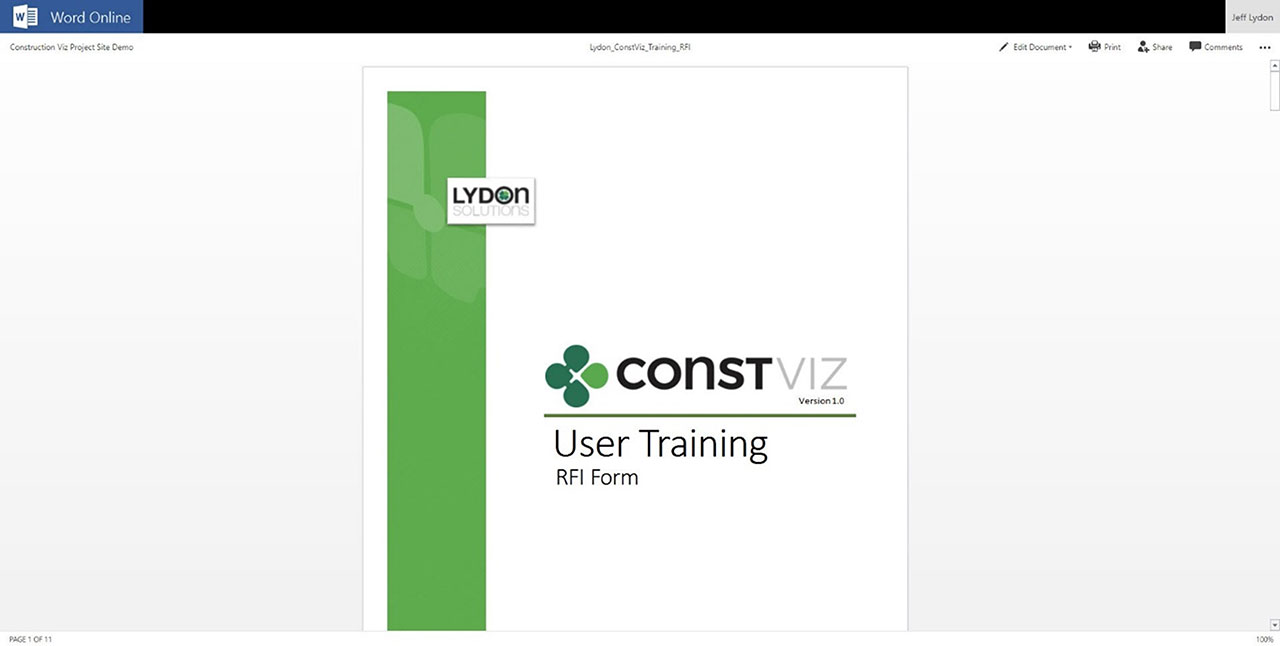
Training Manual in Word Online

Get a Free Demo and Consultation

Several major owners, construction managers, and utilities use Construction Viz every day to manage multi-billion-dollar projects and programs. Contact us now for a free demo and consultation to learn how Construction Viz can help your organization better manage your projects.

  • « Go to Previous Page
  • Page 1
  • Interim pages omitted …
  • Page 4
  • Page 5
  • Page 6
  • Page 7
  • Page 8
  • Interim pages omitted …
  • Page 11
  • Go to Next Page »

Footer

About Constructon Viz

Construction Viz is a flexible construction project management software solution powered by Microsoft SharePoint and SQL.
Read More >

Navigation

  • Home
  • About
  • Features
  • Apps
  • Blog
  • Contact
  • Login

Apps

  • Construction Viz Hub
  • Drawing Management
  • File Manager
  • Specification Management

–

  • Project Forms
  • Project Planner
  • Project Scheduler
  • Project Tracker
  • Task Manager

Connect with Us

This field is for validation purposes and should be left unchanged.

Sign up to receive helpful tips for construction project managers as well as updates about Construction Viz.

Lydon Solutions

© Lydon Solutions

  • Privacy
  • Cookies
  • Terms of Use
  • Disclaimer
  • End-user license

Click here to start a Microsoft Teams chat.

Click here to start a Microsoft Teams chat.

Contact Us
This field is for validation purposes and should be left unchanged.
Name(Required)
Join Our Newsletter

Sign up to receive helpful tips for project managers and updates about Construction Viz.

Get Started

Join Our Newsletter

Sign up to receive helpful tips for construction project managers as well as updates about Construction Viz.

This field is for validation purposes and should be left unchanged.