• Skip to primary navigation
  • Skip to main content
  • Skip to footer
Construction Viz

Construction Viz

Project Management Perfect

  • About
  • Features
  • Apps
  • Blog
  • Contact
  • Download Flyer
  • Get Started Today
  • Login
Show Search
Hide Search

da_admin

Transitioning from InfoPath to Construction Viz

Forms | February 23, 2021

Microsoft will end support for its Infopath 2013 offering in July 2026. Here is why Construction Viz is an ideal form and project management solution for construction organizations looking to transition away from Microsoft Infopath.

Microsoft released Infopath in 2003 as a standalone forms-creation and data-gathering application, and it quickly became the de facto form development tool for Microsoft SharePoint. The application, which empowered end-users to develop robust forms without needing to be an IT developer, quickly grew in popularity. With a lot of research and trial and error, you can build quite powerful forms that can also be extended with custom code, if needed.

As of 2013, Microsoft InfoPath has not received any software enhancements. Microsoft has moved in a different technology direction with the release of Power Apps and Forms, which better fit its Microsoft 365 cloud platform. Although InfoPath remains in heavy use today, Microsoft has indicated it will end support for the application in July 2026. While that date might seem far off, construction organizations need to start looking at transitioning to other form technologies.

You might assume that Microsoft Power Apps and Forms would be your organization's best bet moving forward. But a web-based form is not just an electronic version of a piece of paper. To deliver a form solution, you have to assess the business need from a 360-degree perspective. That means considering permissions, reporting, integrations, attachments, metadata, offline capability, logs, search, workflows, UI/UX, deployment, and backups. These areas must work together seamlessly to deliver an end-to-end construction solution that does not disrupt the business process, is easy to configure and implement, and can be supported and customized.

This is why our Construction Viz form apps are an ideal solution for construction organizations looking to transition from Microsoft Infopath.

The Construction Viz Form apps 

We designed our lineup of Construction Viz form apps based on our over 11 years of developing forms in InfoPath for the construction industry. Our goal was to remove any complexity in delivering forms and ensure that we had all of the bases covered from permissions to workflow in a turnkey solution.  

Each Construction Viz form is an app that can be licensed individually and deployed quickly into Microsoft 365 and SharePoint. The forms are pre-built with construction-specific fields and features but are still customizable by an administrator without coding or the need to be an IT pro. And while the forms are all standalone solutions, you can combine them to take advantage of additional features like cross-linking between related records, unified notifications and reminders, streamlined workflows, and more. 

Best of all, Construction Viz fully integrates with Microsoft 365, so if you already have solutions built in the Power Platform, Teams, or SharePoint, you can leverage them alongside our apps to create a truly customized solution for your organization. 

Construction Viz Forms lineup
form-icon_actionitems

Action Items

form-icon_change-order

Change Order Request

form-icon_daily

Daily Report

form-icon_docset

Document Binder

form-icon_minutes

Meeting Minutes

form-icon_noncompliance

NCR/NCN

form-icon_notice

Notice

form-icon_commitment

Pay App Suite: Commitment

form-icon_change

Meeting Minutes

form-icon_pay-app

Pay App Suite: Pay Application

form-icon_punchlist

Punch List Items

form-icon_qa-inspection

Quality Assurance Inspection

form-icon_rfi

Request for Information

form-icon_rfp

Request for Proposal

form-icon_risk

Risk

form-icon_incident

Safety Incident

form-icon_safety-insp

Safety Inspection

form-icon_servreq

Service Request

form-icon_submittal

Submittal

form-icon_subs-comp

Substantial Completion

transmittal

Transmittal

form-icon_work-order

Work Order

icon-more

Custom Forms

Download our catalog of Construction Viz construction form apps

Need a Construction Form and Project Management Solution?

Construction Viz is a turnkey and flexible construction project management solution powered by Microsoft 365 and SharePoint. The platform includes everything you need to manage your construction projects—document management, dashboards, reports, forms, workflows, and more— all in one place. The solution is available in the cloud, on-premise, or as à la carte apps for Microsoft SharePoint and Microsoft 365. Contact us for a free demo and consultation.

If you need help setting up Microsoft 365 for your construction organization, check out our managed services at LydonSolutions.com.
Solving the Action Items Dilemma with Construction Viz

Action Item | February 18, 2021

Learn how we integrated the Construction Viz Meeting Minutes and Action Item apps to turbocharge action item management for construction project teams.

Here is a common scenario for many construction organizations:

  • Your project teams hold meetings to review progress and capture action items in meeting minutes.
  • In most cases, team members probably document meeting minutes in Microsoft Word.
  • Next, someone likely re-enters action items into a separate log using Microsoft Excel.

Not only is this not a very efficient way to collect meeting information, but it is also error-prone and difficult to keep in sync. It is also challenging to ensure that your team is working off the most up-to-date versions of these documents.

We took a step back and analyzed the above process when designing the Construction Viz Meeting Minutes and Action Items apps. The result was a deep integration between these two tools to create a streamlined and always-up-to-date bidirectional connection between meeting minutes and action items.

How Construction Viz improves action item management

The bidirectional flow of data between our Construction Viz Meeting Minutes and Action items apps offers construction project teams many benefits:

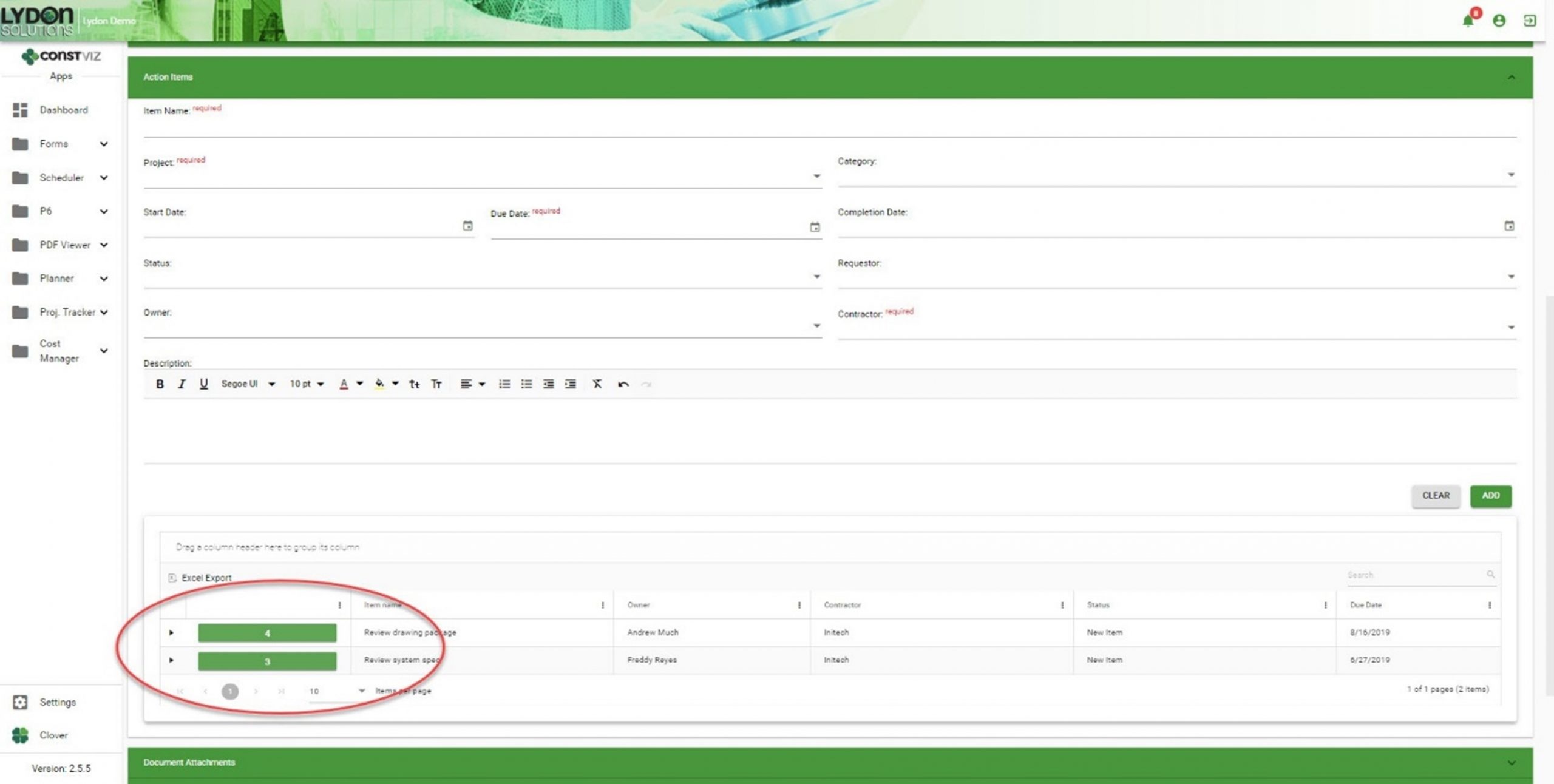
  • You can create action items directly within the Meeting Minutes app.
Solving-Action-Items-Dilemma_1
  • Action items created within a meeting minutes record automatically generate entries within the Action Items app.
Solving-Action-Items-Dilemma_2
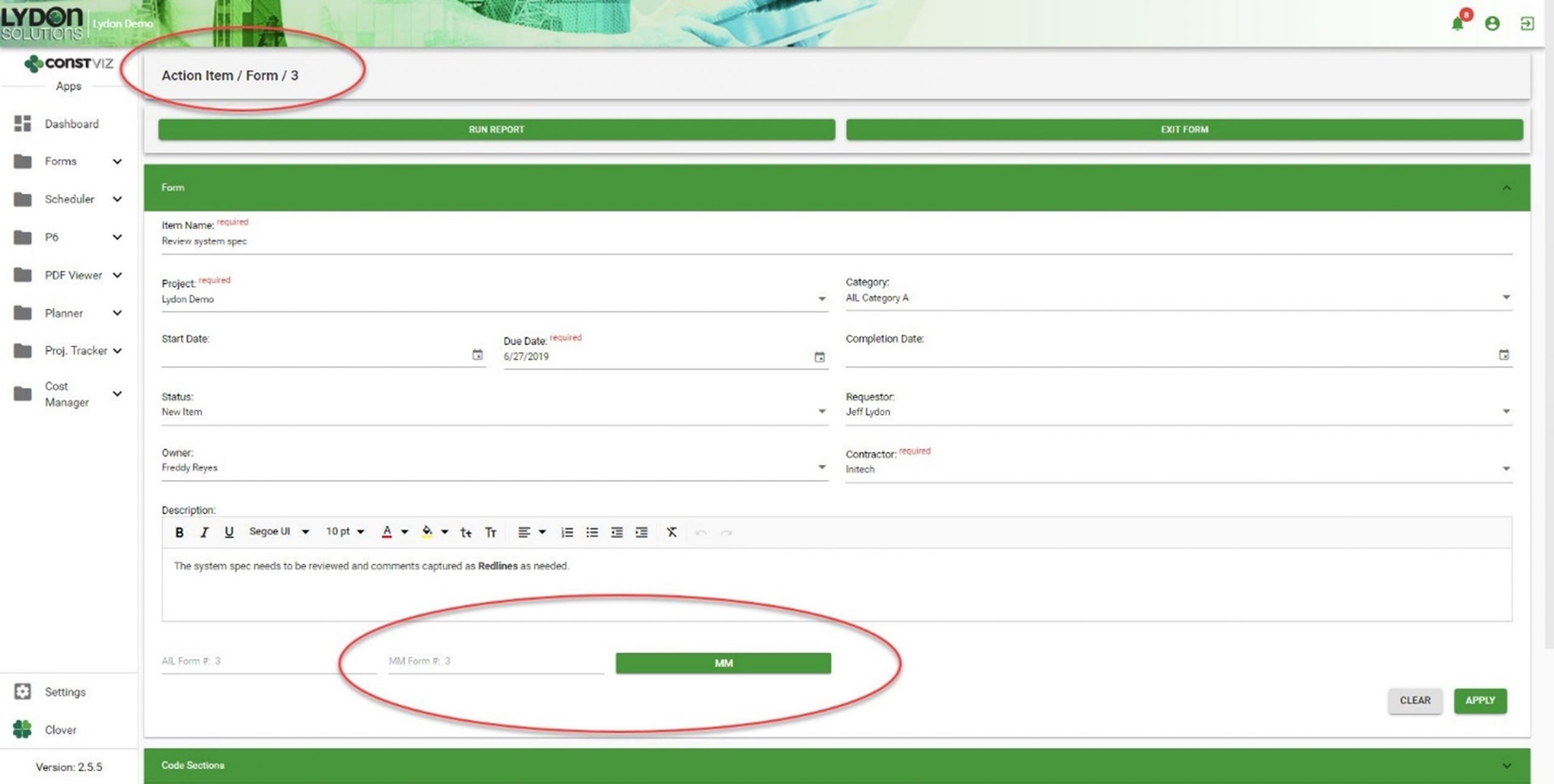
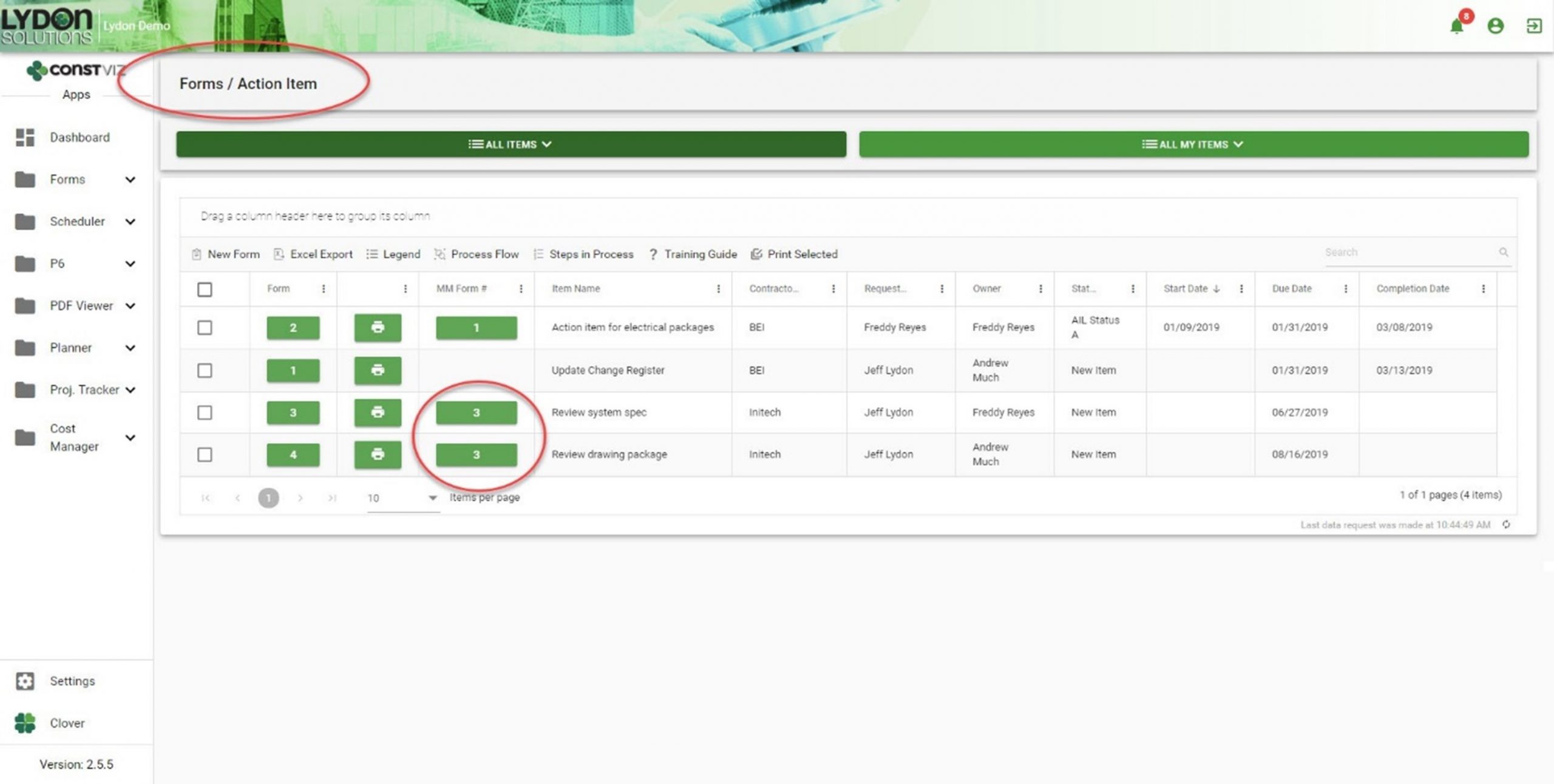
  • Both apps automatically generate cross-links, relating action items and meeting minutes records to each other. Now you can easily cross-reference action items and meetings, giving you a complete log as a single source of truth.
Solving-Action-Items-Dilemma_3
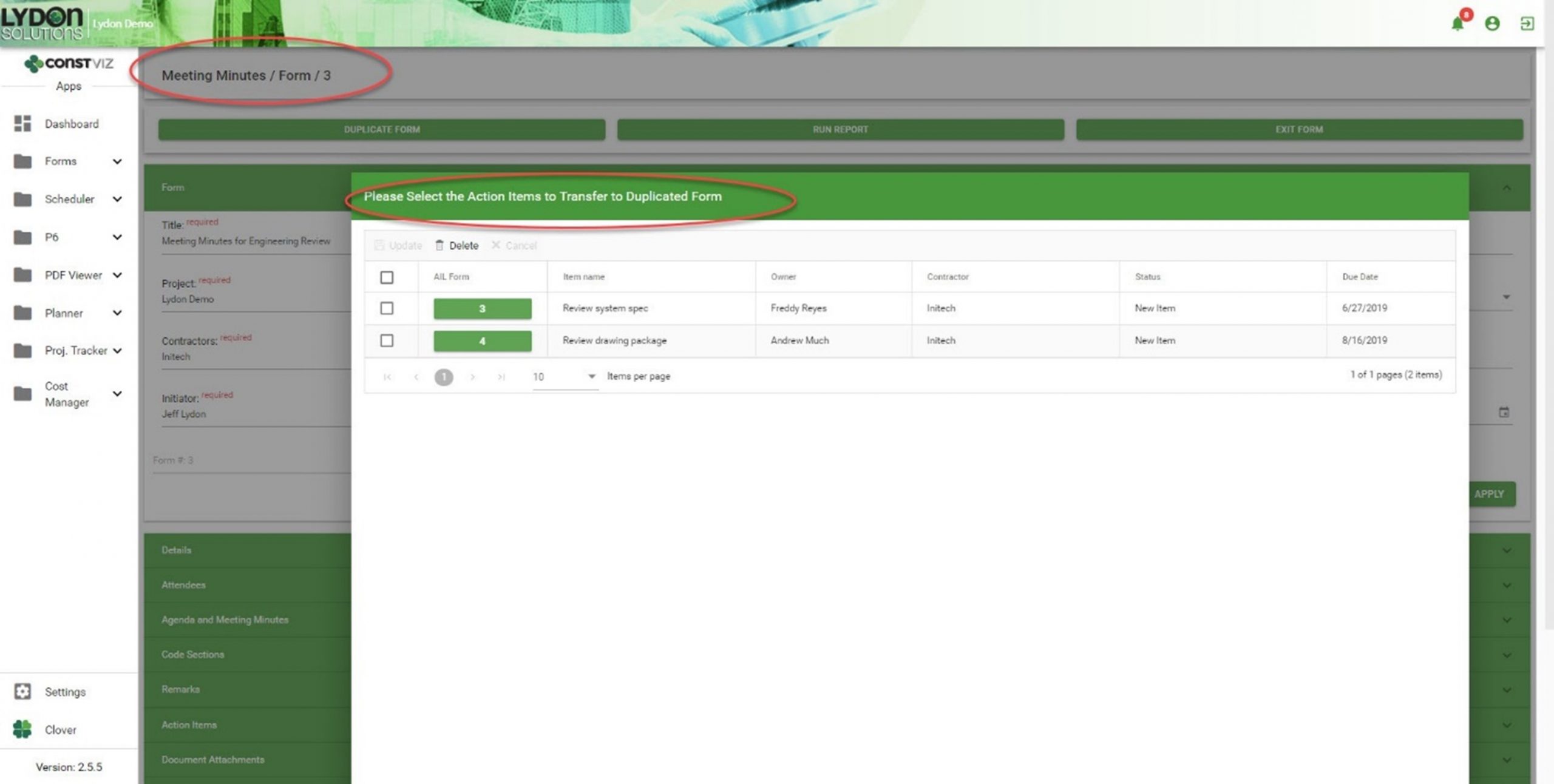
  • If you duplicate a meeting minute form, you can selectively carry forward action items, creating a history of assigned and open action items, as well as a record of the meeting in which you first entered them.
Solving-Action-Items-Dilemma_4

Get a free demo and consultation

Streamlining meeting minutes and action items is just another example of how our team applied our real-world construction project management experience to help organizations save time and cost. Find out how Construction Viz can help your team better manage your projects. Check out our full lineup of Construction Viz apps and schedule your free demo and consultation today.

If you can measure it, you can manage it with Construction Viz Task Manager

Project Management Tools | February 10, 2021

Being a construction project manager is a demanding job where all responsibility for a project's success falls on your shoulders. You spend most of your time herding cats, trying to hold your team members accountable while working in a matrixed organization. It's not enough to email a team member when a deliverable is due. You need constant reminders when follow-ups are required and a simple but effective means to monitor and report progress.

We designed the Construction Viz Task Manager App for project managers like you. Construction Viz Task Manager has everything you need to plan, track, and report on your team's project and program tasks within one powerful app.

Construction Viz Task Manager Key Features

The Construction Viz Task Manager app installs easily into the Construction Viz Hub and integrates with our full lineup of construction project management apps. Task Manager provides a 360-degree approach to managing tasks, including the following features:

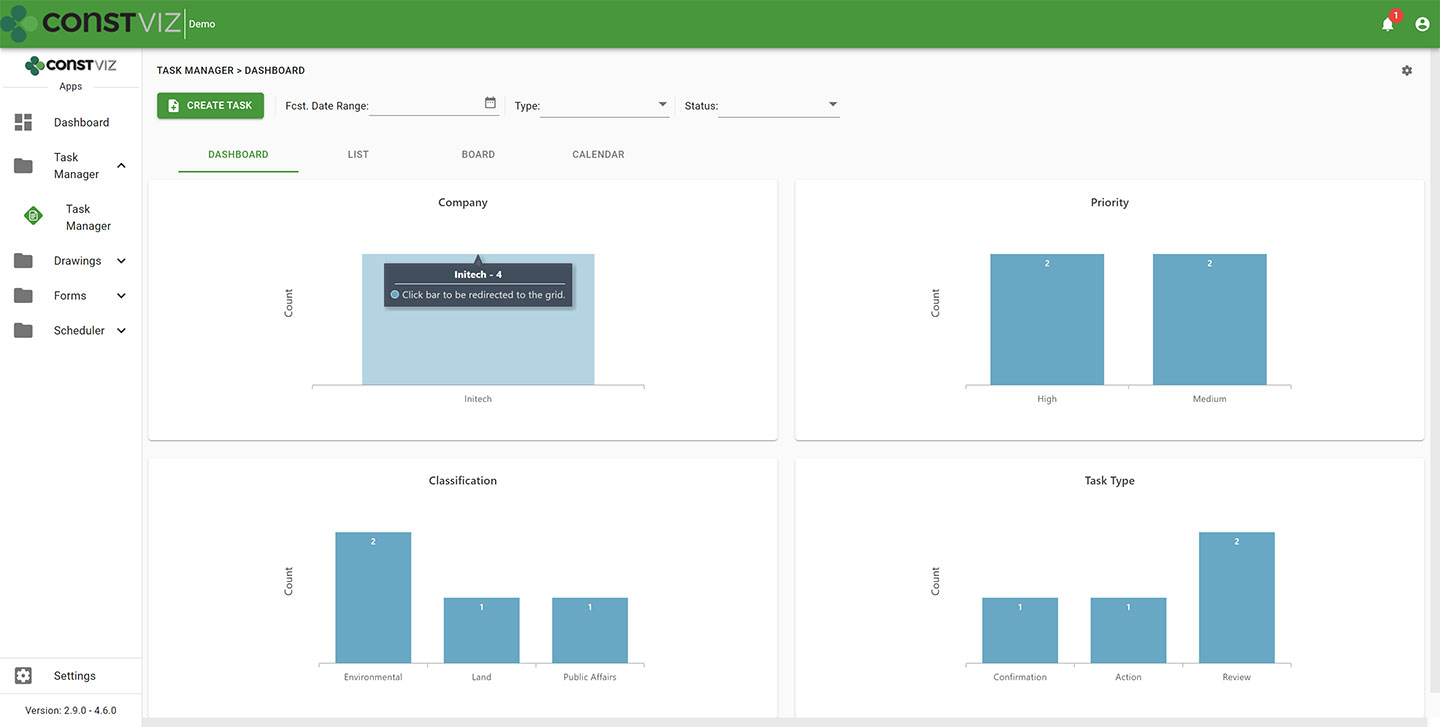
  • Dashboard summary. As a PM, your time is limited. Task Manager lets you quickly see the status of your project team's tasks in configurable dashboards with drill-down capability.
cv-tm_1
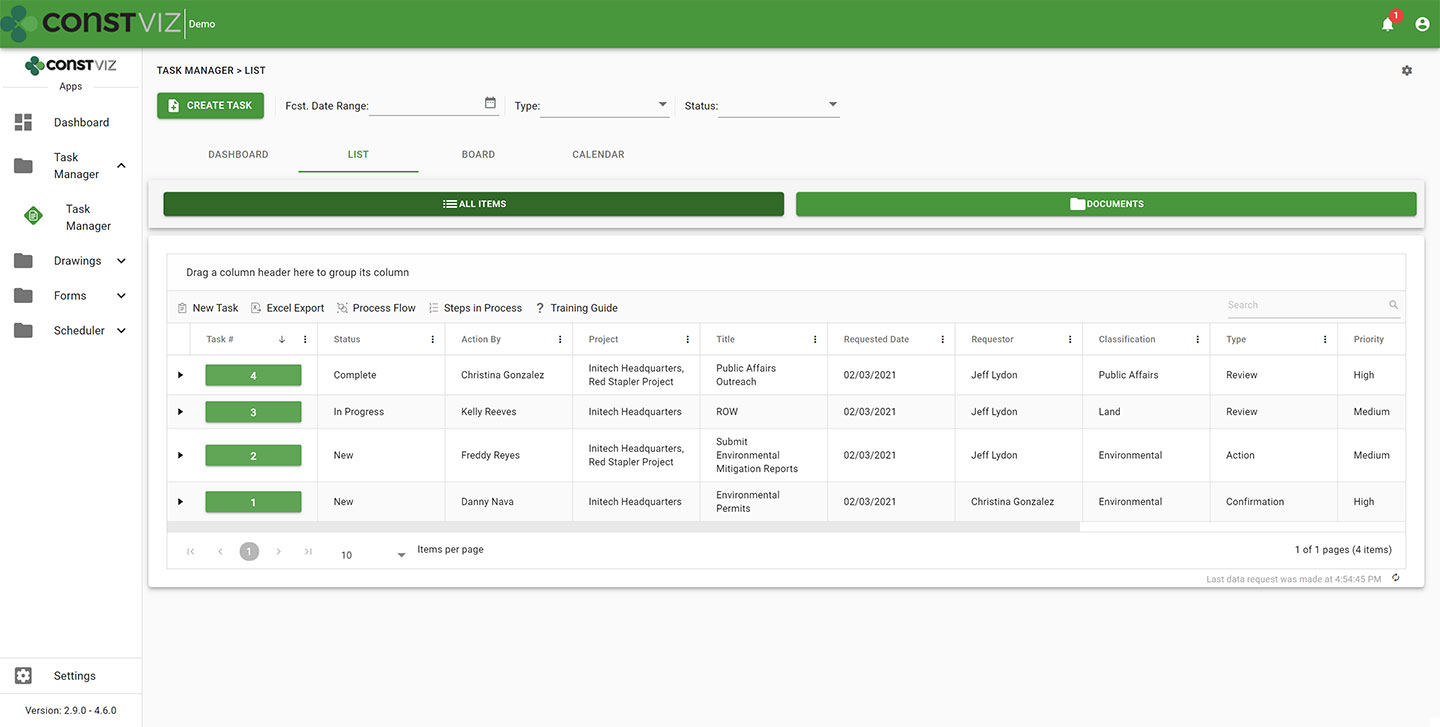
  • List view. Task Manager lets you see all your tasks consolidated into a centralized list view. You can use this pre-defined view to quickly group, filter, search, and report on your team's tasks.
cv-tm_2
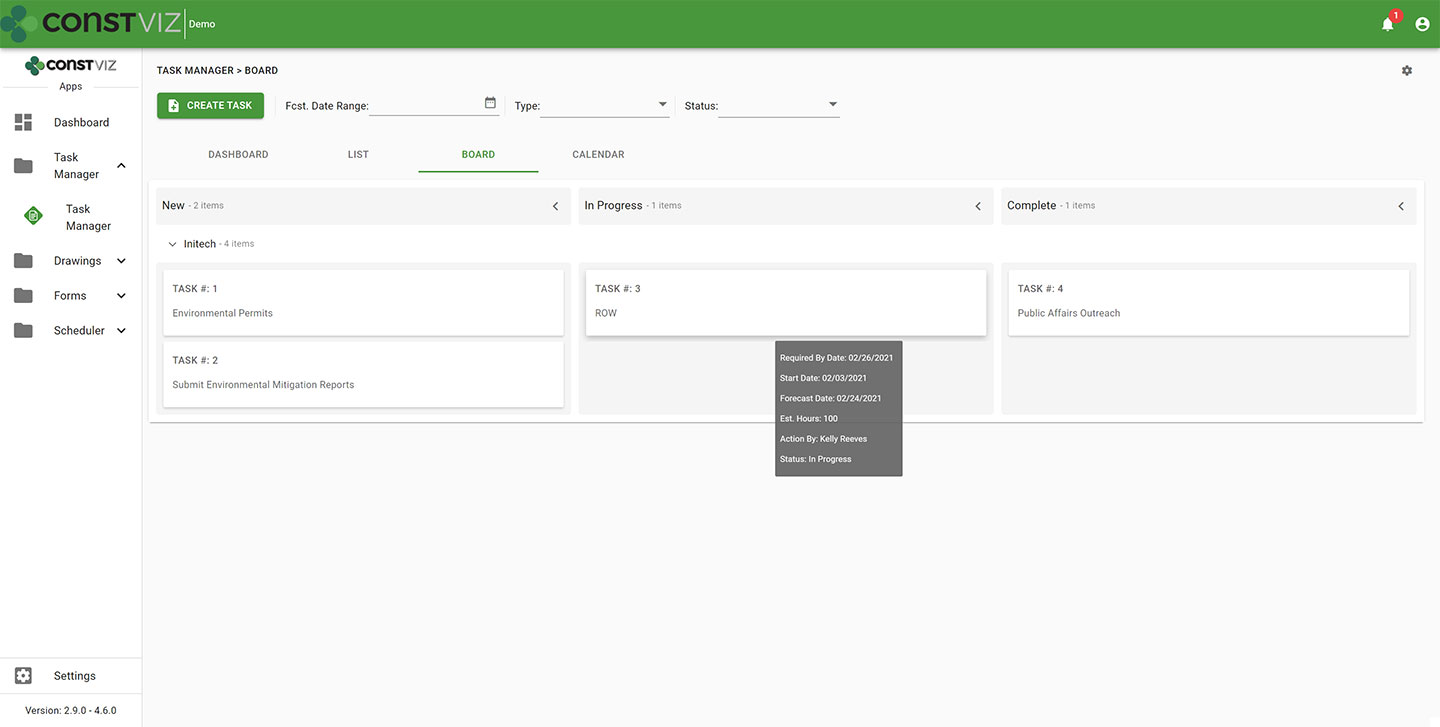
  • Board view. Want an easy way to see the progress of a task? Task Manager's board view uses a Kanban approach to managing tasks with configurable buckets and swim lanes so you can see progress made by each team member. The app highlights any behind schedule tasks in red, allowing you to target those items for immediate follow up.
cv-tm_3
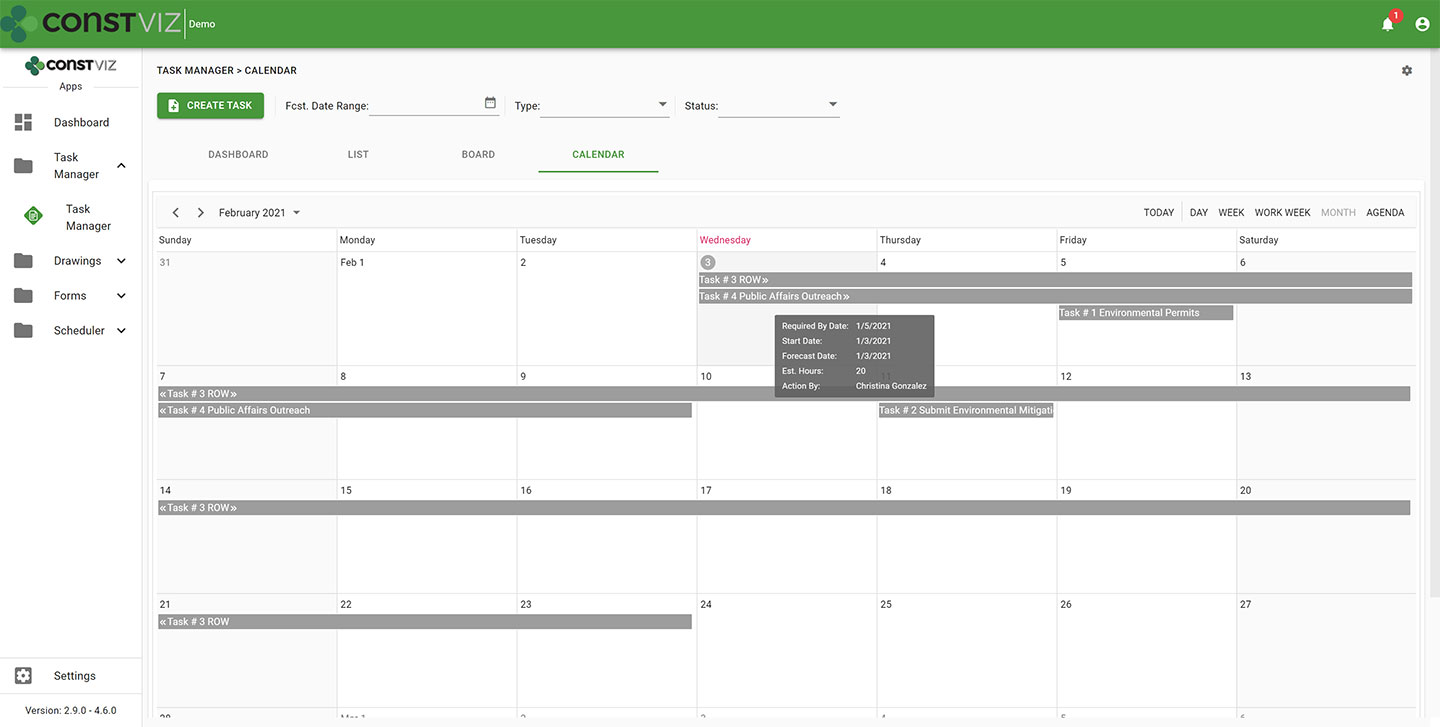
  • Calendar view. Seeing when tasks are due in a familiar calendar layout is invaluable. Task Manager's calendar allows you to proactively manage when tasks are forecast to be complete using daily, weekly, or monthly views. Since Construction Viz uses SharePoint as the backend, you can even link your Task Manager calendar to your Outlook calendar.
cv-tm_4
  • When you assign a task to someone in Task Manager, the app automatically sends the assignee an email with a link for them to take action. Task Manager integrates with Microsoft Power Automate, letting you tailor the timing and frequency of email notifications for your business processes so that frequent reminders do not go unnoticed. Like all of our apps, tasks from Task Manager also display in the Construction Viz notification center, ensuring you and your team always know about items requiring your attention.
  • Task Manager integrates with other Construction Viz forms and apps. Task Manager integrates across the suite of Construction Viz apps, streamlining your workflows. For example, if you are in a Construction Viz RFI form, you could create a task and assign it to a team member, thereby associating the two records. Now, anyone viewing the task can see the linked RFI record and vice versa. With Task Manager, you no longer have to bounce between one system to know when a task is due and another to view the work item. Everything is readily accessible and interlinked directly in all the relevant Construction Viz apps.
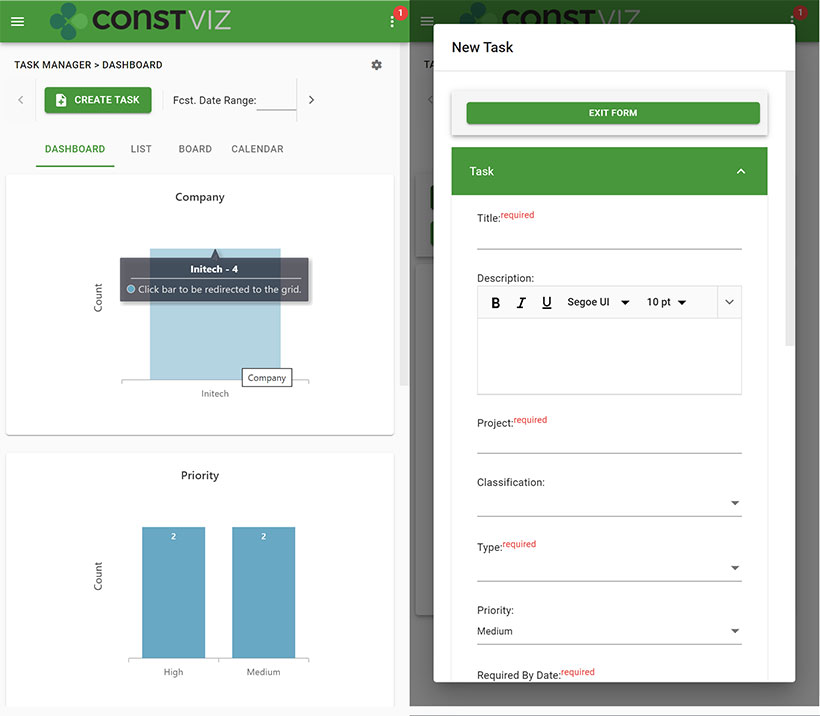
  • Use any device with full mobile responsive and offline support. Task Manager, like all our apps, is fully responsive on any device. You can also work offline without an internet connection.  So whether you are at the office or in the field, you can always manage your tasks.
cv-tm_5
  • Adaptive Cards integration. Task Manager takes advantage of Microsoft's Adaptive Card technology, allowing team members to work in Outlook without ever logging into any system.  Task-driven cards make it easy for team members to respond to tasks wherever they are and on any device using Microsoft Outlook. You can read more about Construction Viz and Microsoft Adaptive Cards in this blog post.

See what Construction Viz Task Manager can do for you

Construction Viz is the most flexible construction project management solution available for Microsoft 365 and SharePoint. Find out how Construction Viz and the Task Manager app can help you better manage your construction projects and programs with a free consultation and demo.

Simplifying PMIS Processes and Training with Construction Viz

Project Management Tools | February 3, 2021

You want your project teams set up for success from day one. Construction Viz makes it easy to access, update, and manage your processes and training materials so your team can focus on the project deliverables that matter.

When organizations roll out a brand new Project Management Information System (PMIS), the last step in the implementation often goes something like this: Here’s the system, attend a generic training session, start using the system, and oh by the way, here is a binder of training material that you can read up on how to use the system. These processes and training resources are often out of date and rarely tailored around how YOU do business. If your team members need training while in the system, they will have to seek out the latest training material, forcing them to lose focus on what they were doing and slow productivity. Is it any wonder no one wants to use that brand new PMIS system?

With Construction Viz, we simplify how project teams access, update, and manage processes and training, ensuring that projects are efficiently moving forward.

Construction Viz Puts Your Processes and Training Materials Front and Center

Setup. Construction Viz treats training and process documentation as an integral part of the system, not an afterthought. When you install Construction Viz in SharePoint, the software automatically creates a library for storing processes and training materials linked to each of your installed apps. You can then add custom process and training material for any app by inserting the appropriate metadata into your documents, ensuring that these materials are at your fingertips when you need them and easy to update and maintain.

Format.  Construction Viz lets you open Microsoft Office applications (Excel, Word, Visio, One Note) in any modern browser without having to download documents to the desktop. So, regardless of which device you are on, you can open and edit your training and process documents. You can even have multiple people simultaneously edit the documents with robust permission and version controls, ensuring that you are always working off the latest materials. Construction Viz also supports all major document and media formats, including video.

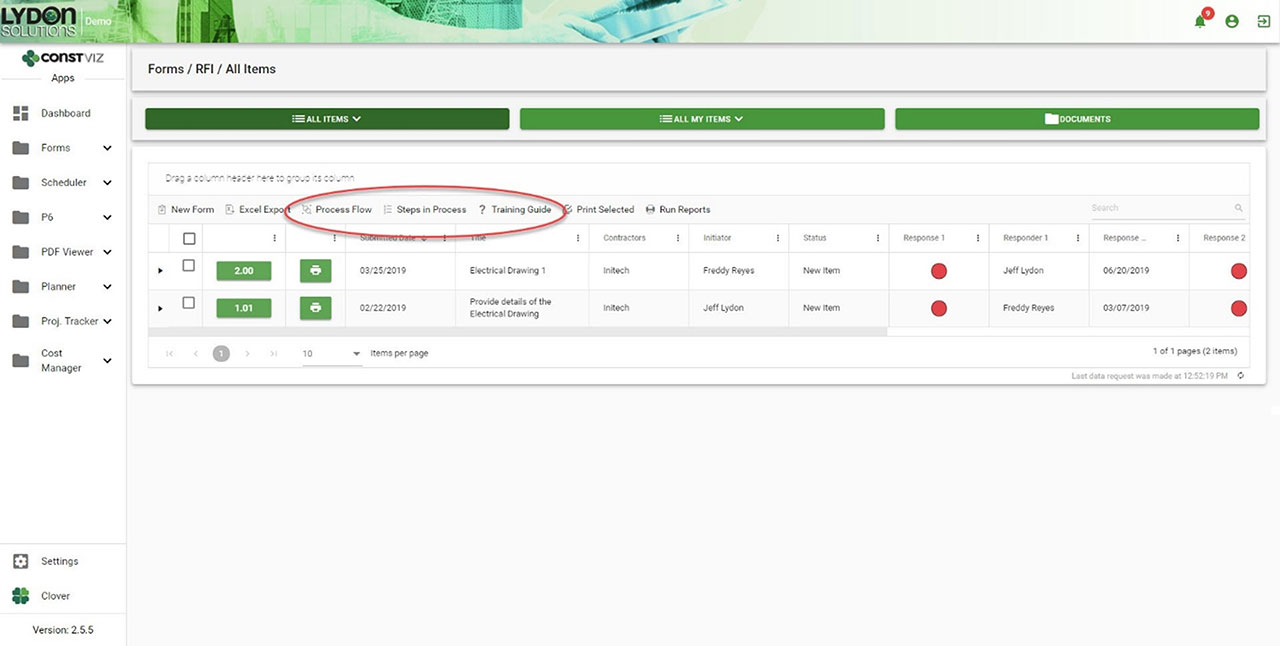
Navigation. Each Construction Viz apps includes links to the process and training resources right above the work area, giving you direct access to the information you need where you are working. Everything is right there in front of the user.

Getting Documentation And Process Right

One of the common reasons PMIS deployments can fail after deployment is low user adoption, often resulting from a lack of adequate training and documentation. With Construction Viz, we integrated training and process document tools right into the system so that your project teams can hit the ground running with everything they need from day one.

Navigation to Processes and Training within each App
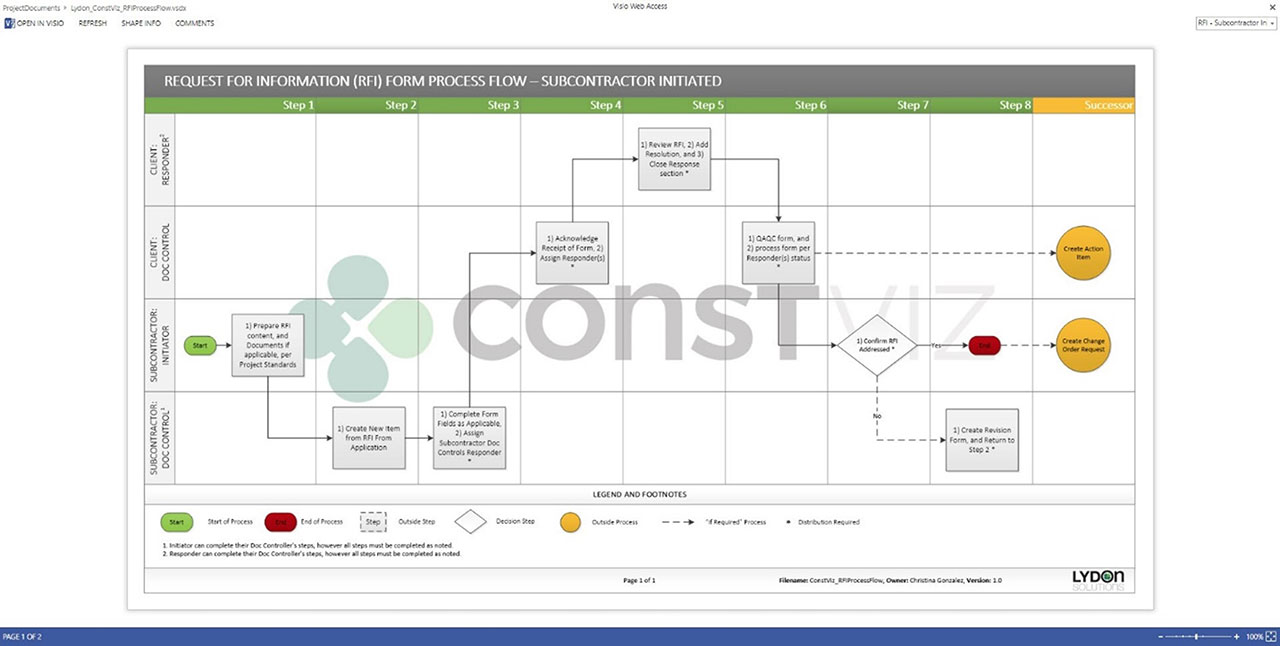
Process workflow diagram in Visio Online
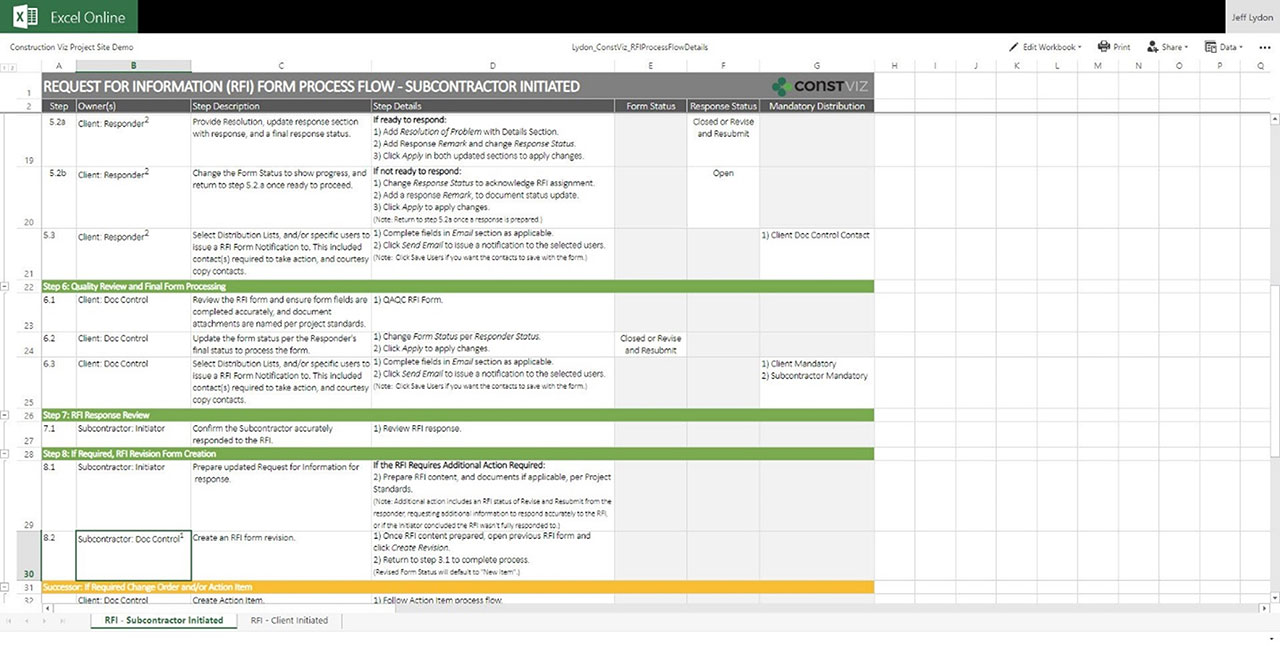
Steps for workflow in Excel Online
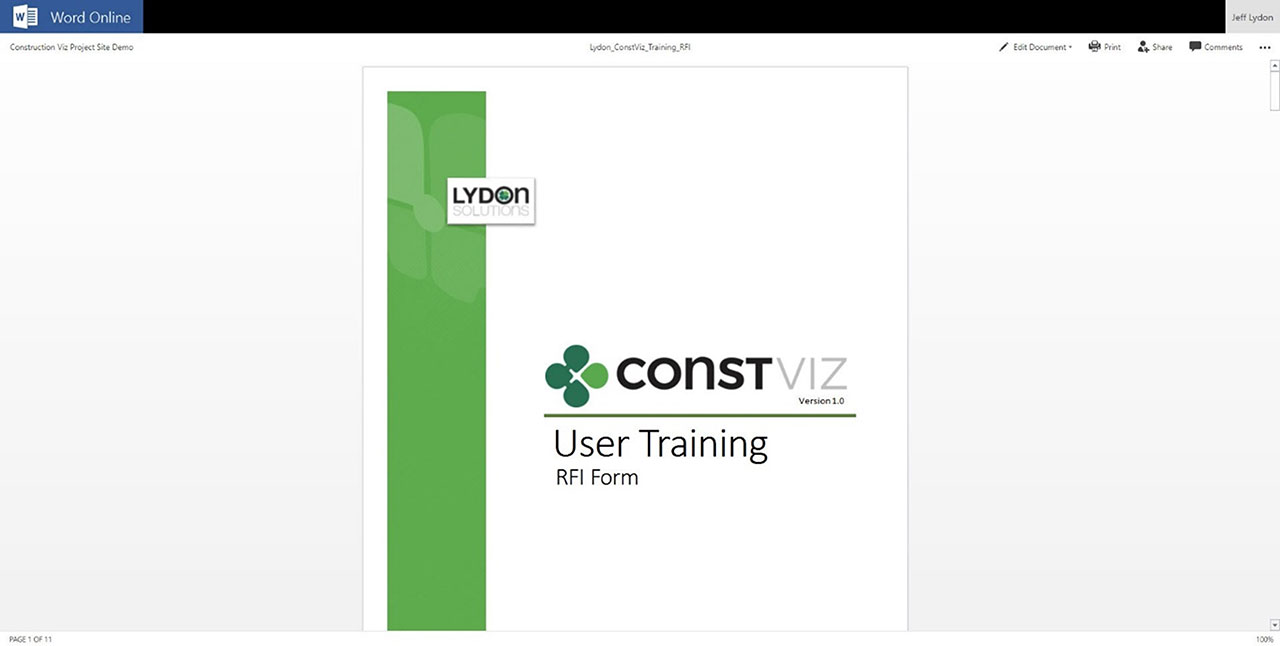
Training Manual in Word Online

Get a Free Demo and Consultation

Several major owners, construction managers, and utilities use Construction Viz every day to manage multi-billion-dollar projects and programs. Contact us now for a free demo and consultation to learn how Construction Viz can help your organization better manage your projects.

Managing Renewables Construction Projects with Construction Viz

Case Study | January 21, 2021

Here is a case study detailing how Lydon Solutions collaborated with a top-five contractor in the utility-scale PV solar EPC space to implement a construction progress tracking solution using Construction Viz.

In early 2020, an industry leaving EPC/O&M contractor tasked Lydon Solutions with delivering a customized construction progress tracking solution to manage utility-scale PV solar construction projects. By leveraging our Construction Viz platform, we rapidly deployed a solution specifically tailored to this client's needs. The client selected Lydon Solutions for this project because our Construction Viz platform delivers ready-to-go solutions integrated with Microsoft 365 and SharePoint while also being fully customizable.

Project Requirements and Challenges

Like any software development project, this effort came with its challenges. Lydon Solutions needed to:

  • Develop a solution within a tight budget.
  • Successfully implement within an aggressive timeframe.
  • Integrate the solution with existing legacy systems.
  • Provide complex dashboards and paginated reporting.
  • Include project-level permissions management.
  • Deliver field daily progress tracking per project.
  • Provide a templatized project setup.
  • Leverage the Construction Viz platform for future functionality.

Before Lydon Solutions' involvement, the contractor used a combination of spreadsheets, databases, and graphing/plotting tools to deliver daily construction progress and performance metrics. This cobbled-together approach worked, but the time-consuming manual process was not sustainable long term as the contractor's business matured. Their goal with the new solution was to simplify the data collection process, reduce the tools and maintenance, eliminate as many manual steps as possible, and ultimately reduce overall reporting costs.

The Lydon Solutions team collaborated closely with the client to gather requirements and develop a design that could reduce the touchpoints and external systems while utilizing Construction Viz's apps and reporting capability to their fullest. The final design allowed the client to set up projects with varying levels of complexity and depth. It also provided them with various construction metrics for detailed tracking, weighted progress percent completion, and complex real-time daily reporting for multiple stakeholders.

“We were impressed with the Lydon Solutions’ ability to learn our business quickly and how they applied that knowledge to their approach in developing our solution.” -Client Feedback

Building the solution followed Lydon Solutions' standard Agile F.O.C.U.S methodology to keep the development and release cycles nimble. We successfully delivered the solution within five months using an 'innovate and build' approach. Our team held weekly design review meetings with the client to ensure that development remained on schedule and provided the ability to pivot when new information became available, processes changed, or opportunities emerged to leverage the latest technology.

Focus

Customizing Construction Viz for Renewable Project Management

A critical deliverable that the client needed was a way to track planned versus actual quantities completed, which required us to create custom applications in Construction Viz. The customizations integrated Construction Viz with the client's master task scheduling systems in Smartsheet to import, analyze, and apply various schedules to each project using a custom automated cloud-based process built by our team. Next, the app automatically factored daily expectations for every tracked metric and overall start and finish dates into the schedule to calculate the progress. To ensure consistent metrics tracking, we provided pre-defined project types for the client to use during project creation.

Project Setup – Unique project templates for automating new project creation.

Project Setup – Unique project templates for automating new project creation.

Project Setup – Unique project templates for automating new project creation.

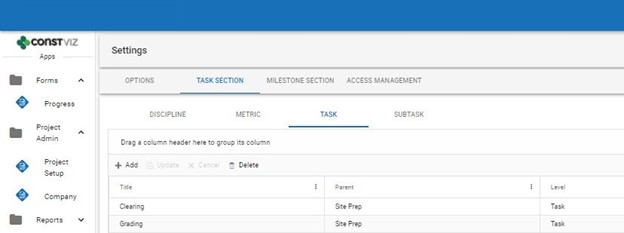
Defining Task and Subtask details – Level of detail build-out to a subtask level of tracking.

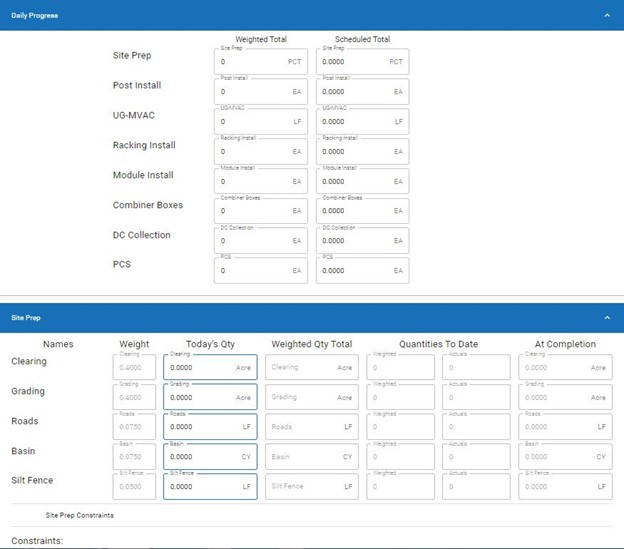
For daily progress tracking, Lydon Solutions developed a new Construction Viz Daily Progress form app. The app captures daily progress, weather, and construction constraints against each task detail level while simultaneously providing expected productivity totals, current cumulative values, and links to preview reports.

Project Setup 3

Daily progress tracking details – capture quantities completed every date for each metric.

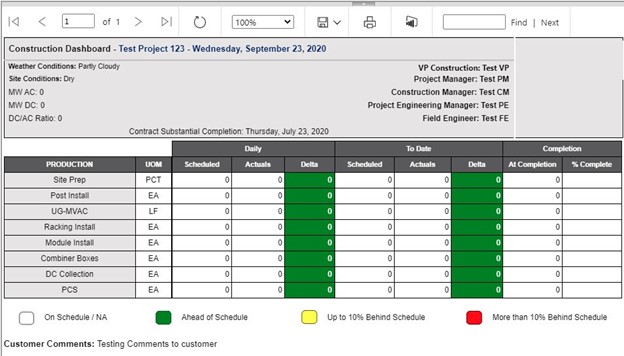
Finally, to deliver real-time dashboards and paginated reports for the project team, subcontractor, customer, and executive stakeholders, Lydon Solutions integrated data from Azure SQL, Smartsheet, and Construction Viz (SharePoint). We also implemented separate permission-controlled reports and distribution lists. The app automatically generates paginated reports at specified times, and the project team can pull these reports at any time using the tool.

Project Setup 4

Robust progress reporting – Push-button reporting for project status across stakeholders

“Lydon Solutions built exactly what we asked for while putting in place the infrastructure for future growth (offline daily forms, drone integration, etc.).” -Client Feedback

This project's success came down to Construction Viz's power as a platform that delivers a turnkey product while also providing unequaled flexibility to accommodate customization to meet a client's requirements. Construction Viz users do not have to mold themselves to the way the system works. The platform allows for custom development to start on the forty-yard line, minimizing risk, cost, and effort and ensuring success.

While this project was technically challenging, working with this major EPC/O&M contractor was a fantastic and incredibly rewarding experience. The solution continues to be implemented across the company to manage its renewable projects portfolio and has saved significant time and cost while providing better project transparency to all stakeholders.

Get a Flexible Custom Construction Project Managed Solution for Your Organization

Can't get an off the shelf construction management solution that fits your requirements? Manage your projects in Microsoft 365 and SharePoint your way with Construction Viz. Contact the Lydon Solutions team today for a free consultation and demo.

Manage your projects in Outlook! No, really!

Project Management Tools | December 14, 2020

Embracing new technology is often a challenge in construction. While technology can help organizations be more efficient, it is challenging to keep up with the constant changes and new systems required to do the job. To add to this dilemma, every contractor, construction manager, and owner have their own Project Management Information System (PMIS) that team members must learn to conduct business. As a result, actual construction productivity takes a hit due to additional training, double-entry, errors, and general user dissatisfaction. It's no wonder most construction organizations are hesitant to leave old faithful: Microsoft Outlook and Office.

So the challenge is, how do we make it as easy as possible for the construction team to do their job and remove the technology burden of learning and working with multiple PMISs? What if you could work in Outlook or Office entirely without ever having to log into another system?

Welcome to Adaptive Cards

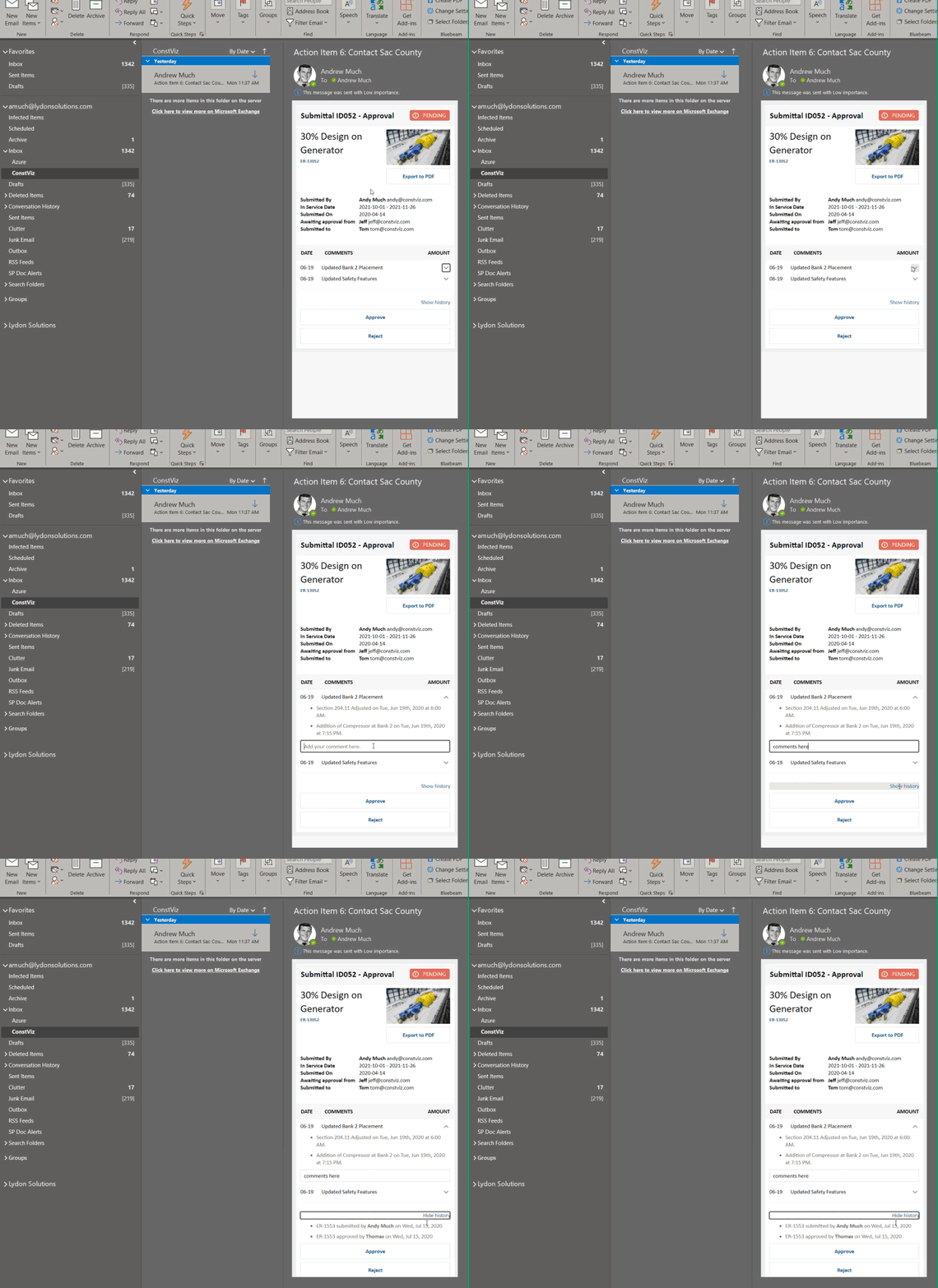
With the flexibility of the Microsoft Power Platform and Adaptive Cards, we have removed the users' burden of learning another PMIS by allowing them to work directly in Microsoft Teams or Outlook. By leveraging Power Automate and Adaptive Cards technology, users can now receive actionable task-focused cards. To respond, users open a card to view the content, review a task, or respond with comments. Work entirely from email or Teams—no need to even log into a PMIS.

The Key Benefits of Adaptive Cards

You may be thinking that your PMIS already sends out emails when there are tasks due. How is this different? Adaptive Cards are the future of actionable messages and notifications. They are essentially small interactive applications.

The are many benefits to Adaptive Cards:

• Cards are responsive to any device.
• The card user interface can be simplified and tailored to perform specific tasks. Using the KISS (keep it simple) approach, we can make it easy for users to review content and respond.
• The cards can include logic to prompt questions and responses without logging into the actual PMIS and never leaving the email.
• Cards can read and write data with various systems such as Microsoft 365 or SharePoint, SAP, Oracle, etc.
• Cards can leverage Windows 10 notifications.
• Cards integrate with Microsoft Teams Chat, Timeline, and Outlook.
• Cards can leverage assistants such as Cortana or a web chatbot.
• Dashboards can be delivered using feeds from multiple Adaptive Cards.
• The cards can include security extended from native applications.

Lydon Solutions can build Adaptive Cards for any PMIS using our pre-defined templates. We even integrated Adaptive Cards into the notification system of Construction Viz, our PMIS for Microsoft 365 and SharePoint. By meeting the user where they work in Microsoft Office and Outlook email, Adaptive Cards keep users in their natural activity flow without interruption, making for more efficient and happier project teams. A win-win.

Adaptive Card for a Construction Viz Submittal Form email notification

Deploy Adaptive Cards for Your Construction Projects

Find out how we can leverage our existing Adaptive Card templates to simplify your workflows and provide team members access to project data in the applications they use every day. Contact us for a free consultation and see how we can help your organization with its digital transformation to Microsoft 365.

If you need a turnkey PMIS for managing your projects in Microsoft 365, learn more about using Construction Viz for project management.

  • « Go to Previous Page
  • Page 1
  • Interim pages omitted …
  • Page 4
  • Page 5
  • Page 6
  • Page 7
  • Page 8
  • Interim pages omitted …
  • Page 11
  • Go to Next Page »

Footer

About Constructon Viz

Construction Viz is a flexible construction project management software solution powered by Microsoft SharePoint and SQL.
Read More >

Navigation

  • Home
  • About
  • Features
  • Apps
  • Blog
  • Contact
  • Login

Apps

  • Construction Viz Hub
  • Cost Report
  • Drawing Management
  • File Manager
  • GIS Maps
  • Oracle Primavera 6
  • Payment
  • Specification Management

–

  • Project Forms
  • Project Planner
  • Project Scheduler
  • Project Tracker
  • Task Manager

Connect with Us

  • This field is for validation purposes and should be left unchanged.
  • Sign up to receive helpful tips for construction project managers as well as updates about Construction Viz.

Lydon Solutions

© Lydon Solutions

  • Privacy
  • Cookies
  • Terms of Use
  • Disclaimer
  • End-user license

Click here to start a Microsoft Teams chat.

Click here to start a Microsoft Teams chat.

Contact Us
This field is for validation purposes and should be left unchanged.
Name(Required)
Join Our Newsletter

Sign up to receive helpful tips for project managers and updates about Construction Viz.

Get Started

Join Our Newsletter

Sign up to receive helpful tips for construction project managers as well as updates about Construction Viz.

  • This field is for validation purposes and should be left unchanged.
  • This site is protected by reCAPTCHA and the Google Privacy Policy and Terms of Service apply.