• Skip to primary navigation
  • Skip to main content
  • Skip to footer
Construction Viz

Construction Viz

Project Management Perfect

  • About
  • Features
  • Apps
  • Blog
  • Contact
  • Download Flyer
  • Get Started Today
  • Login
Show Search
Hide Search

da_admin

Construction Viz Takes the Risk Out of Risk Management

Risk Management | June 14, 2021

From initiation through to project closeout, construction projects are subject to an endless array of risks. The Construction Viz Risk app helps you identify, manage, and plan for the factors that can negatively or positively impact your project's cost and schedule. 

Many construction organizations turn to Microsoft Excel as their risk management solution, using built-in risk registers and distributing spreadsheets via email to project teams. There are many shortcomings to this approach, including having multiple versions of files floating around, undocumented review processes, the inability to attach backup information, and a lack of mitigation processes. We've been in your shoes on projects, which is why we designed our Construction Viz Risk app to be a better long-term risk management solution.

Key features of the Construction Viz Risk app

The Construction Viz Risk app addresses all the shortfalls found in homegrown Excel and enterprise risk management solutions:

  • Set individual risk probabilities and impacts by the project within a single site.  Construction Viz can include one or more projects per SharePoint site.  Since every project can have a different set of risk factors, the Construction Viz Risk app allows you to set unique cost and schedule impact values, each with its own legend, by the project.  This feature enables you to consolidate risk management into a single site across your portfolio of projects.
  • Mobile ready. Our form technology works on any device with a modern browser. You can capture a risk on your phone while in a meeting or out in the field.  You can even enter a risk without an internet connection.
  • Track changes. The app features revision control, allowing you to create and manage multiple versions of your risk forms and track any edits by users.
  • Upload supporting documentation. Easily attach supporting information, including links to other forms and data repositories.
  • Get approvals. Route risks for review and approval via automated Power Automate or ad hoc workflows with ball-in-court tracking
  • Send to distribution. Email risks to your project team based on predefined distributions while enforcing strict permission controls.
  • Perform analysis. Perform risk analysis using configurable data grids. Create custom views for managing risks by value, ownership, status, or mitigation.
  • Communicate risks. Generate robust reports of risks and opportunities for management review and disposition.
RiskMgmt_1

Take the risk out of managing your project risks with Construction Viz

With the Construction Viz Risk app, you will be able to finally spend more time managing and less time trying to collect and track risks.  Contact us today for a no-obligation demo and consultation.
Construction Viz Avoids the Folder Nightmare with Automated Document Controls

Document Control | June 8, 2021

Have you ever been part of a project that stores documents in an overly complicated file folder structure? You end up having to click through multiple levels of folders to get to a single item you need. Forget about moving that file to another location or even finding that document again in the future. Not very efficient.

The reality is, storing documents in a file folder structure can work well for a few scenarios, but there are some significant drawbacks across the enterprise, such as:

  • How do you best organize the folder structure – by project name, document type, or team?
  • What happens when a folder name changes? How does that affect related files, bookmarks, and overall searchability?
  • Do you use long folder names to be more descriptive? The resulting URL can become too lengthy, preventing you from sharing file links via email.
  • How do you effectively search the folders outside of using the filename?
  • Can anyone create a folder, and if so, how do you prevent duplication?

For the above reasons and many more, most project management organizations often employ document metadata instead of, or in addition to, folder structures. Metadata allows you to tag attributes about a document so you can search, filter, and group them based on that information.

However, effectively using metadata requires more upfront planning, additional user training, and, depending on your processes, adding manual tags based on where you save a file. All reasons why some organizations wind up falling back on file folders or do not consistently use metadata as their document controls team intends.

If you use Construction Viz, we have got you covered. That is because we added a built-in auto-tagging feature that takes the hassle out of metadata.

Construction Viz simplifies project metadata with auto-tagging

The Construction Viz auto-tagging feature automatically enriches your documents with contextual metadata. What about construction forms like RFIs, submittals, and daily reports that typically store images, drawings, documents, and other files? We built automated metadata tagging into the form apps to streamline metadata for the forms and file attachments.

So how does auto-tagging in Construction Viz work?

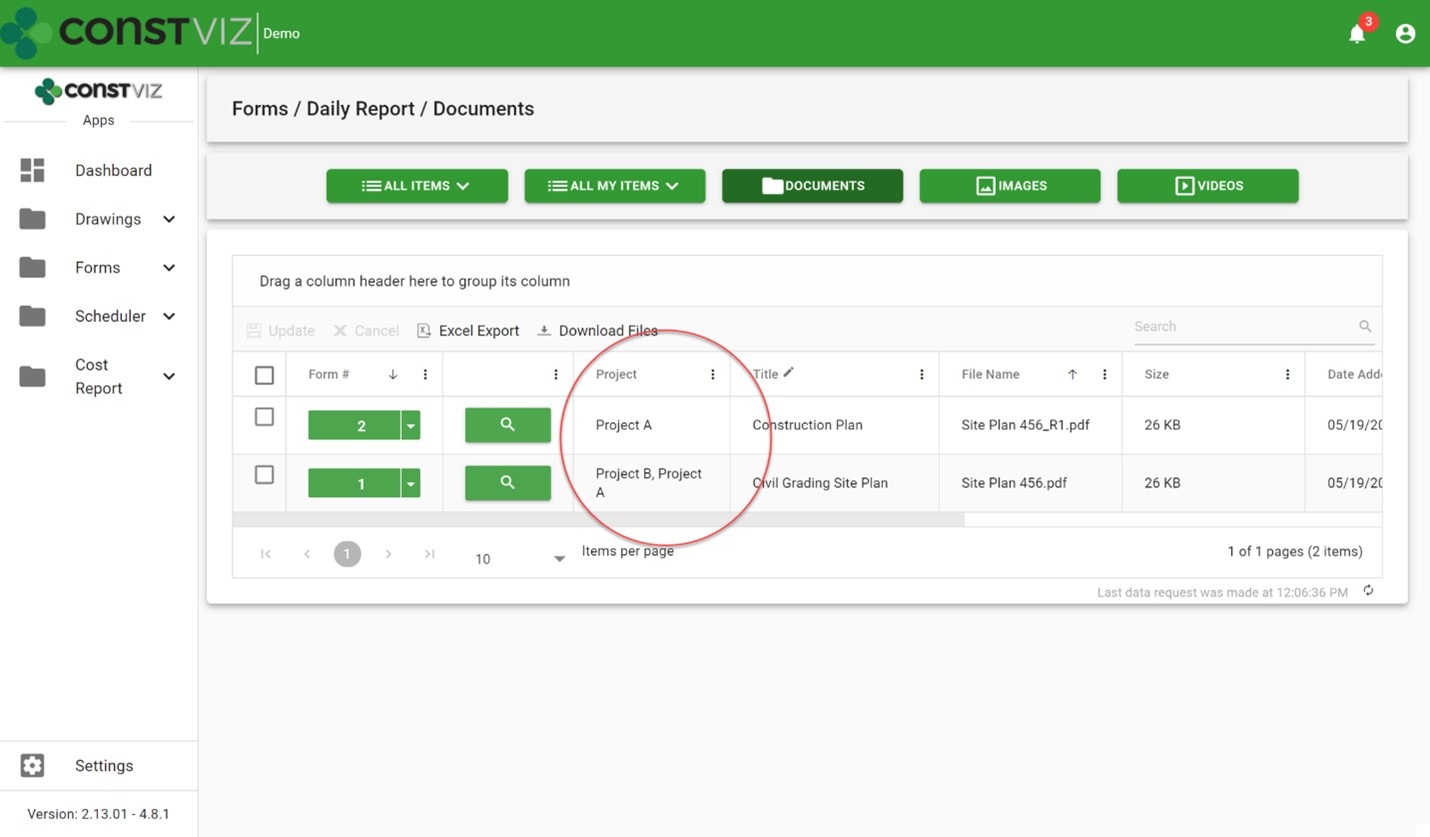
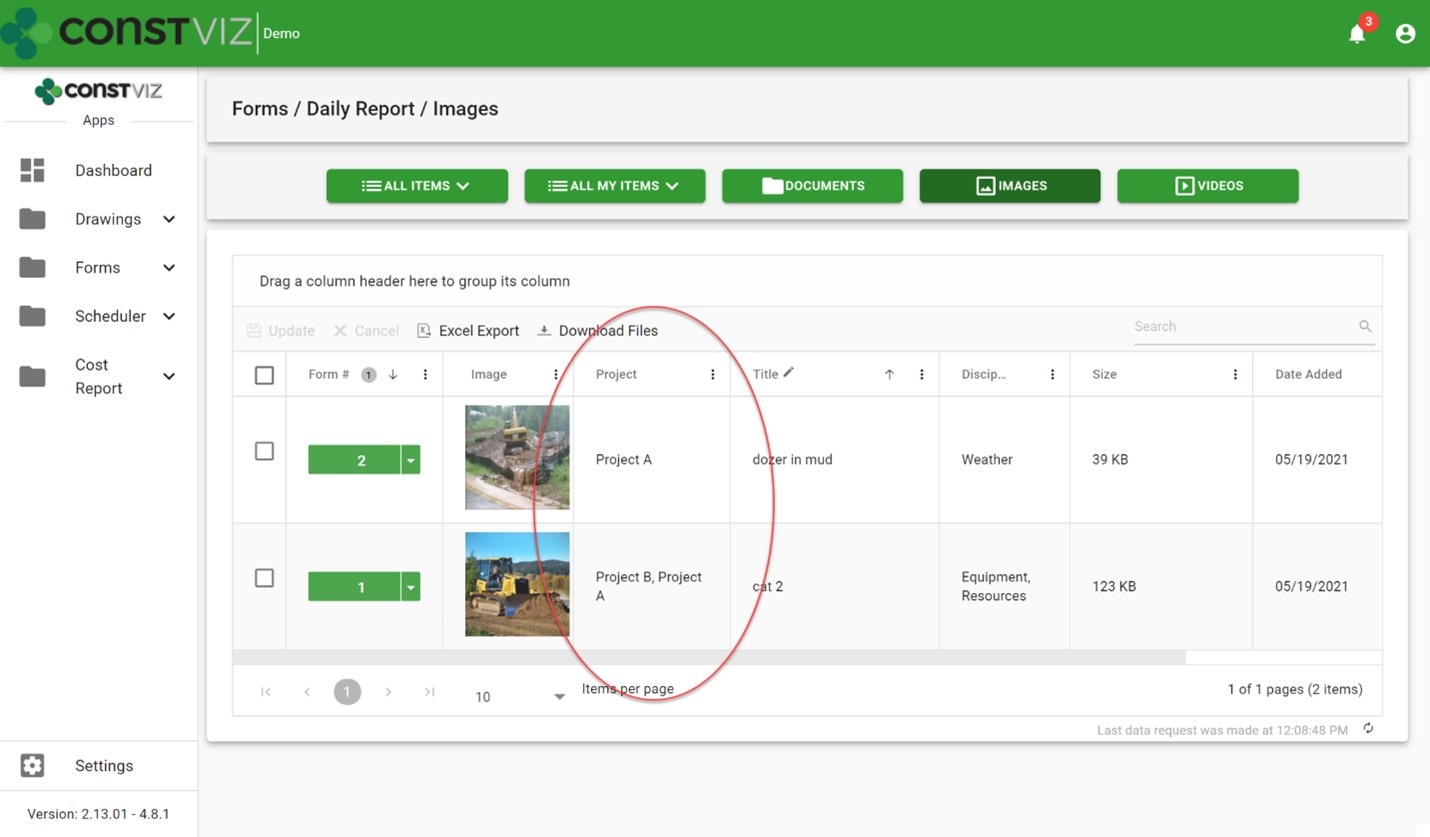
When attaching files (documents, images, and video) to a form, Construction Viz automatically saves the files to a SharePoint library and includes the form-specific metadata and any metadata added to the attachment. No additional metadata tagging by the user is required. Below are some example screenshots of this feature in action.

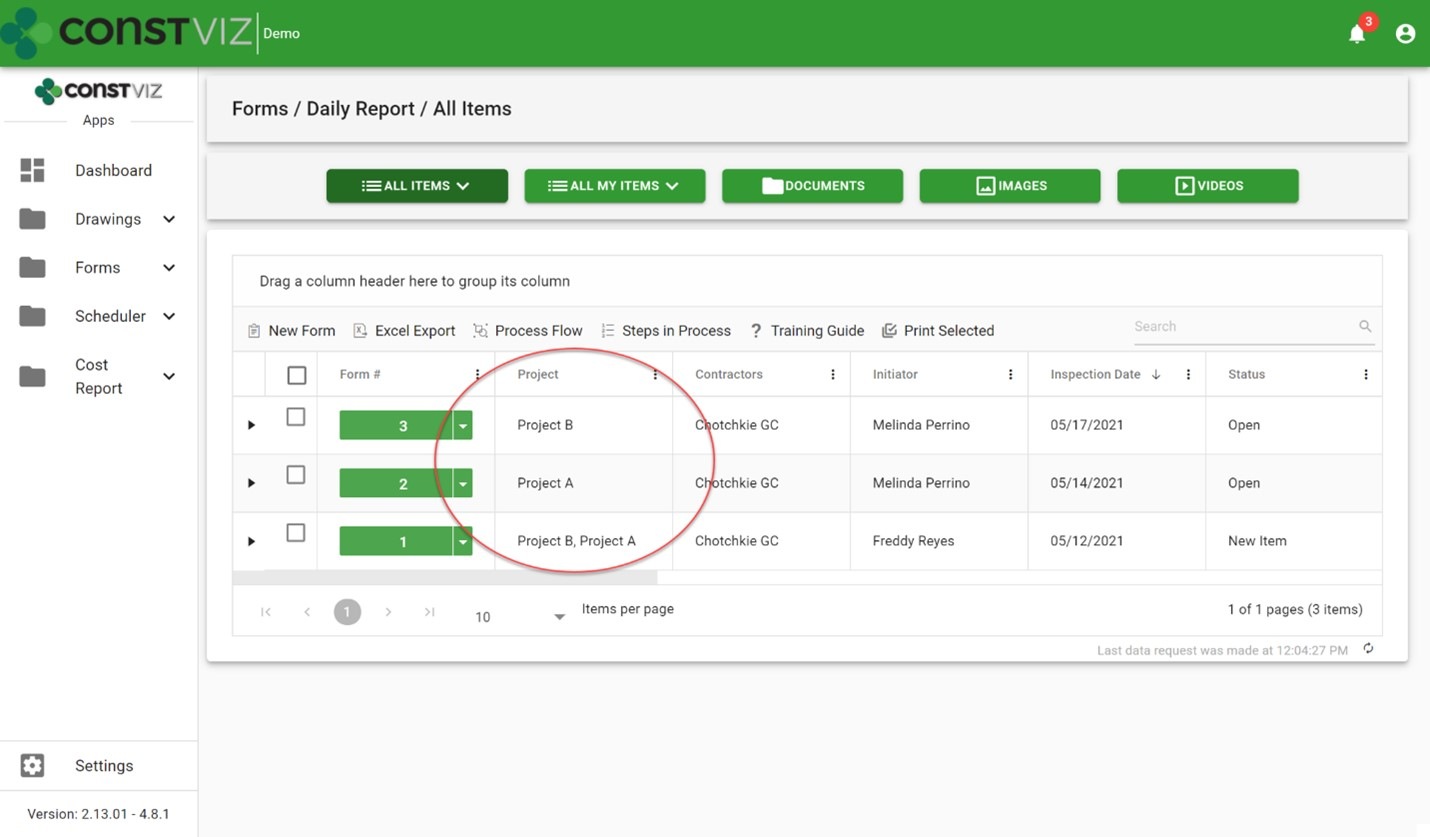
Daily report forms with project metadata tagged:

FolderNightmare_1

Daily report document attachments automatically tagged with project metadata:

FolderNightmare_2

Daily report image attachments auto-tagged with project metadata:

FolderNightmare_3

Benefits of the Construction Viz auto-tagging feature

The Construction Viz auto-tagging feature saves significant time for both the users and the document controls team. It ensures your organization's documents are stored with the proper metadata so you can find them in the future either by the associated form or by the attachment itself. For example, you can search for a specific image instead of finding the daily report that has the image as an attachment. Likewise, you can find a particular submittal package independent of the submittal form that has it as an attachment.

Also, since Construction Viz stores all the metadata with the lists and libraries in Microsoft 365 and SharePoint, you can create custom SharePoint views, Power BI reports or export the raw data to Excel.

Manage your projects with Construction Viz and Microsoft 365

Construction Viz lets you manage your projects right in Microsoft 365 with familiar tools such as Excel and SharePoint – all optimized for your construction project teams' needs. To see our catalog of our available construction apps for Microsoft 365 and SharePoint, check out the Construction Viz apps page. You can submit a free consultation and demo request to learn more.

And head over to LydonSolutions.com for more information if you are interested in a customized construction project management solution using Microsoft 365.

Construction Viz Form Archiving Wizard

Forms | May 5, 2021

Organizations managing major construction projects typically use multiple project and information management systems, including systems for document storage, task scheduling, contractor correspondence, and more. Since most of these systems reside on external hosting, it is challenging to efficiently archive project data.

If you use Microsoft 365 to manage your projects, Construction Viz has your project data archival covered with our Form Archiving Wizard.

Construction Viz differs from other project management information systems because you can deploy it into your Microsoft 365, so your project data always remains under your control. And because Construction Viz stores all your project data and documents in SharePoint lists and libraries, your information is readily accessible at any time. Construction Viz further simplifies your project closeout process by archiving your data in place without you having to take any further action. Should your organization have a separate archiving system of record, Construction Viz has you covered there too.

Introducing the Construction Viz Form Archiving Wizard

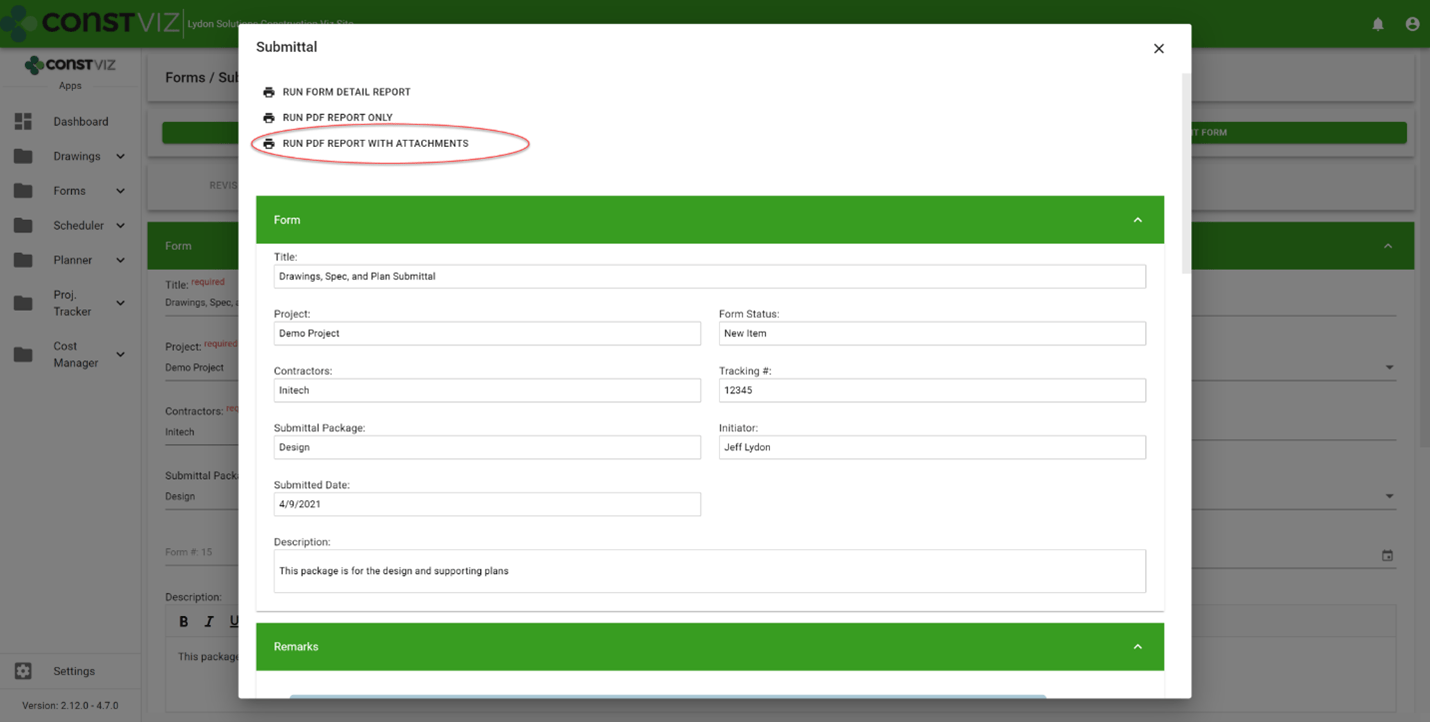
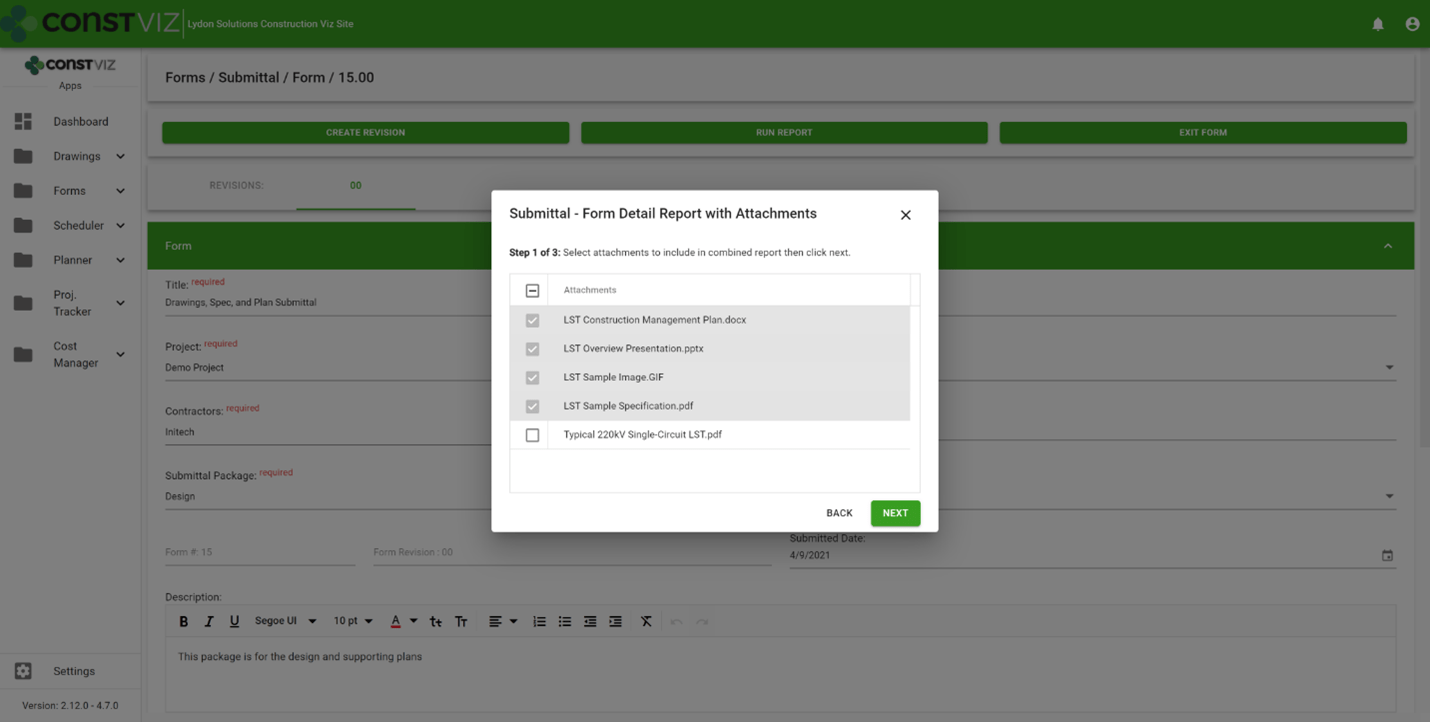
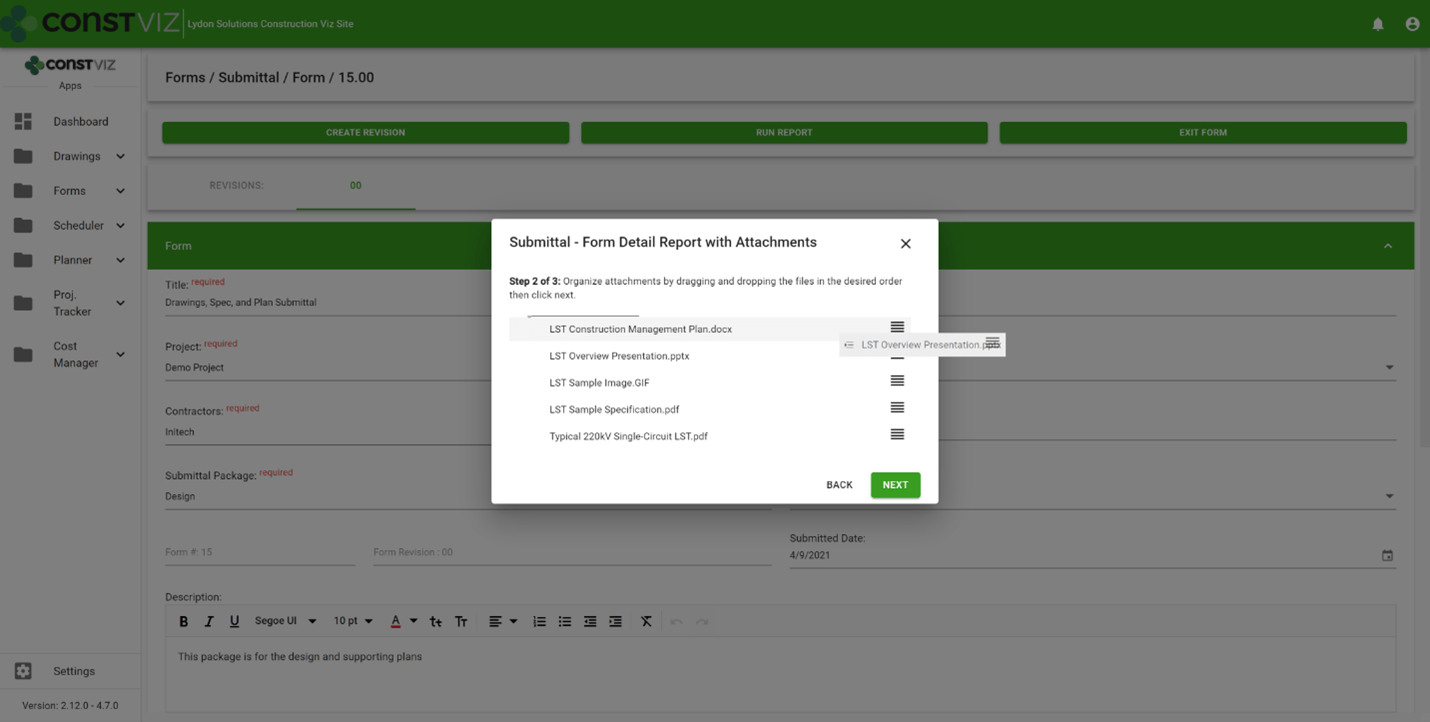
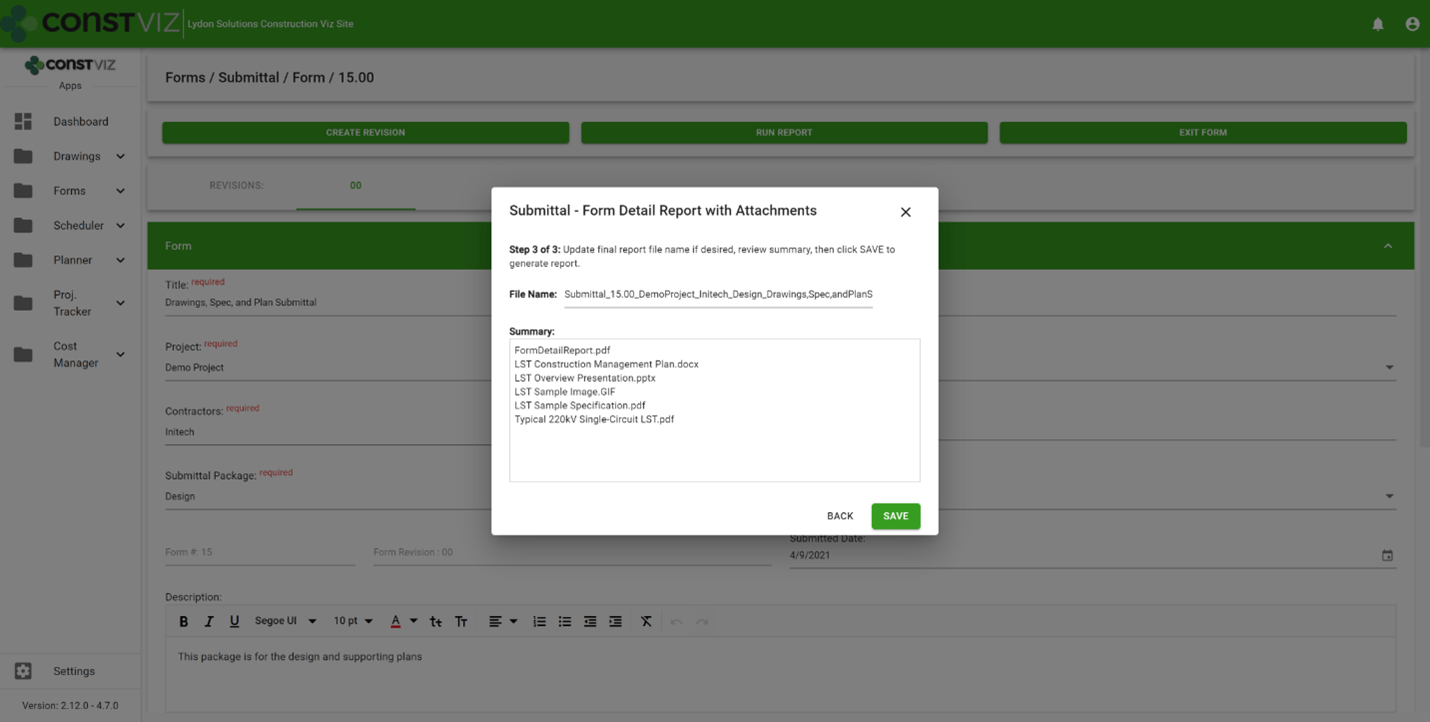
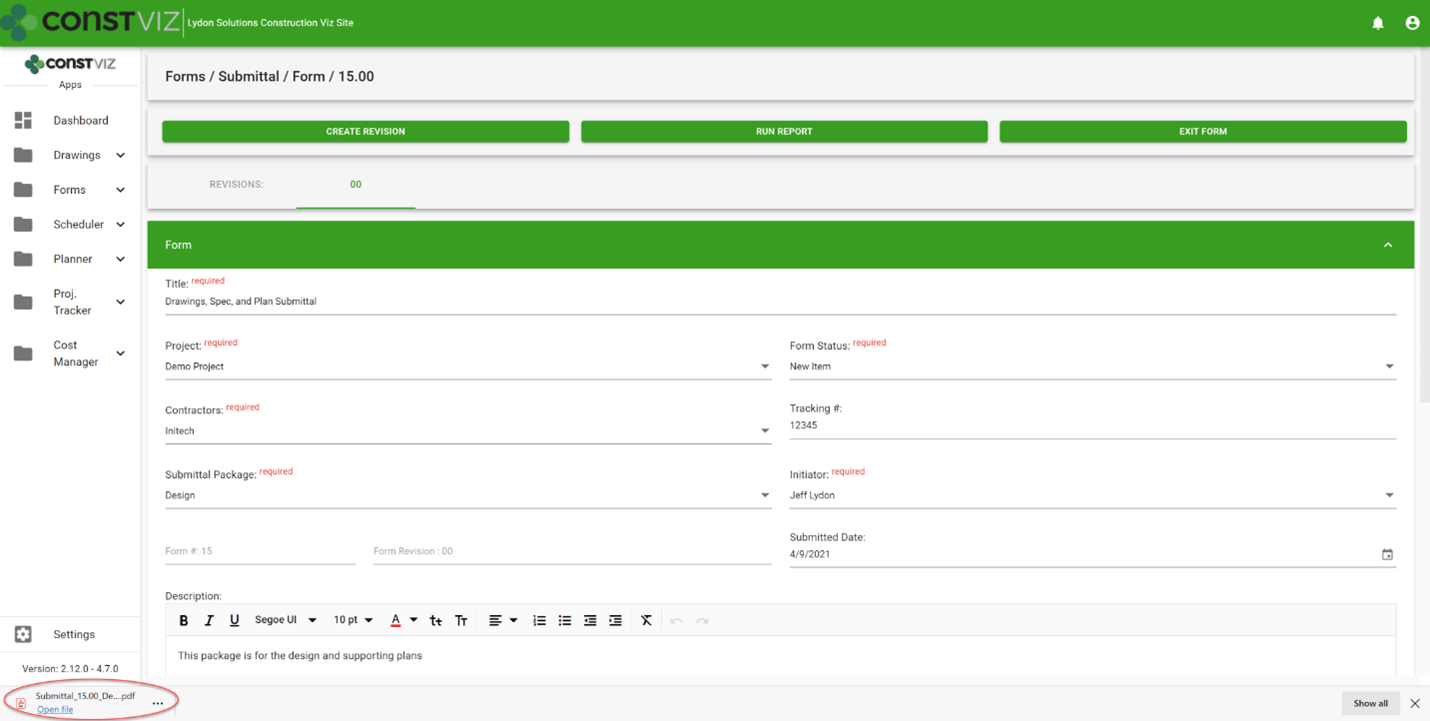
With only a few clicks, the Construction Viz Form Archiving Wizards lets you create an archivable version of any construction form and all its attachments. The easy-to-follow wizard walks you through picking which files to attach, the order they should print, and what to name the final file. Construction Viz automatically converts all form data and files to PDF format and organizes them into a binder that you can save locally, route in a Power Automate workflow, or save to another archiving system.

See the screenshots below for a preview of the Construction Viz Form Archiving Wizard in action.

Run the PDF with attachments report within a form.

Archive-Wizard_1

Select the attachments to include in the report PDF.

Archive-Wizard_2

Order the PDF attachments.

Archive-Wizard_3

Name the PDF report Binder.

Archive-Wizard_4

The Construction Viz Form Archiving Wizard automatically generates a PDF Binder.

Archive-Wizard_5

We anticipate this feature will save a significant amount of time for your document control team. The wizard will also allow you to easily share PDFs of forms, with their attachments, to contractors that might not have access to your Microsoft 365 tenant.

Manage Your Projects with Construction Viz and Microsoft 365

Construction Viz lets you manage your projects right in Microsoft 365 with familiar tools such as Excel and SharePoint – all optimized for your construction project teams' needs. To see our catalog of our available construction apps for Microsoft 365 and SharePoint, click here. You can submit a free consultation and demo request here.

And head over to LydonSolutions.com for more information if you are interested in a custom construction project management solution using Microsoft 365.

PWAs and the future of mobile apps with Construction Viz

Project Management Tools | April 21, 2021

We built Construction Viz as a progressive web app (PWA), which offers our construction industry clients many powerful capabilities out of the box. Read on to learn about PWA technology and how it is a game-changer for construction project management.  

Traditional web apps that you install on your device have been around for over ten years. Think iPhone apps. Traditional web apps typically:

  • Require users to download an app from the Apple App Store, Google Play, or the Microsoft Store
  • Are custom-built applications that live on a specific platform, separate from the fully-featured business application
  • Require frequent updates and constant maintenance
  • Only provide a reduced or watered-down version of the complete web application.

Progressive web apps take things to the next level.

The Advantages of Progressive Web App Technology

So what is a progressive web app, how is it different from a regular web app, and why is this technology critical to delivering a leading-edge Project Management Information System (PMIS) of the future?

PWAs, unlike traditional web apps, are browser-based cross-platform mobile apps. These fully-featured applications behave just like a desktop application but run in your browser.

Progressive web apps have many advantages over traditional web apps, including:

  • They are responsive across devices for a mobile workforce.
  • They work on any modern browser.
  • They behave like desktop applications independent of the browser.
  • They allow for access to device hardware such as sensors, cameras, and GPS.
  • You can work offline (yes, the entire application, not just a form).
  • They utilize push notifications such as chat, weather updates, changes to content, event reminders within your operating system.

PWAs are are considered the future of mobile app development and many companies, including Microsoft, are making the move.

Why Progressive Web Apps Matter for Construction Project Management

There are four reasons why you, as a service worker or manager in the construction industry, should want a PMIS powered by progressive web app technology:

  1. PWAs will replace traditional apps, so you are future-proofing your investment by selecting a tool built with the latest generation of app technology.
  2. PWAs support offline access critical to construction work which often entails working in remote locations without reliable internet access.
  3. PWAs are a more cost-effective solution since there is a single application across all platforms, considerably reducing development and support costs.
  4. PWAs enable you to take advantage of any sensor tech in the end user's device or hardware, opening up advanced capabilities (like geolocation) critical to construction projects.

Lydon Solutions built Construction Viz from the ground up in React, the latest in client-side development technology, to be a progressive web app. Construction Viz users can take advantage of all the benefits of PWA technology that I described above.

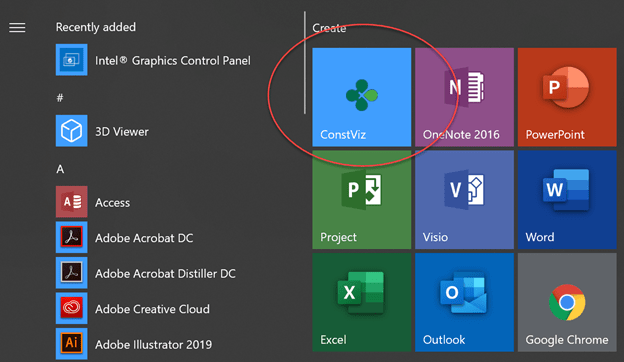
Construction Viz added to the Start menu in Windows 10

Construction Viz added to the Start menu in Windows 10

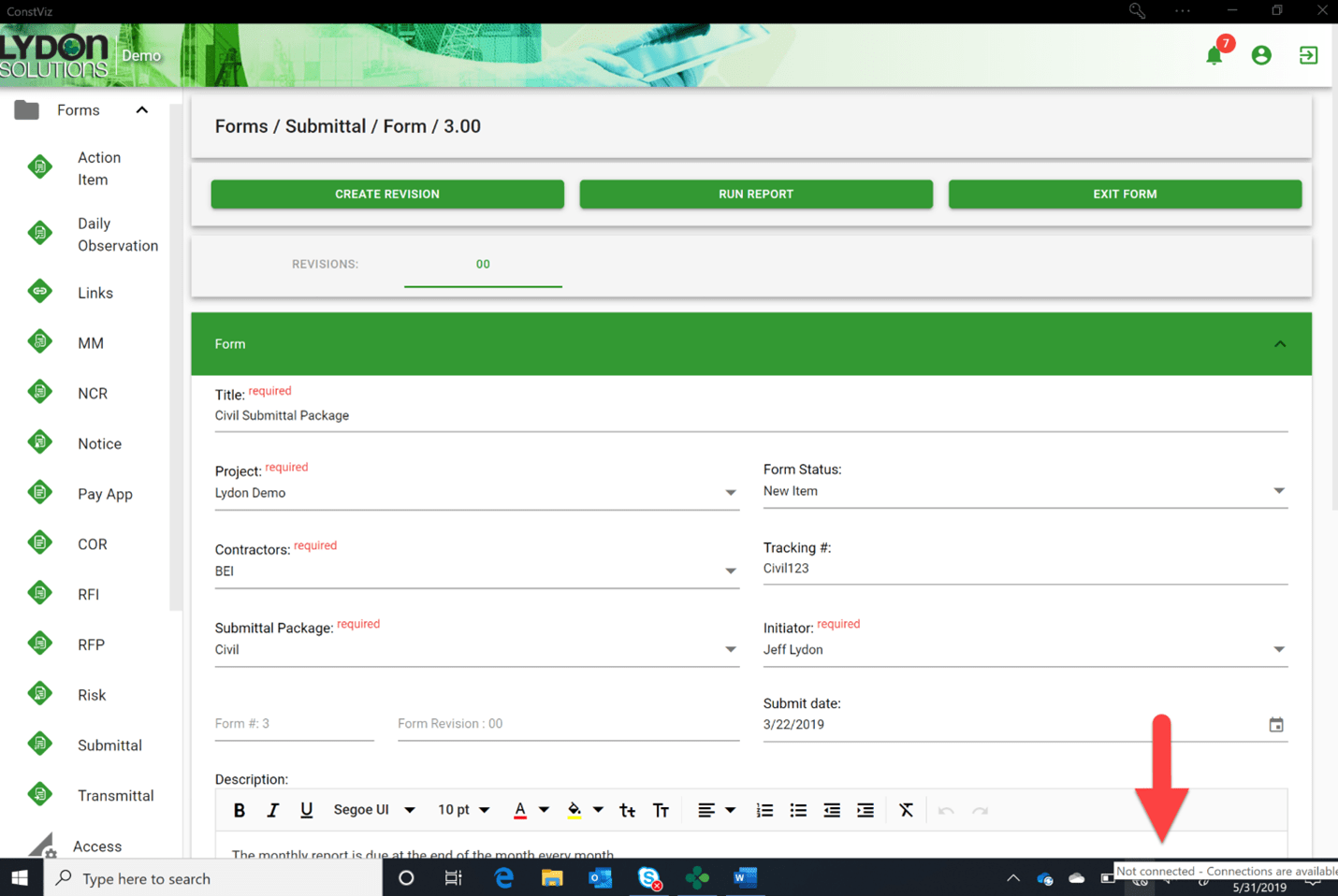
The entire Construction Viz application can go offline, not just a form

The entire Construction Viz application can go offline, not just a form

Video of Construction Viz Daily Report rendered on an iPhone (no app required)

Get a Free Consultation & Stay in Touch

We invite you to schedule a free demo and consultation to learn more about how Construction Viz can help your organization reduce cost, stay on schedule, and be more efficient with your construction programs and projects. And don't forget to signup below to join our mailing list, so you don't miss any future updates.

Dashboards Simplified with Construction Viz and Microsoft Power BI

Dashboards | March 17, 2021

We added integration between Construction Viz and Microsoft Power BI early last year to give our users another option for creating reports and dashboards. Read how you can take advantage of this integration to create customizable reporting and data visualizations for your organization.

Microsoft Power BI is rapidly becoming the reporting solution of choice for many organizations. Those with a Microsoft 365 subscription can build highly complex reports and dashboards, share them with their internal and external teammates, and even publish them to public-facing websites.

We recognize that not every company, project, or PM is the same. That is why we designed Construction Viz to be as flexible as possible, allowing for many different reporting solutions, including prebuilt SQL reports and automated dynamic dashboards. Being that Construction Viz utilizes Microsoft365 and SharePoint, adding integration with Power BI extends this flexibility further, giving construction organizations another robust reporting option that they can use alongside Construction Viz's construction project management features.

Construction Viz Integrated Reporting Using Power BI Embedded

Our integration between Construction Viz and Power BI leverages the Power BI Embedded API framework provided by Microsoft. We then built a custom menu specifically for creating, deploying, and viewing your Power BI reports within the Construction Viz Hub.

The advantages of this approach are:

  • A single source of truth. Using Power BI with Construction Viz gives you one location to see ALL your reports, apps, and documentation for your project.
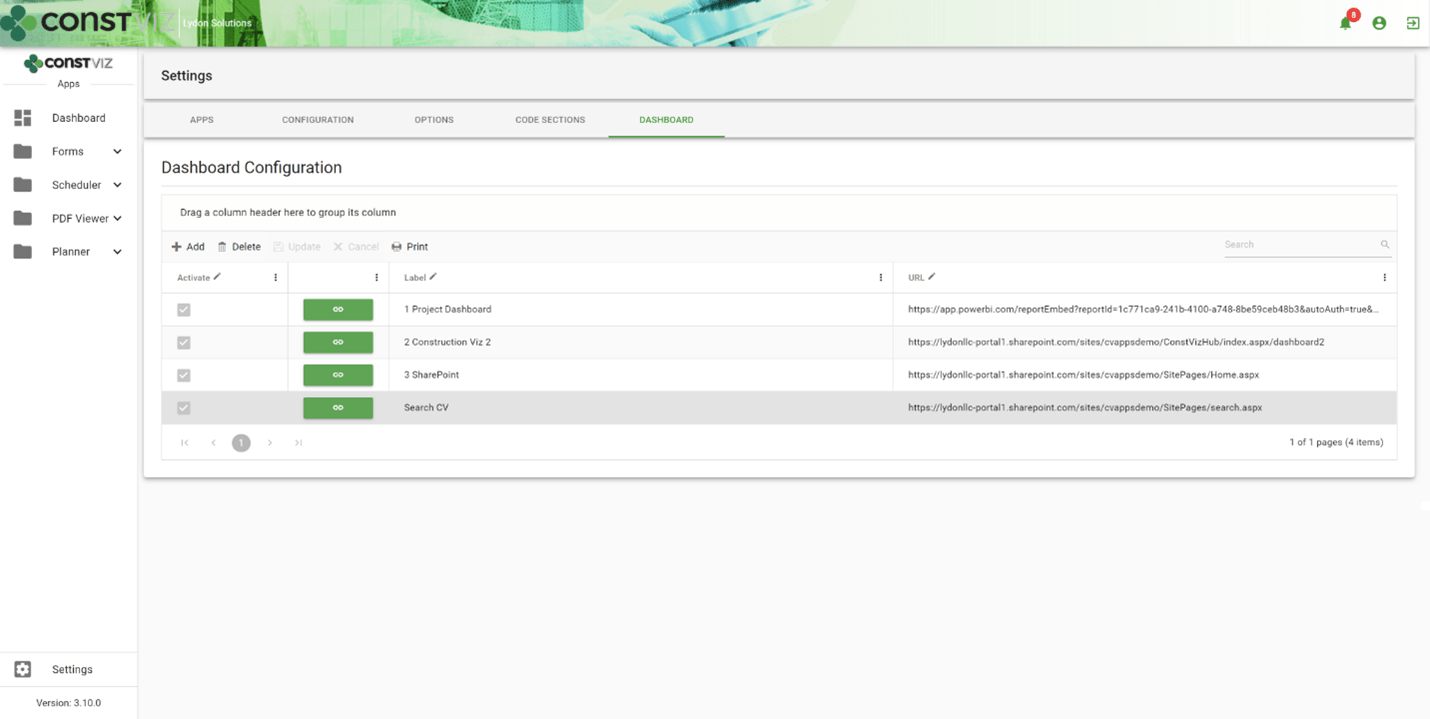
  • Create your own dashboard tabs in the Construction Viz Hub. You can easily design a custom reporting interface by creating, naming, ordering, and displaying or hiding report dashboards.
dash-powerbi_1
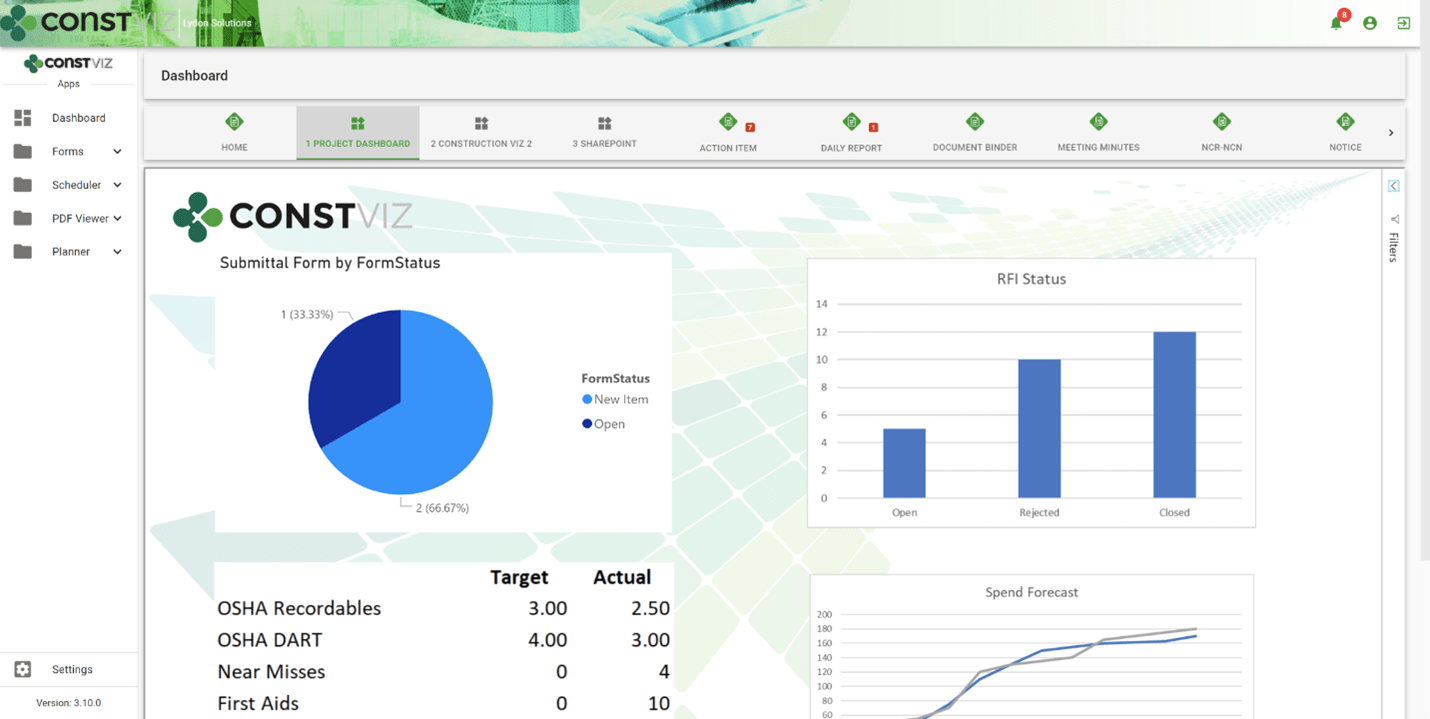
  • Embed your Power BI Reports alongside Construction Viz. With a simple copy and paste, you can display your Power BI reports in Construction Viz side by side with our pre-defined dashboards, allowing you to mix and match your reporting and visualization tools as needed.
dash-powerbi_2
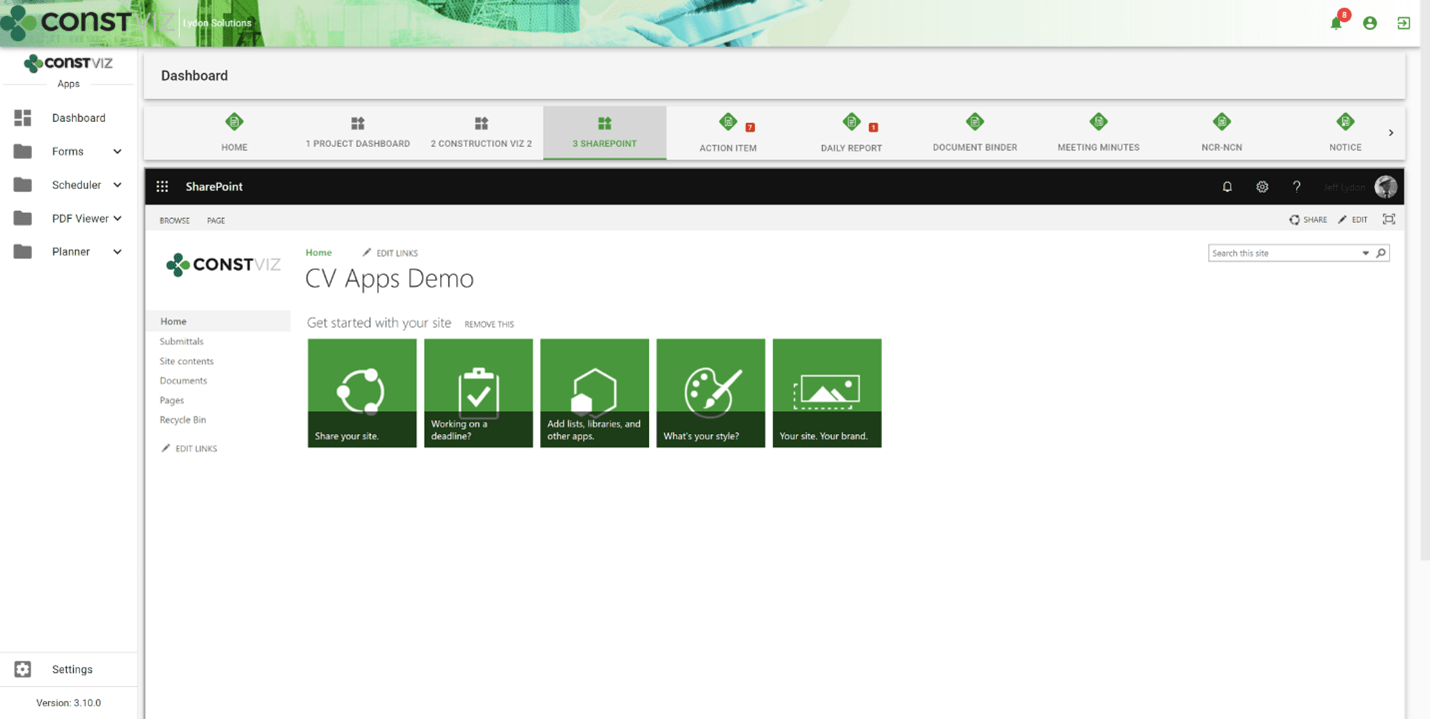
  • Embed other Microsoft 365 applications. The dashboard creation feature also allows the user to link to SharePoint, Excel Services, other Construction Viz instances, and more without an additional login.
dash-powerbi_3
  • Import pre-defined reports. We built pre-defined Power BI reports that support our Construction Viz apps. These reports can be imported into your Power BI tenant and added as dashboard tabs as well.

Construction Project Management Powered by Microsoft 365 and SharePoint

Construction Viz is a unique construction management solution since it can be deployed into a Microsoft 365 SharePoint Online site, ensuring your data stays with you.

With Power BI and Power Automate, we continue to deeply integrate Construction Viz into the Microsoft 365 ecosystem so that you can leverage the tools you already use while keeping control of your data, allowing you to manage your projects more effectively.

Learn What Construction Viz Can Do for Your Organization

You can deploy Construction Viz as a turnkey solution or select from our lineup of construction project management apps to create a fully customized system for your organization.

Find out more with a free consultation and demo.

VIZualize your Construction Projects with SharePoint Spaces and Construction Viz

News | March 5, 2021

Microsoft began rolling out SharePoint Spaces for Microsoft 365 users last year. SharePoint Spaces is an immersive, web-based platform that allows you to create and share secure and extensible mixed reality experiences.

Users can build interactive mixed reality pages inside SharePoint sites to share 360-degree images and video, 3D objects, 2D images, text, document libraries, and more. You can even play ambient sounds in the background when visitors view the site.

The functionality works best when used with a virtual reality or mixed reality (VR/MR) headset to navigate the 3D space, but this is not required. Users without a headset can navigate the SharePoint Spaces on any device with a modern browser and interact with the artifacts using their keyboard and mouse.

You can find more information about getting started with SharePoint Spaces here.

Using SharePoint Spaces with Construction Viz

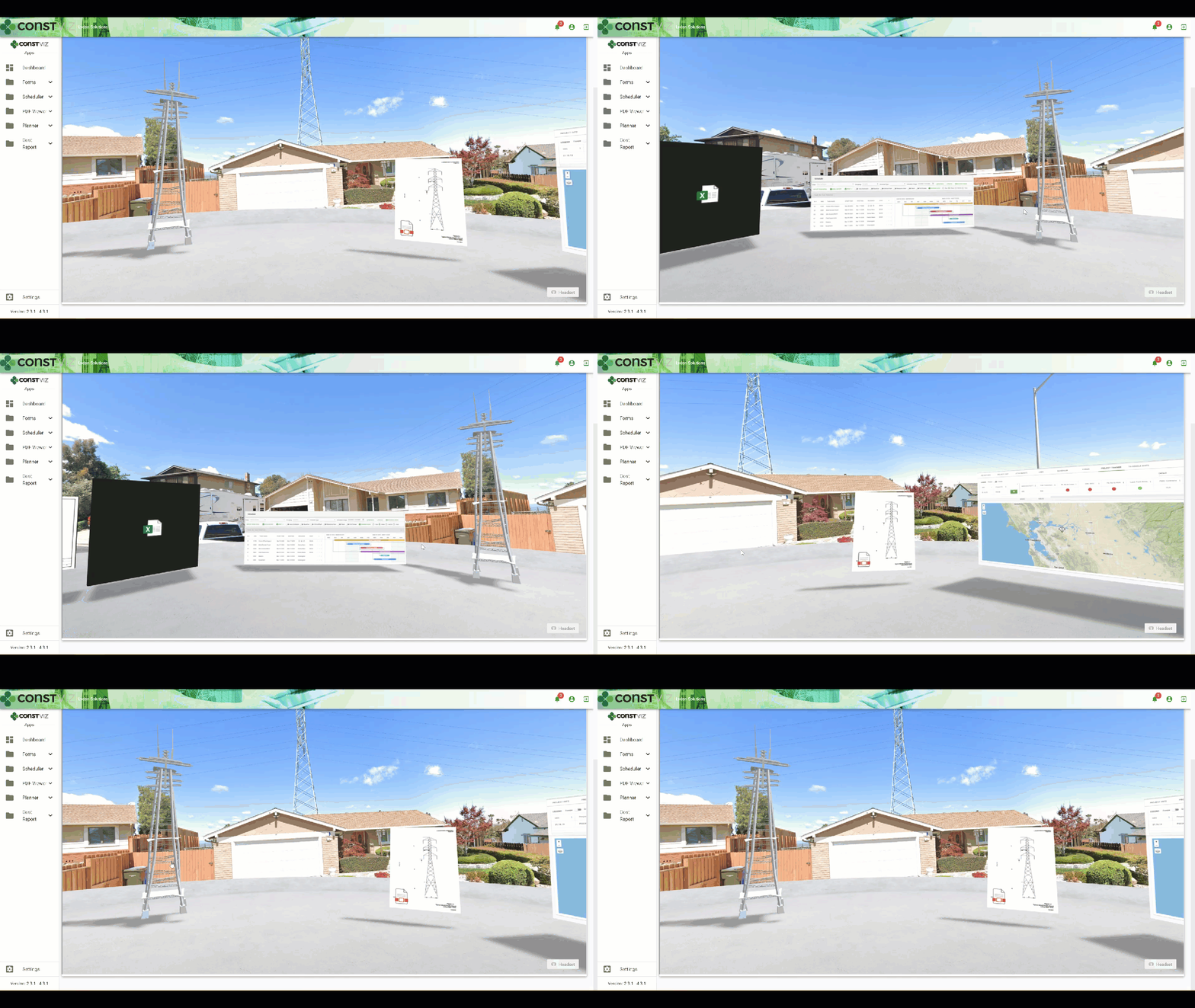
SharePoint Spaces' mixed reality features provide another way to navigate, share, and visualize project data. There are several benefits to using spaces for your construction organization beyond just a shared meeting room with project content. Below is a demo of how a construction project can benefit by integrating our Construction Viz apps with SharePoint Spaces. Examples integrations include:

  • Geospatial location data via the GIS Mapping app
  • Project progress using the Project Tracker app
  • Project Gantt chart scheduling using the Scheduler app
  • Document management using our Construction Form apps for submittals, transmittals, drawings, specs, and so on
VIZualize_1

Stay tuned as Spaces evolves, and we continue to integrate further and build VR/MR solutions for Construction Viz.

Do you want to add VR/MR to your construction project management toolkit?

Construction Viz and our full lineup of construction project management apps for Microsoft 365 can all integrate with this new technology from Microsoft. Schedule your free consultation and demo today to learn more about Construction Viz for your organization.

If you would like expert help using Microsoft 365 to manage your construction projects, we offer business consulting and managed services at LydonSolutions.com.

  • « Go to Previous Page
  • Page 1
  • Interim pages omitted …
  • Page 3
  • Page 4
  • Page 5
  • Page 6
  • Page 7
  • Interim pages omitted …
  • Page 11
  • Go to Next Page »

Footer

About Constructon Viz

Construction Viz is a flexible construction project management software solution powered by Microsoft SharePoint and SQL.
Read More >

Navigation

  • Home
  • About
  • Features
  • Apps
  • Blog
  • Contact
  • Login

Apps

  • Construction Viz Hub
  • Cost Report
  • Drawing Management
  • File Manager
  • GIS Maps
  • Oracle Primavera 6
  • Payment
  • Specification Management

–

  • Project Forms
  • Project Planner
  • Project Scheduler
  • Project Tracker
  • Task Manager

Connect with Us

  • This field is for validation purposes and should be left unchanged.
  • Sign up to receive helpful tips for construction project managers as well as updates about Construction Viz.

Lydon Solutions

© Lydon Solutions

  • Privacy
  • Cookies
  • Terms of Use
  • Disclaimer
  • End-user license

Click here to start a Microsoft Teams chat.

Click here to start a Microsoft Teams chat.

Contact Us
This field is for validation purposes and should be left unchanged.
Name(Required)
Join Our Newsletter

Sign up to receive helpful tips for project managers and updates about Construction Viz.

Get Started

Join Our Newsletter

Sign up to receive helpful tips for construction project managers as well as updates about Construction Viz.

  • This field is for validation purposes and should be left unchanged.
  • This site is protected by reCAPTCHA and the Google Privacy Policy and Terms of Service apply.