• Skip to primary navigation
  • Skip to main content
  • Skip to footer
Construction Viz

Construction Viz

Project Management Perfect

  • About
  • Features
  • Apps
  • Blog
  • Contact
  • Download Flyer
  • Get Started Today
  • Login
Show Search
Hide Search

da_admin

Construction Viz App Spotlight: Document Binder

Document Control | September 2, 2021

The Construction Viz Document Binder app makes it easy to organize and find related construction project documents, images, and videos with features such as automated metadata, permissions, dashboards, reporting, workflow routing, and more.  

Most companies that use Microsoft SharePoint for documents store them in folders. They then rely on the folder and file names as a simple form of metadata for the organization. While folders seem like the most logical and quick way to organize documents, doing so comes with drawbacks:

  • Locating documents in a folder structure can be frustrating and time-consuming, especially if you use the native SharePoint UI to navigate document libraries.
  • The more folder levels used to organize your documents, the longer the URL, which impacts saving and sharing files in SharePoint.
  • You could try adding metadata directly to your documents to make it easier to search and find what you need. However, it is often challenging to get users to add metadata consistently. And if you need to re-classify documents stored in folders, now you must laboriously copy and paste between folders!
  • Finally, the folder method provides limited functionality out of the box, so you are out of luck if you want to use other features such as reviews, emails, permissions, dashboards, and reporting.

The bottom line is that you need more than just a simple folder structure to store and share project information with your teams.

Enter the Construction Viz Document Binder app

With the Construction Viz Document Binder form app, we built a way to easily group related documents while including a ton of functionality and flexibility currently lacking in your standard SharePoint document library folder structure.

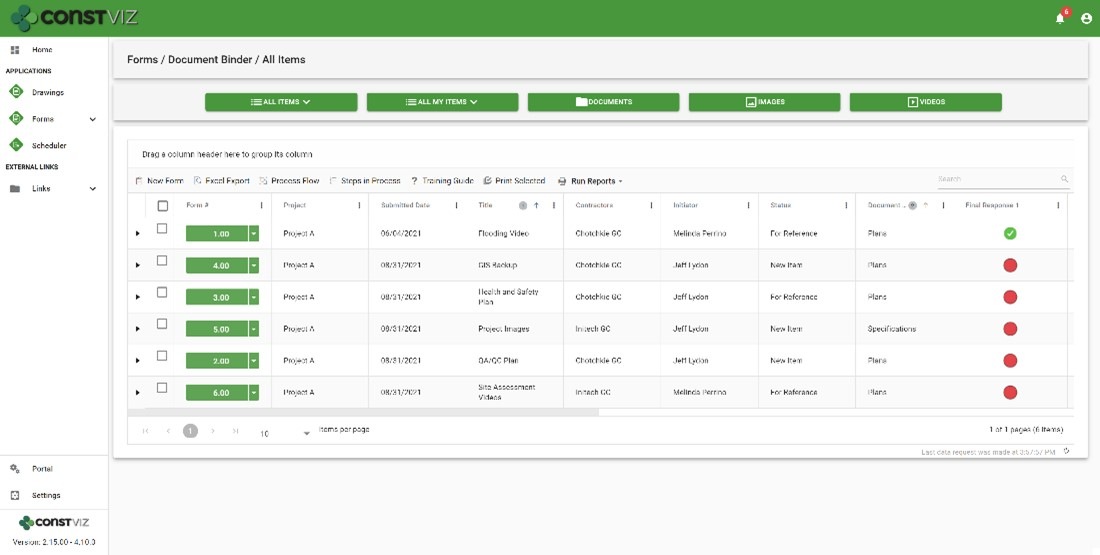
The document binder app could not be simpler to use. You create a document binder form, fill out a few key fields, and drag and drop documents into it. The app automatically tags the form metadata to the attached documents, allowing you to quickly search by form or attachment.

Think of the document binder form as a cover sheet for saving your project documents that also provides the following functionality:

  • Detailed metadata tracking lets you quickly find what you are looking for using the configurable grids or search
  • Responsiveness to any device on a modern browser with offline capability letting you get to your information where and when you want
  • Integration with Microsoft Office for the web lets you open, edit, and share documents in your browser
  • Automatic file name conflict resolution when uploading attachments to prevent overwriting files
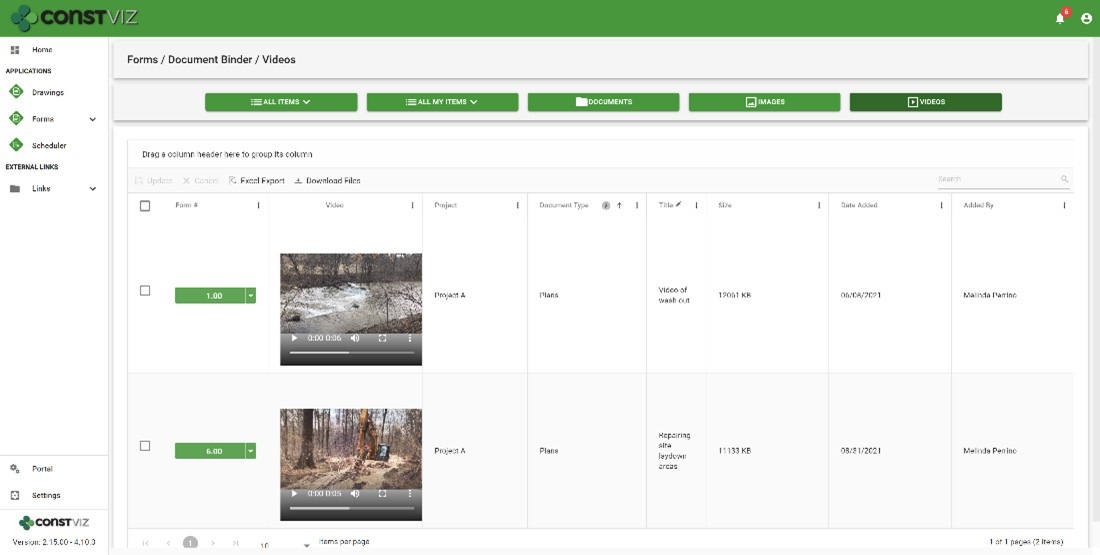
  • Quick view for uploaded files by documents, images, and video
  • Revision management for each form and document
  • Ad hoc workflow approvals with ball-in-court approval indicators
  • Email to users and distribution lists with a history log for auditing
  • Permission management by the contractor and user-defined groups
  • Dashboards, reports, and notifications so you always know where a binder is in the approval process and who needs to take action
  • Archive in place, or if required, create an archive PDF for each binder using the Form Archiving Wizard
Doc-Binder_1
Doc-Binder_2

Get Construction Viz for your organization

Construction Viz is about choice, and it is the only construction management platform designed around how you work and where you work.

Contact us today to learn more about our lineup of Construction Viz apps and how we can help you better manage your projects.
Construction Viz App Spotlight: Substantial Completion Form

Forms | August 12, 2021

We designed the Construction Viz Substantial Completion form app to streamline getting your project to the finish line with greater efficiency and consistency.

Substantial completion is the stage of the project where portions of work are sufficiently complete. In other words, it marks the point at which constructed items become assets, start depreciating, and are potentially handed off to the operations and maintenance teams for support. It’s also the time to collect warranties and ensure all punch list items are complete.

The owner and construction or general manager typically document achieving substantial completion in an email exchange. As we all know, email is the preferred communication tool on construction projects, and it will not go away soon. But email is not the most effective way to manage critical information at this phase of the project.

The Construction Viz Substantial Completion form provides a much better framework for project teams.

Construction Viz Substantial Completion form app

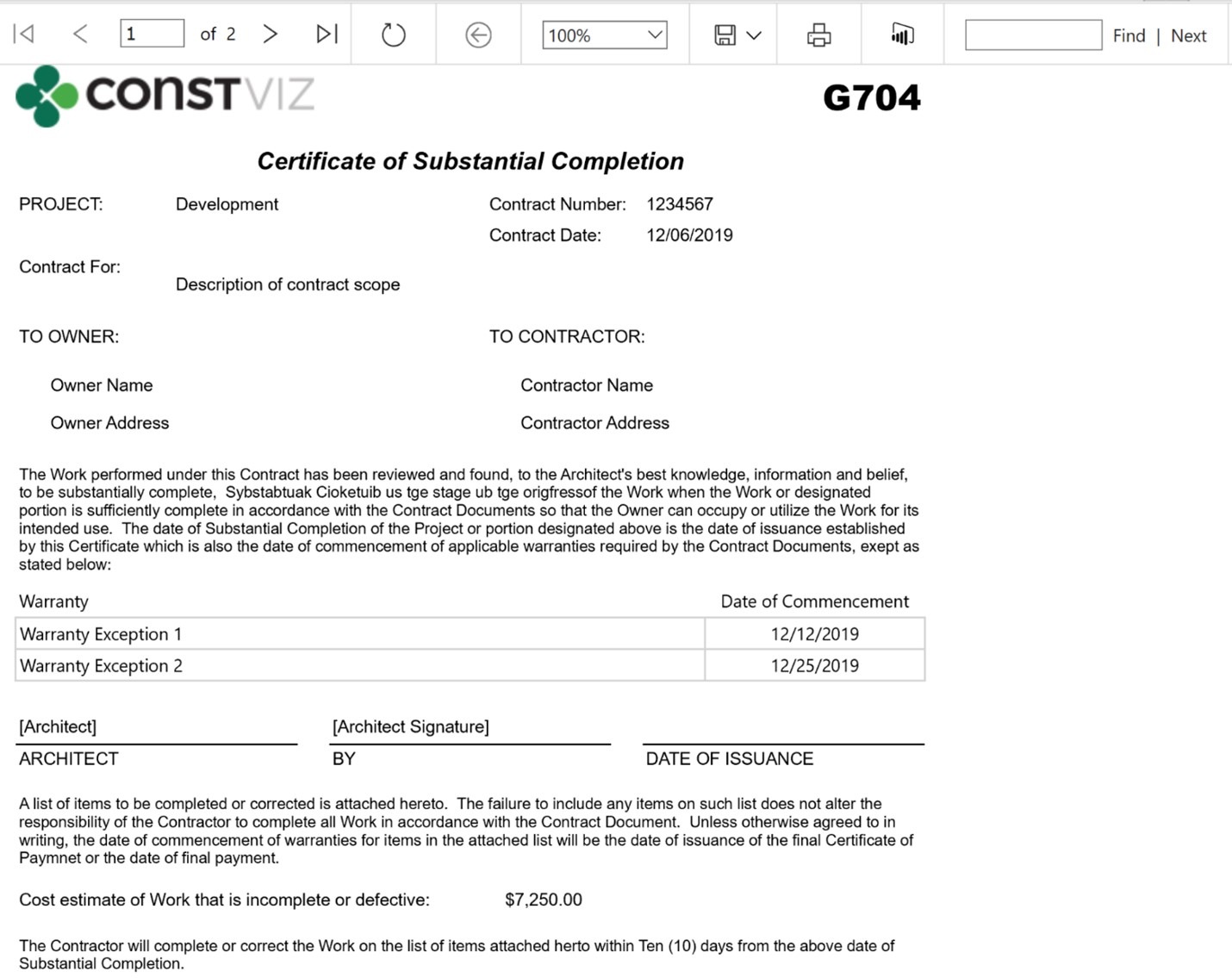
The Construction Viz Substantial Completion form app makes the turnover process more efficient and easier to manage for all parties involved. The user can track details, warranties, and punch list items for each significant area of scope, including the value outstanding and when each will be complete for turnover.  The user can run a G704 Certificate of Substation Completion report for physical signature and record retention at any time.

Construction Viz Certificate of Substantial Completion (G704) print view:

Substantial-Completion_1

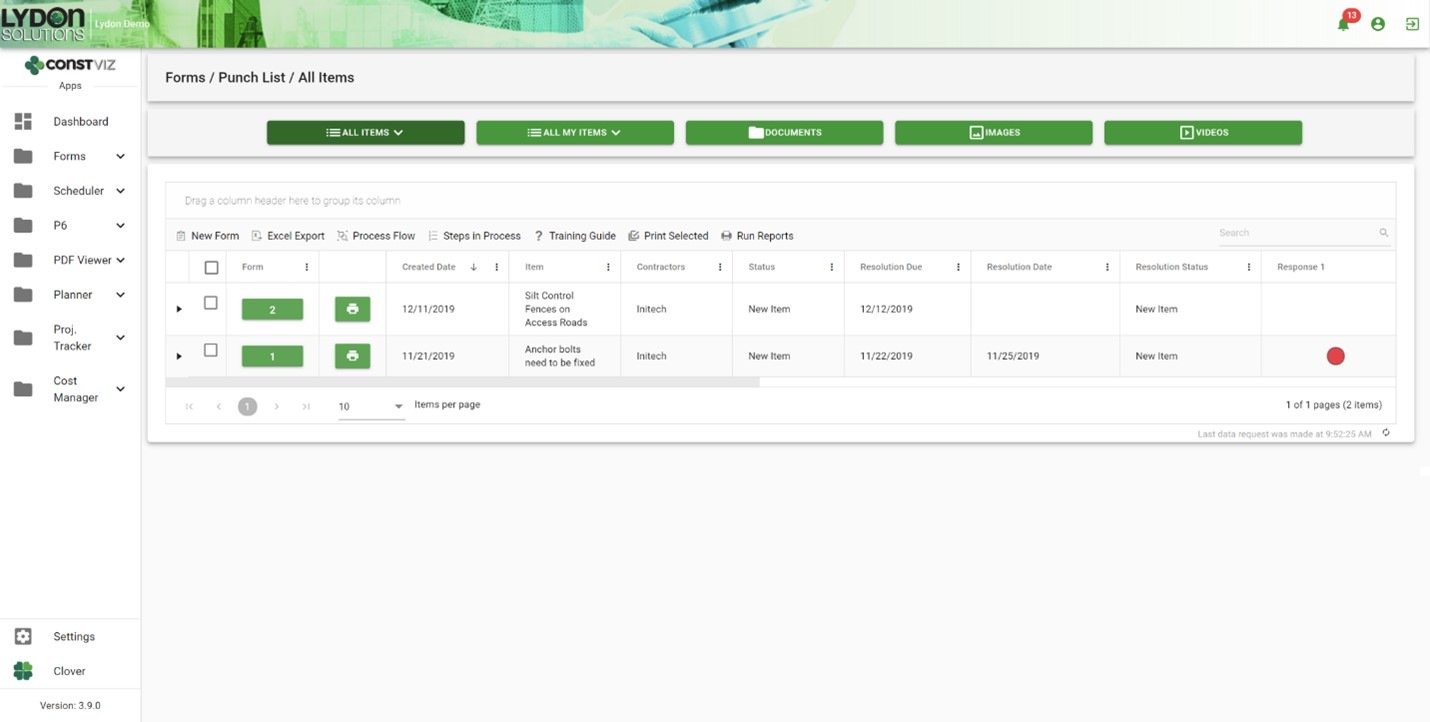
The challenge with traditional email correspondence is responsibility and progress management. Construction Viz solves this by capturing ownership within each punch list issue and displaying that information in interactive form status dashboards, ball in court grids, outstanding response log reports, and user alert notifications. And emails are automatically generated for individual users and distribution lists for review and acceptance.

Construction Viz Substantial Completion form log:

Substantial-Completion_2

Get just the construction forms you need

The Substantial Completion form is part of a full suite of construction apps available for Construction Viz. You can mix and match the forms you need for your project workflow.

All Construction Viz form apps are extendable with additional components, including:

  • Document, image, and video attachments
  • Geospatial mapping
  • WBS, specification, and asset tracking
  • Progress tracking using the Construction Viz Scheduler app and integrated P6 Scheduling
  • External links and data relationships
  • Electronic review and approval
  • Ad hoc workflow capability
  • Microsoft Power Automate workflow integration
  • Power BI reporting integration
  • Ball in court Dashboards and KPIs

Schedule a free consultation to see how we can help you get your project to the finish line with Construction Viz.

New Image Markup Feature for Construction Viz

Forms | August 5, 2021

Our latest Construction Viz feature lets project team members mark up images on any device with or without internet access.

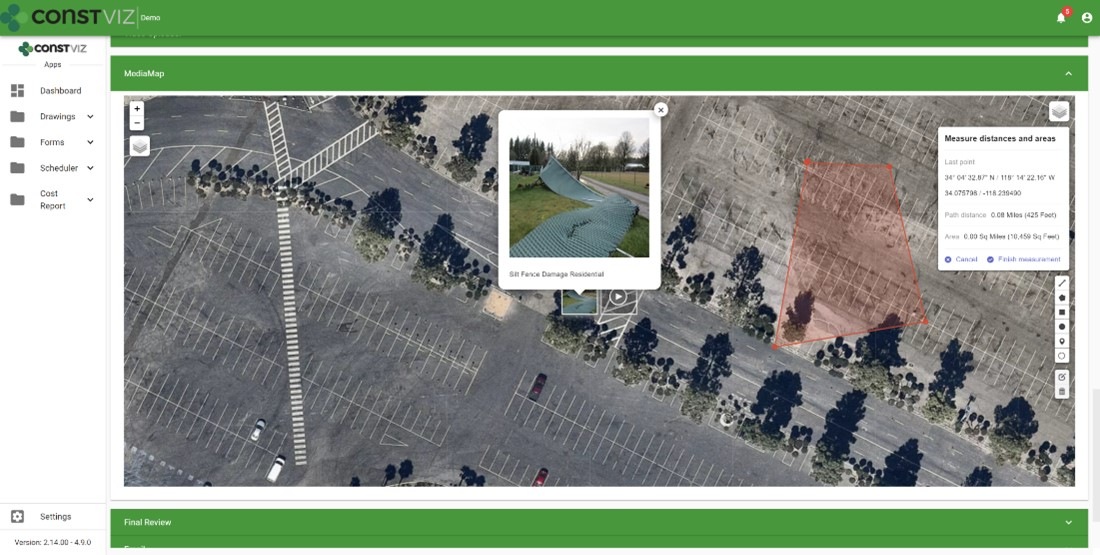
Adding images to a daily report, safety incident, or punchlist is critical to documenting work completed in the field and identifying any issues for potential corrective action. Construction Viz makes the process simple, enabling users to take photos with any device, with or without an internet connection, and attach images directly to the form. Our Media Map Component automatically plots the image and the location where it was taken on a geospatial map and adds this information to the form. Users can easily add comments, waypoints, and even measurements as a layer to the media map.

And because Construction Viz is a progressive web app (PWA), this is all done without users ever installing an app on their devices.

But what about marking up the images?  Our users told us that marking up images would be a handy feature and make Construction Viz's data capture even better. We listened. Read on to learn about his useful new capability.

Construction Viz image markup feature

We expanded our Image Uploader Component for construction forms based on user feedback to add image markup capability and further simplify the entire process. Here is how it works:

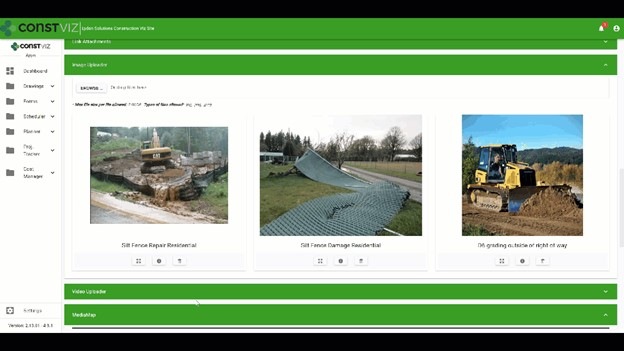
  • After users upload images, the app displays them in interactive cards. Adding metadata such as title or description can be done in a couple of clicks.
  • The user can expand the photos from thumbnails to a full-screen mode to draw directly onto the image canvas.
  • The markup tool lets users pick from a palette of pen colors, complete with erasing and undo functionality.

The updated Image Uploader Component can be enabled in any one of our apps or can be added to a custom app as needed.

This new functionality enhances the entire data collection and documentation experience by extending what's possible for field workers. Also, since Construction Viz stores all of the data to your Microsoft 365 SharePoint, your project information is available for further reporting and workflow using the Power Platform.

The image markup tool is one of many features that we have built into Construction Viz. For an overview of the other powerful capabilities built into Construction Viz, check out our features page.

Construction Viz image markup feature

We expanded our Image Uploader Component for construction forms based on user feedback to add image markup capability and further simplify the entire process. Here is how it works:

  • After users upload images, the app displays them in interactive cards. Adding metadata such as title or description can be done in a couple of clicks.
  • The user can expand the photos from thumbnails to a full-screen mode to draw directly onto the image canvas.
  • The markup tool lets users pick from a palette of pen colors, complete with erasing and undo functionality.

The updated Image Uploader Component can be enabled in any one of our apps or can be added to a custom app as needed.

This new functionality enhances the entire data collection and documentation experience by extending what's possible for field workers. Also, since Construction Viz stores all of the data to your Microsoft 365 SharePoint, your project information is available for further reporting and workflow using the Power Platform.

The image markup tool is one of many features that we have built into Construction Viz. For an overview of the other powerful capabilities built into Construction Viz, check out our features page.

Construction Viz Media Map Component

Image-Mark-Up_1

Construction Viz Media Map Component

Image-Mark-Up_2

Get a demo of Construction Viz today

Construction Viz is an enterprise Project Management Information System (PMIS) built by construction professionals for construction professionals. We value our client's feedback and are always looking for the most efficient ways to get the job done.

Contact us for a no-obligation consultation and demo today to learn how Construction Viz can help your team better manage your construction projects.

Why its Time to Rethink Where You Store Your Project Data

Storage | July 21, 2021

Over our years of working in and providing software solutions for the construction industry, we have seen dramatic shifts in how organizations deploy project management systems and where they store project data. The cloud over the last fifteen years replaced the "old way" of on-premise servers. Now, organizations have another emerging option that combines the best of on-premise and cloud servers. Read on to learn more about the benefits of client tenants and Microsoft 365.

The old way: on-premise deployments

WhereIsYourData_1

Before the last fifteen years or so, companies deployed their project management systems on client servers behind firewalls to prevent data from being accessible from the internet. While this approach ensured that the project management information systems (PMIS) and data were secure, it had several drawbacks, including:

  • extended owner IT approval process for new software
  • exorbitant capital costs to spin up and maintain physical servers
  • no access for third-party software providers and outside contractors

The new way: embracing the cloud

WhereIsYourData_2

With the rise of cloud computing over the last fifteen years, many companies moved to externally hosted solutions. The benefits of the cloud appeared to outweigh the security concerns that IT departments had with data residing outside of their firewall. Cost-conscious management pressured IT departments to outsource data hosting and software applications to save money and improve overall efficiency.

However, there are drawbacks to the cloud. Security breaches have become common, and owners have discovered that it is frustratingly difficult to get their data out of externally hosted systems for archiving and reporting. As a result, the pendulum is starting to shift away from externally hosted PMIS solutions and cloud data repositories.

Today's better solution: client tenants and Microsoft 365

WhereIsYourData_3

With today's cloud computing capabilities, owners can spin up their own data centers in AWS or Azure to manage their company's data. And with the rise of no-code/low-code development, owners have also started building custom solutions in their own Microsoft 365 tenant using the Power Platform and SharePoint. The owners that embrace this model like having their data readily available when and where they need it.

In many ways, this shift marks a return to the "old way" of owners having their systems and data behind their firewall.  But instead of maintaining physical servers, they have virtual machines (VMs) in their tenants in the cloud.

Like any other software provider, companies providing construction project management software will have to adjust to this shift to allow owners to decide where their data will ultimately reside.

Today's better solution: client tenants and Microsoft 365

WhereIsYourData_4

We saw the above shift occurring and developed our Construction Viz solution to be either externally hosted or deployed directly into a client's Microsoft 365. With the latter, now you can have the best of both worlds with your data residing in your Microsoft 365 tenant while the PMIS application runs securely in a Microsoft Azure certified app.

Construction Viz is designed for the future and provides the following benefits for a construction organization:

  • Verified Microsoft Azure app. Construction Viz utilizes Microsoft's app security technology. Apps need to be accepted into the tenant to run.
  • Data resides in SharePoint. When we deploy our Construction Viz apps, they automatically create associated SharePoint lists and libraries in the Microsoft 365 tenant. As a result, you can access and use the app data across all the Microsoft 365 services such as Power BI and Power Automate.
  • No need for Archiving. There is no need for archiving since the project data resides in your SharePoint sites.
  • Authentication. The entire solution leverages Microsoft authentication, so no additional login is required.
  • Contractor access. With Construction Viz's robust but simple access management controls, contractors can access the project data they need securely.
  • Microsoft 365 integrated. Construction Viz deeply integrates into Microsoft 365. That means if the owner wants to build a custom solution, we can easily access it inside Construction Viz.

Get a free demo and consultation

The technology journey, in a way, has come full circle with systems and data once again behind the owner's firewall. Is your PMIS keeping up with the times?

Construction Viz is a powerful and flexible construction project management solution optimized for YOU and your workflow. For maximum flexibility, Construction Viz is available in the cloud, on-premise, or as à la carte apps for Microsoft SharePoint and Microsoft 365.

Contact us today to schedule a free demo and consultation.

Tame Your Inbox with the Construction Viz Email Log Feature

Email Log | July 15, 2021

“I never received the email!”

How many times have you heard this response as a project manager on construction projects?

Email, in many cases, has become the primary form of project communication. But tracking the history of sending and receiving electronic mail is problematic, and read receipts only go so far. Another challenge is ensuring that everyone has the information they need since there is often no centralized project email inbox accessible by the entire team.

Unfortunately, as email has become more pervasive on projects, many of us find it challenging to keep up with essential project updates and information that gets lost in our overflowing inboxes.

Introducing the Construction Viz Email Log Feature

We are introducing the Construction Viz app-specific email log feature to address the above issues and consign the “I never received the email!” response to history.

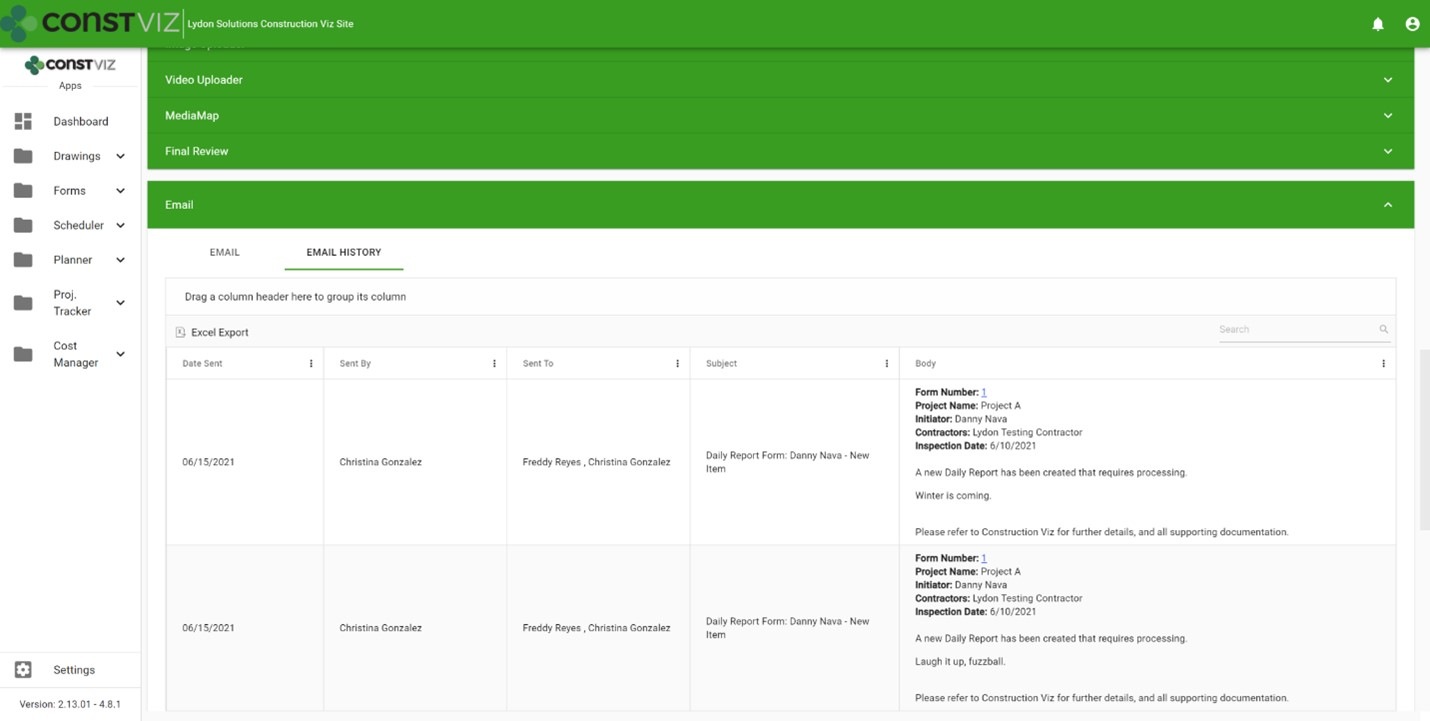
Now each Construction Viz app includes a history of every email notification that it sends. So, if you want to see all emails sent regarding an RFI, you can click the new history tab of the email component. The email notifications are organized in an interactive grid, allowing you to filter, group, and search items and providing a single source of record for the back-and-forth email communication on your projects.

And, because Construction Viz utilizes Microsoft 365, the data is available in SharePoint lists and libraries that can be easily reported on in Power BI, if needed.

Email History tab in a form app

Blog-Email-Logs_1

Email Logs is one of the many features available in our catalog of Construction Viz apps. Construction Viz is a customizable enterprise-scale project management information solution (PMIS) that can be externally hosted or deployed to your Microsoft 365 tenant. To find out how Construction Viz can help you manage your construction projects, request a free demo here.

Construction Viz Adds Actionable SMS Text Notifications

Notifications | June 21, 2021

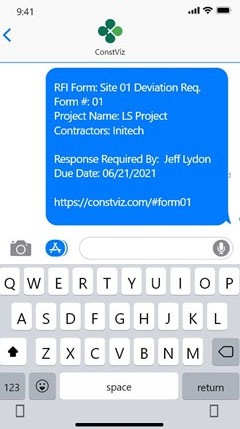
Never miss a critical construction project update again. Construction Viz now lets your project teams receive actionable SMS text notifications for project events.  

Today, we are connected to our phones more than ever. For better or worse, our phones have become the go-to device for our everyday activities, both personal and business. And while Microsoft 365 and email are at the core of how we conduct business, we cannot ignore that SMS text messages are a pervasive unstructured communication technology.

New SMS text notification feature for Construction Viz

We built Construction Viz as a progressive web app (PWA) that leverages your Microsoft 365 investment and that you can access on any device with a modern browser. At the core of Construction Viz is the idea that we meet you where you work, allowing you to always know your projects' status through email and system notifications. Today we are extending our notifications further to include SMS text messages.

Using our deep integration with Microsoft 365 Power Automate, we can send notifications as actionable SMS text messages. Your workflows can trigger SMS messages for specific events, such as an alert of poor weather conditions, a site safety issue, or even the need for approval on a form like an RFI or submittal.

With Construction Viz, we can include a link to any of our form apps that the user can click and open in their browser and respond without ever leaving their phone. To avoid overwhelming users with large volumes of texts, we can optionally send daily or weekly digests of project status.

SMSFeature_1
SMSFeature_2

With Construction Viz and Microsoft 365 Power Automate, you and your team can receive notifications within the application, email, Adaptive Cards, Microsoft To-Do, Microsoft Teams, and, now, SMS text messages. No matter where you prefer to do your work, we have you covered.

Learn more about Construction Viz

Find out how Construction Viz allows you to take full advantage of your investment in Microsoft 365 for your construction projects by scheduling a no-obligation consultation and demo today.

  • « Go to Previous Page
  • Page 1
  • Page 2
  • Page 3
  • Page 4
  • Page 5
  • Page 6
  • Interim pages omitted …
  • Page 11
  • Go to Next Page »

Footer

About Constructon Viz

Construction Viz is a flexible construction project management software solution powered by Microsoft SharePoint and SQL.
Read More >

Navigation

  • Home
  • About
  • Features
  • Apps
  • Blog
  • Contact
  • Login

Apps

  • Construction Viz Hub
  • Cost Report
  • Drawing Management
  • File Manager
  • GIS Maps
  • Oracle Primavera 6
  • Payment
  • Specification Management

–

  • Project Forms
  • Project Planner
  • Project Scheduler
  • Project Tracker
  • Task Manager

Connect with Us

  • This field is for validation purposes and should be left unchanged.
  • Sign up to receive helpful tips for construction project managers as well as updates about Construction Viz.

Lydon Solutions

© Lydon Solutions

  • Privacy
  • Cookies
  • Terms of Use
  • Disclaimer
  • End-user license

Click here to start a Microsoft Teams chat.

Click here to start a Microsoft Teams chat.

Contact Us
This field is for validation purposes and should be left unchanged.
Name(Required)
Join Our Newsletter

Sign up to receive helpful tips for project managers and updates about Construction Viz.

Get Started

Join Our Newsletter

Sign up to receive helpful tips for construction project managers as well as updates about Construction Viz.

  • This field is for validation purposes and should be left unchanged.
  • This site is protected by reCAPTCHA and the Google Privacy Policy and Terms of Service apply.