• Skip to primary navigation
  • Skip to main content
  • Skip to footer
Construction Viz

Construction Viz

Project Management Perfect

  • About
  • Features
  • Apps
  • Blog
  • Contact
  • Download Flyer
  • Get Started Today
  • Login
Show Search
Hide Search

da_admin

Construction Viz – Application for Payment

Forms | May 26, 2020

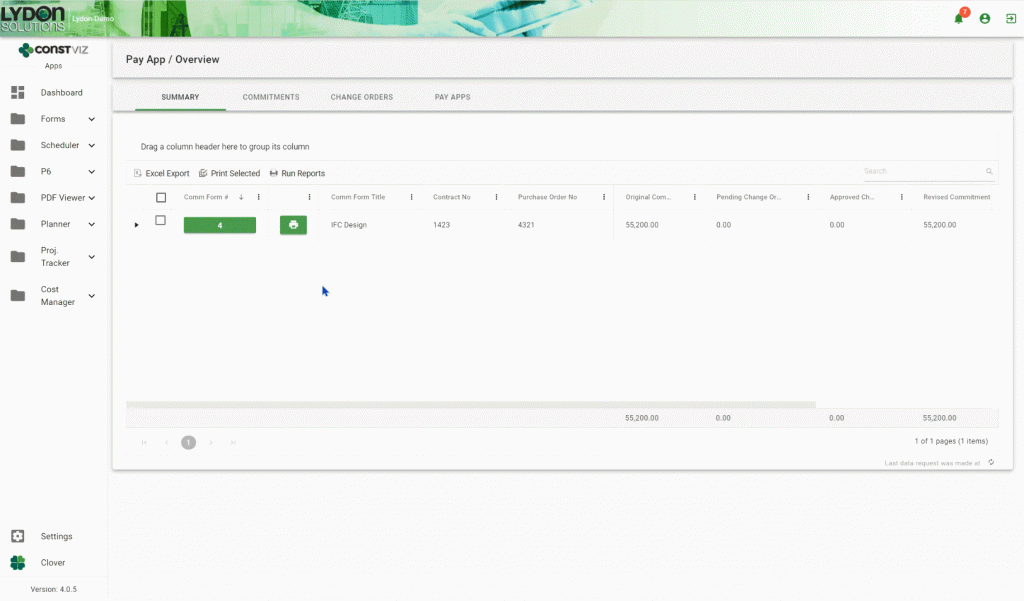
The Application for Payment is a formal document that details a contractor’s request for payment and should identify the work completed and materials received or installed during a specified time period. The entire process can be rather complex since it must consider the original commitment and approved change order values, work completed, and overall approval process, all the while lineup with, and output to, the standard AIA G702/G703 reports that support the final invoice to the client.

Throughout my years in Project Controls, I’ve seen many different approaches for processing payment applications. Most of these solutions were entered into a Project Management Information System (PMIS), rather than in Microsoft Excel. In my experience, the pay app processes and tools were extremely cumbersome because some, if not all, of the steps were done manually via hard copy or through email, links to the project or payment schedule were not included with the application, and there was a lack of details in the tracking templates to know where the pay application was in the process at any given point in time.

When we decided to build-out Application for Payment functionality in Construction Viz, we wanted to address some of the shortfalls identified with other software products, as well as enhance the overall usability for project team members.

As a result, we built four separate forms—Commitment, Change Order Request, Change Order, and Pay Application—that integrate with one another for a comprehensive approach from committing scope to making a progress payment.

Key features include:

  • All forms and functionality can be accessed on any device with a modern browser; and since Construction Viz is a Progressive Web App, it can be made available offline without having to install an app on your device.
  • All four forms can be customized to your processes and deployed into your on-premise SharePoint or Microsoft 365.
  • In addition to the 4 forms being integrated with one another, they can also be integrated with our other applications such as the Scheduler and Project Tracker.
  • Each form is tracked at a line item level of detail, in a Schedule of Value (SOV) format by WBS, Cost Code, Work Order, Account and/or Line Item.
  • Each form can be independently routed for review and approval.
  • Only approved forms impact the overall summary rollup which provides a status of all payments.
  • Since a Change Order Request is purely a field request and does not commit costs, contractors can leverage current commitment information to quickly add change request line details, or can create new change request line details, without impacting the PO.
  • Retention can be identified on the Commitment level and automatically withheld on each Pay Application.
  • Both the standard AIA G702 and G703 reports can be generated from any Pay App form.

Find out more about all of our tools to help you manage your projects in SharePoint and Microsoft 365, or visit LydonSolutions.com to submit a free consultation for services to get you on the right track with your PMIS.
Project Portals for Remote Collaboration

Collaboration | May 12, 2020

Remote project management can be challenging when trying to bring together many different disciplines on a construction project. Let’s face it, every stakeholder has their own responsibilities and focus areas that don’t fit neatly into the traditional off the shelf Project Management Information System (PMIS).

This is why we built Construction Viz Portals.

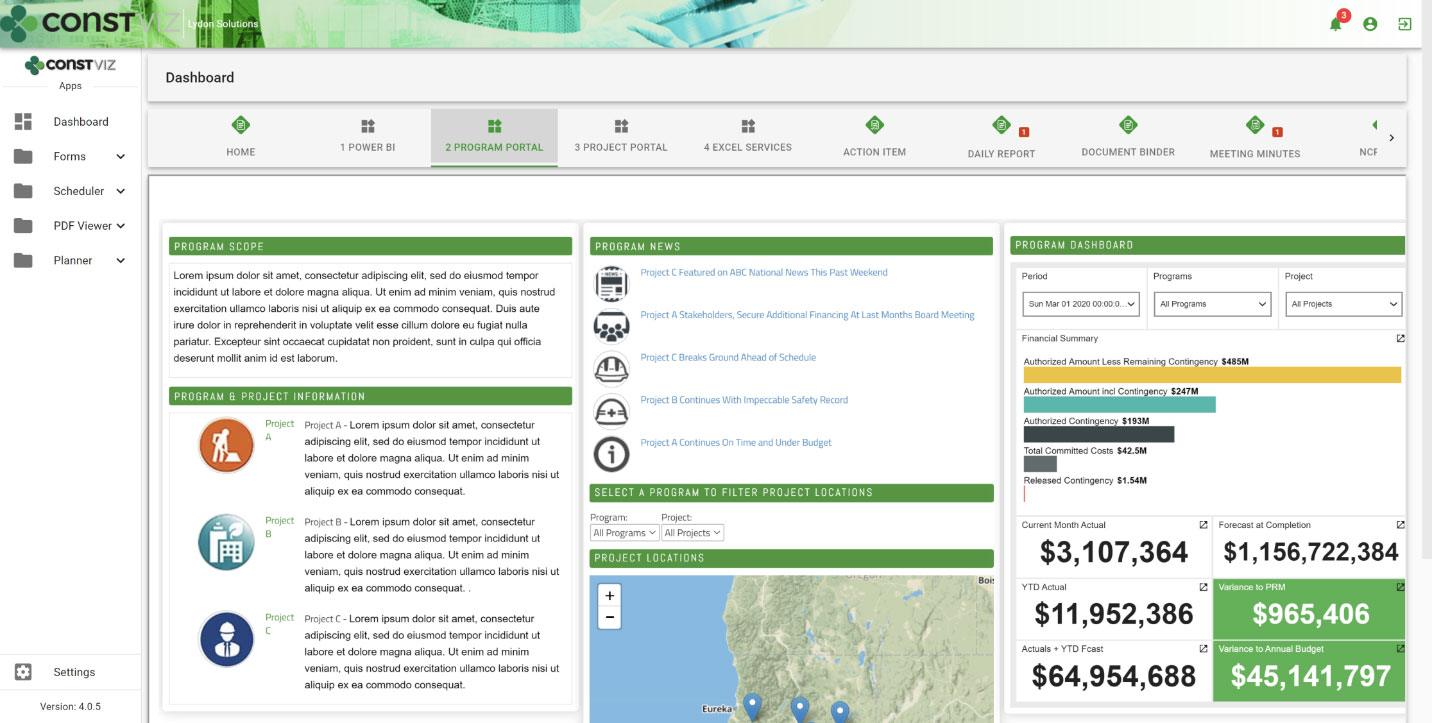
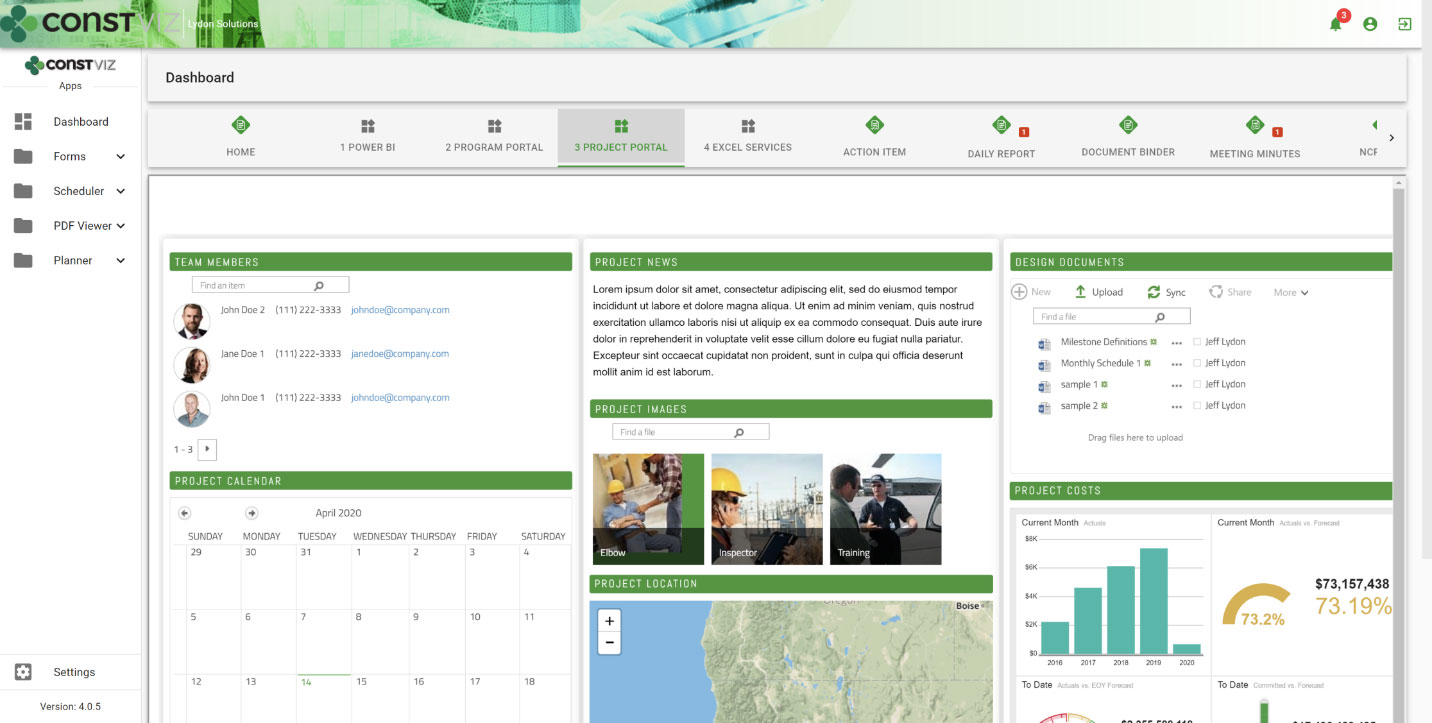
Portals are discipline-focused information windows into the project health. They display easily digestible snippets of information such as KPIs, dashboards, web pages, and maps. Best of all these can be built in any Microsoft 365 application and then surfaced in Construction Viz Portals. Have a Power BI Report or a SharePoint web page that you want to build and share with team members, simply grab the URL and paste into the builder. Select from a pre-set list of portals or build your own and connect them yourself.

Portals allow you to share information the way you want, using the applications you use everyday. Get a free demo to learn more about Construction Viz Portals and how we can deliver a tailored solution to manage your projects. If you need help optimizing Microsoft 365 for managing your projects, check out our managed services at LydonSolutions.com.

project-portals1
project-portals2

Manage Work Orders for Projects of Any Size with Construction Viz

Work Orders | April 6, 2020

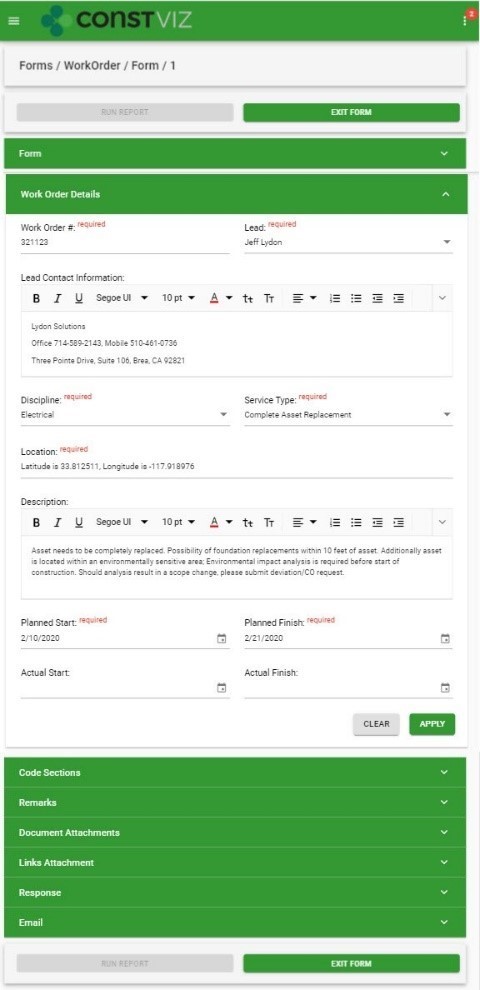
Whether you are managing a project or program, Construction Viz gives you everything you need to manage work orders with complete visibility into each step and robust reporting. Our Work Order app also integrates with our other construction project management apps, including Construction Viz Scheduler, Planner, Project Tracker, and our full lineup of Form apps. 

Projects come in all shapes and sizes. Some can cost thousands and be completed in hours while others could cost millions and take years to complete. How organizations label projects can vary as well. Some organizations call everything with a clearly defined scope, schedule, and budget a project. Others call projects consisting of multiple work orders, each with scope, schedule, and budget, a program.

While the labels can vary, as a project manager, you don’t want to use two completely different systems and sets of processes, one for projects and one for programs, when all you are trying to do is create a simple RFI. You and your team need visibility to your entire project portfolio in an easy-to-use system, whether it falls within construction or even facilities management.

Construction Viz Helps You Manage Projects of Any Size


With  Construction Viz, not only did we address the standard construction project requirements needed to manage a project successfully, but we also included the ability to manage programs using our integrated Work Order app.

Using the Construction Viz Work Order app, you can manage the entire process from a client service request through work order completion.  If you are taking a comprehensive approach to work order management, the process starts within the Construction Viz Service Request app to capture high-level details for the required service, including an anticipated scope and the target completion date.  Once a service request is approved, Construction Viz makes it easy for you to create one or more work orders directly from the request form, keeping all of your program and project information linked for easy review and reporting.

The Work Order app captures definitive scope, estimated cost, and forecasted schedule completion.  The app enables you to manage every step as well as each party with robust reporting and interactive ball-in-court dashboards.

Take Charge of Your Projects with Construction Viz

Construction Viz goes way beyond work order management. All of the Construction Viz apps integrate with one another. Our Scheduler, Planner,  Project Tracker, and our full lineup of Form apps, including Requests for Information (RFI), Submittal, Transmittal, and more, can be linked to a single work order, providing you and your team visibility to your entire portfolio.

Stop using multiple systems to manage your projects. No matter what size project you are managing, we've got you covered. To find out more, request a free consultation.

Construction Viz Service Request App Makes Requesting Services a Snap

Service Request | March 31, 2020

Our Construction Viz Service Request app, for SharePoint and Office 365, streamlines the owner-driven service request process, making it simple to create, manage, and report on the entire service workflow.

As an owner, how do you go about requesting services from your facilities department or external contractors?  Do you create a service ticket in your asset management system? Maybe send emails with reference documentation attached? Perhaps you make multiple phone calls to the many contacts that could potentially fulfill your request? Pretty soon, you have information scattered across your asset management system, your inbox, and the notepad on your desk.

You aren’t alone. The reality is most companies use multiple methods and technologies to initiate and process service requests. Without a centralized process, there is a high probability of overlooked, conflicting, or duplicate service requests. This lack of visibility prevents accountability for the entire process, from initiation of the request, work order creation, and project completion.

Streamline Your Workflow with the Construction Viz Service Request App

The Construction Viz Service Request app makes it easy to effectively and efficiently manage all stages of your service requests, bridging the gap between project management, construction, and maintenance.

Our Construction Viz Service Request app provides the following capabilities:

  • Standardized and centralized service request management process – The app captures all the information related to your service request workflow from end to end. Now all parties involved have visibility to the status of each service request with accountability for who is responsible for follow-up.
  • Better scheduling – You can link your service requests within the Construction Viz Scheduler and Planner apps, giving you the option to manage the requested need and completion dates in a project Gantt chart or calendar view.
  • Detailed scope and change management – The Construction Viz Service Request app captures all crucial scope information associated with your service requests within the form, including documents, images, and videos. It even captures changes with a built-in revision control process.
  • Integrated work order creation – Create, monitor, and track associated work orders directly within the service request form itself.
  • Dynamic reporting – Immediately identify issues with robust progress reporting, querying functionality, simple status indicators, and ball-in-court dashboards.
  • Geospatial mapping – Display your service requests with their attached images and videos in a geospatial map view so you can see where work needs to be performed and plan accordingly.
  • Review and approval workflow – You can assign actions related to the service request to one or multiple people. Once assigned, each assignee will be notified and can quickly access and address their items from their dashboard, ensuring efficient communication and full accountability for the project.
blog_service-request_img

Learn More with a Free Consultation

Construction Viz is a one-stop-shop for managing your construction projects in SharePoint or Office 365. The platform includes everything you need to manage your construction projects, including document management, dashboards, reports, forms, workflows, and more. Best of all, our Construction Viz Apps let you select just the features you need to create a completely custom solution for your organization.

Schedule a free consultation today to learn more.

Construction Viz Profile Builder

Video | March 10, 2020

Customize your Construction Viz profile and interface with the Profile Builder. Profile Builder is included in the settings portion of Construction Viz and allows you to personalize the look and feel of the user interface. Adjust theme colors, company and project names, active forms, and the company logo. Change the look and feel of the navigation in just a few clicks.

See how easy it is to customize your profile and projects using the Construction Viz Profile Builder in the video below:

Use Construction Viz Profile Builder to:

• Create and save multiple project and program profiles
• Change the look and feel of your UI in real time with two clicks
• Activate or deactivate apps to change user navigation
• Switch configuration profiles depending on the project
• Configure each project in your program and updating your project's profile

Contact us today for a no-obligation demo and find out how you can get the project management features you need right in your SharePoint & Office 365 environments.


Construction Viz Planner App: Plan Submittal Packages for your Construction Project

Video | March 4, 2020

Looking for a calendar solution for construction to help keep track of all your project activities? The Construction Viz Planner App allows you to schedule, monitor, and address contractor submittals without having to leave the calendar view.

See how you can plan and track project events, forms, meetings, and submittals right in your Microsoft SharePoint and Office 365 environment in our video below.

Use the Planner App, our project calendar solution for construction, to:

• Create recurring events: Create, monitor and address Submittal Events without having to leave the calendar
• Attach documents: Reference documents can be attached to events
• Email events: Email event notifications to team members using distribution lists or individual contacts
• Mark as complete: Submittal events can be marked complete once submitted

The Planner App bundles our Submittal and Meeting Minutes Form Apps, allowing you to create and submit forms directly in your calendar interface. 

Available for SharePoint and Office 365.

Learn more about our calendar solution for construction. Contact us today to schedule a free demo of our Project Planner App.


  • « Go to Previous Page
  • Page 1
  • Interim pages omitted …
  • Page 6
  • Page 7
  • Page 8
  • Page 9
  • Page 10
  • Page 11
  • Go to Next Page »

Footer

About Constructon Viz

Construction Viz is a flexible construction project management software solution powered by Microsoft SharePoint and SQL.
Read More >

Navigation

  • Home
  • About
  • Features
  • Apps
  • Blog
  • Contact
  • Login

Apps

  • Construction Viz Hub
  • Cost Report
  • Drawing Management
  • File Manager
  • GIS Maps
  • Oracle Primavera 6
  • Payment
  • Specification Management

–

  • Project Forms
  • Project Planner
  • Project Scheduler
  • Project Tracker
  • Task Manager

Connect with Us

  • This field is for validation purposes and should be left unchanged.
  • Sign up to receive helpful tips for construction project managers as well as updates about Construction Viz.

Lydon Solutions

© Lydon Solutions

  • Privacy
  • Cookies
  • Terms of Use
  • Disclaimer
  • End-user license

Click here to start a Microsoft Teams chat.

Click here to start a Microsoft Teams chat.

Contact Us
This field is for validation purposes and should be left unchanged.
Name(Required)
Join Our Newsletter

Sign up to receive helpful tips for project managers and updates about Construction Viz.

Get Started

Join Our Newsletter

Sign up to receive helpful tips for construction project managers as well as updates about Construction Viz.

  • This field is for validation purposes and should be left unchanged.
  • This site is protected by reCAPTCHA and the Google Privacy Policy and Terms of Service apply.