• Skip to primary navigation
  • Skip to main content
  • Skip to footer
Construction Viz

Construction Viz

Project Management Perfect

  • About
  • Features
  • Apps
  • Blog
  • Contact
  • Download Flyer
  • Get Started Today
  • Login
Show Search
Hide Search

Sharepoint

Simpler Project Management with the Construction Viz Project Tracker App

Project Tracker | November 17, 2020

When planning a construction project and seeing it through to closeout, it’s essential that you use the right tools to keep the entire project team on track. We created the Construction Viz Project Tracker app to assist with this process.

The Construction Viz Project Tracking app, available for Microsoft 365 and SharePoint, combines all of your critical project information into a single interactive dashboard for easy reporting, resolving issues, and monitoring the schedule and budget.

The benefits of using Project Tracker

Keep track of everything you need to know about your projects with the Project Tracker app. You can use Project Tracker to:

1. Keep track of 1000s of projects with ease. The Project Tracker app allows you to manage tasks for one or several customers associated with a project. Roll up tasks from multiple customers into one easy-to-read dashboard to see everything at a glance.
2. Manage permits to issuance. Identify permitting requirements and work on hundreds of permits to keep your team on track.
3. Prepare the Job Package Binder. With a click of a button, the Project Tracker can prepare the job package binder for your construction foreman to take on the job site.
4. Be productive anywhere with full mobile and offline support. Use our lineup of Construction Viz offline mobile forms, such as The Daily Inspection Report, to track programs and projects from a mobile device.
5. Always know where your projects are happening with GIS integration. View your projects spatially. Load in GIS layers to overlay on top of your projects.
6. Tag documents in seconds. Construction Viz makes document management for your project easy, letting you tag documents to one or many projects based on the dynamic that you define.
7. Integrate with Power Automate. The Project Tracker app integrates into Microsoft Power Automate to give you the option to send alerts or create workflows.

Check out our presentation about the Project Tracker app to learn more and see how one major California utility company uses the tool to manage complex maintenance projects involving over six thousand transmission towers.

Construction Viz Project Tracker from Jeffrey Lydon

Get started with Project Tracker and Construction Viz

The Project Tracker app is a part of the Construction Viz Suite, which offers more than thirty-one construction forms to assist with project management. Find out more about Construction Viz and see how we can help you better manage your projects by requesting a free demo today.

How Construction Viz Streamlines Email Approvals

Collaboration | September 10, 2020

Construction Viz enables your team to get more done with the tools they already know and use most. In this post, we’ll share how stakeholders can view and respond to approval workflows directly within Microsoft Outlook – all without needing to sign into any other construction project management platform.

Your construction project team already spends a lot of their day working in Microsoft Excel, Word, and Outlook. One of our goals with Construction Viz is empowering project teams to keep using their Microsoft products instead of having to learn a new Project Management Information System (PMIS). Our recently introduced Construction Viz Cost Report app is an example of this philosophy in action. In our blog post introducing the new app, we explained how the tool enables cost engineers to use their preferred software, Excel, while automatically importing cost data into Microsoft SharePoint for viewing and reporting by other team members.

Read on to learn how Construction Viz can let you leverage Microsoft Outlook to collect input and approval from team members via email without requiring users to sign into anything else.

The Problems with Typical Approval Workflows

Before talking about what Construction Viz can do, let’s review how other platforms handle the approval workflow.

Most construction project management systems on the market send an email to designated users when an approval workflow is triggered. This email has some basic information captured from the workflow and a link to view the entire item being submitted for approval directly in the project management system. To proceed, the user needs to sign in to the software platform that generated the email.

The above process is probably familiar and may seem simple enough, but it includes multiple assumptions, including that the user receiving the email:

  1. Has an active account in the project system.
  2. Can sign in to the system from the device they are currently using.
  3. Remembers their password.
  4. Is trained and familiar with the system.
  5. Knows how to navigate the system to provide their response to the correct record.

As you can see, each of those assumptions puts the burden on the end-user. If any of those assumptions turn out to be incorrect, the approval process stops dead in its tracks.

With Construction Viz, we threw out all these assumptions and designed something better.

Construction Viz Simplifies Approval Workflow Emails

We have worked with and analyzed the workflows of numerous construction companies over the years. As a result, we’ve seen that most team members who review and approve records do not need to use the construction project management system for any other reason. So why make them log in every time they need to respond to an approval request?

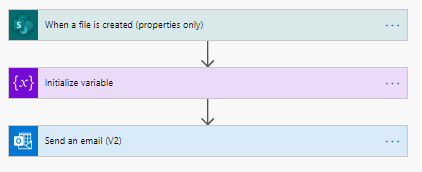
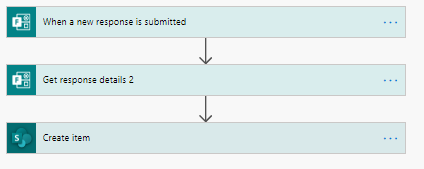
Knowing the above, we designed Construction Viz to streamline the review and approval process. We built a workflow using Microsoft Power Automate to email approval requests to project team members, even if they don’t have a Construction Viz or Microsoft 365 account.

Microsoft Power Automate workflow example

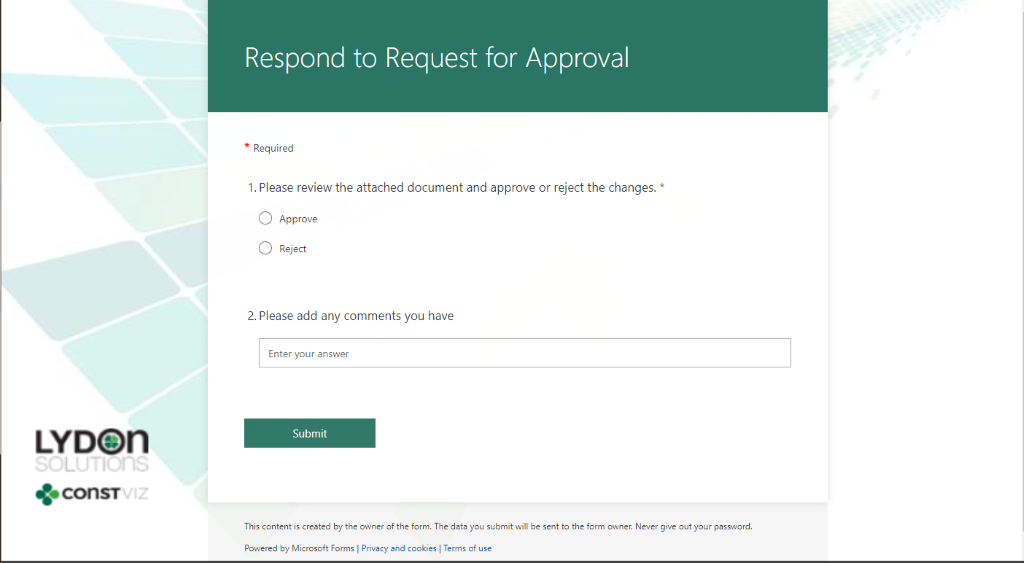
The email generated by Construction Viz has all the necessary information and attachments required to approve the record, as well as a linked lightweight Microsoft Form that the recipient can use to respond to the request. There is no need for them to sign into Construction Viz or any other system. The approver can review and make updates directly in the included form, and Microsoft Power Automate automatically pushes those updates back to Construction Viz. For the recipient, it could not be simpler to respond to the request, no matter what device they are using.

Construction Viz email approval form

Taking Approvals to the Next Level

Construction Viz streamlines the approval workflow process and enables team members to do more with email, a tool they regularly use throughout the day.

But what if users are not even in Outlook at all? Could Construction Viz display approval request forms in any application, or even in the notification area of a user’s mobile device? We think that would be a great feature. Stay tuned for more details on what we have planned next to do just that.

Get Construction Viz for your Team

Construction Viz is a web-based construction project management solution that you can deploy into Microsoft 365 and SharePoint. There are many advantages to this deployment model, such as having your data stay with you in your Microsoft 365 tenant. Also, you can leverage the full power of Microsoft 365 application services with Construction Viz, all with the same Microsoft user credentials.

If you need help setting up your construction projects in Microsoft 365, visit LydonSolutions.com, where you can find out more on our Microsoft 365 Managed Services and submit a no-obligation consultation request. If you prefer a turnkey, enterprise-ready project management software solution, contact us today for a free demo.

Keep Organized with the Construction Viz Drawing Management App

Drawing Management | September 1, 2020

Make sure your team always has access to the latest set of drawings for your projects with the Construction Viz Drawing Management app for Microsoft 365 and SharePoint.

A frequent challenge for construction project managers is finding and referencing the latest set of drawings. Part of the problem is that many organizations do not keep an updated master drawing list. Further complicating things, teams often store PDFs of the drawings for their projects without metadata in a shared drive with a complex folder structure. As a result, only employees that know the folder scheme can find and update drawing revisions correctly.

The impact of project teams not having timely access to the correct drawings can be felt from the home office to the field, resulting in lost productivity for the engineers and contractors doing the work. Effective drawing management is not just a problem for small companies. We have seen these kinds of issues happen even on multi-billion-dollar projects over the years.

With the new Construction Viz Drawing Management app, available for Microsoft 365 and SharePoint, we set out to reimagine how a system can help project teams manage construction drawings more effectively.

Six Key Features of the Construction Viz Drawing App


The Construction Viz Drawing Management app improves the entire drawing management process in six key areas:

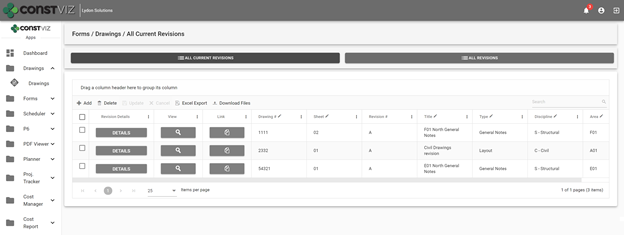
1. Creating an interactive master drawing list. The Construction Viz Drawing app includes an interactive and searchable grid of every drawing organized by ID number, sheet, title, revision, discipline, area, and drawing set. The latest revisions are listed first, so team members are always working off the most recent revision. The grid can be filtered and grouped to find any drawing easily.

Construction Viz Drawing Management App - Master Drawing List

2. Organizing drawing file storage. No more complex folder structures. As with all Construction Viz data, the Drawing Management app stores each drawing and revision as a record with a single associated file in SharePoint for easy access.

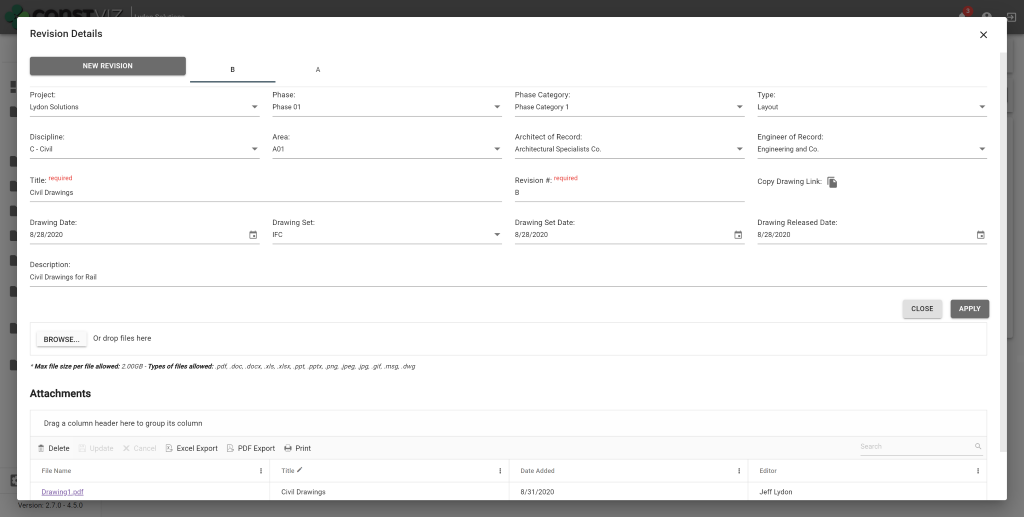
3. Improving drawing revision management. When a user uploads new drawings, the app requires them to input a user-defined revision value. Since the app displays the latest revisions first, other team members can readily find and work off of the most recent version of a drawing.

Construction Viz Drawing Management App – Revision Management

4. Adding drawing metadata. The app requires users to complete standard metadata fields when uploading new drawings. This rich metadata lets teams filter, group, and search drawings in the app’s master grid view.

5. Relating drawings to other processes. The Drawing Management app integrates with other Construction Viz apps to add a “Related Drawings” component. The component enables users working in other apps to select one or more drawings and relate them to any record, such as an RFI or other form, using the same interactive and searchable grid featured in the Document Management app. This feature makes it quick and easy for users to include related drawings on construction forms and correspondence without having to deal with attachments.

Construction Viz Drawing Management App – Related Drawings component

6. Exporting drawing PDFs to local devices. Users can export drawing PDFs for use on their local devices from within the master drawing list grid or a related app using the component feature described above.

These six features of the Construction Viz Drawing Management app will save a project team the headache that comes with trying to update and find the latest drawing revisions. Integration with other Construction Viz apps ensures that users have ready access to the right drawings when and where they need them – and can share them with a few clicks.

See What Else Construction Viz Can Do for Your Organization

Construction Viz offers a full lineup of construction management apps, including tools for project tracking, scheduling, GIS maps, cost reports, construction forms, and more. Find out how Construction Viz can help you better manage your construction project by scheduling a no-obligation demo today.

Codes Metadata in Construction Viz

Video | February 5, 2020

Construction Viz lets you utilize metadata to track work breakdown structure, specifications, and dynamic relation matrices for your projects.

Watch our newest video to see how Construction Viz makes this process easy in both SharePoint and Office 365.

Available Metadata and Other Features in Construction Viz:

• Work Breakdown Structure (WBS)
• Project Specifications
• Dynamic Relation Matrices (DRM)
• Standardized metadata across all Apps for every record
• Metadata can be queried and reported across Construction Viz
• Available for Microsoft SharePoint and Office365

Find out more about how Construction Viz can help use project information for reporting and streamlining projects. Schedule your free consultation today!

Construction Viz & Revision Management

Forms | August 22, 2019

Construction management is really the management of the flow of information. It never ends from the time the bids are taken to the final close-out of the contract. Forms convey questions (RFIs) and responses, price changes (change order requests) and status reports. Ongoing design changes add to the volume of information between owners, designers and contractors.

Unfortunately, managing these changes can be difficult with most Project Management Information Systems (PMIS).

With Construction Viz, you can leverage the powerful revision-management capabilities of SharePoint. However, we took it a step further by integrating revision-management capabilities directly into our Form Apps. This feature enables you to see the different revisions so you can more easily manage the entire process—from creation to reporting—for all construction correspondence forms, including submittals, transmittals and RFIs.

Here’s how it works.

Create a Revision

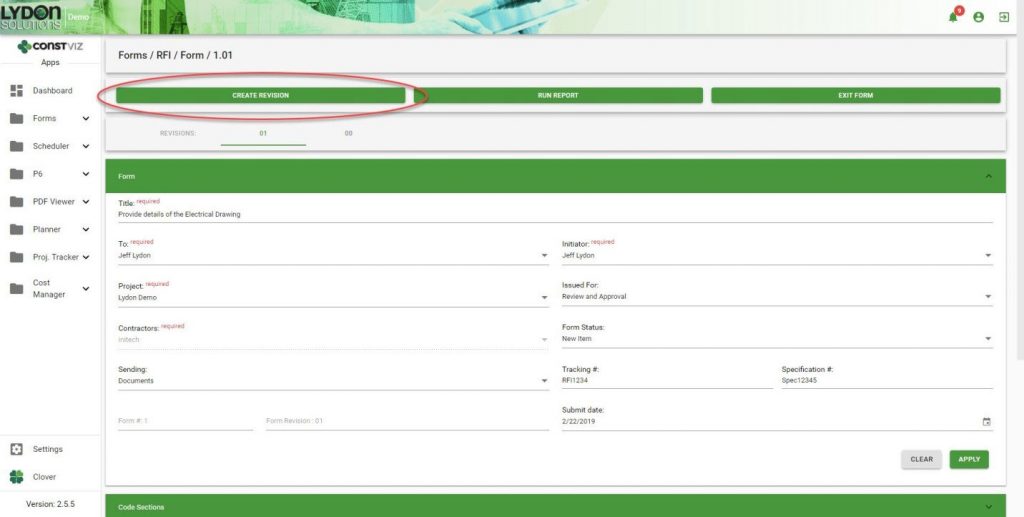
A Create Revision button within a form allows you to easily create and link form revisions together at any point in time.

SharePoint Revision Management

Duplication of Form Content

When revisions are created, important information captured in the previous revision is carried over from one form to the next. This ensures consistency and saves time because you do not have to fill in that information again.

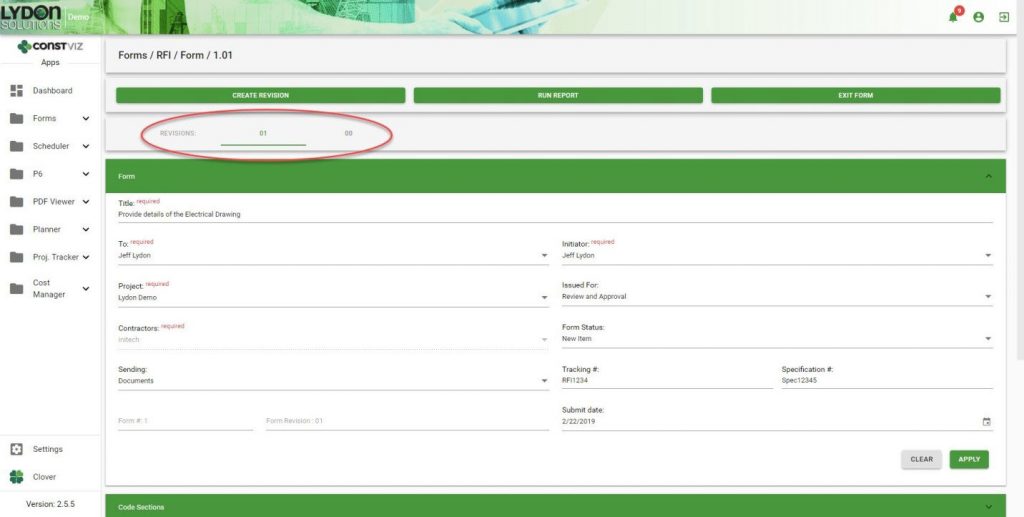
In-Form Navigation

You can easily jump back and forth between revisions as needed.

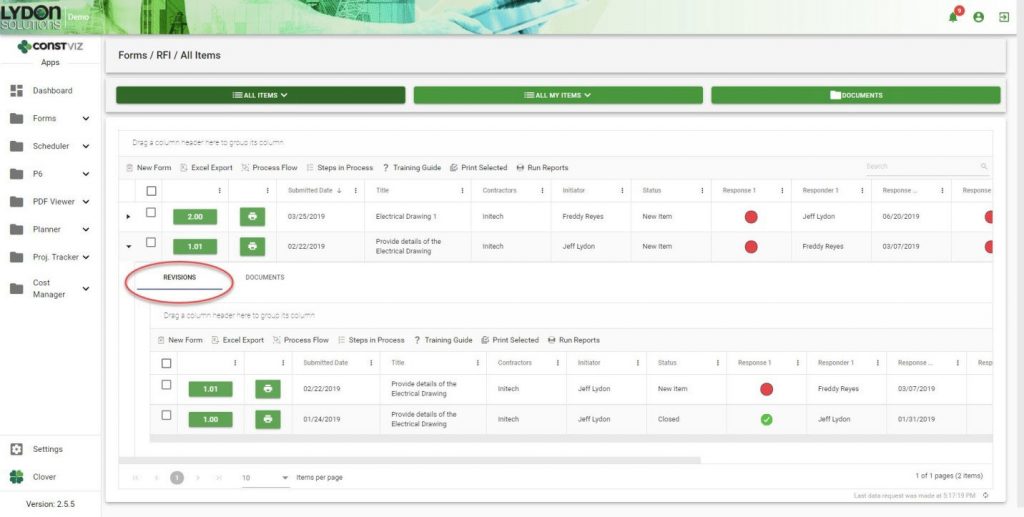
Grid/Log Navigation

Revisions are automatically added to the form grid in descending chronological order. Simply click the form to open the sub-grid to see all the revisions related to that form.

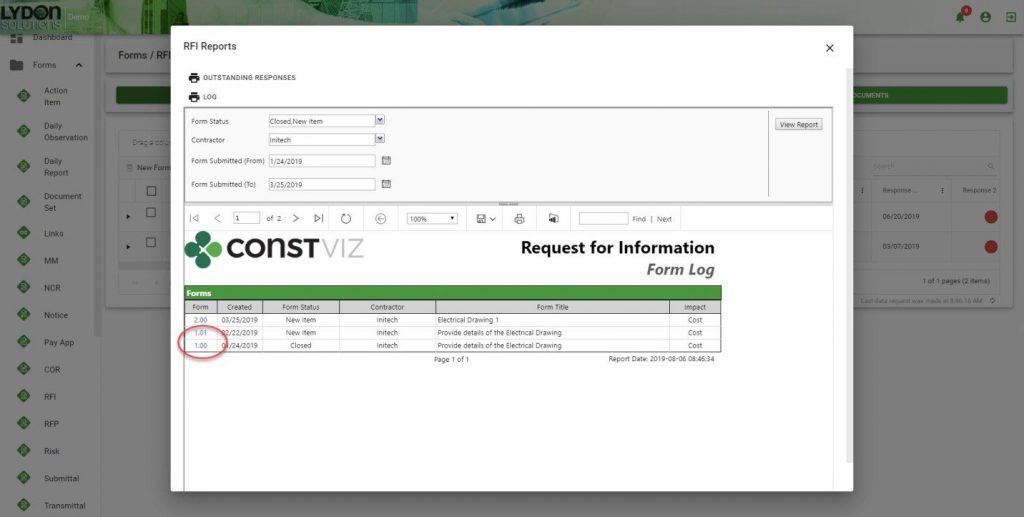
Reporting

All revisions are grouped together, which makes it easier for you to find any revision. Reports can be saved in a variety of formats including PDF, Excel and PowerPoint. The form number/revision is hyperlinked, making it easy to open any form.

Revision management is just one of the many ways Construction Viz makes your job easier. Contact us for a free consultation to learn more. You can also sign up for our monthly newsletter below to get our latest blog updates, tips on using Microsoft SharePoint, and other useful info delivered directly to your inbox.

Announcing the Construction Viz Blog

News | August 14, 2019

Welcome to the new Construction Viz blog, a dedicated information hub for product news, updates, how-to guides, and more. Going forward, this will be the best place for in-depth information about Construction Viz, a powerful and flexible construction project management software solution introduced by Lydon Solutions.

Meanwhile, the Lydon Solutions blog will continue to provide general company updates as well as thoughtful perspectives and useful tips aimed at construction project management professionals.

Be sure to join our mailing list in the footer below to stay up-to-date with both blogs!

Construction Viz – Our Journey So Far

Longtime readers of the Lydon Solutions blog know that we’ve been talking about Construction Viz since its release in 2016. To bring everyone up to speed, below is a chronological recap of posts originally published on our Lydon Solutions parent site.

2016 – Construction Viz Launches

We announced Construction Viz back in 2016 as a subscription-based construction project management solution powered by Microsoft SharePoint, SQL, and Azure.  We were pretty excited since there really was not (and still is not) anything else like it on the market.

What makes Construction Viz so different is its deep integration with SharePoint and SQL, industry-leading enterprise technologies from Microsoft that most companies already use and trust. But getting the most out of these platforms requires complicated configuration and customization. Construction Viz handles all of that, letting organizations manage their projects in a way that is fully optimized for construction teams. It includes everything project teams need, including document management, dashboards, reports, forms, workflows, and more – all available right within the familiar SharePoint environment and backed with all the power of SQL for data management and querying.

2017 – Expanding the Features of Construction Viz

We believe that every organization, project, and PM have unique needs. But too many platforms out there take a one-size-fits-all approach. The industry deserves better.

Which is why we designed Construction Viz from the ground up to be a flexible and easy-to-use solution tailored to the way you and your team do your work. Throughout 2017, we shared updates on the Lydon Solutions blog about how we were expanding and refining Construction Viz’s features:

(Even More) Powerful Reporting with SQL SSRS

Our integration with Microsoft SQL and the SQL Server Reporting Services (SSRS) toolkit – formerly Datazen – opened up powerful reporting and dashboard features for our Construction Viz users.

Combined Geospatial Map and Project Data

“Dude, where’s my project?” is something Construction Viz users never need to ask.  Thanks to our deep integration with Microsoft SharePoint and SQL, it is easy to seamlessly combine map data from applications like ArcGIS with project information in Construction Viz to create a robust, mobile-friendly mapping solution.

Document Editing and Real-time Collaboration Using Mobile Devices

Project teams need to be productive in the office and the field. Which is why we integrated Construction Viz with Microsoft Office Online Server. The integration enables Construction Viz users to view, edit, and collaborate on Office documents in real-time right from their mobile browser on any device.

Create and Share Custom Project Dashboards

If a picture is worth a thousand words, then a well-designed dashboard is worth ten thousand. We shared how users can combine Construction Viz with Microsoft SQL Server Mobile Report Publisher to easily build and share visually-striking, custom project dashboards with their team.

2018 – Introducing Construction Viz Apps for SharePoint & Office 365

Last year we had big news with the rollout of our Construction Viz Apps for SharePoint & Office 365. The apps are game-changers for construction project management teams, allowing organizations to select and deploy only the features they need right into their Microsoft SharePoint or Office 365 environments. No other platform gives you that kind of flexibility.

Construction Viz Apps are turbocharged with React, an innovative technology used by industry-leading disruptors like Facebook, Netflix, Airbnb, and Dropbox. Building our apps with React enables us to give you all the power of Construction Viz, SharePoint, and SQL with a simple user-interface and complete freedom to choose the features that are important to you.

Our Construction Viz Apps are the full realization of the vision we had in 2016 of giving construction teams an alternative to bloated, one-size-fits-all platforms.

2019 – Big Plans for Construction Viz

Which brings us to the present. We Have Big Plans for Construction Viz in 2019, including a new marketplace to make it even easier to buy and deploy our apps, adding services to help construction organizations get the most out of Office 365, plus much more.

Our new Construction Viz blog will the place to get the latest product updates, news, and app-related announcements. So join our newsletter in the footer below to make sure you don’t miss out.

Learn More About Construction Viz – Our Powerful Construction Project Management Software

We would love the opportunity to show you how Construction Viz can transform for the better the way you and your organization manage your construction projects. Contact us today for a no-obligation demo and consultation.

  • « Go to Previous Page
  • Page 1
  • Interim pages omitted …
  • Page 5
  • Page 6
  • Page 7

Footer

About Constructon Viz

Construction Viz is a flexible construction project management software solution powered by Microsoft SharePoint and SQL.
Read More >

Navigation

  • Home
  • About
  • Features
  • Apps
  • Blog
  • Contact
  • Login

Apps

  • Construction Viz Hub
  • Cost Report
  • Drawing Management
  • File Manager
  • GIS Maps
  • Oracle Primavera 6
  • Payment
  • Specification Management

–

  • Project Forms
  • Project Planner
  • Project Scheduler
  • Project Tracker
  • Task Manager

Connect with Us

  • This field is for validation purposes and should be left unchanged.
  • Sign up to receive helpful tips for construction project managers as well as updates about Construction Viz.

Lydon Solutions

© Lydon Solutions

  • Privacy
  • Cookies
  • Terms of Use
  • Disclaimer
  • End-user license

Click here to start a Microsoft Teams chat.

Click here to start a Microsoft Teams chat.

Contact Us
This field is for validation purposes and should be left unchanged.
Name(Required)
Join Our Newsletter

Sign up to receive helpful tips for project managers and updates about Construction Viz.

Get Started

Join Our Newsletter

Sign up to receive helpful tips for construction project managers as well as updates about Construction Viz.

  • This field is for validation purposes and should be left unchanged.
  • This site is protected by reCAPTCHA and the Google Privacy Policy and Terms of Service apply.