• Skip to primary navigation
  • Skip to main content
  • Skip to footer
Construction Viz

Construction Viz

Project Management Perfect

  • About
  • Features
  • Apps
  • Blog
  • Contact
  • Download Flyer
  • Get Started Today
  • Login
Hide Search

Drawing Management

Simplifying Construction Drawing Management and Access with Construction Viz, SharePoint, and Clover AI

Drawing Management | September 3, 2026

Getting the right drawing into the hands of field personnel should be simple. Too often, it is not.

To find what they need, field teams often need to navigate complex PMIS (project management information system) interfaces, search through folders, and verify revision histories before they can be confident they are looking at the latest approved drawing. On a mobile device and in the middle of active fieldwork, those extra steps create unnecessary friction.

"Getting the right drawing into the hands of field personnel should be simple. Most PMIS make it complicated instead."

With our Clover AI Copilot Agent for Microsoft 365 and Construction Viz, we have simplified that experience.

Building a Better Foundation for Drawing Management

Most companies are already using SharePoint to manage their drawings.

The Construction Viz Drawing Management solution takes it a step further by introducing metadata that tracks drawing revisions, connects drawings to related project workflows, and stores project information within the client’s SharePoint environment.

"Construction Viz combines structured metadata with Clover AI to give field teams quick access to the latest approved information, wherever they are working."

Because that information is organized using structured metadata, it creates a strong foundation not only for managing drawings, but also for search, reporting, and AI-enabled project intelligence.

Construction Viz combines structured metadata with Clover AI and SharePoint capabilities to give field teams quick access to the latest approved information, wherever they are working.

With Clover AI, SharePoint AI, and Skills capabilities, Construction Viz can use that foundation to deliver a more streamlined drawing experience specifically for field users.

Faster, Simpler Access to Current Drawings

This AI-enhanced approach enables interactive HTML reports and targeted interfaces that give users quick access to the project information they need without requiring them to navigate the full project management system.

Key capabilities include:

  • Interactive live HTML reports with automatic data refresh, tailored to specific audiences
  • Simple, field-focused interfaces for accessing drawings
  • Automatic access to the latest approved drawing revision
  • No Power BI license required
  • No Copilot license required for end users
  • Flexible embedding within emails, SharePoint pages, and Construction Viz dashboards

The result is a mobile-friendly experience that helps field teams quickly access current project information while keeping the underlying data, AI capabilities, and reports securely within the organization’s Microsoft 365 environment.

Turning Clover AI into Practical Construction Workflows

These enhanced drawing management capabilities go beyond creating another report.

Clover AI is Lydon Solutions’ construction-focused Copilot Agent, designed to put Microsoft AI to work against real project information and workflows. Combined with Construction Viz, it turns structured project data into more useful, accessible information for the people who need it.

By bringing together Construction Viz, SharePoint, and Clover AI, organizations can create targeted business applications and user experiences around the way their teams actually work.

That is an important part of our approach. Rather than adding AI simply as another standalone feature, we apply it to construction-specific workflows where it can help teams find information, generate reports, analyze project data, and make better decisions faster.

"Rather than adding AI as a standalone feature, Clover AI puts it to work against real construction data and workflows."

As Microsoft continues to expand the AI capabilities available across Microsoft 365 and SharePoint, Construction Viz and Clover AI provide a practical way to apply those technologies to real construction use cases.

If you can imagine it, we can deliver it.

Learn more about Clover AI and Construction Viz, and sign up for a trial to see how your organization can use Microsoft 365, SharePoint, Clover AI, and Construction Viz to create more efficient construction workflows.
Get a Free Consultation

"*" indicates required fields

This field is for validation purposes and should be left unchanged.
Name*

Keep Organized with the Construction Viz Drawing Management App

Drawing Management | September 1, 2020

Make sure your team always has access to the latest set of drawings for your projects with the Construction Viz Drawing Management app for Microsoft 365 and SharePoint.

A frequent challenge for construction project managers is finding and referencing the latest set of drawings. Part of the problem is that many organizations do not keep an updated master drawing list. Further complicating things, teams often store PDFs of the drawings for their projects without metadata in a shared drive with a complex folder structure. As a result, only employees that know the folder scheme can find and update drawing revisions correctly.

The impact of project teams not having timely access to the correct drawings can be felt from the home office to the field, resulting in lost productivity for the engineers and contractors doing the work. Effective drawing management is not just a problem for small companies. We have seen these kinds of issues happen even on multi-billion-dollar projects over the years.

With the new Construction Viz Drawing Management app, available for Microsoft 365 and SharePoint, we set out to reimagine how a system can help project teams manage construction drawings more effectively.

Six Key Features of the Construction Viz Drawing App


The Construction Viz Drawing Management app improves the entire drawing management process in six key areas:

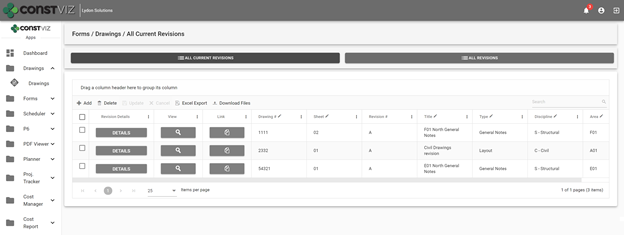
1. Creating an interactive master drawing list. The Construction Viz Drawing app includes an interactive and searchable grid of every drawing organized by ID number, sheet, title, revision, discipline, area, and drawing set. The latest revisions are listed first, so team members are always working off the most recent revision. The grid can be filtered and grouped to find any drawing easily.

Construction Viz Drawing Management App - Master Drawing List

2. Organizing drawing file storage. No more complex folder structures. As with all Construction Viz data, the Drawing Management app stores each drawing and revision as a record with a single associated file in SharePoint for easy access.

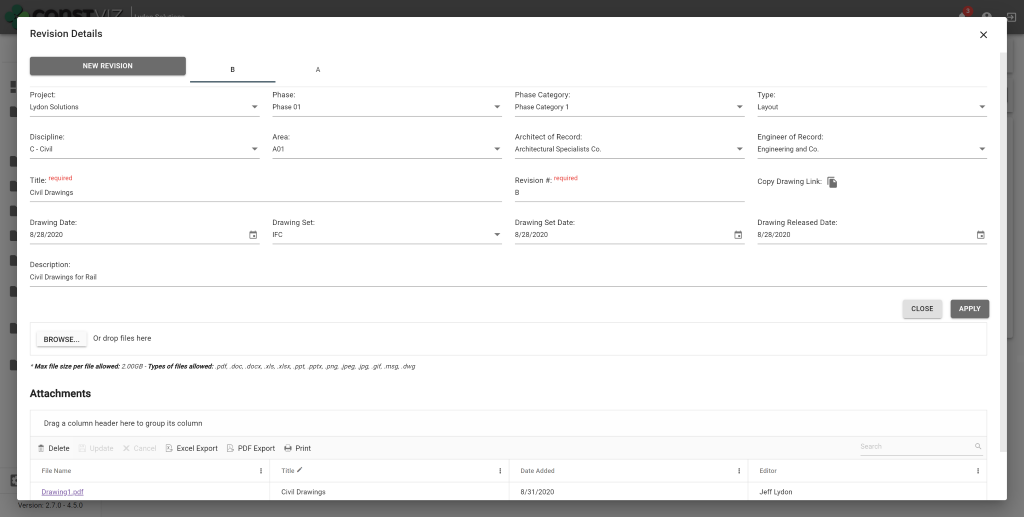
3. Improving drawing revision management. When a user uploads new drawings, the app requires them to input a user-defined revision value. Since the app displays the latest revisions first, other team members can readily find and work off of the most recent version of a drawing.

Construction Viz Drawing Management App – Revision Management

4. Adding drawing metadata. The app requires users to complete standard metadata fields when uploading new drawings. This rich metadata lets teams filter, group, and search drawings in the app’s master grid view.

5. Relating drawings to other processes. The Drawing Management app integrates with other Construction Viz apps to add a “Related Drawings” component. The component enables users working in other apps to select one or more drawings and relate them to any record, such as an RFI or other form, using the same interactive and searchable grid featured in the Document Management app. This feature makes it quick and easy for users to include related drawings on construction forms and correspondence without having to deal with attachments.

Construction Viz Drawing Management App – Related Drawings component

6. Exporting drawing PDFs to local devices. Users can export drawing PDFs for use on their local devices from within the master drawing list grid or a related app using the component feature described above.

These six features of the Construction Viz Drawing Management app will save a project team the headache that comes with trying to update and find the latest drawing revisions. Integration with other Construction Viz apps ensures that users have ready access to the right drawings when and where they need them – and can share them with a few clicks.

See What Else Construction Viz Can Do for Your Organization

Construction Viz offers a full lineup of construction management apps, including tools for project tracking, scheduling, GIS maps, cost reports, construction forms, and more. Find out how Construction Viz can help you better manage your construction project by scheduling a no-obligation demo today.

Footer

About Constructon Viz

Construction Viz is a flexible construction project management software solution powered by Microsoft SharePoint and SQL.
Read More >

Navigation

  • Home
  • About
  • Features
  • Apps
  • Blog
  • Contact
  • Login

Apps

  • Construction Viz Hub
  • Drawing Management
  • File Manager
  • Specification Management

–

  • Project Forms
  • Project Planner
  • Project Scheduler
  • Project Tracker
  • Task Manager

Connect with Us

This field is for validation purposes and should be left unchanged.

Sign up to receive helpful tips for construction project managers as well as updates about Construction Viz.

Lydon Solutions

© Lydon Solutions

  • Privacy
  • Cookies
  • Terms of Use
  • Disclaimer
  • End-user license

Click here to start a Microsoft Teams chat.

Click here to start a Microsoft Teams chat.

Contact Us
This field is for validation purposes and should be left unchanged.
Name(Required)
Join Our Newsletter

Sign up to receive helpful tips for project managers and updates about Construction Viz.

Get Started

Join Our Newsletter

Sign up to receive helpful tips for construction project managers as well as updates about Construction Viz.

This field is for validation purposes and should be left unchanged.