• Skip to primary navigation
  • Skip to main content
  • Skip to footer
Construction Viz

Construction Viz

Project Management Perfect

  • About
  • Features
  • Apps
  • Blog
  • Contact
  • Download Flyer
  • Get Started Today
  • Login
Hide Search

project management

Archive Your Project Data in Three Clicks with the Construction Viz PDF Report Wizard 

Project Management, Project Management Tools, Reporting | October 26, 2023

Have you ever needed an easy way to archive PDF versions of all your project correspondence, such as RFIs and daily reports, including attachments (which could be in various file formats)?  

The new Construction Viz PDF report wizard aims to build on our existing technology with the ability to generate PDFs from multiple forms at the same time. Read on to find out more about this new feature. 

Introducing the Construction Viz PDF Report Wizard

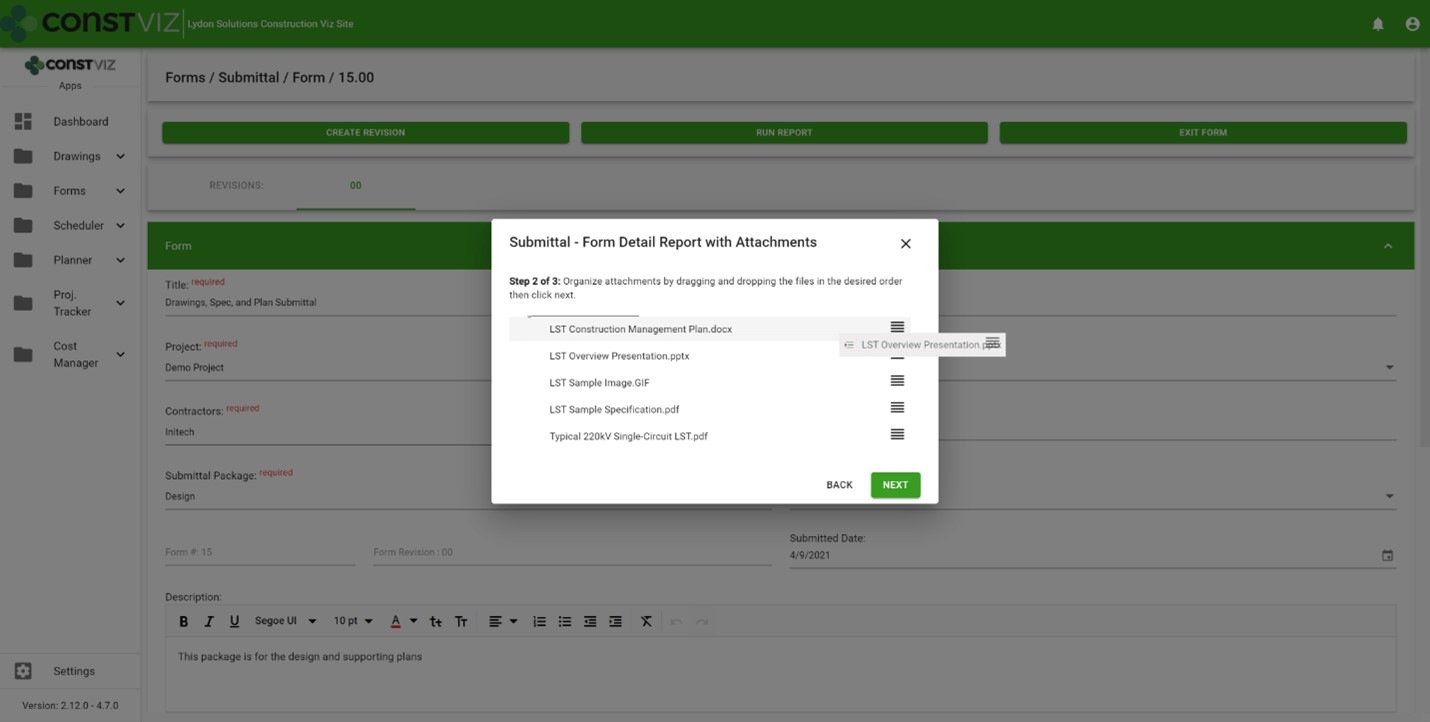
We built the Construction Viz PDF Report Wizard based on the Construction Viz Form archive wizard which is a powerful and heavily used feature in Construction Viz. It allows users to create PDF binders from any form, including the form attachments. The step-by-step wizard walks you through selecting a form, adding and ordering attachments, and naming the generated PDF binder.
Picture1

Form archiving wizard – re-ordering attachments 

The cool part is the archive wizard converts attached files from their native format (Excel, Word, etc.) to PDF and automatically provides a name for the PDF binder. So, if you want to send a contractor a PDF of an RFI with any relevant attachments, select the form, select which attachments they need to see, and follow the wizard to generate a PDF you can email.  

This feature is an excellent form-by-form solution, but what if you want a push-button way to choose more than one form? Let's say you want to archive all of the RFIs, submittals, and dailies on a project and include all the form attachments. And you want to do this in bulk. 

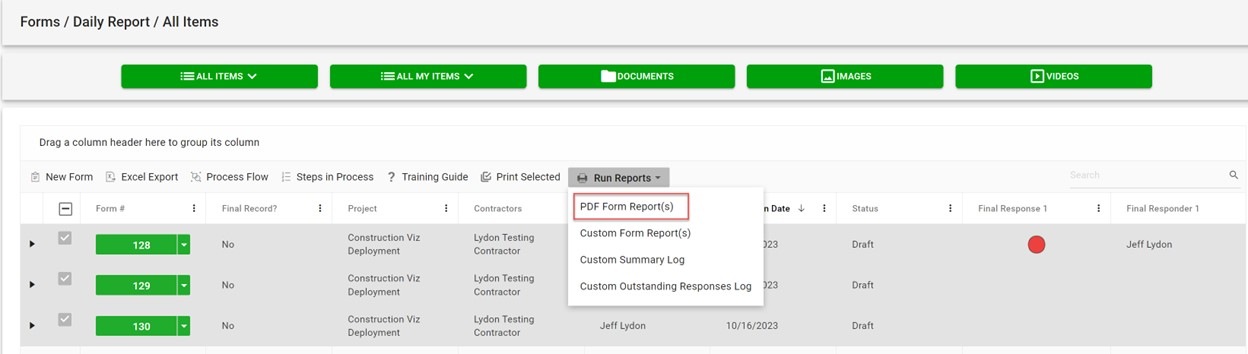
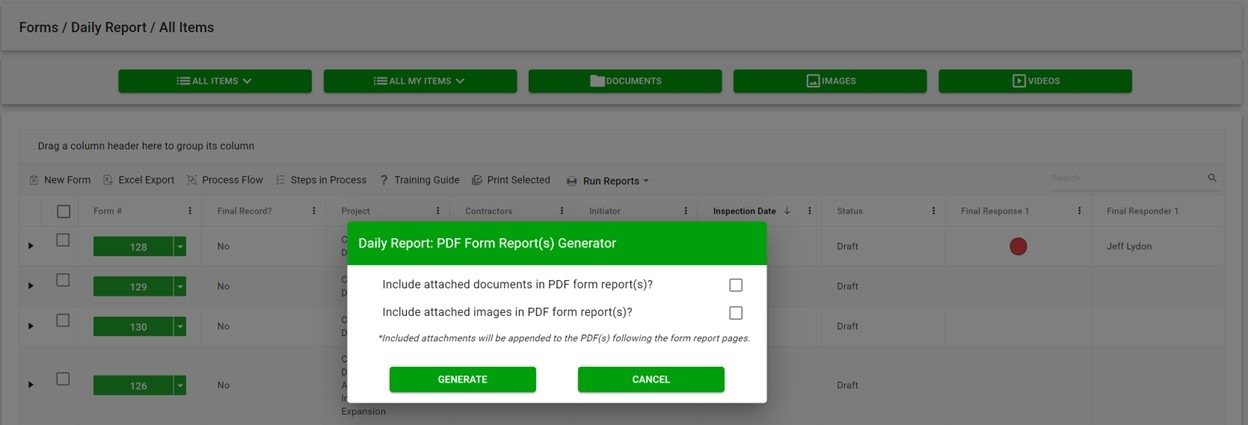
The new PDF report wizard leverages some of the same technology from our form archive wizard to create multi-form PDF binders of your project correspondence. Users select one or more forms, click the PDF Form Report(s) button, and have the option to include attachments, images, or both. And just like the form archive wizard, the attachments are automatically converted from their native format (Excel, Word, etc.) to PDF, including any images. 
Picture2

If you are wondering about file sizes impacting the system and preventing you from continuing your work, don't. While the file conversion runs, the tool prompts you to load another screen to continue working without interruption. Construction Viz will notify you when the processing is complete and the PDF files are downloaded locally.  
Picture3

Our development team at Lydon Solutions continues to drive innovations in your day-to-day workload with our Construction Viz product for Microsoft 365 so you can focus on what's important, delivering the project on time and within budget. You can request a demo of Construction Viz here, or if you need help with Microsoft 365, you can click here for a free one-hour consultation with our Microsoft technology experts. 
Linked apps, where have you been?

Forms | August 24, 2023

The new linked apps feature in Construction Viz allows creating any form within another form, like an action item within a meeting minute form or a change request in a risk form. Find out how this new feature can save time and improve your overall document control processes.

A need based on common real-world scenarios

If you think about the evolution of a change on a project, it might start with an issue, move to risk, get added to an RFI, and finally move to a change request to implement the change. Typically, these are all separate forms, but they are all part of an interrelated process to document and disposition a project change.

Taking a step back and looking at the entire change process, each form builds on the prior, from inception to implementation. Additional details, further justification, subsequent approvals, etc., are added at each stage of the change lifecycle.

If you can relate these separate processes together, project teams can streamline the process and build an audit trail to support the justification of the change.

Enter Construction Viz’s linked apps

With the new Construction Viz connected apps feature, you can create one or more form apps within another. For example, if you are filling out a risk form and want to generate a related change request, you can add the change request form linked component to the risk form settings.

When a user completes a risk form, the new component will show a window into the change request app where they can create one or more change requests without ever leaving the risk form. And the change request will automatically link back to the risk form and vice versa.

This functionality can be added to any form, creating a one-to-many relationship so that an entire process can be automatically related.

Linked apps are just one of the many features we have added to Construction Viz to enhance information management on a project further. You can request a demo of Construction here.

Not ready to move to an enterprise construction management system or need help with Microsoft 365? You can request a free 1-hour Microsoft 365 consultation request with our experts here.

CV-Product-Demo-Webinar

Construction Viz for Microsoft 365 Product Demo
Webinar - September 7, 2023, 11:00 AM PST
Participate in this interactive session to share your challenges and learn more about Construction Viz for Microsoft 365.
Learn More

Construction Viz for Managing Franchise Stores

News | July 10, 2023

Construction Viz is a unique enterprise construction PMIS fully configurable and customizable to your specific construction business. This flexibility makes it simple to add entirely new applications and functionalities to the source code to accommodate our customers’ needs. And on top of that, the entire solution can be deployed into your Microsoft 365 tenant, providing the ultimate control and security of your processes and data.

We recently were tasked with developing a solution for managing the construction of over 400 franchise stores nationwide. This effort included out-of-the-box functionality and custom applications to manage each store from initiation to closeout.

Here is a high-level overview of how we met our client’s needs for franchise store management with Construction Viz.

Construction Viz Hub Customized for Franchise Stores

With Construction Viz, a SharePoint site deployment can represent a single project or hundreds of projects, depending on the need. In this instance, we needed to accommodate 400 stores.

To do this, we rebuilt the Construction Viz projects, contacts, and company settings to capture additional store-specific information, such as owner, location, store type, insurance requirements, and the like. We then connected these settings to our construction-specific forms (e.g., RFI, submittals, etc.) and assigned them to specific stores and projects.

Repurposing out-of-the-box construction apps

The common wisdom is not to reinvent the wheel. We took this maxim to heart while adapting Construction Viz to the needs of franchise store management.

We started by leveraging our existing Construction Viz form apps, such as RFIs, submittals, and daily reports. Next, we configured these forms to capture store information so the client could get a bird’s-eye view of project information across all stores and be able to drill down into each specific store.

New custom apps specific to franchise store management

To capture the unique data needed to manage a portfolio of stores, we needed to build several new applications, including:

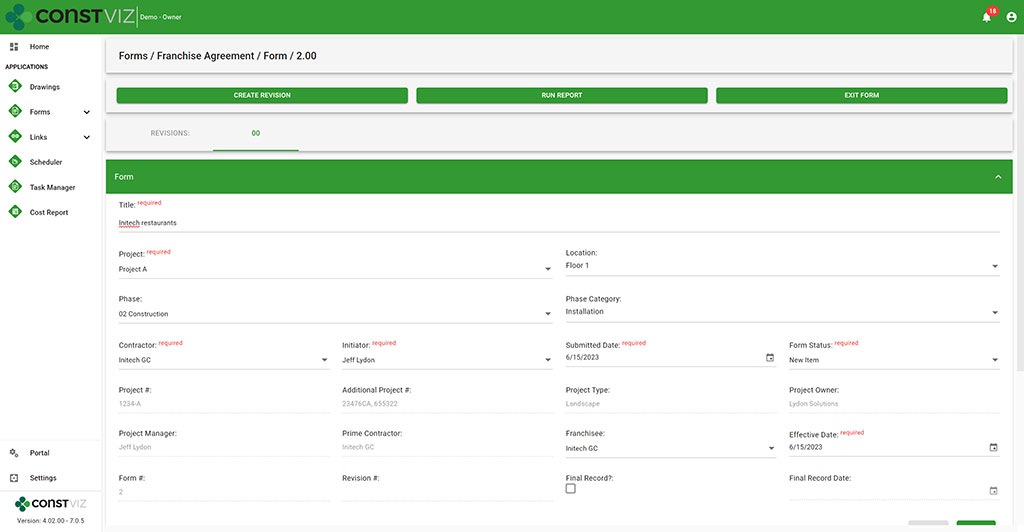
  • Franchise Agreement – This form tracks all of the information required to complete a franchise agreement between the franchise and the franchisee, such as contract terms and ongoing lease costs such as taxes, maintenance, and utilities.
Construction Viz Franchise Agreement form
  • Permits – We rebuilt our Permit form to capture the many types of permits required, from obtaining land to ongoing health services. Key reminder dates, such as permit expiration date, were included so email notifications could be automatically triggered when late.
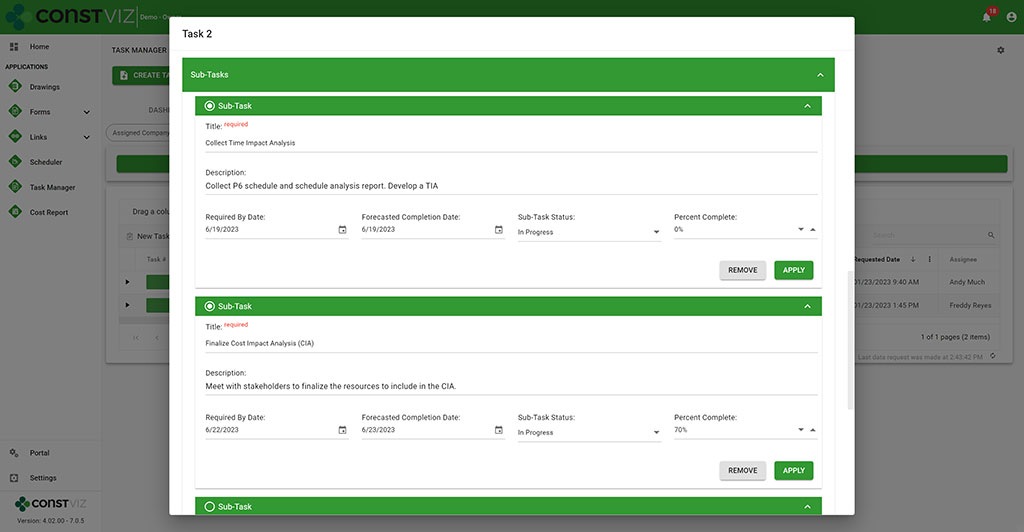
  • Work Performance – We rebuilt our Task Manager app to add subtask detail and percent complete so that every task across the portfolio of stores is centralized and reported on.
Construction Viz Task Manager with sub-task functionality

Discover How Construction Viz Can Meet Your Specific Project Management Needs

Designing and delivering solutions around how you work is one of the key advantages of Lydon Solutions services and how we developed Construction Viz.

Our construction and IT specialists will walk you through our proven step by step FOCUS software implementation methodology to ensure your projects are a success. Using out-of-the-box Construction Viz applications or building a custom solution, we can guide you from concept to delivery, so that your team will want to use the product at the end of the day.

Find out more about Construction Viz with a no-obligation demo and consultation. Or, if you need help with Microsoft 365, head over to LydonSolutions.com to learn about our entire lineup of construction technology services and solutions. 

Improve Project Efficiency with New Schedule Views for Construction Viz

Forms | June 5, 2023

Construction forms such as submittals, RFIs, and daily reports are tightly integrated with project schedules but can get lost among the hundreds or thousands of potential activities. To manage forms effectively, it’s not enough to just see them included in a weekly schedule report. It is essential to evaluate inquiries promptly and efficiently in real-time to address any possible schedule disruptions.

These inquiries may include the following:

  • Did the contractor adhere to the contractual obligations by submitting their documents on time?
  • Was the review of Requests for Information (RFIs) conducted within the agreed-upon deadlines?
  • Were the daily inspections conducted as scheduled?

You need a simple and quick way to answer these questions and more in your construction project management software solution. The problem is that the typical form logs found in most PMISs allow you to sort and filter on due dates, but it lacks form-specific Gantt chart views to manage deliverables.

Our new form view feature for Construction Viz solves this shortcoming.

Construction Viz gives you a clear view of your form data

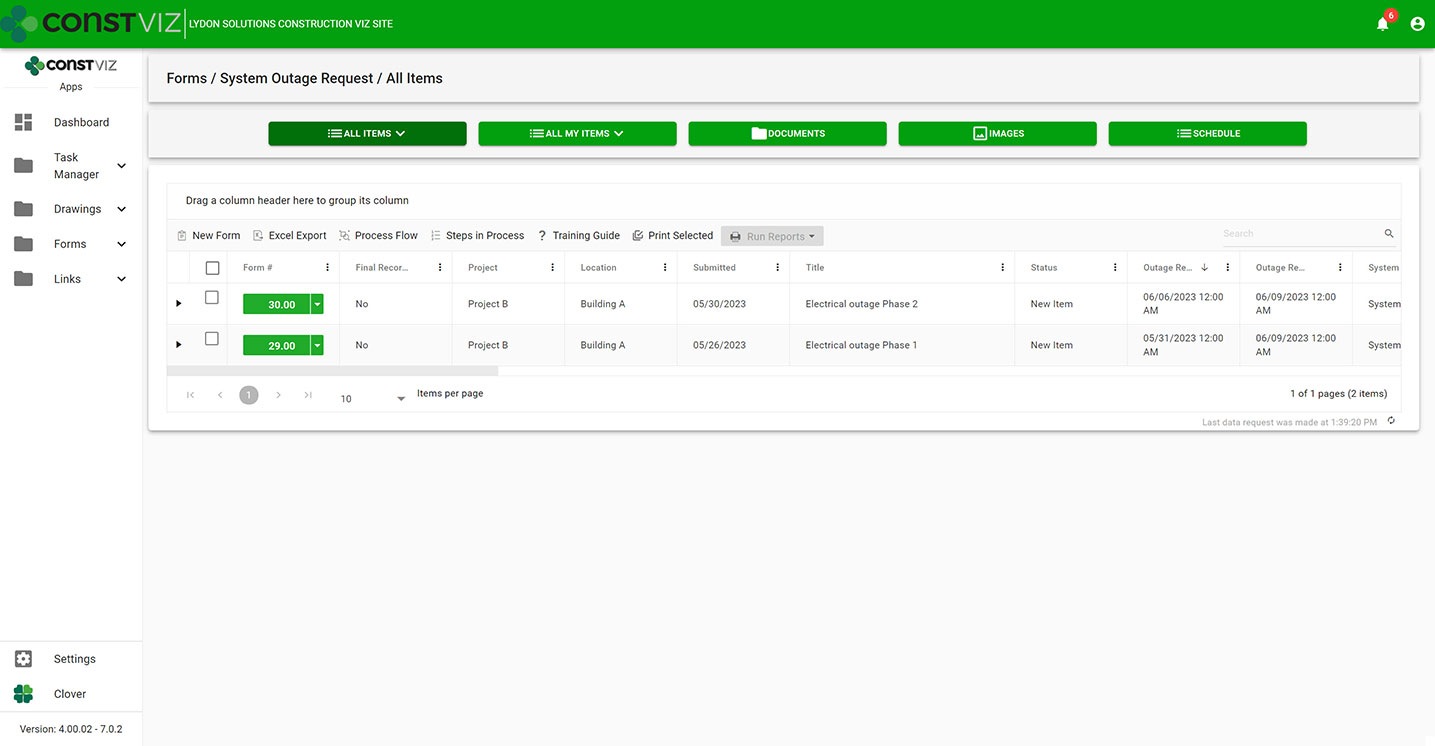
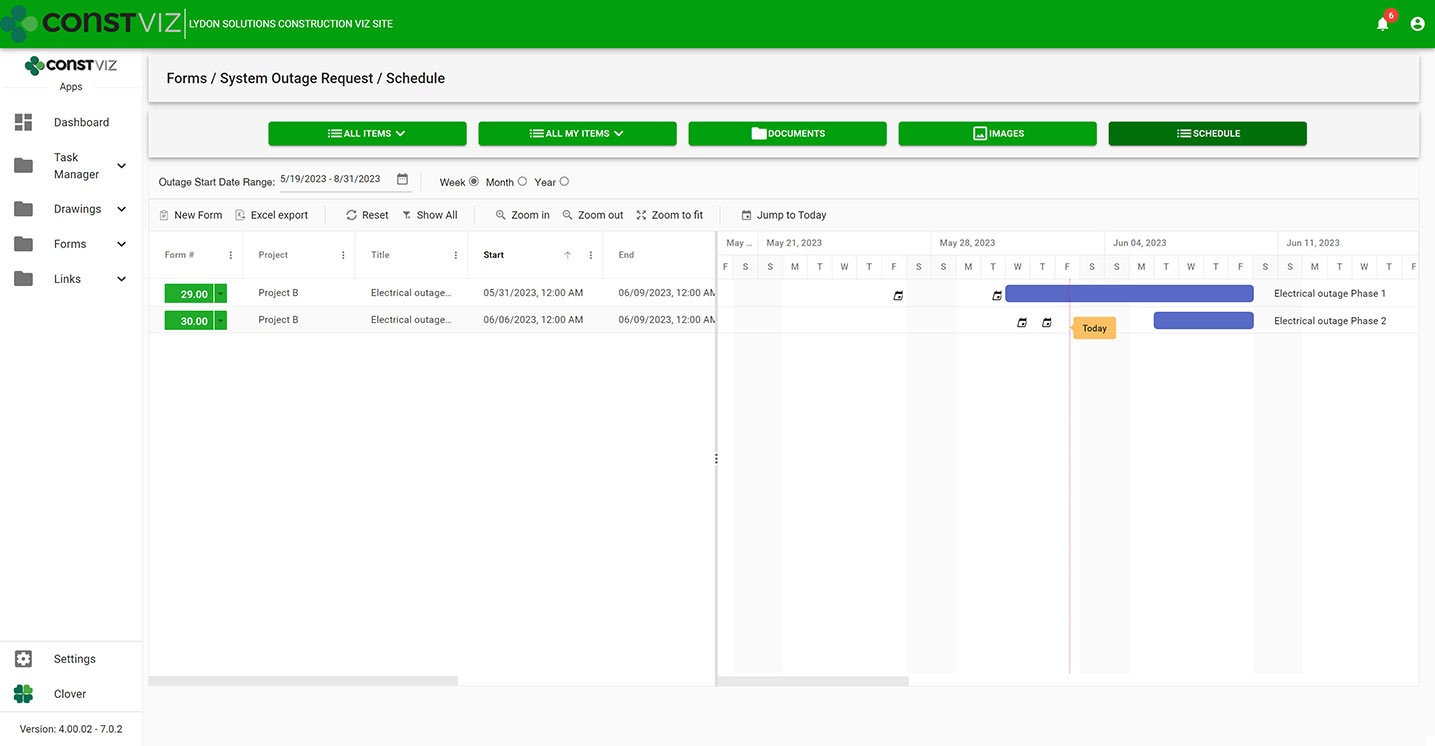
With the new Construction Viz schedule views, you can visualize any of our apps in a traditional Gantt chart view accessible from within the app itself. Now, you have the best of both worlds, the detailed analysis of form data in interactive logs and a Gantt chart focused specifically on the form.

Construction Viz System Outage Request app All Items List (“Form Log”) View
Construction Viz System Outage Request app with new schedule view

Construction Viz Scheduler view sample

Customizable form-specific schedules

You can further tailor Construction Viz’s new schedule views for a specific form. For example, baseline vs. the current schedule, resources assignment, and critical path could be added to the submittal form app while not adding those features to the daily report app. And you can roll up schedule data captured in each form app into an overall master schedule.

The new schedule view keeps team leads and members focused on meeting their specific deliverable dates using an intuitive and interactive Gantt chart.

Find out more about Construction Viz features and apps for Microsoft 365 here.

Construction Viz Then, Now, and Tomorrow

News | October 27, 2022

I was cleaning up my office over the weekend and found an article in ENR that I wrote back in 2017 announcing Construction Viz to the world. Little did I know what the future would hold. If you ever have a dream, think the challenge is too hard, and want to give up, I hope this article helps inspire you.

Rewind to 2017 and the launch of Construction Viz

“The only time you should look back in life, is to see how far you have come.”
— Kevin Hart

Until 2017, when I wrote this advertisement article for ENR, we had been strictly developing and hosting SharePoint-based solutions for the construction industry. With Construction Viz, our goal was to create a flexible app-driven platform that we could host or deploy into a client’s SharePoint. We wanted to use the latest and greatest technology and speed up the development and implementation times.

We knew SharePoint, but this was new ground.

In the first iterations of Construction Viz, we built custom JavaScript and Angular components connected to SharePoint lists and libraries. At the time, we had to deploy client-side code into SharePoint sites for the functionality to work.

Going out of the gate was a little rough since we were developing a completely new system while still managing our existing SharePoint clients. We didn’t know where this whole thing would go, but we knew we needed to move away from custom SharePoint development and hosting and into more of a product for Microsoft 365. In 2017, Microsoft 365 started picking up steam with Teams and the Power Platform. We knew Microsoft 365 would be the future, and we needed to change our approach.

Fast forward five years

“Don’t look back unless you can smile; don’t look ahead unless you can dream.”
— Irish Saying

While we had many ups and downs over the years, we stuck it out with Construction Viz for Microsoft 365, which has paid off! We have deployed Construction Viz for our clients on muti billion-dollar programs across many construction sectors.

So, how did we get here?

LookingBackCV_2

Bet on our people

Everyone on our team brings a unique skillset from technical architecture, UI/UX, front-end and back-end developers, and product managers. Everyone played a significant role in the direction of the product. The key was to listen to everyone and let the best idea win. The teams managed themselves; they took ownership of the product and were vested in its success.

Stayed nimble

There have been many challenges along the way that make you want to throw your hands up, like when Microsoft restricted deploying code into Microsoft 365. It literally stopped us in our tracks. We had to completely change our deployment model and fast. Construction Viz’s code now runs in the cloud in Lydon Solutions’ Azure data center while the lists and libraries are deployed into SharePoint. It seemed like a curse at the time, but now, the entire solution can be deployed into a client’s Microsoft 365 or SharePoint on-premises or hosted in our Azure environment.

Allowed for continuous improvement

We continually leverage the latest and greatest technology to compete with the larger companies still stuck on ten-year-old technology. We switched our client-side code to React JS, which has provided many needed benefits and made the entire solution a progressive web app (PWA) so a user on any device with a modern browser can access Construction Viz online or offline. We also created a portal to manage projects and programs across a portfolio.

Focused on time to market

Our clients want products quickly, so we needed to remove as many barriers as possible. We needed to scale the solution so deployments could happen the same day. We built a deployment model that could run with a single line of code and include diagnostics to ensure successful implementations.

Offered an attractive price model

Other vendors charge exorbitant prices for project management information systems (PMIS), which were still on old technology and resisted any product changes. We changed our pricing to a per-user/month model based on the applications selected so that clients weren’t paying for a bloated system where they might only use 5%.

The Future of Construction Viz

“You can’t connect the dots looking forward, you can only connect them looking backwards.”
— Steve Jobs

Having an IT company that provides services and products means that you have to be ready to adjust to market conditions. Today, clients want solutions now and don’t want to wait.

Our roadmap for Construction Viz includes a marketplace to purchase our applications online. The game plan is to offer an affordable suite of apps that can deliver 80-90% of the market need. Clients will be able to buy apps using a credit card and deploy them into their Microsoft 365 tenant themselves. A touchless Construction Viz deployment model will allow clients to take advantage of the Microsoft 365 ecosystem they have already purchased.

Stay tuned…

Managing Multiple Construction Projects with Microsoft 365 and SharePoint Online

Project Management Tools | September 13, 2022

So, you want to use Microsoft 365 and SharePoint Online to manage your construction projects? With out-of-the-box SharePoint, you will have to decide whether you will use one site per project or multiple projects per site. Fortunately, Construction Viz is flexible enough to accommodate both approaches.

Two Ways to Set Up Microsoft SharePoint to Manage Construction Projects

Before we highlight the value Construction Viz can bring, let’s look at the two ways you can setup SharePoint to manage multiple projects and the pros and cons of each approach:

Option 1: Create a SharePoint site for every project.

  • Pro: This approach ensures you wall off project data between projects and lets you easily restrict permissions to each site.
  • Con: Going this route requires more administration to update and maintain multiple site configurations and aggregate data for reporting.

Option 2: Create a single site for all projects

  • Pro: This approach makes it easier to aggregate and report on your project data.
  • Con: Using a single site can make permissions management complex and complicated depending on security requirements. You also have to decide how to define a project across all of the SharePoint assets (e.g., pages, folders, and project metadata across lists and libraries).

Unfortunately, there is no right or wrong way; the approach often depends on many factors. However, whatever method you select, Construction Viz can streamline the process for you.

How Construction Viz Simplifies Managing Multiple Projects in SharePoint

When we designed the Construction Viz Hub, we wanted to give clients the ability to manage projects the way they want in the same application within Microsoft SharePoint. With Construction Viz, you can manage a project, program, or portfolio within one site or multiple. It’s up to you!

Highlights of Construction Viz’s Multi-Project Management Features 

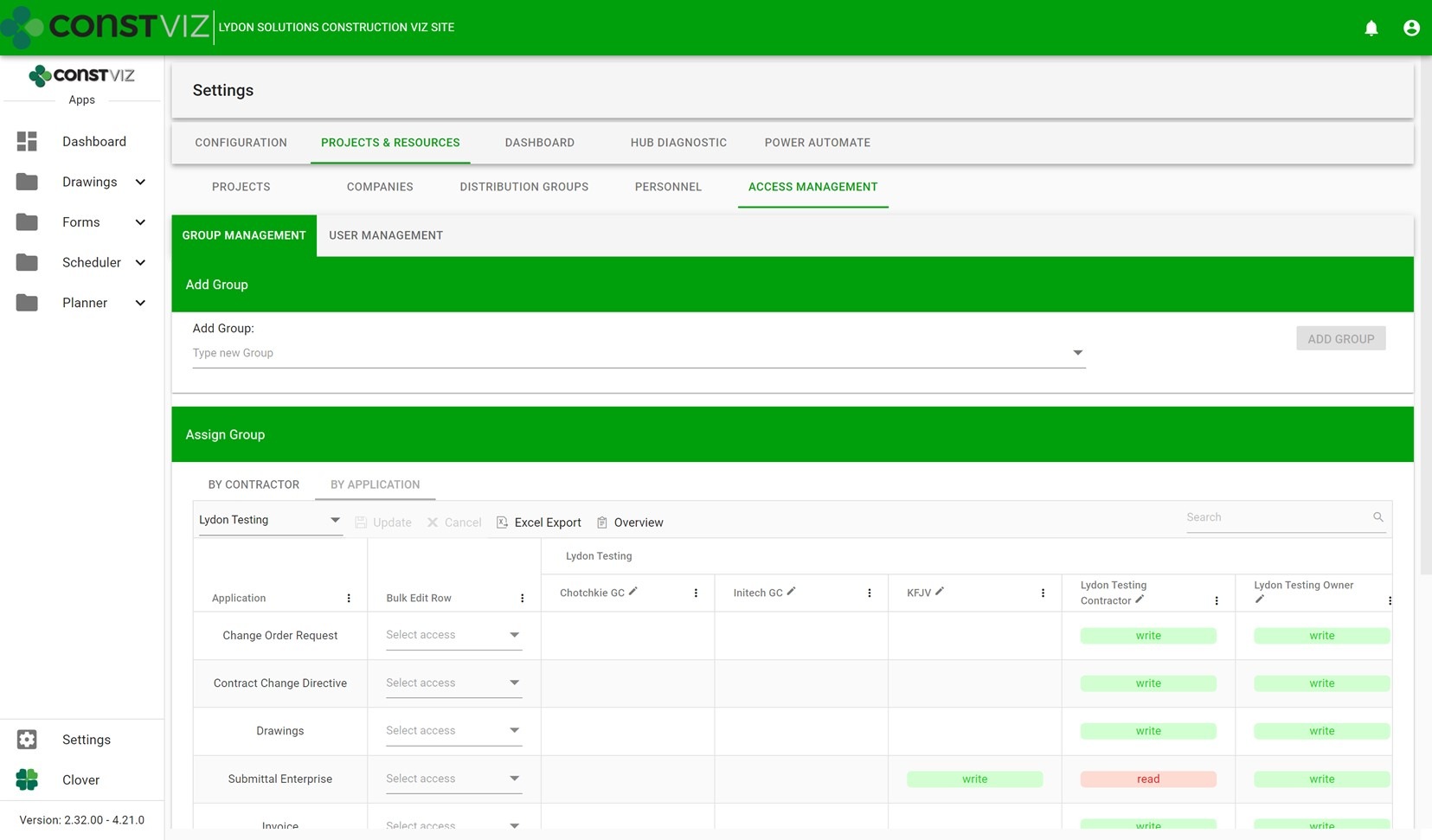
Simplified access management – We built our own access management solution on top of SharePoint to streamline the process of adding internal and external users to our applications. This custom solution reduces the administrative burden of permissions management.

Multi-Project_1

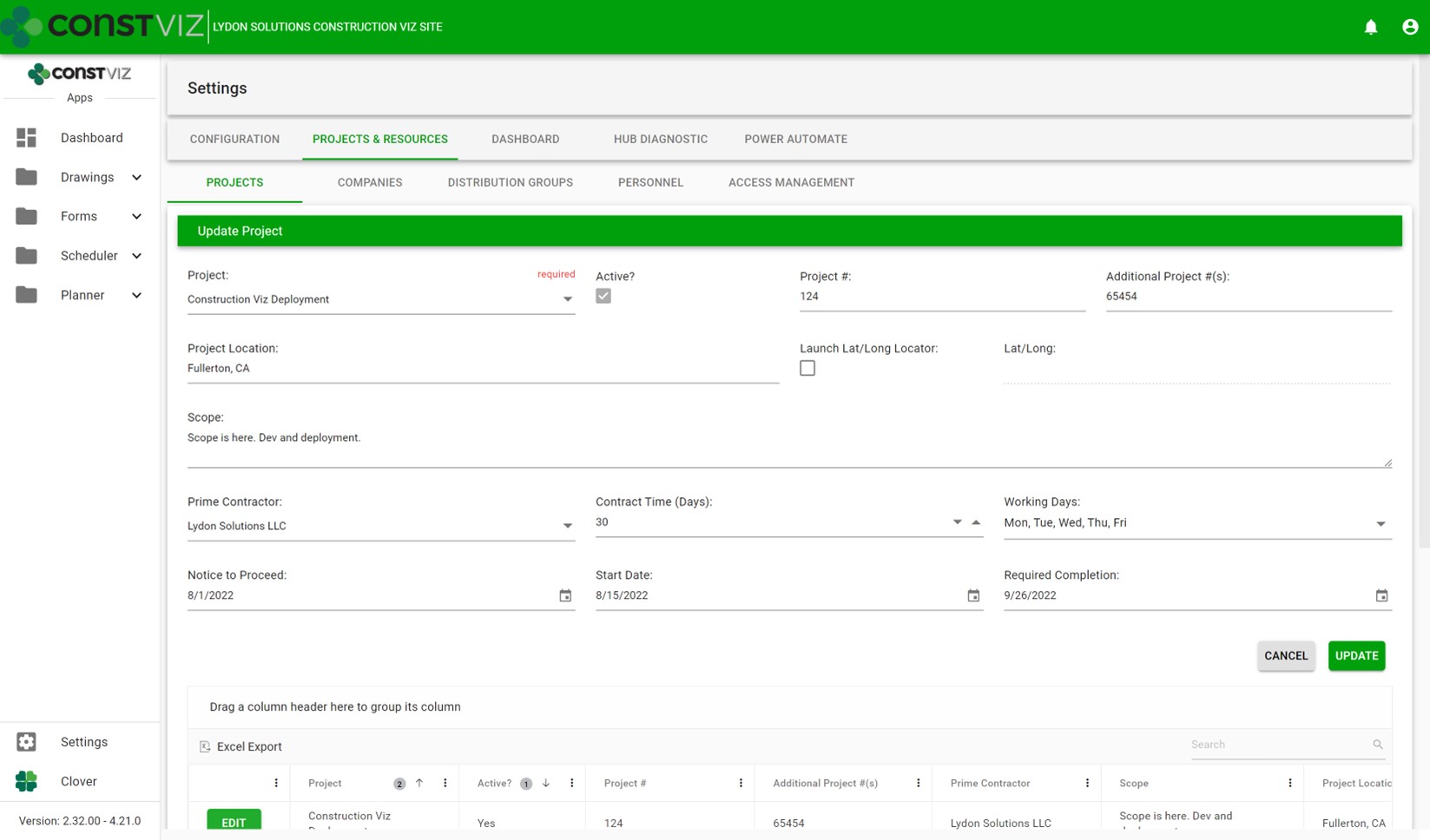
Expanded project settings – We integrated multi-project information across all the apps within a deployment. We also made it so that project pickers and default values can be unique by application, allowing for robust configuration depending on deployment requirements.

Multi-Project_2

Expanded personnel settings – We incorporated both SharePoint user and non-user management within a central location for easier access management. This feature allows for easier administration of access and distribution groups across projects.

Multi-Project_3

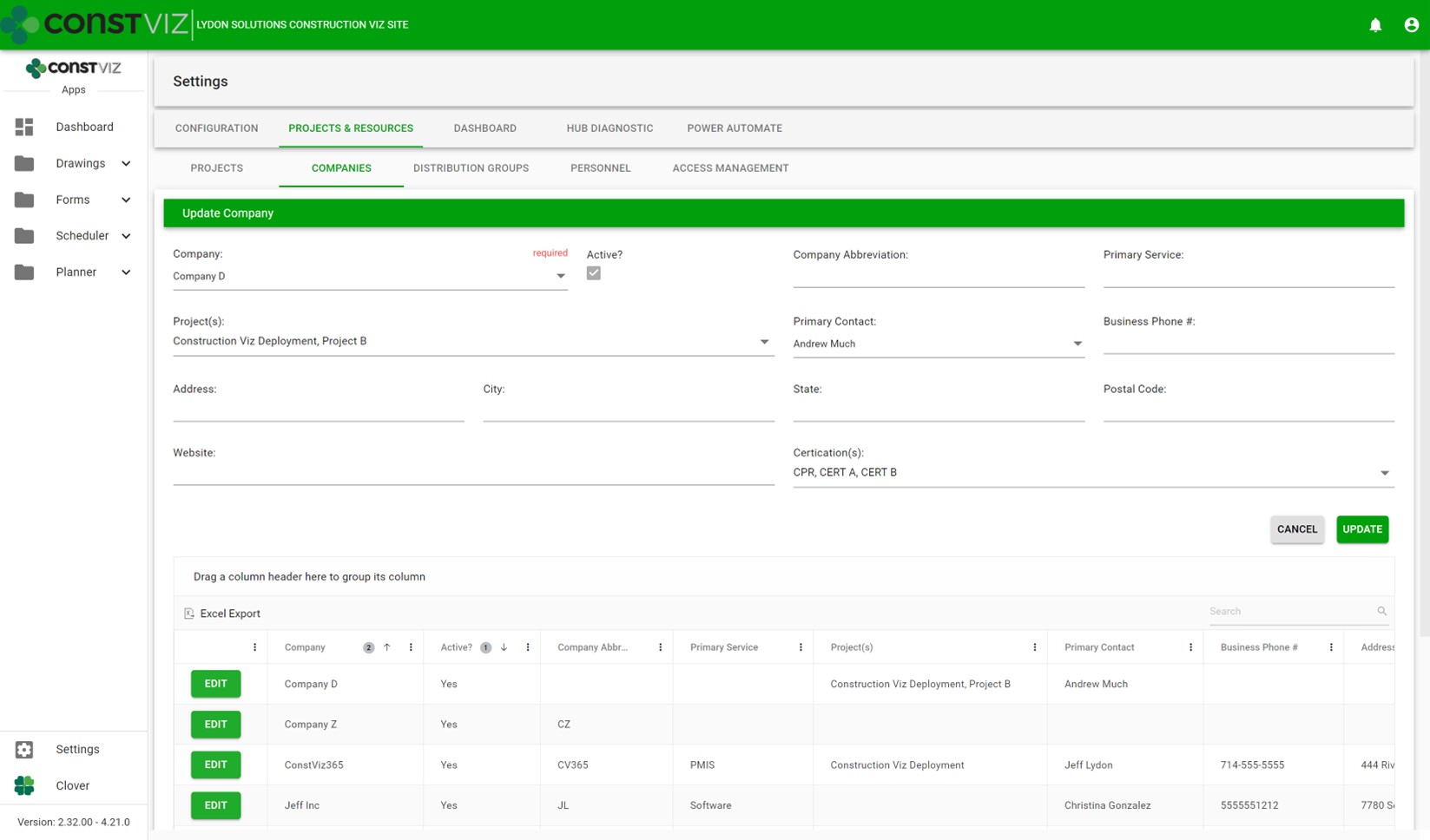
Expanded project-specific company settings – We added the ability to assign companies to one or more projects so they can be restricted and re-used across multiple projects or a program.

Multi-Project_4

Included data and reporting rollup by program and portfolio – We built data rollup capabilities and reports for one or more sites to report project status across the portfolio.

Multi-Project_5

We made all these design considerations so that Construction Viz can provide you with the best way to manage your projects, programs, and portfolios in the most efficient way possible. You can learn more about the capabilities and features of Construction Viz on our website.

  • « Go to Previous Page
  • Page 1
  • Interim pages omitted …
  • Page 3
  • Page 4
  • Page 5
  • Page 6
  • Page 7
  • Page 8
  • Go to Next Page »

Footer

About Constructon Viz

Construction Viz is a flexible construction project management software solution powered by Microsoft SharePoint and SQL.
Read More >

Navigation

  • Home
  • About
  • Features
  • Apps
  • Blog
  • Contact
  • Login

Apps

  • Construction Viz Hub
  • Drawing Management
  • File Manager
  • Specification Management

–

  • Project Forms
  • Project Planner
  • Project Scheduler
  • Project Tracker
  • Task Manager

Connect with Us

This field is for validation purposes and should be left unchanged.

Sign up to receive helpful tips for construction project managers as well as updates about Construction Viz.

Lydon Solutions

© Lydon Solutions

  • Privacy
  • Cookies
  • Terms of Use
  • Disclaimer
  • End-user license

Click here to start a Microsoft Teams chat.

Click here to start a Microsoft Teams chat.

Contact Us
This field is for validation purposes and should be left unchanged.
Name(Required)
Join Our Newsletter

Sign up to receive helpful tips for project managers and updates about Construction Viz.

Get Started

Join Our Newsletter

Sign up to receive helpful tips for construction project managers as well as updates about Construction Viz.

This field is for validation purposes and should be left unchanged.