• Skip to primary navigation
  • Skip to main content
  • Skip to footer
Construction Viz

Construction Viz

Project Management Perfect

  • About
  • Features
  • Apps
  • Blog
  • Contact
  • Download Flyer
  • Get Started Today
  • Login
Hide Search

project management

Construction Viz Questionnaire Phase 2 and Beyond!

Forms | June 5, 2025

After building a truly dynamic questionnaire feature into Construction Viz, we quickly followed up with the ability to add comments to every response.

Check out this post to see how this small but super helpful feature provides even more flexibility to the Questionnaire component and see what's coming down the pike!

New Construction Questionnaire Comments Field Enhancement

Questionnaires need to be as dynamic as possible. Based on client feedback, users wanted the ability to add comments to each response to provide further explanation. For example, when completing an inspection report, the inspector might indicate a non-compliance issue per their observation checklist and use the new comments feature for that specific response to further elaborate as to why.

https://constructionviz.com/wp-content/uploads/2025/06/Questionnaire-2a.webm

The comments can be printed to PDF with the form using the report wizard. As with all Construction Viz apps, the tool automatically saves the data to the client's Microsoft 365 SharePoint site.

A Preview of the Roadmap

We have several more exciting enhancements on the roadmap that will add even more features to the questionnaire component very soon, including:

  • Adding photos to every response, including geospatial data. This enhancement will make collecting punch-list items a breeze.
  • Sorting through and finding photos quickly with a new image view that displays all photos added to a questionnaire, complete with metadata.
  • Pulling data from a centralized list with a new lookup response type. This feature will enable organizations to establish standard lists, such as a set of inventory materials that you can assign to each response as you complete it.

And that is just a small preview of what's to come. Stay tuned for more updates.

Lydon Solutions continues to innovate and deliver solutions to real-world construction challenges with Construction Viz. You can request a demo of Construction Viz for Microsoft 365 below.
Get a Free Demo

"*" indicates required fields

This field is for validation purposes and should be left unchanged.
Name*

Customized Questionnaires Now Available in All Construction Viz Apps

Forms | May 8, 2025

Whether you are completing a site inspection, daily report, or even a risk assessment, you may need to create customized questionnaires where you can add unique questions and choose the types of responses, like a date or checkbox. With our latest release of Construction Viz, we aimed to deliver a truly dynamic questionnaire solution that is available across all our apps. Check out this article to find out more.

The new questionnaire component delivers robust and dynamic features on all fronts, and as with all Construction Viz applications, the data is stored on your SharePoint sites.

Questionnaires Available in All Construction Viz Apps

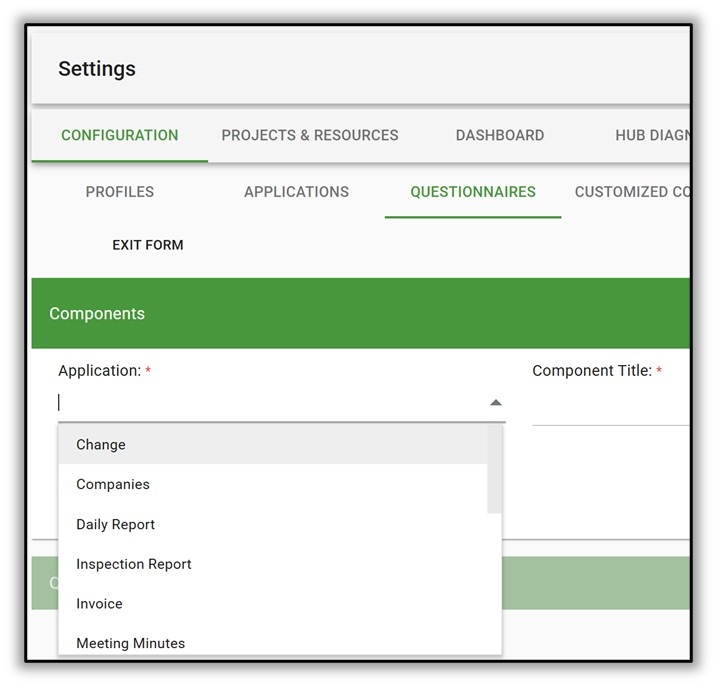
The questionnaire component is available across all Construction Viz apps. It is available in the daily and inspection form apps by default, but you can activate it on any of our apps.

Need questionnaires in a Change Request or Submittal form app? No problem. Activate the questionnaire feature in the settings.

Construction Questionnaire

Construction Viz Questionnaire Component Features

Custom response data types

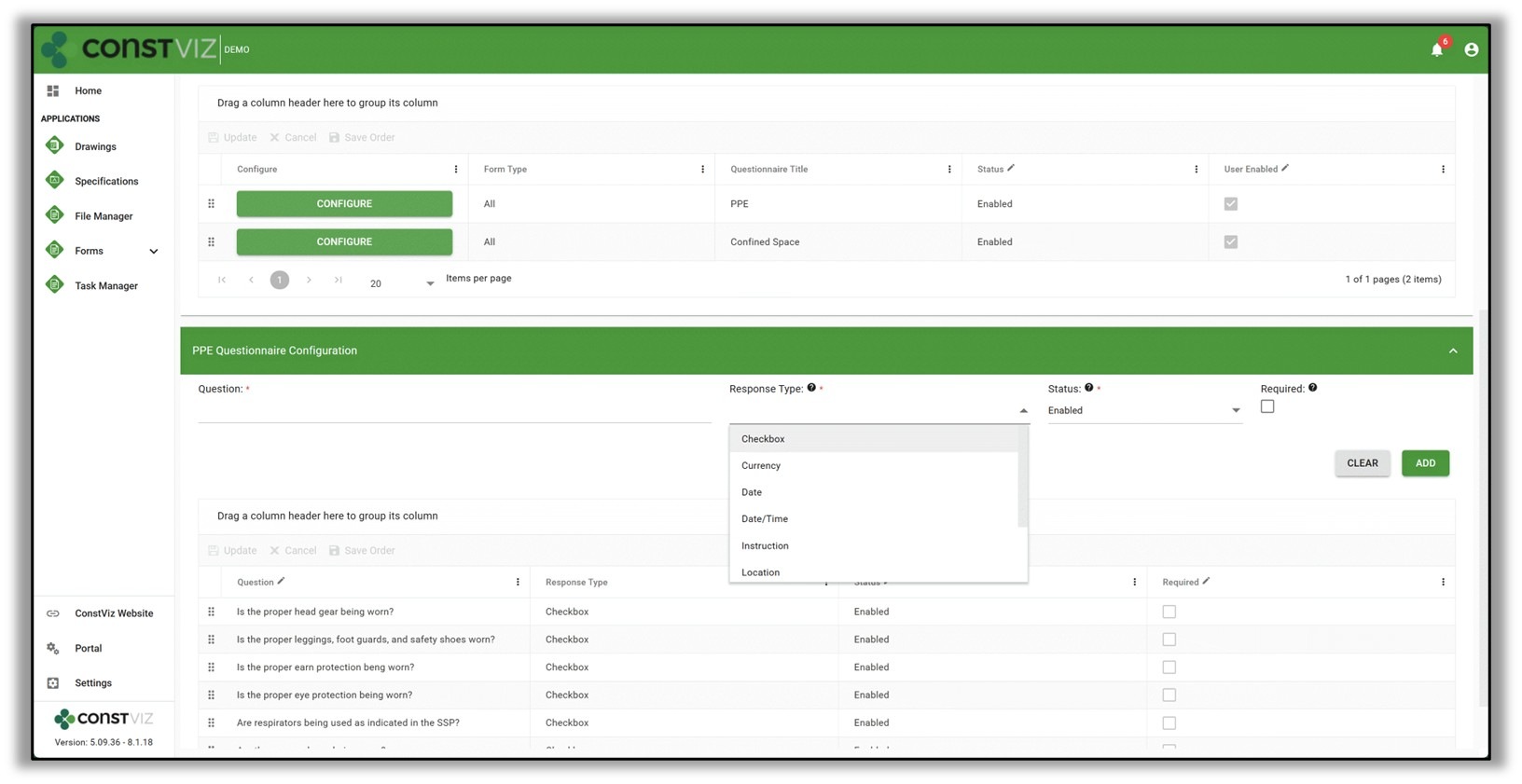
Want different response data types for each question? When creating a questionnaire template, an admin can assign each question a unique response type, such as a checkbox, currency, date, date/time, instruction, location, number, percent, and text.

Construction Questionnaire

User enabled questionnaires

You might have a set of questions that require responses in a form by default, but you might also need the flexibility to respond to questions depending on the unique circumstance or condition.

The new user-enabled questionnaires allow the initiator to enable other related questions depending on the situation, providing the ultimate flexibility.

Form type questionnaires

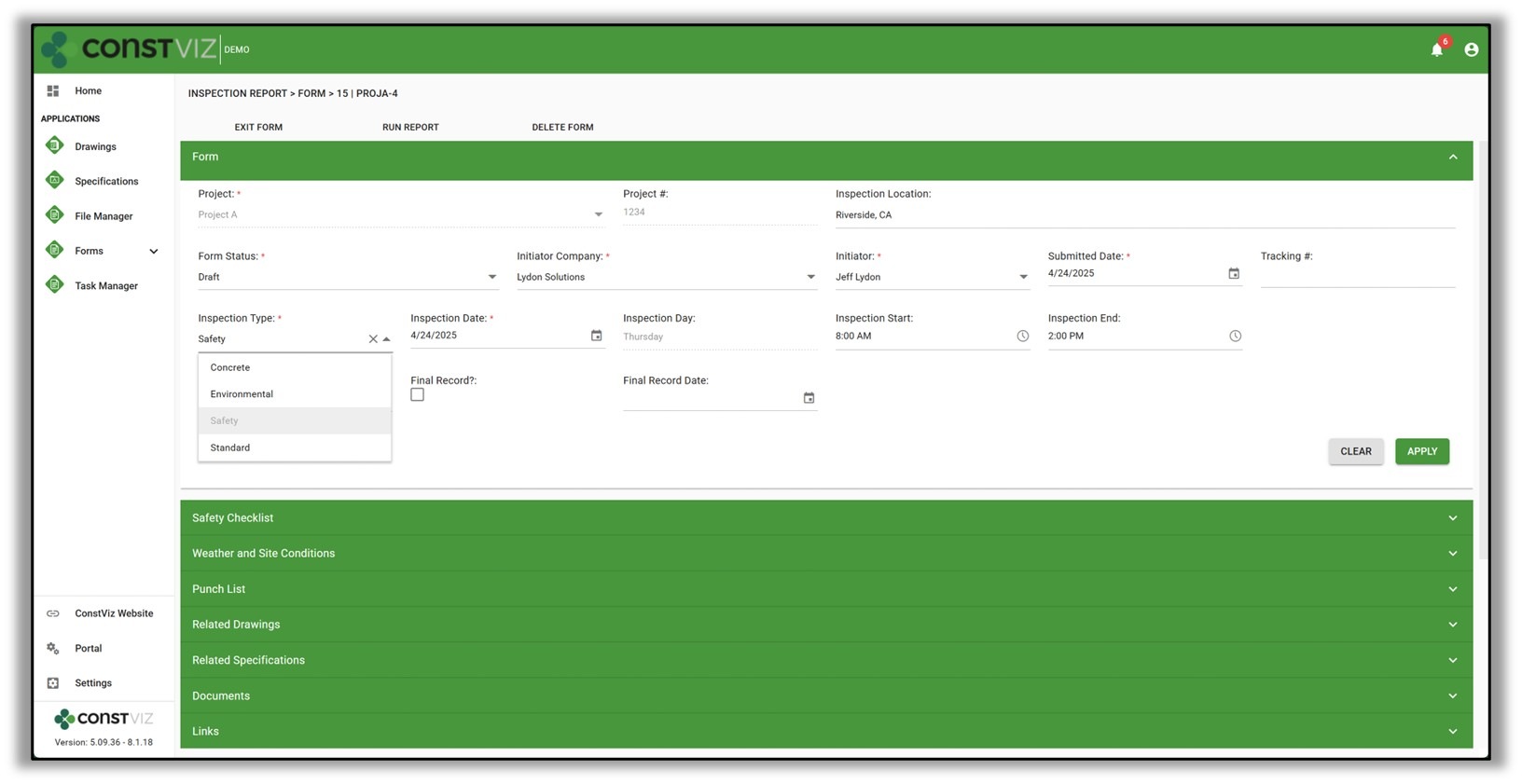
We added a new form type field to select forms that can drive which questionnaires are enabled in the form. So, when a user selects a safety inspection form type in an inspection report form app, the safety questionnaires are made available by default.

Construction Questionnaire

These new questionnaire features in Construction Viz provide the ability to adapt to dynamic business needs and increase overall efficiency on construction projects.

Lydon Solutions continues to innovate and deliver solutions to real-world problems with Construction Viz. You can request a demo of Construction Viz for Microsoft 365 below.
Get a Free Consultation - Blog

"*" indicates required fields

This field is for validation purposes and should be left unchanged.
Name*

Customize Form Statuses and Notifications with Construction Viz

Notifications | January 28, 2025

Configurable statuses and notifications for the way you work!

Every company, project, and project manager manages construction projects differently. Having unique form statuses and defining when a user receives a notification is no different. Check out this article to see how Construction Viz can adapt form statuses and notifications to your processes.

Customize Statuses and Notifications Easily in Construction Viz

Keeping your process flexible is the name of the game in construction, and this is why we built a custom form app status and notification feature in Construction Viz.

Form statuses can be different on every project, depending on the contract requirement. For example, you might want a form review status of a submittal to be “Ready for Review” instead of “Open” or an RFI status to be “Acknowledge” instead of “Review Required.” These may be slight differences, but depending on the client, they can make a big difference with regard to ball in court and turnaround time.

With Construction Viz, you can create your own statuses, identify default statuses when you create a new form, and determine which ones will trigger a notification for users to take action. We made the entire process simple and straightforward so you can set up quickly and focus on what matters: getting work done.

CV-Notifs_1

See our lineup of construction form apps here.

Construction Project Management Your Way

Our configurable statuses and notification features let you customize your communication workflows to meet your needs. You can find out more about Construction Viz on the features page.

Ready to streamline your construction project workflows? Discover how Construction Viz can revolutionize your project management. Request a free demo today and see the difference it can make for your organization.

Get a Free Demo

Get a Free Consultation - Blog

"*" indicates required fields

This field is for validation purposes and should be left unchanged.
Name*

Construction Viz Document Control 2.0

Document Control | December 4, 2024

Every company, project, and project manager does things differently in construction. Lydon Solutions continuously updates Construction Viz to accommodate our clients' unique business cases and integrate those features into the baseline product.

Document control is one of the cornerstones of Construction Viz, and we have recently made some powerful enhancements at our clients' request that you may find super helpful for your projects.

Check out this article to find out more.

Enhancements to Document Control in Construction Viz

There are several new document control features that we recently released that are unique to Construction Viz that might help you manage project documentation:

Tag files wherever you are

Most users store files in folders because they traditionally use File Explorer or shared drives. Folders are great, but metadata provides another level of document management because it frees you from a rigid nested folder structure.

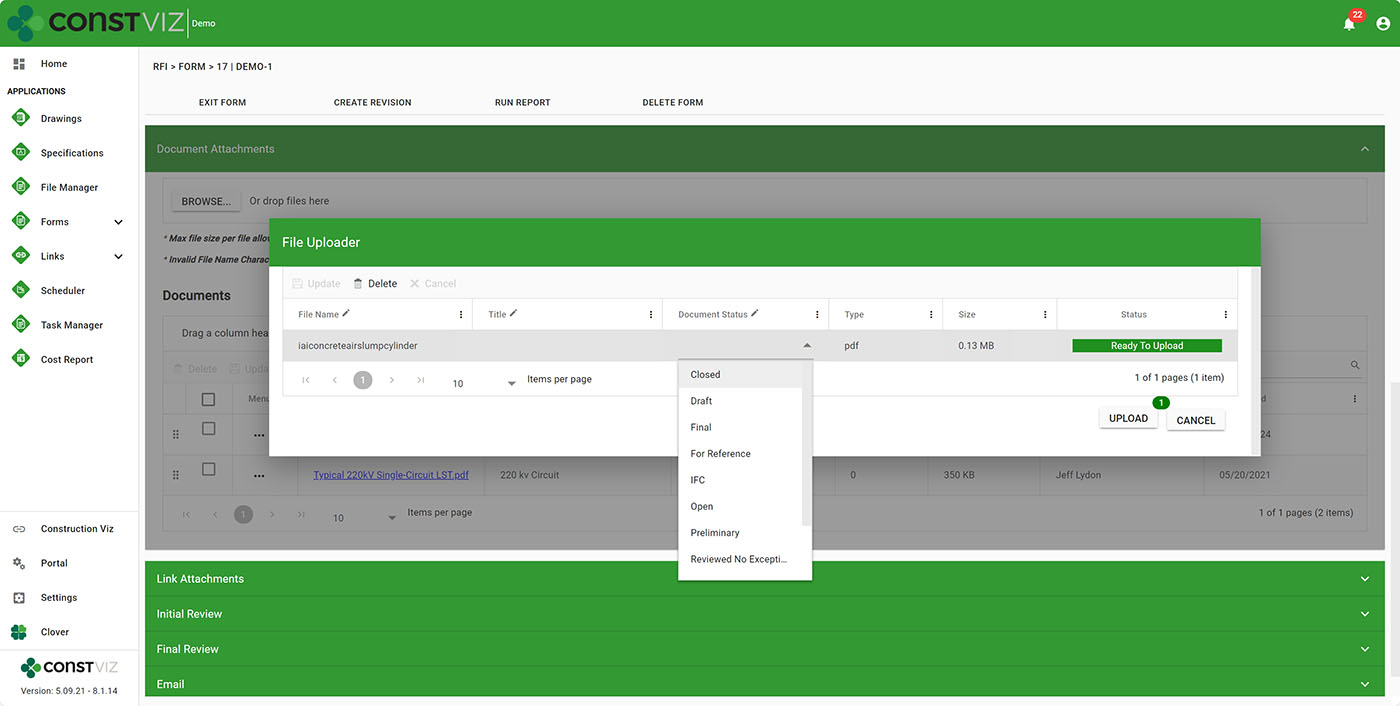
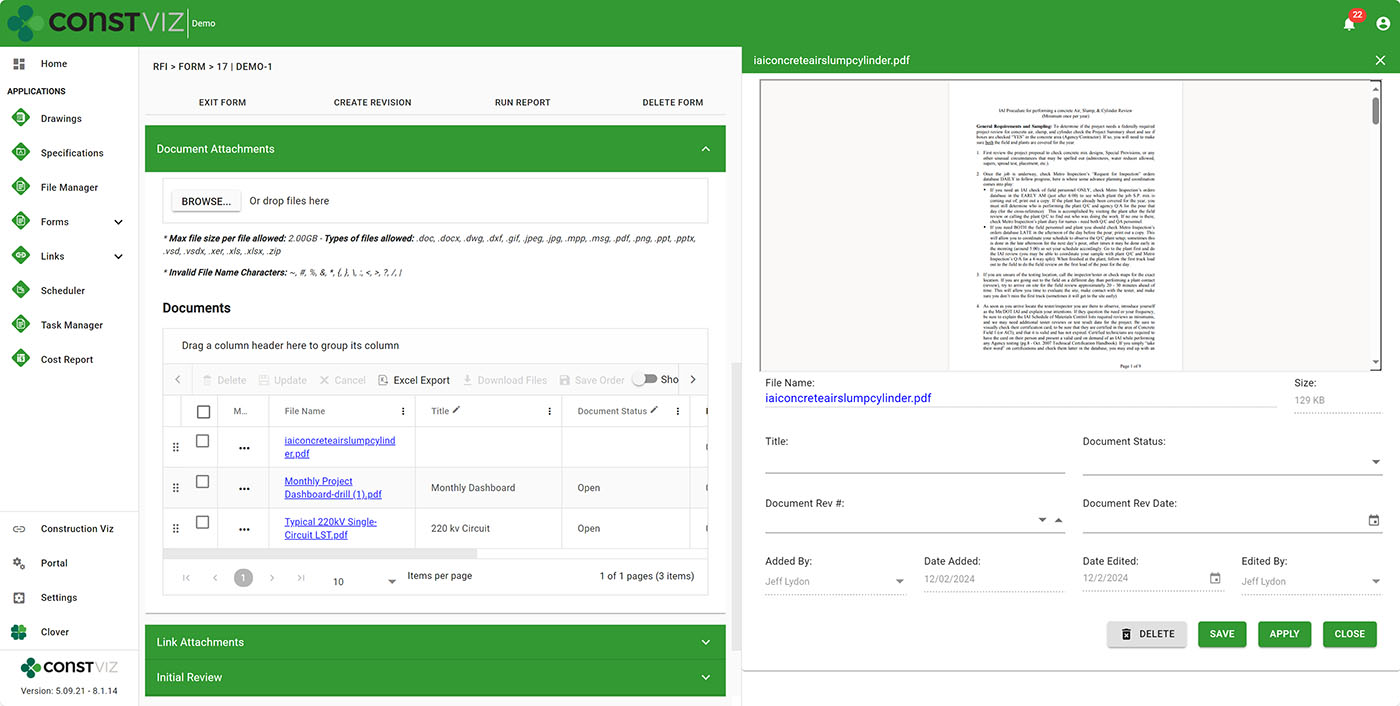
Construction Viz leverages metadata throughout every application. With this latest update, we now allow users to tag files (including images and video) with metadata through the entire file lifecycle: On the upload file screen, within a form attachment grid, in a file-specific flyout menu, and the form documents view.

https://constructionviz.com/wp-content/uploads/2024/12/Doc-Ctrl-2-1.webm

So, now there's no excuse not to assign metadata to your files. Your document control team will thank you, and the PMs can rest assured that they can find the files they are looking for.

Doc-Ctrl-2-3
Doc-Ctrl-2-4

Finalize document records

There are working files and final files. Working files are updated frequently by one or more team members. Final files are for end-user consumption, such as the final version of the contract in PDF format. You typically want to isolate these two types of files.

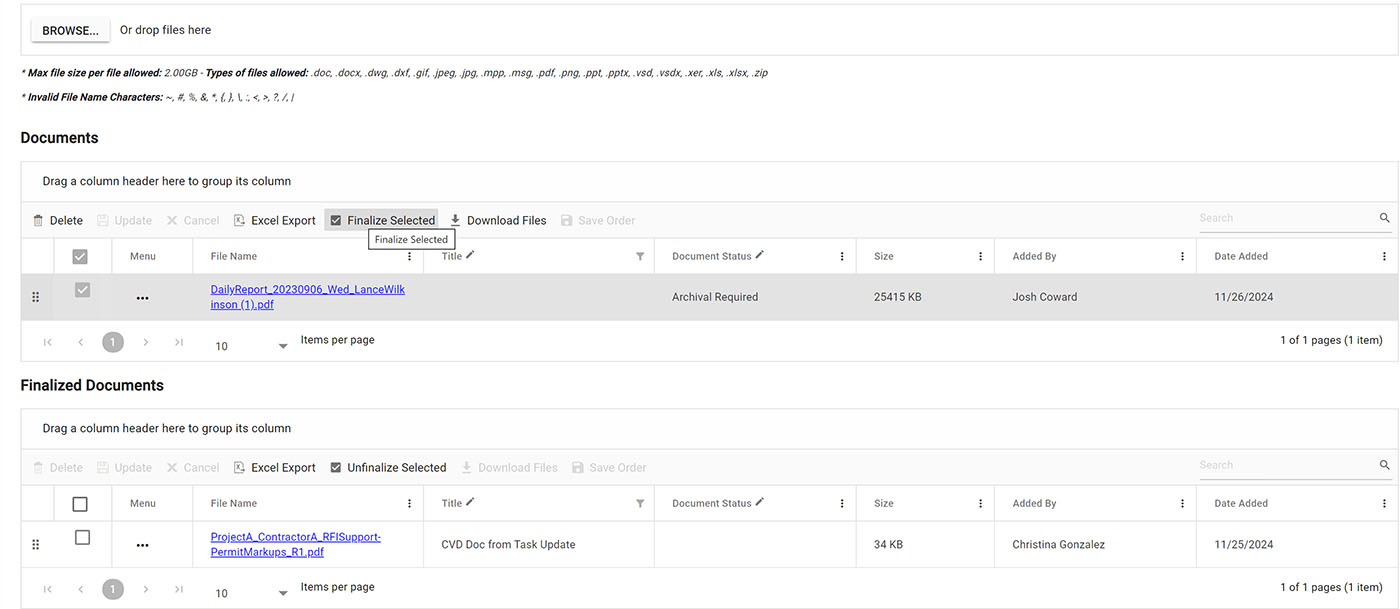
With the new finalize feature, you can select working file attachments in a form and click finalize to move them to another finalized file attachment area within the same form. This feature keeps the two file types separate and even allows them to be permission-controlled within the same form. This new component can also be added to any form to provide an additional layer of control at the document level.

Doc-Ctrl-2-2

Save and view files from another document library

You will likely use multiple related forms on a project but want to share a single file attachment location. For example, let's say you use two forms, like a Bid for the overall bid documents and Tasks for the bid requirement deliverables. Theoretically, you could have many tasks to complete a bid, but you don't want the uploaded associated files to reside in the individual Task forms. You might wish to have task files reside in the Bid form itself.

With this update, you can add the Bid form documents library to every task so that when you upload a file to a task, it is automatically saved to the Bid form, essentially sharing document libraries across forms. This new embedded component can be added to any form.

Simplify Your Construction Project Management

These pretty slick new features will help with your document management workflow, save your projects time and money, and avoid claims. You can find out more about Construction Viz on the features page.

Ready to streamline your construction project workflows? Discover how Construction Viz can revolutionize your project management. Request a free demo today and see the difference it can make for your organization.

Get a Free Demo

Get a Free Consultation - Blog

"*" indicates required fields

This field is for validation purposes and should be left unchanged.
Name*

Construction Viz is Easy to Use

Construction Viz | August 6, 2024

While it might be debatable how integrated Microsoft 365 apps are, the one thing they do have going for them is ease of use. Rarely do you have to take a training class to use a Microsoft product.

With Construction Viz, we tried to echo this same UI design and layout while keeping the tool as easy to use as possible. Read on to learn how we designed Construction Viz for all levels of technology experience across your construction organization.

Construction Viz Streamlines Construction Project Management

A system can live or die based on how intuitive and easy to use it is. As we all know, the construction industry is one of, if not the most fragmented, technology-related industries. Experience levels and adoption vary from office to field, across departments, and even among remote workers. So, a tool needs to be:

  • Non-intimidating. Initial impression count. You should not be overwhelmed with the amount of data right in your face. Regardless of your technology background, if you have ever searched a website, used a phone, or created an email in Outlook, the experience should be familiar.
  • Action-oriented. There are way too many distractions and urgent items requiring our attention in today's world. Personal and business tasks put a strain on your time. Issues requiring your attention need to be front and center.
  • Minimal clicks. Most users will tune out if it takes more than two clicks to get to where you want to go.
  • Intuitive. Let's face it: nobody reads training guides anymore. Users will look elsewhere if it's not intuitive and will allow you to hit the ground running immediately.

Construction Viz checks all of these boxes and more. We designed the solution to welcome users of all technology experiences and allow you to get in, complete your tasks, and get out so you can get on with your busy schedule.

Differentiator-Pt5_1

Why Construction Viz?

Read more about what sets Construction Viz apart from the competition in our new blog series:

  • Part 1: Get Just the Apps You Need with Construction Viz
  • Part 2: Deploy Construction Viz Securely to YOUR Microsoft 365
  • Part 3: Customize Construction Viz to YOUR Unique Needs
  • Part 4: Construction Viz Offers Best in Class Pricing
  • Part 5: Construction Viz is Easy to Use
  • Part 6: Your Data Stays with You 24/7 in Construction Viz
  • Part 7: Designed by Construction Professionals for Construction Professionals
  • Part 8: Construction Viz is Integrated with Microsoft 365

Keep an eye on this series of articles, where we will elaborate on the benefits of Construction Viz over other construction management platforms on the market. You can request a free demo below to find out more about what Construction Viz can provide. If you are new to Microsoft 365 and need help setting it up and/or helping you deliver solutions, you can request a free one-hour consultation here.

Get a Free Demo

"*" indicates required fields

This field is for validation purposes and should be left unchanged.
Name*

Construction Viz Offers Best in Class Pricing

Construction Viz | August 2, 2024

Tired of paying a licensing fee based on a percentage of the value of your projects? You need reliable pricing that doesn’t penalize you if you have a good year or your company is growing. Construction Viz has flexible pricing based on the number of users and apps selected. Find out how Construction Viz can put more money in your pocket, not an IT company.

We built Construction Viz back in 2017 to be flexible, robust, and easy to use. However, we also wanted to be as cost-effective as possible while delivering the solution to YOUR Microsoft 365.

We hear the same comment repeatedly from clients switching to Construction Viz.

“Why did I have to pay a percentage based on the value of my projects, and I only use 5% of what the tool provided? It’s way out of line.”

Construction Viz Lets You Pay Only for What You Use

With Construction Viz, you pay for each user based on the number of apps you want.

  • What if my company revenue grows by 10X? Same pricing.
  • What if I add multiple projects? Same pricing.
  • What if I only want four apps? Only pay for four apps.
  • What if I want to change the system to my liking? Standard hourly bill rate for changes.
  • What if I want contractors to access my system? Do I pay for those? Depending on the number of users and what they are doing in the system, sometimes they can be accommodated without additional fees.

Many companies are waking up to the fact that bigger isn’t necessarily better, and you shouldn’t have to pay more for a bloated, overly complex software product. Isn’t it time for a solution that benefits your unique project needs and limited budget?

Why Construction Viz?

Read more about what sets Construction Viz apart from the competition in our new blog series:

  • Part 1: Get Just the Apps You Need with Construction Viz
  • Part 2: Deploy Construction Viz Securely to YOUR Microsoft 365
  • Part 3: Customize Construction Viz to YOUR Unique Needs
  • Part 4: Construction Viz Offers Best in Class Pricing
  • Part 5: Construction Viz is Easy to Use
  • Part 6: Your Data Stays with You 24/7 in Construction Viz
  • Part 7: Designed by Construction Professionals for Construction Professionals
  • Part 8: Construction Viz is Integrated with Microsoft 365

Keep an eye on this series of articles, where we will elaborate on the benefits of Construction Viz over other construction management platforms on the market. You can request a free demo below to find out more about what Construction Viz can provide. If you are new to Microsoft 365 and need help setting it up and/or helping you deliver solutions, you can request a free one-hour consultation.

Get a Free Demo

"*" indicates required fields

This field is for validation purposes and should be left unchanged.
Name*
  • « Go to Previous Page
  • Page 1
  • Page 2
  • Page 3
  • Page 4
  • Interim pages omitted …
  • Page 8
  • Go to Next Page »

Footer

About Constructon Viz

Construction Viz is a flexible construction project management software solution powered by Microsoft SharePoint and SQL.
Read More >

Navigation

  • Home
  • About
  • Features
  • Apps
  • Blog
  • Contact
  • Login

Apps

  • Construction Viz Hub
  • Drawing Management
  • File Manager
  • Specification Management

–

  • Project Forms
  • Project Planner
  • Project Scheduler
  • Project Tracker
  • Task Manager

Connect with Us

This field is for validation purposes and should be left unchanged.

Sign up to receive helpful tips for construction project managers as well as updates about Construction Viz.

Lydon Solutions

© Lydon Solutions

  • Privacy
  • Cookies
  • Terms of Use
  • Disclaimer
  • End-user license

Click here to start a Microsoft Teams chat.

Click here to start a Microsoft Teams chat.

Contact Us
This field is for validation purposes and should be left unchanged.
Name(Required)
Join Our Newsletter

Sign up to receive helpful tips for project managers and updates about Construction Viz.

Get Started

Join Our Newsletter

Sign up to receive helpful tips for construction project managers as well as updates about Construction Viz.

This field is for validation purposes and should be left unchanged.