• Skip to primary navigation
  • Skip to main content
  • Skip to footer
Construction Viz

Construction Viz

Project Management Perfect

  • About
  • Features
  • Apps
  • Blog
  • Contact
  • Download Flyer
  • Get Started Today
  • Login
Show Search
Hide Search

Microsoft 365

Manage your projects in Outlook! No, really!

Project Management Tools | December 14, 2020

Embracing new technology is often a challenge in construction. While technology can help organizations be more efficient, it is challenging to keep up with the constant changes and new systems required to do the job. To add to this dilemma, every contractor, construction manager, and owner have their own Project Management Information System (PMIS) that team members must learn to conduct business. As a result, actual construction productivity takes a hit due to additional training, double-entry, errors, and general user dissatisfaction. It's no wonder most construction organizations are hesitant to leave old faithful: Microsoft Outlook and Office.

So the challenge is, how do we make it as easy as possible for the construction team to do their job and remove the technology burden of learning and working with multiple PMISs? What if you could work in Outlook or Office entirely without ever having to log into another system?

Welcome to Adaptive Cards

With the flexibility of the Microsoft Power Platform and Adaptive Cards, we have removed the users' burden of learning another PMIS by allowing them to work directly in Microsoft Teams or Outlook. By leveraging Power Automate and Adaptive Cards technology, users can now receive actionable task-focused cards. To respond, users open a card to view the content, review a task, or respond with comments. Work entirely from email or Teams—no need to even log into a PMIS.

The Key Benefits of Adaptive Cards

You may be thinking that your PMIS already sends out emails when there are tasks due. How is this different? Adaptive Cards are the future of actionable messages and notifications. They are essentially small interactive applications.

The are many benefits to Adaptive Cards:

• Cards are responsive to any device.
• The card user interface can be simplified and tailored to perform specific tasks. Using the KISS (keep it simple) approach, we can make it easy for users to review content and respond.
• The cards can include logic to prompt questions and responses without logging into the actual PMIS and never leaving the email.
• Cards can read and write data with various systems such as Microsoft 365 or SharePoint, SAP, Oracle, etc.
• Cards can leverage Windows 10 notifications.
• Cards integrate with Microsoft Teams Chat, Timeline, and Outlook.
• Cards can leverage assistants such as Cortana or a web chatbot.
• Dashboards can be delivered using feeds from multiple Adaptive Cards.
• The cards can include security extended from native applications.

Lydon Solutions can build Adaptive Cards for any PMIS using our pre-defined templates. We even integrated Adaptive Cards into the notification system of Construction Viz, our PMIS for Microsoft 365 and SharePoint. By meeting the user where they work in Microsoft Office and Outlook email, Adaptive Cards keep users in their natural activity flow without interruption, making for more efficient and happier project teams. A win-win.
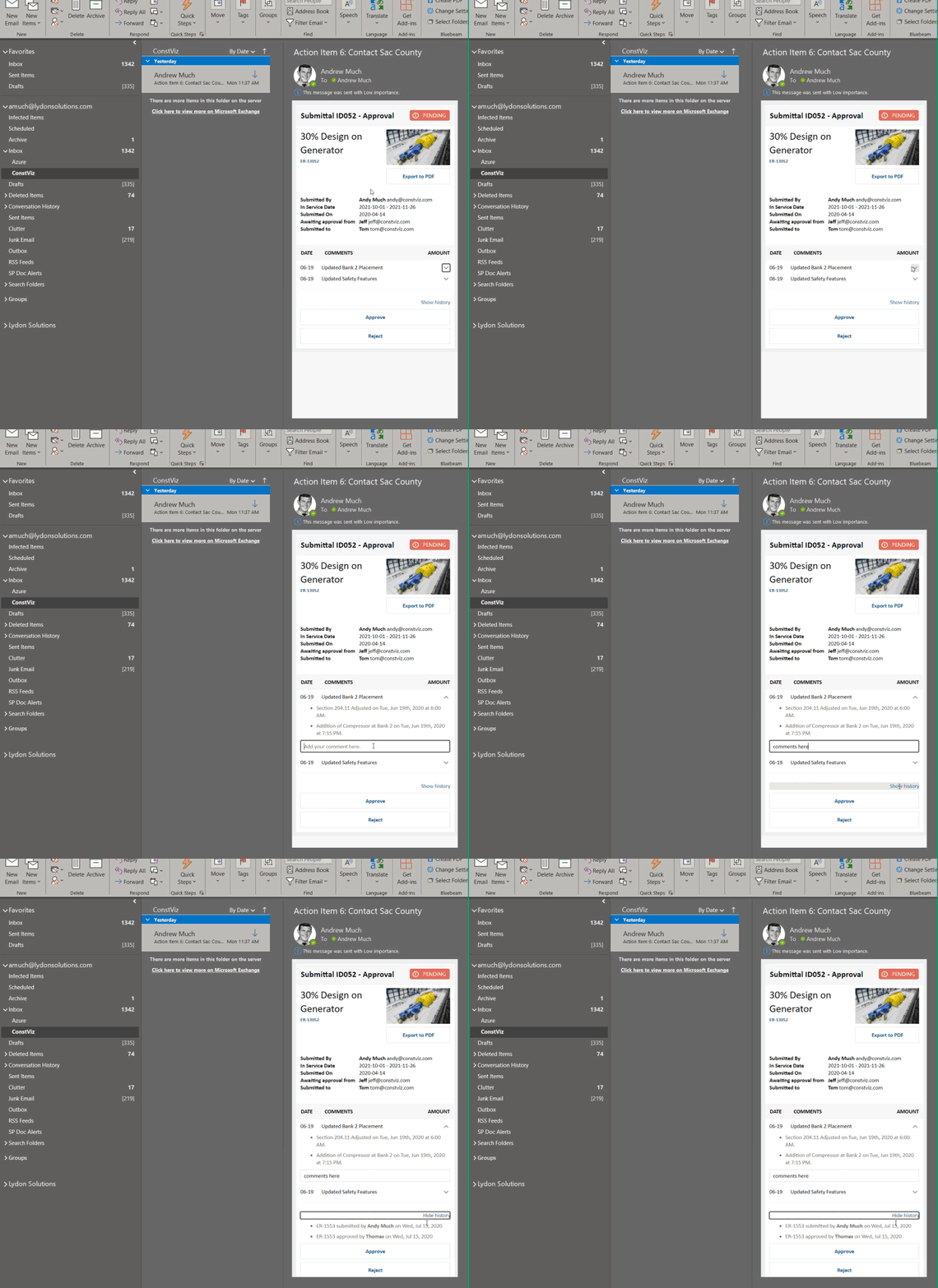
Adaptive Card for a Construction Viz Submittal Form email notification

Deploy Adaptive Cards for Your Construction Projects

Find out how we can leverage our existing Adaptive Card templates to simplify your workflows and provide team members access to project data in the applications they use every day. Contact us for a free consultation and see how we can help your organization with its digital transformation to Microsoft 365.

If you need a turnkey PMIS for managing your projects in Microsoft 365, learn more about using Construction Viz for project management.

Simpler Project Management with the Construction Viz Project Tracker App

Project Tracker | November 17, 2020

When planning a construction project and seeing it through to closeout, it’s essential that you use the right tools to keep the entire project team on track. We created the Construction Viz Project Tracker app to assist with this process.

The Construction Viz Project Tracking app, available for Microsoft 365 and SharePoint, combines all of your critical project information into a single interactive dashboard for easy reporting, resolving issues, and monitoring the schedule and budget.

The benefits of using Project Tracker

Keep track of everything you need to know about your projects with the Project Tracker app. You can use Project Tracker to:

1. Keep track of 1000s of projects with ease. The Project Tracker app allows you to manage tasks for one or several customers associated with a project. Roll up tasks from multiple customers into one easy-to-read dashboard to see everything at a glance.
2. Manage permits to issuance. Identify permitting requirements and work on hundreds of permits to keep your team on track.
3. Prepare the Job Package Binder. With a click of a button, the Project Tracker can prepare the job package binder for your construction foreman to take on the job site.
4. Be productive anywhere with full mobile and offline support. Use our lineup of Construction Viz offline mobile forms, such as The Daily Inspection Report, to track programs and projects from a mobile device.
5. Always know where your projects are happening with GIS integration. View your projects spatially. Load in GIS layers to overlay on top of your projects.
6. Tag documents in seconds. Construction Viz makes document management for your project easy, letting you tag documents to one or many projects based on the dynamic that you define.
7. Integrate with Power Automate. The Project Tracker app integrates into Microsoft Power Automate to give you the option to send alerts or create workflows.

Check out our presentation about the Project Tracker app to learn more and see how one major California utility company uses the tool to manage complex maintenance projects involving over six thousand transmission towers.

Construction Viz Project Tracker from Jeffrey Lydon

Get started with Project Tracker and Construction Viz

The Project Tracker app is a part of the Construction Viz Suite, which offers more than thirty-one construction forms to assist with project management. Find out more about Construction Viz and see how we can help you better manage your projects by requesting a free demo today.

Keep Organized with the Construction Viz Drawing Management App

Drawing Management | September 1, 2020

Make sure your team always has access to the latest set of drawings for your projects with the Construction Viz Drawing Management app for Microsoft 365 and SharePoint.

A frequent challenge for construction project managers is finding and referencing the latest set of drawings. Part of the problem is that many organizations do not keep an updated master drawing list. Further complicating things, teams often store PDFs of the drawings for their projects without metadata in a shared drive with a complex folder structure. As a result, only employees that know the folder scheme can find and update drawing revisions correctly.

The impact of project teams not having timely access to the correct drawings can be felt from the home office to the field, resulting in lost productivity for the engineers and contractors doing the work. Effective drawing management is not just a problem for small companies. We have seen these kinds of issues happen even on multi-billion-dollar projects over the years.

With the new Construction Viz Drawing Management app, available for Microsoft 365 and SharePoint, we set out to reimagine how a system can help project teams manage construction drawings more effectively.

Six Key Features of the Construction Viz Drawing App


The Construction Viz Drawing Management app improves the entire drawing management process in six key areas:

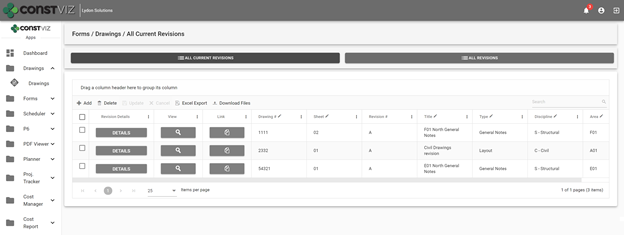
1. Creating an interactive master drawing list. The Construction Viz Drawing app includes an interactive and searchable grid of every drawing organized by ID number, sheet, title, revision, discipline, area, and drawing set. The latest revisions are listed first, so team members are always working off the most recent revision. The grid can be filtered and grouped to find any drawing easily.

Construction Viz Drawing Management App - Master Drawing List

2. Organizing drawing file storage. No more complex folder structures. As with all Construction Viz data, the Drawing Management app stores each drawing and revision as a record with a single associated file in SharePoint for easy access.

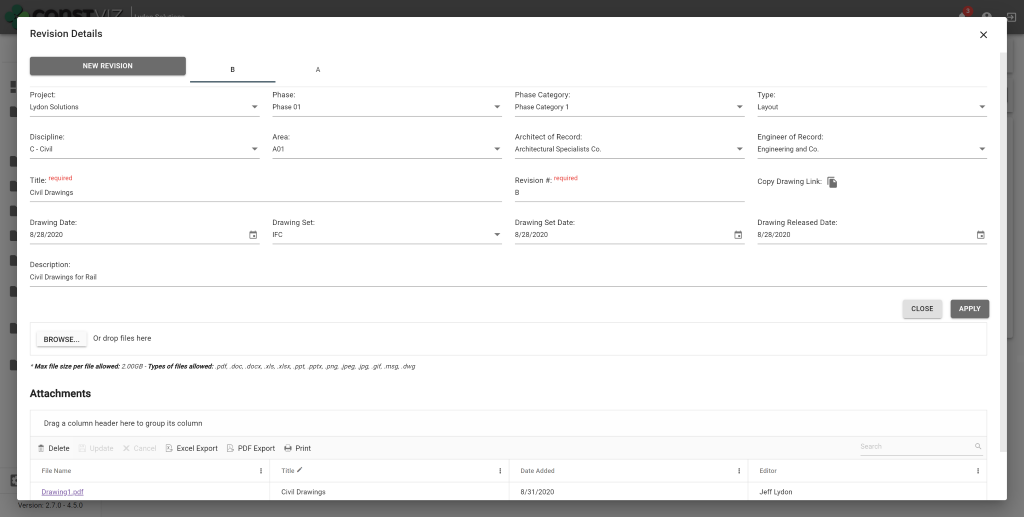
3. Improving drawing revision management. When a user uploads new drawings, the app requires them to input a user-defined revision value. Since the app displays the latest revisions first, other team members can readily find and work off of the most recent version of a drawing.

Construction Viz Drawing Management App – Revision Management

4. Adding drawing metadata. The app requires users to complete standard metadata fields when uploading new drawings. This rich metadata lets teams filter, group, and search drawings in the app’s master grid view.

5. Relating drawings to other processes. The Drawing Management app integrates with other Construction Viz apps to add a “Related Drawings” component. The component enables users working in other apps to select one or more drawings and relate them to any record, such as an RFI or other form, using the same interactive and searchable grid featured in the Document Management app. This feature makes it quick and easy for users to include related drawings on construction forms and correspondence without having to deal with attachments.

Construction Viz Drawing Management App – Related Drawings component

6. Exporting drawing PDFs to local devices. Users can export drawing PDFs for use on their local devices from within the master drawing list grid or a related app using the component feature described above.

These six features of the Construction Viz Drawing Management app will save a project team the headache that comes with trying to update and find the latest drawing revisions. Integration with other Construction Viz apps ensures that users have ready access to the right drawings when and where they need them – and can share them with a few clicks.

See What Else Construction Viz Can Do for Your Organization

Construction Viz offers a full lineup of construction management apps, including tools for project tracking, scheduling, GIS maps, cost reports, construction forms, and more. Find out how Construction Viz can help you better manage your construction project by scheduling a no-obligation demo today.

Your Flows, Your PMIS: Power Automate & Construction Viz

Power Automate | August 18, 2020

Power Automate is a Microsoft 365 service that automates time-consuming business tasks and processes. It makes it practical and simple for line-of-business users to build workflows across applications and services. Most PMIS systems on the market have their own proprietary workflow functionality, but what makes Microsoft’s Power Automate unique, is that it is a stand-alone service that can integrate with both Microsoft 365 as well as external applications.

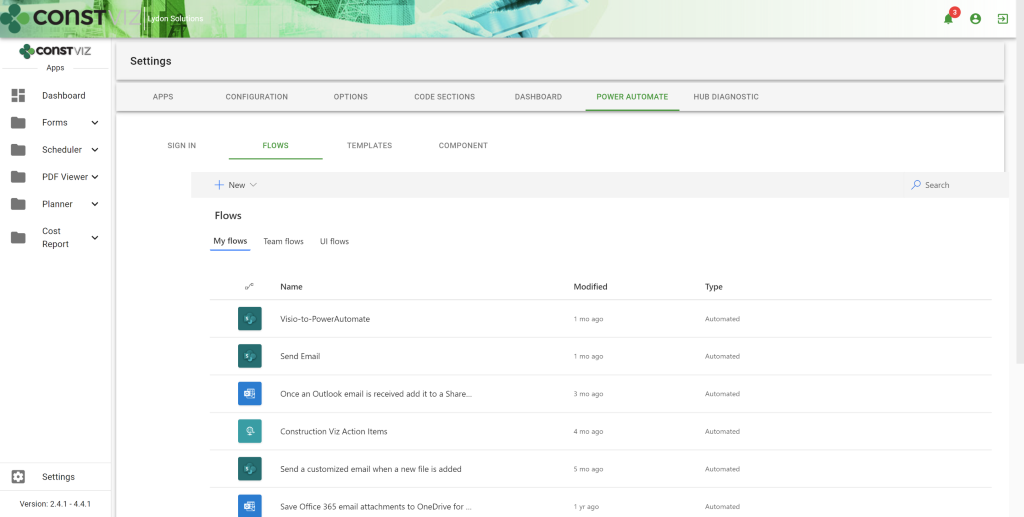
Being that Construction Viz can be deployed into Microsoft 365, we deeply integrated Power Automate into our application so you can build, deploy, and support your flows from within the Construction Viz hub directly inside your Microsoft 365 tenant. With Microsoft’s free, on-premises data gateway, you can also connect Power Automate flows (as well as other Power Platform services) to line-of-business systems behind your corporate firewall. In fact, we have leveraged the Gateway to connect client’s Microsoft 365 environments to our hosted Construction Viz service offering which opens up a wide array of possibilities.

Power Automate

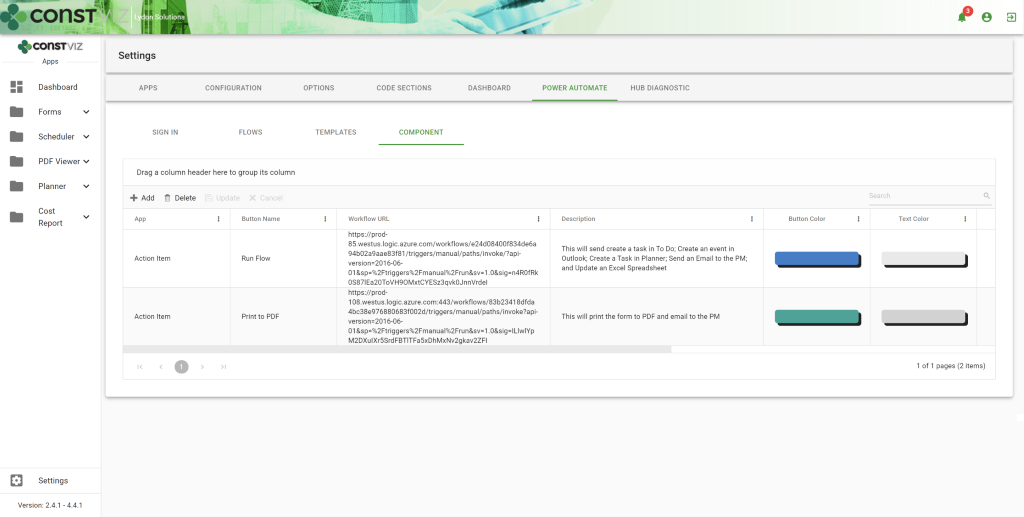
We make it easier than ever to add your own manual triggers and configurable buttons that allow users to link their flows and add it to any app.

So, What Could You do with Power Automate and Construction Viz?

Send out Construction Viz Action Items for review that will update one or more Microsoft 365 applications at one time from a single workflow. This is triggered by using a button you can add to the Action Item form. So not only will the alert notification display as an action item in a user’s ball-in-court, but it can also update:

• Microsoft To Do – as a task
• Outlook – as an email approval request, a task or event
• Planner – as an event
• Teams – as a post
• Excel – as an action item in a Worksheet

Why is this important? Because every company or employee might manage their work in different Microsoft 365 applications. For some users, it’s Excel. For others, it might be Outlook, and so on. With Power Automate, you can configure the workflow around how you work and what applications in Microsoft 365 you use frequently.

Other Power Automate workflows can include:

• Creating PDFs from Construction Viz forms as well as attachments
• Extracting data from Excel to use in Construction Viz apps
• Emailing alerts from Power BI dashboards embedded in Construction Viz

To get you started, we have built a set of Power Automate workflows that work with Construction Viz and can be imported into your Microsoft 365 tenant. Once imported, you can modify as needed to create the solution that works best for your organization.

Get Started with Power Automate

Get the most out of Microsoft 365 by combining Construction Viz with Power Automate to create unparalleled solutions.

To find out more, schedule a free demo of Construction Viz. If you need help with Microsoft 365 setup for your construction organization, check out our managed services at Lydon Solutions.

Construction Viz – Application for Payment

Forms | May 26, 2020

The Application for Payment is a formal document that details a contractor’s request for payment and should identify the work completed and materials received or installed during a specified time period. The entire process can be rather complex since it must consider the original commitment and approved change order values, work completed, and overall approval process, all the while lineup with, and output to, the standard AIA G702/G703 reports that support the final invoice to the client.

Throughout my years in Project Controls, I’ve seen many different approaches for processing payment applications. Most of these solutions were entered into a Project Management Information System (PMIS), rather than in Microsoft Excel. In my experience, the pay app processes and tools were extremely cumbersome because some, if not all, of the steps were done manually via hard copy or through email, links to the project or payment schedule were not included with the application, and there was a lack of details in the tracking templates to know where the pay application was in the process at any given point in time.

When we decided to build-out Application for Payment functionality in Construction Viz, we wanted to address some of the shortfalls identified with other software products, as well as enhance the overall usability for project team members.

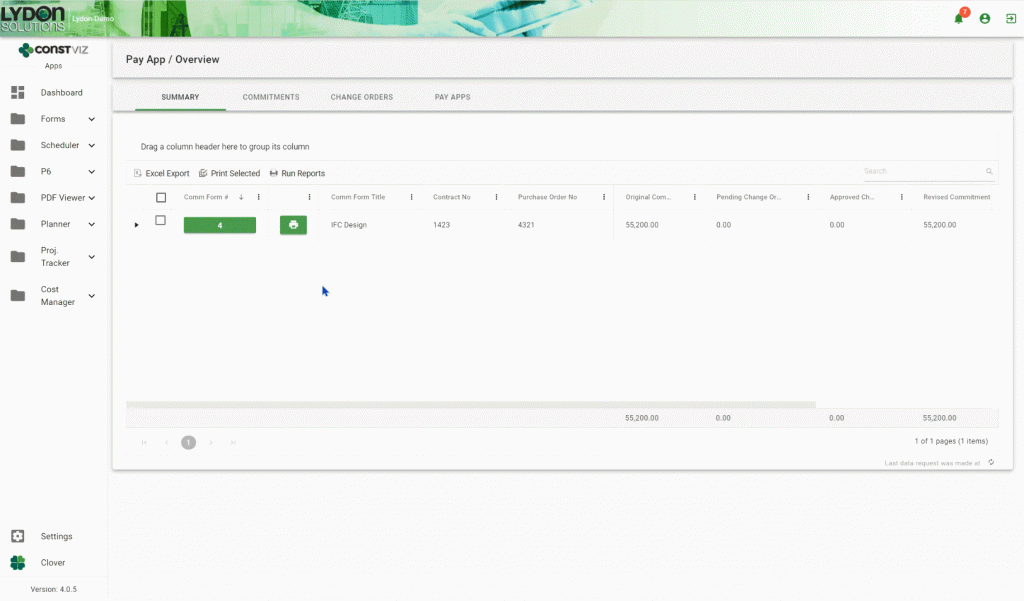
As a result, we built four separate forms—Commitment, Change Order Request, Change Order, and Pay Application—that integrate with one another for a comprehensive approach from committing scope to making a progress payment.

Key features include:

  • All forms and functionality can be accessed on any device with a modern browser; and since Construction Viz is a Progressive Web App, it can be made available offline without having to install an app on your device.
  • All four forms can be customized to your processes and deployed into your on-premise SharePoint or Microsoft 365.
  • In addition to the 4 forms being integrated with one another, they can also be integrated with our other applications such as the Scheduler and Project Tracker.
  • Each form is tracked at a line item level of detail, in a Schedule of Value (SOV) format by WBS, Cost Code, Work Order, Account and/or Line Item.
  • Each form can be independently routed for review and approval.
  • Only approved forms impact the overall summary rollup which provides a status of all payments.
  • Since a Change Order Request is purely a field request and does not commit costs, contractors can leverage current commitment information to quickly add change request line details, or can create new change request line details, without impacting the PO.
  • Retention can be identified on the Commitment level and automatically withheld on each Pay Application.
  • Both the standard AIA G702 and G703 reports can be generated from any Pay App form.

Find out more about all of our tools to help you manage your projects in SharePoint and Microsoft 365, or visit LydonSolutions.com to submit a free consultation for services to get you on the right track with your PMIS.

  • « Go to Previous Page
  • Page 1
  • Interim pages omitted …
  • Page 8
  • Page 9
  • Page 10

Footer

About Constructon Viz

Construction Viz is a flexible construction project management software solution powered by Microsoft SharePoint and SQL.
Read More >

Navigation

  • Home
  • About
  • Features
  • Apps
  • Blog
  • Contact
  • Login

Apps

  • Construction Viz Hub
  • Cost Report
  • Drawing Management
  • File Manager
  • GIS Maps
  • Oracle Primavera 6
  • Payment
  • Specification Management

–

  • Project Forms
  • Project Planner
  • Project Scheduler
  • Project Tracker
  • Task Manager

Connect with Us

  • This field is for validation purposes and should be left unchanged.
  • Sign up to receive helpful tips for construction project managers as well as updates about Construction Viz.

Lydon Solutions

© Lydon Solutions

  • Privacy
  • Cookies
  • Terms of Use
  • Disclaimer
  • End-user license

Click here to start a Microsoft Teams chat.

Click here to start a Microsoft Teams chat.

Contact Us
This field is for validation purposes and should be left unchanged.
Name(Required)
Join Our Newsletter

Sign up to receive helpful tips for project managers and updates about Construction Viz.

Get Started

Join Our Newsletter

Sign up to receive helpful tips for construction project managers as well as updates about Construction Viz.

  • This field is for validation purposes and should be left unchanged.
  • This site is protected by reCAPTCHA and the Google Privacy Policy and Terms of Service apply.