• Skip to primary navigation
  • Skip to main content
  • Skip to footer
Construction Viz

Construction Viz

Project Management Perfect

  • About
  • Features
  • Apps
  • Blog
  • Contact
  • Download Flyer
  • Get Started Today
  • Login
Hide Search

Microsoft 365

Construction Viz Avoids the Folder Nightmare with Automated Document Controls

Document Control | June 8, 2021

Have you ever been part of a project that stores documents in an overly complicated file folder structure? You end up having to click through multiple levels of folders to get to a single item you need. Forget about moving that file to another location or even finding that document again in the future. Not very efficient.

The reality is, storing documents in a file folder structure can work well for a few scenarios, but there are some significant drawbacks across the enterprise, such as:

  • How do you best organize the folder structure – by project name, document type, or team?
  • What happens when a folder name changes? How does that affect related files, bookmarks, and overall searchability?
  • Do you use long folder names to be more descriptive? The resulting URL can become too lengthy, preventing you from sharing file links via email.
  • How do you effectively search the folders outside of using the filename?
  • Can anyone create a folder, and if so, how do you prevent duplication?

For the above reasons and many more, most project management organizations often employ document metadata instead of, or in addition to, folder structures. Metadata allows you to tag attributes about a document so you can search, filter, and group them based on that information.

However, effectively using metadata requires more upfront planning, additional user training, and, depending on your processes, adding manual tags based on where you save a file. All reasons why some organizations wind up falling back on file folders or do not consistently use metadata as their document controls team intends.

If you use Construction Viz, we have got you covered. That is because we added a built-in auto-tagging feature that takes the hassle out of metadata.

Construction Viz simplifies project metadata with auto-tagging

The Construction Viz auto-tagging feature automatically enriches your documents with contextual metadata. What about construction forms like RFIs, submittals, and daily reports that typically store images, drawings, documents, and other files? We built automated metadata tagging into the form apps to streamline metadata for the forms and file attachments.

So how does auto-tagging in Construction Viz work?

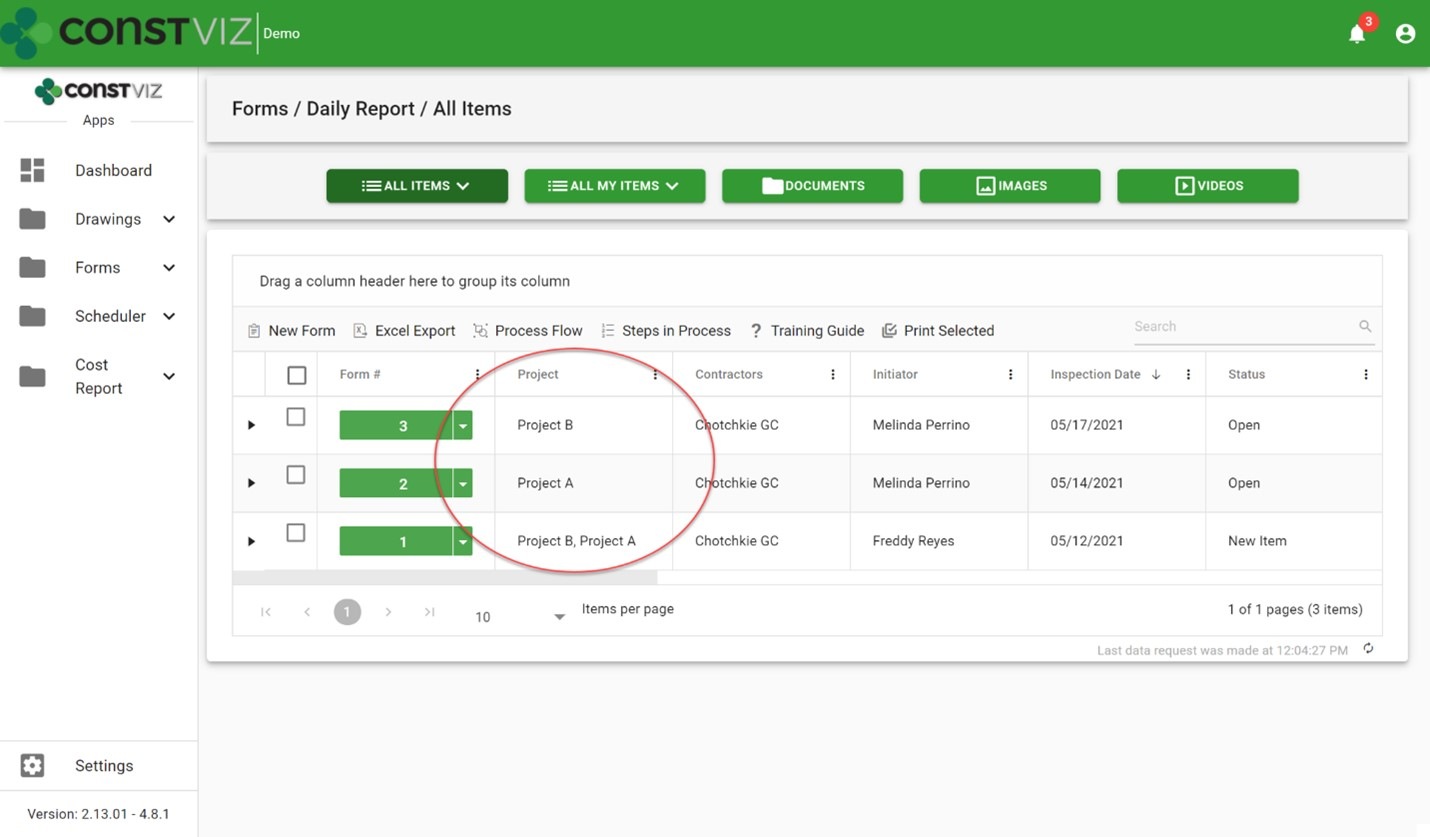
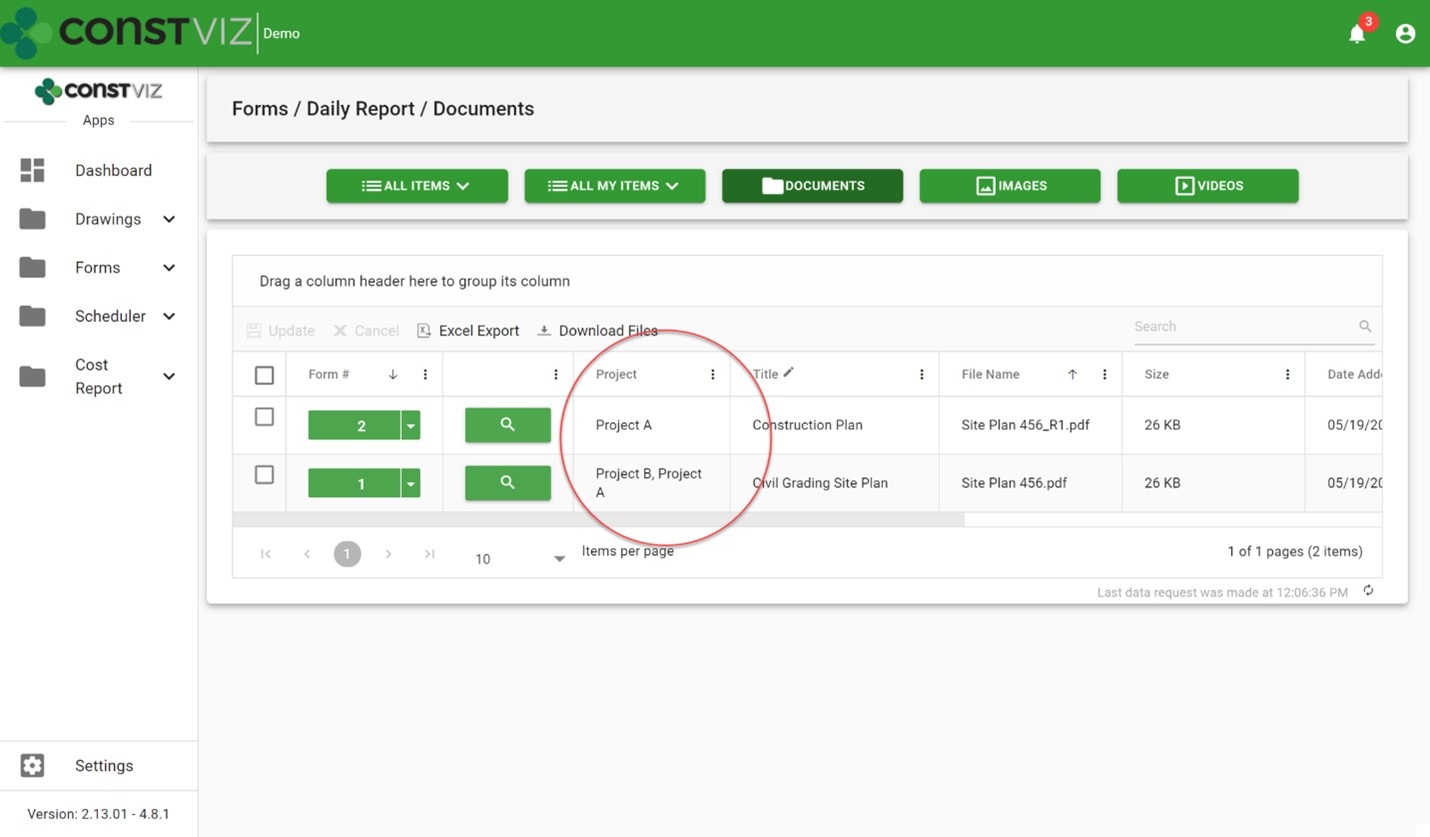
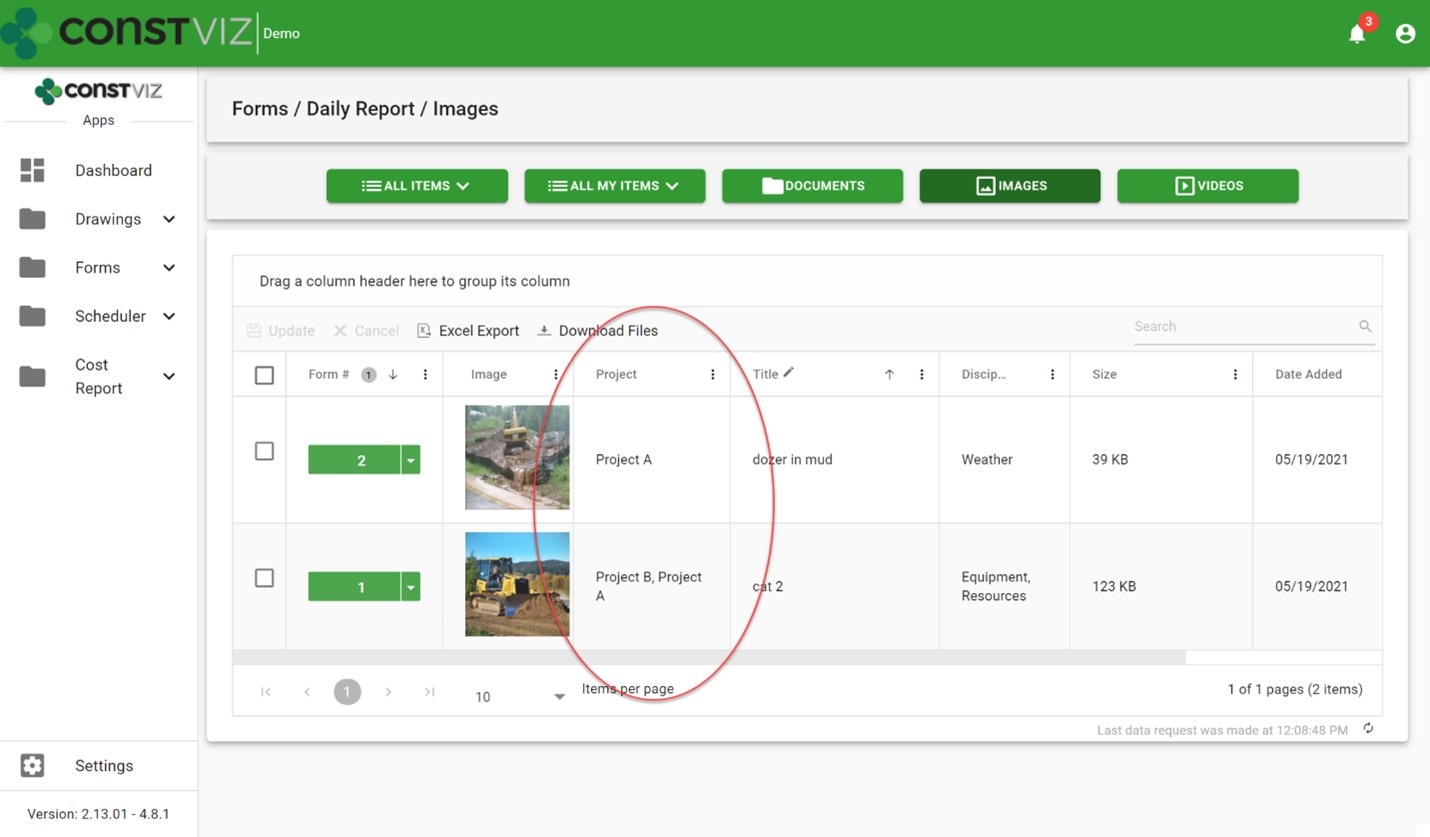
When attaching files (documents, images, and video) to a form, Construction Viz automatically saves the files to a SharePoint library and includes the form-specific metadata and any metadata added to the attachment. No additional metadata tagging by the user is required. Below are some example screenshots of this feature in action.

Daily report forms with project metadata tagged:
FolderNightmare_1

Daily report document attachments automatically tagged with project metadata:
FolderNightmare_2

Daily report image attachments auto-tagged with project metadata:
FolderNightmare_3

Benefits of the Construction Viz auto-tagging feature

The Construction Viz auto-tagging feature saves significant time for both the users and the document controls team. It ensures your organization's documents are stored with the proper metadata so you can find them in the future either by the associated form or by the attachment itself. For example, you can search for a specific image instead of finding the daily report that has the image as an attachment. Likewise, you can find a particular submittal package independent of the submittal form that has it as an attachment.

Also, since Construction Viz stores all the metadata with the lists and libraries in Microsoft 365 and SharePoint, you can create custom SharePoint views, Power BI reports or export the raw data to Excel.

Manage your projects with Construction Viz and Microsoft 365

Construction Viz lets you manage your projects right in Microsoft 365 with familiar tools such as Excel and SharePoint – all optimized for your construction project teams' needs. To see our catalog of our available construction apps for Microsoft 365 and SharePoint, check out the Construction Viz apps page. You can submit a free consultation and demo request to learn more.

And head over to LydonSolutions.com for more information if you are interested in a customized construction project management solution using Microsoft 365.
If you can measure it, you can manage it with Construction Viz Task Manager

Project Management Tools | February 10, 2021

Being a construction project manager is a demanding job where all responsibility for a project's success falls on your shoulders. You spend most of your time herding cats, trying to hold your team members accountable while working in a matrixed organization. It's not enough to email a team member when a deliverable is due. You need constant reminders when follow-ups are required and a simple but effective means to monitor and report progress.

We designed the Construction Viz Task Manager App for project managers like you. Construction Viz Task Manager has everything you need to plan, track, and report on your team's project and program tasks within one powerful app.

Construction Viz Task Manager Key Features

The Construction Viz Task Manager app installs easily into the Construction Viz Hub and integrates with our full lineup of construction project management apps. Task Manager provides a 360-degree approach to managing tasks, including the following features:

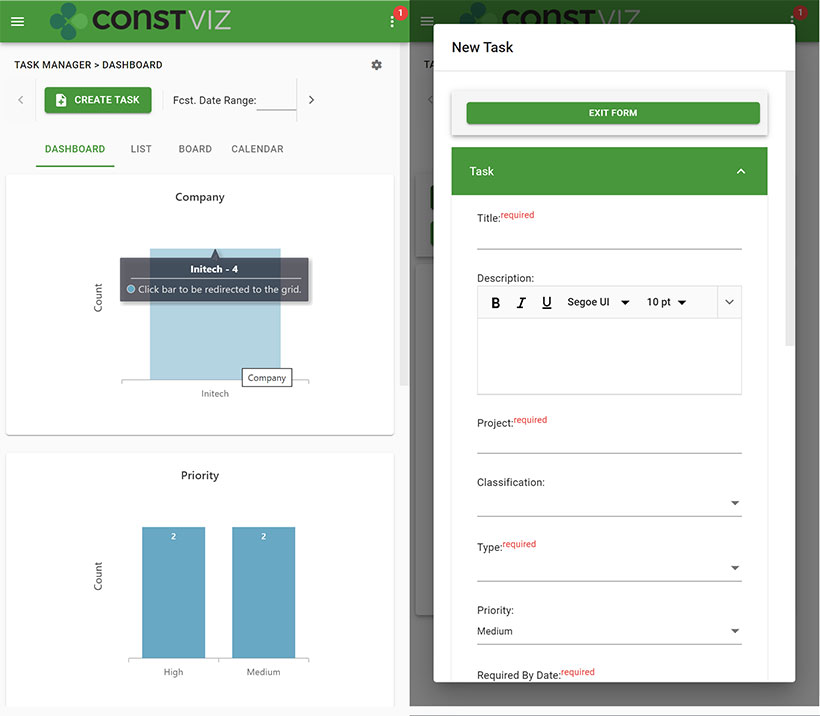
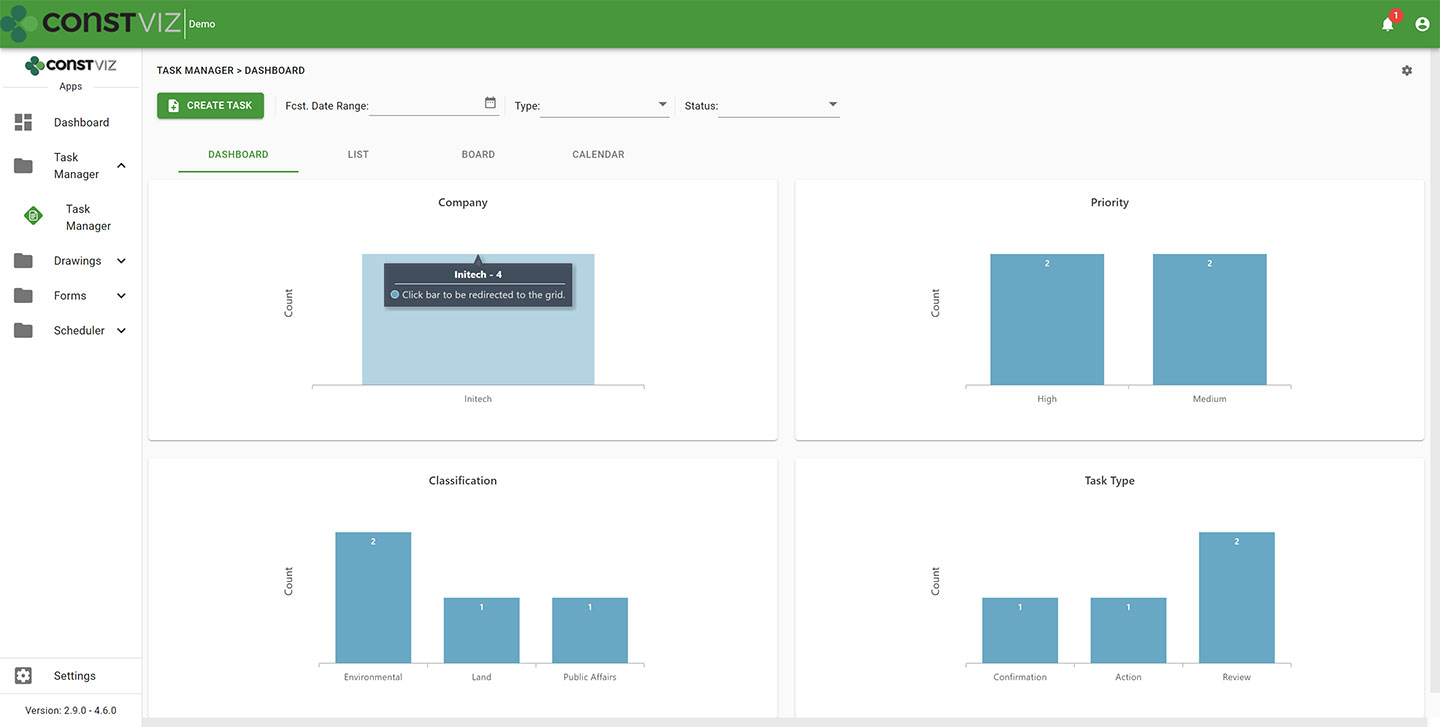
  • Dashboard summary. As a PM, your time is limited. Task Manager lets you quickly see the status of your project team's tasks in configurable dashboards with drill-down capability.
cv-tm_1
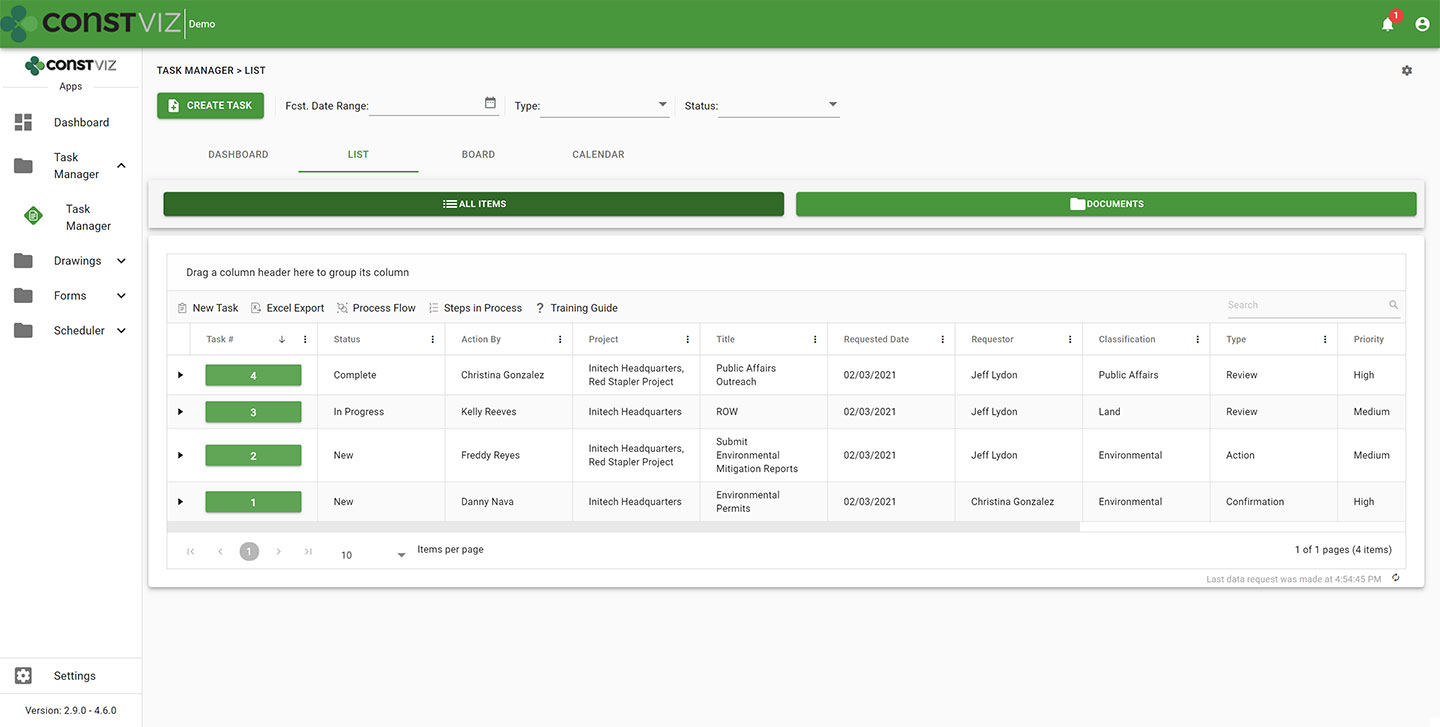
  • List view. Task Manager lets you see all your tasks consolidated into a centralized list view. You can use this pre-defined view to quickly group, filter, search, and report on your team's tasks.
cv-tm_2
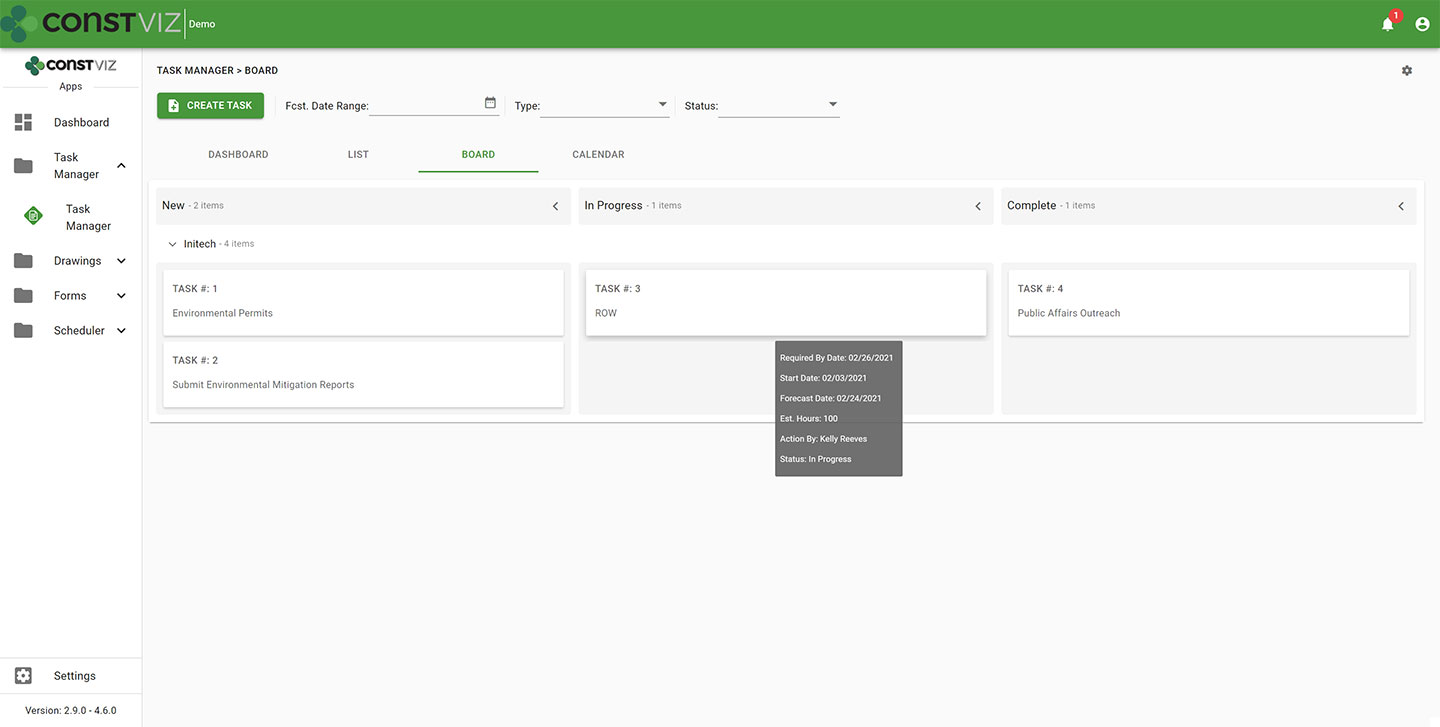
  • Board view. Want an easy way to see the progress of a task? Task Manager's board view uses a Kanban approach to managing tasks with configurable buckets and swim lanes so you can see progress made by each team member. The app highlights any behind schedule tasks in red, allowing you to target those items for immediate follow up.
cv-tm_3
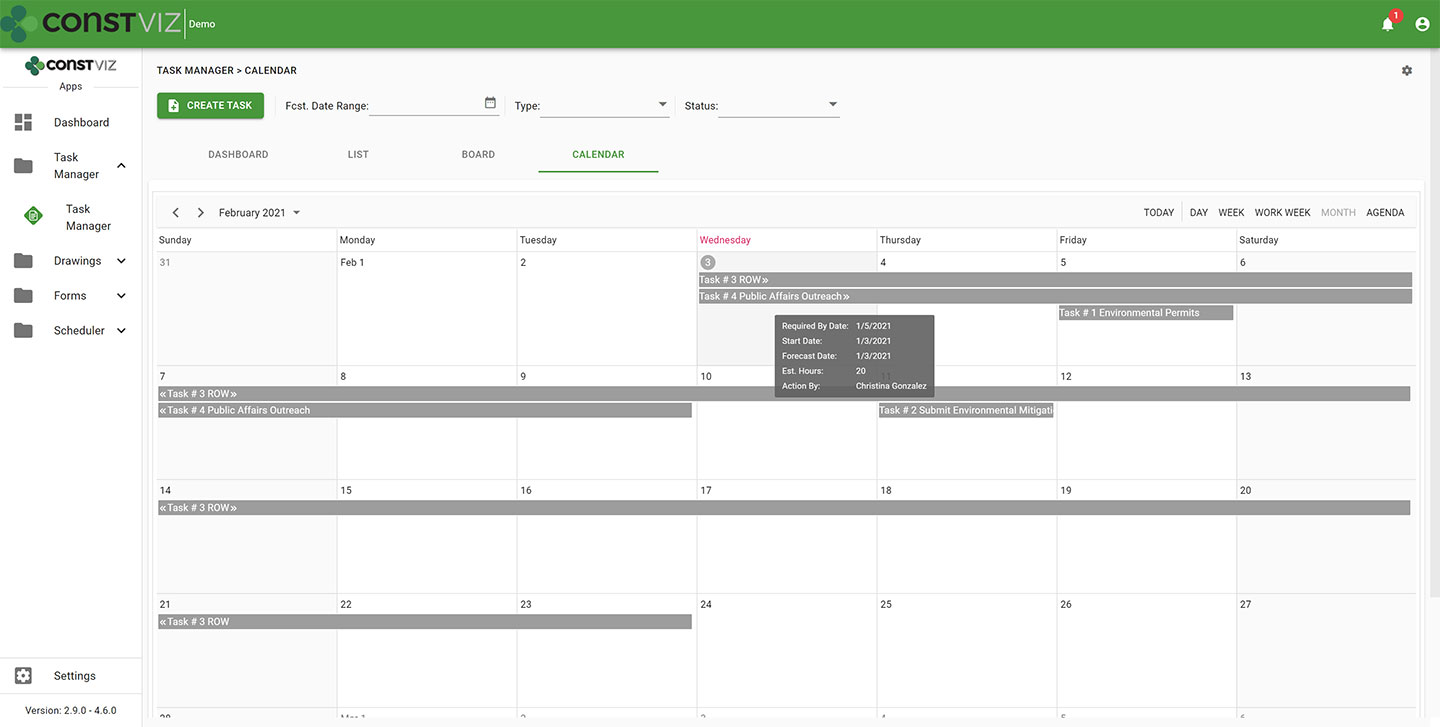
  • Calendar view. Seeing when tasks are due in a familiar calendar layout is invaluable. Task Manager's calendar allows you to proactively manage when tasks are forecast to be complete using daily, weekly, or monthly views. Since Construction Viz uses SharePoint as the backend, you can even link your Task Manager calendar to your Outlook calendar.
cv-tm_4
  • When you assign a task to someone in Task Manager, the app automatically sends the assignee an email with a link for them to take action. Task Manager integrates with Microsoft Power Automate, letting you tailor the timing and frequency of email notifications for your business processes so that frequent reminders do not go unnoticed. Like all of our apps, tasks from Task Manager also display in the Construction Viz notification center, ensuring you and your team always know about items requiring your attention.
  • Task Manager integrates with other Construction Viz forms and apps. Task Manager integrates across the suite of Construction Viz apps, streamlining your workflows. For example, if you are in a Construction Viz RFI form, you could create a task and assign it to a team member, thereby associating the two records. Now, anyone viewing the task can see the linked RFI record and vice versa. With Task Manager, you no longer have to bounce between one system to know when a task is due and another to view the work item. Everything is readily accessible and interlinked directly in all the relevant Construction Viz apps.
  • Use any device with full mobile responsive and offline support. Task Manager, like all our apps, is fully responsive on any device. You can also work offline without an internet connection.  So whether you are at the office or in the field, you can always manage your tasks.
cv-tm_5
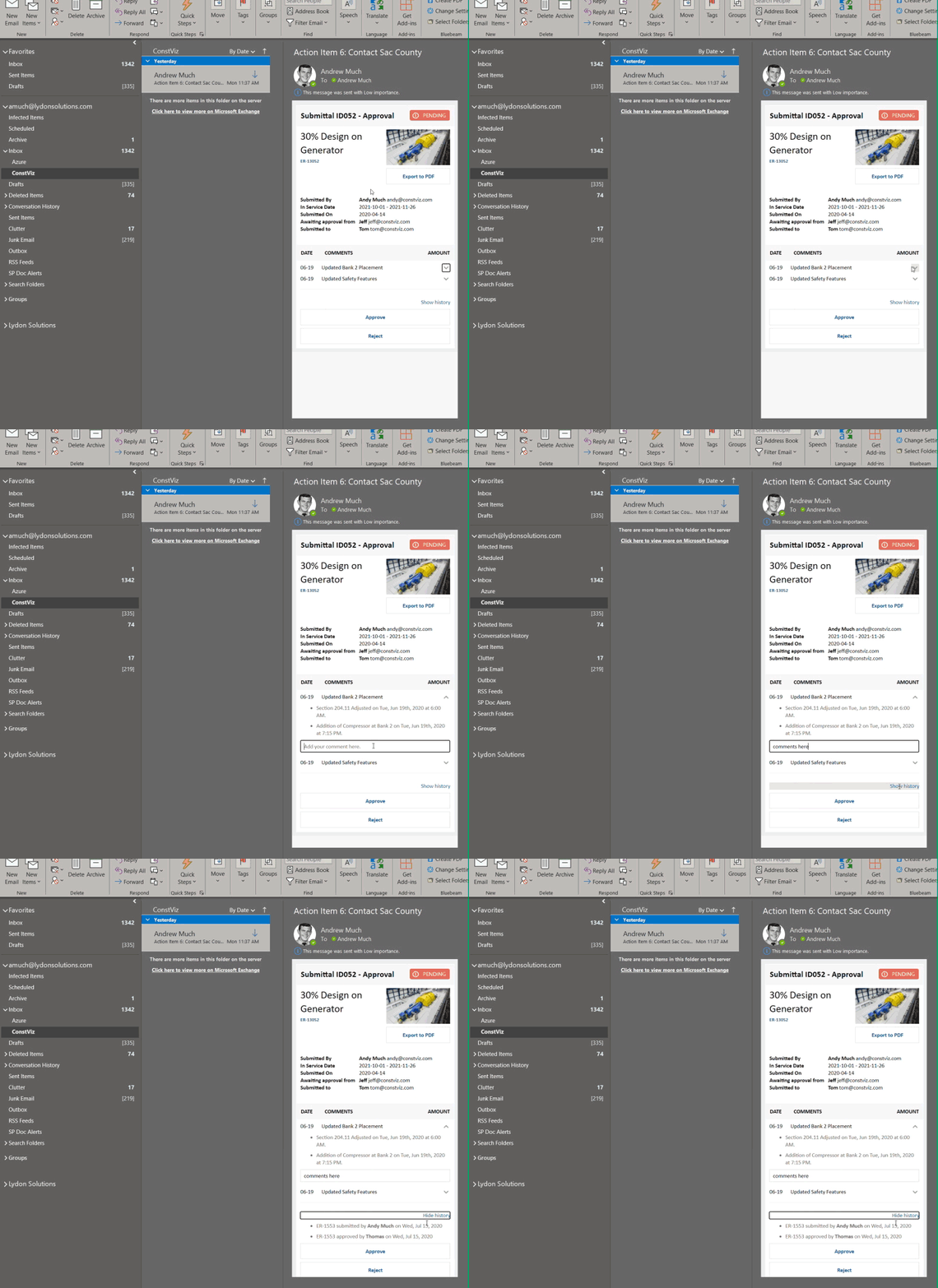
  • Adaptive Cards integration. Task Manager takes advantage of Microsoft's Adaptive Card technology, allowing team members to work in Outlook without ever logging into any system.  Task-driven cards make it easy for team members to respond to tasks wherever they are and on any device using Microsoft Outlook. You can read more about Construction Viz and Microsoft Adaptive Cards in this blog post.

See what Construction Viz Task Manager can do for you

Construction Viz is the most flexible construction project management solution available for Microsoft 365 and SharePoint. Find out how Construction Viz and the Task Manager app can help you better manage your construction projects and programs with a free consultation and demo.

Manage your projects in Outlook! No, really!

Project Management Tools | December 14, 2020

Embracing new technology is often a challenge in construction. While technology can help organizations be more efficient, it is challenging to keep up with the constant changes and new systems required to do the job. To add to this dilemma, every contractor, construction manager, and owner have their own Project Management Information System (PMIS) that team members must learn to conduct business. As a result, actual construction productivity takes a hit due to additional training, double-entry, errors, and general user dissatisfaction. It's no wonder most construction organizations are hesitant to leave old faithful: Microsoft Outlook and Office.

So the challenge is, how do we make it as easy as possible for the construction team to do their job and remove the technology burden of learning and working with multiple PMISs? What if you could work in Outlook or Office entirely without ever having to log into another system?

Welcome to Adaptive Cards

With the flexibility of the Microsoft Power Platform and Adaptive Cards, we have removed the users' burden of learning another PMIS by allowing them to work directly in Microsoft Teams or Outlook. By leveraging Power Automate and Adaptive Cards technology, users can now receive actionable task-focused cards. To respond, users open a card to view the content, review a task, or respond with comments. Work entirely from email or Teams—no need to even log into a PMIS.

The Key Benefits of Adaptive Cards

You may be thinking that your PMIS already sends out emails when there are tasks due. How is this different? Adaptive Cards are the future of actionable messages and notifications. They are essentially small interactive applications.

The are many benefits to Adaptive Cards:

• Cards are responsive to any device.
• The card user interface can be simplified and tailored to perform specific tasks. Using the KISS (keep it simple) approach, we can make it easy for users to review content and respond.
• The cards can include logic to prompt questions and responses without logging into the actual PMIS and never leaving the email.
• Cards can read and write data with various systems such as Microsoft 365 or SharePoint, SAP, Oracle, etc.
• Cards can leverage Windows 10 notifications.
• Cards integrate with Microsoft Teams Chat, Timeline, and Outlook.
• Cards can leverage assistants such as Cortana or a web chatbot.
• Dashboards can be delivered using feeds from multiple Adaptive Cards.
• The cards can include security extended from native applications.

Lydon Solutions can build Adaptive Cards for any PMIS using our pre-defined templates. We even integrated Adaptive Cards into the notification system of Construction Viz, our PMIS for Microsoft 365 and SharePoint. By meeting the user where they work in Microsoft Office and Outlook email, Adaptive Cards keep users in their natural activity flow without interruption, making for more efficient and happier project teams. A win-win.

Adaptive Card for a Construction Viz Submittal Form email notification

Deploy Adaptive Cards for Your Construction Projects

Find out how we can leverage our existing Adaptive Card templates to simplify your workflows and provide team members access to project data in the applications they use every day. Contact us for a free consultation and see how we can help your organization with its digital transformation to Microsoft 365.

If you need a turnkey PMIS for managing your projects in Microsoft 365, learn more about using Construction Viz for project management.

Simpler Project Management with the Construction Viz Project Tracker App

Project Tracker | November 17, 2020

When planning a construction project and seeing it through to closeout, it’s essential that you use the right tools to keep the entire project team on track. We created the Construction Viz Project Tracker app to assist with this process.

The Construction Viz Project Tracking app, available for Microsoft 365 and SharePoint, combines all of your critical project information into a single interactive dashboard for easy reporting, resolving issues, and monitoring the schedule and budget.

The benefits of using Project Tracker

Keep track of everything you need to know about your projects with the Project Tracker app. You can use Project Tracker to:

1. Keep track of 1000s of projects with ease. The Project Tracker app allows you to manage tasks for one or several customers associated with a project. Roll up tasks from multiple customers into one easy-to-read dashboard to see everything at a glance.
2. Manage permits to issuance. Identify permitting requirements and work on hundreds of permits to keep your team on track.
3. Prepare the Job Package Binder. With a click of a button, the Project Tracker can prepare the job package binder for your construction foreman to take on the job site.
4. Be productive anywhere with full mobile and offline support. Use our lineup of Construction Viz offline mobile forms, such as The Daily Inspection Report, to track programs and projects from a mobile device.
5. Always know where your projects are happening with GIS integration. View your projects spatially. Load in GIS layers to overlay on top of your projects.
6. Tag documents in seconds. Construction Viz makes document management for your project easy, letting you tag documents to one or many projects based on the dynamic that you define.
7. Integrate with Power Automate. The Project Tracker app integrates into Microsoft Power Automate to give you the option to send alerts or create workflows.

Check out our presentation about the Project Tracker app to learn more and see how one major California utility company uses the tool to manage complex maintenance projects involving over six thousand transmission towers.

Construction Viz Project Tracker from Jeffrey Lydon

Get started with Project Tracker and Construction Viz

The Project Tracker app is a part of the Construction Viz Suite, which offers more than thirty-one construction forms to assist with project management. Find out more about Construction Viz and see how we can help you better manage your projects by requesting a free demo today.

Keep Organized with the Construction Viz Drawing Management App

Drawing Management | September 1, 2020

Make sure your team always has access to the latest set of drawings for your projects with the Construction Viz Drawing Management app for Microsoft 365 and SharePoint.

A frequent challenge for construction project managers is finding and referencing the latest set of drawings. Part of the problem is that many organizations do not keep an updated master drawing list. Further complicating things, teams often store PDFs of the drawings for their projects without metadata in a shared drive with a complex folder structure. As a result, only employees that know the folder scheme can find and update drawing revisions correctly.

The impact of project teams not having timely access to the correct drawings can be felt from the home office to the field, resulting in lost productivity for the engineers and contractors doing the work. Effective drawing management is not just a problem for small companies. We have seen these kinds of issues happen even on multi-billion-dollar projects over the years.

With the new Construction Viz Drawing Management app, available for Microsoft 365 and SharePoint, we set out to reimagine how a system can help project teams manage construction drawings more effectively.

Six Key Features of the Construction Viz Drawing App


The Construction Viz Drawing Management app improves the entire drawing management process in six key areas:

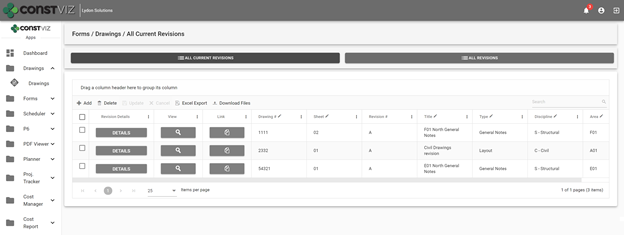
1. Creating an interactive master drawing list. The Construction Viz Drawing app includes an interactive and searchable grid of every drawing organized by ID number, sheet, title, revision, discipline, area, and drawing set. The latest revisions are listed first, so team members are always working off the most recent revision. The grid can be filtered and grouped to find any drawing easily.

Construction Viz Drawing Management App - Master Drawing List

2. Organizing drawing file storage. No more complex folder structures. As with all Construction Viz data, the Drawing Management app stores each drawing and revision as a record with a single associated file in SharePoint for easy access.

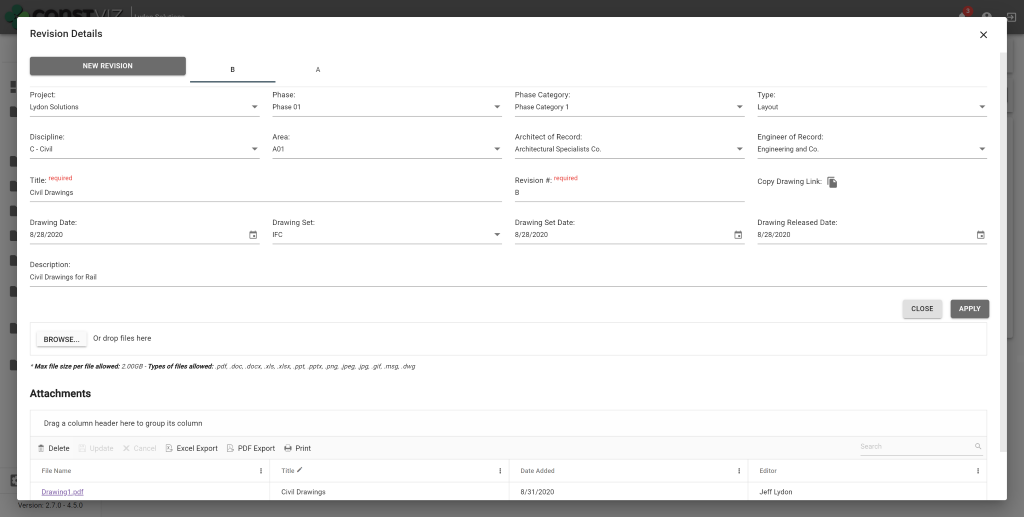
3. Improving drawing revision management. When a user uploads new drawings, the app requires them to input a user-defined revision value. Since the app displays the latest revisions first, other team members can readily find and work off of the most recent version of a drawing.

Construction Viz Drawing Management App – Revision Management

4. Adding drawing metadata. The app requires users to complete standard metadata fields when uploading new drawings. This rich metadata lets teams filter, group, and search drawings in the app’s master grid view.

5. Relating drawings to other processes. The Drawing Management app integrates with other Construction Viz apps to add a “Related Drawings” component. The component enables users working in other apps to select one or more drawings and relate them to any record, such as an RFI or other form, using the same interactive and searchable grid featured in the Document Management app. This feature makes it quick and easy for users to include related drawings on construction forms and correspondence without having to deal with attachments.

Construction Viz Drawing Management App – Related Drawings component

6. Exporting drawing PDFs to local devices. Users can export drawing PDFs for use on their local devices from within the master drawing list grid or a related app using the component feature described above.

These six features of the Construction Viz Drawing Management app will save a project team the headache that comes with trying to update and find the latest drawing revisions. Integration with other Construction Viz apps ensures that users have ready access to the right drawings when and where they need them – and can share them with a few clicks.

See What Else Construction Viz Can Do for Your Organization

Construction Viz offers a full lineup of construction management apps, including tools for project tracking, scheduling, GIS maps, cost reports, construction forms, and more. Find out how Construction Viz can help you better manage your construction project by scheduling a no-obligation demo today.

Your Flows, Your PMIS: Power Automate & Construction Viz

Power Automate | August 18, 2020

Power Automate is a Microsoft 365 service that automates time-consuming business tasks and processes. It makes it practical and simple for line-of-business users to build workflows across applications and services. Most PMIS systems on the market have their own proprietary workflow functionality, but what makes Microsoft’s Power Automate unique, is that it is a stand-alone service that can integrate with both Microsoft 365 as well as external applications.

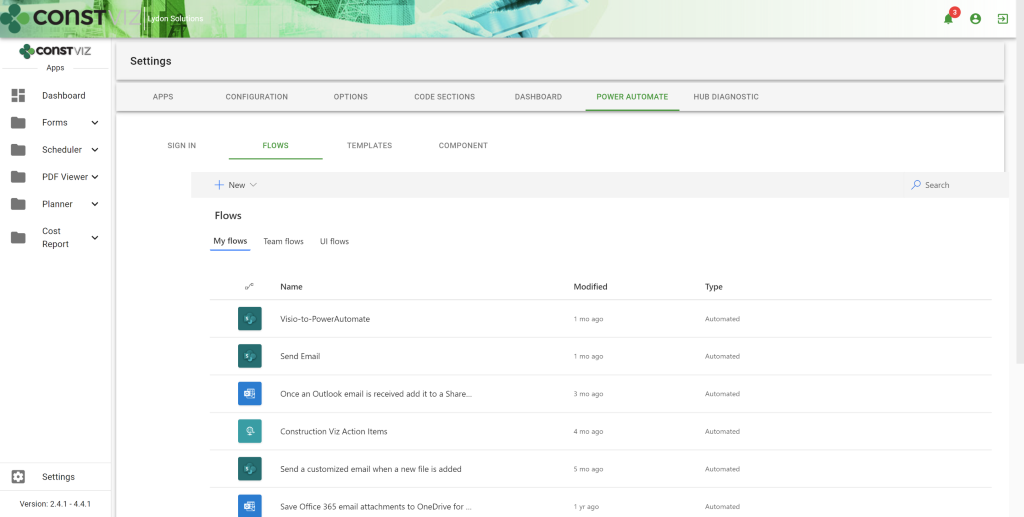
Being that Construction Viz can be deployed into Microsoft 365, we deeply integrated Power Automate into our application so you can build, deploy, and support your flows from within the Construction Viz hub directly inside your Microsoft 365 tenant. With Microsoft’s free, on-premises data gateway, you can also connect Power Automate flows (as well as other Power Platform services) to line-of-business systems behind your corporate firewall. In fact, we have leveraged the Gateway to connect client’s Microsoft 365 environments to our hosted Construction Viz service offering which opens up a wide array of possibilities.

Power Automate

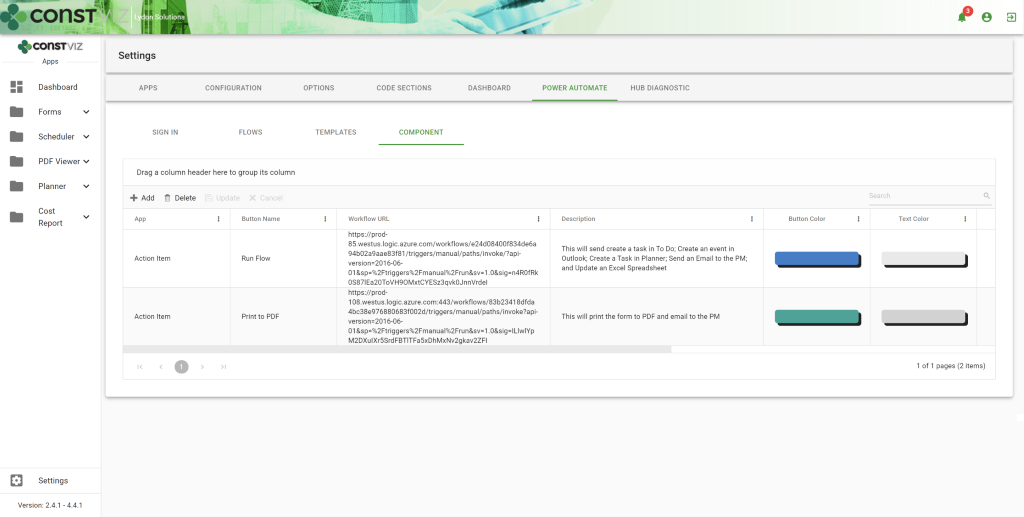
We make it easier than ever to add your own manual triggers and configurable buttons that allow users to link their flows and add it to any app.

So, What Could You do with Power Automate and Construction Viz?

Send out Construction Viz Action Items for review that will update one or more Microsoft 365 applications at one time from a single workflow. This is triggered by using a button you can add to the Action Item form. So not only will the alert notification display as an action item in a user’s ball-in-court, but it can also update:

• Microsoft To Do – as a task
• Outlook – as an email approval request, a task or event
• Planner – as an event
• Teams – as a post
• Excel – as an action item in a Worksheet

Why is this important? Because every company or employee might manage their work in different Microsoft 365 applications. For some users, it’s Excel. For others, it might be Outlook, and so on. With Power Automate, you can configure the workflow around how you work and what applications in Microsoft 365 you use frequently.

Other Power Automate workflows can include:

• Creating PDFs from Construction Viz forms as well as attachments
• Extracting data from Excel to use in Construction Viz apps
• Emailing alerts from Power BI dashboards embedded in Construction Viz

To get you started, we have built a set of Power Automate workflows that work with Construction Viz and can be imported into your Microsoft 365 tenant. Once imported, you can modify as needed to create the solution that works best for your organization.

Get Started with Power Automate

Get the most out of Microsoft 365 by combining Construction Viz with Power Automate to create unparalleled solutions.

To find out more, schedule a free demo of Construction Viz. If you need help with Microsoft 365 setup for your construction organization, check out our managed services at Lydon Solutions.

  • « Go to Previous Page
  • Page 1
  • Interim pages omitted …
  • Page 8
  • Page 9
  • Page 10
  • Page 11
  • Go to Next Page »

Footer

About Constructon Viz

Construction Viz is a flexible construction project management software solution powered by Microsoft SharePoint and SQL.
Read More >

Navigation

  • Home
  • About
  • Features
  • Apps
  • Blog
  • Contact
  • Login

Apps

  • Construction Viz Hub
  • Drawing Management
  • File Manager
  • Specification Management

–

  • Project Forms
  • Project Planner
  • Project Scheduler
  • Project Tracker
  • Task Manager

Connect with Us

This field is for validation purposes and should be left unchanged.

Sign up to receive helpful tips for construction project managers as well as updates about Construction Viz.

Lydon Solutions

© Lydon Solutions

  • Privacy
  • Cookies
  • Terms of Use
  • Disclaimer
  • End-user license

Click here to start a Microsoft Teams chat.

Click here to start a Microsoft Teams chat.

Contact Us
This field is for validation purposes and should be left unchanged.
Name(Required)
Join Our Newsletter

Sign up to receive helpful tips for project managers and updates about Construction Viz.

Get Started

Join Our Newsletter

Sign up to receive helpful tips for construction project managers as well as updates about Construction Viz.

This field is for validation purposes and should be left unchanged.