• Skip to primary navigation
  • Skip to main content
  • Skip to footer
Construction Viz

Construction Viz

Project Management Perfect

  • About
  • Features
  • Apps
  • Blog
  • Contact
  • Download Flyer
  • Get Started Today
  • Login
Show Search
Hide Search

Construction Viz Apps

Introducing the New Construction Viz Specification App

Specification Management | January 18, 2024

The Construction Viz Specification app complements the Drawing app by providing a one-stop shop for storing and organizing contract requirements, managing revisions, and integrating specifications across our suite of Construction Viz form applications. If specification management is a focus area for your projects, read on to learn more about this exciting new tool.
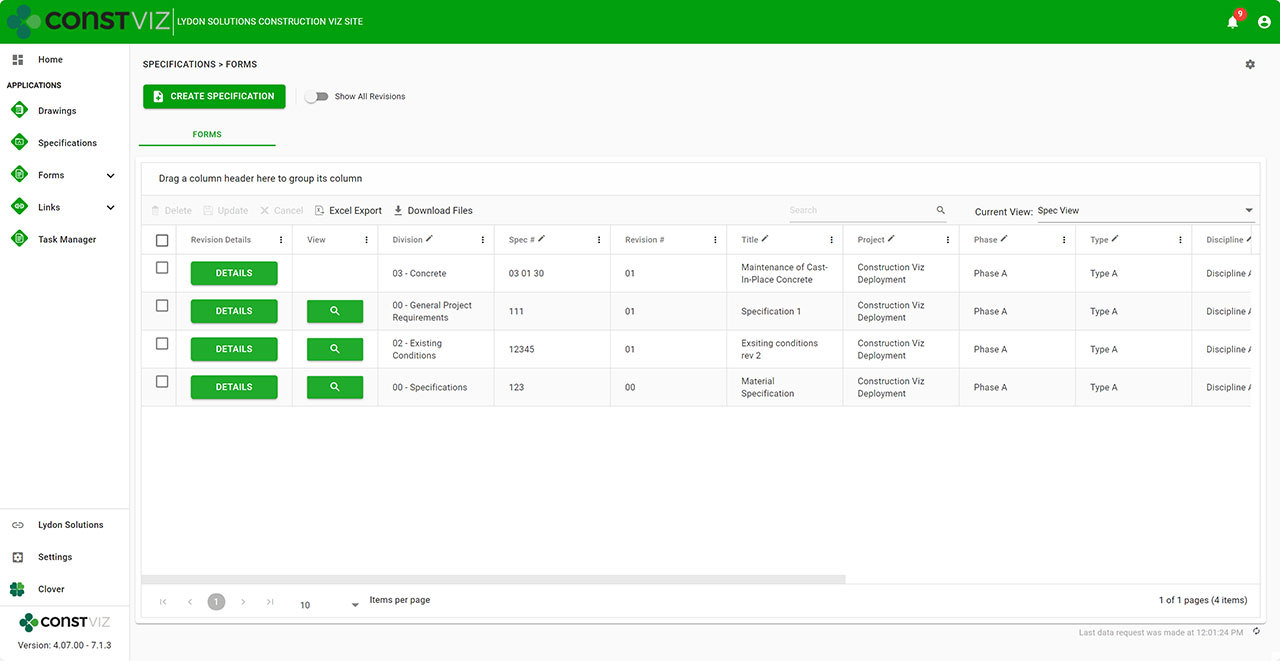
Spec-Mgmt_1

Key Features of the Construction Viz Specification App

Find the correct specification. Managing construction projects involves strict adherence to the contract drawings and specifications. Team members need to be able to quickly find the latest specifications and reference them in project correspondence. With the Specification app, we added a comprehensive set of metadata fields such as division, set, spec number, and release date to find what you are looking for easily.

Work off the latest revision. Revision management is a common issue in projects. We added our robust revision management functionality, allowing users always to see the latest revisions by default in the logs but can easily toggle to see all revisions.

Manage one set of specifications. More than one set of specifications can float around on projects, especially if uploaded to correspondence forms. To ensure a single source of truth for specifications, we built the Related Specifications Component that can be added to any form. With the Related Specifications Component, users can filter, assign, and download specifications within any form. This feature saves one set of specifications that can be easily referenced anywhere throughout the project.

View specifications your way. We know you want to search for specifications based on your specific criteria, so we included our saved views feature in the Construction Viz Specifications app. This feature enables you to create one or more views to help you quickly find what you need and have that view default every time you visit the specifications. You can read more about the saved views feature in this blog post.
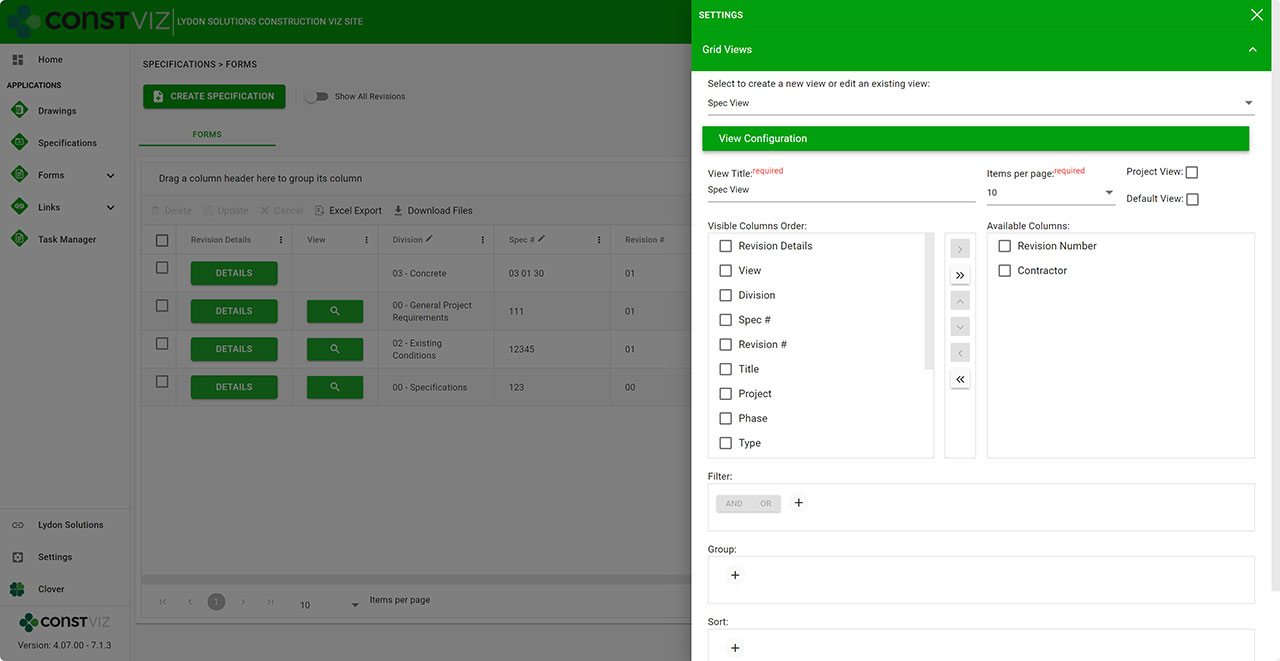
Spec-Mgmt_3

Lydon Solutions continues to build features and functionality to make construction management easier using the tools that everyone is familiar with, Microsoft 365. If you are looking for a turnkey construction management solution that can be further customized to your specific needs and deployed to your Microsoft 365 tenant, click this link to request a demo.
New eSignature Feature for Construction Viz 

Construction Viz, Project Management, Project Management Tools | December 20, 2023

As construction organizations move from paper processes to web-based project management tools, the adoption of electronic approvals has been mixed. Clicking an approved button that registers your account name and date is standard in most construction management systems. However, some organizations and specific forms still require digital or wet signatures. While several electronic signature tools are on the market, their ease of use and cost can be a deterrent. We added a free and easy-to-use digital signature feature to Construction Viz to capture signatures in any of our forms. Read on to discover how our simple signature feature might address your challenges. 

Several signature solutions are available for SharePoint, including the new built-in SharePoint eSignature subscription service that will be available soon. The benefit of these tools is that files that receive signatures never leave your Microsoft 365 tenant, ensuring your data remains secure and in your control.  

Leveraging these eSignatures through SharePoint is great but does require additional subscription costs and administration. What if you want something simpler and at no extra cost?  

Construction Viz eSignatures Feature for Construction Forms

Picture1

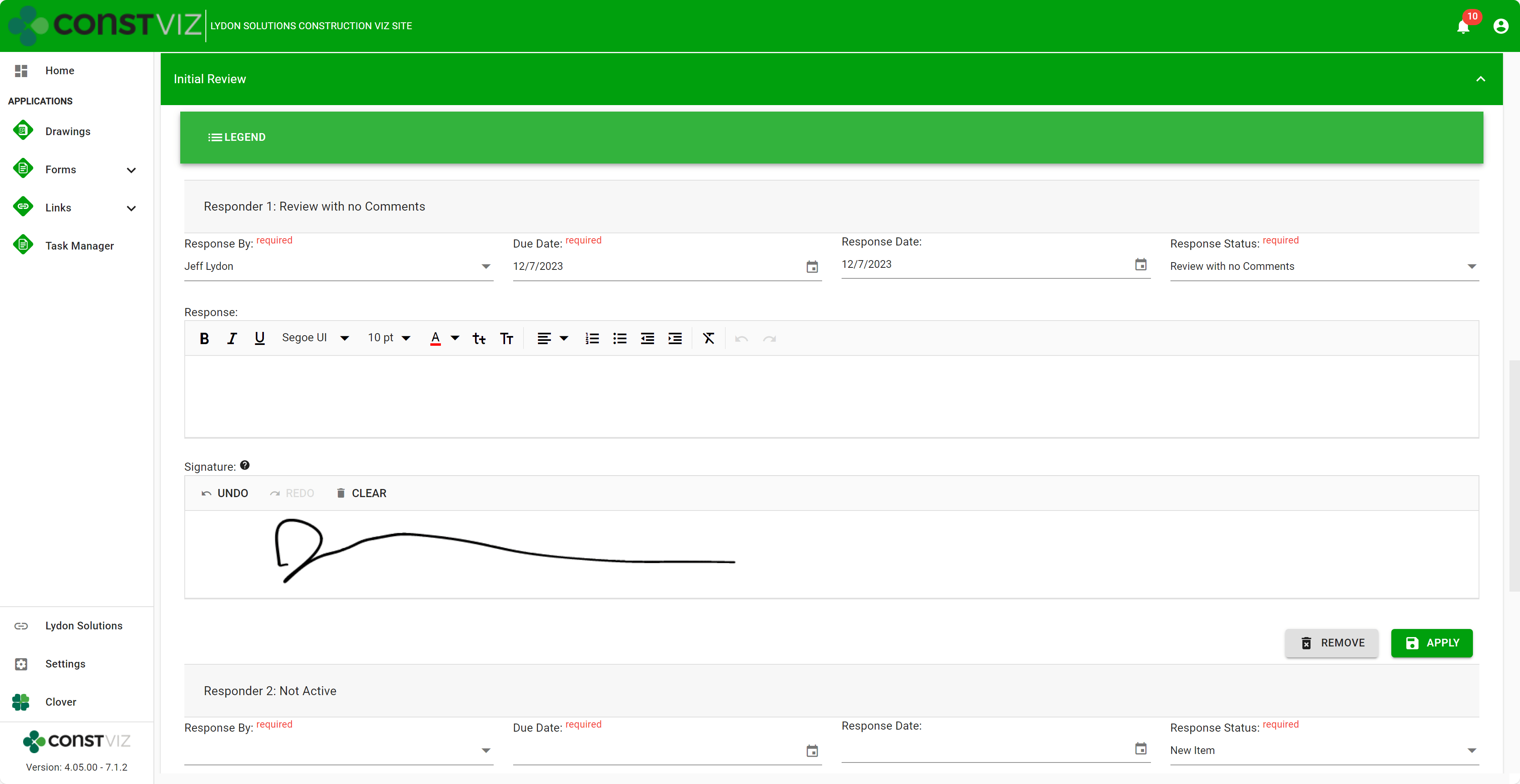
With the Construction Viz eSignature feature, signatures are available on any form in the review components. For example, say you want an inspector to sign a daily report digitally. We can activate eSignatures in your Construction Viz settings to automatically add eSignatures to all your daily report forms. 

Since this new eSignature feature is built into Construction Viz, we included additional controls such as: 

  • Only the user assigned the review can sign their signatures. 
  • If a user is removed from the reviewers, their signature is removed as well.  
  • Administrators are restricted from signing on behalf of a user.  
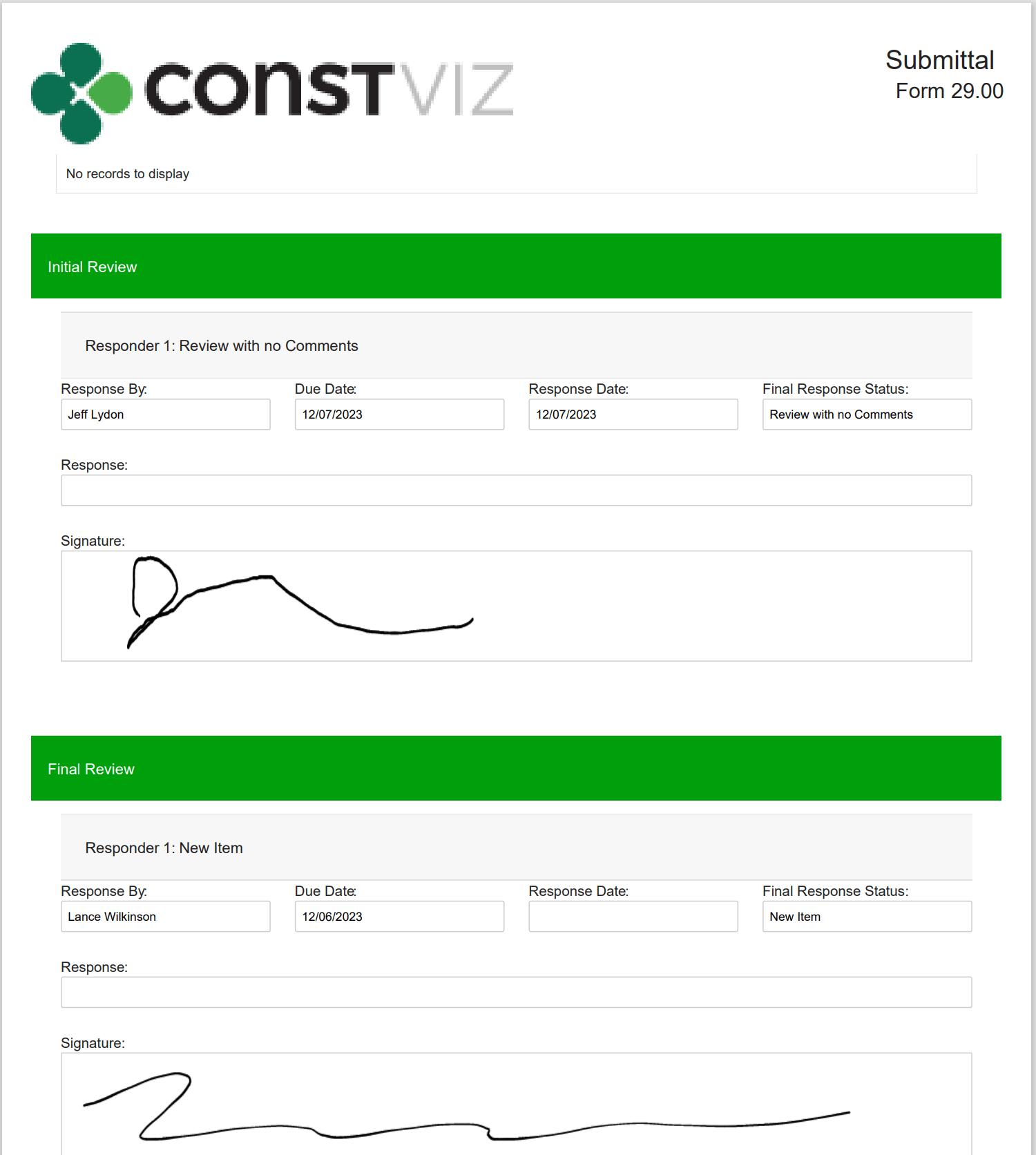
  • eSignatures are available on any Construction Viz form! 
  • eSignatures print in form reports! 
Picture2

Our new eSignature feature is perfect if you need a simple, free solution within Construction Viz. You can find out more about Construction Viz by requesting a demonstration here. 

Archive Your Project Data in Three Clicks with the Construction Viz PDF Report Wizard 

Project Management, Project Management Tools, Reporting | October 26, 2023

Have you ever needed an easy way to archive PDF versions of all your project correspondence, such as RFIs and daily reports, including attachments (which could be in various file formats)?  

The new Construction Viz PDF report wizard aims to build on our existing technology with the ability to generate PDFs from multiple forms at the same time. Read on to find out more about this new feature. 

Introducing the Construction Viz PDF Report Wizard

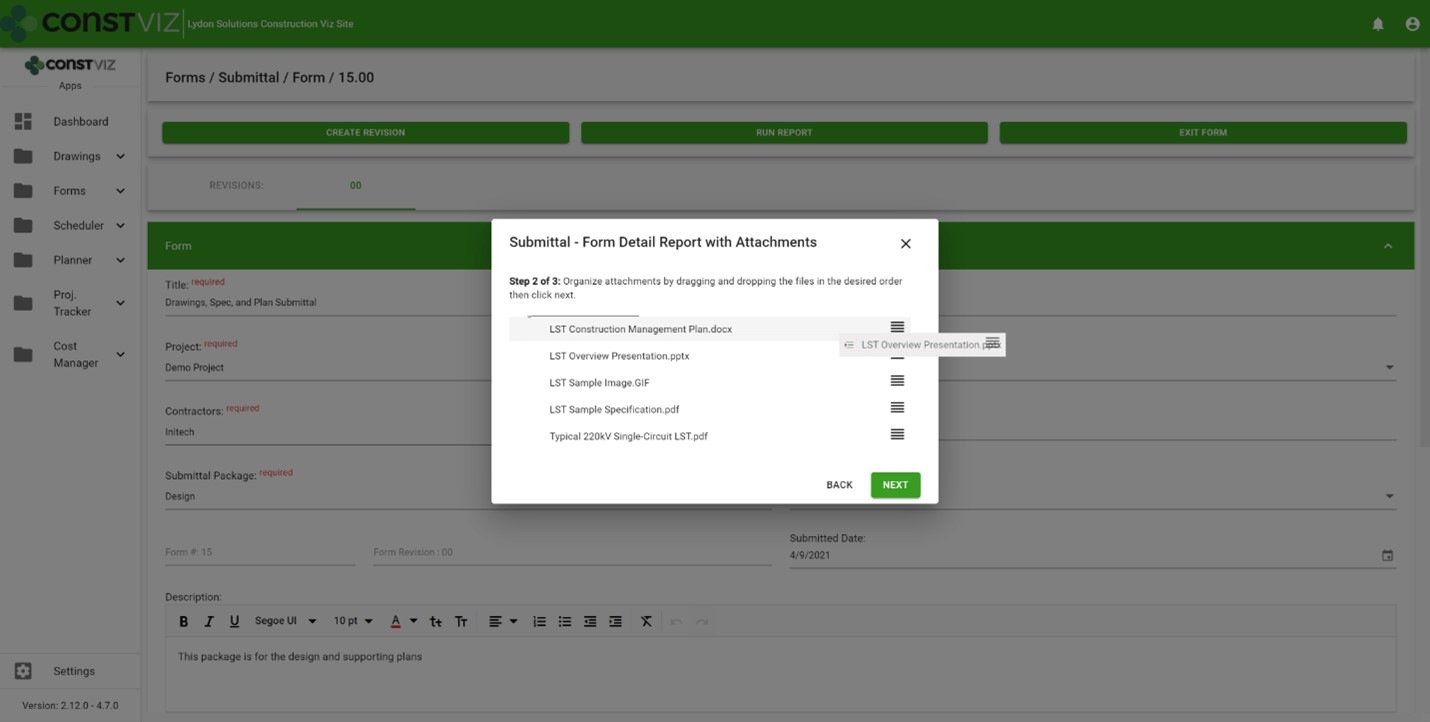
We built the Construction Viz PDF Report Wizard based on the Construction Viz Form archive wizard which is a powerful and heavily used feature in Construction Viz. It allows users to create PDF binders from any form, including the form attachments. The step-by-step wizard walks you through selecting a form, adding and ordering attachments, and naming the generated PDF binder.

Picture1

Form archiving wizard – re-ordering attachments 

The cool part is the archive wizard converts attached files from their native format (Excel, Word, etc.) to PDF and automatically provides a name for the PDF binder. So, if you want to send a contractor a PDF of an RFI with any relevant attachments, select the form, select which attachments they need to see, and follow the wizard to generate a PDF you can email.  

This feature is an excellent form-by-form solution, but what if you want a push-button way to choose more than one form? Let's say you want to archive all of the RFIs, submittals, and dailies on a project and include all the form attachments. And you want to do this in bulk. 

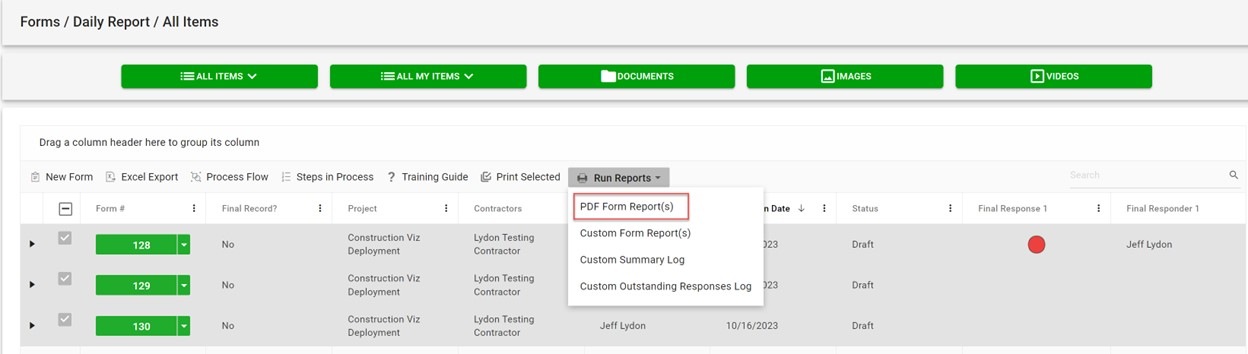
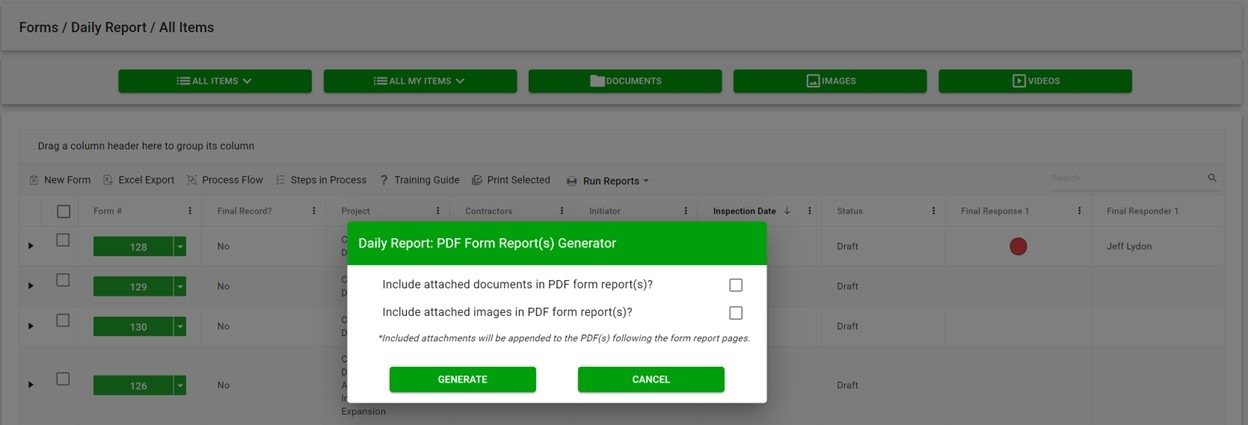
The new PDF report wizard leverages some of the same technology from our form archive wizard to create multi-form PDF binders of your project correspondence. Users select one or more forms, click the PDF Form Report(s) button, and have the option to include attachments, images, or both. And just like the form archive wizard, the attachments are automatically converted from their native format (Excel, Word, etc.) to PDF, including any images. 

Picture2

If you are wondering about file sizes impacting the system and preventing you from continuing your work, don't. While the file conversion runs, the tool prompts you to load another screen to continue working without interruption. Construction Viz will notify you when the processing is complete and the PDF files are downloaded locally.  

Picture3

Our development team at Lydon Solutions continues to drive innovations in your day-to-day workload with our Construction Viz product for Microsoft 365 so you can focus on what's important, delivering the project on time and within budget. You can request a demo of Construction Viz here, or if you need help with Microsoft 365, you can click here for a free one-hour consultation with our Microsoft technology experts. 

Improve Project Efficiency with New Schedule Views for Construction Viz

Forms | June 5, 2023

Construction forms such as submittals, RFIs, and daily reports are tightly integrated with project schedules but can get lost among the hundreds or thousands of potential activities. To manage forms effectively, it’s not enough to just see them included in a weekly schedule report. It is essential to evaluate inquiries promptly and efficiently in real-time to address any possible schedule disruptions.

These inquiries may include the following:

  • Did the contractor adhere to the contractual obligations by submitting their documents on time?
  • Was the review of Requests for Information (RFIs) conducted within the agreed-upon deadlines?
  • Were the daily inspections conducted as scheduled?

You need a simple and quick way to answer these questions and more in your construction project management software solution. The problem is that the typical form logs found in most PMISs allow you to sort and filter on due dates, but it lacks form-specific Gantt chart views to manage deliverables.

Our new form view feature for Construction Viz solves this shortcoming.

Construction Viz gives you a clear view of your form data

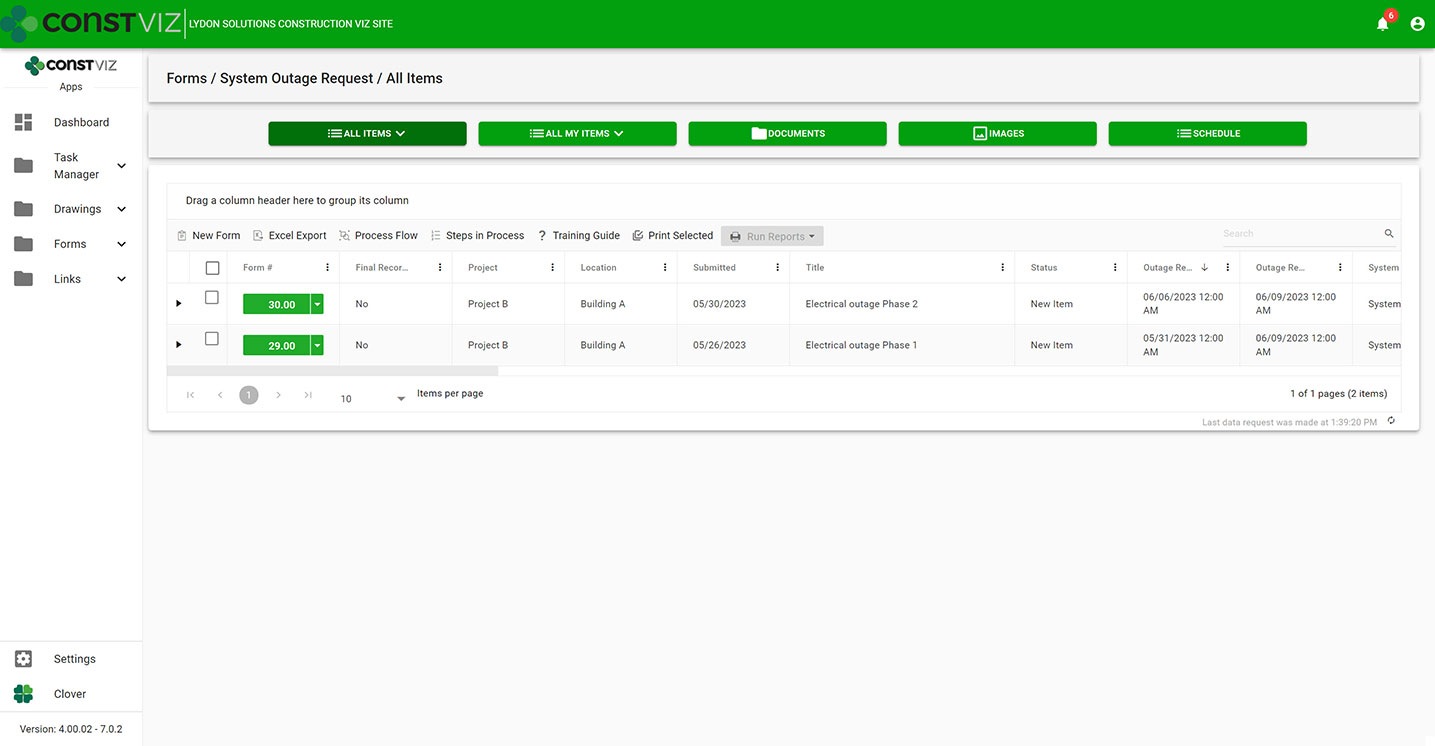
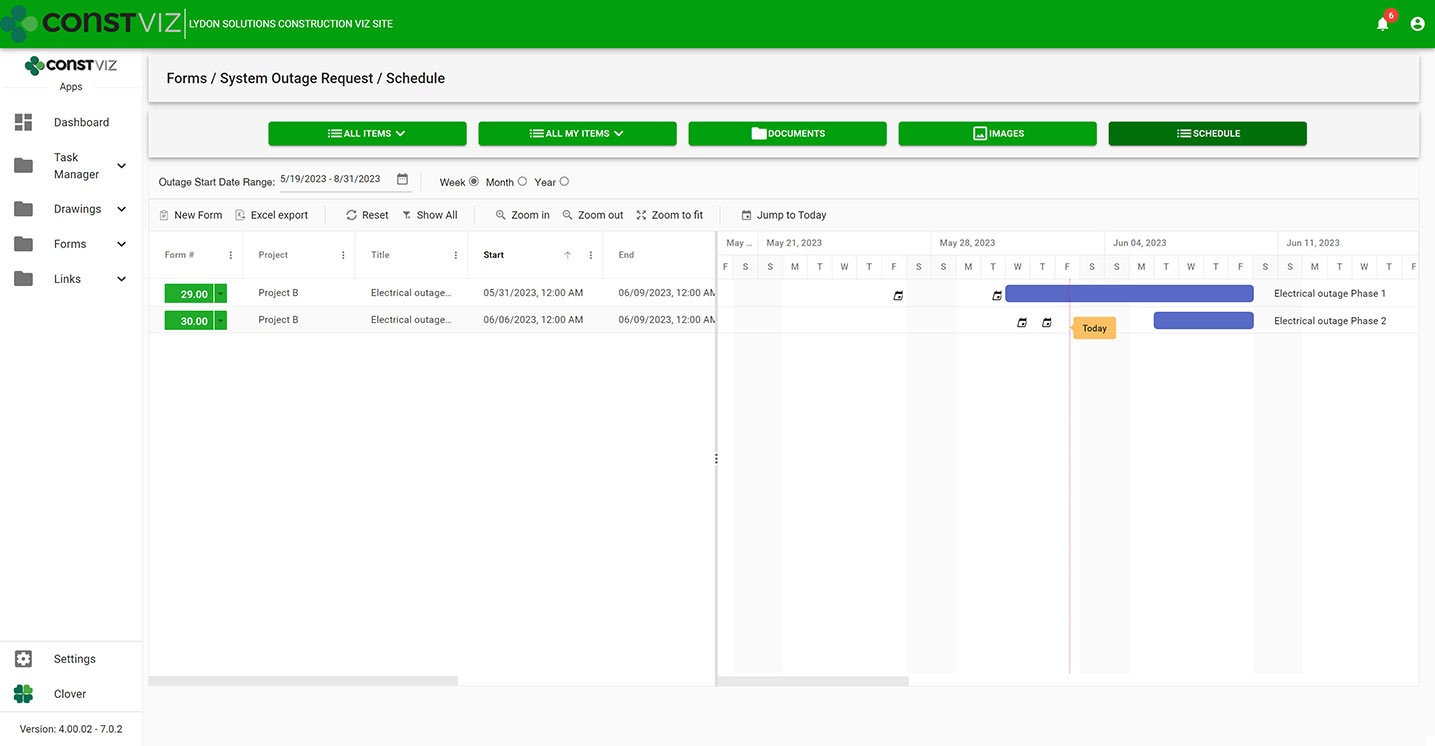
With the new Construction Viz schedule views, you can visualize any of our apps in a traditional Gantt chart view accessible from within the app itself. Now, you have the best of both worlds, the detailed analysis of form data in interactive logs and a Gantt chart focused specifically on the form.

Construction Viz System Outage Request app All Items List (“Form Log”) View
Construction Viz System Outage Request app with new schedule view

Construction Viz Scheduler view sample

Customizable form-specific schedules

You can further tailor Construction Viz’s new schedule views for a specific form. For example, baseline vs. the current schedule, resources assignment, and critical path could be added to the submittal form app while not adding those features to the daily report app. And you can roll up schedule data captured in each form app into an overall master schedule.

The new schedule view keeps team leads and members focused on meeting their specific deliverable dates using an intuitive and interactive Gantt chart.

Find out more about Construction Viz features and apps for Microsoft 365 here.

Construction Viz’s Spreadsheet Component Meets You Where You Work

Reporting | October 4, 2022

The most common software used on construction projects is Microsoft Excel. The catch-all tool has allowed project teams to build localized solutions for tracking, reporting, and sharing project information. Unfortunately, Excel has created a problem for most project management information systems (PMIS) on the market that expect users to give up their Excel files and adopt their platform. The bottom line is that users are entrenched in Excel and, more often than not, don't give it up.

The new Construction Viz Spreadsheet component embraces Excel

Over the years, we have found that disregarding Excel in favor of only using a web-based PMIS can create resentment among project teams, with users ultimately returning to their old faithful at the end of the day.

At Lydon Solutions, we choose our battles wisely, meeting users where they work: Excel, Outlook, and Teams. We built the new Spreadsheet component to bridge the gap between our Construction Viz PMIS and Excel users, delivering a best of both worlds approach.

What is the Spreadsheet Component?

We build Construction Viz applications to use components like mini-applications that perform discrete tasks, such as attaching documents, uploading images, and capturing approvals. Components can be combined to deliver turnkey applications like RFI or daily report forms. Adding the Spreadsheet component to an application enables interaction with Excel files saved to Construction Viz, allowing users to display, modify, and extract data from worksheets.

How Does it Work?

The process of using the Spreadsheet component in a Construction Viz form would go like this:

  • Create a new form record, like a status report, and fill in the required fields.
  • Upload your Excel file(s) using the Document Attachment component within the form. The file is automatically tagged and stored in the supporting SharePoint Online library.
  • Open the Spreadsheet component in the form and select the Excel file you uploaded from the list.
  • The Spreadsheet component will display the Excel file selected and extract data from rows, columns, or cells as identified in the setup and displayed beneath the spreadsheet.
  • You can then make changes to the spreadsheet (formatting, adding columns, adding formulas, etc), save it locally, and then upload it back to the Document Attachments component.

How is this different than Excel Online and your Construction Viz Cost Report application?

Excel Online displays an Excel file in the browser once stored in a SharePoint document library. If you want to extract data from that Excel file to use in another SharePoint list, application, or report, you will need to build and maintain a Power Automate workflow. Our Cost Report application leverages a Power Automate Workflow or Microsoft Graph to extract data out of Excel, but this approach is limited to data stored within a specific Excel table.

Organizations can add the Construction Viz Spreadsheet component to any of our applications to enable their users to read and display Excel files directly without needing a workflow. The Spreadsheet component can also read data from anywhere in an Excel file (rows, columns, and cells) and is not limited to an Excel table.

To find out more about the new Spreadsheet component or any of our applications, visit Construction Viz.com to sign up for a free demo. If you are not ready for an enterprise construction management PMIS like Construction Viz but want to manage your projects in Microsoft 365, you can visit LydonSolutions.com and submit a request for a free one-hour consultation to help you on your way.

The new Construction Viz Questionnaire component provides even more choice

Project Management Tools | August 26, 2022

In construction, questionnaires are essential for gathering qualitative and quantitative information on a project. As a project manager, you want your field team to use questionnaires to report on various construction activities including, but not limited to, job site safety, project progress, quality control, identification of issues and defects, and adherence to specification and contractual requirements.

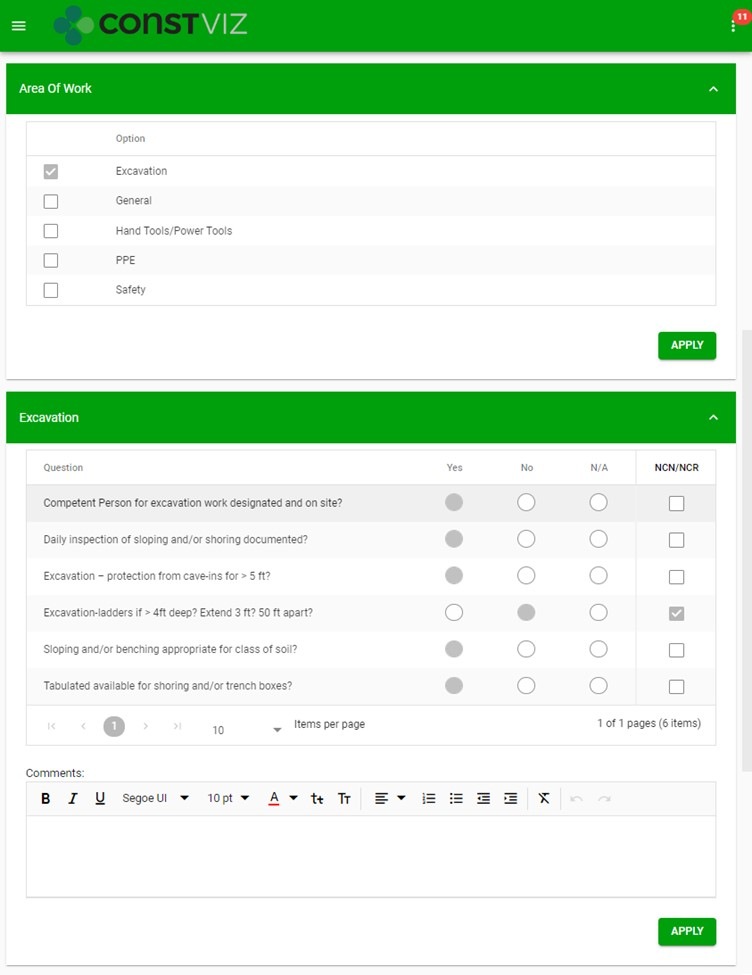
For those using Construction Viz, you may already be familiar with our standard Area of Work (AOW) component which allows you to create ad hoc questions in the Daily Report or Inspection forms. Field personnel respond to the AOW questions through set yes, no, and N/A response fields. While the functionality of the AOW component has worked great for documenting and reporting on field activities and project progress, we wanted to give our clients even more flexibility when creating unique questionnaires.

Area of Work (AOW) Component

Questionnaire_1

Introducing the new customized “Questionnaire” component, for any Construction Viz form!

The new “Questionnaire” component expands on our standard AOW component in multiple ways:

  • Custom Deployment. Your customized “Questionnaire” component is deployed per your requirements. Name your component and choose from various response field types that will be available in questionnaires within your component, including:
    • Text fields. Capture open-ended responses.
    • Standardize responses and minimize data input.
    • Date fields. Capture key dates, such as start and/or completion dates, delivery dates.
    • Number fields. Restrict responses to numerical values to track various measurable data such as quantities, hours, cost, etc.
  • Dynamic Component Configuration. You can create multiple questionnaires within your custom component, and have full control over configuration:
    • Component Configuration. As the project progresses, you can create new, or hide old, questionnaires, and re-order the questionnaires within the component so the questions are responded to in a logical sequence of project activities, etc.
    • Questionnaire Configuration. For each questionnaire, restrict how field personnel respond to your questions by selecting from the available response field types, and configure the order of the active columns and individual questions in which they appear within the questionnaire.

New Questionnaire Component

https://constructionviz.com/wp-content/uploads/2022/08/Questionnaire_OriginalScreenRecording.mp4

More than one customized “Questionnaire” component can be deployed within any Construction Viz form, and each component can be uniquely customized and configured, giving you endless possibilities for gathering the information you need manage your project.

The customized “Questionnaire” component is just one of many dynamic components we have available for Construction Viz. Let us customize your construction management experience. Check out our Construction Viz features page to learn more about what’s possible. And you can schedule a consultation and demo to discover how Construction Viz can enhance your project management workflows.

  • « Go to Previous Page
  • Page 1
  • Page 2
  • Page 3
  • Page 4
  • Page 5
  • Page 6
  • Go to Next Page »

Footer

About Constructon Viz

Construction Viz is a flexible construction project management software solution powered by Microsoft SharePoint and SQL.
Read More >

Navigation

  • Home
  • About
  • Features
  • Apps
  • Blog
  • Contact
  • Login

Apps

  • Construction Viz Hub
  • Cost Report
  • Drawing Management
  • File Manager
  • GIS Maps
  • Oracle Primavera 6
  • Payment
  • Specification Management

–

  • Project Forms
  • Project Planner
  • Project Scheduler
  • Project Tracker
  • Task Manager

Connect with Us

  • This field is for validation purposes and should be left unchanged.
  • Sign up to receive helpful tips for construction project managers as well as updates about Construction Viz.

Lydon Solutions

© Lydon Solutions

  • Privacy
  • Cookies
  • Terms of Use
  • Disclaimer
  • End-user license

Click here to start a Microsoft Teams chat.

Click here to start a Microsoft Teams chat.

Contact Us
This field is for validation purposes and should be left unchanged.
Name(Required)
Join Our Newsletter

Sign up to receive helpful tips for project managers and updates about Construction Viz.

Get Started

Join Our Newsletter

Sign up to receive helpful tips for construction project managers as well as updates about Construction Viz.

  • This field is for validation purposes and should be left unchanged.
  • This site is protected by reCAPTCHA and the Google Privacy Policy and Terms of Service apply.