• Skip to primary navigation
  • Skip to main content
  • Skip to footer
Construction Viz

Construction Viz

Project Management Perfect

  • About
  • Features
  • Apps
  • Blog
  • Contact
  • Download Flyer
  • Get Started Today
  • Login
Hide Search

Construction Viz Apps

Deploy Construction Viz Securely to YOUR Microsoft 365

Construction Viz | July 18, 2024

In the age of cloud computing, the question is, where is your data, and how safe is it? Do you trust construction software vendors to secure your data to the level that your organization requires? Is it truly your data when you have to request a copy of it at the end of the project to archive?

Lydon Solutions has been building construction IT solutions on the Microsoft stack for over fifteen years. We started the company by building and hosting custom SharePoint instances, and we haven’t stopped since.

With our Construction Viz enterprise construction management solution for Microsoft 365, we created a unique product that can be deployed for a client without using the Microsoft app store or even custom scripts. Using Microsoft’s Identity platform, Construction Viz securely stores project data in SharePoint sites, using lists and document libraries as its database. No data is stored outside of your Microsoft 365 tenant. Check out this post to find out more. A deployment can even occur on the same day. At any time, you can revoke consent for the app, and it will no longer connect to your Microsoft 365 tenant, but all of your data will remain in YOUR SharePoint Lists and Libraries.

Also, Construction Viz is a Progressive Web App (PWA), so there is no app to install on the device. It behaves just like a desktop application, is responsive, and will work on any device with a modern browser, so you don’t have different experiences and security issues with multiple apps floating around your IT footprint.

Why store your construction data in Microsoft 365?

  • Microsoft is #1 in enterprise cloud security.
  • Microsoft is #1 in data availability 24/7 on a global scale.
  • Microsoft has localized data centers, so data stays in the country of origin.
Differentiator-Pt2_1
  • Microsoft ensures regional and country-specific legal compliance.
Differentiator-Pt2_2
  • Microsoft 365 features and investment.
  • You control your data 24/7.
Differentiator-Pt2_3
  • Ability to Archive in place.
  • Ability to Backup your data.
  • Use the same sign-in for all your applications.
  • Leverage your organization’s existing investment and adoption of Microsoft 365.

So, with so many benefits to keeping your data in your Microsoft 365, isn’t it time to rethink where your construction management system resides?

Why Construction Viz?

Read more about what sets Construction Viz apart from the competition in our new blog series:

  • Part 1: Get Just the Apps You Need with Construction Viz
  • Part 2: Deploy Construction Viz Securely to YOUR Microsoft 365
  • Part 3: Customize Construction Viz to YOUR Unique Needs
  • Part 4: Construction Viz Offers Best in Class Pricing
  • Part 5: Construction Viz is Easy to Use
  • Part 6: Your Data Stays with You 24/7 in Construction Viz
  • Part 7: Designed by Construction Professionals for Construction Professionals
  • Part 8: Construction Viz is Integrated with Microsoft 365

Keep an eye on this series of articles, where we will elaborate on the benefits of Construction Viz over other construction management platforms on the market. You can request a free demo here to find out more about what Construction Viz can provide.

If you are new to Microsoft 365 and need help setting it up or helping you deliver solutions, you can request a free one-hour consultation below.
Get a Free Consultation

"*" indicates required fields

This field is for validation purposes and should be left unchanged.
Name*

Get Just the Apps You Need with Construction Viz

Construction Viz | July 15, 2024

Frustrated with having to pay for a bloated construction project management system that you only use a fraction of? With Construction Viz, you can select and only pay for the apps you need. Isn’t it about time the consumer has the choice of what they want to use and pay for?

Many of the larger construction project management systems focus on getting clients bought into their ecosystem, forcing their way of managing projects, and charging excessive fees for a bloated system.

The reality is that every organization, project, and project manager manages projects differently; there is no one-size-fits-all. Also, many organizations already have several software packages that they use for specific purposes to help manage projects. They don’t want to have to do double entry, confuse users with multiple systems, and might need only a handful of tools to fill in the gaps.

Pick Only the Apps You Need with Construction Viz

We built Construction Viz to be as flexible as possible, so organizations don’t feel boxed in. If you only need a Daily Report app, you can pay for that app only. If you need more in the future, you can add more Construction Viz apps at any time. Also, if you don’t like how out-of-the-box apps work or need a new app, we can build custom apps or tailor our apps to your unique needs.

Construction Viz allows you to select from over 40 industry-standard construction forms and a total of 50 construction apps, including:

Construction Viz - Construction Forms

Action Items
Contract Change Directive
Change Order Request
Daily Report
Document Binder
Invoice
Meeting Minutes
NCR/NCN
Notice
Outage Request
Commitment
Change Order
Permit

Punch List Items
Quality Assurance Inspection
RFI
Request for Proposal
Risk
Safety Incident
Safety Inspection
Service Request
Submittal
Substantial Completion
Transmittal
Work Order

Construction Viz – Construction Apps

Drawings
Specifications
Cost Reports
File Manager
Forms
GIS Maps

Payment
P6
Planner
Tracker
Scheduler
Task Manager

You can check out our app catalog here.

Why Construction Viz?

Read more about what sets Construction Viz apart from the competition in our new blog series:

  • Part 1: Get Just the Apps You Need with Construction Viz
  • Part 2: Deploy Construction Viz Securely to YOUR Microsoft 365
  • Part 3: Customize Construction Viz to YOUR Unique Needs
  • Part 4: Construction Viz Offers Best in Class Pricing
  • Part 5: Construction Viz is Easy to Use
  • Part 6: Your Data Stays with You 24/7 in Construction Viz
  • Part 7: Designed by Construction Professionals for Construction Professionals
  • Part 8: Construction Viz is Integrated with Microsoft 365

If you are already using Microsoft 365 and either need a complete enterprise construction management solution or just a couple of apps, Construction Viz might be the best option. Keep an eye on this series of articles, where we will elaborate on the benefits of Construction Viz over other construction management platforms on the market. You can request a free demo below.

Get a Free Consultation

"*" indicates required fields

This field is for validation purposes and should be left unchanged.
Name*

How Do You Capture Meeting Minutes in Microsoft 365?

Forms | July 11, 2024

Construction Viz Meeting Minutes App

One of the most basic needs of a construction project is an effective way to document meeting minutes and their associated action items. For those using Microsoft 365, you've probably experimented with several options, from simple Word documents to building Power Apps. With the Construction Viz Meeting Minutes form app, we did all of the heavy lifting so you could hit the ground running. Check out this article to find out more.

When you think about what makes up a solid meeting minutes tool, you need a way to capture attendees, agenda topics, and action items. Also, the tool needs the ability to print, search, and send minutes to team members. In Microsoft 365, to deliver a meeting minutes solution, you will need to string together several applications to meet these minimum requirements. With Construction Viz, we have considered all these areas and more with our Meeting Minutes app, and if that's the only app you need, that's the only app you pay for!

The Meeting Minutes form is one of over forty form apps available in Construction Viz, but it's also one of those must-have apps to add to your toolbox.

Key Components of the Meeting Minutes App

Construction Viz apps are comprised of targeted code widgets called components that perform a specific function, can be turned on or off, and allow customization as needed. The Meeting Minutes app includes the following components out of the box:

  • Meeting Logistics. Capture the start day/time and location of the meeting.
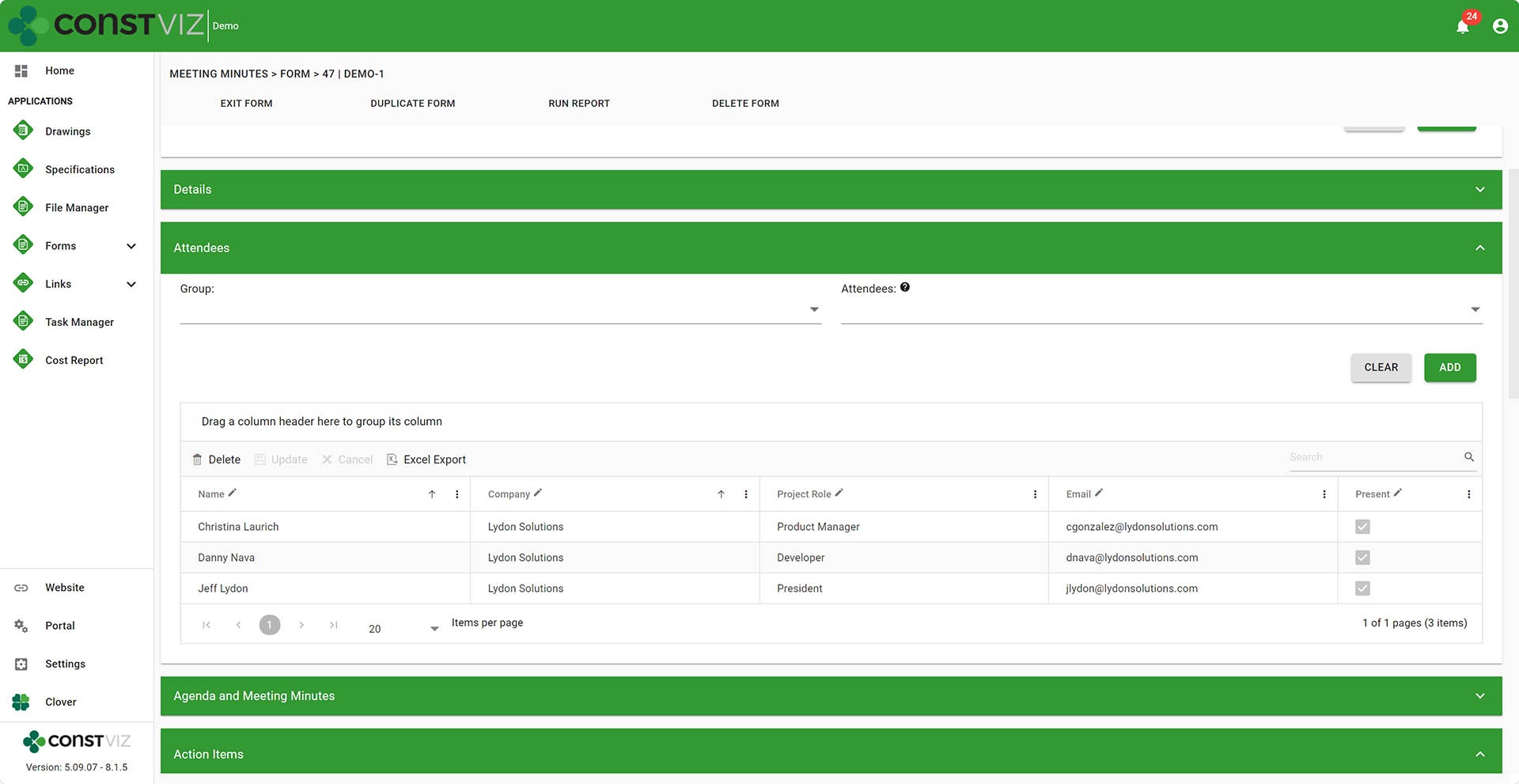
  • Attendees. Include all users and non-users in attendance.
Meeting-Minutes_1
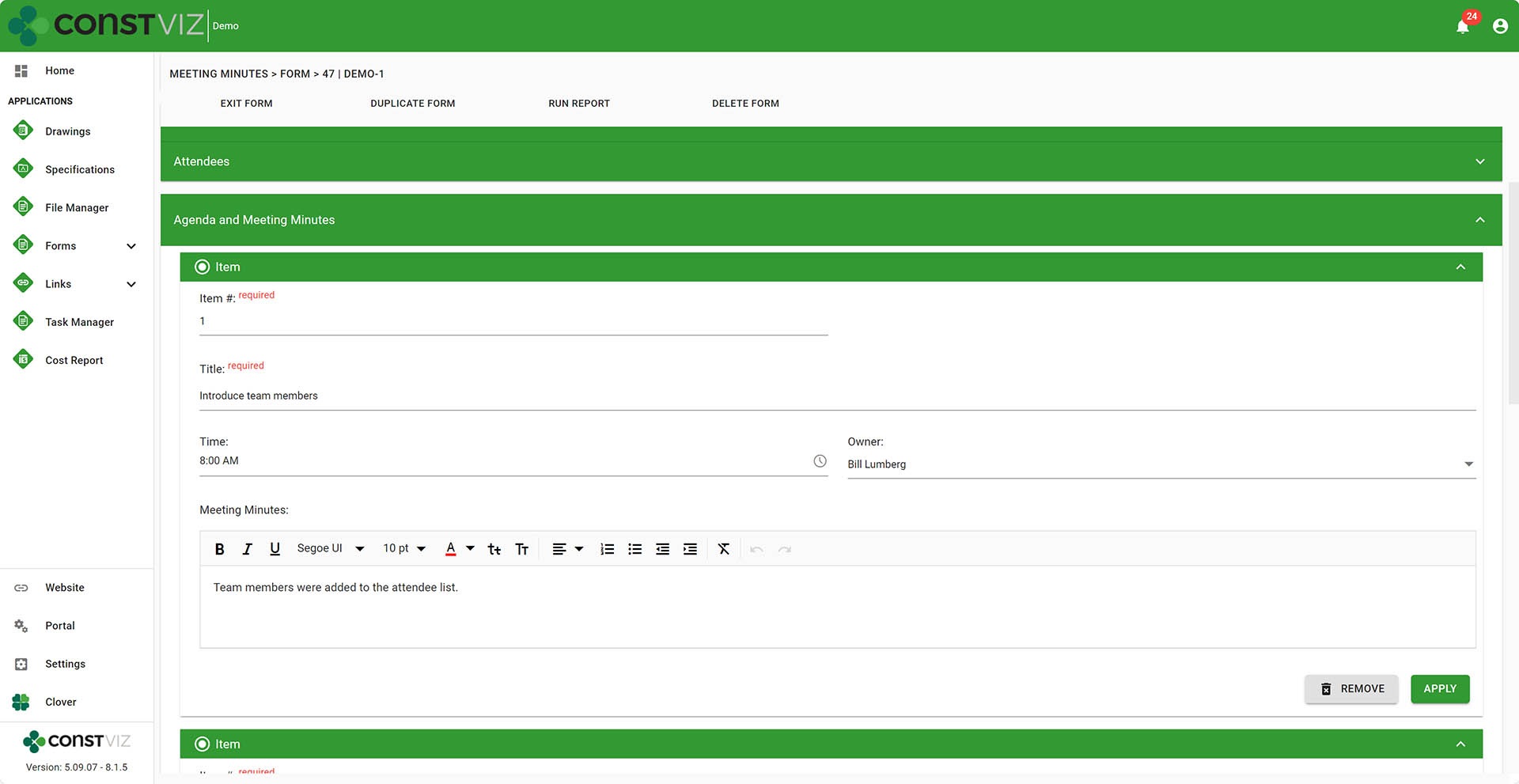
  • Agenda and Minutes. Create as many agenda items as needed, including minutes associated with the agenda item.
Meeting-Minutes_2
  • Document Attachments. Upload as many files as needed and capture metadata to organize your files.
  • Link Attachments. Add links to internal or external locations.
  • Include as many reviewers as needed to ensure the forms are complete and ready to be distributed.
  • Send off emails to groups and users with links to the form.

Embedded Apps

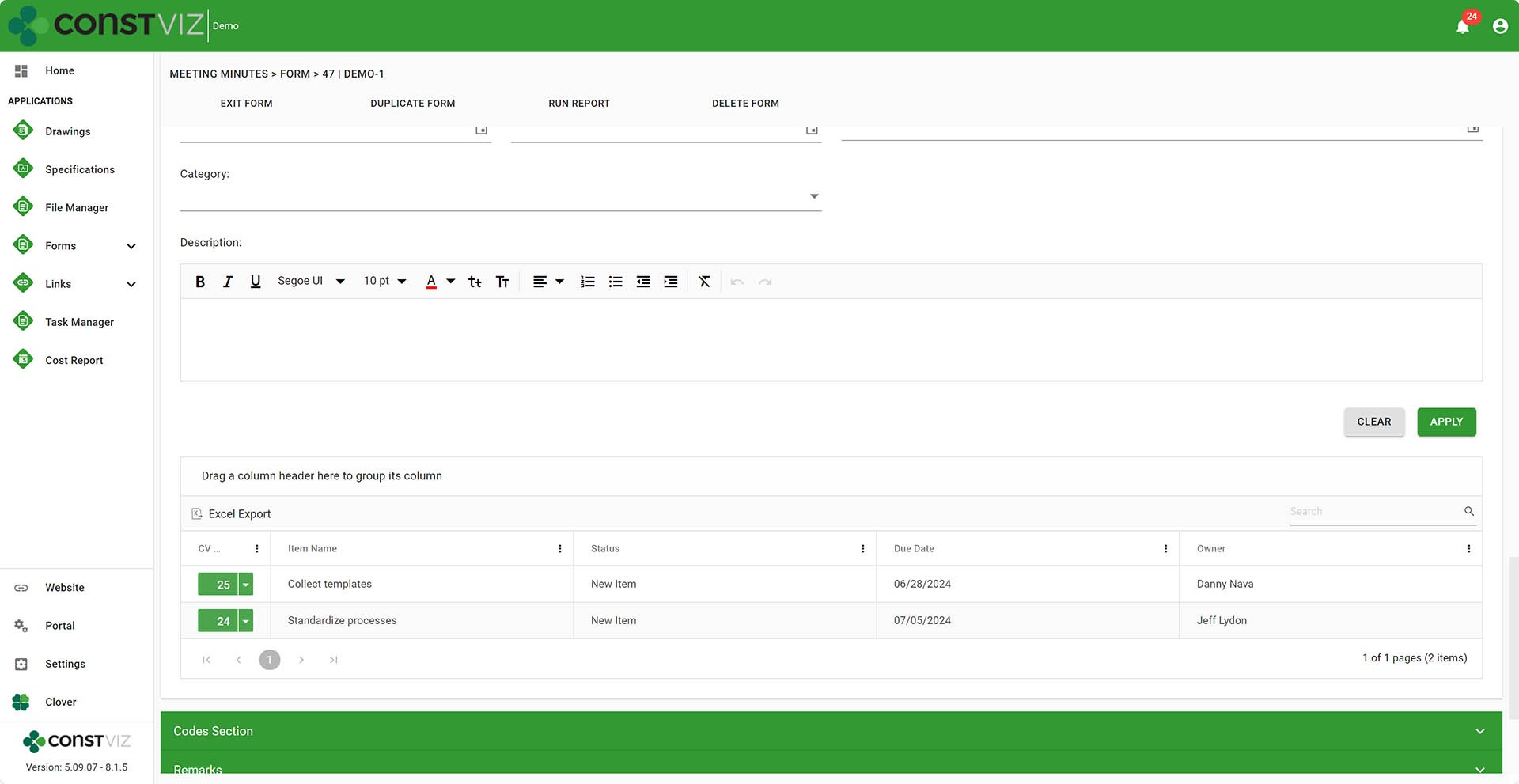
  • Action Items can be created while in a meeting minutes form and are automatically linked to the Action Item app so you never lose track of where the action item was assigned.
Meeting-Minutes_3
  • Ability to automatically carry open action items into subsequent meetings. Avoid having to re-type the action items in every meeting by including them from the menu when duplicating a form.

Reporting

  • Print to PDF one or many forms. It also includes an option to include document attachments automatically converted to PDF from Office files.
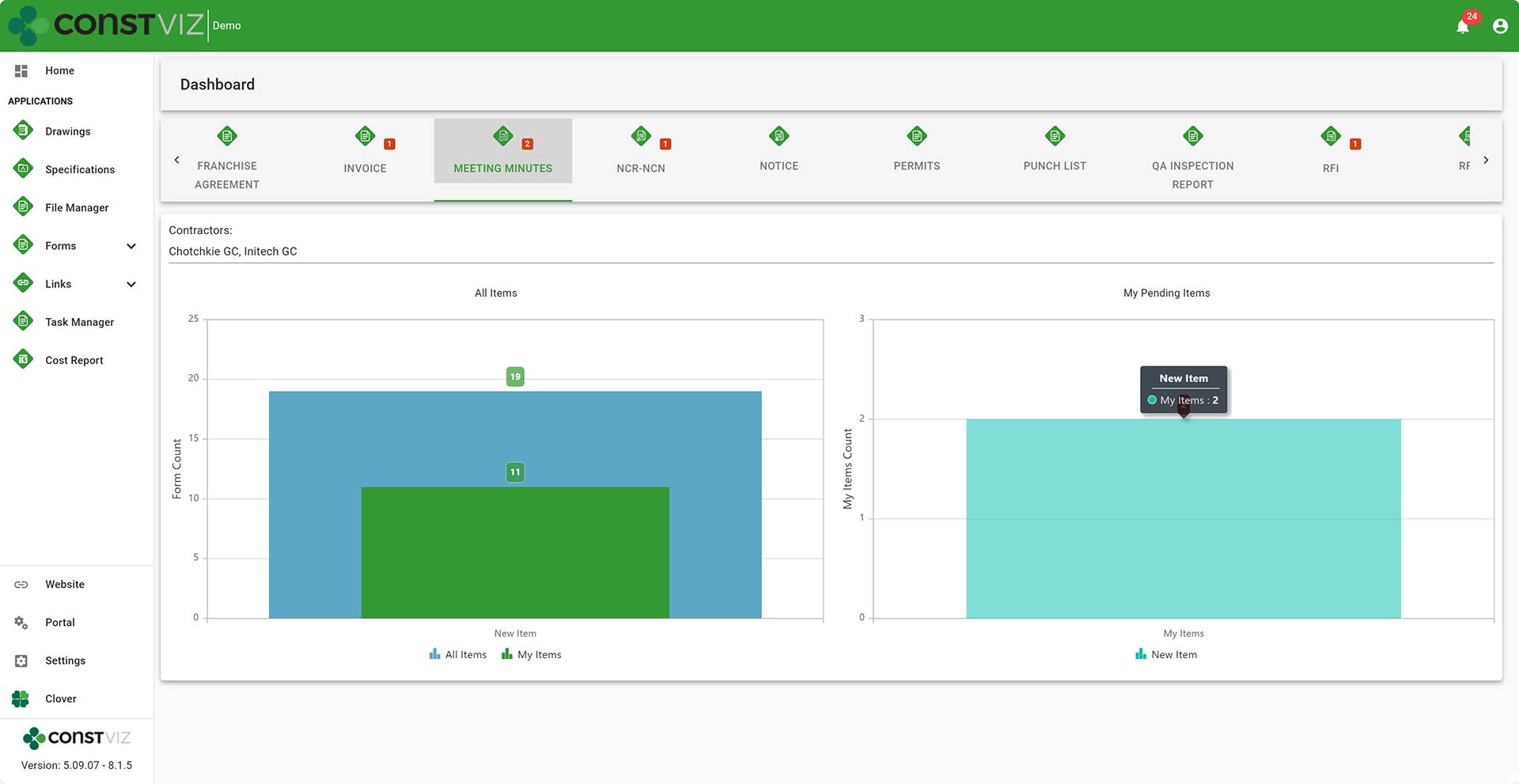
  • Dashboards display by form status with drill-downs to filtered views.
Meeting-Minutes_4
  • Ability to insert Power BI reports. You can add your own dashboards to Construction Viz by copying and pasting a Power BI report URL into the Dashboard settings.

Workflow

  • Add one or more reviewers on the fly so they can receive emails and notifications.
  • Automatically email reviewers. Upon add, email can be sent off to reviewers automatically.
  • Add Power Automate workflows. You can add your own Power Automate workflows to the app settings.

Other

  • Duplicate forms so you can reuse form templates, minimizing data entry.
  • Saved views to create project and personal views.
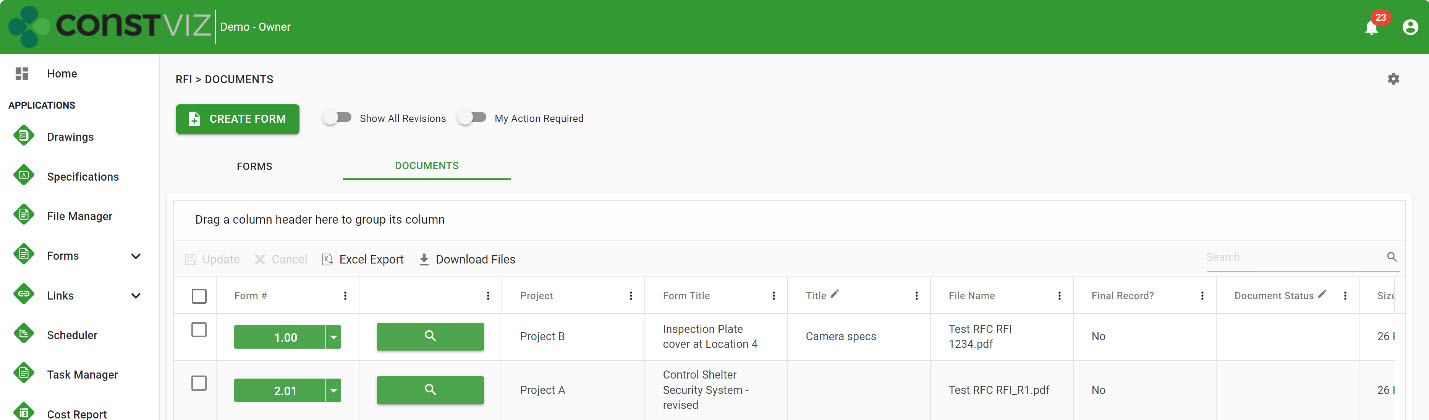
  • Document attachment view so you can find attached files independent of the meeting minutes.
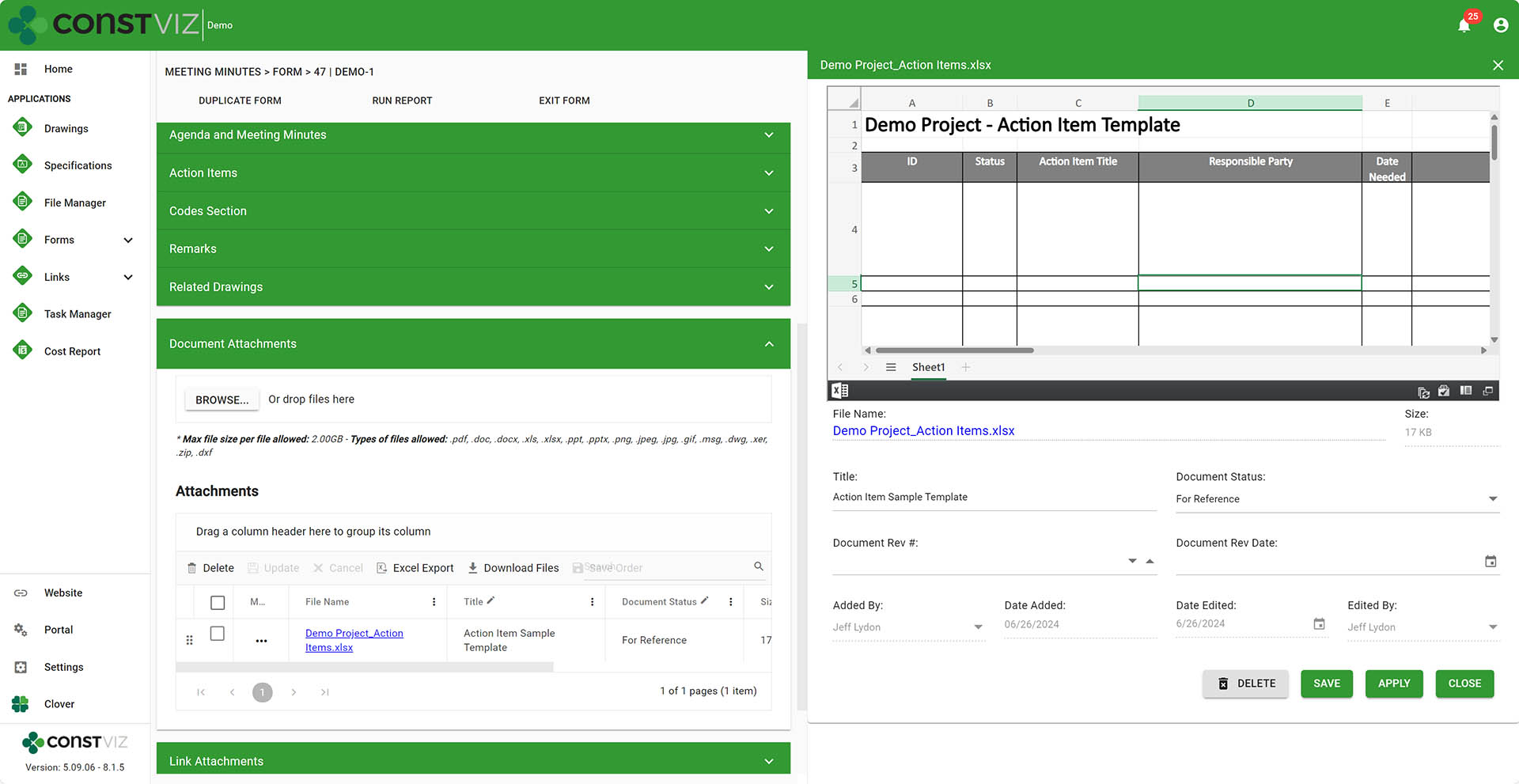
  • File flyout menu so you can update attached document metadata (Title, revision, date, etc.) in an easy-to-use form.
Meeting-Minutes_5
  • My Action Required Toggle so you can filter any forms in your queue that need your attention.
  • Notifications Center indicates meeting minutes and action items in your cue.
  • Project-specific form numbering is available if more than one project is managed in the deployment of Construction Viz.
  • Export any app grids to Excel.
  • Permission controls by contractor already integrated into the app.
  • Availability to add Construction Viz to a Microsoft Team.
  • Data is stored in client Microsoft 365 SharePoint Online, so it's securely available 24x7

Whew. That's an exhaustive list, and I’m sure I left off a bunch of features, but you get the picture😊.

While there are many considerations for rolling your own meeting minutes tool in Microsoft 365, there is no right or wrong. It always comes down to time and money. Would you want to spend your time building the solution or leveraging one that is ready-made but can still be customized? Either way, Lydon Solutions is here to help. You can request a free one-hour consultation here or a demo of the Construction Viz meeting minutes app below.

Get a Free Consultation

"*" indicates required fields

This field is for validation purposes and should be left unchanged.
Name*

New Construction Viz Document Control Features to Organize Your Files

Document Control | June 24, 2024

Managing construction documents and correspondence is a significant undertaking, especially for multi-billion-dollar projects and programs.

Having the right tools to collect, organize, and retrieve your files securely is of the utmost importance to ensuring project success, avoiding claims, and passing audits.  Construction Viz provides many tools to help project teams better manage their files right within their own Microsoft 365.  Find out how the new Construction Viz Flyout feature works with you, so you spend less time documenting and more time getting stuff done.

Let’s face it: document controls can be a godsend or a curse on construction projects. You either spend the time organizing files upfront or more time trying to find them later. Everyone knows a system is only as good as the data input: “garbage in equals garbage out.”

Construction Viz Flyout Menu System

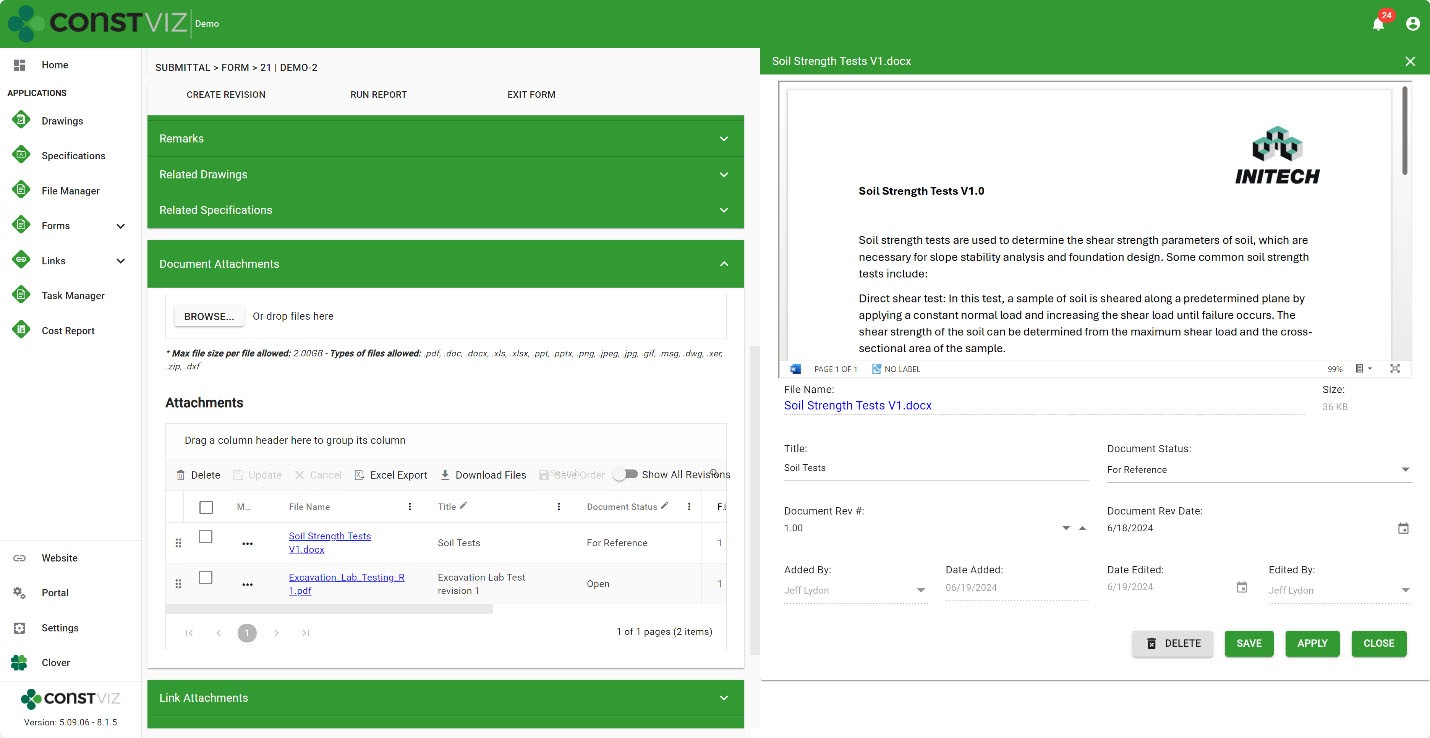
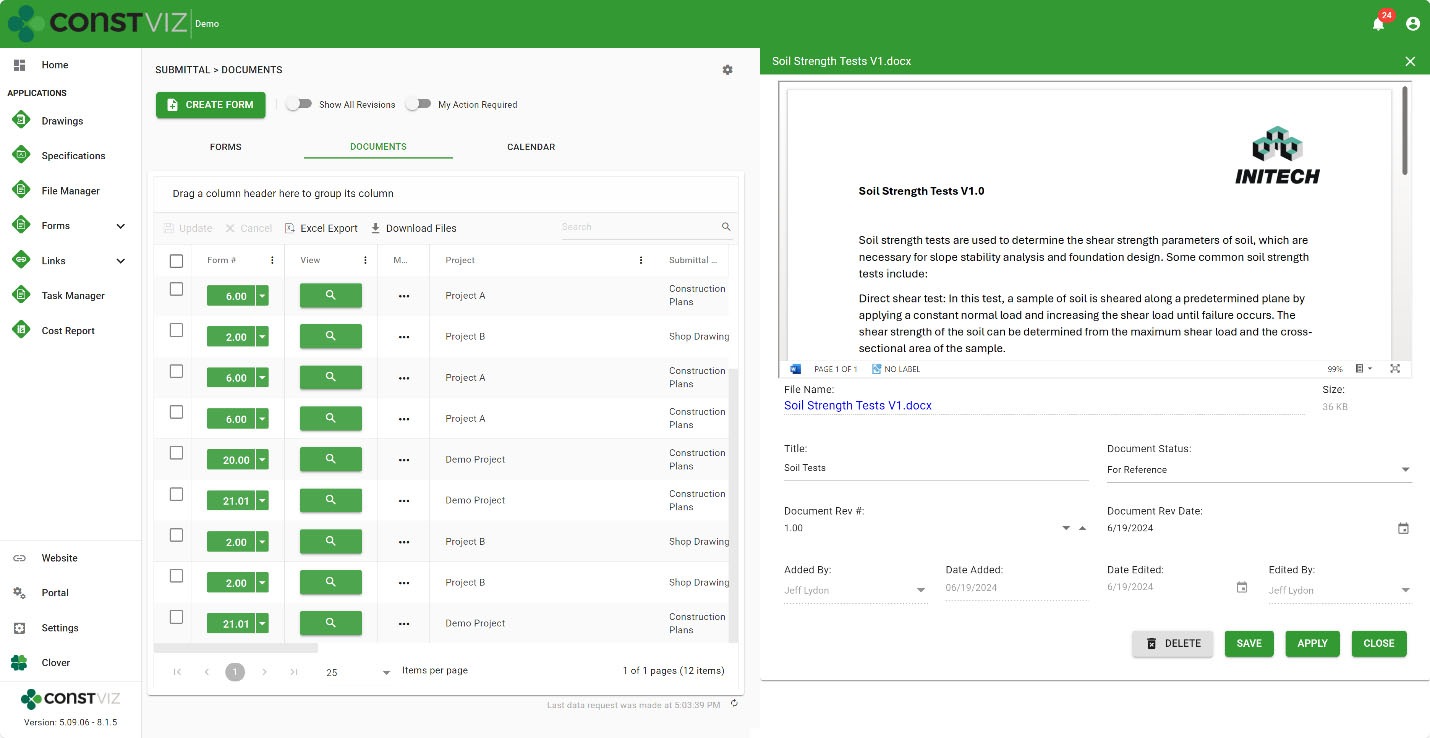
Project teams organize files using folders, assigning metadata, or a combination of both. While folders are the preferred method of organizing files, incorporating metadata can help improve file organization, maintenance, archiving, and search. In the latest release of Construction Viz, we added a new Flyout feature to help you capture file metadata easily when uploading files.  Simply click the open details from the file menu, and an interactive Flyout tray to capture metadata will appear on the right side of the screen.

Doc-Control_1

Several features make the Flyout unique:

Preview files – A web version preview of the file is displayed in the Flyout to help when filling in the metadata or finding the file at a later date. You can also open the file from the viewer in its native application.

Simple Form to make updates – Easily update one or more file metadata fields in a simple form so users can quickly make updates without having to scroll. Once an update is made, click Apply to save changes and continue editing other files, or click Save to save your updates and close the Flyout.

Available Everywhere – This new Flyout feature is available in all form apps and document views! We’ve made it easy to update metadata for your files wherever you are in Construction Viz. Now, there’s really no excuse for getting your files organized right out of the gate and using metadata on your next project 😊.

Doc-Control_2

Construction Viz Flyout Feature

Get a Demo of Construction Viz

The Flyout feature is one of many features we have added to Construction Viz to make managing construction project documents and correspondence easier. Take your Microsoft 365 to the next level for your projects with Construction Viz. You can request a demo of Construction Viz here.

Get a Free Consultation

"*" indicates required fields

This field is for validation purposes and should be left unchanged.
Name*

Overwhelmed with Project Documents? Construction Viz Can Help

Project Management Tools | May 1, 2024

So you moved to Microsoft 365 to manage your project documents - well done! SharePoint, Teams, and OneDrive are all great products for organizing projects, but they can create an even worse nightmare if not used correctly.

With Construction Viz for Microsoft 365, we feel your pain and are here to help clean up the mess and get the project managers back to doing what they do best: managing projects.

Managing Construction Project Documents

Let's face it: managing project documents can be challenging, even if you have a document control specialist and are using Microsoft 365.

You need to consider many factors and the downside of going it alone when managing your documents:

  • Metadata. Metadata helps you organize and find data. You can add columns or folders to organize your files better, but it requires upfront planning and setup by the entire team.
  • Approvals. Most documents go through some approval process. Are you going to create a Power Automate workflow for approvals? Most likely, no.
  • Supporting documentation for forms. When you create or submit forms such as an RFI or submittal, you fill out a cover sheet (the form) and attach the relevant files. You must decide where to store those files and how to reference them. If you are unfamiliar with Microsoft 365, this might pose a challenge.
  • Revisions. Documents such as drawings go through revisions. How can you ensure the team is working on the latest revision but still has access to all prior revisions? Other records, such as RFIs, go through revisions; how will you handle form revisions?
  • Views. Once you upload all your files, you need a way for everyone to find and search for the documents. Are you going to create these views? What if a user seeks a specific file in a project? If you are using folders, making users hunt and peck through layers of folders is inefficient. You could create and configure a search hub, which can be complex and time-consuming.

You get the picture. There is a lot of upfront planning, and you must understand how to use Microsoft 365 effectively to manage your documents.

Construction Viz Simplifies Project Document Management

With Construction Viz, we have you covered. We thought through all the above challenges and provided even more functionality, so you don't have to worry about any of the upfront planning and complex administration.

Some of the great features of Construction Viz include:

✔ Metadata assignment. Metadata is automatically assigned and stored in SharePoint when you save a form or document.

Doc-Mgmt_1

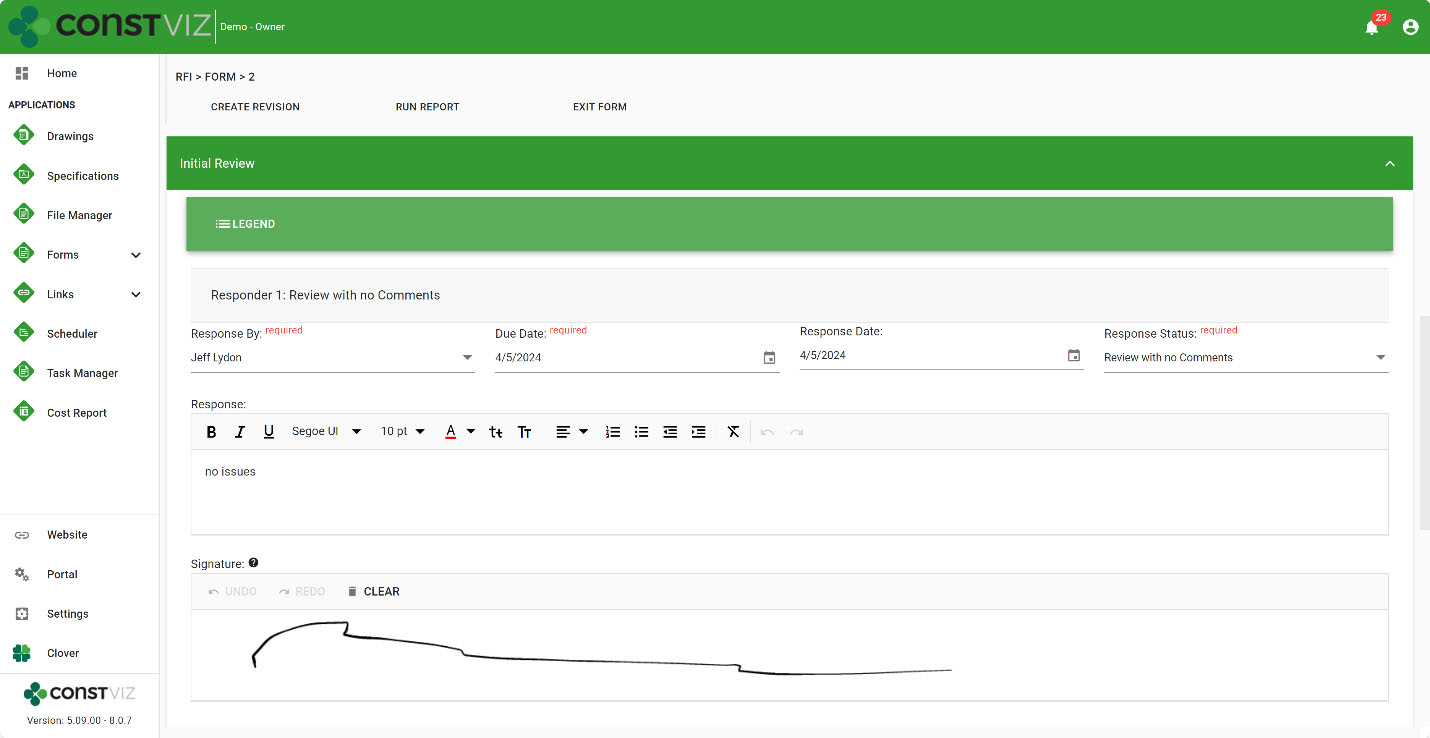
✔ Electronic approvals on everything. Construction Viz allows as many approvals as you would like with any app and even includes e-signature approvals. You get ball-in-court reporting and automatic notifications of tasks due so you can stay on top of your workload. You can have automatic approval emails sent, or you can select a person or group to send emails with all of the email history captured in app-specific logs.

Doc-Mgmt_2

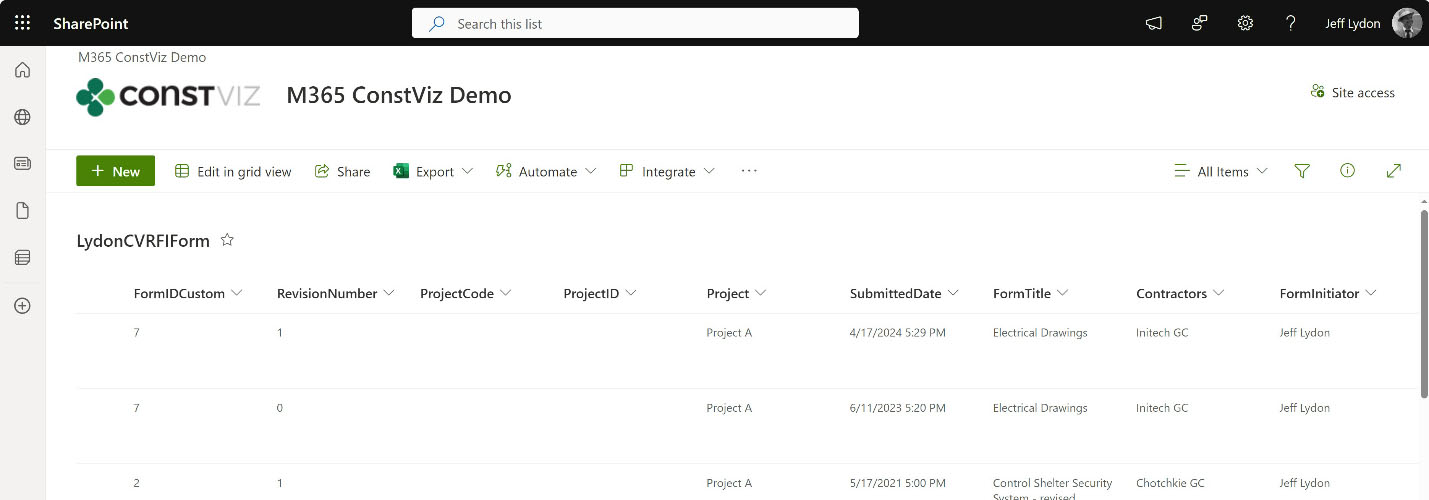
✔ Data resides securely in your SharePoint. All documents are organized and stored securely in your SharePoint lists and libraries, so you know where your data is at all times and have access to it 24x7.

Doc-Mgmt_3

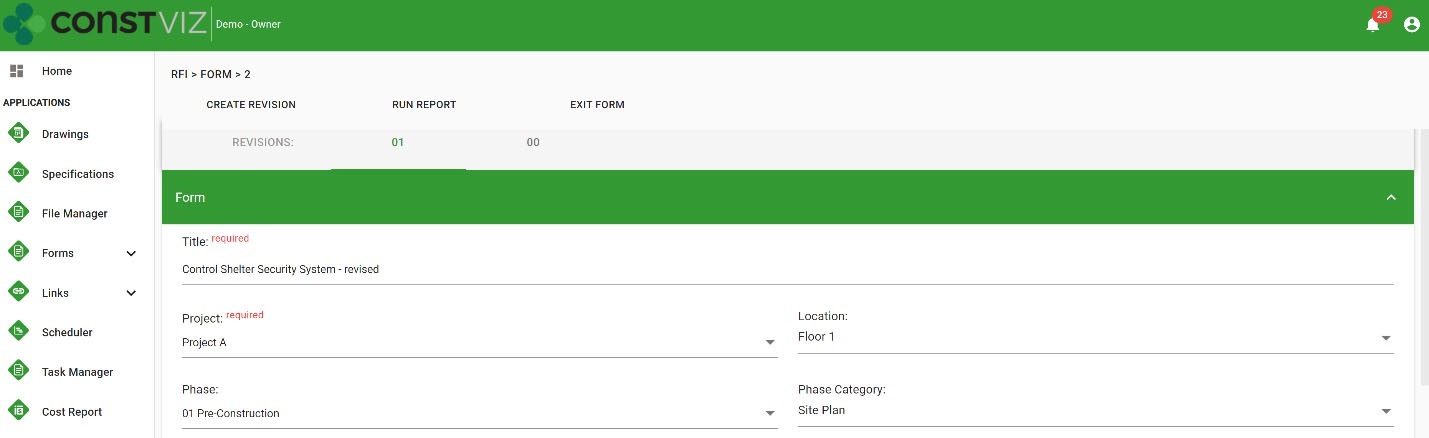
✔ Controlled revision management. Forms and documents have revision management features so that you can easily replicate, track, report, and access the latest revision and all previous revisions with a simple toggle.

Doc-Mgmt_4

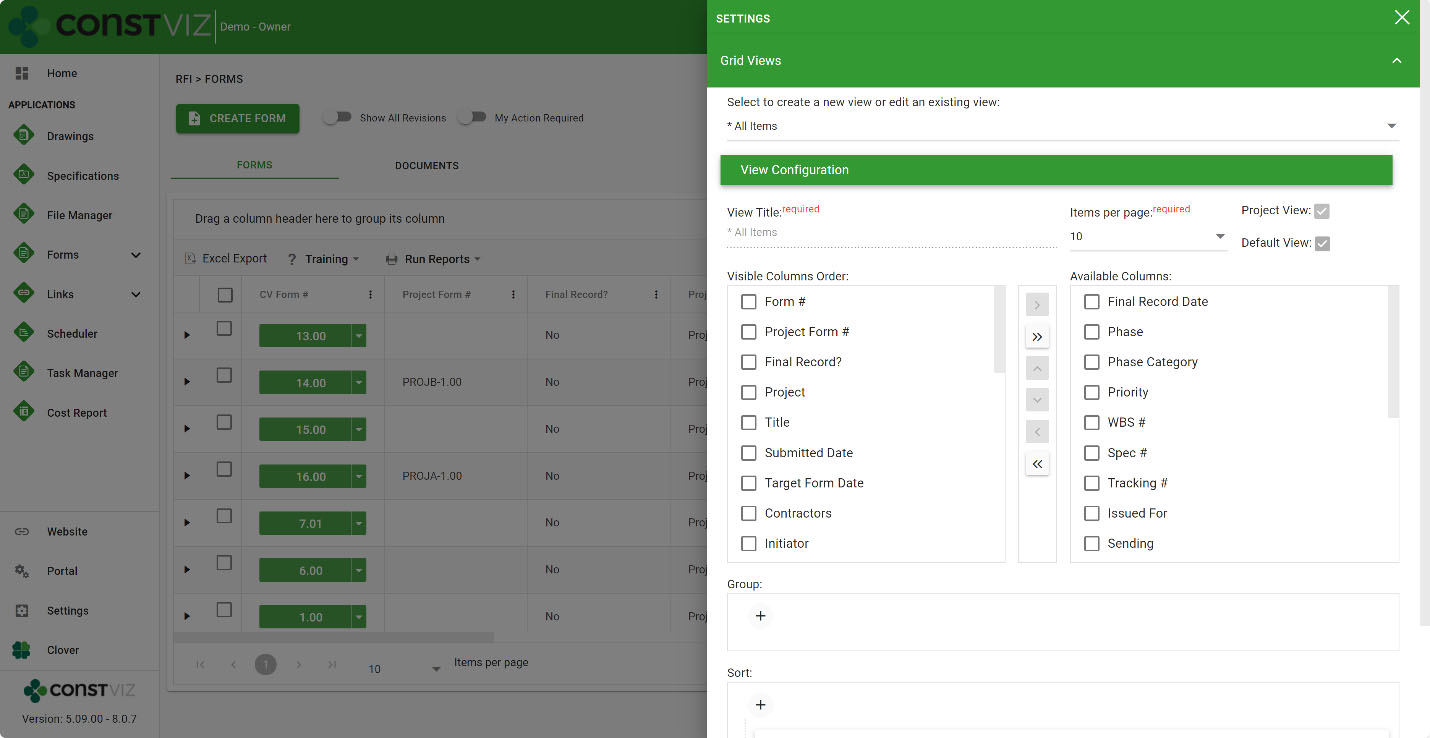
✔ Custom Views. Every Construction Viz app has a predefined set of views so that you can take action quickly. Also, you can copy, edit, and create custom views for more in-depth analytics.

Doc-Mgmt_5

Construction Viz lets you get back to spending time constructing projects and less time administering them.

Want to organize your project documents in Microsoft 365? Use the form below to request a demo of Construction Viz. If you're not ready for an enterprise construction management solution but still need help organizing your files, request a free one-hour consultation at LydonSolutions.com.

Get a Free Consultation

"*" indicates required fields

This field is for validation purposes and should be left unchanged.
Name*

Project Time Tracking in the Construction Viz Task Manager

Project Management Tools | April 18, 2024

Outside of when the task was completed, how many hours it took to perform it is the second most asked question. Project Managers need to know the level of effort to compare it against estimated hours, add hours to billing, check efficiencies, or manage labor utilization. Accurate construction project time tracking is thus essential to every project.

With the Construction Viz Task Manager, we continue to extend the functionality so that everything you need to manage a task is included in the application, including time tracking.

Construction Project Time Tracking

Everything in project management, and life in general, comes down to managing a series of tasks. Effectively managing the who, what, when, where, and why of tasks can lead to a successful project.

We see task management as a cornerstone of project management, which is why, with Construction Viz, we are beefing up resource management features so that you can manage tasks how you want to manage them. One of those critical features is detailed construction project time tracking.

Key Features of the Construction Viz Task Manager App

The Construction Viz Task Manager might seem familiar to those who use Microsoft Planner and MS Project for the Web. But we designed the app for construction projects with the ability to customize it to your unique processes.

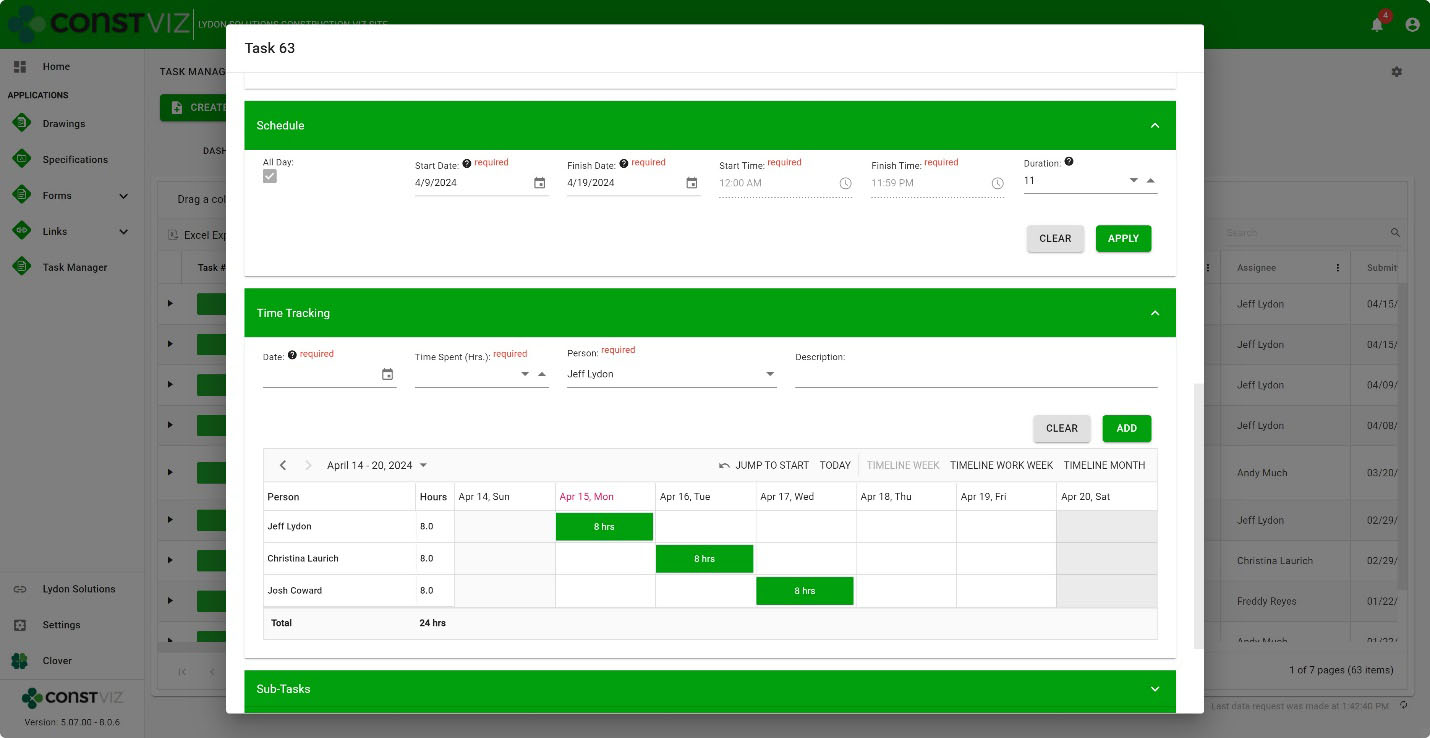
The Construction Viz Task Manager’s new Time-Tracking component can be activated in a task and works with the Schedule component. Resources and hours can be assigned daily based on a task’s scheduled start and finish dates.

Time-Tracking

The interface is simple but powerful under the hood. Add resources, the description of work, hours, and the specific day in a weekly or monthly view. Records are saved to SharePoint lists, so the data is always available for you to create your own Power BI reports.

And, because Construction Viz utilizes your Microsoft 365 SharePoint Online lists and libraries, you can rest assured that the data securely resides in your Microsoft 365 tenant.

The Construction Viz Task Manager is one of many applications that round out a suite of apps to help you manage your projects. If you want to learn more, use the form below to request a demo.

If you are not ready for an enterprise construction management solution but need help with Microsoft 365, you can request a free one-hour consultation here.

Get a Free Consultation

"*" indicates required fields

This field is for validation purposes and should be left unchanged.
Name*
  • « Go to Previous Page
  • Page 1
  • Page 2
  • Page 3
  • Page 4
  • Page 5
  • Page 6
  • Go to Next Page »

Footer

About Constructon Viz

Construction Viz is a flexible construction project management software solution powered by Microsoft SharePoint and SQL.
Read More >

Navigation

  • Home
  • About
  • Features
  • Apps
  • Blog
  • Contact
  • Login

Apps

  • Construction Viz Hub
  • Drawing Management
  • File Manager
  • Specification Management

–

  • Project Forms
  • Project Planner
  • Project Scheduler
  • Project Tracker
  • Task Manager

Connect with Us

This field is for validation purposes and should be left unchanged.

Sign up to receive helpful tips for construction project managers as well as updates about Construction Viz.

Lydon Solutions

© Lydon Solutions

  • Privacy
  • Cookies
  • Terms of Use
  • Disclaimer
  • End-user license

Click here to start a Microsoft Teams chat.

Click here to start a Microsoft Teams chat.

Contact Us
This field is for validation purposes and should be left unchanged.
Name(Required)
Join Our Newsletter

Sign up to receive helpful tips for project managers and updates about Construction Viz.

Get Started

Join Our Newsletter

Sign up to receive helpful tips for construction project managers as well as updates about Construction Viz.

This field is for validation purposes and should be left unchanged.