• Skip to primary navigation
  • Skip to main content
  • Skip to footer
Construction Viz

Construction Viz

Project Management Perfect

  • About
  • Features
  • Apps
  • Blog
  • Contact
  • Download Flyer
  • Get Started Today
  • Login
Show Search
Hide Search

construction management apps

Introducing Construction Viz Enterprise Submittal Form

Forms | January 18, 2022

Submittals are staples on every construction project as a standard communication tool between contractors and the owner, construction manager (CM), or general contractor (GC) for contractual deliverables. The submittal process involves contractors completing a submittal form with the necessary metadata like project name and package, attaching the required documents, and sending it to the owner/CM/GC for review and approval. It’s a pretty straightforward process, but larger organizations have more stringent compliance, reporting, and scheduling requirements for adhering to a contractual submittal register.

We are excited to announce a new Construction Viz Submittal Enterprise Form, a variant of our standard Submittal Form, to address this need. The new enterprise form extends our lineup of existing construction project form apps.

Features of the Construction Viz Submittal Enterprise Form app

So how is the enterprise version different from our standard Submittal form app?

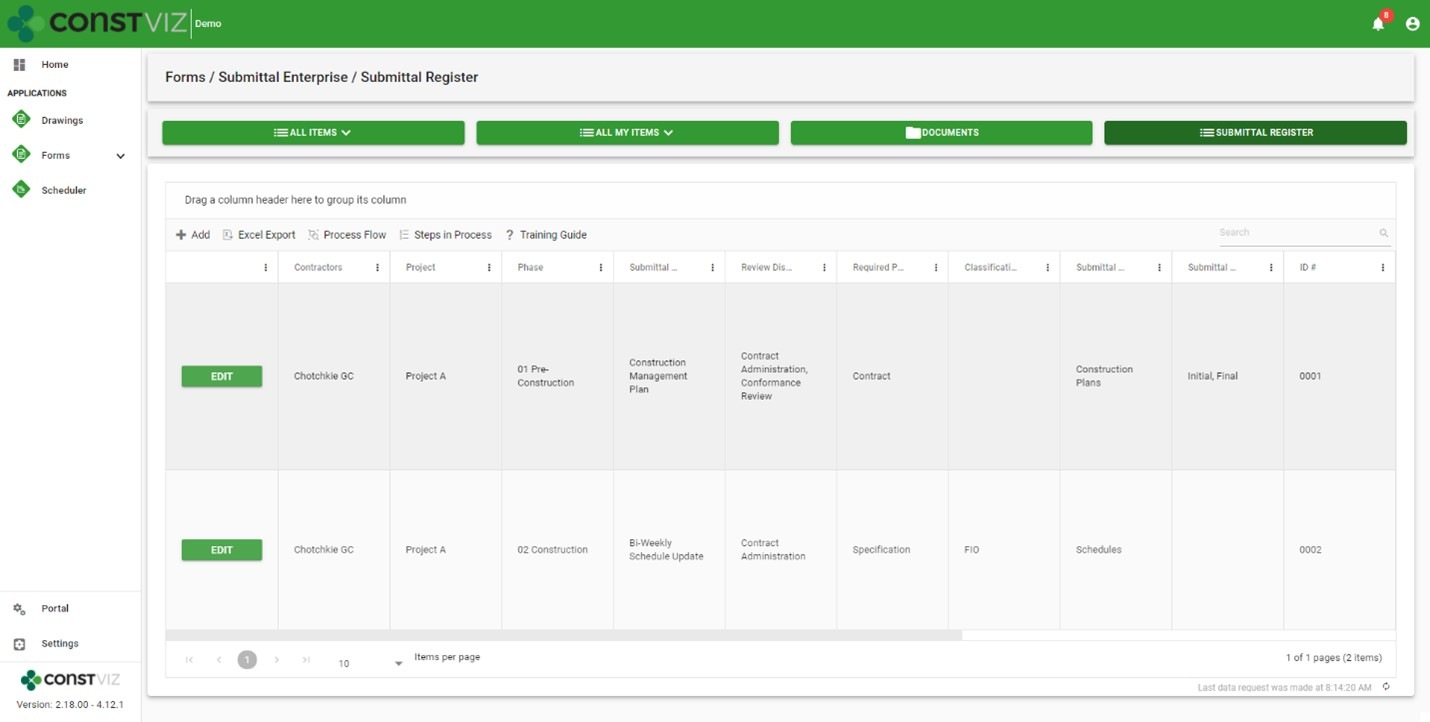
With the Submittal Enterprise form, we placed the submittal register at the center of the process while making it even easier for a contractor to fill out. The new Submittal Enterprise form boasts the following enhancements.

New submittal register

  • Robust, customizable register: Enter as many contractual submittal register items as needed into a configurable grid with all the metadata you need for each project.
  • Permission controlled: Only users with the correct permissions can update the register. Similarly, contractors can only view and select register items within a submittal form that you permit them to access.
  • Monitor due dates: The form app enables tracking and monitoring submittal due dates and re-occurring instances, such as monthly schedule submissions or weekly reports, for compliance.
  • Extensibility: You can customize the form to support other applications as needed, such as enabling the submittal register component to plan daily inspections or track custom specifications.
Enhancements to the submittal form
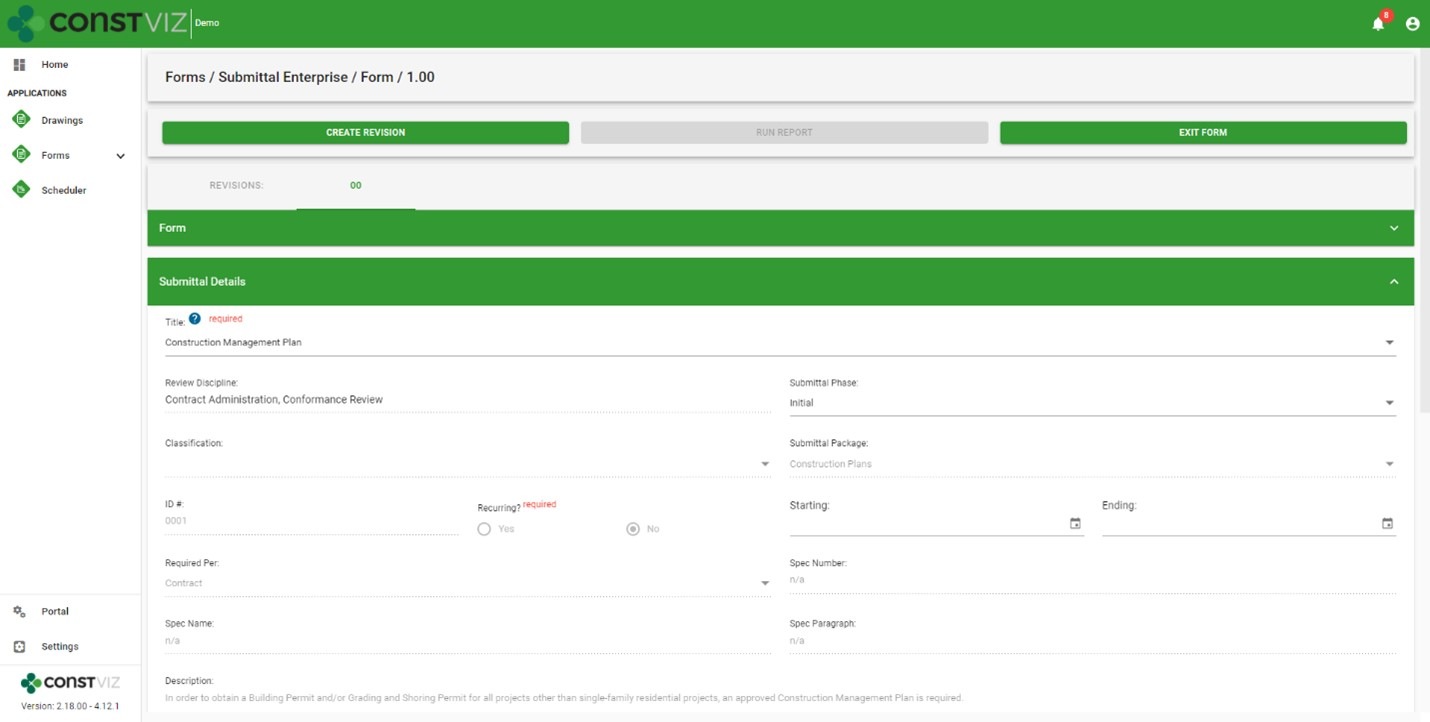
  • Easy creation: Contractors only need to select a few fields in a submittal to auto-populate the rest of the form from the register, minimizing training, reducing data entry, and ensuring data integrity throughout the process.
  • Helpful tooltips: Tooltips are available to display only the submittal register packages assigned to each contractor, further reducing errors when creating a submittal.
EnterpriseSubmittal_2

The Construction Viz Submittal Enterprise form is available as a single application or bundled in a suite of Microsoft 365 applications to fit your organization’s specific needs. While Construction Viz delivers out-of-the-box applications to get you started right away, all of our applications are further customizable as needed by the client and project. Learn more with a demo and consultation today.
New Image Markup Feature for Construction Viz

Forms | August 5, 2021

Our latest Construction Viz feature lets project team members mark up images on any device with or without internet access.

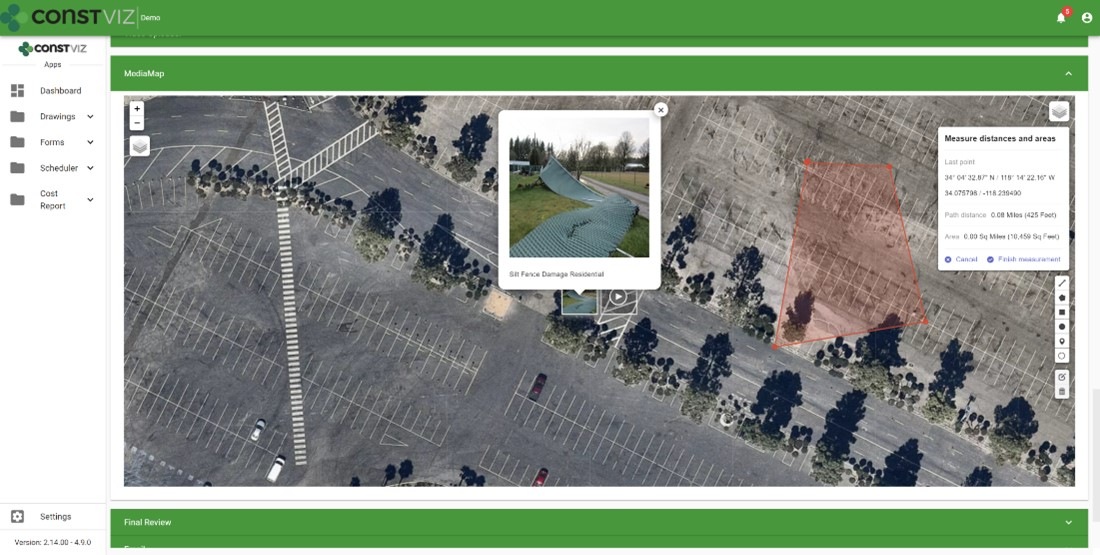
Adding images to a daily report, safety incident, or punchlist is critical to documenting work completed in the field and identifying any issues for potential corrective action. Construction Viz makes the process simple, enabling users to take photos with any device, with or without an internet connection, and attach images directly to the form. Our Media Map Component automatically plots the image and the location where it was taken on a geospatial map and adds this information to the form. Users can easily add comments, waypoints, and even measurements as a layer to the media map.

And because Construction Viz is a progressive web app (PWA), this is all done without users ever installing an app on their devices.

But what about marking up the images?  Our users told us that marking up images would be a handy feature and make Construction Viz's data capture even better. We listened. Read on to learn about his useful new capability.

Construction Viz image markup feature

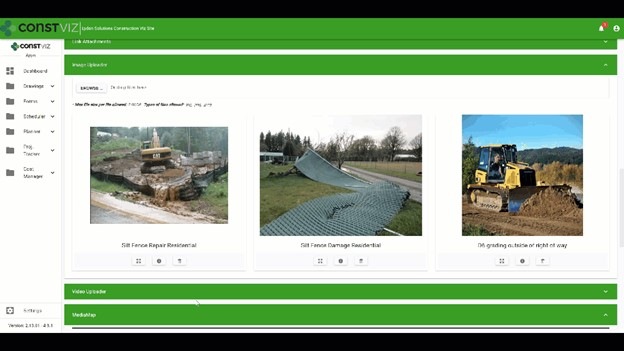
We expanded our Image Uploader Component for construction forms based on user feedback to add image markup capability and further simplify the entire process. Here is how it works:

  • After users upload images, the app displays them in interactive cards. Adding metadata such as title or description can be done in a couple of clicks.
  • The user can expand the photos from thumbnails to a full-screen mode to draw directly onto the image canvas.
  • The markup tool lets users pick from a palette of pen colors, complete with erasing and undo functionality.

The updated Image Uploader Component can be enabled in any one of our apps or can be added to a custom app as needed.

This new functionality enhances the entire data collection and documentation experience by extending what's possible for field workers. Also, since Construction Viz stores all of the data to your Microsoft 365 SharePoint, your project information is available for further reporting and workflow using the Power Platform.

The image markup tool is one of many features that we have built into Construction Viz. For an overview of the other powerful capabilities built into Construction Viz, check out our features page.

Construction Viz image markup feature

We expanded our Image Uploader Component for construction forms based on user feedback to add image markup capability and further simplify the entire process. Here is how it works:

  • After users upload images, the app displays them in interactive cards. Adding metadata such as title or description can be done in a couple of clicks.
  • The user can expand the photos from thumbnails to a full-screen mode to draw directly onto the image canvas.
  • The markup tool lets users pick from a palette of pen colors, complete with erasing and undo functionality.

The updated Image Uploader Component can be enabled in any one of our apps or can be added to a custom app as needed.

This new functionality enhances the entire data collection and documentation experience by extending what's possible for field workers. Also, since Construction Viz stores all of the data to your Microsoft 365 SharePoint, your project information is available for further reporting and workflow using the Power Platform.

The image markup tool is one of many features that we have built into Construction Viz. For an overview of the other powerful capabilities built into Construction Viz, check out our features page.

Construction Viz Media Map Component

Image-Mark-Up_1

Construction Viz Media Map Component

Image-Mark-Up_2

Get a demo of Construction Viz today

Construction Viz is an enterprise Project Management Information System (PMIS) built by construction professionals for construction professionals. We value our client's feedback and are always looking for the most efficient ways to get the job done.

Contact us for a no-obligation consultation and demo today to learn how Construction Viz can help your team better manage your construction projects.

Solving the Action Items Dilemma with Construction Viz

Action Item | February 18, 2021

Learn how we integrated the Construction Viz Meeting Minutes and Action Item apps to turbocharge action item management for construction project teams.

Here is a common scenario for many construction organizations:

  • Your project teams hold meetings to review progress and capture action items in meeting minutes.
  • In most cases, team members probably document meeting minutes in Microsoft Word.
  • Next, someone likely re-enters action items into a separate log using Microsoft Excel.

Not only is this not a very efficient way to collect meeting information, but it is also error-prone and difficult to keep in sync. It is also challenging to ensure that your team is working off the most up-to-date versions of these documents.

We took a step back and analyzed the above process when designing the Construction Viz Meeting Minutes and Action Items apps. The result was a deep integration between these two tools to create a streamlined and always-up-to-date bidirectional connection between meeting minutes and action items.

How Construction Viz improves action item management

The bidirectional flow of data between our Construction Viz Meeting Minutes and Action items apps offers construction project teams many benefits:

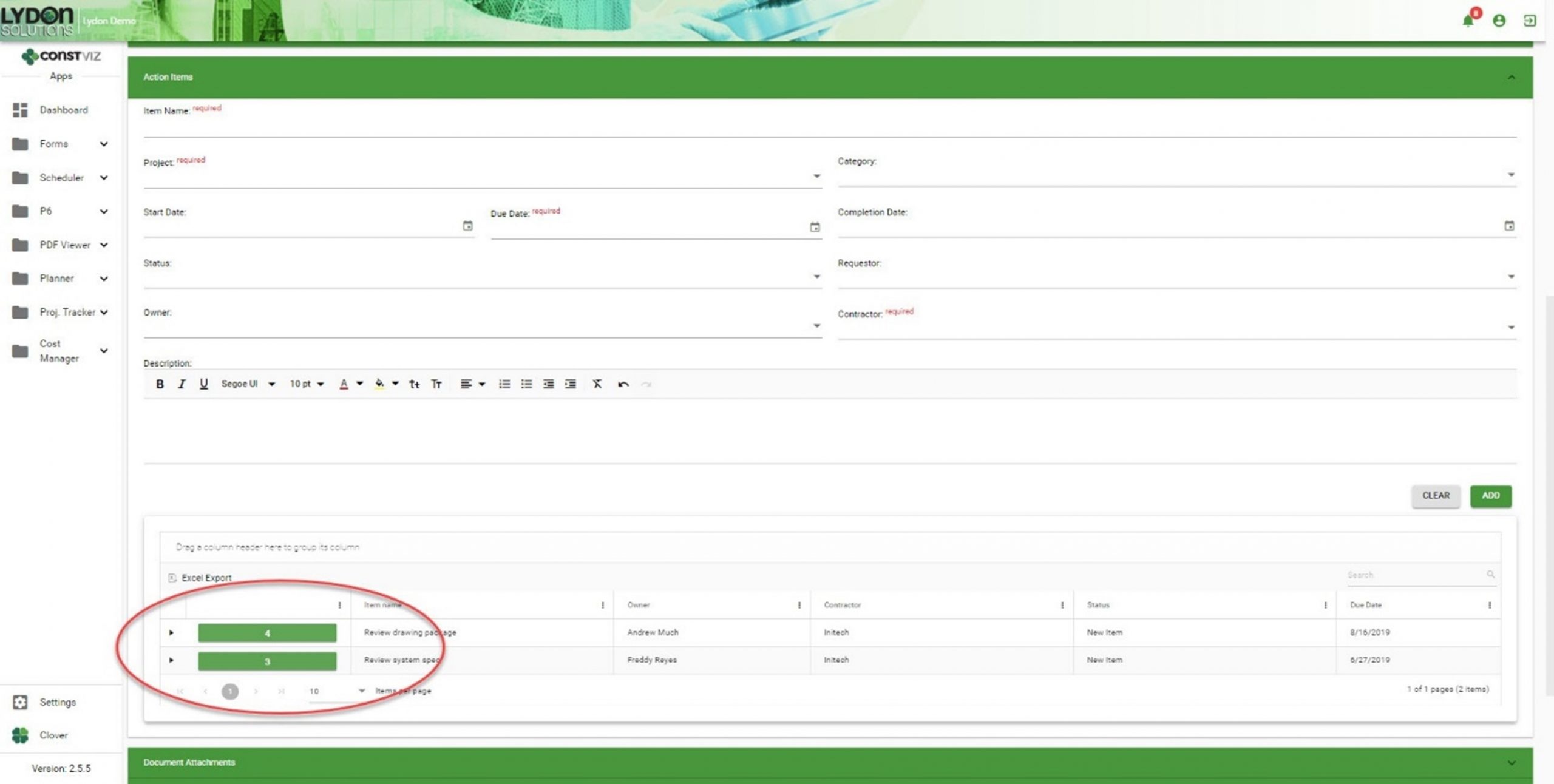
  • You can create action items directly within the Meeting Minutes app.
Solving-Action-Items-Dilemma_1
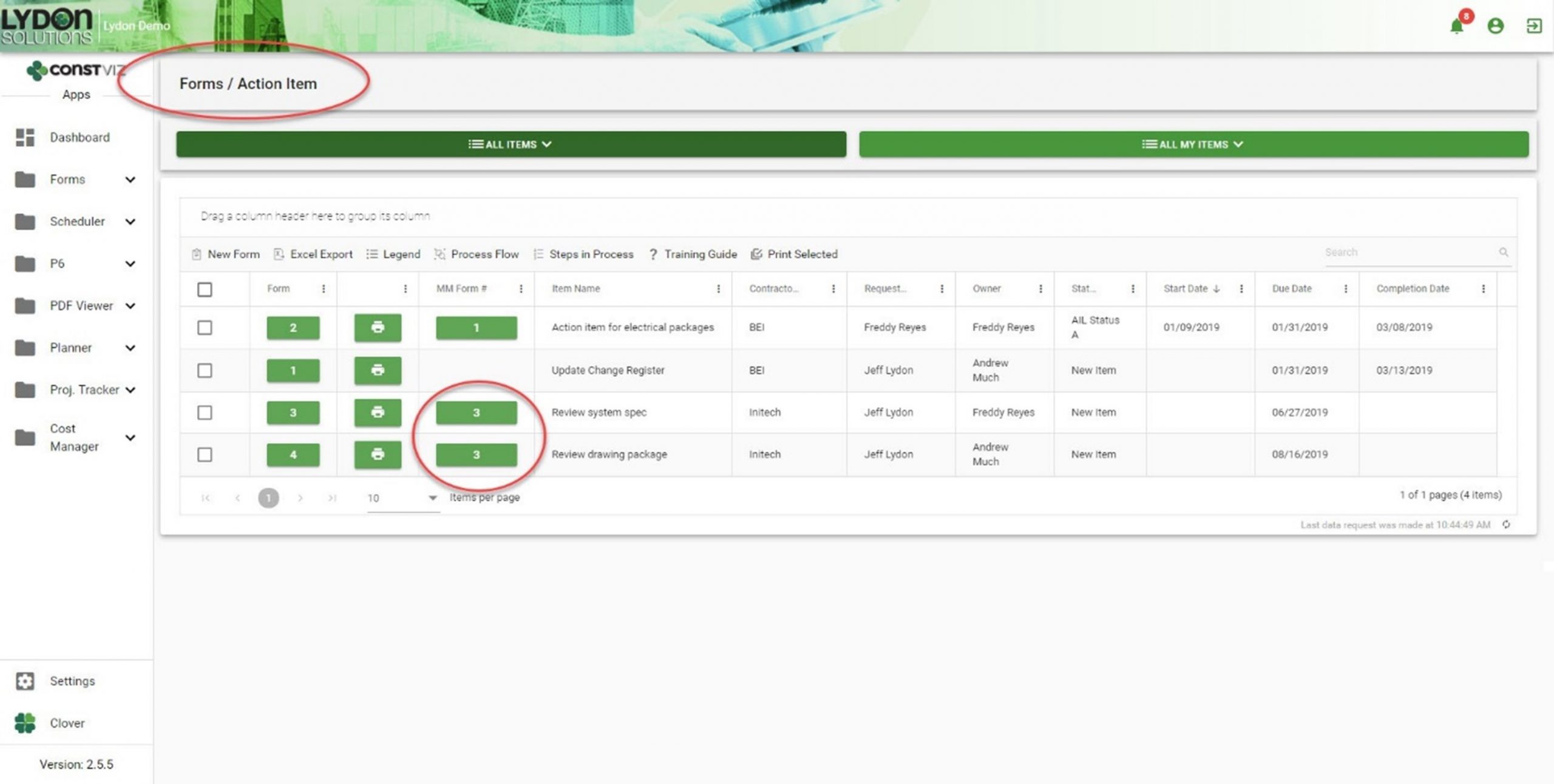
  • Action items created within a meeting minutes record automatically generate entries within the Action Items app.
Solving-Action-Items-Dilemma_2
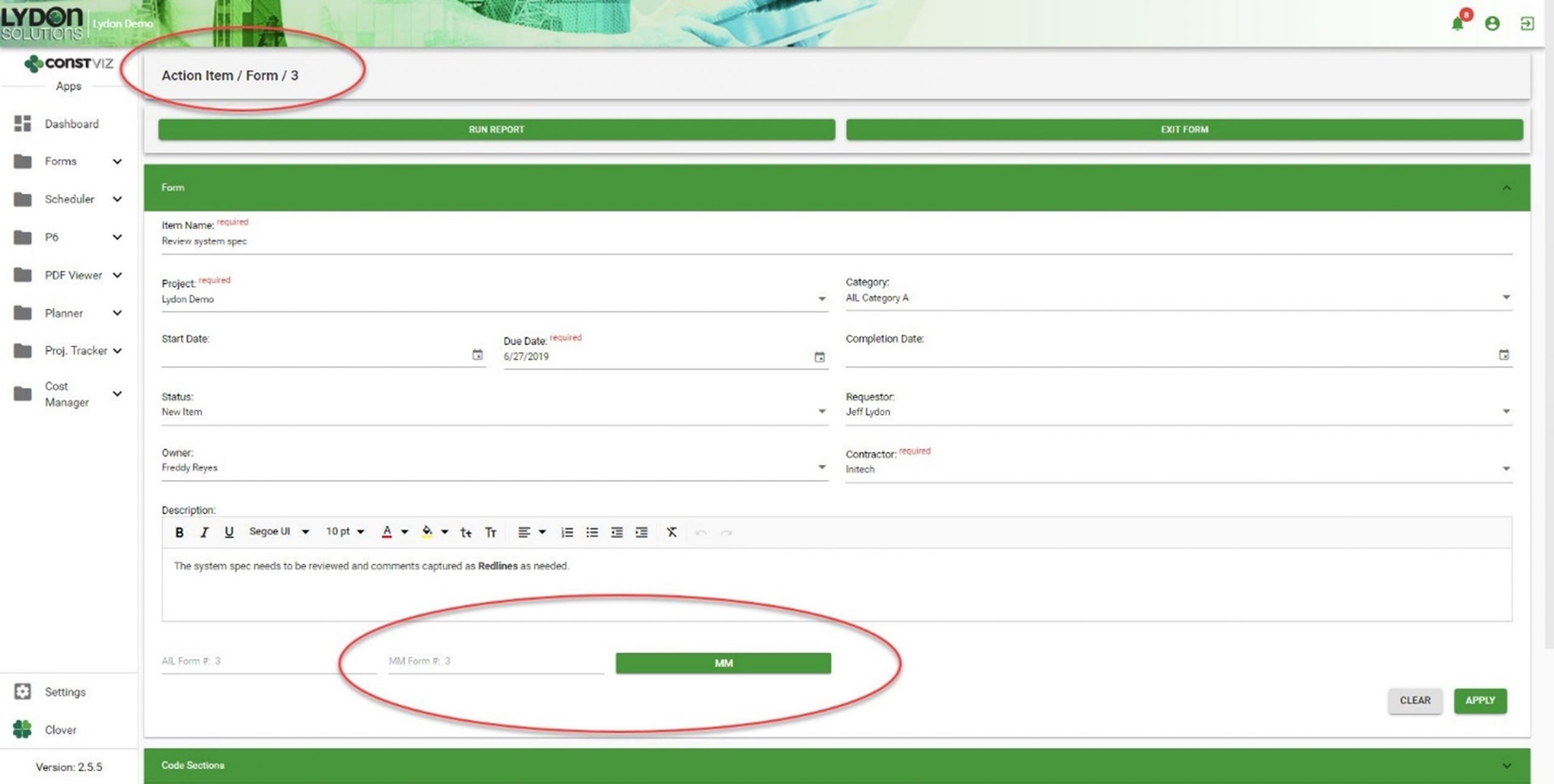
  • Both apps automatically generate cross-links, relating action items and meeting minutes records to each other. Now you can easily cross-reference action items and meetings, giving you a complete log as a single source of truth.
Solving-Action-Items-Dilemma_3
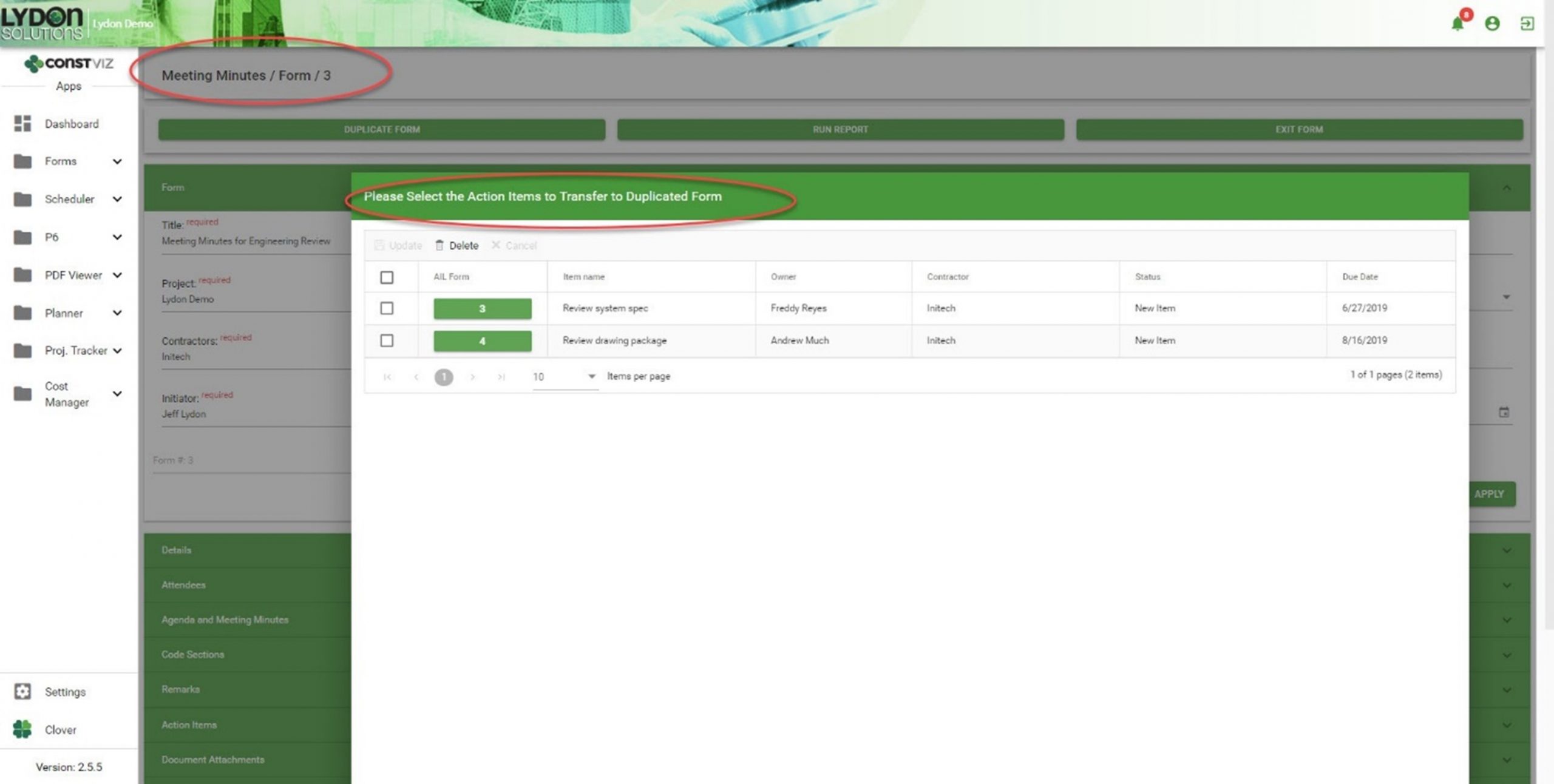
  • If you duplicate a meeting minute form, you can selectively carry forward action items, creating a history of assigned and open action items, as well as a record of the meeting in which you first entered them.
Solving-Action-Items-Dilemma_4

Get a free demo and consultation

Streamlining meeting minutes and action items is just another example of how our team applied our real-world construction project management experience to help organizations save time and cost. Find out how Construction Viz can help your team better manage your projects. Check out our full lineup of Construction Viz apps and schedule your free demo and consultation today.
Why Access Management Matters For Your Projects

Collaboration | November 30, 2020

Construction projects involve many different stakeholders that create, edit, and review project information, making it challenging to ensure sensitive data doesn't end up in the wrong hands. Thus, using a robust Project Management Information System (PMIS) with the right access management tools is essential.

For companies utilizing Microsoft 365 or SharePoint as a PMIS, you are probably aware of these tools' powerful access level capabilities out of the box. While you can assign granular permissions at a site, library, folder, and even a specific file level, you can very quickly create a spiderweb of complexity that can be too unwieldy to manage. Construction Viz, our construction project management solution powered by Microsoft 365 and SharePoint, lets you take full control of access management for your projects.

Leveraging SharePoint Access Management with Construction Viz


For over 11 years, Lydon Solutions has been building SharePoint-based construction management solutions, including our very own PMIS, Construction Viz. One of the thorniest issues organizations encounter using SharePoint to manage construction projects is access management. This is why our goal when we built Construction Viz was to leverage SharePoint's underlying access controls while providing a simplified user interface for easier permissions administration.

What makes the Construction Viz Access Management layer so great?


Construction-centric.
With years of experience building custom solutions in SharePoint and providing document control services, we know how teams typically share and control project information. We designed Construction Viz Access Management around groups, users, apps, and specific content related to contractors and companies. For example, a project team could give certain users access to the Submittal app but only allow them to see and edit submittals from their company or for a specific project.

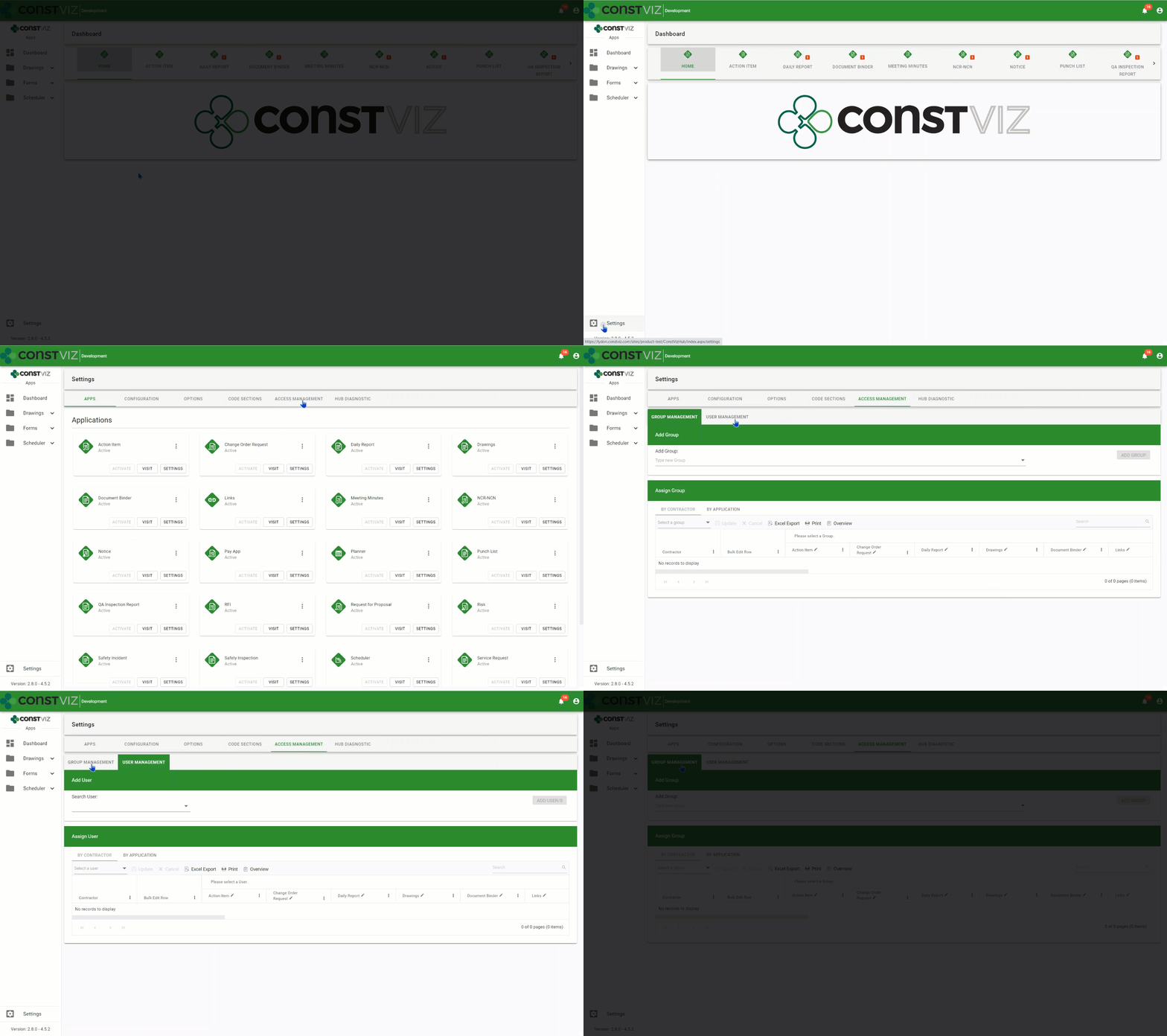
Simplified Management. Access Management is centralized in the Construction Viz Hub to simplify access administration. As you activate Construction Viz apps within the Hub, they are automatically added to the access management module, allowing administrators to grant users access right away. You can manage access in two ways:

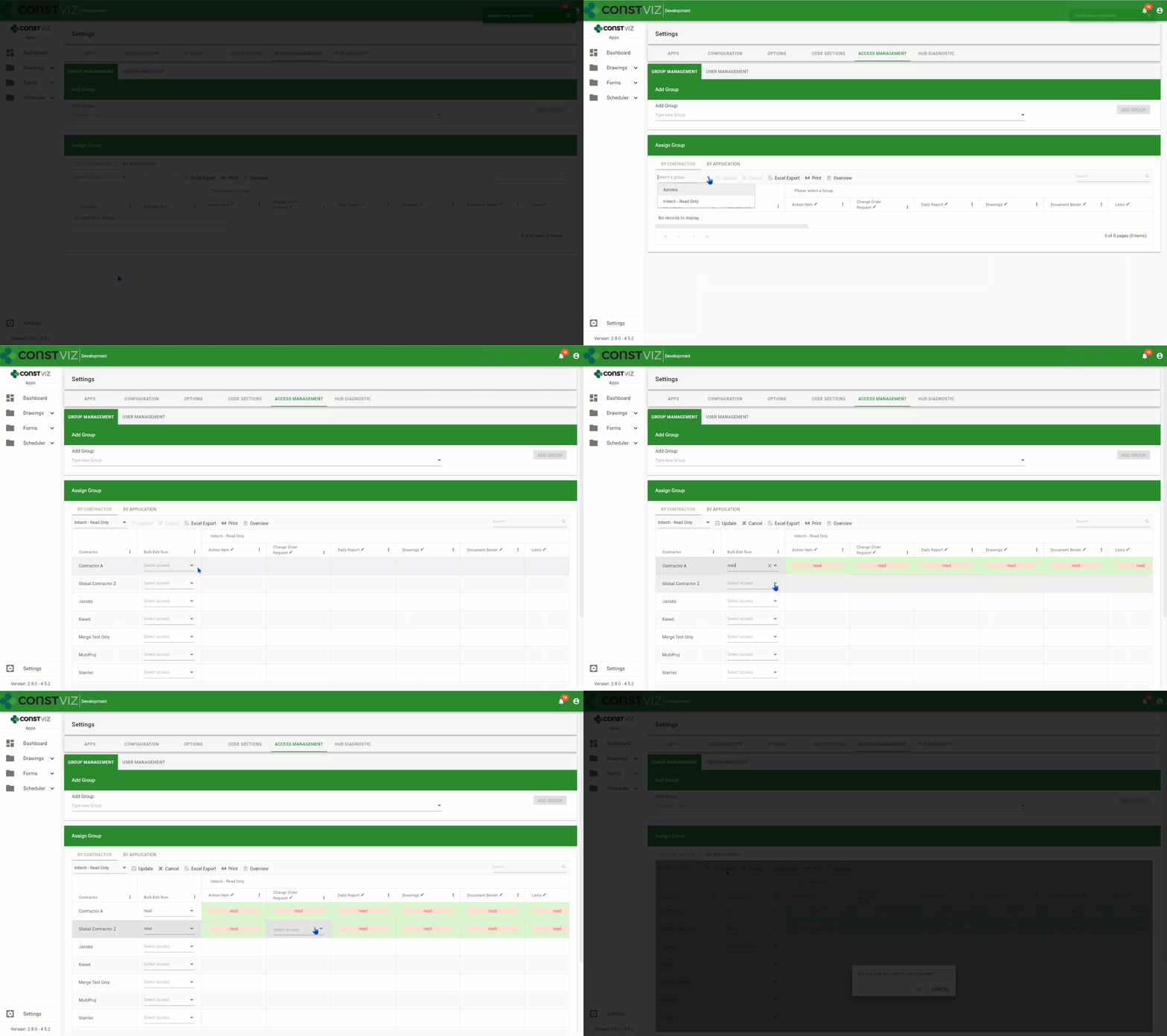
  1. From Groups Management, an administrator can create access groups, assigning each different access rights - such as read, write, or none - on a per contractor, company, or app basis. From Users Management, an administrator can then assign individual users to a specific access group, thus automatically assigning the user the same rights defined under Groups Management.
  2. If the administrator needs to set special access rules for a user, they can give a user custom access rather than adding them to a specific access group.

You can display all groups or users' access levels in an interactive grid from either Groups Management or Access Management views. This data can then be exported to Excel and printed as a PDF for further analysis and reporting.

Powerful Customization. Construction Viz Access Management provides consistent access control across all apps in the suite. You can define access down to the component level (such as form header, attachments, links, reviews, and so) and even to the field level (such as initiator, status, and description) depending on your needs. For example, you could set up your RFI forms with access controls that only allow the contractor who submitted the form to edit the description field. In this same form, the general contractor reviewing this information might only have access to the response fields in their assigned review section. Similarly, the owner could have access to just their response fields in their review section.

With Construction Viz Access Management, we built in the capabilities for managing stakeholder access for construction projects of any size in a way that minimizes the level of effort required to administer.

Learn More About Construction Viz Access Management


Access Management is a feature we built into our apps to ensure access to project data can be managed easily across our suite of apps. Find out other ways that Construction Viz can help your projects be successful by contacting us for a free consultation and demo. If you need help getting your construction projects up and running quickly, Lydon Solutions also offers managed services for Microsoft 365 and SharePoint.

Introducing No-App, Offline Forms for Construction Viz (Video)

Forms | November 21, 2019

Forms are an essential part of your construction project workflow. Construction Viz Form Apps let you and your team complete digital forms anywhere, on any device and even without an internet connection.

Watch our latest video to see how you can streamline your construction project workflows even when you're offline with our no-app, offline forms for Construction Viz.

Key Features of Our No-App, Offline Forms

  • No app to install: Get full access to your construction project forms right in your browser on any modern device.
  • No internet? No problem: You can edit forms without a internet connection, and then sync changes when you're back online. This allows for continuous access with the ability to make changes even in the field.
  • Full-featured construction management forms: Our library of mobile-responsive construction project forms have built-in permissions, comments, workflows, and reminders.
  • Powered by technology you trust: Construction Viz is integrated with SharePoint and Office 365.

Discover Project Management Perfected with our complete suite of offline forms designed to help you manage your projects anytime, anywhere. Contact us today to schedule a demo and receive more information about Construction Viz Apps for Microsoft SharePoint & Office 365.

Construction Viz & Revision Management

Forms | August 22, 2019

Construction management is really the management of the flow of information. It never ends from the time the bids are taken to the final close-out of the contract. Forms convey questions (RFIs) and responses, price changes (change order requests) and status reports. Ongoing design changes add to the volume of information between owners, designers and contractors.

Unfortunately, managing these changes can be difficult with most Project Management Information Systems (PMIS).

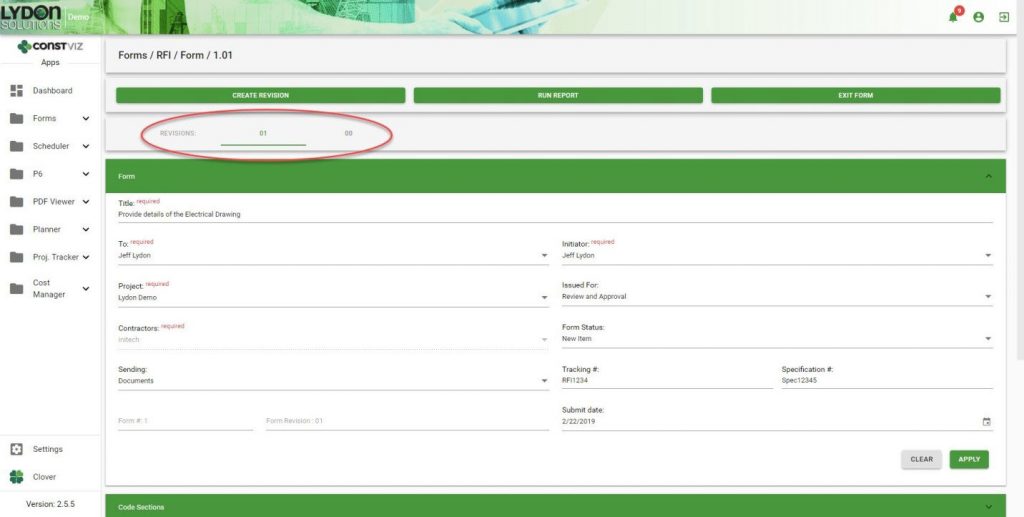
With Construction Viz, you can leverage the powerful revision-management capabilities of SharePoint. However, we took it a step further by integrating revision-management capabilities directly into our Form Apps. This feature enables you to see the different revisions so you can more easily manage the entire process—from creation to reporting—for all construction correspondence forms, including submittals, transmittals and RFIs.

Here’s how it works.

Create a Revision

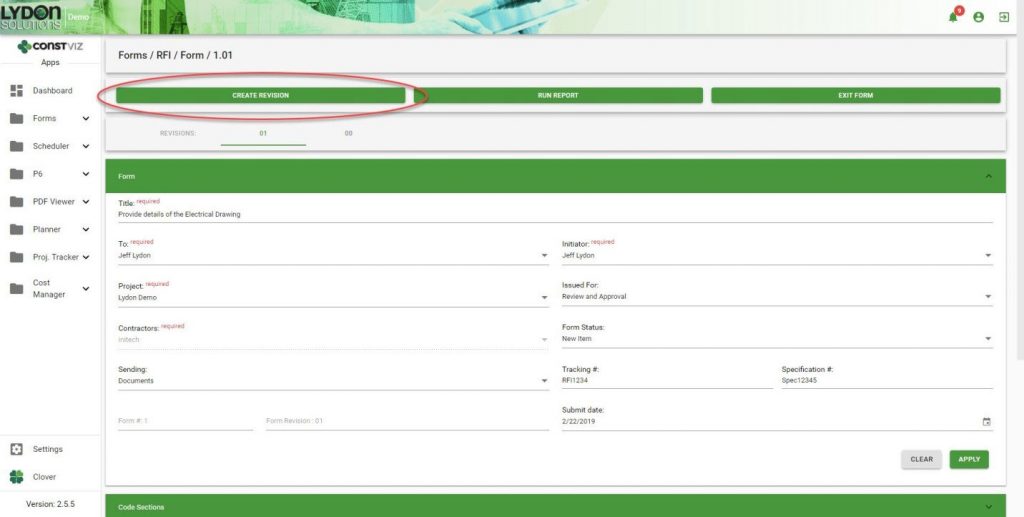
A Create Revision button within a form allows you to easily create and link form revisions together at any point in time.

SharePoint Revision Management

Duplication of Form Content

When revisions are created, important information captured in the previous revision is carried over from one form to the next. This ensures consistency and saves time because you do not have to fill in that information again.

In-Form Navigation

You can easily jump back and forth between revisions as needed.

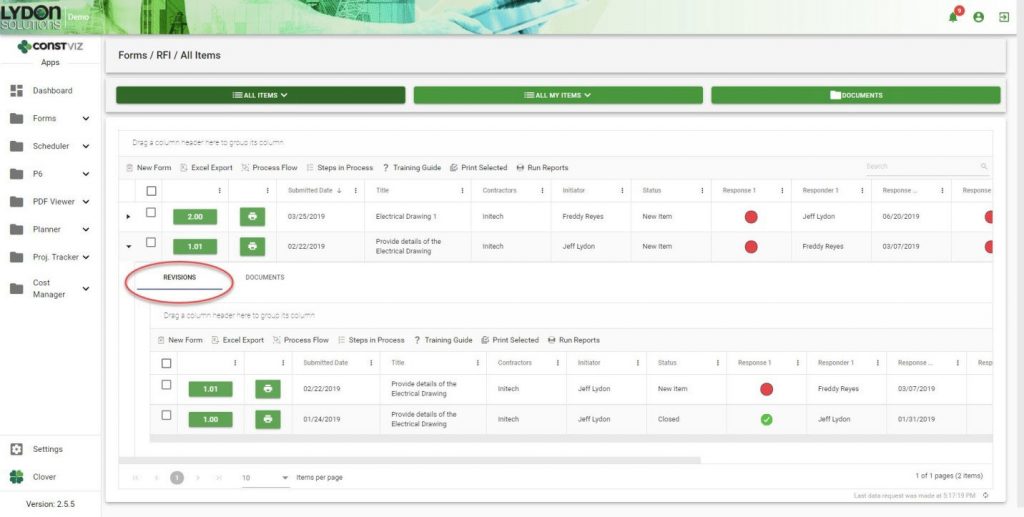
Grid/Log Navigation

Revisions are automatically added to the form grid in descending chronological order. Simply click the form to open the sub-grid to see all the revisions related to that form.

Reporting

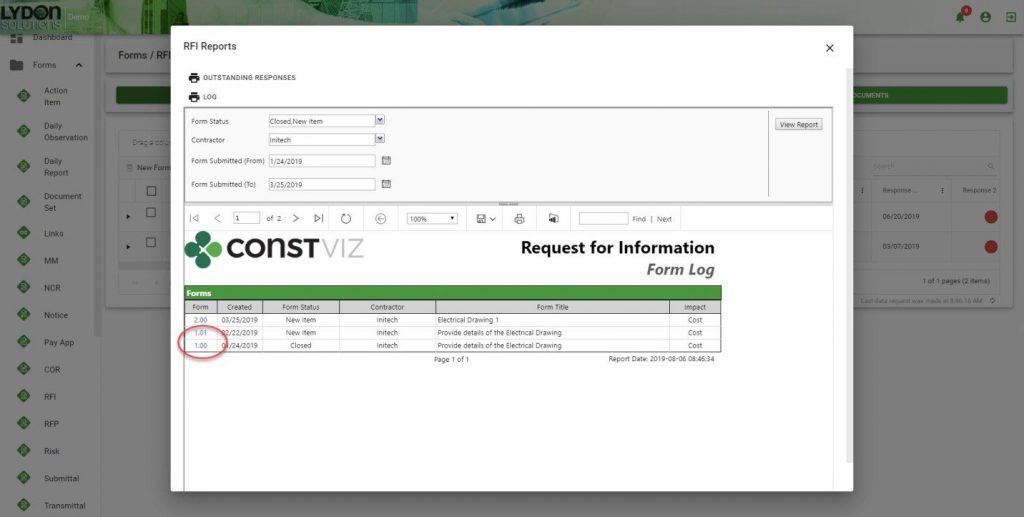
All revisions are grouped together, which makes it easier for you to find any revision. Reports can be saved in a variety of formats including PDF, Excel and PowerPoint. The form number/revision is hyperlinked, making it easy to open any form.

Revision management is just one of the many ways Construction Viz makes your job easier. Contact us for a free consultation to learn more. You can also sign up for our monthly newsletter below to get our latest blog updates, tips on using Microsoft SharePoint, and other useful info delivered directly to your inbox.

  • « Go to Previous Page
  • Page 1
  • Page 2
  • Page 3

Footer

About Constructon Viz

Construction Viz is a flexible construction project management software solution powered by Microsoft SharePoint and SQL.
Read More >

Navigation

  • Home
  • About
  • Features
  • Apps
  • Blog
  • Contact
  • Login

Apps

  • Construction Viz Hub
  • Cost Report
  • Drawing Management
  • File Manager
  • GIS Maps
  • Oracle Primavera 6
  • Payment
  • Specification Management

–

  • Project Forms
  • Project Planner
  • Project Scheduler
  • Project Tracker
  • Task Manager

Connect with Us

  • This field is for validation purposes and should be left unchanged.
  • Sign up to receive helpful tips for construction project managers as well as updates about Construction Viz.

Lydon Solutions

© Lydon Solutions

  • Privacy
  • Cookies
  • Terms of Use
  • Disclaimer
  • End-user license

Click here to start a Microsoft Teams chat.

Click here to start a Microsoft Teams chat.

Contact Us
This field is for validation purposes and should be left unchanged.
Name(Required)
Join Our Newsletter

Sign up to receive helpful tips for project managers and updates about Construction Viz.

Get Started

Join Our Newsletter

Sign up to receive helpful tips for construction project managers as well as updates about Construction Viz.

  • This field is for validation purposes and should be left unchanged.
  • This site is protected by reCAPTCHA and the Google Privacy Policy and Terms of Service apply.