• Skip to primary navigation
  • Skip to main content
  • Skip to footer
Construction Viz

Construction Viz

Project Management Perfect

  • About
  • Features
  • Apps
  • Blog
  • Contact
  • Download Flyer
  • Get Started Today
  • Login
Show Search
Hide Search

construction management apps

Project Time Tracking in the Construction Viz Task Manager

Project Management Tools | April 18, 2024

Outside of when the task was completed, how many hours it took to perform it is the second most asked question. Project Managers need to know the level of effort to compare it against estimated hours, add hours to billing, check efficiencies, or manage labor utilization. Accurate construction project time tracking is thus essential to every project.

With the Construction Viz Task Manager, we continue to extend the functionality so that everything you need to manage a task is included in the application, including time tracking.

Construction Project Time Tracking

Everything in project management, and life in general, comes down to managing a series of tasks. Effectively managing the who, what, when, where, and why of tasks can lead to a successful project.

We see task management as a cornerstone of project management, which is why, with Construction Viz, we are beefing up resource management features so that you can manage tasks how you want to manage them. One of those critical features is detailed construction project time tracking.

Key Features of the Construction Viz Task Manager App

The Construction Viz Task Manager might seem familiar to those who use Microsoft Planner and MS Project for the Web. But we designed the app for construction projects with the ability to customize it to your unique processes.

The Construction Viz Task Manager’s new Time-Tracking component can be activated in a task and works with the Schedule component. Resources and hours can be assigned daily based on a task’s scheduled start and finish dates.
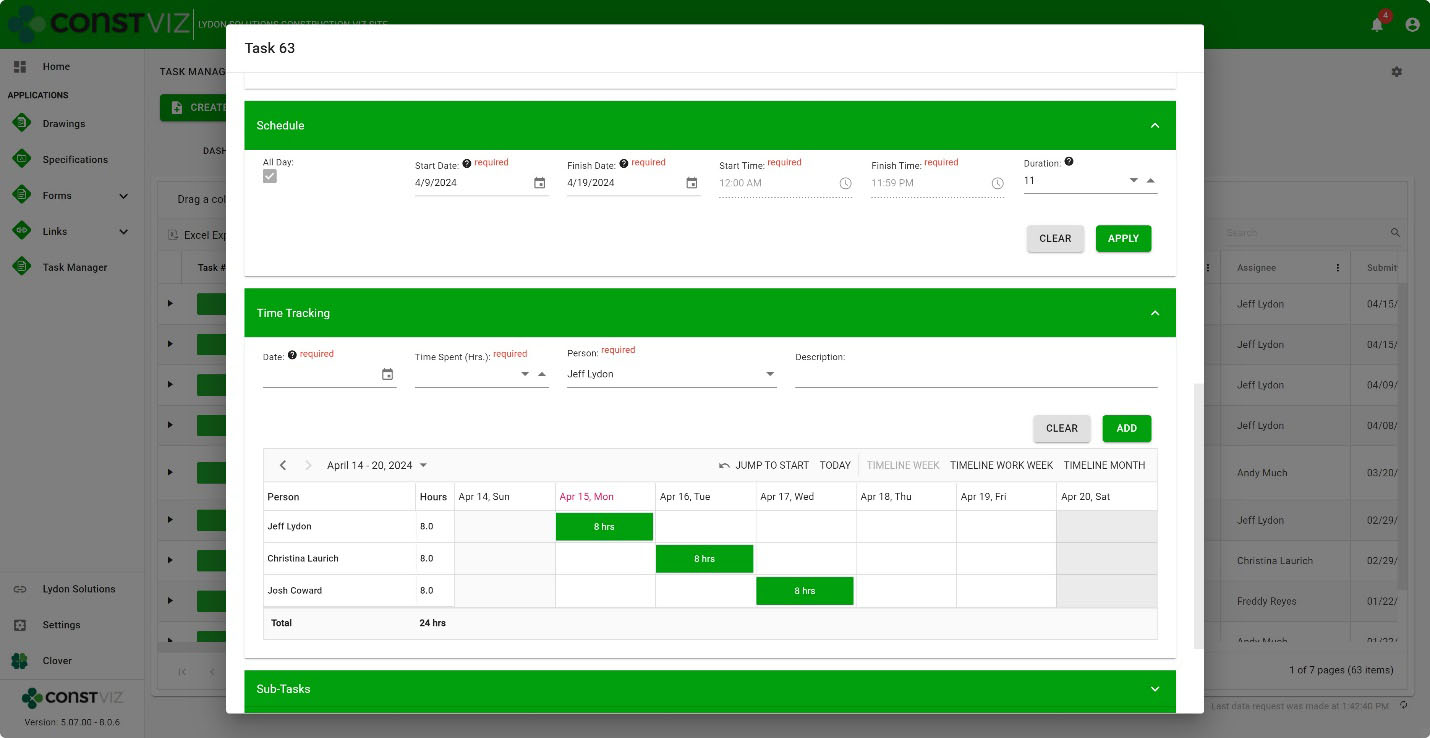
Time-Tracking

The interface is simple but powerful under the hood. Add resources, the description of work, hours, and the specific day in a weekly or monthly view. Records are saved to SharePoint lists, so the data is always available for you to create your own Power BI reports.

And, because Construction Viz utilizes your Microsoft 365 SharePoint Online lists and libraries, you can rest assured that the data securely resides in your Microsoft 365 tenant.

The Construction Viz Task Manager is one of many applications that round out a suite of apps to help you manage your projects. If you want to learn more, use the form below to request a demo.

If you are not ready for an enterprise construction management solution but need help with Microsoft 365, you can request a free one-hour consultation here.
Get a Free Consultation

  • This field is for validation purposes and should be left unchanged.

New eSignature Feature for Construction Viz 

Construction Viz, Project Management, Project Management Tools | December 20, 2023

As construction organizations move from paper processes to web-based project management tools, the adoption of electronic approvals has been mixed. Clicking an approved button that registers your account name and date is standard in most construction management systems. However, some organizations and specific forms still require digital or wet signatures. While several electronic signature tools are on the market, their ease of use and cost can be a deterrent. We added a free and easy-to-use digital signature feature to Construction Viz to capture signatures in any of our forms. Read on to discover how our simple signature feature might address your challenges. 

Several signature solutions are available for SharePoint, including the new built-in SharePoint eSignature subscription service that will be available soon. The benefit of these tools is that files that receive signatures never leave your Microsoft 365 tenant, ensuring your data remains secure and in your control.  

Leveraging these eSignatures through SharePoint is great but does require additional subscription costs and administration. What if you want something simpler and at no extra cost?  

Construction Viz eSignatures Feature for Construction Forms

Picture1

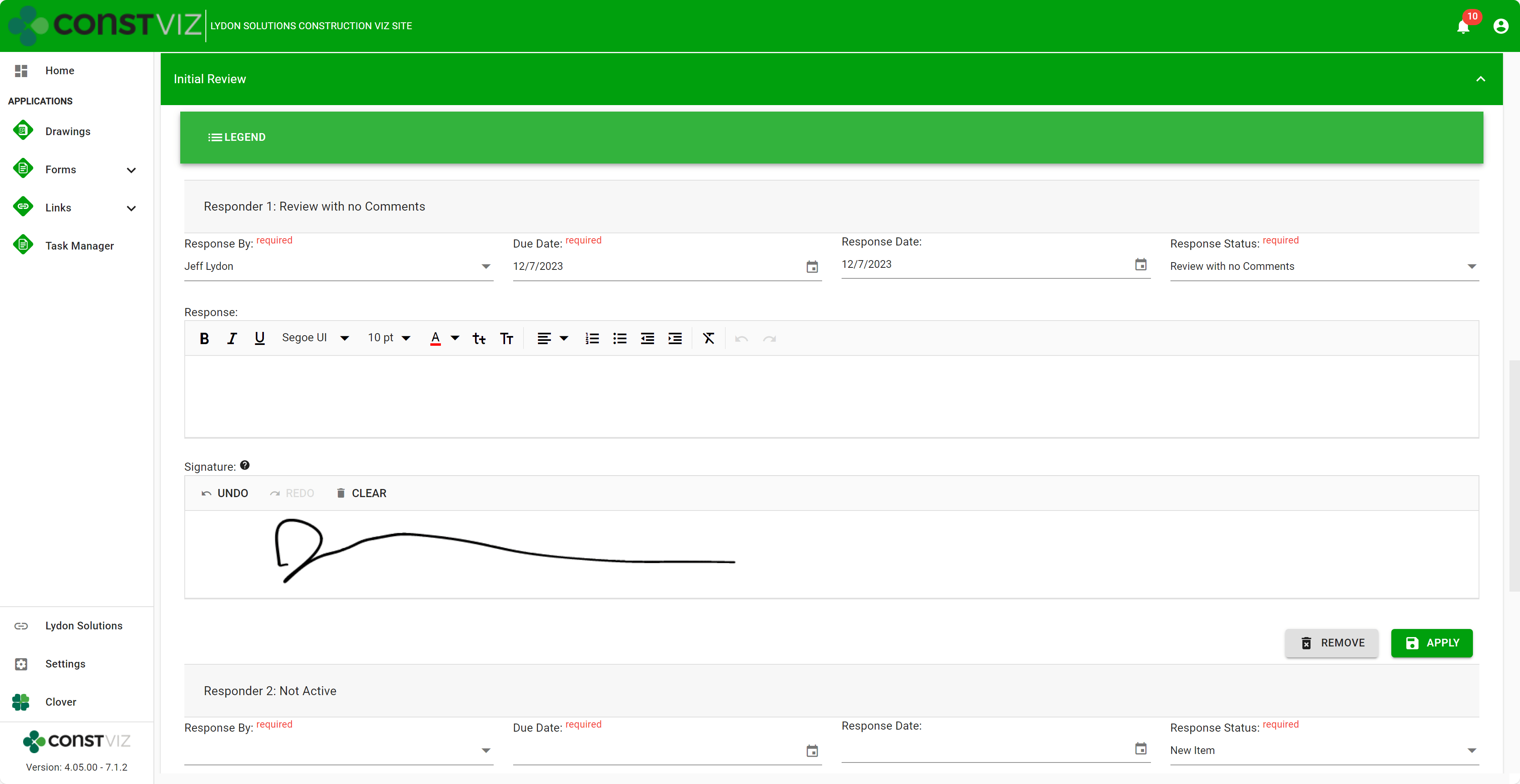
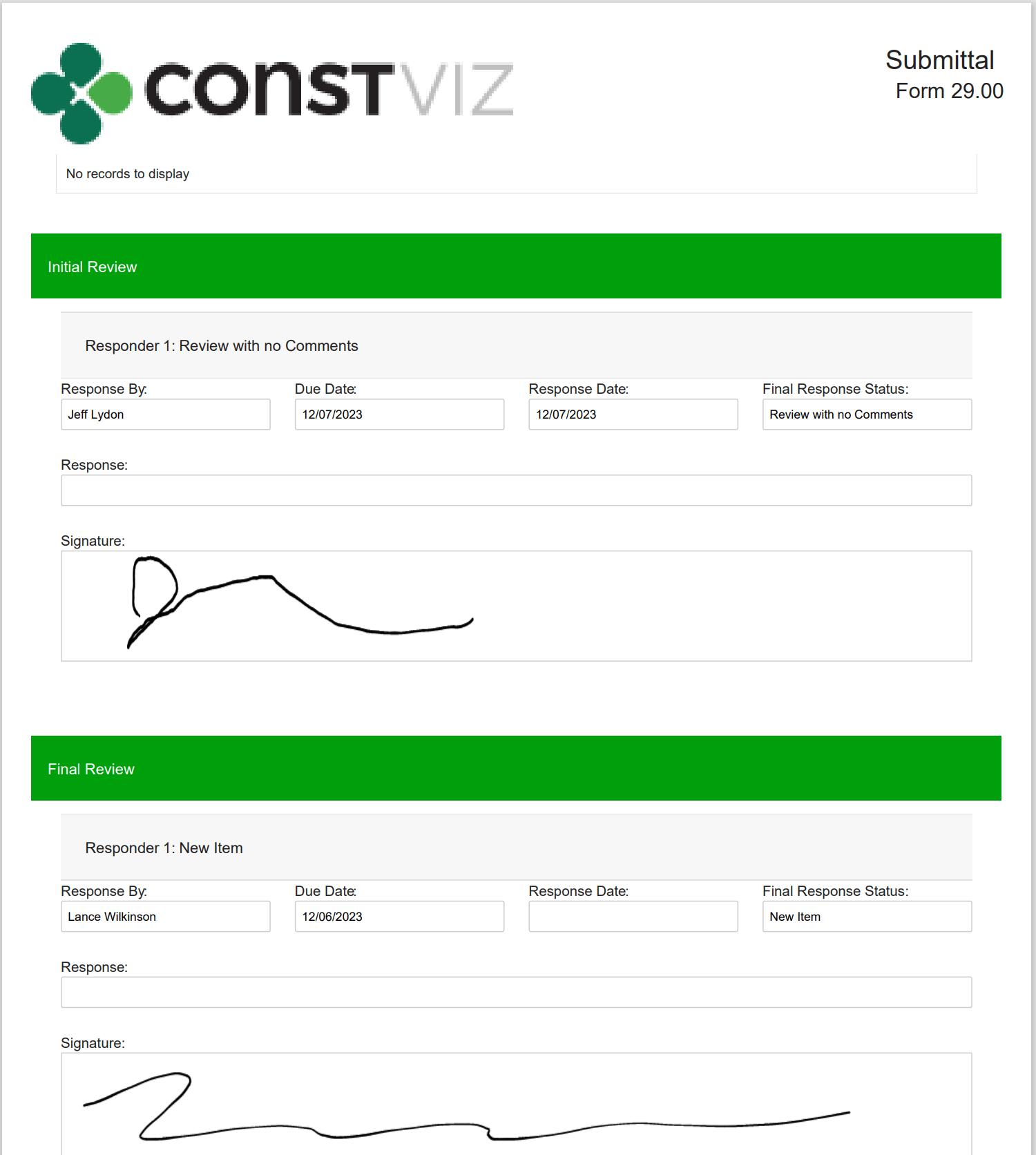
With the Construction Viz eSignature feature, signatures are available on any form in the review components. For example, say you want an inspector to sign a daily report digitally. We can activate eSignatures in your Construction Viz settings to automatically add eSignatures to all your daily report forms. 

Since this new eSignature feature is built into Construction Viz, we included additional controls such as: 

  • Only the user assigned the review can sign their signatures. 
  • If a user is removed from the reviewers, their signature is removed as well.  
  • Administrators are restricted from signing on behalf of a user.  
  • eSignatures are available on any Construction Viz form! 
  • eSignatures print in form reports! 
Picture2

Our new eSignature feature is perfect if you need a simple, free solution within Construction Viz. You can find out more about Construction Viz by requesting a demonstration here. 

Improve Project Efficiency with New Schedule Views for Construction Viz

Forms | June 5, 2023

Construction forms such as submittals, RFIs, and daily reports are tightly integrated with project schedules but can get lost among the hundreds or thousands of potential activities. To manage forms effectively, it’s not enough to just see them included in a weekly schedule report. It is essential to evaluate inquiries promptly and efficiently in real-time to address any possible schedule disruptions.

These inquiries may include the following:

  • Did the contractor adhere to the contractual obligations by submitting their documents on time?
  • Was the review of Requests for Information (RFIs) conducted within the agreed-upon deadlines?
  • Were the daily inspections conducted as scheduled?

You need a simple and quick way to answer these questions and more in your construction project management software solution. The problem is that the typical form logs found in most PMISs allow you to sort and filter on due dates, but it lacks form-specific Gantt chart views to manage deliverables.

Our new form view feature for Construction Viz solves this shortcoming.

Construction Viz gives you a clear view of your form data

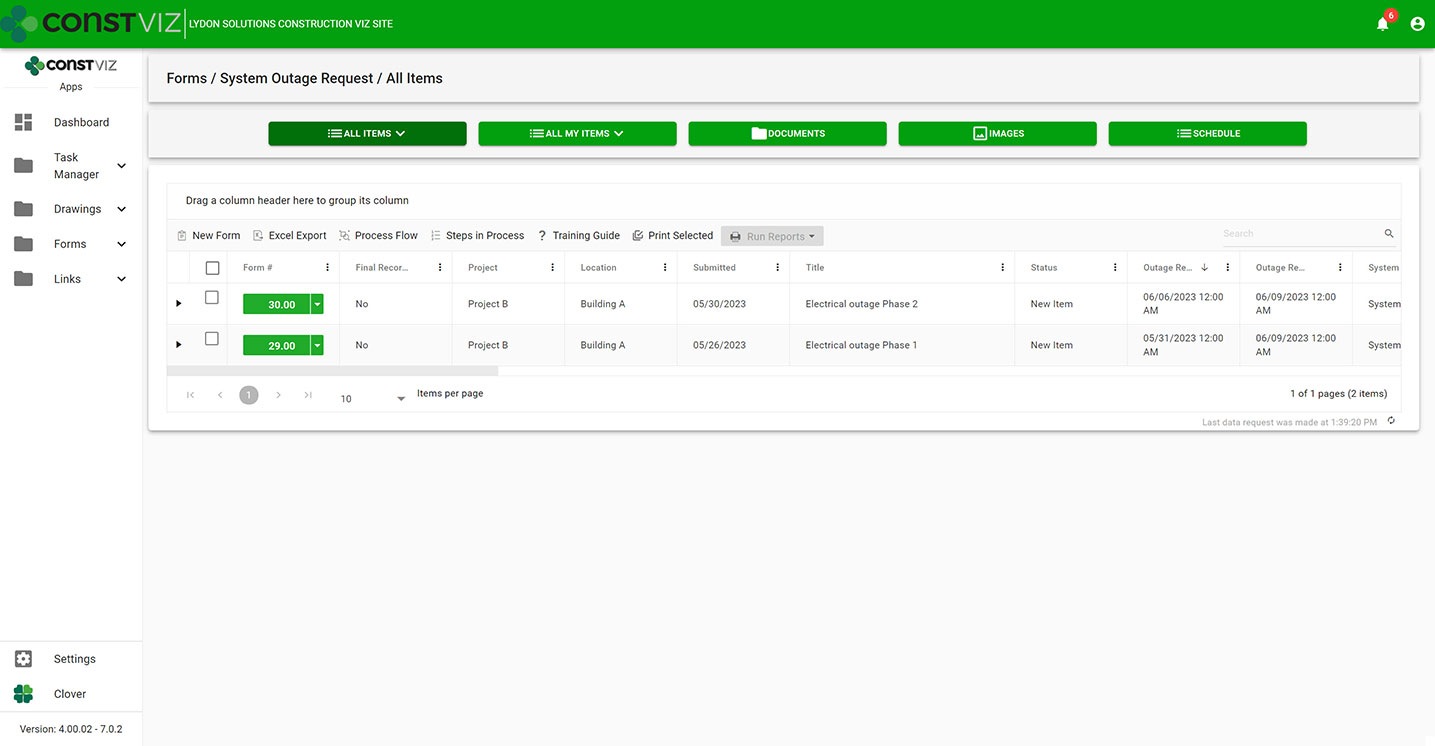
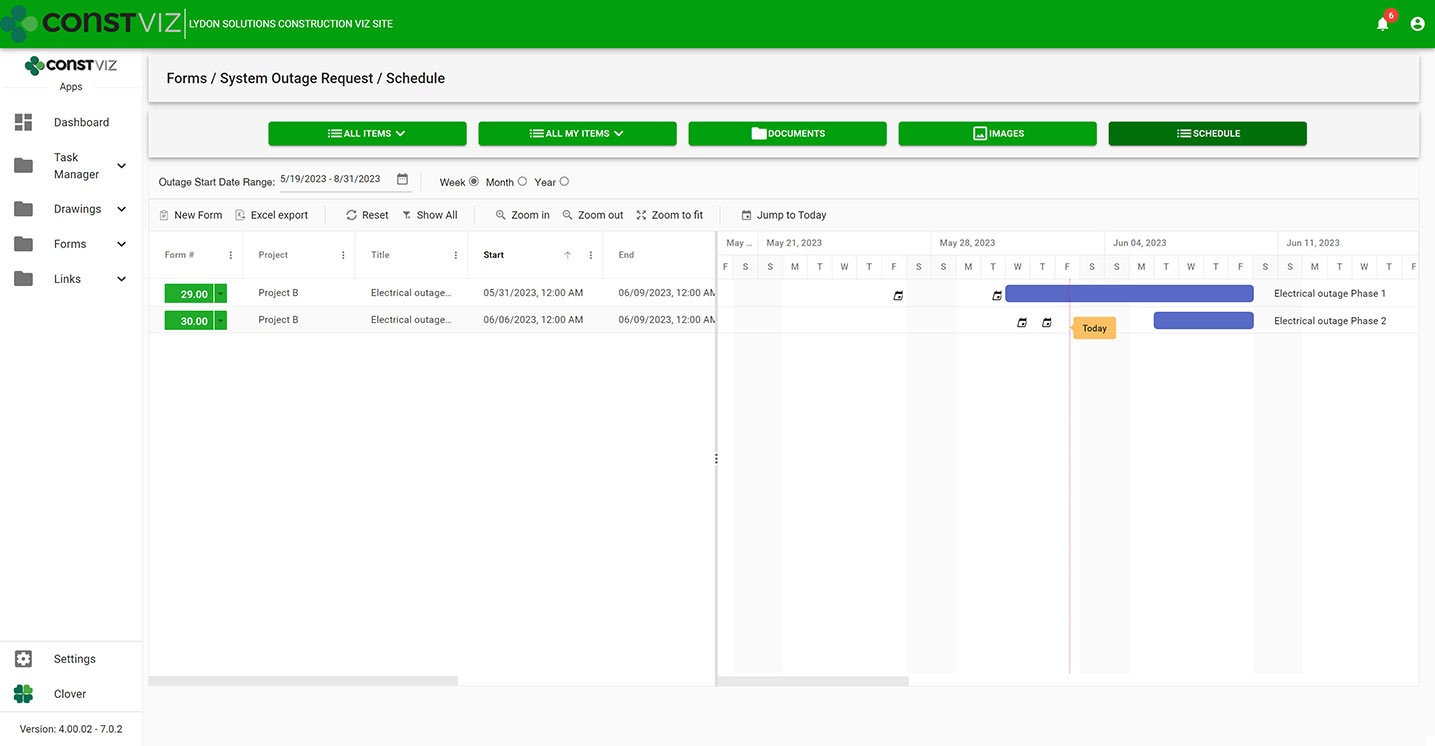
With the new Construction Viz schedule views, you can visualize any of our apps in a traditional Gantt chart view accessible from within the app itself. Now, you have the best of both worlds, the detailed analysis of form data in interactive logs and a Gantt chart focused specifically on the form.

Construction Viz System Outage Request app All Items List (“Form Log”) View
Construction Viz System Outage Request app with new schedule view

Construction Viz Scheduler view sample

Customizable form-specific schedules

You can further tailor Construction Viz’s new schedule views for a specific form. For example, baseline vs. the current schedule, resources assignment, and critical path could be added to the submittal form app while not adding those features to the daily report app. And you can roll up schedule data captured in each form app into an overall master schedule.

The new schedule view keeps team leads and members focused on meeting their specific deliverable dates using an intuitive and interactive Gantt chart.

Find out more about Construction Viz features and apps for Microsoft 365 here.

The new Construction Viz Questionnaire component provides even more choice

Project Management Tools | August 26, 2022

In construction, questionnaires are essential for gathering qualitative and quantitative information on a project. As a project manager, you want your field team to use questionnaires to report on various construction activities including, but not limited to, job site safety, project progress, quality control, identification of issues and defects, and adherence to specification and contractual requirements.

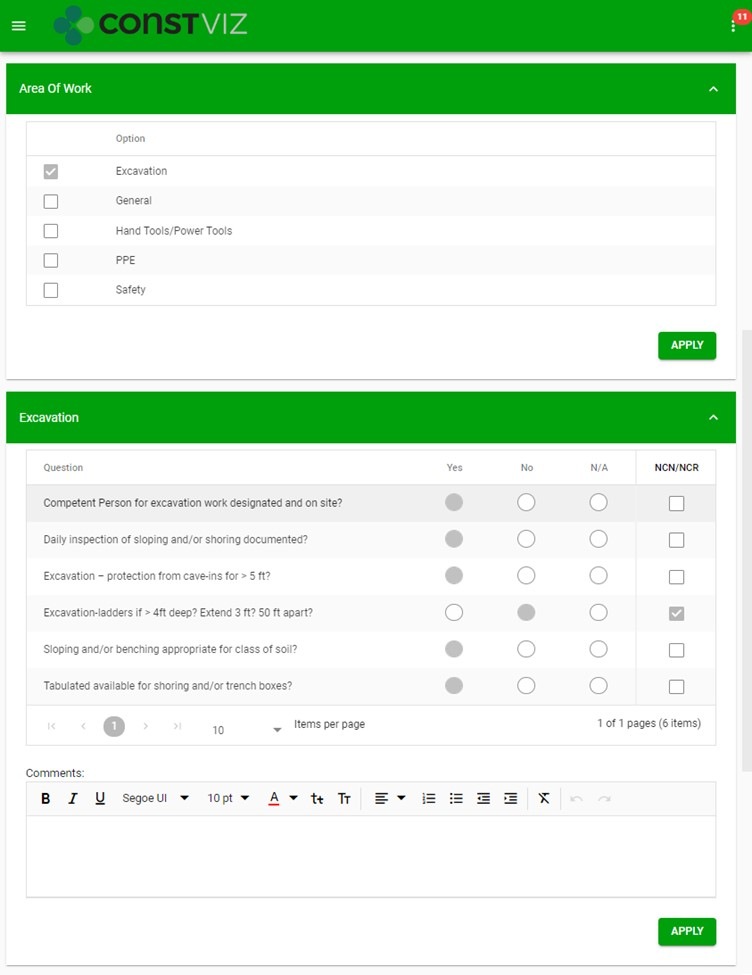
For those using Construction Viz, you may already be familiar with our standard Area of Work (AOW) component which allows you to create ad hoc questions in the Daily Report or Inspection forms. Field personnel respond to the AOW questions through set yes, no, and N/A response fields. While the functionality of the AOW component has worked great for documenting and reporting on field activities and project progress, we wanted to give our clients even more flexibility when creating unique questionnaires.

Area of Work (AOW) Component

Questionnaire_1

Introducing the new customized “Questionnaire” component, for any Construction Viz form!

The new “Questionnaire” component expands on our standard AOW component in multiple ways:

  • Custom Deployment. Your customized “Questionnaire” component is deployed per your requirements. Name your component and choose from various response field types that will be available in questionnaires within your component, including:
    • Text fields. Capture open-ended responses.
    • Standardize responses and minimize data input.
    • Date fields. Capture key dates, such as start and/or completion dates, delivery dates.
    • Number fields. Restrict responses to numerical values to track various measurable data such as quantities, hours, cost, etc.
  • Dynamic Component Configuration. You can create multiple questionnaires within your custom component, and have full control over configuration:
    • Component Configuration. As the project progresses, you can create new, or hide old, questionnaires, and re-order the questionnaires within the component so the questions are responded to in a logical sequence of project activities, etc.
    • Questionnaire Configuration. For each questionnaire, restrict how field personnel respond to your questions by selecting from the available response field types, and configure the order of the active columns and individual questions in which they appear within the questionnaire.

New Questionnaire Component

https://constructionviz.com/wp-content/uploads/2022/08/Questionnaire_OriginalScreenRecording.mp4

More than one customized “Questionnaire” component can be deployed within any Construction Viz form, and each component can be uniquely customized and configured, giving you endless possibilities for gathering the information you need manage your project.

The customized “Questionnaire” component is just one of many dynamic components we have available for Construction Viz. Let us customize your construction management experience. Check out our Construction Viz features page to learn more about what’s possible. And you can schedule a consultation and demo to discover how Construction Viz can enhance your project management workflows.

Training Made Easy with Construction Viz and Microsoft Stream

Collaboration | July 25, 2022

If you are unfamiliar with Microsoft Stream, in a nutshell, it’s a video management service included with your Microsoft 365 subscription. To find out more, you can check out a prior post, “Microsoft 365 Stream for your Construction Videos.”

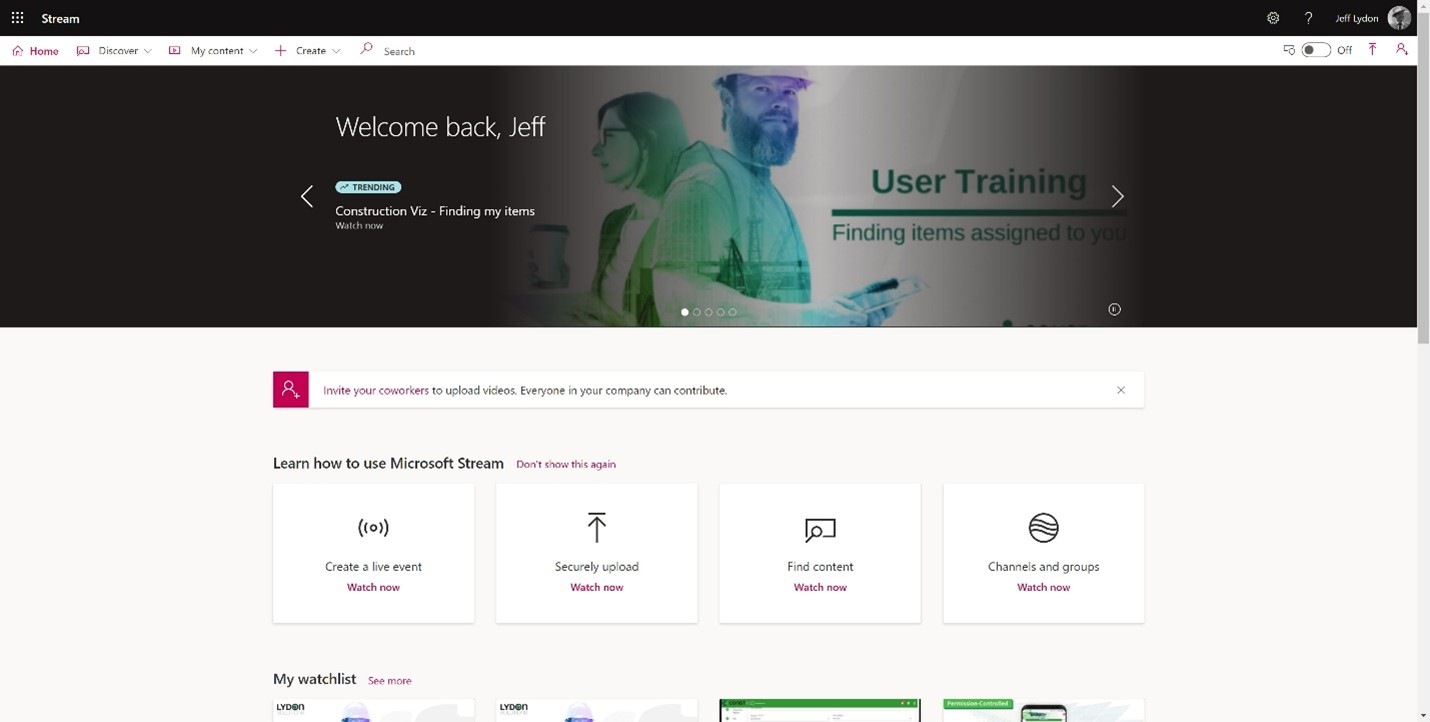
Stream home page
Stream home page

Stream isn’t just another file drop-off application. It is designed to manage videos specifically. The real value of Stream is the ability to aggregate and share all of your videos into a central location accessible from your Microsoft 365 login.

How can I use Construction Viz and Microsoft Stream to help with training project teams?

Construction Viz is an enterprise construction PMIS that can be deployed into a Microsoft 365 tenant. It allows you to leverage all Microsoft 365 services using your same Microsoft 365 credentials.

On-demand training videos can be made available as part of a Construction Viz deployment. With Stream, Construction Viz training videos can be easily uploaded and shared across Microsoft 365 Groups and Users, including guest users. Further, these videos can be accessed from within any Construction Viz Hub.

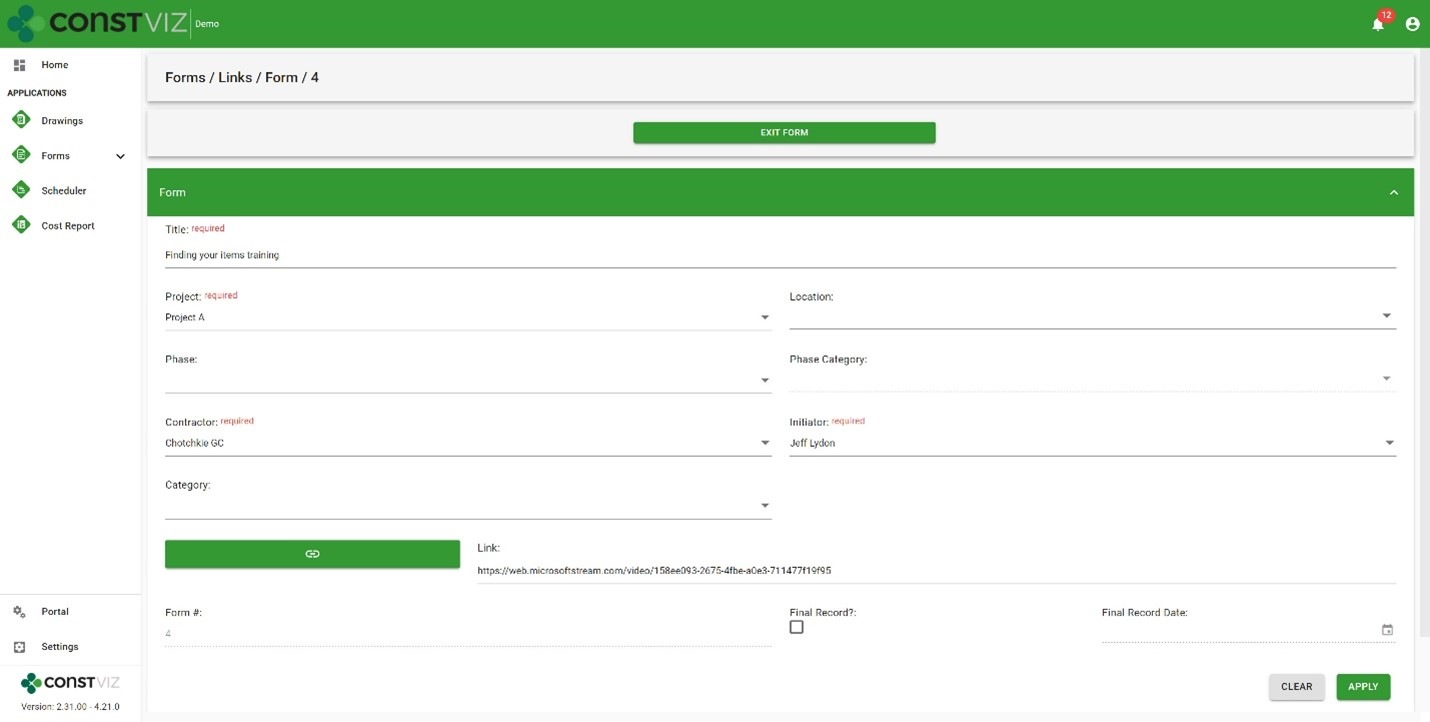
Construction Viz Links App with link to a Stream training session

Want to create training videos and add them to Microsoft Stream, but you are not a videographer? Not a problem.

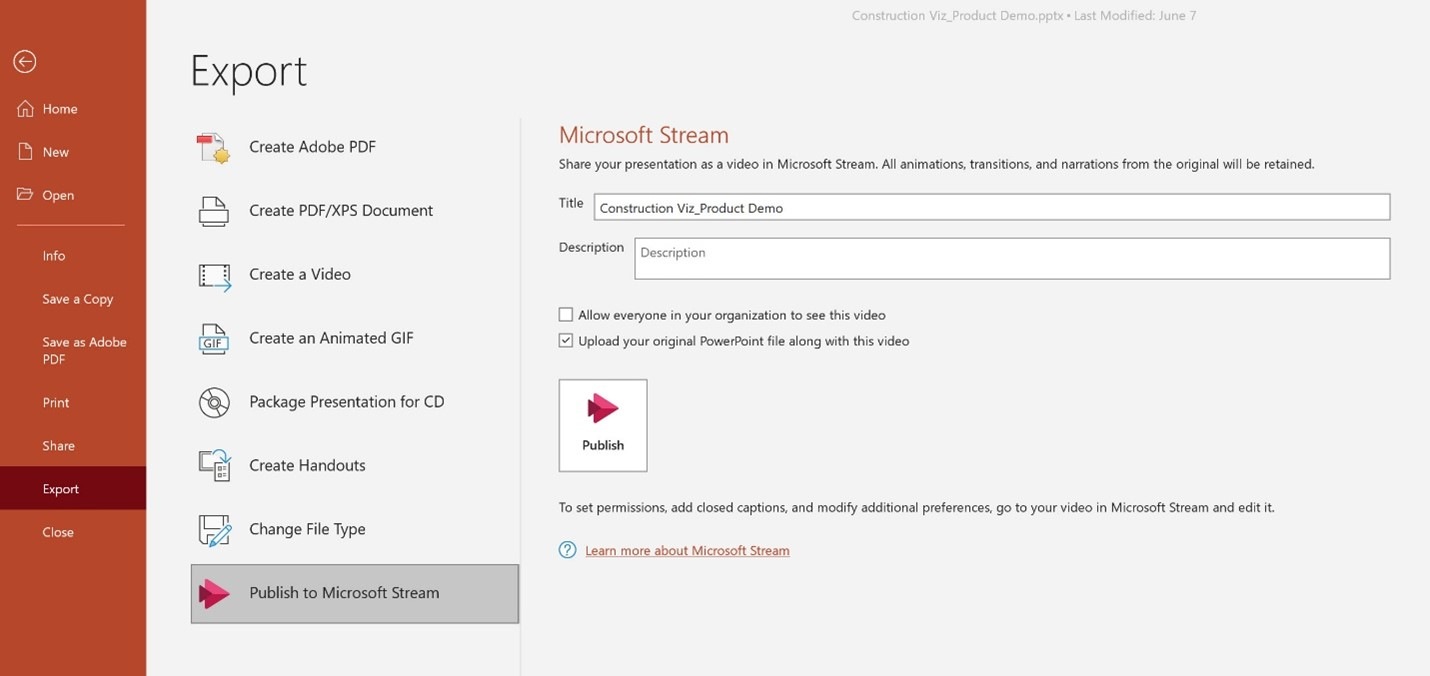
Microsoft has recently provided the ability to publish PowerPoint presentations directly to Stream. So, if you are a PowerPoint guru, you can easily make robust training videos from your existing presentations.

PowerPoint Publish to Stream menu

Sounds promising, but we like to use surveys and quizzes to test learning objectives.

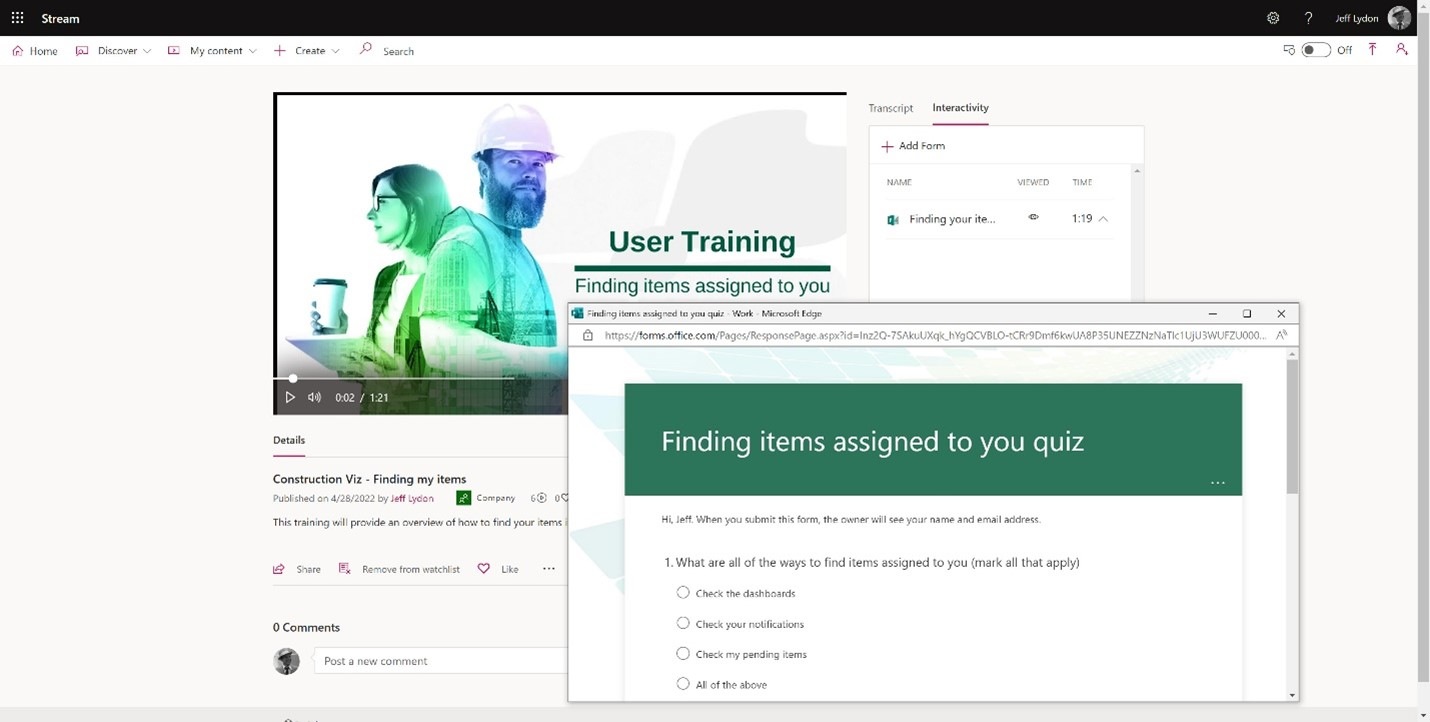
You can add surveys and quizzes to Stream videos using Microsoft Forms. Survey results are automatically tabulated and made available within the Forms app in Microsoft 365.

Microsoft Forms quiz added to Stream training

What if we like to schedule and provide both in-person and virtual live training sessions?

You can live stream events in Stream! These events can be added to user calendars, and the recordings can be available for future on-demand training.

So, if you want to do video training, check out Microsoft Stream.

If you are looking for a project management information system (PMIS) that uses Microsoft 365, request a Construction Viz demo.

Construction Viz Dynamic Profiles Lets You Create Targeted User Experiences

News | March 29, 2022

One of the many challenges to implementing an enterprise construction Project Management Information System (PMIS) is getting the entire project team to use the system. With Construction Viz dynamic profiles, we made it so every user can have their own unique system experience, as simple or complex as needed.

How do dynamic profiles work in Construction Viz?

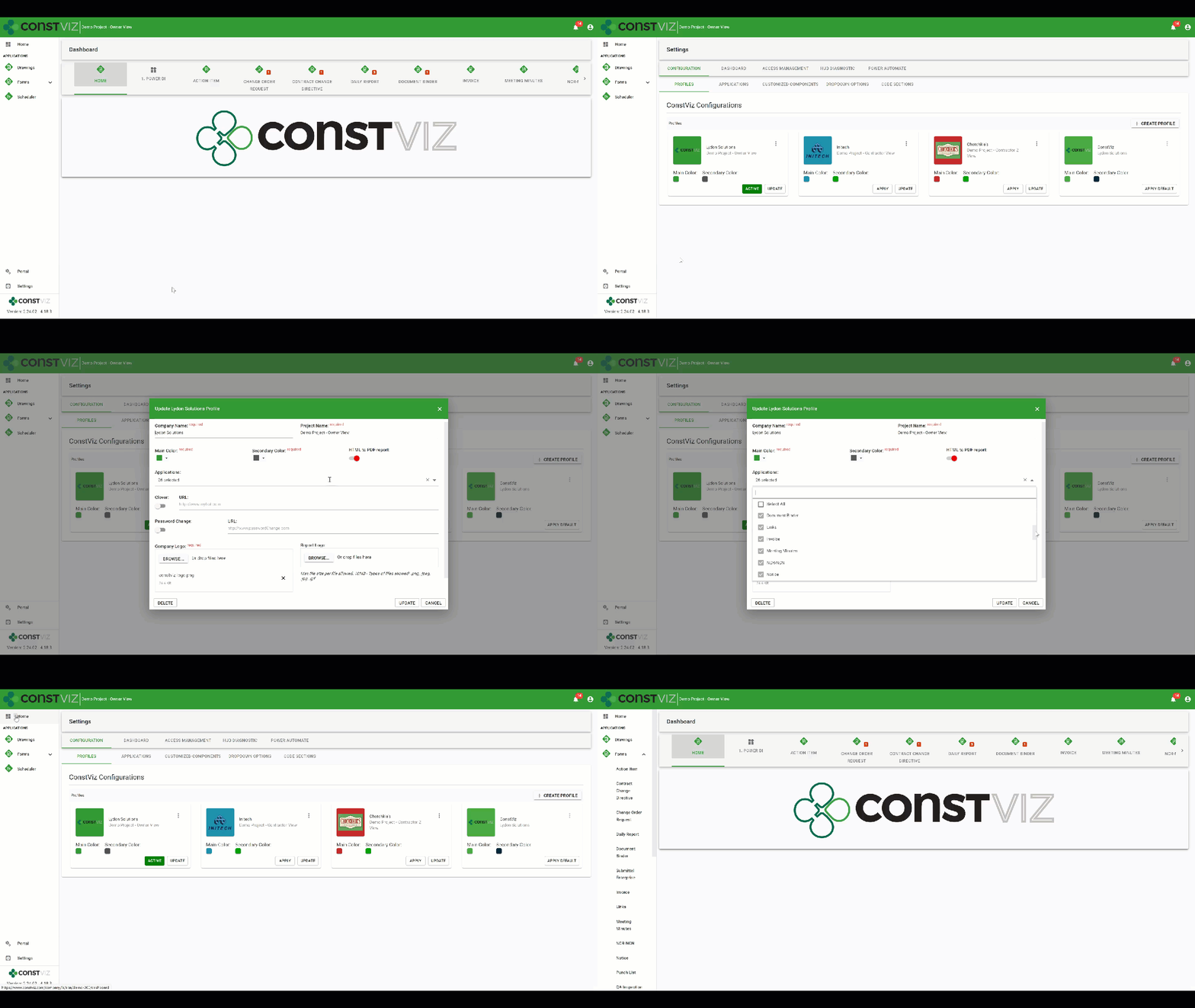
As a construction project owner, you might want to make two different instances of the Construction Viz interface: one for your internal team members with access to all of the project’s applications and a second for your contractor with access to only some applications. You would start by creating a new owner profile, customize the interface with your logo, project title, and a unique color scheme. Then you select all the applications you want to be activated for the owner profile.

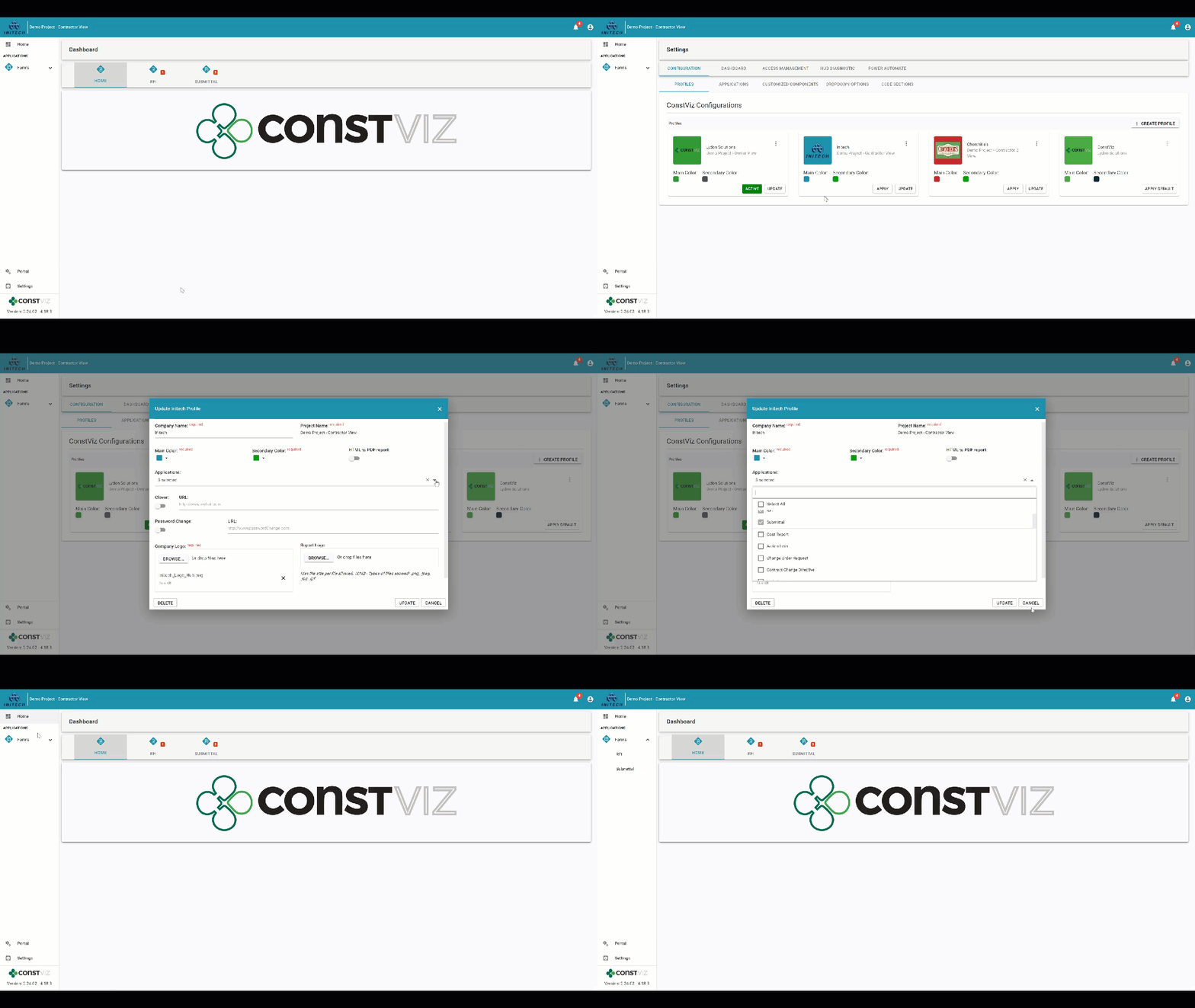
Dynamic profile for the owner with 26 apps selected for a project

Once you complete the owner profile, you next create a new contractor profile (customizing the interface with their logo, project title, and a unique color scheme), selecting only the specific project applications you want to be active for them.

Dynamic profile for Initech contractor with only three applications selected: Dashboards, RFIs, and Submittals for the same project

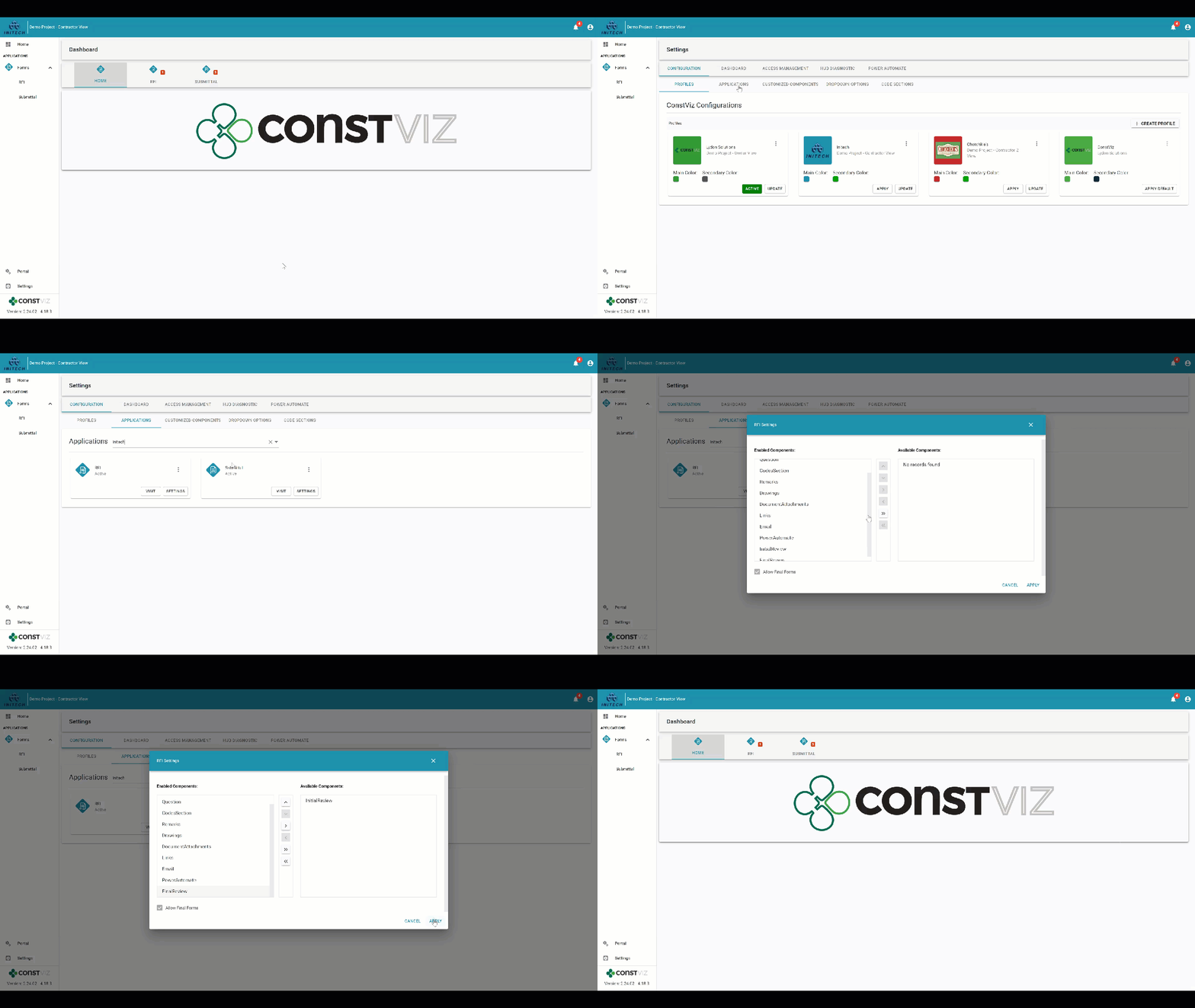
You can further customize each profile by choosing what components (e.g., Initial Reviews, Attachments, Mapping, Images) to enable or disable within each activated application. Dynamic profiles let you target exactly what you need your team members to do in Construction Viz and create a truly custom experience depending on who is logging into your project.

Dynamic profile for Initech contractor with the RFI Initial Review by owner component disabled

With configurable dynamic profiles, you can change the entire user experience for every team member depending on their role, assignments, organization, department, or company.

How are Construction Viz dynamic profiles different than permissions?

Our dynamic profiles feature is unique because it works hand in hand with permissions. So, while you might create a dynamic profile for a contractor activating specific apps and components for them, you can still use permissions to assign team members with read or write access to content.

How can I find out more?

Construction Viz is the only enterprise-scale construction management solution for Microsoft 365. You can find out more about what makes Construction Viz different than its competitors and the available apps. To schedule a demo, click here.

  • « Go to Previous Page
  • Page 1
  • Page 2
  • Page 3
  • Go to Next Page »

Footer

About Constructon Viz

Construction Viz is a flexible construction project management software solution powered by Microsoft SharePoint and SQL.
Read More >

Navigation

  • Home
  • About
  • Features
  • Apps
  • Blog
  • Contact
  • Login

Apps

  • Construction Viz Hub
  • Cost Report
  • Drawing Management
  • File Manager
  • GIS Maps
  • Oracle Primavera 6
  • Payment
  • Specification Management

–

  • Project Forms
  • Project Planner
  • Project Scheduler
  • Project Tracker
  • Task Manager

Connect with Us

  • This field is for validation purposes and should be left unchanged.
  • Sign up to receive helpful tips for construction project managers as well as updates about Construction Viz.

Lydon Solutions

© Lydon Solutions

  • Privacy
  • Cookies
  • Terms of Use
  • Disclaimer
  • End-user license

Click here to start a Microsoft Teams chat.

Click here to start a Microsoft Teams chat.

Contact Us
This field is for validation purposes and should be left unchanged.
Name(Required)
Join Our Newsletter

Sign up to receive helpful tips for project managers and updates about Construction Viz.

Get Started

Join Our Newsletter

Sign up to receive helpful tips for construction project managers as well as updates about Construction Viz.

  • This field is for validation purposes and should be left unchanged.
  • This site is protected by reCAPTCHA and the Google Privacy Policy and Terms of Service apply.