• Skip to primary navigation
  • Skip to main content
  • Skip to footer
Construction Viz

Construction Viz

Project Management Perfect

  • About
  • Features
  • Apps
  • Blog
  • Contact
  • Download Flyer
  • Get Started Today
  • Login
Show Search
Hide Search

Jeff Lydon

Construction Viz for Managing Franchise Stores

News | July 10, 2023

Construction Viz is a unique enterprise construction PMIS fully configurable and customizable to your specific construction business. This flexibility makes it simple to add entirely new applications and functionalities to the source code to accommodate our customers’ needs. And on top of that, the entire solution can be deployed into your Microsoft 365 tenant, providing the ultimate control and security of your processes and data.

We recently were tasked with developing a solution for managing the construction of over 400 franchise stores nationwide. This effort included out-of-the-box functionality and custom applications to manage each store from initiation to closeout.

Here is a high-level overview of how we met our client’s needs for franchise store management with Construction Viz.

Construction Viz Hub Customized for Franchise Stores

With Construction Viz, a SharePoint site deployment can represent a single project or hundreds of projects, depending on the need. In this instance, we needed to accommodate 400 stores.

To do this, we rebuilt the Construction Viz projects, contacts, and company settings to capture additional store-specific information, such as owner, location, store type, insurance requirements, and the like. We then connected these settings to our construction-specific forms (e.g., RFI, submittals, etc.) and assigned them to specific stores and projects.

Repurposing out-of-the-box construction apps

The common wisdom is not to reinvent the wheel. We took this maxim to heart while adapting Construction Viz to the needs of franchise store management.

We started by leveraging our existing Construction Viz form apps, such as RFIs, submittals, and daily reports. Next, we configured these forms to capture store information so the client could get a bird’s-eye view of project information across all stores and be able to drill down into each specific store.

New custom apps specific to franchise store management

To capture the unique data needed to manage a portfolio of stores, we needed to build several new applications, including:

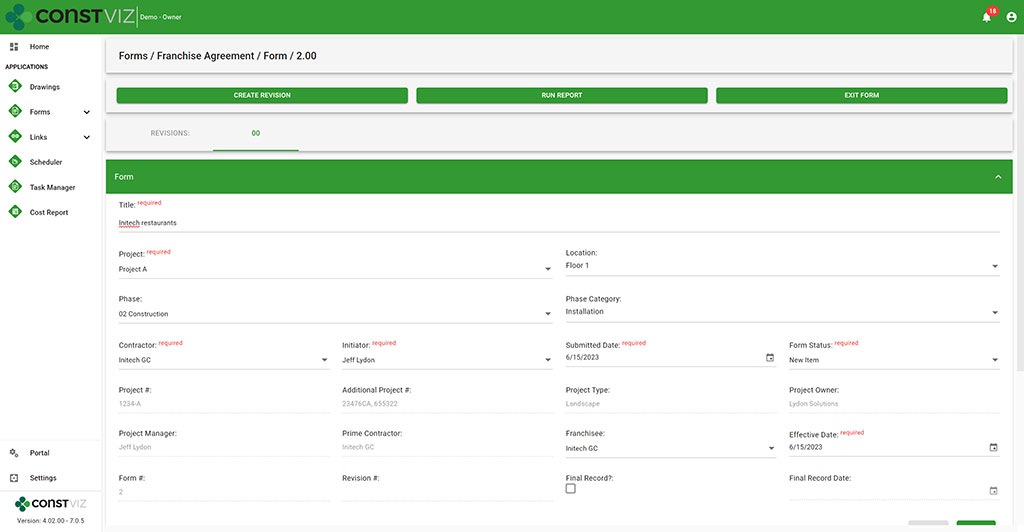
  • Franchise Agreement – This form tracks all of the information required to complete a franchise agreement between the franchise and the franchisee, such as contract terms and ongoing lease costs such as taxes, maintenance, and utilities.
Construction Viz Franchise Agreement form
  • Permits – We rebuilt our Permit form to capture the many types of permits required, from obtaining land to ongoing health services. Key reminder dates, such as permit expiration date, were included so email notifications could be automatically triggered when late.
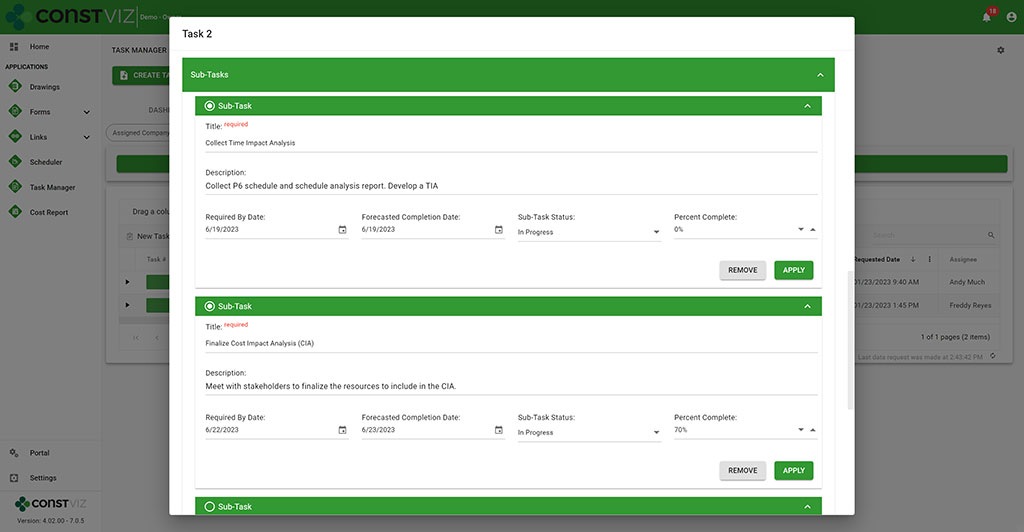
  • Work Performance – We rebuilt our Task Manager app to add subtask detail and percent complete so that every task across the portfolio of stores is centralized and reported on.
Construction Viz Task Manager with sub-task functionality

Discover How Construction Viz Can Meet Your Specific Project Management Needs

Designing and delivering solutions around how you work is one of the key advantages of Lydon Solutions services and how we developed Construction Viz.

Our construction and IT specialists will walk you through our proven step by step FOCUS software implementation methodology to ensure your projects are a success. Using out-of-the-box Construction Viz applications or building a custom solution, we can guide you from concept to delivery, so that your team will want to use the product at the end of the day.

Find out more about Construction Viz with a no-obligation demo and consultation. Or, if you need help with Microsoft 365, head over to LydonSolutions.com to learn about our entire lineup of construction technology services and solutions. 

ChatGPT (Microsoft CoPilot) for Construction Viz

News | June 19, 2023

Microsoft Build 2023 was filled with AI Copilot (ChatGPT) features across the entire Microsoft 365 and Windows ecosystem. There is no question that AI has arrived and will change how we work going forward.

Co-Pilot_1

Times a changing with generative AI tools

“A recent report from Goldman Sachs estimates around 300 million jobs could be affected by generative AI, meaning 18% of work globally could be automated—with more advanced economies heavily impacted than emerging markets,” Jack Kelly via Forbes on March 31, 2023.

“The [Goldman Sachs] report also predicts two-thirds of jobs in the U.S. and Europe ‘are exposed to some degree of AI automation,’ and around a quarter of all jobs could be performed by AI entirely,” Adrianna Johnson via Forbes on March 30, 2023.

The impact of AI on construction

AI will have a significant impact on construction. The changes will be broad and far-reaching, from faster and more accurate designs to AI-controlled drones for mapping and inspections. AI will force organizations to change by adopting these cutting-edge technologies to compete in the world of tomorrow.

If you are on Microsoft 365 and Azure, you’re in luck. What once would take millions of dollars in R&D to develop AI models is now made available by Microsoft to integrate into your existing applications.

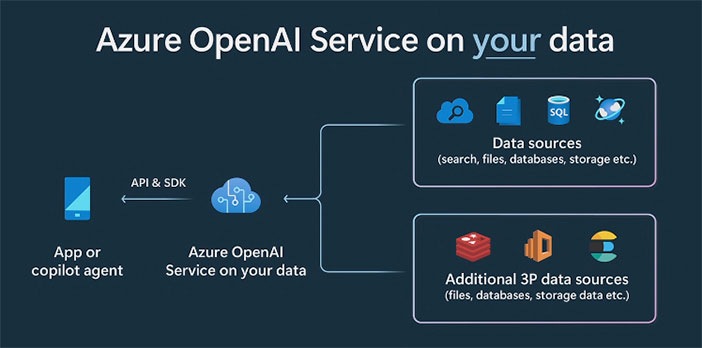
Co-Pilot_2

Construction Viz and Copilot AI (ChatGPT)

Lydon Solutions is excited to announce that we have started exploring this game-changing technology made available to us in Microsoft 365. We aim to revolutionize construction management by integrating Copilot (ChatGPT) with Construction Viz. Since Construction Viz uses your Microsoft 365 SharePoint lists and libraries, Microsoft Copilot (ChatGPT) allows us to incorporate AI naturally into our product.

No other construction management solution can boast what we will be able to do with AI using your data delivered securely in your Microsoft 365 tenant.

The Construction Viz AI gameplan

In the coming months, we will enhance Clover, our AI assistant bot you can activate in the Construction Viz Hub.

Our team will expand Clover to leverage your data stored in your Microsoft 365 SharePoint online and allow you, through a common language, to analyze your construction project data. For example, we are exploring enabling real-time analyses using simple language, including:

  • Scope change management lifecycle—Scoping documents, risk management, RFIs, change requests, change orders, and more.
  • Smart scheduling—What if analysis, time impact analysis, and schedule development.
  • Inspection—Inspection data analysis for delays, issues, log of vendors on site, and progress and productivity
  • Task management—Generate reports on your tasks, overdue tasks, and plan for the day

These are only some areas we will consider as part of this initiative. AI is a brave new world, and Lydon Solutions will bring this technology to a construction project near you soon.

Subscribe to our newsletter from our website footer to stay in the loop on this AI journey! Also, you can request a demo of Construction viz for Microsoft 365 here.

Improve Project Efficiency with New Schedule Views for Construction Viz

Forms | June 5, 2023

Construction forms such as submittals, RFIs, and daily reports are tightly integrated with project schedules but can get lost among the hundreds or thousands of potential activities. To manage forms effectively, it’s not enough to just see them included in a weekly schedule report. It is essential to evaluate inquiries promptly and efficiently in real-time to address any possible schedule disruptions.

These inquiries may include the following:

  • Did the contractor adhere to the contractual obligations by submitting their documents on time?
  • Was the review of Requests for Information (RFIs) conducted within the agreed-upon deadlines?
  • Were the daily inspections conducted as scheduled?

You need a simple and quick way to answer these questions and more in your construction project management software solution. The problem is that the typical form logs found in most PMISs allow you to sort and filter on due dates, but it lacks form-specific Gantt chart views to manage deliverables.

Our new form view feature for Construction Viz solves this shortcoming.

Construction Viz gives you a clear view of your form data

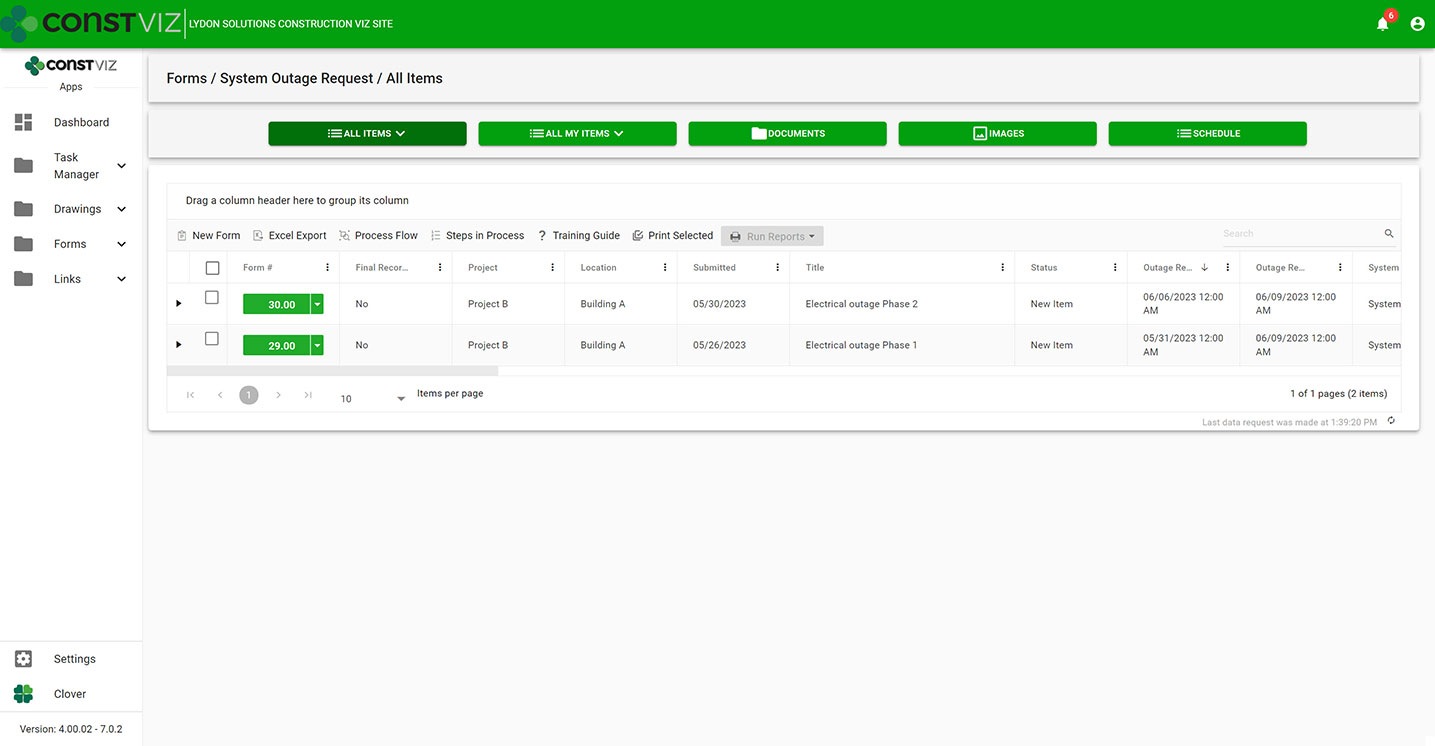
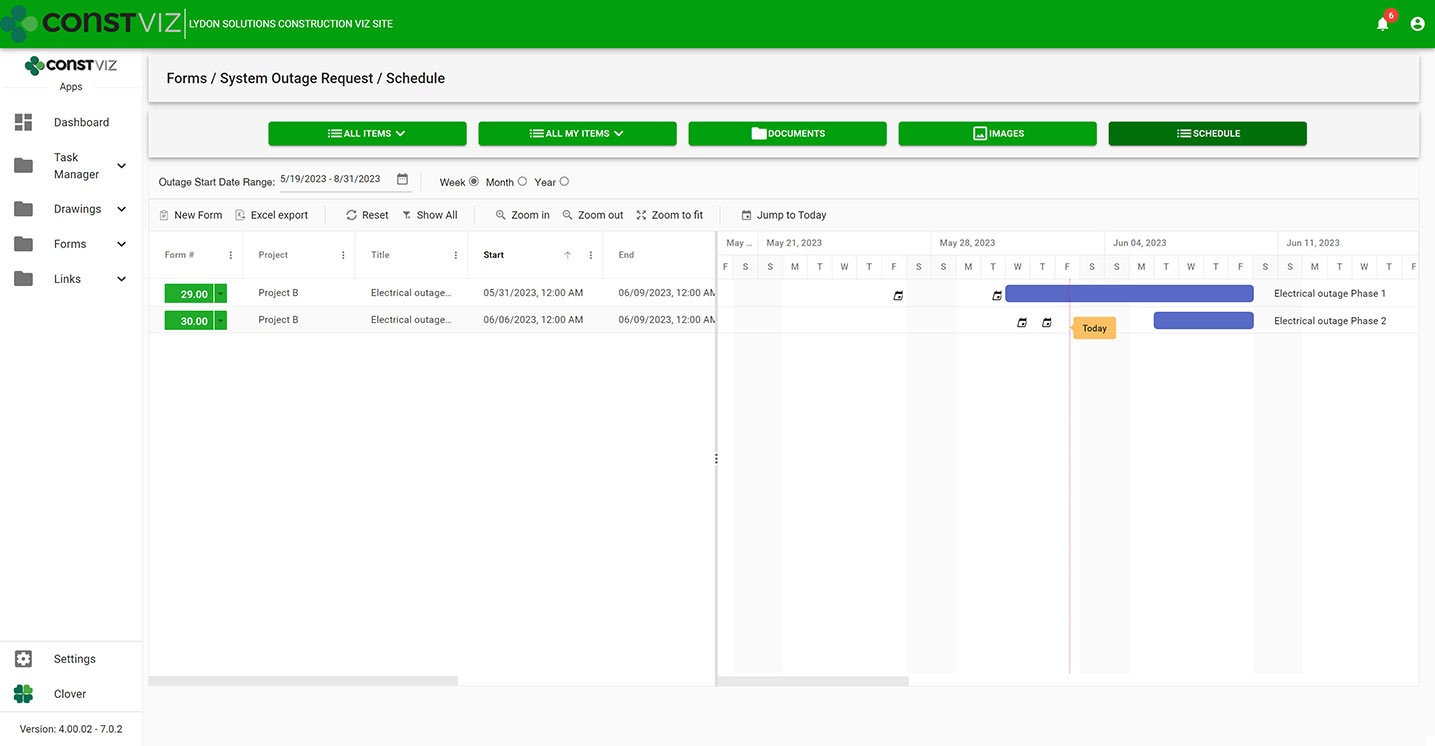
With the new Construction Viz schedule views, you can visualize any of our apps in a traditional Gantt chart view accessible from within the app itself. Now, you have the best of both worlds, the detailed analysis of form data in interactive logs and a Gantt chart focused specifically on the form.

Construction Viz System Outage Request app All Items List (“Form Log”) View
Construction Viz System Outage Request app with new schedule view

Construction Viz Scheduler view sample

Customizable form-specific schedules

You can further tailor Construction Viz’s new schedule views for a specific form. For example, baseline vs. the current schedule, resources assignment, and critical path could be added to the submittal form app while not adding those features to the daily report app. And you can roll up schedule data captured in each form app into an overall master schedule.

The new schedule view keeps team leads and members focused on meeting their specific deliverable dates using an intuitive and interactive Gantt chart.

Find out more about Construction Viz features and apps for Microsoft 365 here.

Embed Power BI Reports into Construction Viz!

Reporting | May 25, 2023

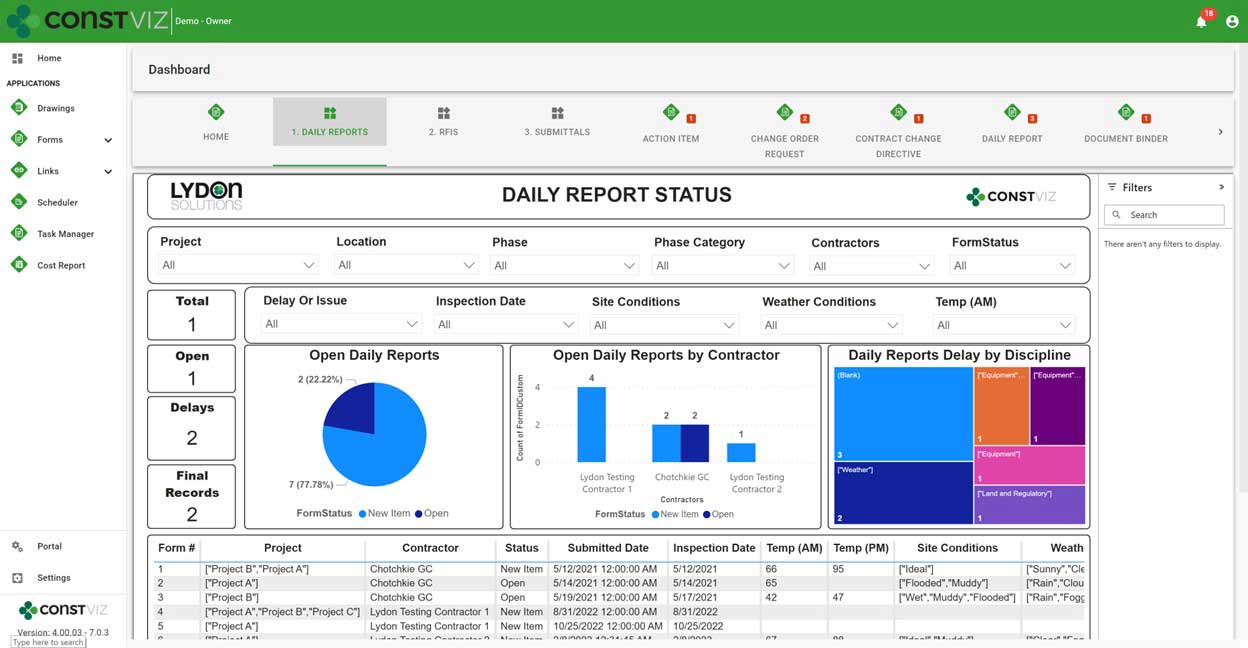
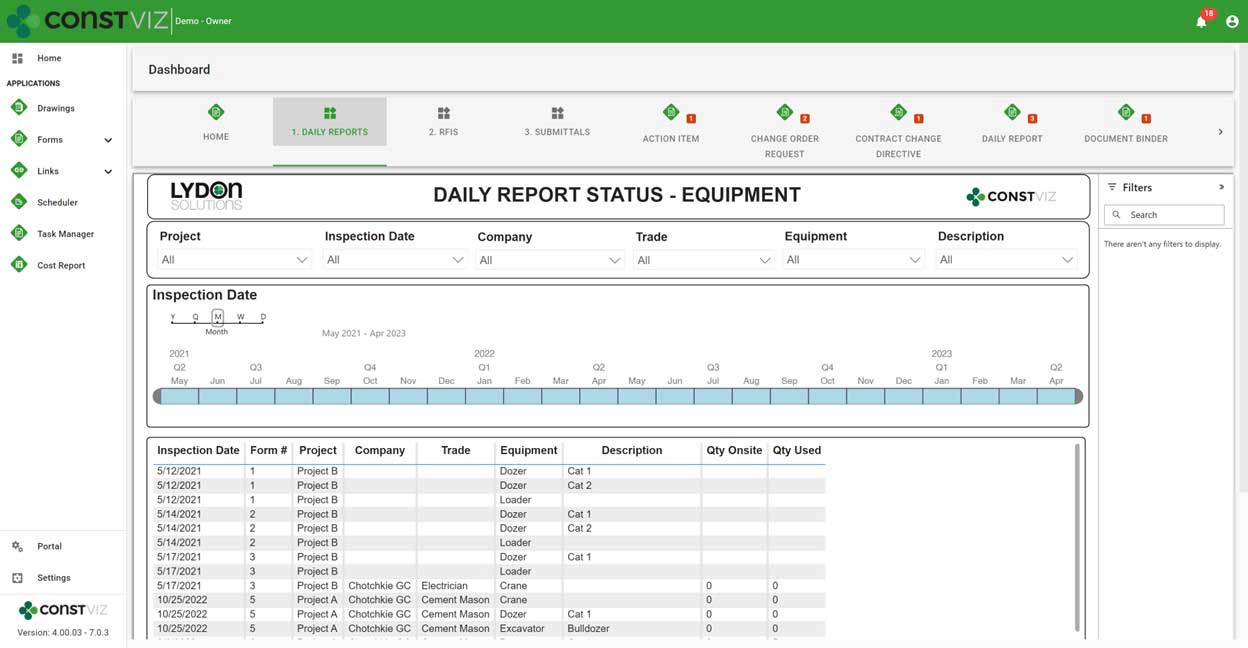
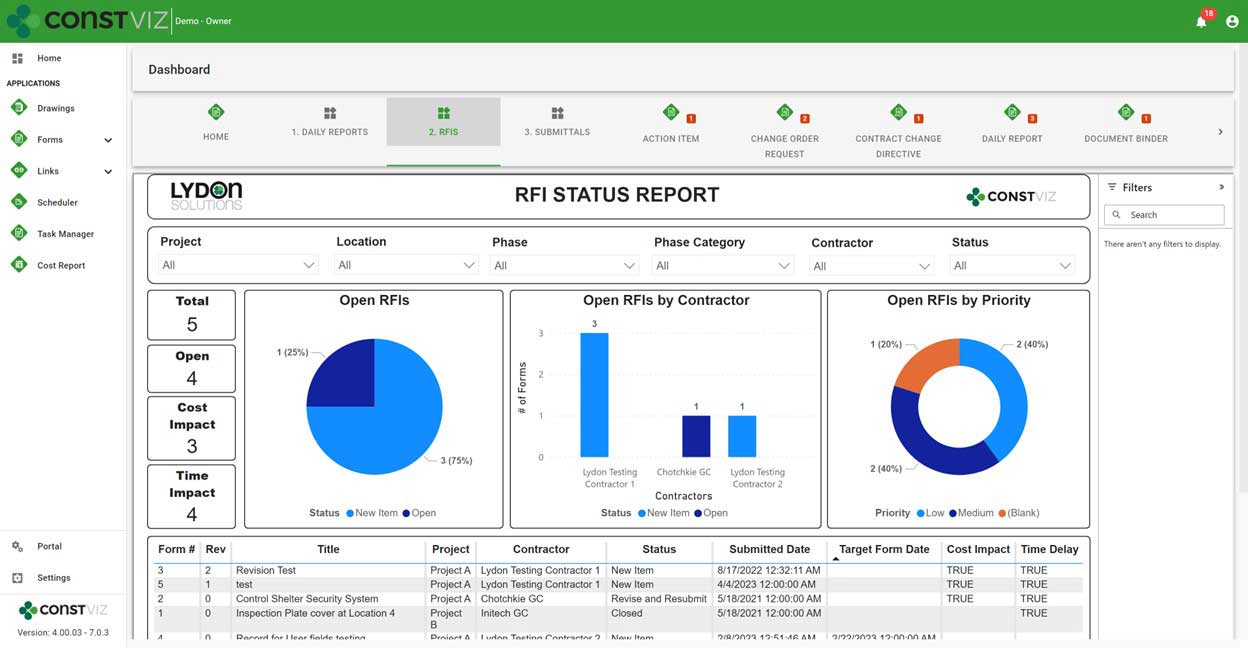
Power BI is a powerful reporting solution available as a service in Microsoft 365. You can generate dashboards, KPIs, and even paginated reports that can be embedded into SharePoint pages, Teams, and even external websites. Since Construction Viz utilizes Microsoft 365 SharePoint Online, your project data is securely available 24x7 for building your own Power BI reports. And, with Construction Viz, you can publish your Power BI reports as new dashboards to Construction Viz Hubs. Check out a few sample reports that leverage the Daily Report and RFI forms!

Construction Viz Daily Status Power BI report captures project data by phase, location, tailgate attendees, on site personnel, trades, equipment, weather, lessons learned, observations, and activities so you can analyze what occurs on site every day.
Construction Viz Daily Status Power BI report captures every piece of equipment on the jobsite by day and whether the equipment is used.
Construction Viz RFI Power BI report captures project RFI data by project, location, status, time or cost impact, company, due date, and priority.

Construction Viz can help you get the most out of Microsoft 365 to manage your projects. Leverage our existing Power BI reports or create your own and add them to your Construction Viz projects so they can be shared with the project teams. To find out more about Construction Viz, you can schedule a one hour demo here or if you need help with Power BI reports or Microsoft 365 in general, you can visit lydonsolutions.com to submit a free one hour consultation.

Don’t Let an Outage Manage You: The New Construction Viz Outage Request App

Forms | March 20, 2023

Keeping your entire team in the loop when planning an outage can be challenging. Effectively managing an outage event involves many more steps and considerations than just placing an activity into the master schedule to identify an outage. You must consider documentation needs and the formal approvals required to manage the event effectively.

Construction Viz Outrage Request form app

We designed the Construction Viz System Outage Request form app to capture as much information as possible to prevent an outage from negatively impacting the overall project schedule. The form app captures outage information such as start and end times, location, systems affected, justification, and work groups required to plan the outage and minimize downtime.

Outage-App_1

In addition to capturing outage-specific information, users can identify assets impacted, relate drawings, add document attachments, upload images, add links, route for review and approval, issue email notifications, and capture revisions. Also, because all Construction Viz apps are deployable into your Microsoft 365 tenant, you can add your custom Power Automate workflows. For example, you could use Power Automate to automatically update team members on changes, add Power BI dashboards and reports, and update Microsoft Teams with workflow progress.

With the Construction Viz Outage Request form app, you will be better prepared to plan and manage outages while keeping your team members in the know.

Visit the apps section of ConstrictionViz.com to learn more about our entire lineup of apps for construction project management. Schedule a free one-hour consultation here to get more information about Construction Viz or how we can help with Microsoft 365 services.

Powerful and Smart Permit Management: The New Construction Viz Permit App

Forms | February 13, 2023

Effective permit management is one of the biggest challenges I have seen organizations struggle with during my years working on construction projects. Often, effective permit management determines whether a team completes a project on time.

Managing permits should be pretty simple: add the permit need date and issue date to a schedule, and off you go. Unfortunately, permits have a life of their own and, if not carefully managed, can have substantial downstream impacts.

The above is why our latest app for Construction Viz will be invaluable to construction project managers. Read on to learn more.

Introducing the new Construction Viz Permit App for Microsoft 365

Permit-App1

With the Construction Viz Permit App, we wanted to focus on four areas of permits management:

  1. Planning – You can create a placeholder form for each permit type required on a project. These placeholder forms capture the needed date of when that permit must be issued so as not to affect the schedule.
  2. Filing and Issued Dates – Once you file a permit, it can get lost in the shuffle and requires constant follow-up. With the Permit app’s grid view you can filter by status, see when the permit was filed, and if it has been issued yet.
  3. Expiration Dates – Expiring permits can be a significant issue on larger long-duration projects with many permits. The Permit app lets users filter and sort the permit grid view by expiration date so that you can re-submit a permit that is due to expire in a timely manner.
  4. Notifications – Team members need to be notified as soon as possible if permit need dates are not going to be met or when a permit will expire. We’ve included our notification email component in the Permit app so that at any point in time, you can easily email all of your stakeholders with an update. Also, we can include a Power Automate workflow that checks all permit need dates in advance and makes the owner aware of the due dates and expiration dates in email and Microsoft Teams.
Permit-App2

To extend the capabilities even further, we’ve also included, by default, the ability to assign a WBS, add links specifications, connect to the Drawings app, create permit revisions, and even add a formal review process to ensure permits are dispositioned in a timely manner. We tried to cover all bases with the new Permit app, so you can hit the ground running.

Find out more about the new Permit app or any of our other construction apps for Microsoft 365 by visiting https://constructionviz.com/apps/  or by requesting a demo here.

  • « Go to Previous Page
  • Page 1
  • Interim pages omitted …
  • Page 5
  • Page 6
  • Page 7
  • Page 8
  • Go to Next Page »

Footer

About Constructon Viz

Construction Viz is a flexible construction project management software solution powered by Microsoft SharePoint and SQL.
Read More >

Navigation

  • Home
  • About
  • Features
  • Apps
  • Blog
  • Contact
  • Login

Apps

  • Construction Viz Hub
  • Cost Report
  • Drawing Management
  • File Manager
  • GIS Maps
  • Oracle Primavera 6
  • Payment
  • Specification Management

–

  • Project Forms
  • Project Planner
  • Project Scheduler
  • Project Tracker
  • Task Manager

Connect with Us

  • This field is for validation purposes and should be left unchanged.
  • Sign up to receive helpful tips for construction project managers as well as updates about Construction Viz.

Lydon Solutions

© Lydon Solutions

  • Privacy
  • Cookies
  • Terms of Use
  • Disclaimer
  • End-user license

Click here to start a Microsoft Teams chat.

Click here to start a Microsoft Teams chat.

Contact Us
This field is for validation purposes and should be left unchanged.
Name(Required)
Join Our Newsletter

Sign up to receive helpful tips for project managers and updates about Construction Viz.

Get Started

Join Our Newsletter

Sign up to receive helpful tips for construction project managers as well as updates about Construction Viz.

  • This field is for validation purposes and should be left unchanged.
  • This site is protected by reCAPTCHA and the Google Privacy Policy and Terms of Service apply.