• Skip to primary navigation
  • Skip to main content
  • Skip to footer
Construction Viz

Construction Viz

Project Management Perfect

  • About
  • Features
  • Apps
  • Blog
  • Contact
  • Download Flyer
  • Get Started Today
  • Login
Show Search
Hide Search

da_admin

Managing Change in Your Construction Projects

Forms | November 18, 2019

Change is the one constant in construction, affecting all areas of the project lifecycle. Capturing those changes quickly and efficiently is imperative to avoid impacting the scope, schedule, and budget of your project.

We designed Construction Viz to ensure it is easy for organizations to identify, account for, and address critical changes. For example, our lineup of Construction Viz Form Apps includes everything you need for effective change management:

  • Mobile and offline support – You need to capture and document change-related issues quickly. Our mobile-responsive construction project forms allow you to collect data from any device wherever you are, even without an internet connection.
  • Streamlined workflow – Construction Viz improves your response efficiency to changes with powerful form components giving you the ability to attach files, create automated routing and approval, generate revisions, and capture schedule information.
  • End-to-end visibility – Keep stakeholders informed and ensure that your team is completing change mitigation tasks on-time with Construction Viz’s built-in dashboards and robust reporting tools.
  • Line-item tracking – You want to make sure that nothing slips through the cracks. All our project forms incorporate metadata, giving you line-item visibility of work breakdowns, cost codes, specifications, assets, and any other custom variables you need.

Project Change Management Features in Construction Viz Form Apps

Below is a snapshot of the out-of-the-box project change management features found in our Construction Viz Form Apps.

Risk Form App

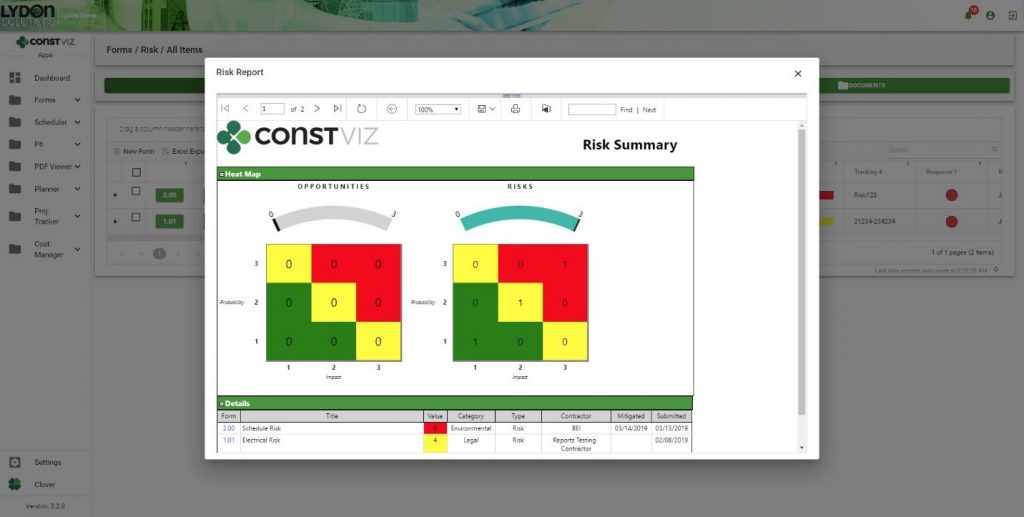
Capturing and Prioritizing Risks and Opportunities that can Impact your Projects
Risks on a project can be a proactive indicator of upcoming changes. The Construction Viz Risk Form App enables you to capture and prioritize the probability, impact, and method of mitigation for potential risks. Integrated reports and dashboards display risks and opportunities, allowing you to track how these changes might affect your projects.
project change management dashboard

Request for Information Form App

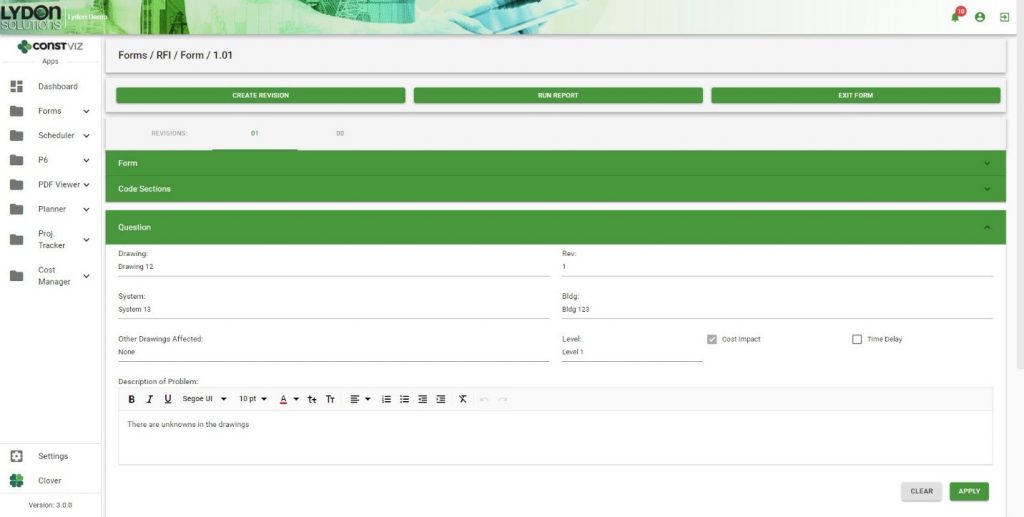
Identifying Questions and Responses as Potential Project Changes
Sometimes change can originate from questions that arise during the lifecycle of a project. Our Construction Viz Request for Information (RFI) Form App is designed to highlight when questions or responses will impact a project’s cost or schedule. The final RFI form serves as historical supporting documentation for change order requests and change orders.
Change Order Request Form App

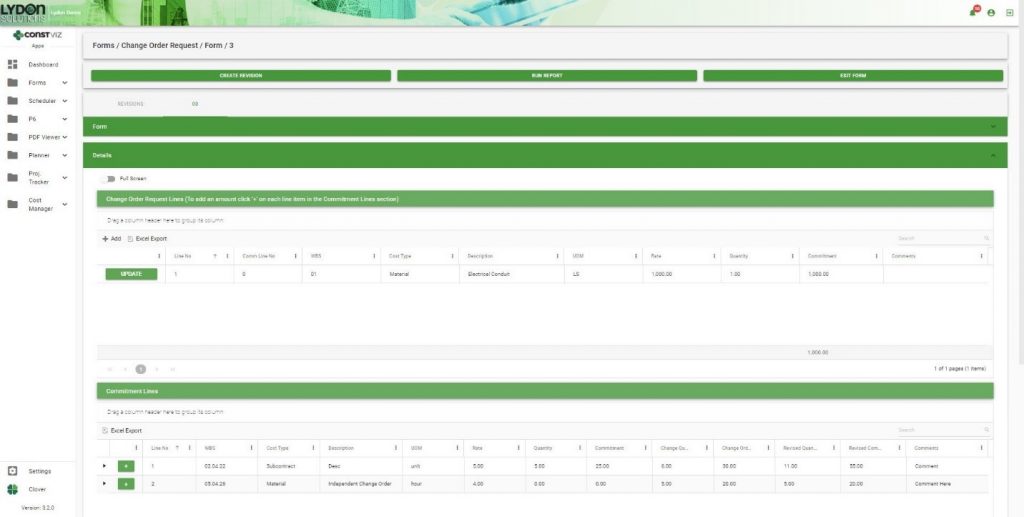
Efficient Handling of Change Order Requests

When a contractor identifies a necessary change, they must submit a formal request to the owner for review and approval before execution. The Construction Viz Change Order Request (COR) Form App simplifies this process, adding the ability to pull in the contractor’s commitments from their Schedule of Values (SOV).   Having this information at their fingertips makes it quick and easy for the contractor to add existing line items from a commitment or propose new ones.
Pay Application Form App

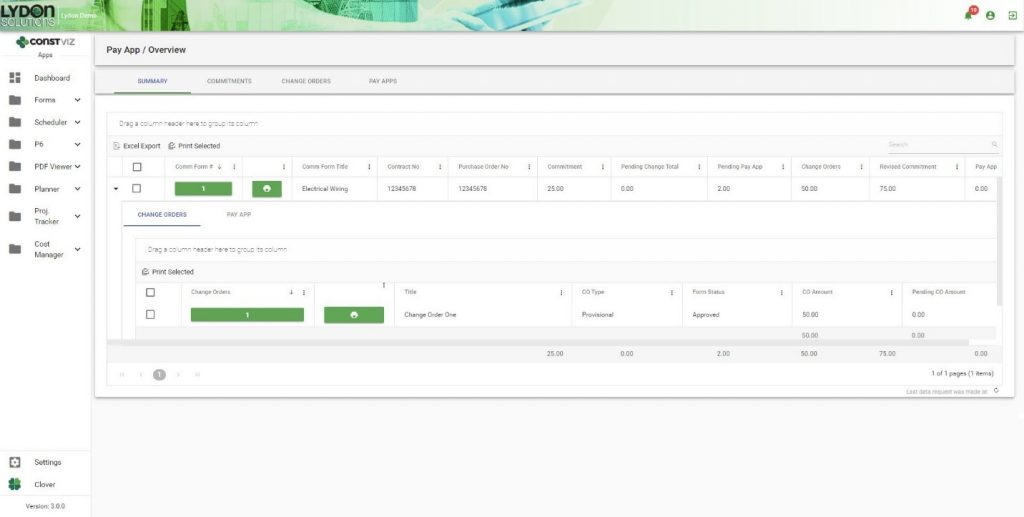
Tracking and Accounting for Change Orders  
Unlike a change order request, change orders are executed contractual commitments that add pending amounts to the SOV at a line-item-level of detail. Construction Viz streamlines this process, ensuring that once the owner approves a change order, the pending amounts will increase the commitment values and only then be available for payment via our Pay Application Form App.
Streamline Your Change Management Process with Construction Viz

Construction Viz takes the headaches out of change management for construction projects. Learn how Construction Viz can help your organization by contacting us today for a free demo and consultation.

Non-Compliance? Not a Problem

Forms | November 8, 2019

Unfortunately, contractors don’t always meet your project requirements. Whether it’s not adhering to the subcontract, not fulfilling a project’s specifications, or violating the terms of an agreement, owners need a way to formally put their contractors on notice when current business practices are unacceptable. Owners must also ensure that violations are rectified and avoided in the future.

In most such cases, owners capture Non-compliance Requests (NCRs) and Non-compliance Notifications (NCNs) in Microsoft Word or Excel and then email these files to the contractor for acknowledgment. While this satisfies the immediate need to communicate the issue, it isn’t a very efficient method. We set out to improve how organizations send and track non-compliance requests and notifications in Construction Viz.

Construction Viz: Create, Share & Track Compliance & Conformance Issues

With Construction Viz, we’ve streamlined and improved the non-compliance notification and resolution process. By removing the NCRs and NCNs from the email chain and leveraging a shared location in Construction Viz, we ensure that non-compliance issues don’t get lost. Not only does this maintain the visibility of both the issue and its resolution, this approach also eliminates confusion over which version of an NCR or NCN to use while safeguarding critical information.

Construction Viz offers organizations the following features to handle non-compliance:

  • Mobile Responsive and Feature Rich Non-Compliance Form App. We built the NCR Form App using our responsive form technology, allowing users to create and view forms anywhere and on any device using a modern browser. We also included all our powerful form components like adding attachments (documents, images, and links), workflows, approvals, ball in court indicators, dashboard views, and easy reporting.    
      
  • Integration with our Field Inspection Form Apps. There are times when inspections (daily, safety, or QA) are what reveal non-conformance and non-compliance issues. With that in mind, we incorporated the functionality to create one or more NCRs/NCNs directly within an inspection form.  Users can automatically create a bi-directional link connecting NCR/NCN issues with the inspection form, streamlining the workflow while preserving a full record of all the relevant captured information.

  • A Focus on the Full Non-Compliance Lifecycle. Documenting NCR/NCN is the first step in the process. However, it doesn’t end there.  The contractor must still create an acceptable corrective action plan for approval by the owner. Only then can the parties work towards a resolution. To track these critical steps, we built two new components into the NCR/NCN form – Corrective Action Plan and Corrective Action Execution. These components specify who is responsible for taking action, when it is due, and when it is complete. We also went a step further by incorporating these actions into our Notifications and Dashboards, so there is full tracking of each actionable task through completion.    

Create Better Project Communication Tools for Your Team Members

Find out how Construction Viz can help owners and contractors better manage construction projects by contacting us for a free demo and consultation.

Collaborate on your Projects with Construction Viz and Microsoft Teams

Collaboration | September 19, 2019

Microsoft Teams, the company’s group chat software application, has been gaining in popularity of late. Microsoft continues to add functionality to Teams and is even phasing out Skype for Business in favor of it. As a result, many organizations are beginning to use Teams for collaboration and communication.  

Teams is also fast becoming a leading project management tool thanks to how it combines with Office 365 and SharePoint Online. When you create a new team in the application, Teams automatically generates a linked SharePoint Online site collection. You can access your team’s SharePoint site by clicking on the globe in the top navigation. 

Construction Viz, which is powered by SharePoint, seamlessly integrates into Teams, allowing you to access all your project information from one location. Read on to learn how.  

Connecting Construction Viz with Microsoft Teams 

We provide organizations looking to use Construction Viz and Teams together with several options: 

1.     Teams SharePoint Site

We can deploy Construction Viz into the SharePoint site that Teams created for you. This keeps all your team’s project data in one place and tied to your Office 365 credentials (no need to log into multiple sites/systems).

2.     SharePoint Online Site

As an alternative, we can deploy Construction Viz to another location in your Office 365/ SharePoint Online environment. Then we can add a tab in Teams linking to Construction Viz. As above, your Office 365 credentials will allow access to both Teams and Construction Viz. 

3.     Externally Hosted SharePoint

If you prefer a turnkey and cloud-based solution, Lydon Solutions can provide web hosting and support of Construction Viz. In this case, we add a tab in Teams linking to our hosted instance of Construction Viz.

Microsoft Teams

Learn More About Construction Viz 

Construction Viz is about choice and it is the only construction management platform designed around how you work and where you work. 

Contact us today to find out more about Teams and Construction Viz as well as how we can help you better manage your projects.

Construction Viz Integration with Oracle Primavera P6

Scheduling | September 18, 2019

Many of you have probably used Oracle Primavera P6, the industry leader in project scheduling.  Anyone that has been in Project Controls, most likely has used P6 to manage their projects. It’s the backbone of construction planning, monitoring and reporting.

People at every level of a project need to see different details from P6 for their individual tasks. That means you need to make P6 data available in your Project Management Information System (PMIS) in a way that all your stakeholders can use and understand it.

Easier said than done. However, Lydon Solutions has been integrating P6 scheduling information into SharePoint for years. We evaluated how and where users need to access P6 data, and then built responsive apps and components that integrate P6 throughout the Construction Viz platform.

Here are some details.

Construction Viz P6 App

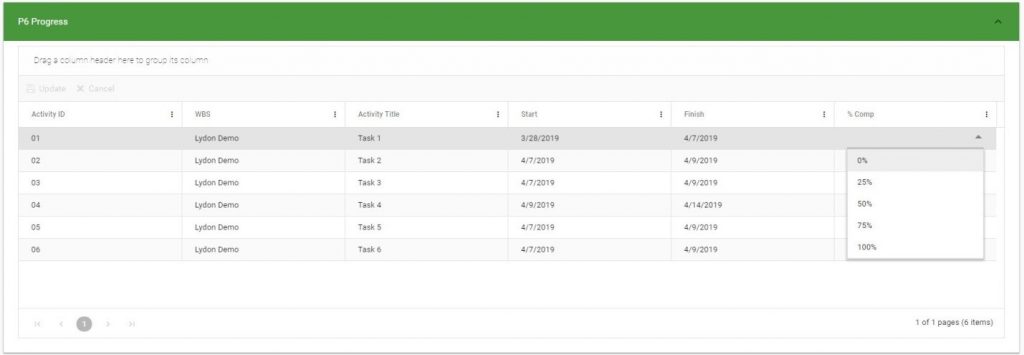
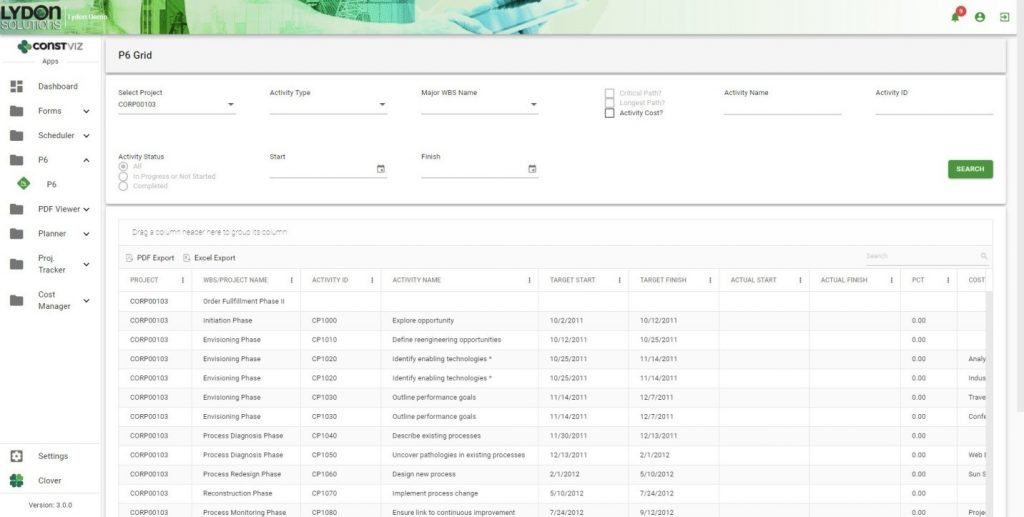
Our Construction Viz P6 app returns data in a configurable grid with powerful query and search capabilities. Users can easily slice and dice schedule information and even export it to Excel, if needed.

primavera p6 data

P6 Component 

Our P6 component can return schedule data based on queries within a form. Since many construction forms rely on P6 data, Construction Viz users can enable this component in any of our existing form apps—from field daily inspection reports to submittals—as well as in any custom-designed forms. The P6 component even allows users to add data to schedules, such as percent completed, quantities complete and expected completion dates. This information can be stored in Construction Viz for further reporting.

primavera p6

Construction Viz Scheduler

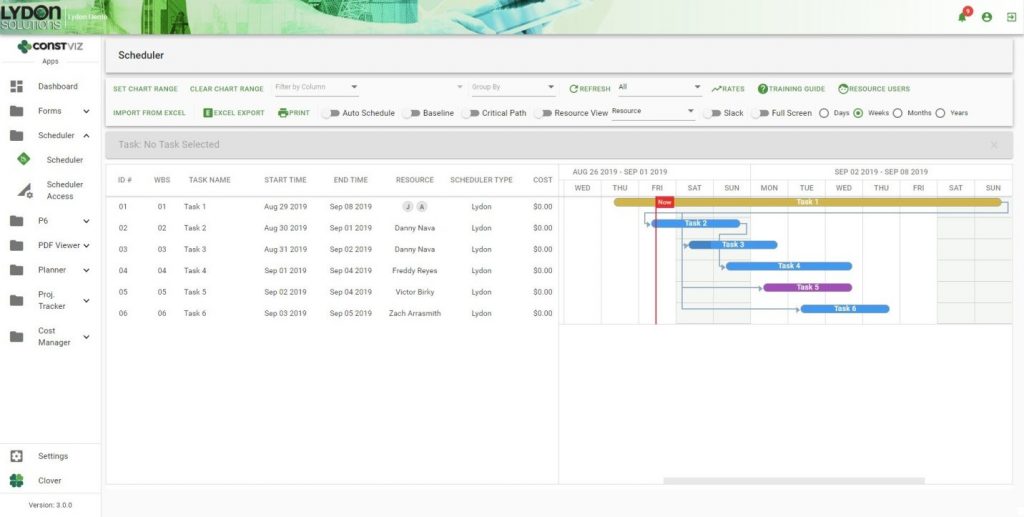
The easy-to-use Construction Viz Scheduler app integrates with P6. This means users can view summary and detailed P6 schedules, which can be shared with the entire project team.

Our P6 solutions are just one of many apps and components in Construction Viz that can turn SharePoint and Office 365 software into a robust construction project management solution. 

To learn more about how to integrate P6 information into your construction management process, contact us. We also invite you to sign up for our monthly newsletter in the footer below to get our latest blog updates, tips on using Microsoft SharePoint, and other useful info delivered directly to your inbox.

Redefining the Daily Report

Forms | August 29, 2019

Daily field reporting is critical to documenting the progress of construction projects to reduce the possibility of claims, capture non-compliant issues, and ultimately communicate the status of the overall project. 

The challenge is how to capture all pertinent field information, easily, in one solution that seamlessly links into an overall Project Management Information System (PMIS). 

We set out to do just that, to build the ultimate Daily Report solution in Construction Viz. Leveraging more than a decade of experience in developing report forms, and using the latest in online technologies, we designed and built a flexible solution that uses components that can be swapped in or out as needed. 

Here are some of its features and benefits:

Responsive. The report can work on PCs and tablets. No need to install a separate app.

Dictation. Avoid typing by using your smart phone’s microphone for dictation.

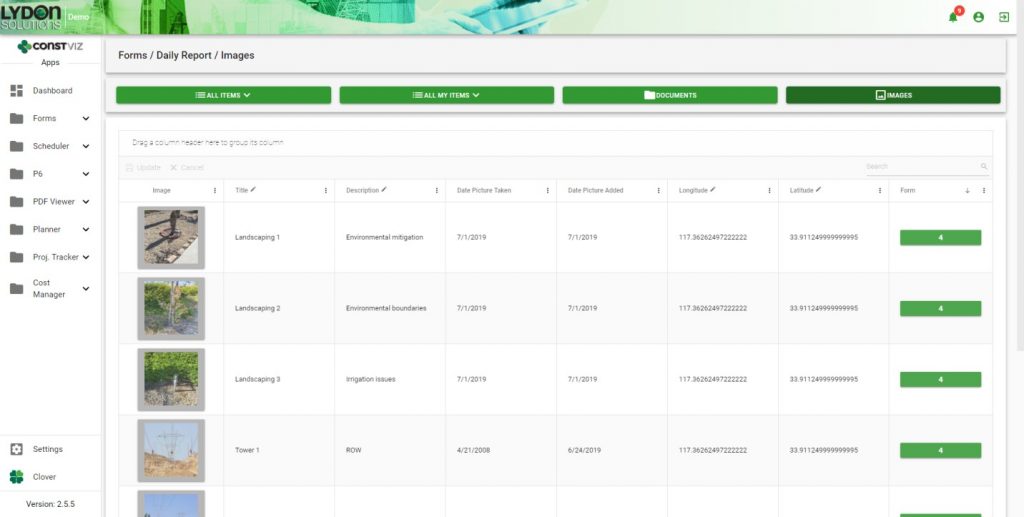
Images and/or videos. Insert images from cameras or other smart devices to document progress and identify field issues.

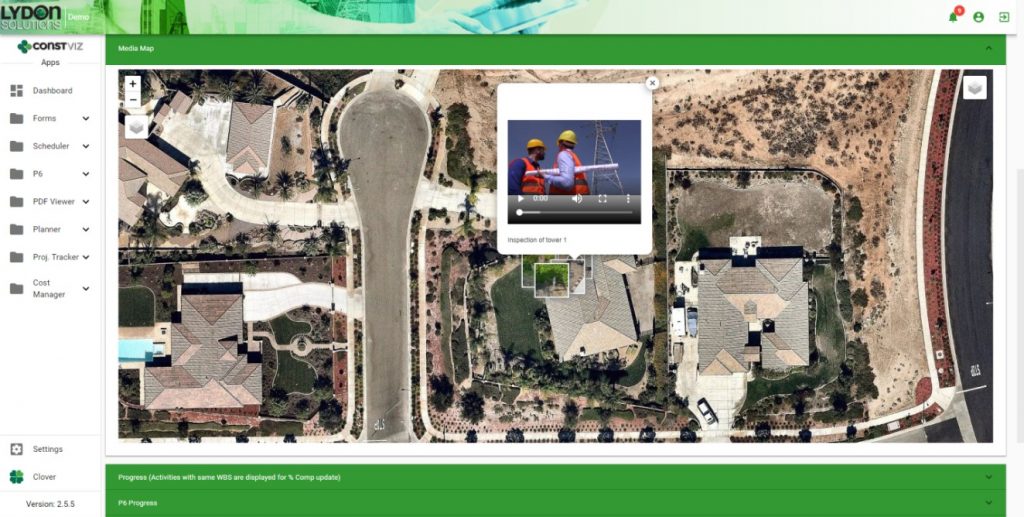
Media mapping. All images and video are automatically plotted on a geospatial layer within the form so you can see the location of each item.

daily reports

Scheduling progress. We integrated Primavera P6 activities and our own custom Scheduler App. This combination enables you to see the level of completion of the project and update the quantities in the field in real time.

daily reports dashboard

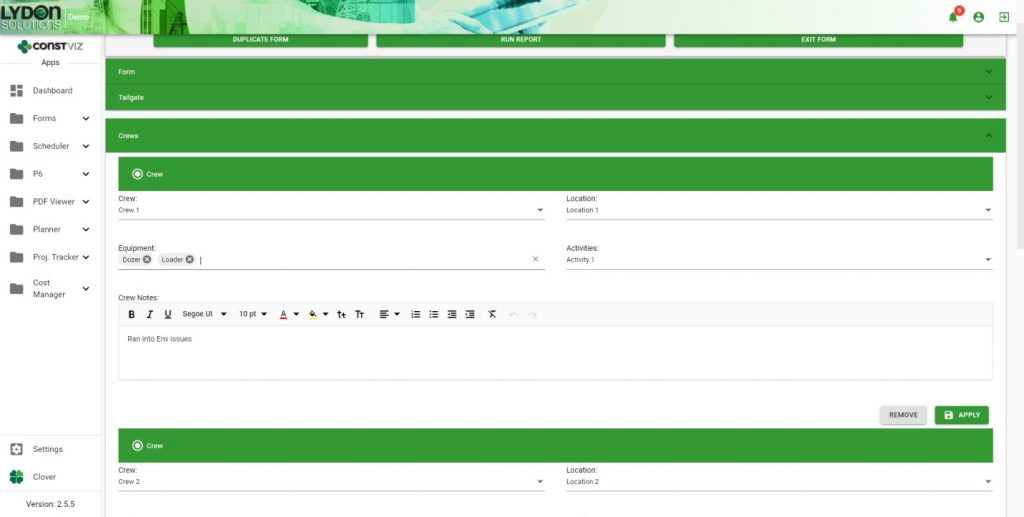
Crew and equipment management. You can track multiple crew activities, equipment, and locations of multiple crews.

Ad hoc reviews. Reviewers can be added to the form as needed with email notifications and ball-in-court tracking.

Reporting. You can generate robust reports that feature configurable views for searching and reporting by form, documents, video and/or images.

Learn more about our entire lineup of Construction Viz Apps and schedule a free demo and consultation. Also sign up for our monthly newsletter below to get our latest blog updates, tips on using Microsoft SharePoint, and other useful info delivered directly to your inbox.
Construction Viz & Revision Management

Forms | August 22, 2019

Construction management is really the management of the flow of information. It never ends from the time the bids are taken to the final close-out of the contract. Forms convey questions (RFIs) and responses, price changes (change order requests) and status reports. Ongoing design changes add to the volume of information between owners, designers and contractors.

Unfortunately, managing these changes can be difficult with most Project Management Information Systems (PMIS).

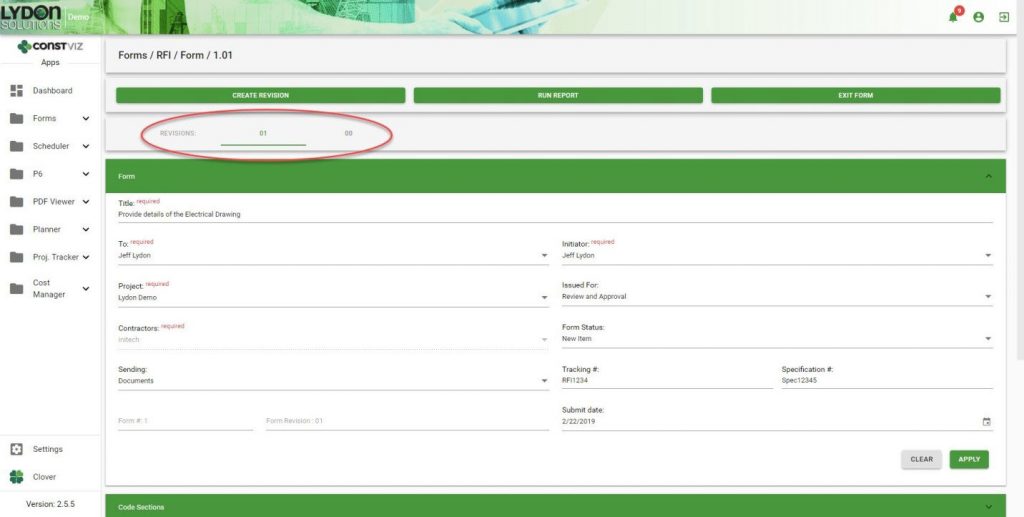
With Construction Viz, you can leverage the powerful revision-management capabilities of SharePoint. However, we took it a step further by integrating revision-management capabilities directly into our Form Apps. This feature enables you to see the different revisions so you can more easily manage the entire process—from creation to reporting—for all construction correspondence forms, including submittals, transmittals and RFIs.

Here’s how it works.

Create a Revision

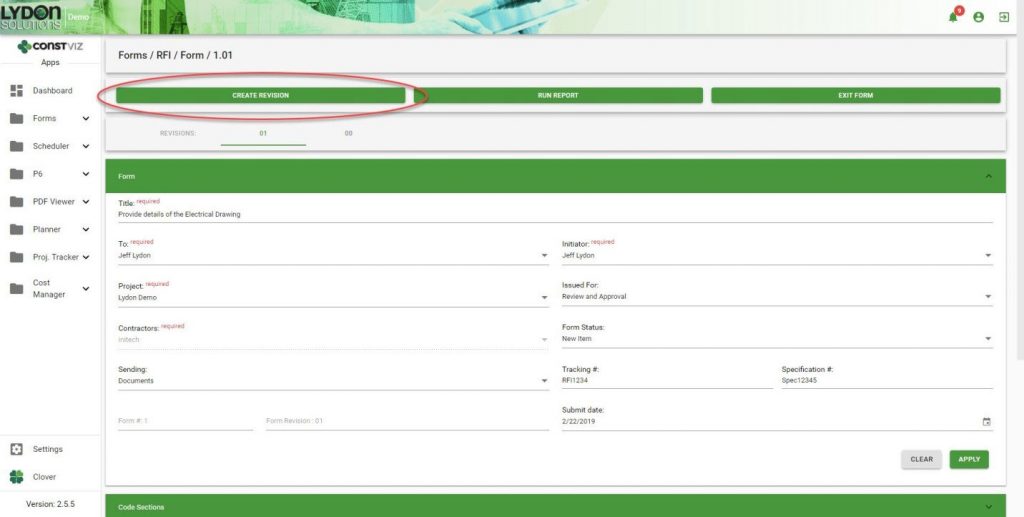
A Create Revision button within a form allows you to easily create and link form revisions together at any point in time.

SharePoint Revision Management

Duplication of Form Content

When revisions are created, important information captured in the previous revision is carried over from one form to the next. This ensures consistency and saves time because you do not have to fill in that information again.

In-Form Navigation

You can easily jump back and forth between revisions as needed.

Grid/Log Navigation

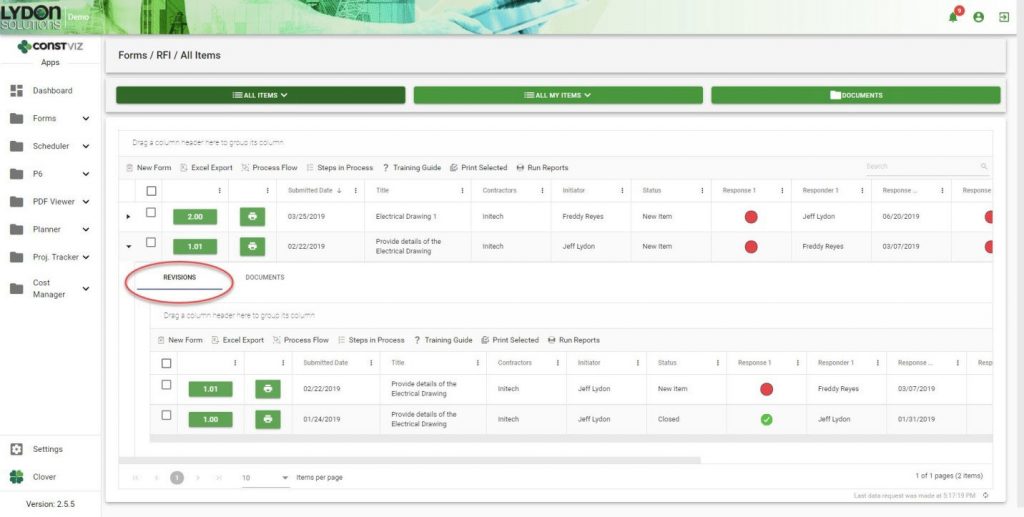
Revisions are automatically added to the form grid in descending chronological order. Simply click the form to open the sub-grid to see all the revisions related to that form.

Reporting

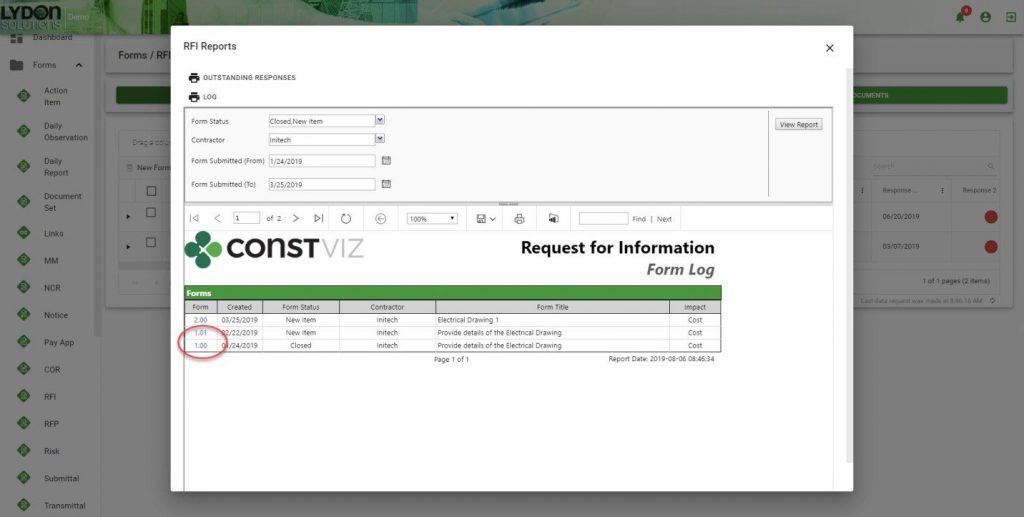
All revisions are grouped together, which makes it easier for you to find any revision. Reports can be saved in a variety of formats including PDF, Excel and PowerPoint. The form number/revision is hyperlinked, making it easy to open any form.

Revision management is just one of the many ways Construction Viz makes your job easier. Contact us for a free consultation to learn more. You can also sign up for our monthly newsletter below to get our latest blog updates, tips on using Microsoft SharePoint, and other useful info delivered directly to your inbox.

  • « Go to Previous Page
  • Page 1
  • Interim pages omitted …
  • Page 8
  • Page 9
  • Page 10
  • Page 11
  • Go to Next Page »

Footer

About Constructon Viz

Construction Viz is a flexible construction project management software solution powered by Microsoft SharePoint and SQL.
Read More >

Navigation

  • Home
  • About
  • Features
  • Apps
  • Blog
  • Contact
  • Login

Apps

  • Construction Viz Hub
  • Cost Report
  • Drawing Management
  • File Manager
  • GIS Maps
  • Oracle Primavera 6
  • Payment
  • Specification Management

–

  • Project Forms
  • Project Planner
  • Project Scheduler
  • Project Tracker
  • Task Manager

Connect with Us

  • This field is for validation purposes and should be left unchanged.
  • Sign up to receive helpful tips for construction project managers as well as updates about Construction Viz.

Lydon Solutions

© Lydon Solutions

  • Privacy
  • Cookies
  • Terms of Use
  • Disclaimer
  • End-user license

Click here to start a Microsoft Teams chat.

Click here to start a Microsoft Teams chat.

Contact Us
This field is for validation purposes and should be left unchanged.
Name(Required)
Join Our Newsletter

Sign up to receive helpful tips for project managers and updates about Construction Viz.

Get Started

Join Our Newsletter

Sign up to receive helpful tips for construction project managers as well as updates about Construction Viz.

  • This field is for validation purposes and should be left unchanged.
  • This site is protected by reCAPTCHA and the Google Privacy Policy and Terms of Service apply.