• Skip to primary navigation
  • Skip to main content
  • Skip to footer
Construction Viz

Construction Viz

Project Management Perfect

  • About
  • Features
  • Apps
  • Blog
  • Contact
  • Download Flyer
  • Get Started Today
  • Login
Hide Search

Microsoft 365

Notification Overload? Construction Viz for Microsoft 365 Can Help

Project Management Tools | May 15, 2024

In today’s connected world, people are bombarded with electronic notifications at home, at work, and across multiple devices. The onslaught of these automated messages that require your attention can become overwhelming and eventually lead to ignorance, especially in the construction industry. With Construction Viz, we put you in charge of your notifications. We aim to make notifications meaningful and unique to your specific project needs. Read on to find out more.

Control Your Project Notifications with Construction Viz

Over the years of deploying enterprise construction management systems, we found that users can face burnout when inundated with notifications all day, especially when they are not actionable.

With Construction Viz, we built a notification framework that can be unique to your projects by implementing the following features:

  • Custom response statuses: Admins can create their own unique statuses for every app. So, if you have statuses like New, Open, Revise & Resubmit, Accepted, and Closed in a Submittal form, you can create those yourself and set a default status when creating a record.
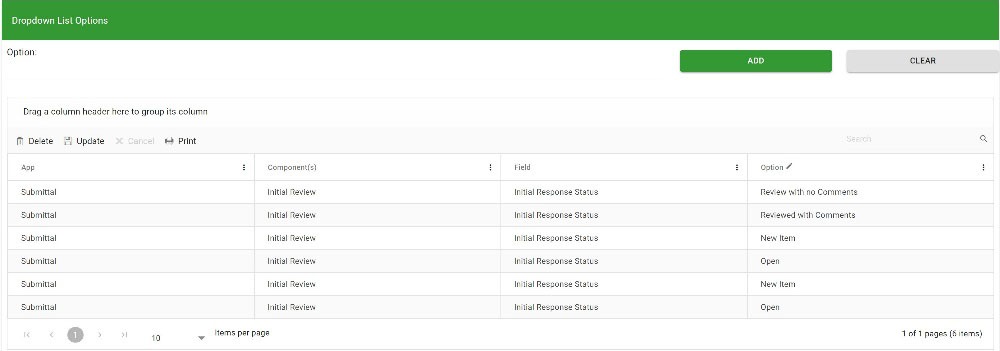
Notfis_1
  • Actionable notifications. In addition to creating your own statuses, you can set which statuses, at each phase, will be posted to the notification center for users to take action.
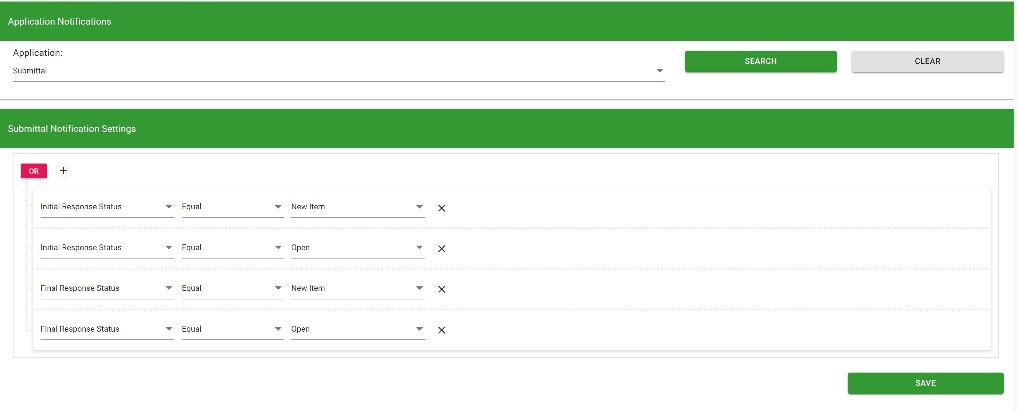
Notfis_2
  • Dashboards. Every app in Construction Viz includes an out-of-the-box dashboard, but you can supplement it with Power BI reports if needed. Check out the link here on Power BI and Construction Viz. These dashboards display the status of all the records and notifications specific to you. Also, the dashboards can drill down into a filtered view of the records.
https://constructionviz.com/wp-content/uploads/2024/05/Notifs_Dashboards.mp4
  • My Action Required views. Every app grid in Construction Viz includes a My Action Required toggle where you can quickly see all the records you need to action on.
  • Microsoft 365 applications. In addition to Construction Viz-specific notifications, Microsoft 365 applications can be utilized to bring notifications directly to your daily workflow.
    • Email. All of our applications can automatically send emails to users, or you can send ad hoc emails to users or groups to take action.
    • Microsoft Teams Approvals. Using Microsoft Power Automate, workflows can be used to send notifications to Teams, so if you find yourself working in Teams, you will receive a new Activity and Approval.
    • Adaptive Cards. Suppose you prefer to work in Outlook or Teams. In that case, Adaptive Cards offer a unique opportunity to surface only key fields in mini-applications that can be embedded into Outlook email and Teams chats, providing the ability to view and respond without having to open Construction Viz. Check out this article to find out more.

Instead of getting frustrated with notifications that aren’t relevant or actionable, Construction Viz can help. Construction Viz is a unique platform to manage your construction projects the way that works best for you. To find out more about how Construction Viz can help you manage your projects in Microsoft 365, you can request a demo here.
Get a Free Consultation

"*" indicates required fields

This field is for validation purposes and should be left unchanged.
Name*

Project Time Tracking in the Construction Viz Task Manager

Project Management Tools | April 18, 2024

Outside of when the task was completed, how many hours it took to perform it is the second most asked question. Project Managers need to know the level of effort to compare it against estimated hours, add hours to billing, check efficiencies, or manage labor utilization. Accurate construction project time tracking is thus essential to every project.

With the Construction Viz Task Manager, we continue to extend the functionality so that everything you need to manage a task is included in the application, including time tracking.

Construction Project Time Tracking

Everything in project management, and life in general, comes down to managing a series of tasks. Effectively managing the who, what, when, where, and why of tasks can lead to a successful project.

We see task management as a cornerstone of project management, which is why, with Construction Viz, we are beefing up resource management features so that you can manage tasks how you want to manage them. One of those critical features is detailed construction project time tracking.

Key Features of the Construction Viz Task Manager App

The Construction Viz Task Manager might seem familiar to those who use Microsoft Planner and MS Project for the Web. But we designed the app for construction projects with the ability to customize it to your unique processes.

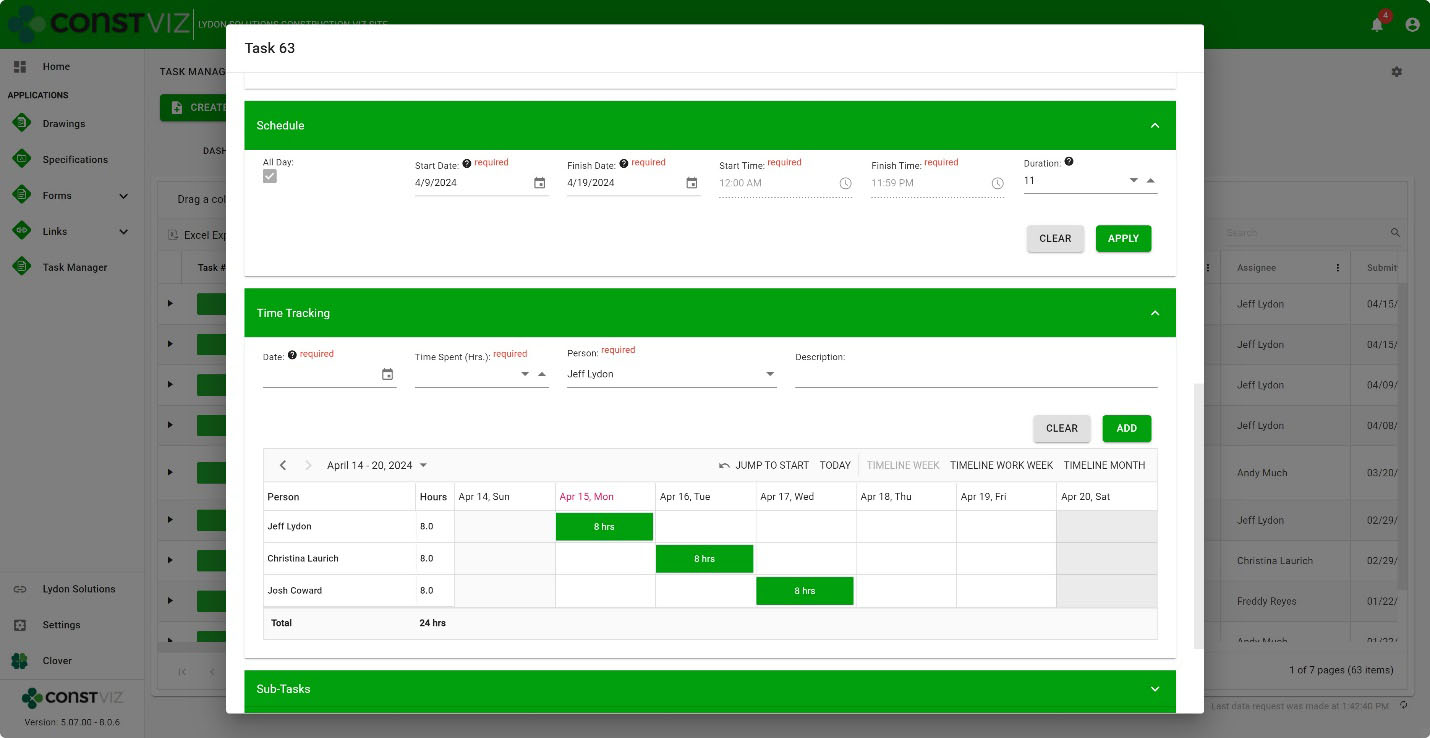
The Construction Viz Task Manager’s new Time-Tracking component can be activated in a task and works with the Schedule component. Resources and hours can be assigned daily based on a task’s scheduled start and finish dates.

Time-Tracking

The interface is simple but powerful under the hood. Add resources, the description of work, hours, and the specific day in a weekly or monthly view. Records are saved to SharePoint lists, so the data is always available for you to create your own Power BI reports.

And, because Construction Viz utilizes your Microsoft 365 SharePoint Online lists and libraries, you can rest assured that the data securely resides in your Microsoft 365 tenant.

The Construction Viz Task Manager is one of many applications that round out a suite of apps to help you manage your projects. If you want to learn more, use the form below to request a demo.

If you are not ready for an enterprise construction management solution but need help with Microsoft 365, you can request a free one-hour consultation here.

Get a Free Consultation

"*" indicates required fields

This field is for validation purposes and should be left unchanged.
Name*

How Can I Manage Project Emails?

Project Management | March 13, 2024

Many companies find managing project emails cumbersome in their existing Project Management Information System (PMIS) and prefer to use Microsoft Outlook for project correspondence. So, how can we accommodate this using Microsoft 365 and Construction Viz? Check out this article to find out more.

One of the questions we hear from construction organizations is: How can they use Microsoft 365 and/or Construction Viz to manage project emails? The process needs to be easy, and they need to have the ability to do this right from Outlook.

Easy Project Email Management with Construction Viz

With Construction Viz, you are in luck. Construction Viz uses Microsoft 365 SharePoint Online to store data so that we can leverage some out-of-the-box functionality to our advantage. Here are a few approaches:

  1. SharePoint sites have email addresses. With a SharePoint Team site, you can use a group email address as the project email to send and receive emails. With Construction Viz, we can ensure any system-generated emails automatically copy that unique email address. We can also send those emails to a SharePoint libraries and surface them in the File Manager app.
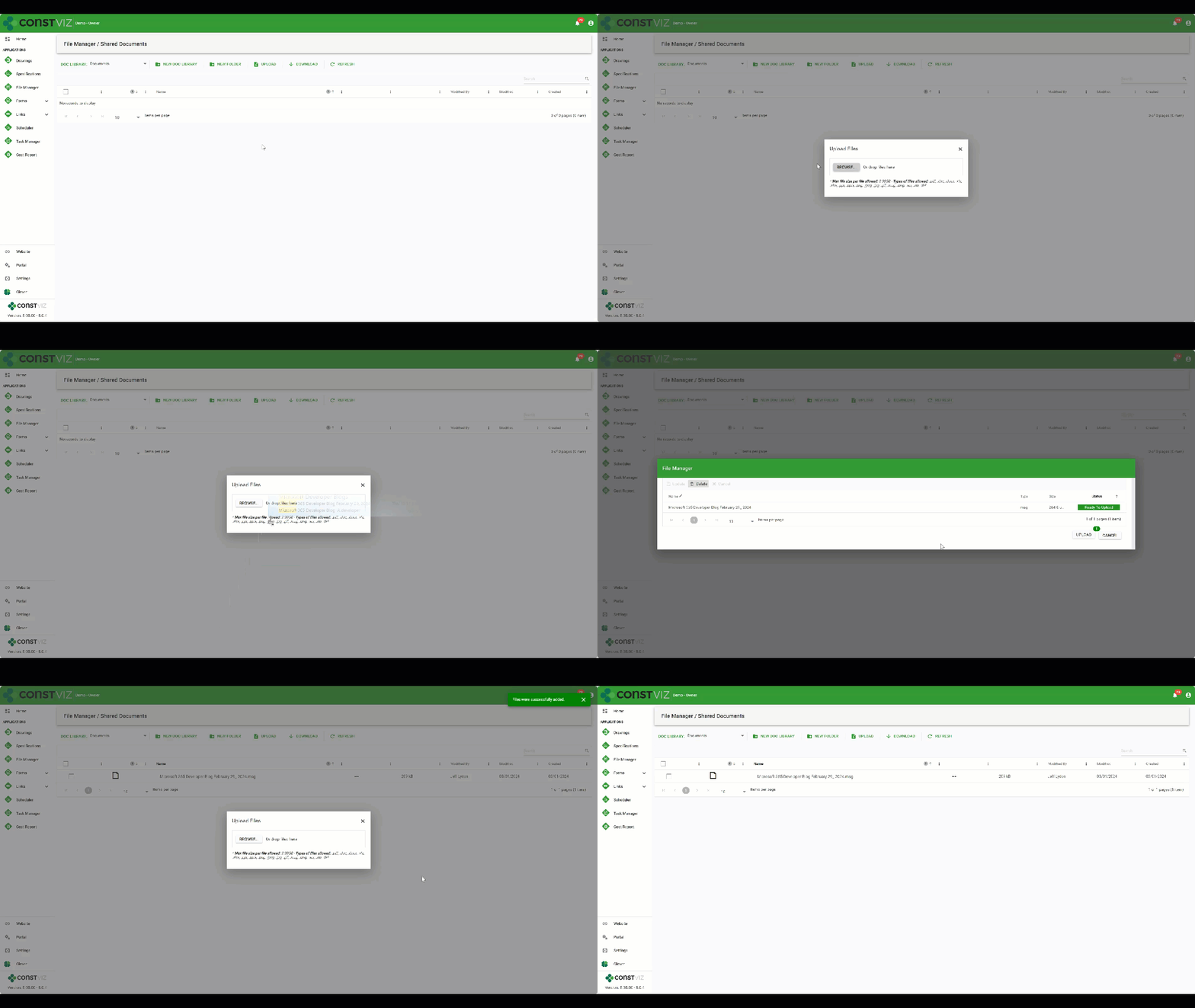
  2. Libraries and Folders for Project Emails. The Construction Viz File Manager app allows you to create one or more SharePoint document libraries and folders to manage project information. So, if you need to store emails from multiple projects, you can create separate document libraries and folders as needed. Once created, you can drag and drop emails from Outlook into the upload screen of the File Manager or any other Construction Viz app. You can then view those emails, send links to the emails to team members, and even include links to those emails in other applications.
Project_Emails_gif
  1. Upload to OneDrive, Teams, or SharePoint. Outlook emails can be dragged and dropped to OneDrive, Teams, or SharePoint. Since all of these applications are connected, the File Manager app can access the messages and display those emails in Construction Viz.

Construction Viz is a one-of-a-kind construction project management solution for Microsoft 365. You can use it out of the box, integrated with other Microsoft 365 apps, and/or customized to your unique needs. You can request a demo here to find out more.

Old School Meet the New School: Construction Viz File Manager

Project Management Tools | February 6, 2024

There are two camps for how to store project files in a project management information system (PMIS): use folders or tag files with metadata. Both approaches have their advantages and disadvantages. With the new Construction Viz File Manager, you can choose either method or both for your projects. Read on to find out how the Construction Viz File Manager can help you manage your project documentation how you want.

File-Mgmt_1

Like the cola wars between Pepsi vs. Coke, storing project files in folders or tagging files with metadata has proponents firmly dug in on both sides of the argument. Knowing that these two camps are resistant to change is why Microsoft offers multiple applications like OneDrive and SharePoint, which store files differently (but they are becoming more similar with each new release).

The case for storing your files in folders

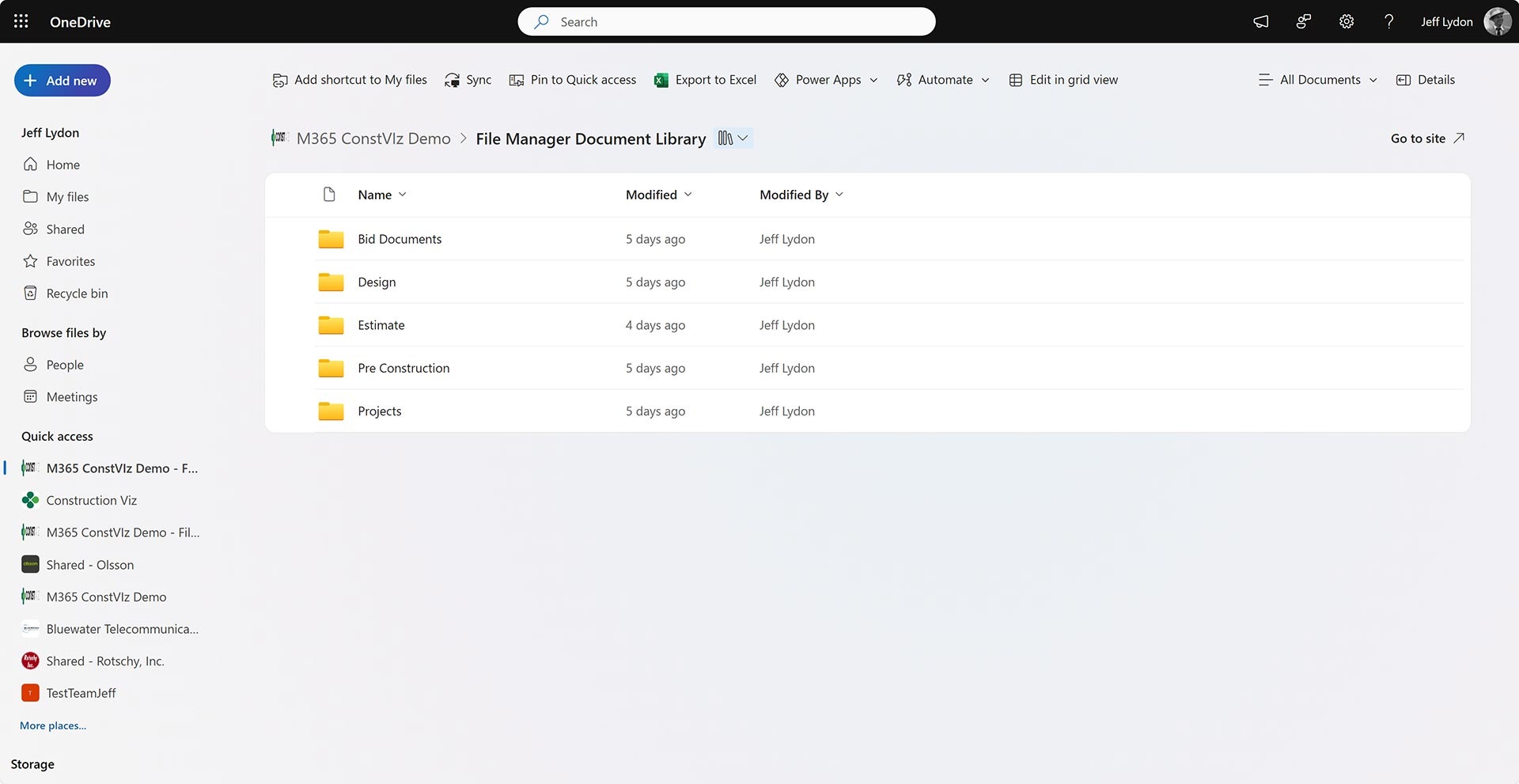
The old-school approach to managing files has always followed the same approach as Windows Explorer, where you drag and drop files into named folders.

A folder-based approach makes storing files simple, but finding them when needed can be challenging depending on the folder hierarchy. You can use search in some instances to find your files by reading the data within them. However, you must often understand the folder structure to find your desired file.

Microsoft 365 OneDrive home screen with folders.

The case for organizing your files with metadata

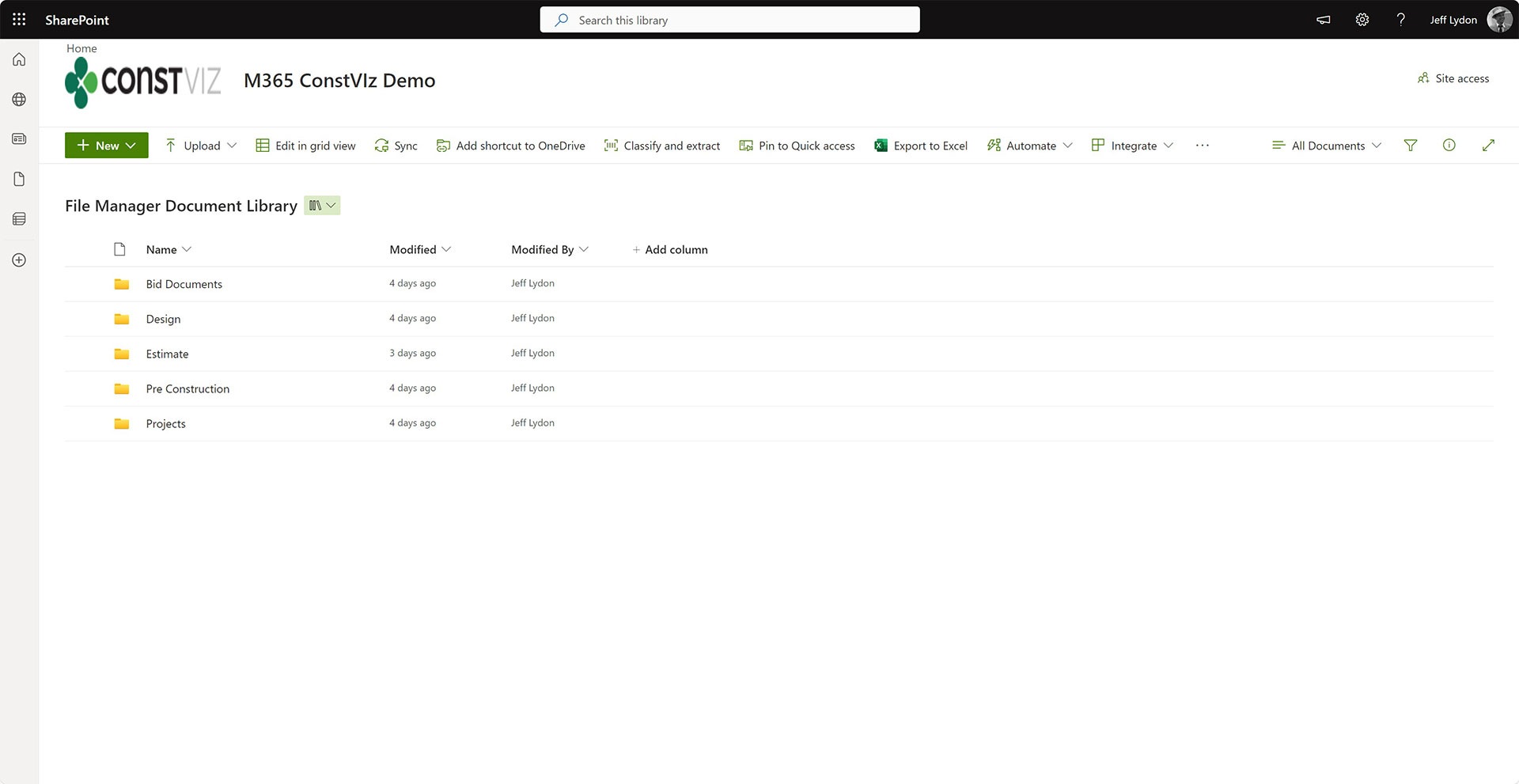
If you tag files with metadata, you can search, filter, and report on those tags, but it does force some up-front work. The person uploading the file must tag data (depending on how you set up the drop-off workflow) to the file in order to effectively search for the file later. So, while metadata tagging is excellent for document control, it can frustrate users on the front end.

SharePoint Document Library with metadata columns Project and Location.

With Construction Viz, we have been a metadata tagging proponent. The more metadata you collect, the more reporting and analysis you can do. So, we structured the system around metadata collected via our form technology. If users preferred to use folders, we would link to SharePoint libraries or OneDrive since we stored data in SharePoint. But with our File Manager app, things are about to change.

How can I use both metadata and folders?

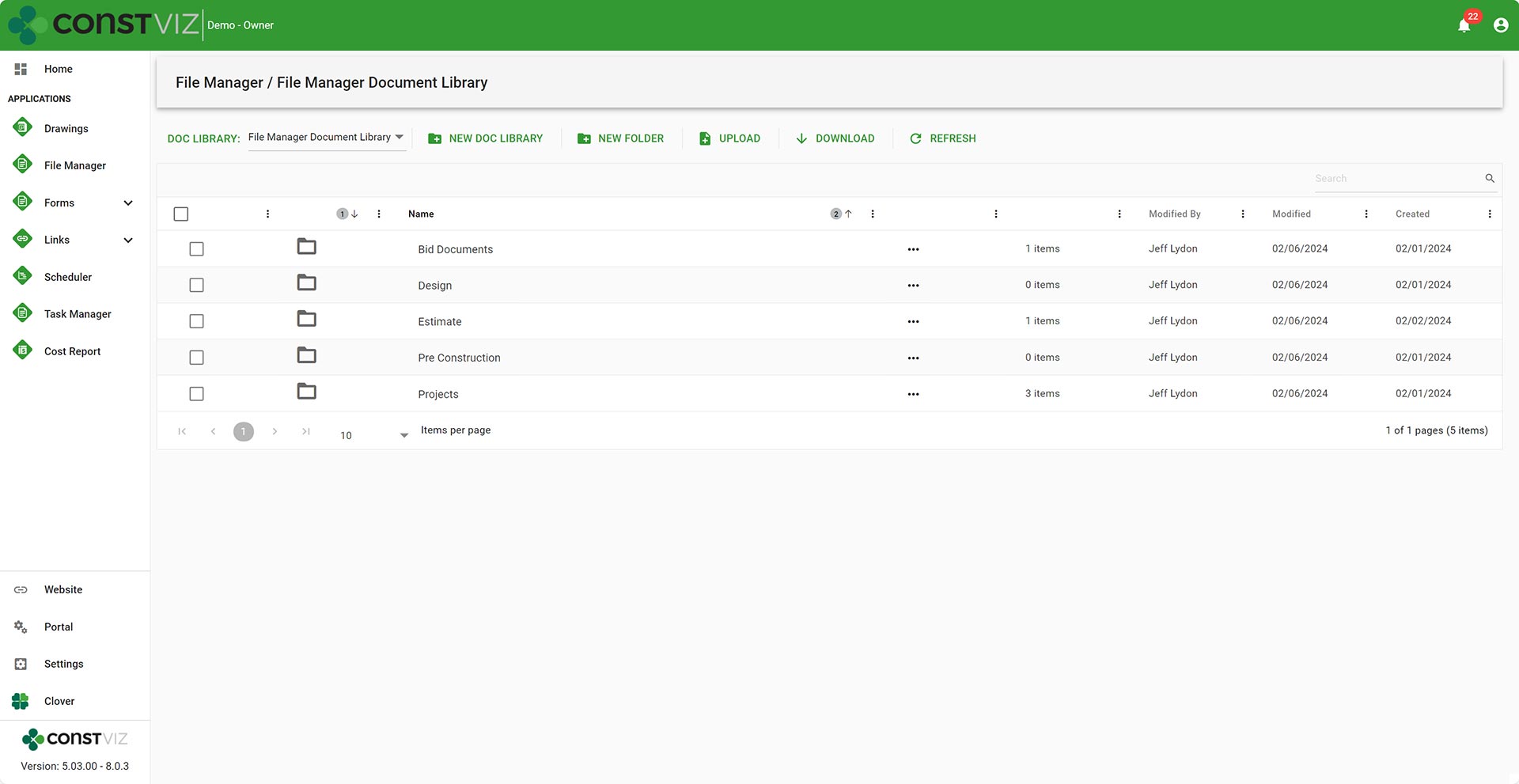
The new Construction Viz File Manager provides the folder management file storage that users love without leaving the Construction Viz hub. Users can build out a custom folder structure similar to OneDrive or Windows Explorer and can link files into forms within Construction Viz.

File-Mgmt_C
SharePoint Document Library with metadata columns Project and Location.
Microsoft 365 OneDrive home screen with folders.

The File Manager seamlessly integrates SharePoint, OneDrive, and Teams files. 

The File Manager boasts the following capabilities:

  • Select any document library in your SharePoint site to create folders or upload documents without having to navigate to SharePoint.
  • Select the default documents library in SharePoint to have files synced across Teams, OneDrive, and SharePoint automatically.
  • Upload files using our standard document attachment uploader that checks file names and allows editing files on the fly.
  • Link files stored in the File Manager to other Construction Viz applications, such as RFIs, submittals, and daily reports.

With the Construction Viz and the new File Manager app you get the best of both worlds of both folders and metadata. You can store files in folders like Windows Explorer or tag them with metadata automatically when adding them as attachments to our forms.

Video overview of the Construction Viz File Manager app

We continue to focus on delivering solutions that meet you where you work and how you work. The File Manager is one of many applications we have implemented that allow you to make the most out of Microsoft 365 to manage your construction projects. You can find out more about Construction Viz here or request a free one-hour consultation with our Microsoft 365 professionals.

Introducing the New Construction Viz Specification App

Specification Management | January 18, 2024

The Construction Viz Specification app complements the Drawing app by providing a one-stop shop for storing and organizing contract requirements, managing revisions, and integrating specifications across our suite of Construction Viz form applications. If specification management is a focus area for your projects, read on to learn more about this exciting new tool.

Spec-Mgmt_1

Key Features of the Construction Viz Specification App

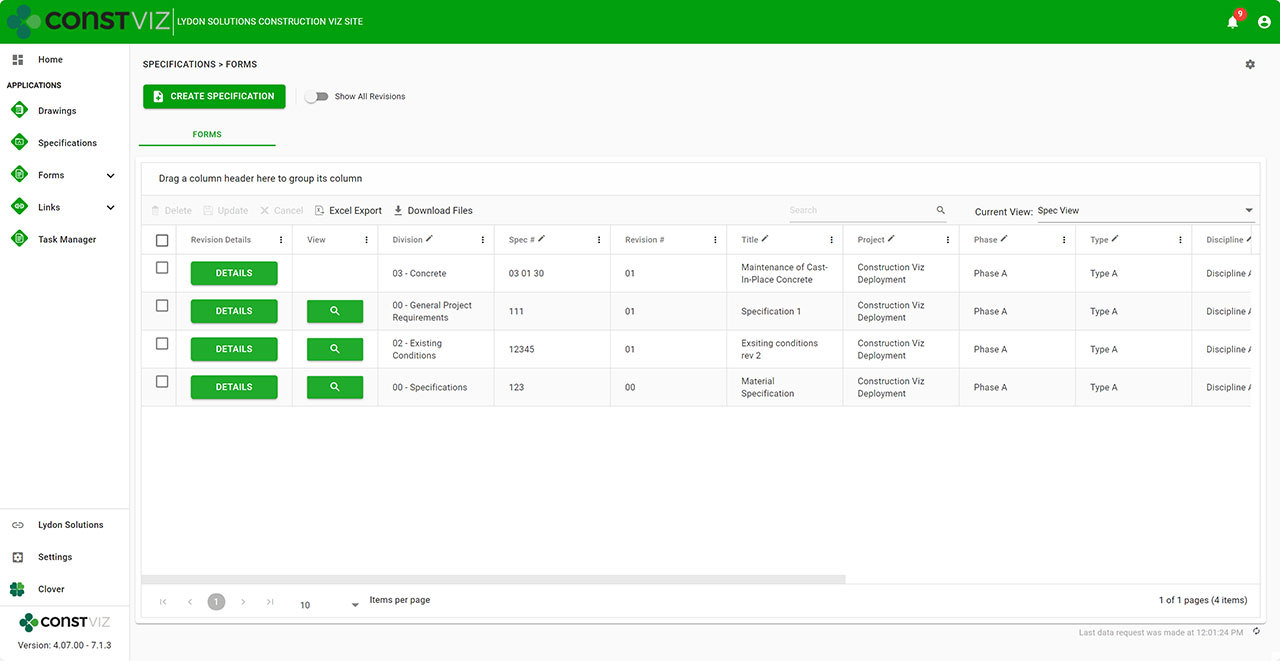
Find the correct specification. Managing construction projects involves strict adherence to the contract drawings and specifications. Team members need to be able to quickly find the latest specifications and reference them in project correspondence. With the Specification app, we added a comprehensive set of metadata fields such as division, set, spec number, and release date to find what you are looking for easily.

Work off the latest revision. Revision management is a common issue in projects. We added our robust revision management functionality, allowing users always to see the latest revisions by default in the logs but can easily toggle to see all revisions.

Manage one set of specifications. More than one set of specifications can float around on projects, especially if uploaded to correspondence forms. To ensure a single source of truth for specifications, we built the Related Specifications Component that can be added to any form. With the Related Specifications Component, users can filter, assign, and download specifications within any form. This feature saves one set of specifications that can be easily referenced anywhere throughout the project.

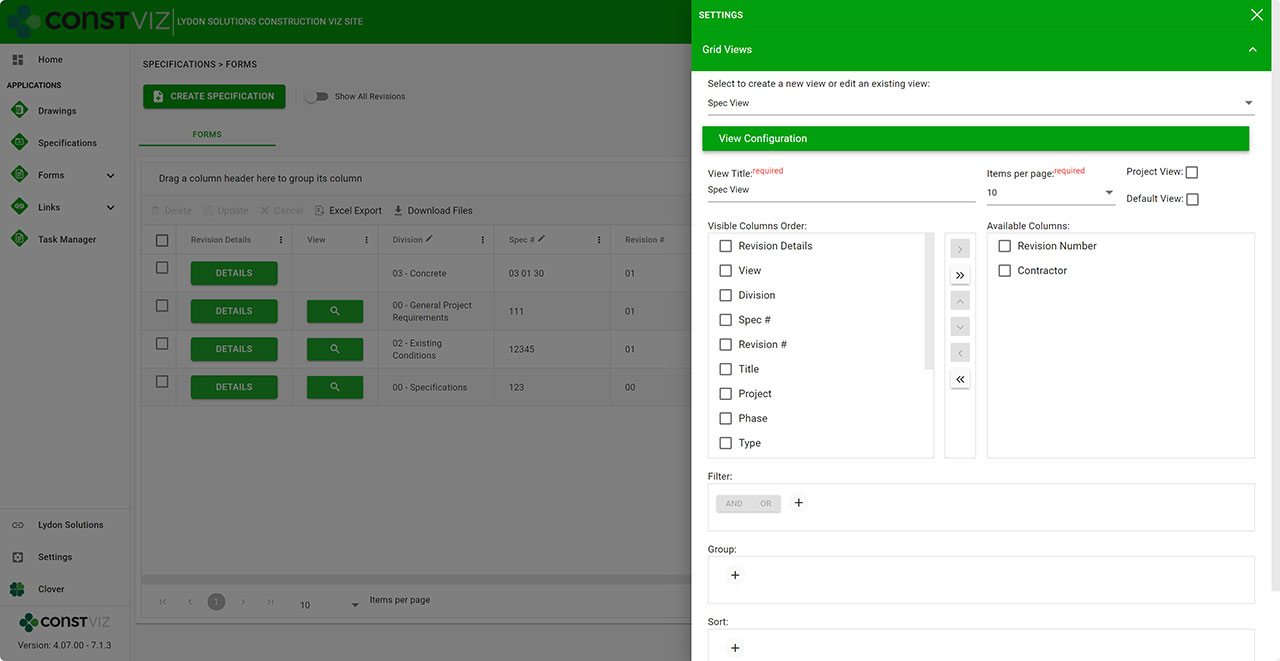
View specifications your way. We know you want to search for specifications based on your specific criteria, so we included our saved views feature in the Construction Viz Specifications app. This feature enables you to create one or more views to help you quickly find what you need and have that view default every time you visit the specifications. You can read more about the saved views feature in this blog post.

Spec-Mgmt_3

Lydon Solutions continues to build features and functionality to make construction management easier using the tools that everyone is familiar with, Microsoft 365. If you are looking for a turnkey construction management solution that can be further customized to your specific needs and deployed to your Microsoft 365 tenant, click this link to request a demo.

View Your Data Your Way with Construction Viz Saved Views 

Forms | January 9, 2024

Construction projects generate a ton of data that must be tracked and analyzed in real-time. With our latest update to Construction Viz, we wanted to make our form app data views even more powerful by adding the ability to create, edit, and save personal and project views for the entire team to use. Read on to discover how this new feature will allow you to analyze and report on your data quickly and easily.

Construction Viz already includes configurable data views across all our apps. Users can group, sort, filter, reorganize, and search on form columns to get to meaningful data quickly. However, we wanted to provide more capabilities to allow users to create and save their personal and project data views. Since Construction Viz stores your data in your Microsoft SharePoint lists and libraries, we took inspiration from the view configuration options in SharePoint but further enhanced its capabilities for construction management.

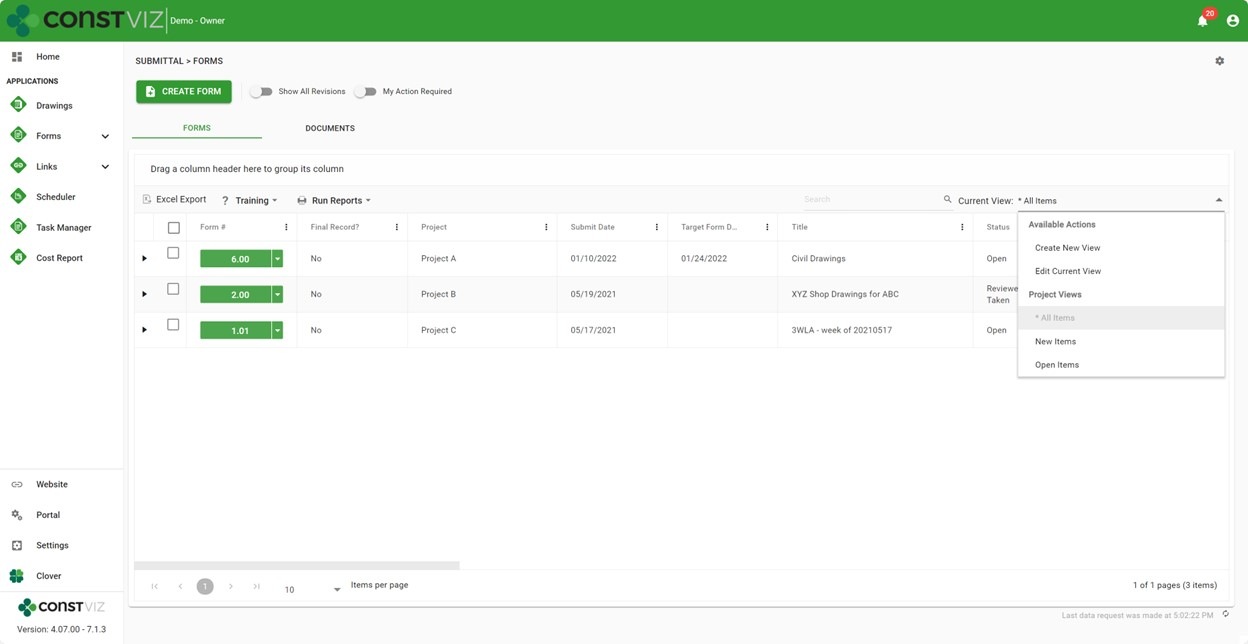
New Construction Viz Saved Views UI

We had to make a few changes to our user interface to deliver the new saved views feature in Construction Viz. While maintaining most of our core structure, we re-designed the layouts to align with our Task Manager app for the ultimate flexibility when visualizing data in different configurations.

New Construction Viz Saved Views UI

Now, we can display different data configurations in grouped tabs, such as dashboards, lists, attachments, Gantts, geospatial maps, and calendars. The new tab structure lets users quickly move between different data configurations while keeping the filtering persistent.

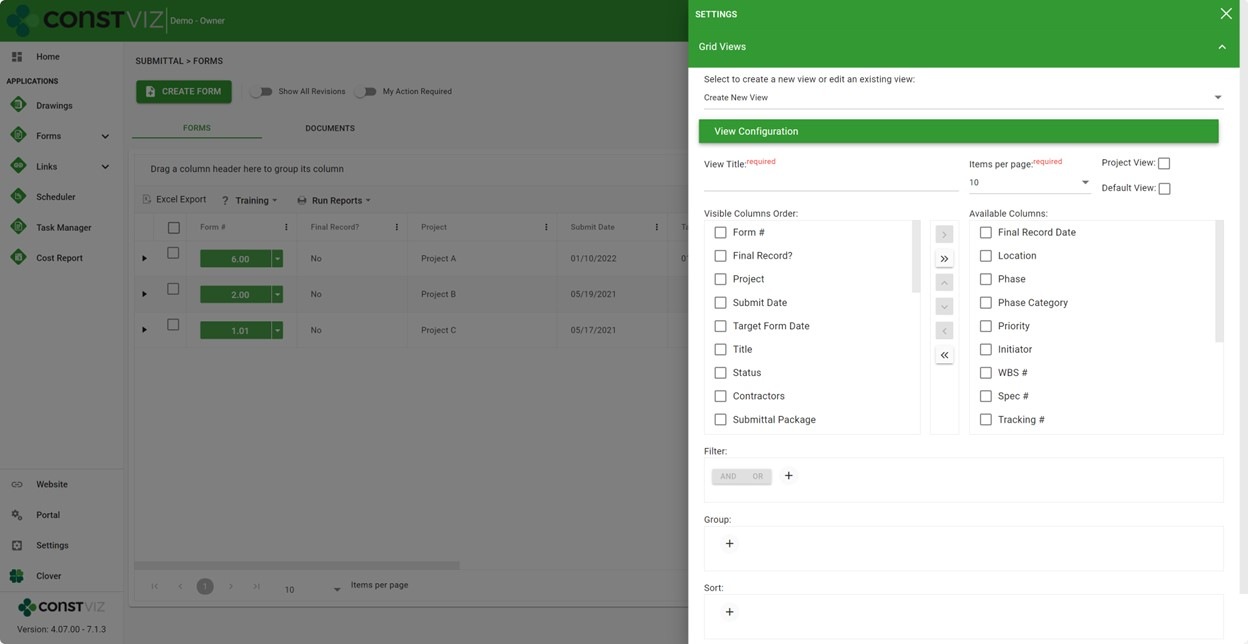
We've also added an app-specific settings cog for saved views and future setting enhancements. Users can now create, edit, and save data views from within the app-specific settings or the data view selector.

Construction Viz App-specific settings

In a future post, we will provide more insights into the benefits of this latest re-design. Exciting features to come 😊

Key Features of Construction Viz Saved Views

We packed many features in this latest Saved Views release, but some of the key highlights include the following:

  • Project vs. Personal Views. Quickly find the forms you seek by creating project views for all users or personal views for your own use.
  • Default views. Save time by assigning a default view to display when navigating to any app.
  • My Action Required. Quickly filter tasks assigned to you by clicking the "My Action Required" toggle.
  • Show All Revisions. By default, Construction Viz displays the latest revisions in form data views, but with this update, users can quickly toggle to see all form and related document revisions. This is a great feature for viewing the history of all forms and their attachments and exporting all records.
  • Available in form apps. The new UI and saved views feature are available in all form apps, such as RFIs, Submittals, or Daily Reports.

Construction Viz is a full-featured and enterprise-ready project management information system (PMIS) for Microsoft 365. To learn more about Construction Viz features and apps, check out our weekly blogs. You can request a demo of Construction Viz here. Also, if you need any Microsoft 365 support or have any suggestions for future blogs, you can submit a consultation request here. 

  • « Go to Previous Page
  • Page 1
  • Interim pages omitted …
  • Page 3
  • Page 4
  • Page 5
  • Page 6
  • Page 7
  • Interim pages omitted …
  • Page 11
  • Go to Next Page »

Footer

About Constructon Viz

Construction Viz is a flexible construction project management software solution powered by Microsoft SharePoint and SQL.
Read More >

Navigation

  • Home
  • About
  • Features
  • Apps
  • Blog
  • Contact
  • Login

Apps

  • Construction Viz Hub
  • Drawing Management
  • File Manager
  • Specification Management

–

  • Project Forms
  • Project Planner
  • Project Scheduler
  • Project Tracker
  • Task Manager

Connect with Us

This field is for validation purposes and should be left unchanged.

Sign up to receive helpful tips for construction project managers as well as updates about Construction Viz.

Lydon Solutions

© Lydon Solutions

  • Privacy
  • Cookies
  • Terms of Use
  • Disclaimer
  • End-user license

Click here to start a Microsoft Teams chat.

Click here to start a Microsoft Teams chat.

Contact Us
This field is for validation purposes and should be left unchanged.
Name(Required)
Join Our Newsletter

Sign up to receive helpful tips for project managers and updates about Construction Viz.

Get Started

Join Our Newsletter

Sign up to receive helpful tips for construction project managers as well as updates about Construction Viz.

This field is for validation purposes and should be left unchanged.