• Skip to primary navigation
  • Skip to main content
  • Skip to footer
Construction Viz

Construction Viz

Project Management Perfect

  • About
  • Features
  • Apps
  • Blog
  • Contact
  • Download Flyer
  • Get Started Today
  • Login
Show Search
Hide Search

Project Management Tools

Archive Your Project Data in Three Clicks with the Construction Viz PDF Report Wizard 

Project Management, Project Management Tools, Reporting | October 26, 2023

Have you ever needed an easy way to archive PDF versions of all your project correspondence, such as RFIs and daily reports, including attachments (which could be in various file formats)?  

The new Construction Viz PDF report wizard aims to build on our existing technology with the ability to generate PDFs from multiple forms at the same time. Read on to find out more about this new feature. 

Introducing the Construction Viz PDF Report Wizard

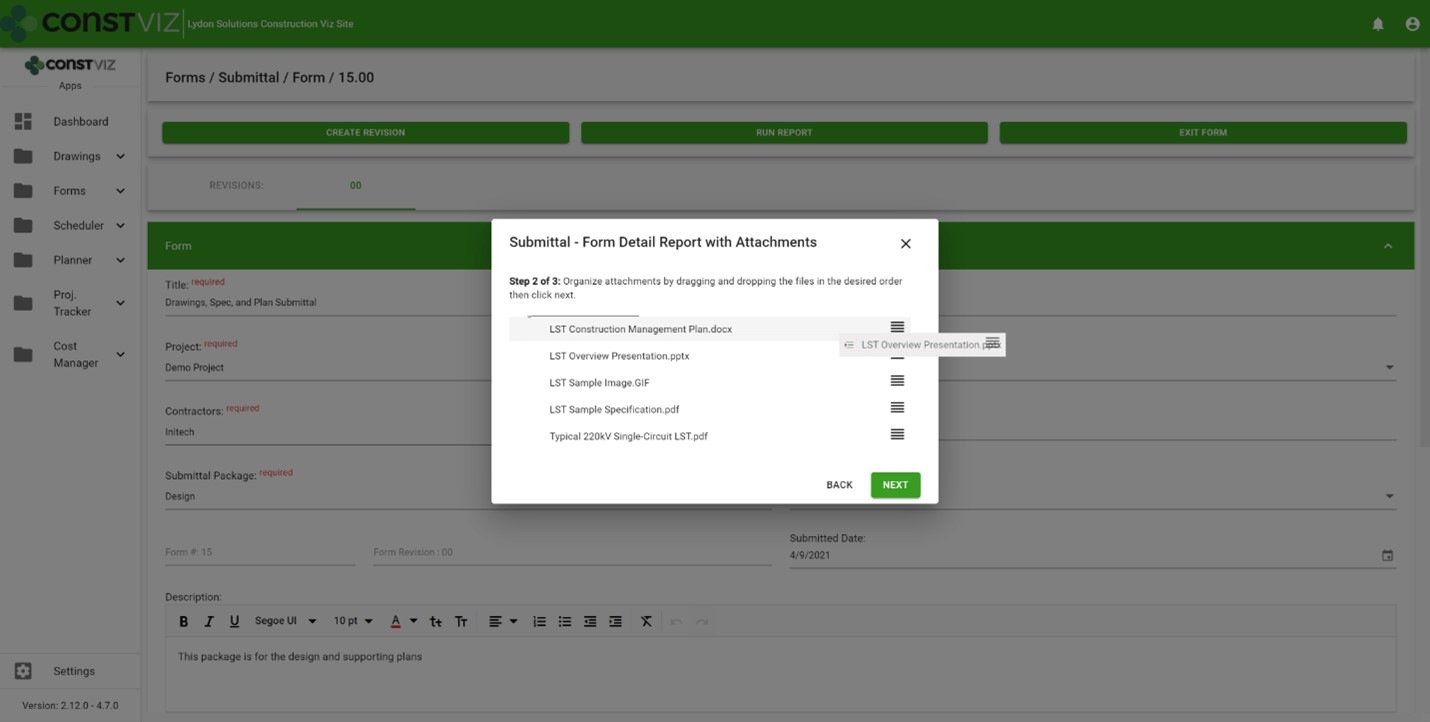
We built the Construction Viz PDF Report Wizard based on the Construction Viz Form archive wizard which is a powerful and heavily used feature in Construction Viz. It allows users to create PDF binders from any form, including the form attachments. The step-by-step wizard walks you through selecting a form, adding and ordering attachments, and naming the generated PDF binder.

Picture1

Form archiving wizard – re-ordering attachments 

The cool part is the archive wizard converts attached files from their native format (Excel, Word, etc.) to PDF and automatically provides a name for the PDF binder. So, if you want to send a contractor a PDF of an RFI with any relevant attachments, select the form, select which attachments they need to see, and follow the wizard to generate a PDF you can email.  

This feature is an excellent form-by-form solution, but what if you want a push-button way to choose more than one form? Let's say you want to archive all of the RFIs, submittals, and dailies on a project and include all the form attachments. And you want to do this in bulk. 

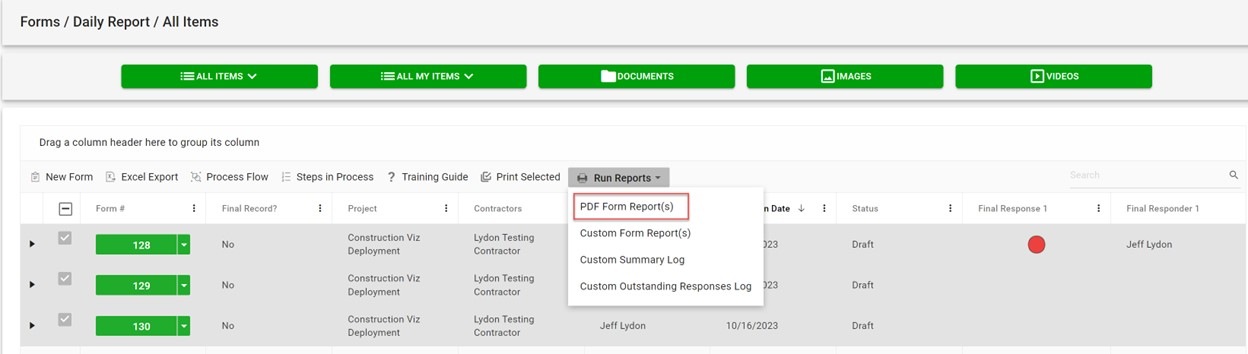
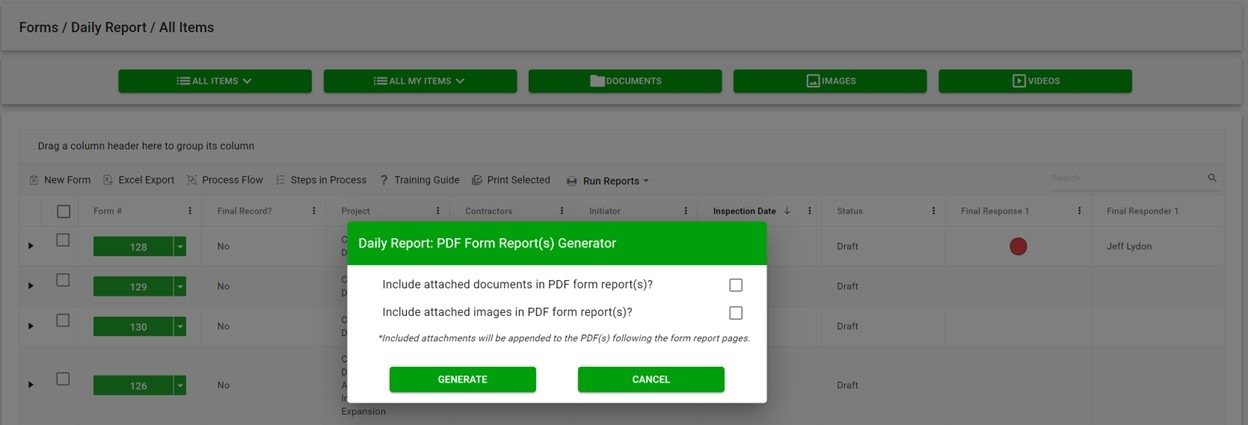
The new PDF report wizard leverages some of the same technology from our form archive wizard to create multi-form PDF binders of your project correspondence. Users select one or more forms, click the PDF Form Report(s) button, and have the option to include attachments, images, or both. And just like the form archive wizard, the attachments are automatically converted from their native format (Excel, Word, etc.) to PDF, including any images. 

Picture2

If you are wondering about file sizes impacting the system and preventing you from continuing your work, don't. While the file conversion runs, the tool prompts you to load another screen to continue working without interruption. Construction Viz will notify you when the processing is complete and the PDF files are downloaded locally.  

Picture3

Our development team at Lydon Solutions continues to drive innovations in your day-to-day workload with our Construction Viz product for Microsoft 365 so you can focus on what's important, delivering the project on time and within budget. You can request a demo of Construction Viz here, or if you need help with Microsoft 365, you can click here for a free one-hour consultation with our Microsoft technology experts. 

Managing Multiple Construction Projects with Microsoft 365 and SharePoint Online

Project Management Tools | September 13, 2022

So, you want to use Microsoft 365 and SharePoint Online to manage your construction projects? With out-of-the-box SharePoint, you will have to decide whether you will use one site per project or multiple projects per site. Fortunately, Construction Viz is flexible enough to accommodate both approaches.

Two Ways to Set Up Microsoft SharePoint to Manage Construction Projects

Before we highlight the value Construction Viz can bring, let’s look at the two ways you can setup SharePoint to manage multiple projects and the pros and cons of each approach:

Option 1: Create a SharePoint site for every project.

  • Pro: This approach ensures you wall off project data between projects and lets you easily restrict permissions to each site.
  • Con: Going this route requires more administration to update and maintain multiple site configurations and aggregate data for reporting.

Option 2: Create a single site for all projects

  • Pro: This approach makes it easier to aggregate and report on your project data.
  • Con: Using a single site can make permissions management complex and complicated depending on security requirements. You also have to decide how to define a project across all of the SharePoint assets (e.g., pages, folders, and project metadata across lists and libraries).

Unfortunately, there is no right or wrong way; the approach often depends on many factors. However, whatever method you select, Construction Viz can streamline the process for you.

How Construction Viz Simplifies Managing Multiple Projects in SharePoint

When we designed the Construction Viz Hub, we wanted to give clients the ability to manage projects the way they want in the same application within Microsoft SharePoint. With Construction Viz, you can manage a project, program, or portfolio within one site or multiple. It’s up to you!

Highlights of Construction Viz’s Multi-Project Management Features 

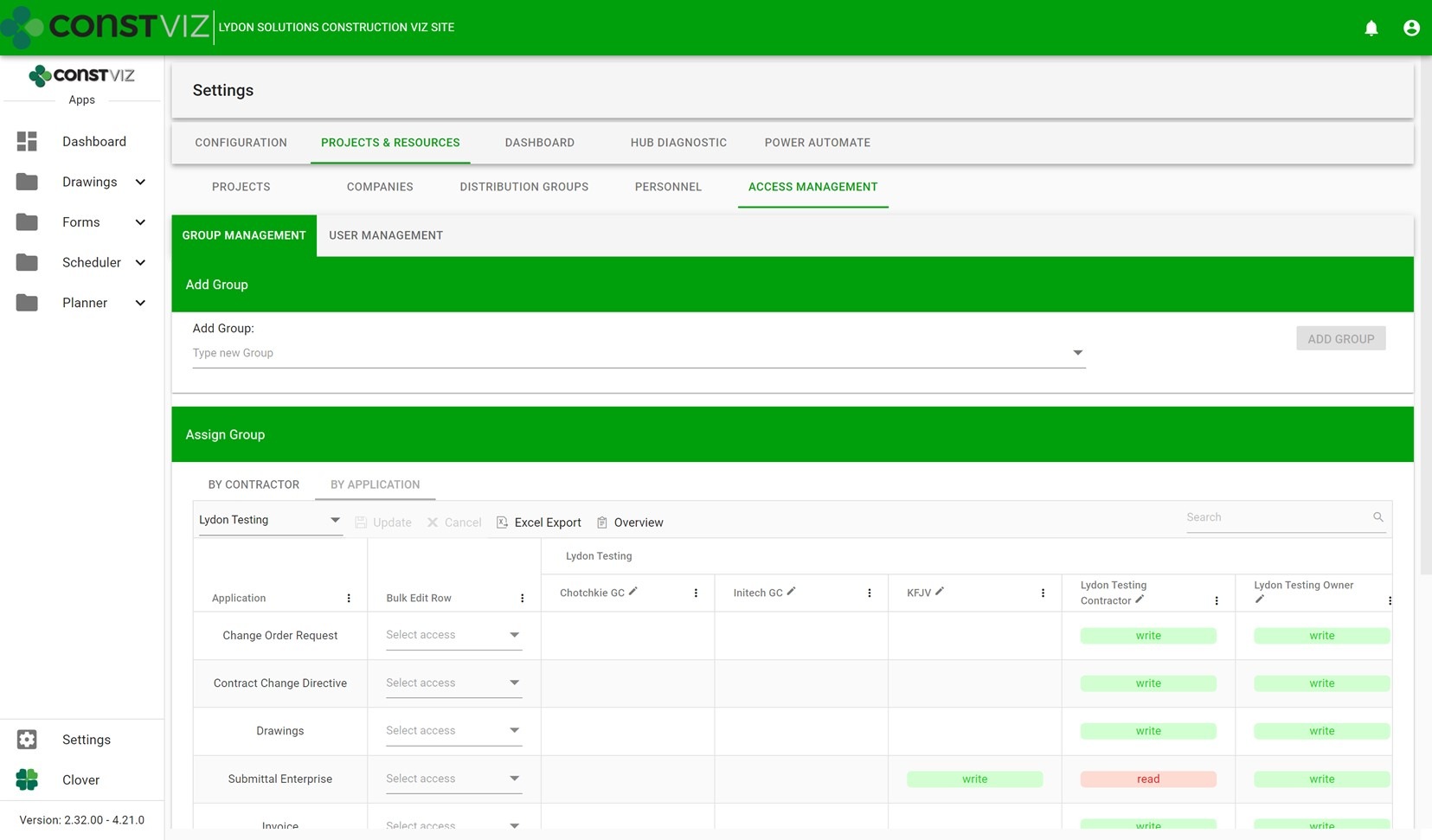
Simplified access management – We built our own access management solution on top of SharePoint to streamline the process of adding internal and external users to our applications. This custom solution reduces the administrative burden of permissions management.

Multi-Project_1

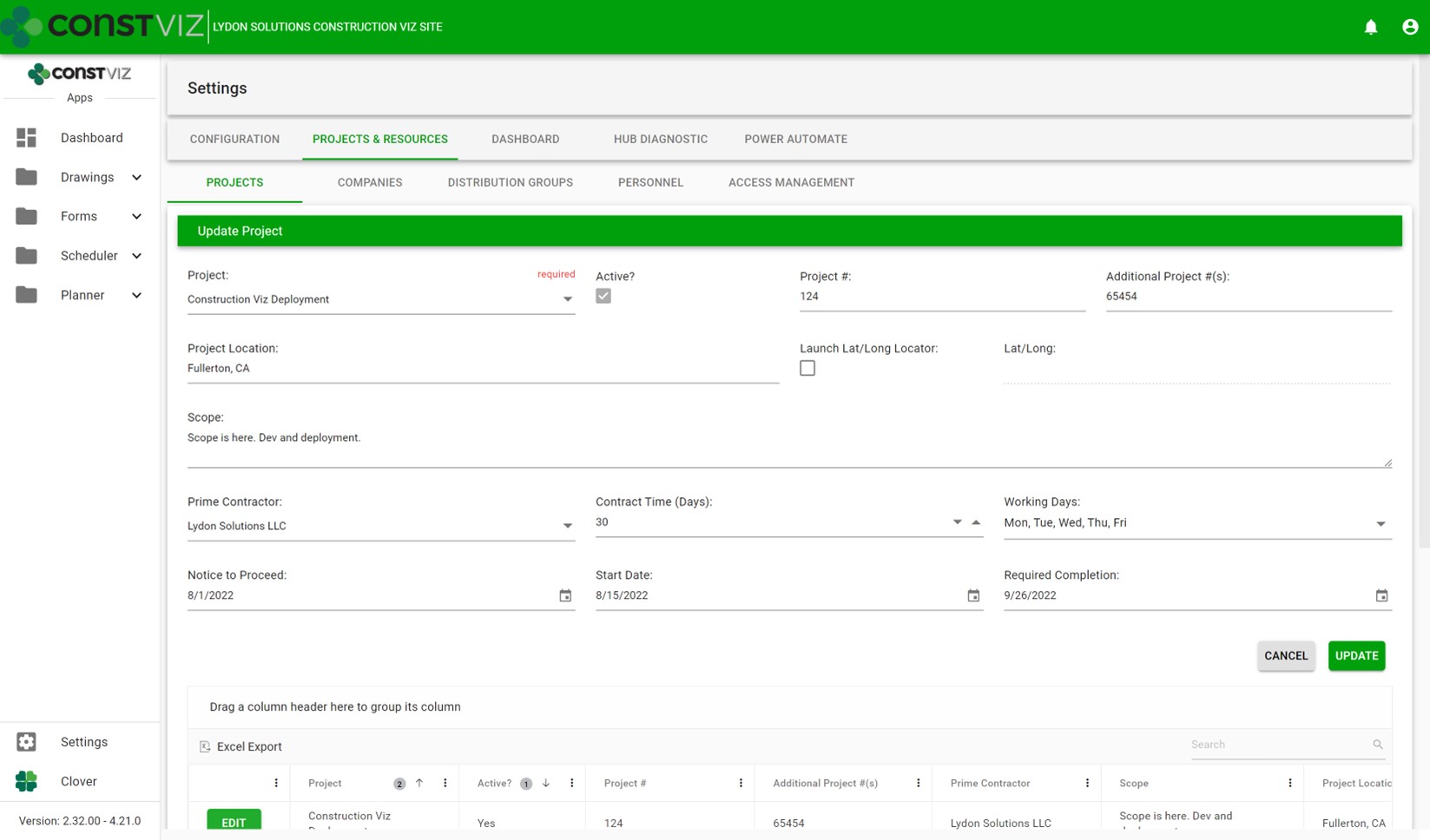
Expanded project settings – We integrated multi-project information across all the apps within a deployment. We also made it so that project pickers and default values can be unique by application, allowing for robust configuration depending on deployment requirements.

Multi-Project_2

Expanded personnel settings – We incorporated both SharePoint user and non-user management within a central location for easier access management. This feature allows for easier administration of access and distribution groups across projects.

Multi-Project_3

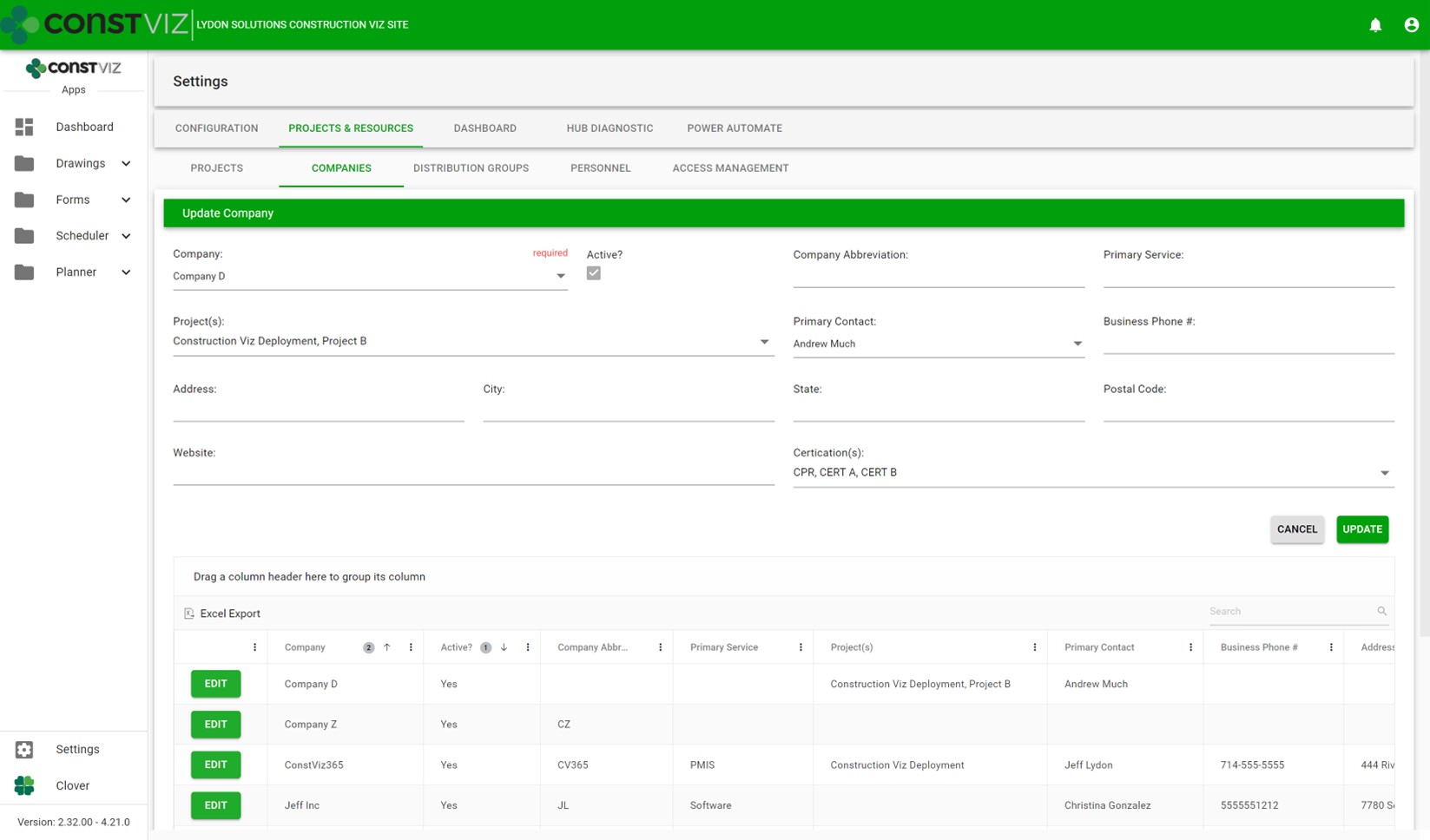
Expanded project-specific company settings – We added the ability to assign companies to one or more projects so they can be restricted and re-used across multiple projects or a program.

Multi-Project_4

Included data and reporting rollup by program and portfolio – We built data rollup capabilities and reports for one or more sites to report project status across the portfolio.

Multi-Project_5

We made all these design considerations so that Construction Viz can provide you with the best way to manage your projects, programs, and portfolios in the most efficient way possible. You can learn more about the capabilities and features of Construction Viz on our website.

The new Construction Viz Questionnaire component provides even more choice

Project Management Tools | August 26, 2022

In construction, questionnaires are essential for gathering qualitative and quantitative information on a project. As a project manager, you want your field team to use questionnaires to report on various construction activities including, but not limited to, job site safety, project progress, quality control, identification of issues and defects, and adherence to specification and contractual requirements.

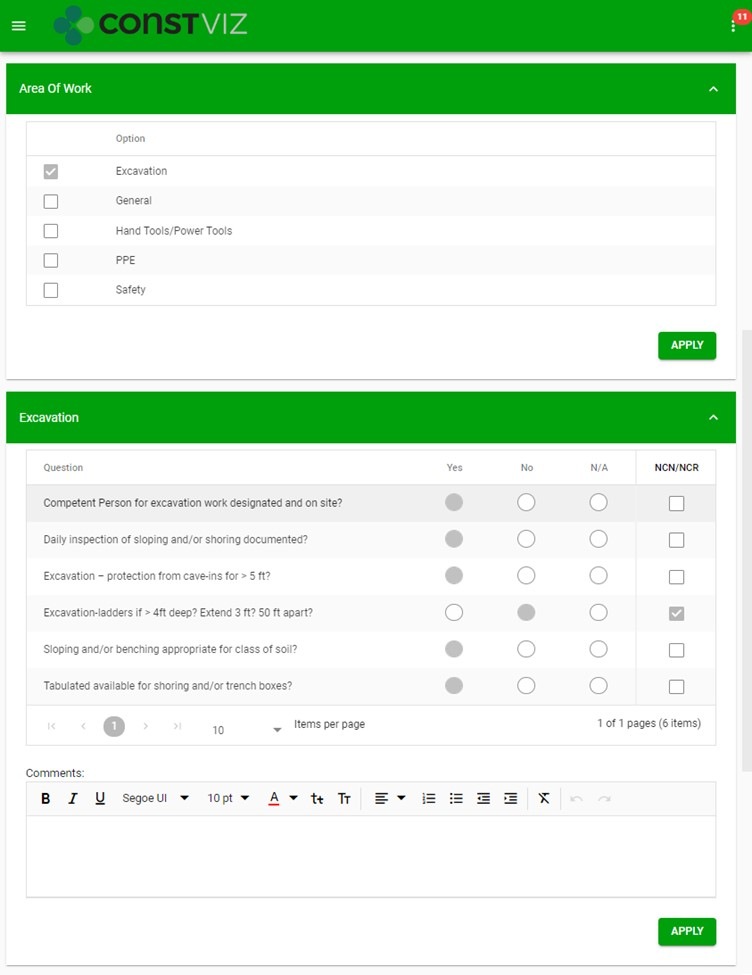
For those using Construction Viz, you may already be familiar with our standard Area of Work (AOW) component which allows you to create ad hoc questions in the Daily Report or Inspection forms. Field personnel respond to the AOW questions through set yes, no, and N/A response fields. While the functionality of the AOW component has worked great for documenting and reporting on field activities and project progress, we wanted to give our clients even more flexibility when creating unique questionnaires.

Area of Work (AOW) Component

Questionnaire_1

Introducing the new customized “Questionnaire” component, for any Construction Viz form!

The new “Questionnaire” component expands on our standard AOW component in multiple ways:

  • Custom Deployment. Your customized “Questionnaire” component is deployed per your requirements. Name your component and choose from various response field types that will be available in questionnaires within your component, including:
    • Text fields. Capture open-ended responses.
    • Standardize responses and minimize data input.
    • Date fields. Capture key dates, such as start and/or completion dates, delivery dates.
    • Number fields. Restrict responses to numerical values to track various measurable data such as quantities, hours, cost, etc.
  • Dynamic Component Configuration. You can create multiple questionnaires within your custom component, and have full control over configuration:
    • Component Configuration. As the project progresses, you can create new, or hide old, questionnaires, and re-order the questionnaires within the component so the questions are responded to in a logical sequence of project activities, etc.
    • Questionnaire Configuration. For each questionnaire, restrict how field personnel respond to your questions by selecting from the available response field types, and configure the order of the active columns and individual questions in which they appear within the questionnaire.

New Questionnaire Component

https://constructionviz.com/wp-content/uploads/2022/08/Questionnaire_OriginalScreenRecording.mp4

More than one customized “Questionnaire” component can be deployed within any Construction Viz form, and each component can be uniquely customized and configured, giving you endless possibilities for gathering the information you need manage your project.

The customized “Questionnaire” component is just one of many dynamic components we have available for Construction Viz. Let us customize your construction management experience. Check out our Construction Viz features page to learn more about what’s possible. And you can schedule a consultation and demo to discover how Construction Viz can enhance your project management workflows.

Construction Viz Feature: Flexible Workflow Management

Project Management Tools | November 2, 2021

Construction projects can be very unique, not unlike the work processes supporting them. It's not uncommon for workflows to remain "fluid" through most of a project lifecycle as scoping requirements change, team members join, and the parties involved agree to work processes. This inherently dynamic nature of construction projects is why we designed Construction Viz to be as flexible as possible.

Construction Viz lets you work the way you want, with pre-configured ad-hoc workflows built into each app. And you can further customize your workflows by leveraging the power of Microsoft 365 Power Automate. No other construction project management software gives you so much control over how you get your projects done and delivers solutions right in your own Microsoft 365.

Construction Viz workflow features

Workflows are critical for managing projects in a project management information system (PMIS). Project teams use them to route forms for review, populate fields based on conditions, and email content for review and approval, to name just a few examples.

So what workflow features does Construction Viz offer?

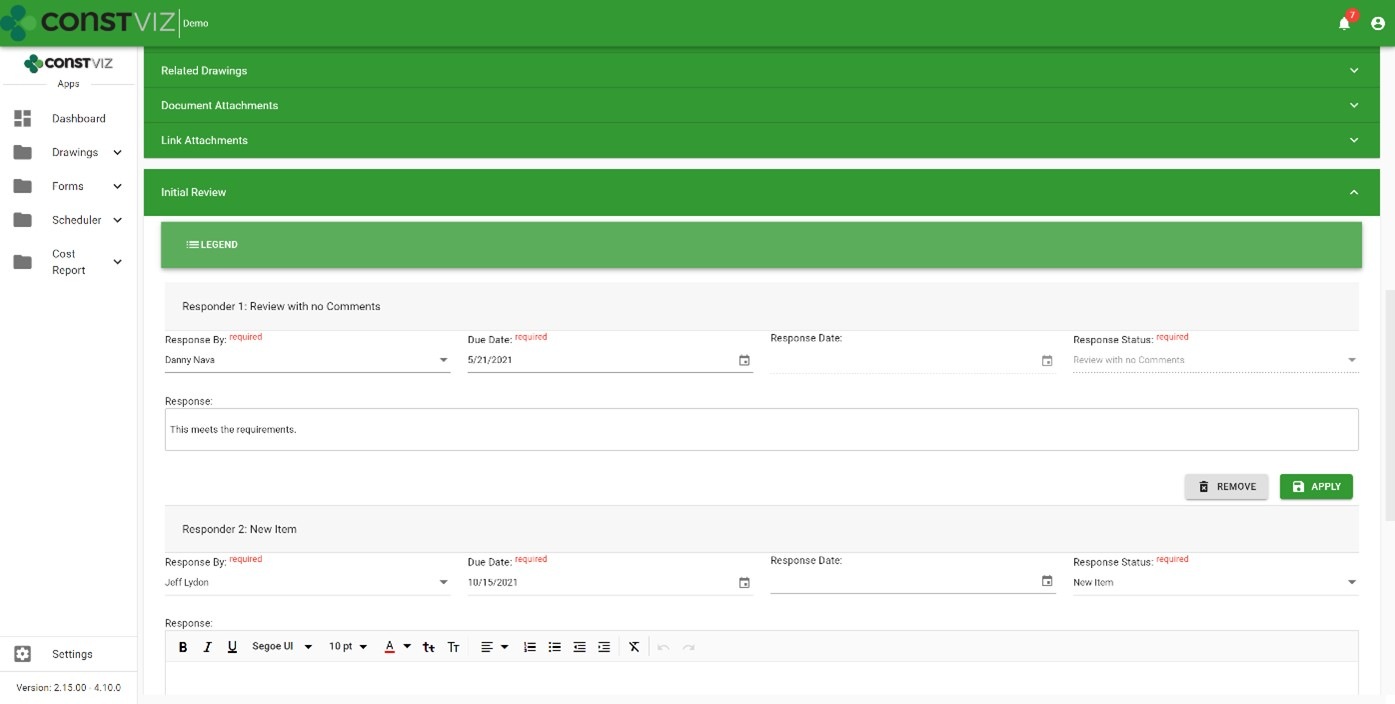
Out-of-the-box workflows – You get access to ad-hoc workflows with Construction Viz on day one. Pick a reviewer, assign a due date, and send it off for action.

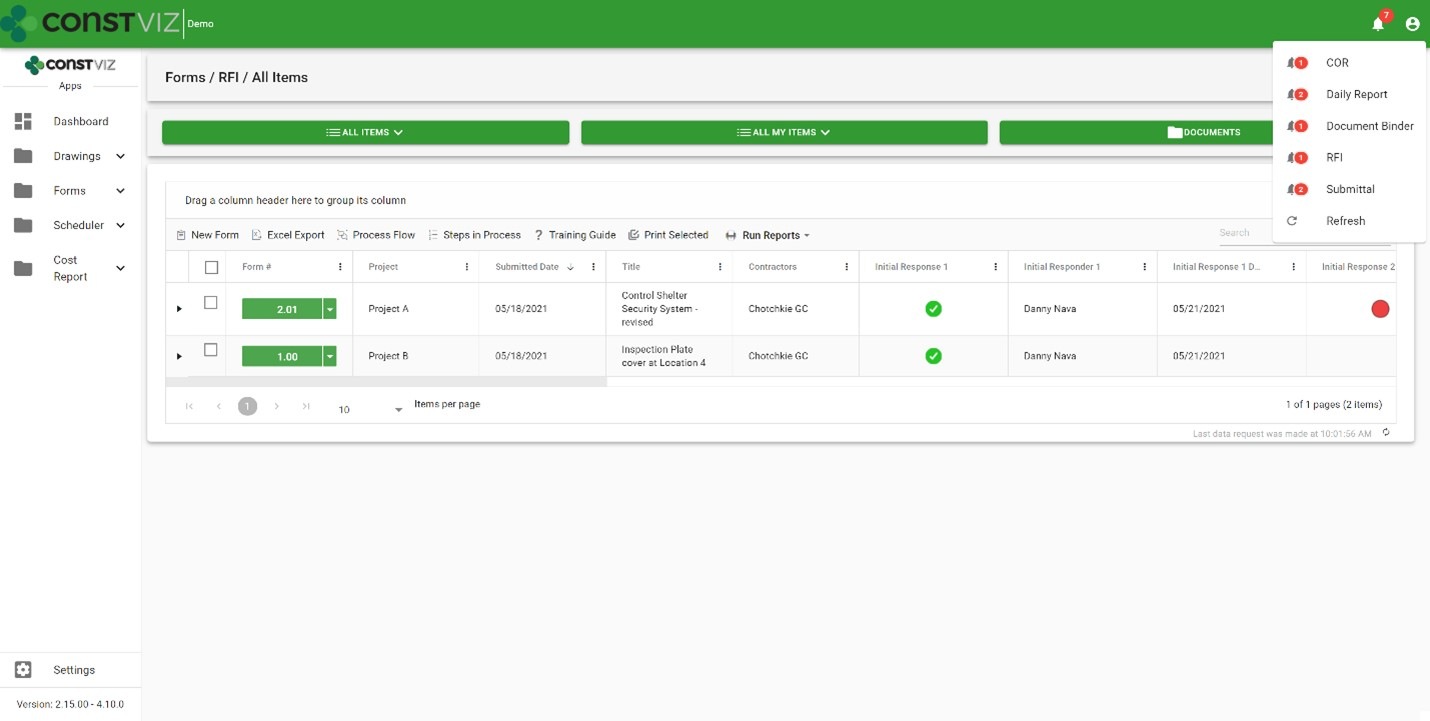
Workflow-Mgmt_1

Email notifications – You can send automated actionable emails to a single reviewer or a group of reviewers. A complete email history log ensures your emails are never lost.

System notifications – Every user you assign as a reviewer receives a notification alert within the Construction Viz Hub with actionable drill-down capabilities.

Form due dates – Based on priority, you can automate standard Target Due to ensure adherence to contract requirements.

Ball in court – Every form log includes a ball-in-court displaying each reviewer's status so you can analyze the data across all records.

Workflow-Mgmt_2

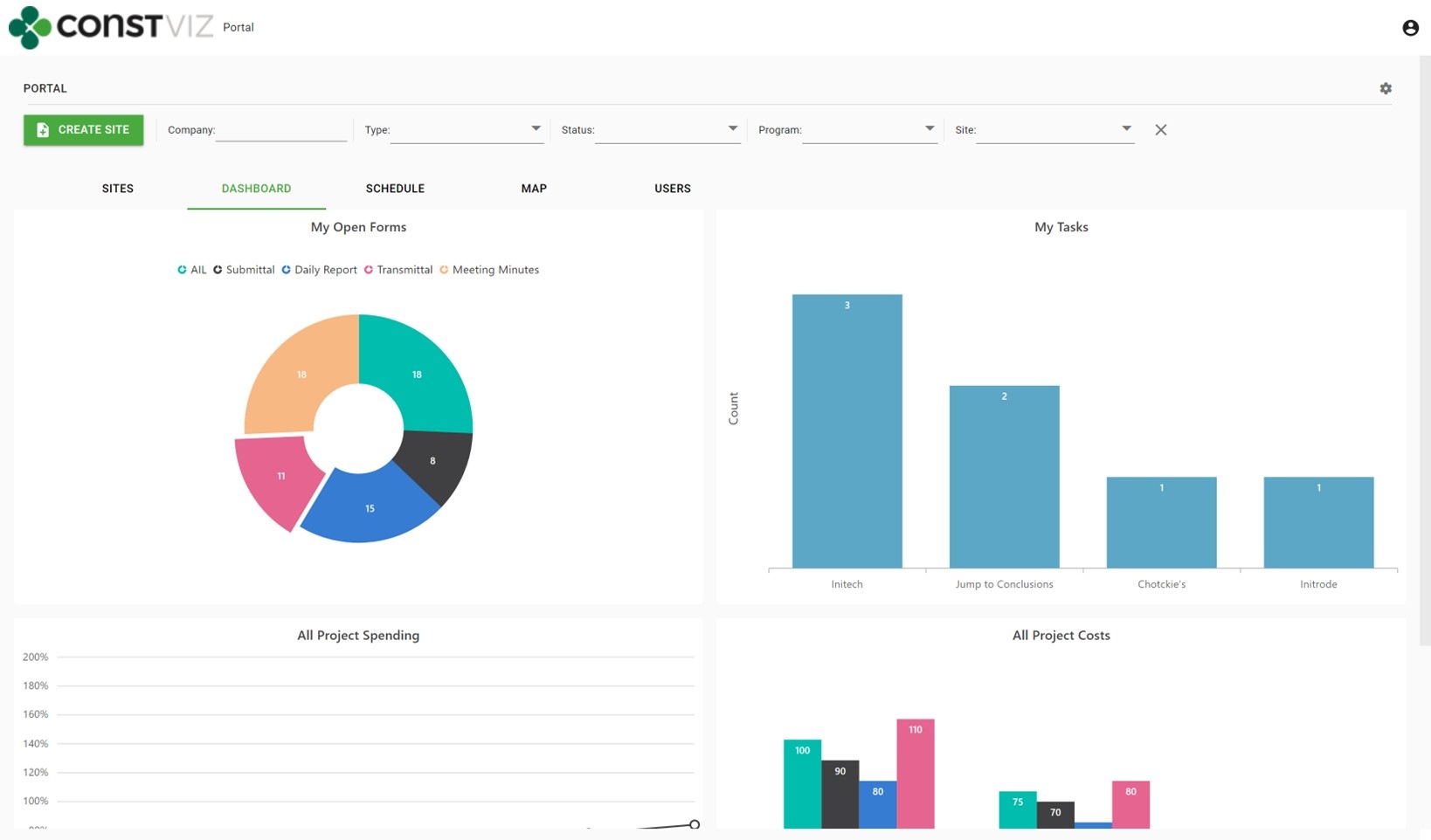
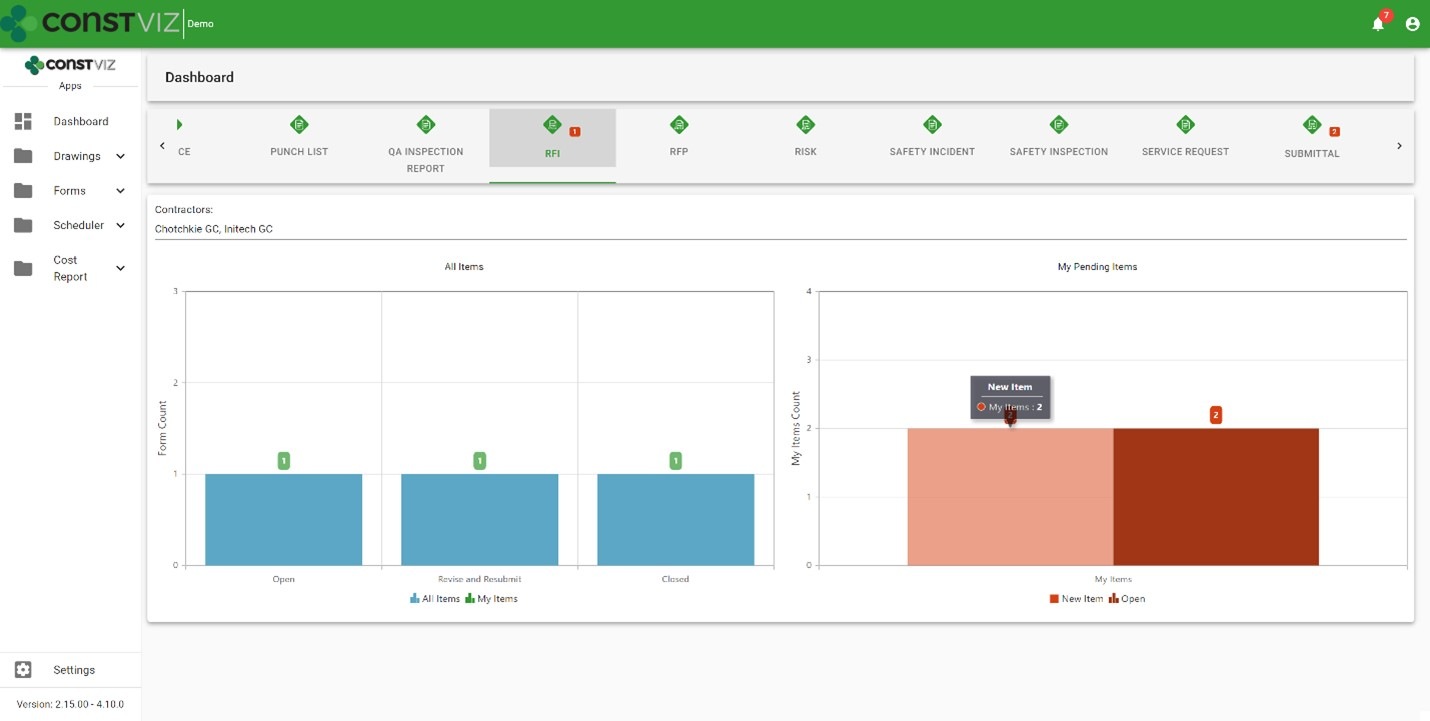
Dashboards – Dashboards display every record by status and by each reviewer so you can quickly identify bottlenecks.

Workflow-Mgmt_3

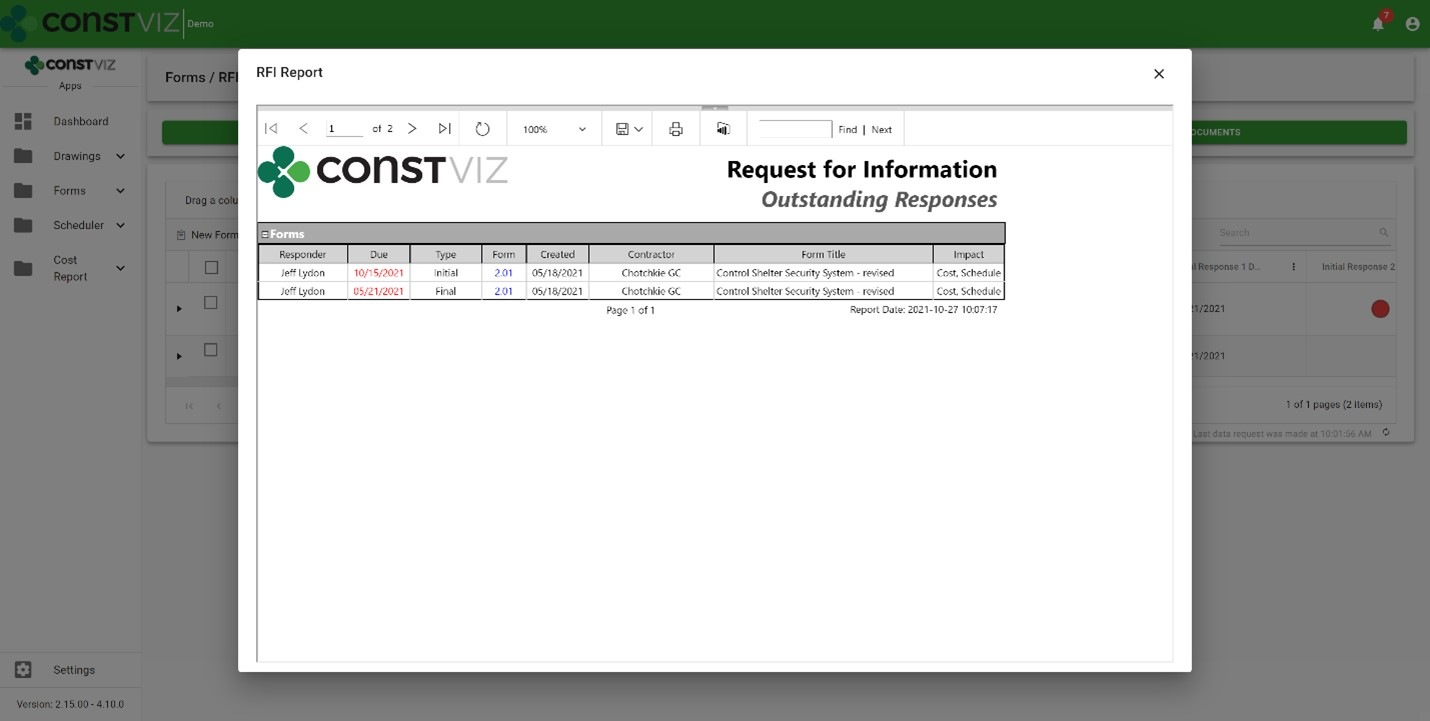
Reports – Outstanding response reports provide formal documents you can export to PDF, Excel, Word, etc.

Workflow-Mgmt_4

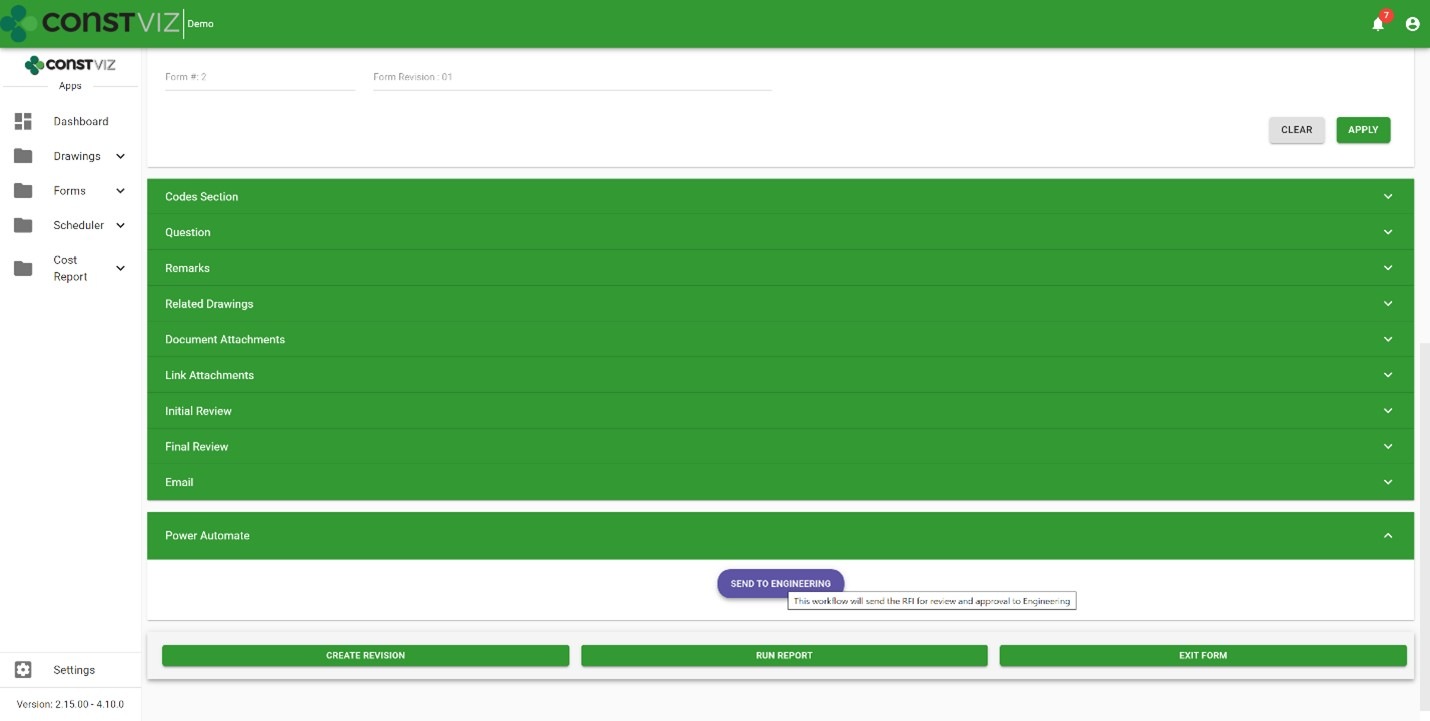
Microsoft 365 Power Automate integration – Power Automate is Microsoft's enterprise workflow solution for Microsoft 365. Construction Viz deeply integrates with Power Automate allowing users to create custom workflows and add them to any of our apps, extending the capabilities and providing unlimited possibilities. Here are a few examples:

  • Automating complex Construction Viz team review and approvals based on form conditions
  • Integrating Construction Viz data with Microsoft 365 services such as Outlook, To Do, Planner, Excel, Teams, and even external systems like SAP and Oracle.
  • Automating Construction Viz Power BI report creation and distribution
Workflow-Mgmt_5

Check out my previous blog article, Your Flows, Your PMIS: Power Automate & Construction Viz, for more information about how Construction Viz and Power Automate can turbocharge your construction project workflows.

Learn more about Construction Viz

Construction Viz is all about choice, and it is the only construction management software platform built for Microsoft 365 and designed around how you work and where you work. Find out more about Construction Viz and how we can help you manage your projects with a free, no-obligation consultation and demo.

PWAs and the future of mobile apps with Construction Viz

Project Management Tools | April 21, 2021

We built Construction Viz as a progressive web app (PWA), which offers our construction industry clients many powerful capabilities out of the box. Read on to learn about PWA technology and how it is a game-changer for construction project management.  

Traditional web apps that you install on your device have been around for over ten years. Think iPhone apps. Traditional web apps typically:

  • Require users to download an app from the Apple App Store, Google Play, or the Microsoft Store
  • Are custom-built applications that live on a specific platform, separate from the fully-featured business application
  • Require frequent updates and constant maintenance
  • Only provide a reduced or watered-down version of the complete web application.

Progressive web apps take things to the next level.

The Advantages of Progressive Web App Technology

So what is a progressive web app, how is it different from a regular web app, and why is this technology critical to delivering a leading-edge Project Management Information System (PMIS) of the future?

PWAs, unlike traditional web apps, are browser-based cross-platform mobile apps. These fully-featured applications behave just like a desktop application but run in your browser.

Progressive web apps have many advantages over traditional web apps, including:

  • They are responsive across devices for a mobile workforce.
  • They work on any modern browser.
  • They behave like desktop applications independent of the browser.
  • They allow for access to device hardware such as sensors, cameras, and GPS.
  • You can work offline (yes, the entire application, not just a form).
  • They utilize push notifications such as chat, weather updates, changes to content, event reminders within your operating system.

PWAs are are considered the future of mobile app development and many companies, including Microsoft, are making the move.

Why Progressive Web Apps Matter for Construction Project Management

There are four reasons why you, as a service worker or manager in the construction industry, should want a PMIS powered by progressive web app technology:

  1. PWAs will replace traditional apps, so you are future-proofing your investment by selecting a tool built with the latest generation of app technology.
  2. PWAs support offline access critical to construction work which often entails working in remote locations without reliable internet access.
  3. PWAs are a more cost-effective solution since there is a single application across all platforms, considerably reducing development and support costs.
  4. PWAs enable you to take advantage of any sensor tech in the end user's device or hardware, opening up advanced capabilities (like geolocation) critical to construction projects.

Lydon Solutions built Construction Viz from the ground up in React, the latest in client-side development technology, to be a progressive web app. Construction Viz users can take advantage of all the benefits of PWA technology that I described above.

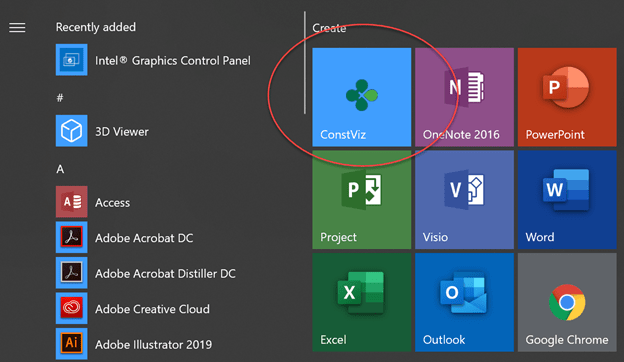
Construction Viz added to the Start menu in Windows 10

Construction Viz added to the Start menu in Windows 10

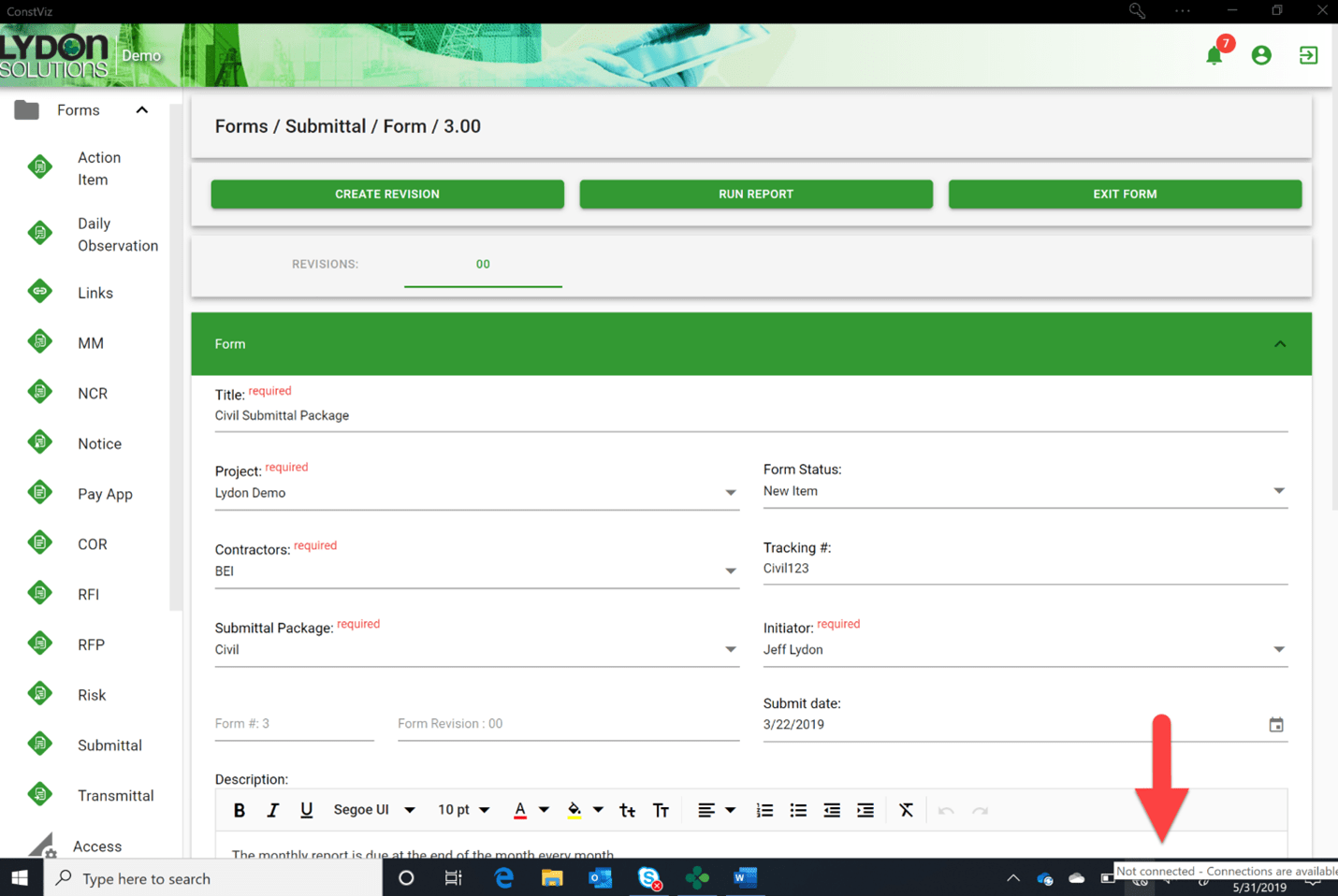
The entire Construction Viz application can go offline, not just a form

The entire Construction Viz application can go offline, not just a form

Video of Construction Viz Daily Report rendered on an iPhone (no app required)

Get a Free Consultation & Stay in Touch

We invite you to schedule a free demo and consultation to learn more about how Construction Viz can help your organization reduce cost, stay on schedule, and be more efficient with your construction programs and projects. And don't forget to signup below to join our mailing list, so you don't miss any future updates.

If you can measure it, you can manage it with Construction Viz Task Manager

Project Management Tools | February 10, 2021

Being a construction project manager is a demanding job where all responsibility for a project's success falls on your shoulders. You spend most of your time herding cats, trying to hold your team members accountable while working in a matrixed organization. It's not enough to email a team member when a deliverable is due. You need constant reminders when follow-ups are required and a simple but effective means to monitor and report progress.

We designed the Construction Viz Task Manager App for project managers like you. Construction Viz Task Manager has everything you need to plan, track, and report on your team's project and program tasks within one powerful app.

Construction Viz Task Manager Key Features

The Construction Viz Task Manager app installs easily into the Construction Viz Hub and integrates with our full lineup of construction project management apps. Task Manager provides a 360-degree approach to managing tasks, including the following features:

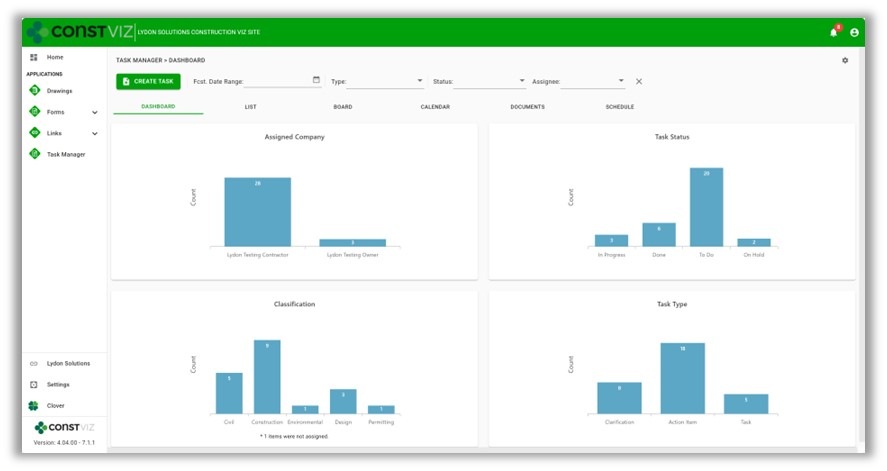
  • Dashboard summary. As a PM, your time is limited. Task Manager lets you quickly see the status of your project team's tasks in configurable dashboards with drill-down capability.
cv-tm_1
  • List view. Task Manager lets you see all your tasks consolidated into a centralized list view. You can use this pre-defined view to quickly group, filter, search, and report on your team's tasks.
cv-tm_2
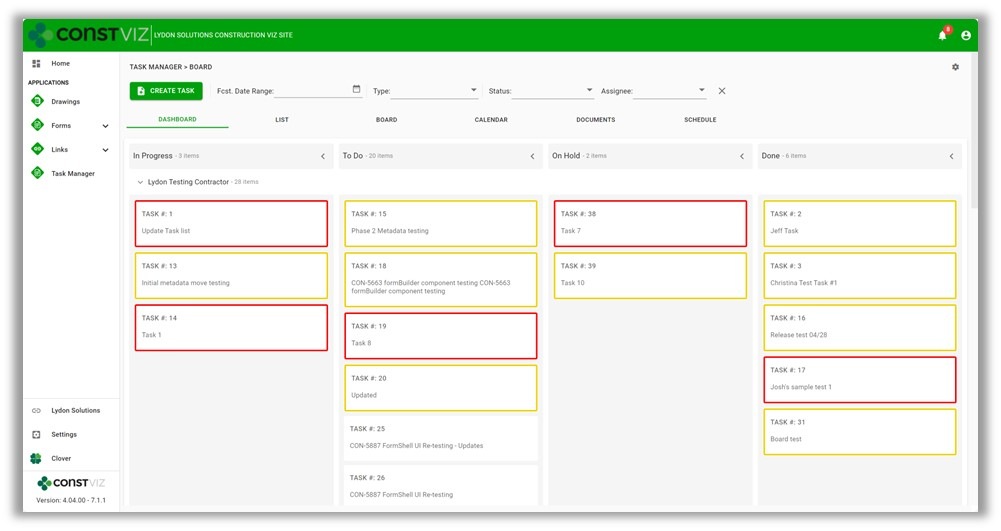
  • Board view. Want an easy way to see the progress of a task? Task Manager's board view uses a Kanban approach to managing tasks with configurable buckets and swim lanes so you can see progress made by each team member. The app highlights any behind schedule tasks in red, allowing you to target those items for immediate follow up.
cv-tm_3
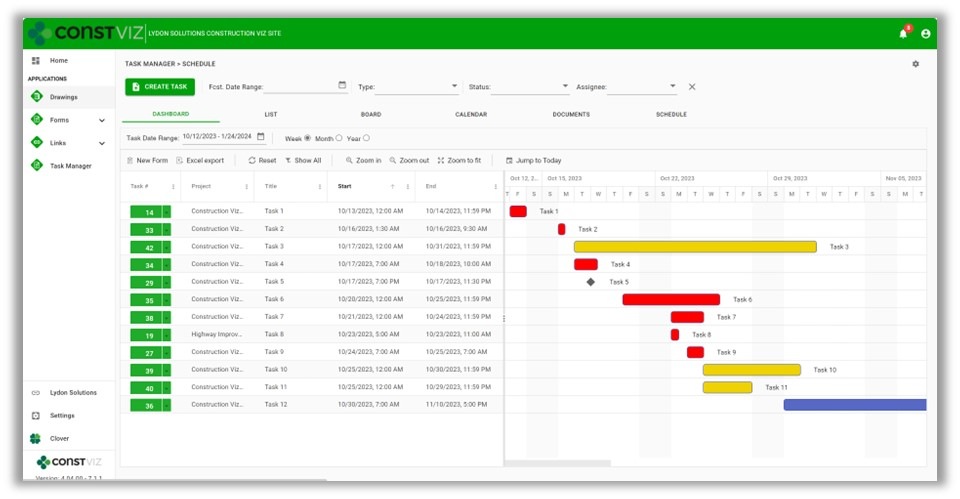
  • Calendar view. Seeing when tasks are due in a familiar calendar layout is invaluable. Task Manager's calendar allows you to proactively manage when tasks are forecast to be complete using daily, weekly, or monthly views. Since Construction Viz uses SharePoint as the backend, you can even link your Task Manager calendar to your Outlook calendar.
cv-tm_4
  • When you assign a task to someone in Task Manager, the app automatically sends the assignee an email with a link for them to take action. Task Manager integrates with Microsoft Power Automate, letting you tailor the timing and frequency of email notifications for your business processes so that frequent reminders do not go unnoticed. Like all of our apps, tasks from Task Manager also display in the Construction Viz notification center, ensuring you and your team always know about items requiring your attention.
  • Task Manager integrates with other Construction Viz forms and apps. Task Manager integrates across the suite of Construction Viz apps, streamlining your workflows. For example, if you are in a Construction Viz RFI form, you could create a task and assign it to a team member, thereby associating the two records. Now, anyone viewing the task can see the linked RFI record and vice versa. With Task Manager, you no longer have to bounce between one system to know when a task is due and another to view the work item. Everything is readily accessible and interlinked directly in all the relevant Construction Viz apps.
  • Use any device with full mobile responsive and offline support. Task Manager, like all our apps, is fully responsive on any device. You can also work offline without an internet connection.  So whether you are at the office or in the field, you can always manage your tasks.
cv-tm_5
  • Adaptive Cards integration. Task Manager takes advantage of Microsoft's Adaptive Card technology, allowing team members to work in Outlook without ever logging into any system.  Task-driven cards make it easy for team members to respond to tasks wherever they are and on any device using Microsoft Outlook. You can read more about Construction Viz and Microsoft Adaptive Cards in this blog post.

See what Construction Viz Task Manager can do for you

Construction Viz is the most flexible construction project management solution available for Microsoft 365 and SharePoint. Find out how Construction Viz and the Task Manager app can help you better manage your construction projects and programs with a free consultation and demo.

  • « Go to Previous Page
  • Page 1
  • Page 2
  • Page 3
  • Go to Next Page »

Footer

About Constructon Viz

Construction Viz is a flexible construction project management software solution powered by Microsoft SharePoint and SQL.
Read More >

Navigation

  • Home
  • About
  • Features
  • Apps
  • Blog
  • Contact
  • Login

Apps

  • Construction Viz Hub
  • Cost Report
  • Drawing Management
  • File Manager
  • GIS Maps
  • Oracle Primavera 6
  • Payment
  • Specification Management

–

  • Project Forms
  • Project Planner
  • Project Scheduler
  • Project Tracker
  • Task Manager

Connect with Us

  • This field is for validation purposes and should be left unchanged.
  • Sign up to receive helpful tips for construction project managers as well as updates about Construction Viz.

Lydon Solutions

© Lydon Solutions

  • Privacy
  • Cookies
  • Terms of Use
  • Disclaimer
  • End-user license

Click here to start a Microsoft Teams chat.

Click here to start a Microsoft Teams chat.

Contact Us
This field is for validation purposes and should be left unchanged.
Name(Required)
Join Our Newsletter

Sign up to receive helpful tips for project managers and updates about Construction Viz.

Get Started

Join Our Newsletter

Sign up to receive helpful tips for construction project managers as well as updates about Construction Viz.

  • This field is for validation purposes and should be left unchanged.
  • This site is protected by reCAPTCHA and the Google Privacy Policy and Terms of Service apply.