• Skip to primary navigation
  • Skip to main content
  • Skip to footer
Construction Viz

Construction Viz

Project Management Perfect

  • About
  • Features
  • Apps
  • Blog
  • Contact
  • Download Flyer
  • Get Started Today
  • Login
Show Search
Hide Search

Project Management Tools

Notification Overload? Construction Viz for Microsoft 365 Can Help

Project Management Tools | May 15, 2024

In today’s connected world, people are bombarded with electronic notifications at home, at work, and across multiple devices. The onslaught of these automated messages that require your attention can become overwhelming and eventually lead to ignorance, especially in the construction industry. With Construction Viz, we put you in charge of your notifications. We aim to make notifications meaningful and unique to your specific project needs. Read on to find out more.

Control Your Project Notifications with Construction Viz

Over the years of deploying enterprise construction management systems, we found that users can face burnout when inundated with notifications all day, especially when they are not actionable.

With Construction Viz, we built a notification framework that can be unique to your projects by implementing the following features:

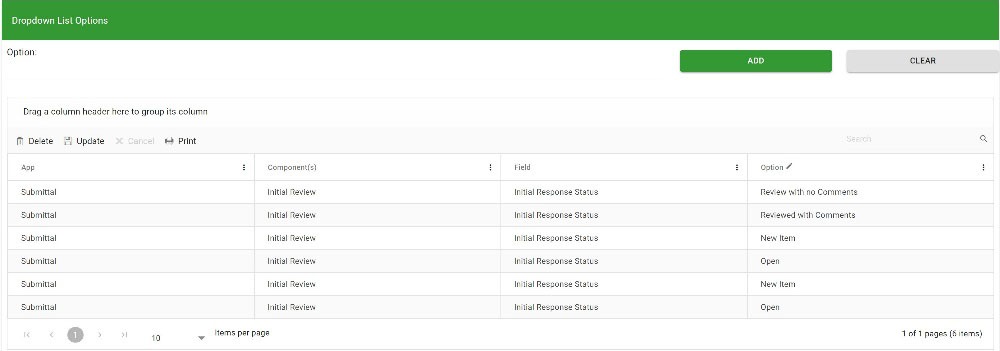
  • Custom response statuses: Admins can create their own unique statuses for every app. So, if you have statuses like New, Open, Revise & Resubmit, Accepted, and Closed in a Submittal form, you can create those yourself and set a default status when creating a record.
Notfis_1
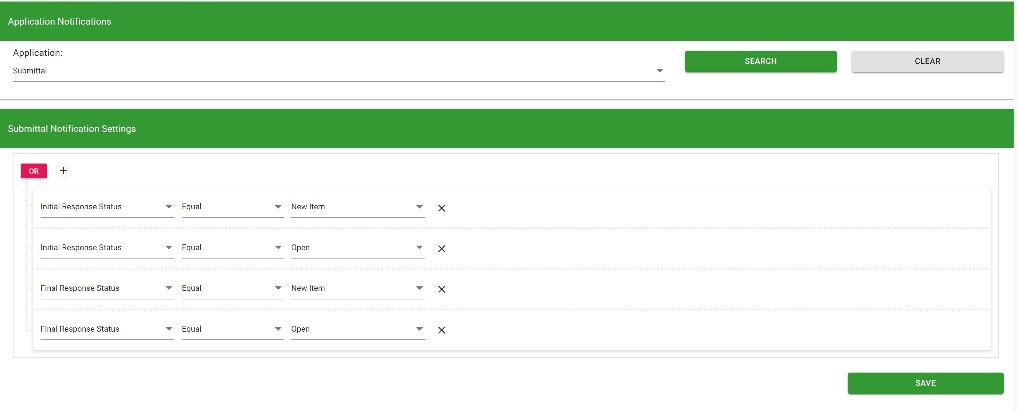
  • Actionable notifications. In addition to creating your own statuses, you can set which statuses, at each phase, will be posted to the notification center for users to take action.
Notfis_2
  • Dashboards. Every app in Construction Viz includes an out-of-the-box dashboard, but you can supplement it with Power BI reports if needed. Check out the link here on Power BI and Construction Viz. These dashboards display the status of all the records and notifications specific to you. Also, the dashboards can drill down into a filtered view of the records.
https://constructionviz.com/wp-content/uploads/2024/05/Notifs_Dashboards.mp4
  • My Action Required views. Every app grid in Construction Viz includes a My Action Required toggle where you can quickly see all the records you need to action on.
  • Microsoft 365 applications. In addition to Construction Viz-specific notifications, Microsoft 365 applications can be utilized to bring notifications directly to your daily workflow.
    • Email. All of our applications can automatically send emails to users, or you can send ad hoc emails to users or groups to take action.
    • Microsoft Teams Approvals. Using Microsoft Power Automate, workflows can be used to send notifications to Teams, so if you find yourself working in Teams, you will receive a new Activity and Approval.
    • Adaptive Cards. Suppose you prefer to work in Outlook or Teams. In that case, Adaptive Cards offer a unique opportunity to surface only key fields in mini-applications that can be embedded into Outlook email and Teams chats, providing the ability to view and respond without having to open Construction Viz. Check out this article to find out more.

Instead of getting frustrated with notifications that aren’t relevant or actionable, Construction Viz can help. Construction Viz is a unique platform to manage your construction projects the way that works best for you. To find out more about how Construction Viz can help you manage your projects in Microsoft 365, you can request a demo here.

Get a Free Consultation

  • This field is for validation purposes and should be left unchanged.

Overwhelmed with Project Documents? Construction Viz Can Help

Project Management Tools | May 1, 2024

So you moved to Microsoft 365 to manage your project documents - well done! SharePoint, Teams, and OneDrive are all great products for organizing projects, but they can create an even worse nightmare if not used correctly.

With Construction Viz for Microsoft 365, we feel your pain and are here to help clean up the mess and get the project managers back to doing what they do best: managing projects.

Managing Construction Project Documents

Let's face it: managing project documents can be challenging, even if you have a document control specialist and are using Microsoft 365.

You need to consider many factors and the downside of going it alone when managing your documents:

  • Metadata. Metadata helps you organize and find data. You can add columns or folders to organize your files better, but it requires upfront planning and setup by the entire team.
  • Approvals. Most documents go through some approval process. Are you going to create a Power Automate workflow for approvals? Most likely, no.
  • Supporting documentation for forms. When you create or submit forms such as an RFI or submittal, you fill out a cover sheet (the form) and attach the relevant files. You must decide where to store those files and how to reference them. If you are unfamiliar with Microsoft 365, this might pose a challenge.
  • Revisions. Documents such as drawings go through revisions. How can you ensure the team is working on the latest revision but still has access to all prior revisions? Other records, such as RFIs, go through revisions; how will you handle form revisions?
  • Views. Once you upload all your files, you need a way for everyone to find and search for the documents. Are you going to create these views? What if a user seeks a specific file in a project? If you are using folders, making users hunt and peck through layers of folders is inefficient. You could create and configure a search hub, which can be complex and time-consuming.

You get the picture. There is a lot of upfront planning, and you must understand how to use Microsoft 365 effectively to manage your documents.

Construction Viz Simplifies Project Document Management

With Construction Viz, we have you covered. We thought through all the above challenges and provided even more functionality, so you don't have to worry about any of the upfront planning and complex administration.

Some of the great features of Construction Viz include:

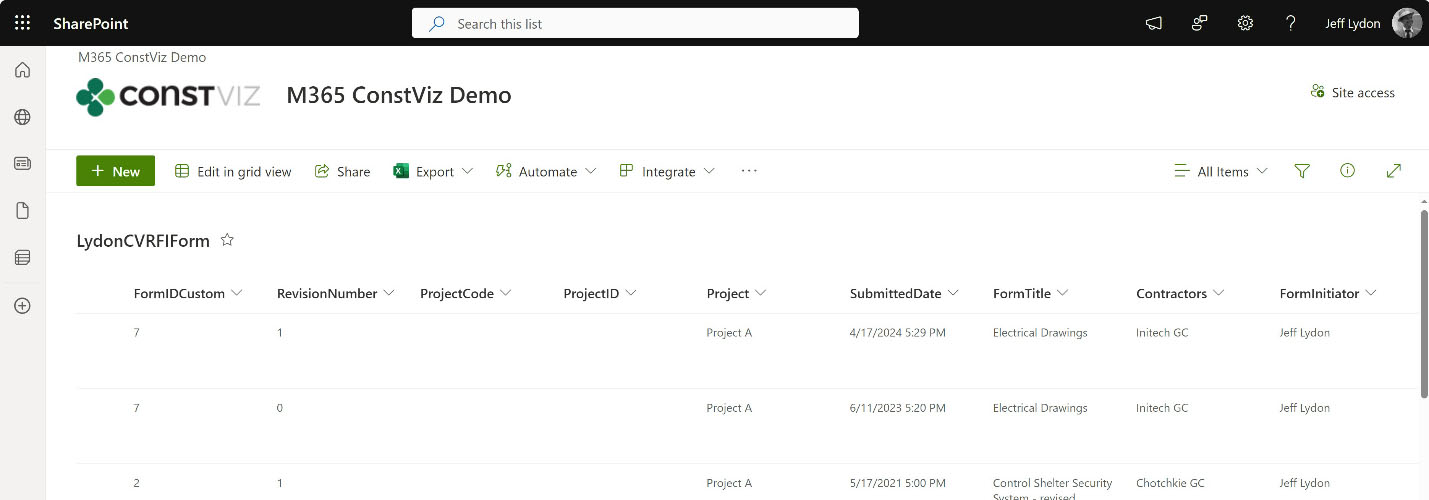
✔ Metadata assignment. Metadata is automatically assigned and stored in SharePoint when you save a form or document.

Doc-Mgmt_1

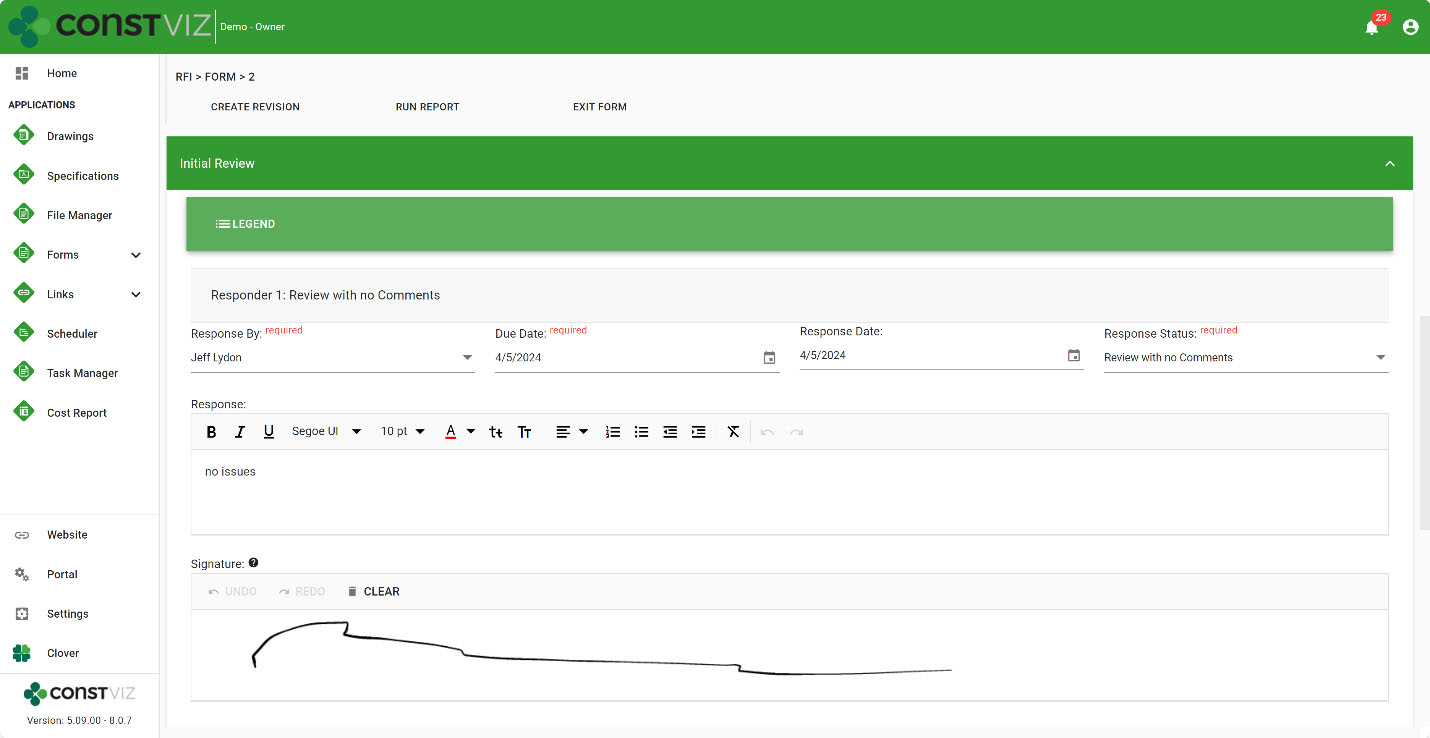
✔ Electronic approvals on everything. Construction Viz allows as many approvals as you would like with any app and even includes e-signature approvals. You get ball-in-court reporting and automatic notifications of tasks due so you can stay on top of your workload. You can have automatic approval emails sent, or you can select a person or group to send emails with all of the email history captured in app-specific logs.

Doc-Mgmt_2

✔ Data resides securely in your SharePoint. All documents are organized and stored securely in your SharePoint lists and libraries, so you know where your data is at all times and have access to it 24x7.

Doc-Mgmt_3

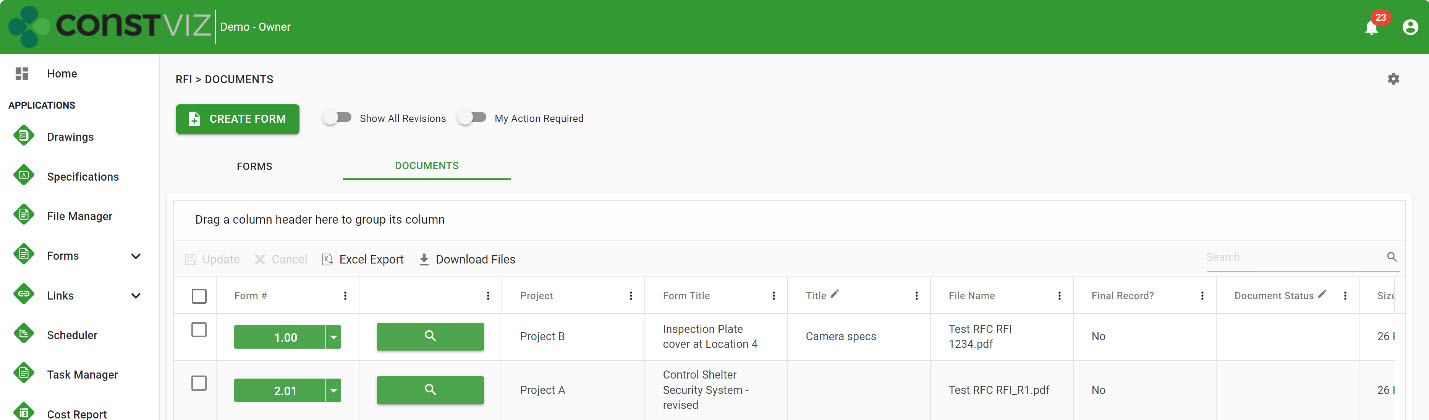
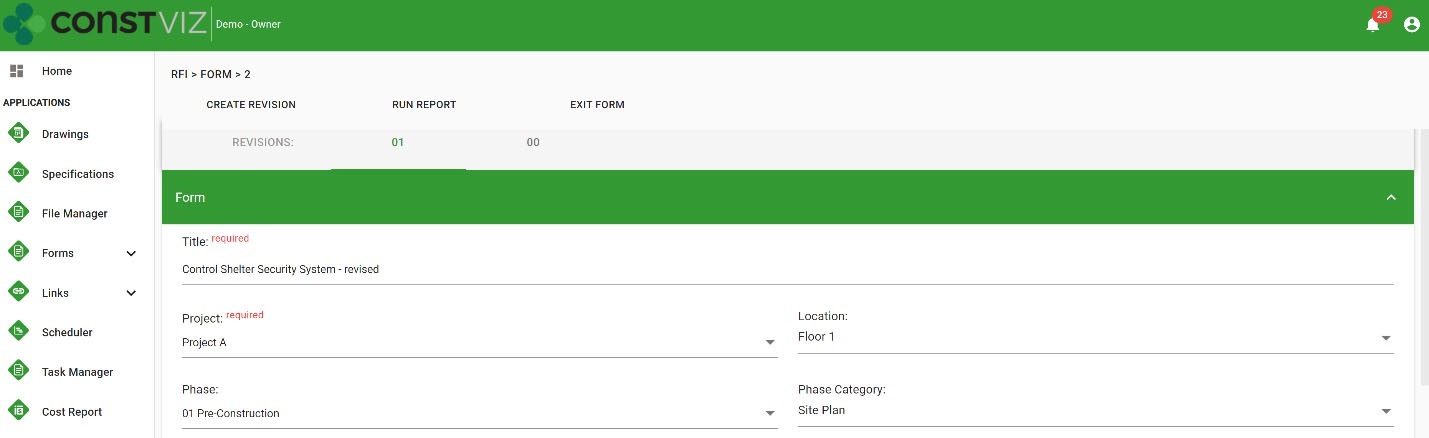
✔ Controlled revision management. Forms and documents have revision management features so that you can easily replicate, track, report, and access the latest revision and all previous revisions with a simple toggle.

Doc-Mgmt_4

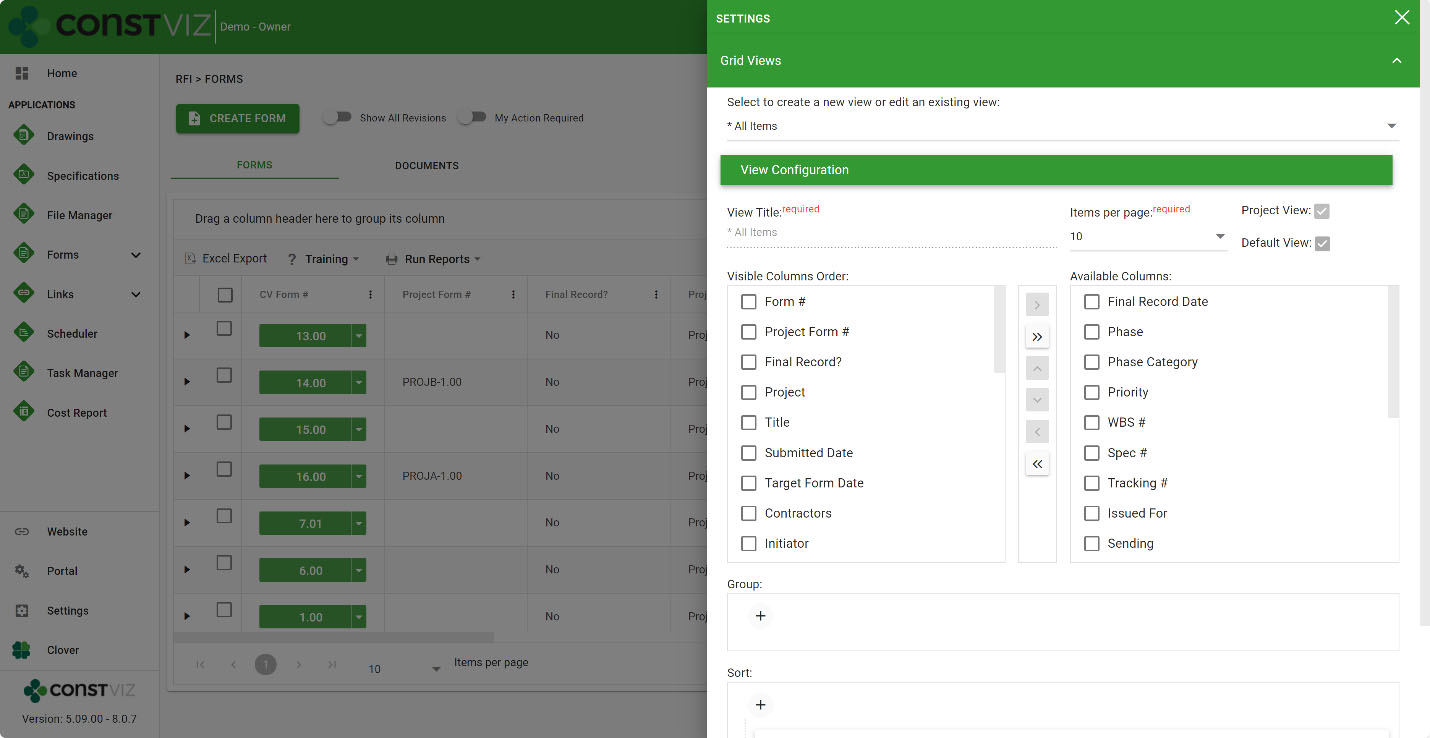
✔ Custom Views. Every Construction Viz app has a predefined set of views so that you can take action quickly. Also, you can copy, edit, and create custom views for more in-depth analytics.

Doc-Mgmt_5

Construction Viz lets you get back to spending time constructing projects and less time administering them.

Want to organize your project documents in Microsoft 365? Use the form below to request a demo of Construction Viz. If you're not ready for an enterprise construction management solution but still need help organizing your files, request a free one-hour consultation at LydonSolutions.com.

Get a Free Consultation

  • This field is for validation purposes and should be left unchanged.

Project Time Tracking in the Construction Viz Task Manager

Project Management Tools | April 18, 2024

Outside of when the task was completed, how many hours it took to perform it is the second most asked question. Project Managers need to know the level of effort to compare it against estimated hours, add hours to billing, check efficiencies, or manage labor utilization. Accurate construction project time tracking is thus essential to every project.

With the Construction Viz Task Manager, we continue to extend the functionality so that everything you need to manage a task is included in the application, including time tracking.

Construction Project Time Tracking

Everything in project management, and life in general, comes down to managing a series of tasks. Effectively managing the who, what, when, where, and why of tasks can lead to a successful project.

We see task management as a cornerstone of project management, which is why, with Construction Viz, we are beefing up resource management features so that you can manage tasks how you want to manage them. One of those critical features is detailed construction project time tracking.

Key Features of the Construction Viz Task Manager App

The Construction Viz Task Manager might seem familiar to those who use Microsoft Planner and MS Project for the Web. But we designed the app for construction projects with the ability to customize it to your unique processes.

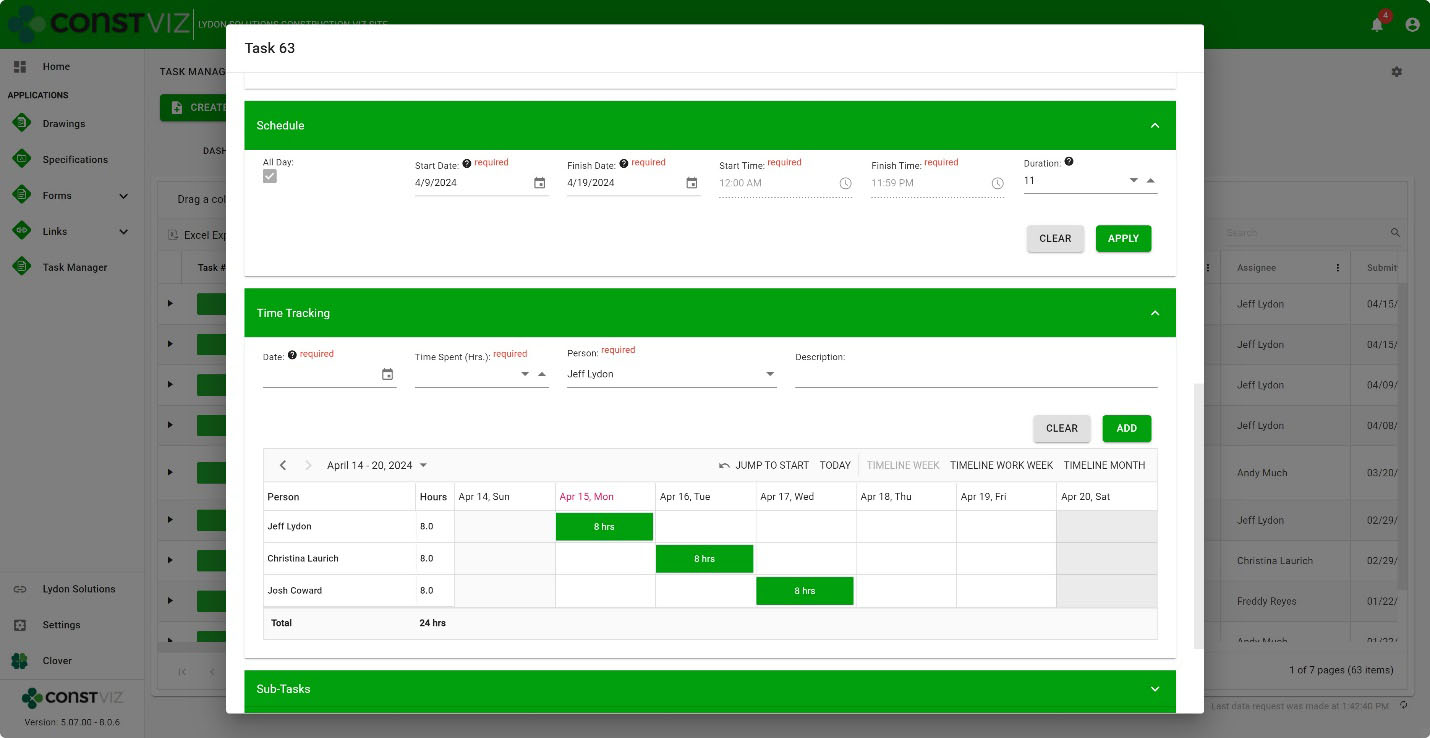
The Construction Viz Task Manager’s new Time-Tracking component can be activated in a task and works with the Schedule component. Resources and hours can be assigned daily based on a task’s scheduled start and finish dates.

Time-Tracking

The interface is simple but powerful under the hood. Add resources, the description of work, hours, and the specific day in a weekly or monthly view. Records are saved to SharePoint lists, so the data is always available for you to create your own Power BI reports.

And, because Construction Viz utilizes your Microsoft 365 SharePoint Online lists and libraries, you can rest assured that the data securely resides in your Microsoft 365 tenant.

The Construction Viz Task Manager is one of many applications that round out a suite of apps to help you manage your projects. If you want to learn more, use the form below to request a demo.

If you are not ready for an enterprise construction management solution but need help with Microsoft 365, you can request a free one-hour consultation here.

Get a Free Consultation

  • This field is for validation purposes and should be left unchanged.

Old School Meet the New School: Construction Viz File Manager

Project Management Tools | February 6, 2024

There are two camps for how to store project files in a project management information system (PMIS): use folders or tag files with metadata. Both approaches have their advantages and disadvantages. With the new Construction Viz File Manager, you can choose either method or both for your projects. Read on to find out how the Construction Viz File Manager can help you manage your project documentation how you want.

File-Mgmt_1

Like the cola wars between Pepsi vs. Coke, storing project files in folders or tagging files with metadata has proponents firmly dug in on both sides of the argument. Knowing that these two camps are resistant to change is why Microsoft offers multiple applications like OneDrive and SharePoint, which store files differently (but they are becoming more similar with each new release).

The case for storing your files in folders

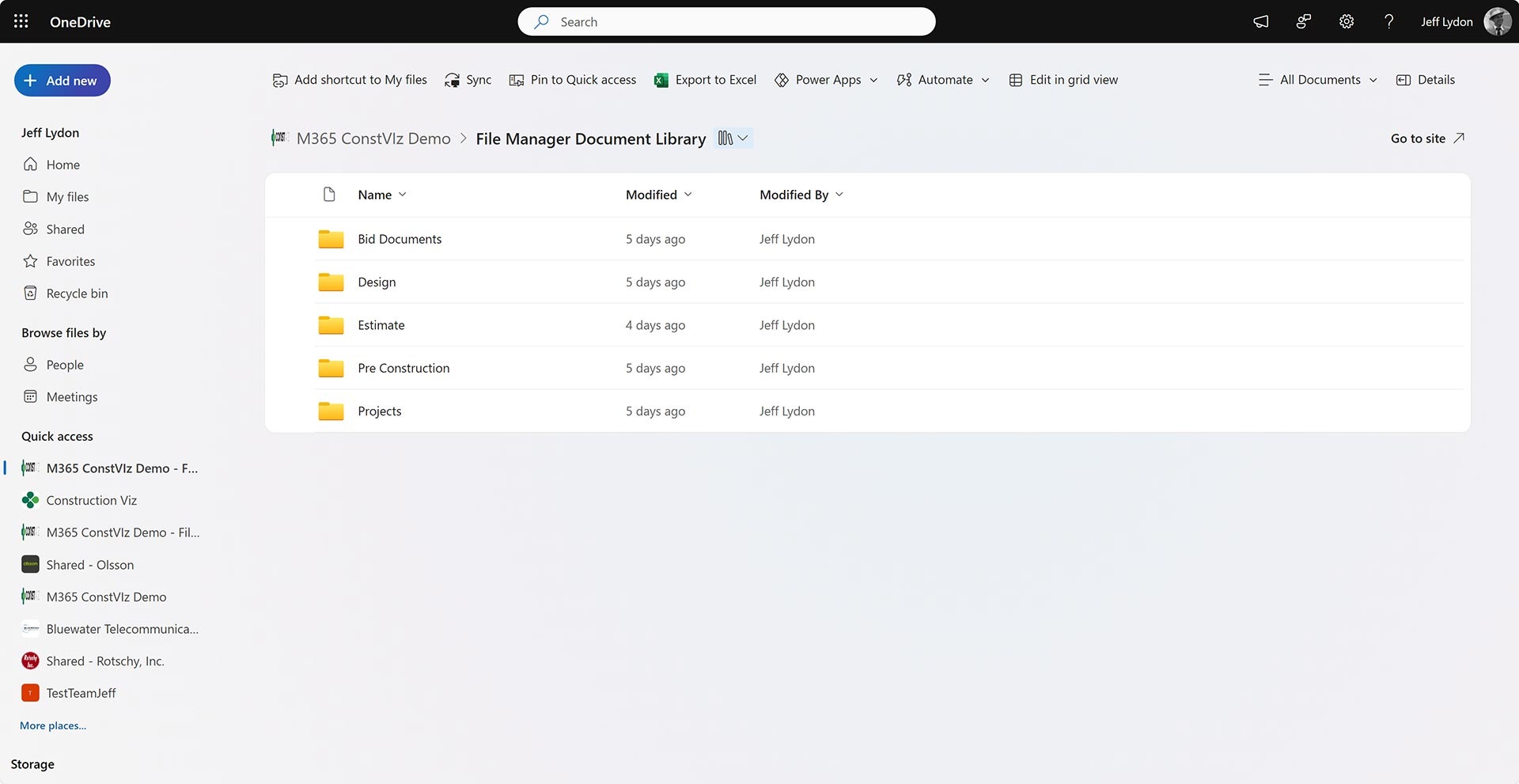
The old-school approach to managing files has always followed the same approach as Windows Explorer, where you drag and drop files into named folders.

A folder-based approach makes storing files simple, but finding them when needed can be challenging depending on the folder hierarchy. You can use search in some instances to find your files by reading the data within them. However, you must often understand the folder structure to find your desired file.

Microsoft 365 OneDrive home screen with folders.

The case for organizing your files with metadata

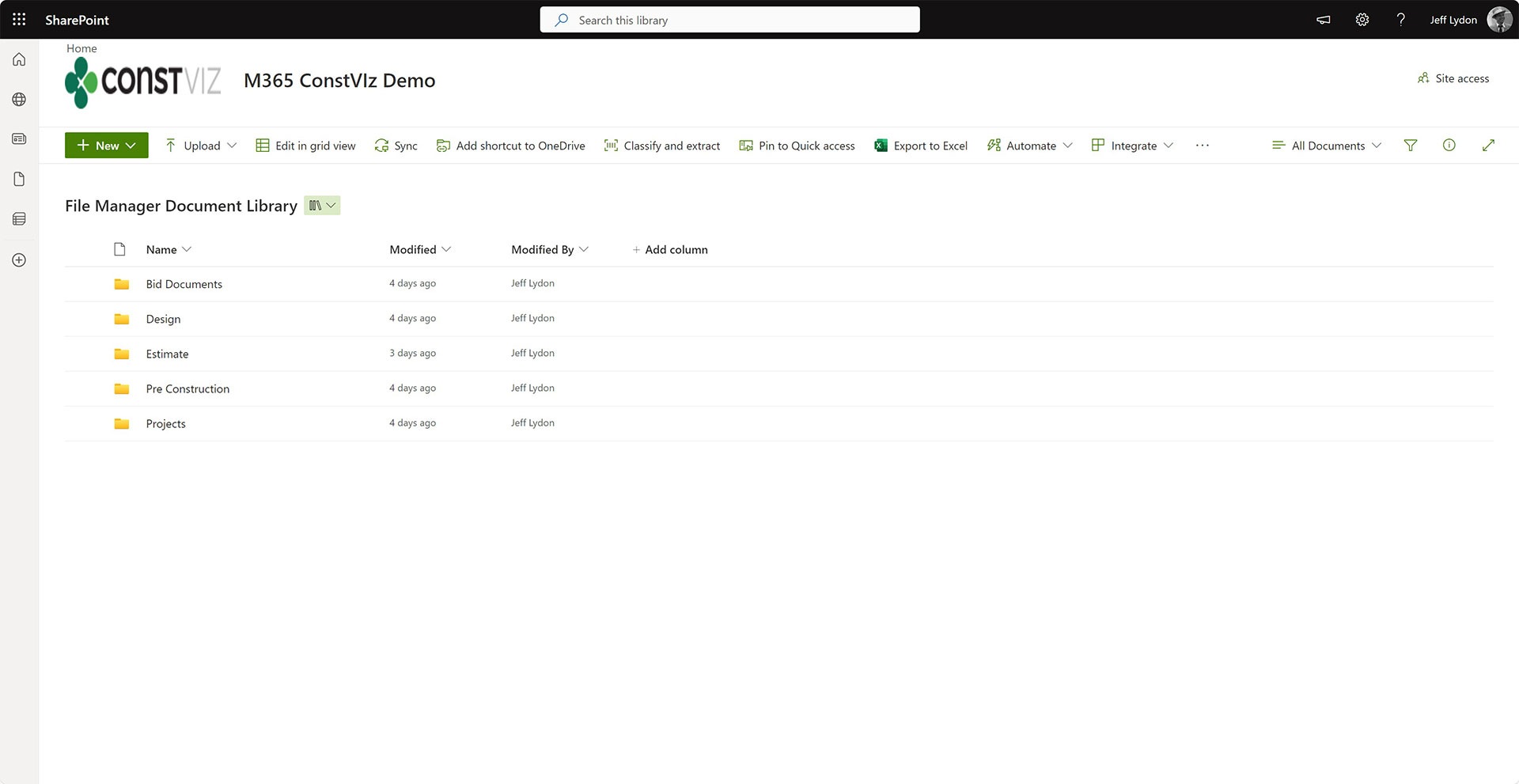
If you tag files with metadata, you can search, filter, and report on those tags, but it does force some up-front work. The person uploading the file must tag data (depending on how you set up the drop-off workflow) to the file in order to effectively search for the file later. So, while metadata tagging is excellent for document control, it can frustrate users on the front end.

SharePoint Document Library with metadata columns Project and Location.

With Construction Viz, we have been a metadata tagging proponent. The more metadata you collect, the more reporting and analysis you can do. So, we structured the system around metadata collected via our form technology. If users preferred to use folders, we would link to SharePoint libraries or OneDrive since we stored data in SharePoint. But with our File Manager app, things are about to change.

How can I use both metadata and folders?

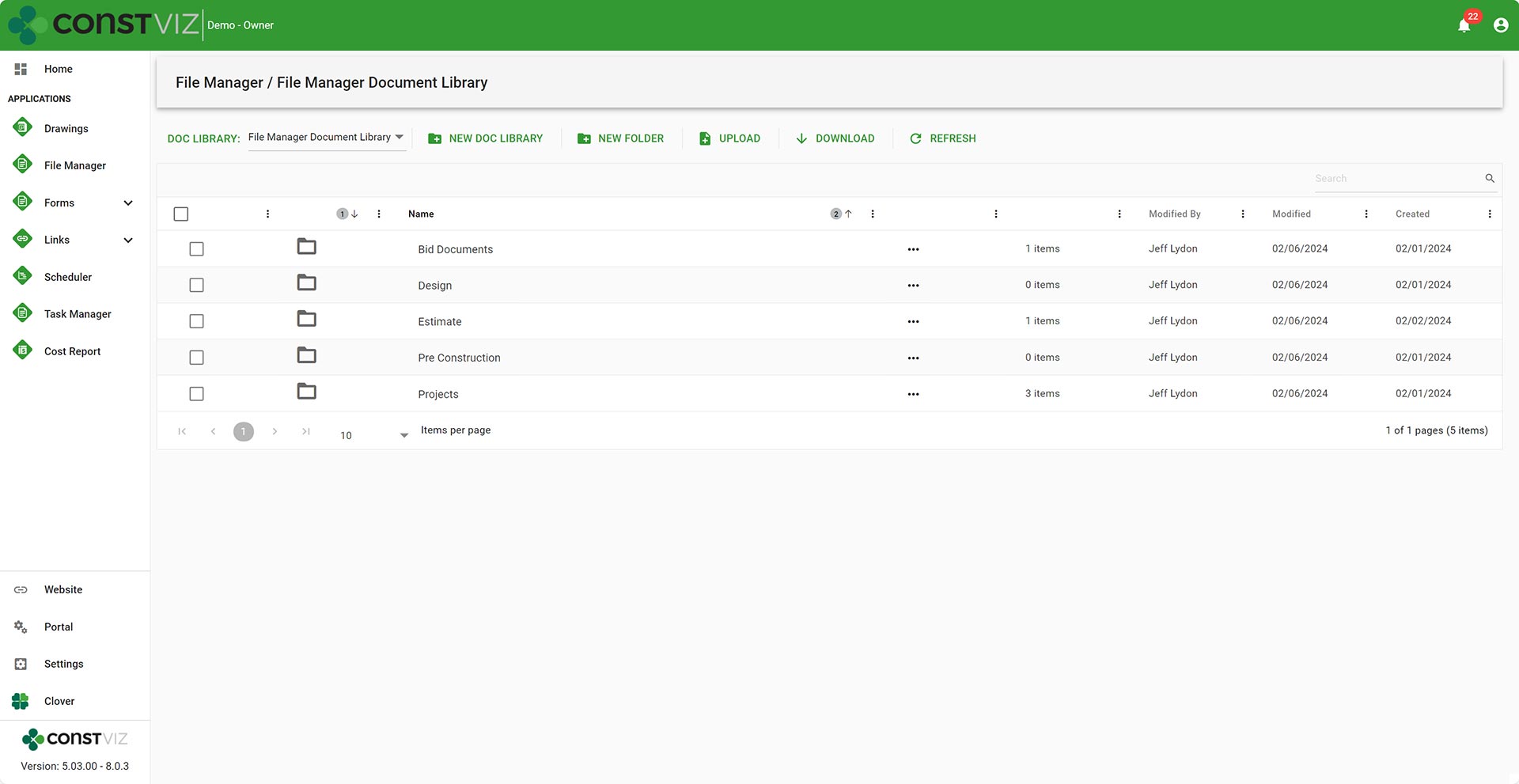
The new Construction Viz File Manager provides the folder management file storage that users love without leaving the Construction Viz hub. Users can build out a custom folder structure similar to OneDrive or Windows Explorer and can link files into forms within Construction Viz.

File-Mgmt_C
SharePoint Document Library with metadata columns Project and Location.
Microsoft 365 OneDrive home screen with folders.

The File Manager seamlessly integrates SharePoint, OneDrive, and Teams files. 

The File Manager boasts the following capabilities:

  • Select any document library in your SharePoint site to create folders or upload documents without having to navigate to SharePoint.
  • Select the default documents library in SharePoint to have files synced across Teams, OneDrive, and SharePoint automatically.
  • Upload files using our standard document attachment uploader that checks file names and allows editing files on the fly.
  • Link files stored in the File Manager to other Construction Viz applications, such as RFIs, submittals, and daily reports.

With the Construction Viz and the new File Manager app you get the best of both worlds of both folders and metadata. You can store files in folders like Windows Explorer or tag them with metadata automatically when adding them as attachments to our forms.

Video overview of the Construction Viz File Manager app

We continue to focus on delivering solutions that meet you where you work and how you work. The File Manager is one of many applications we have implemented that allow you to make the most out of Microsoft 365 to manage your construction projects. You can find out more about Construction Viz here or request a free one-hour consultation with our Microsoft 365 professionals.

New eSignature Feature for Construction Viz 

Construction Viz, Project Management, Project Management Tools | December 20, 2023

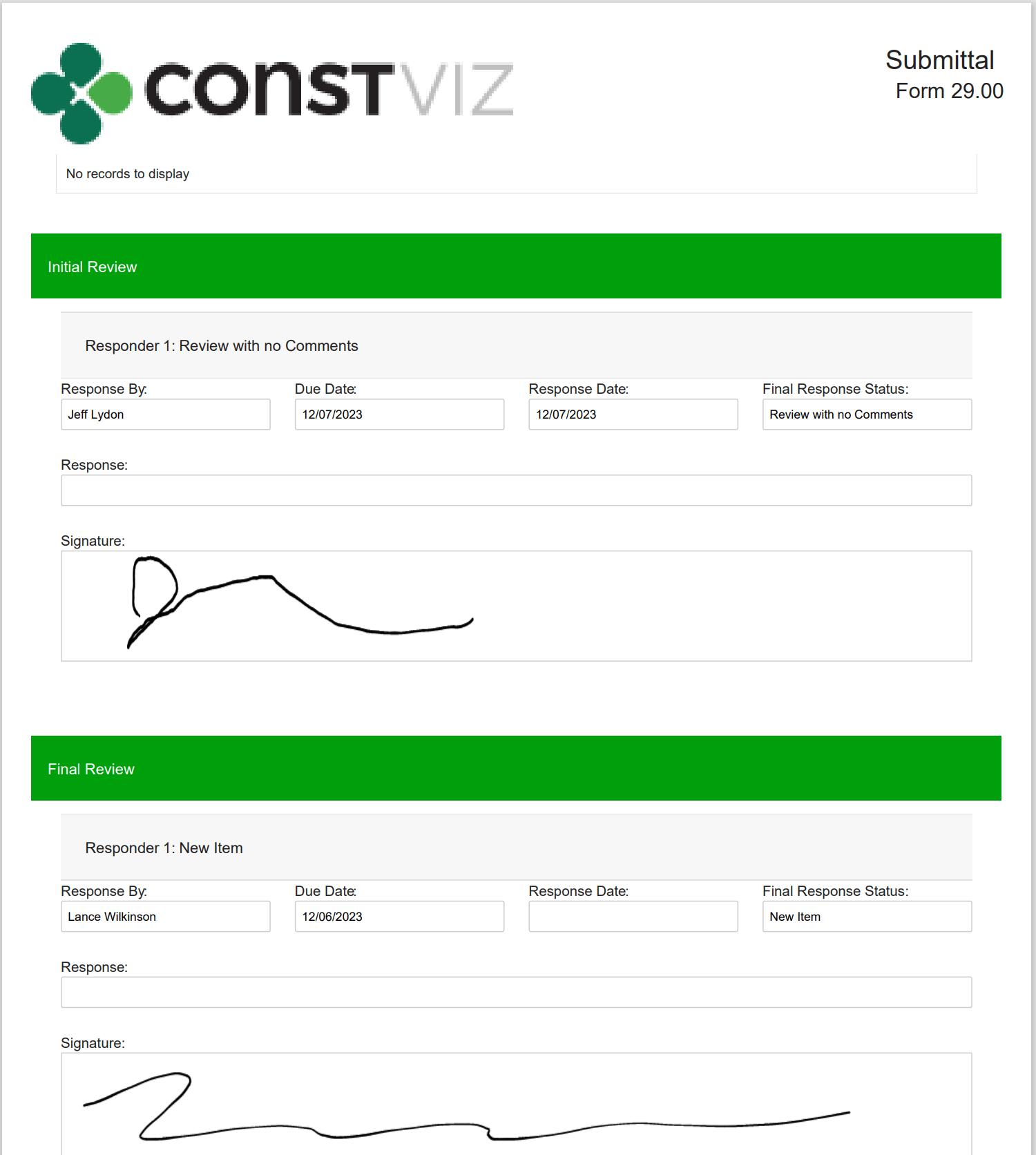
As construction organizations move from paper processes to web-based project management tools, the adoption of electronic approvals has been mixed. Clicking an approved button that registers your account name and date is standard in most construction management systems. However, some organizations and specific forms still require digital or wet signatures. While several electronic signature tools are on the market, their ease of use and cost can be a deterrent. We added a free and easy-to-use digital signature feature to Construction Viz to capture signatures in any of our forms. Read on to discover how our simple signature feature might address your challenges. 

Several signature solutions are available for SharePoint, including the new built-in SharePoint eSignature subscription service that will be available soon. The benefit of these tools is that files that receive signatures never leave your Microsoft 365 tenant, ensuring your data remains secure and in your control.  

Leveraging these eSignatures through SharePoint is great but does require additional subscription costs and administration. What if you want something simpler and at no extra cost?  

Construction Viz eSignatures Feature for Construction Forms

Picture1

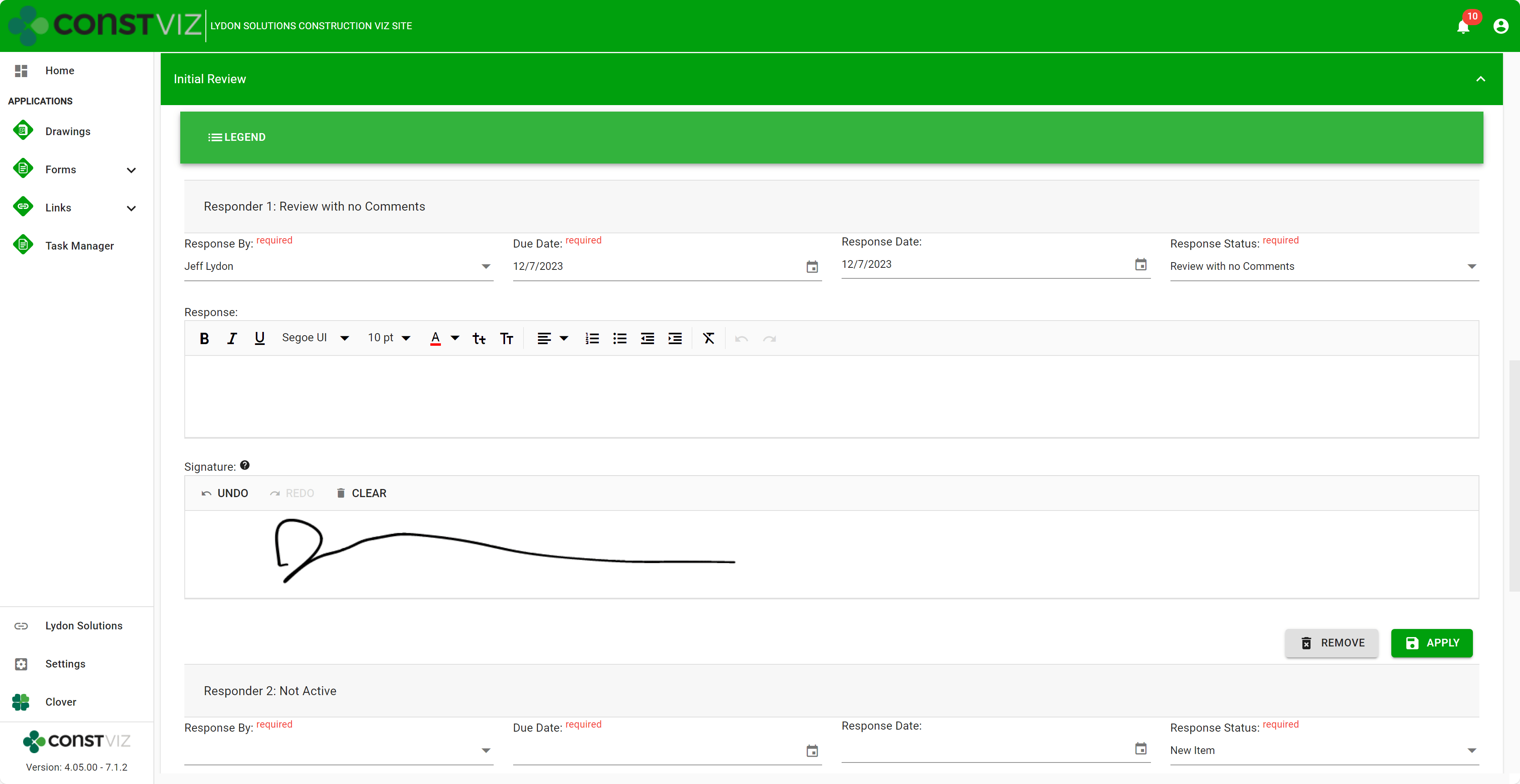
With the Construction Viz eSignature feature, signatures are available on any form in the review components. For example, say you want an inspector to sign a daily report digitally. We can activate eSignatures in your Construction Viz settings to automatically add eSignatures to all your daily report forms. 

Since this new eSignature feature is built into Construction Viz, we included additional controls such as: 

  • Only the user assigned the review can sign their signatures. 
  • If a user is removed from the reviewers, their signature is removed as well.  
  • Administrators are restricted from signing on behalf of a user.  
  • eSignatures are available on any Construction Viz form! 
  • eSignatures print in form reports! 
Picture2

Our new eSignature feature is perfect if you need a simple, free solution within Construction Viz. You can find out more about Construction Viz by requesting a demonstration here. 

Construction Viz Task Manager 2.0 – Gantt Charts Coming to Task Management

Project Management, Project Management Tools, Scheduling | November 28, 2023

The Construction Viz Task Manager app for Microsoft 365 delivers a simple yet powerful way to track and report on project tasks. It is a stand-alone application in Construction Viz but can be integrated into any other application, such as RFIs, Submittals, or Meeting Minutes. With the latest update, we’ve moved the needle significantly on project task management to include scheduling, checklists, and sub-tasks!

Read on to find out more about how our updated Task Manager app can help you organize and track tasks for your projects.

What is New in Construction Viz Task Manager 2.0

We built the Task Manager so that team members have a 360-degree view of project tasks. The Task Manager includes the following views:

  • Dashboard – Displays charts of key metrics with drill-down capability.
Picture1
  • List – Provides a log of all tasks with filtering, grouping, and search.
  • Board – Displays a Kanban view for updating the status of tasks.
  • Calendar – Plots tasks on a familiar calendar with today, day, week, month, and agenda views.

With the latest Task Manager release, we are extending the functionality to include lightweight scheduling. So, if you are looking for a three-week look ahead project schedule tool or prefer a Gantt chart-style view of your tasks, we’ve got you covered.

This release includes the following updates to the Task Manager app:

  • Schedule View – A new view that displays all tasks in a familiar Gantt chart schedule. The schedule includes scheduling controls to filter and change displays.
Picture2
  • Task Schedule component – We added a scheduling component to the task form for managing start and finish dates, times, all-day events, and durations.
  • Task Checklist component – We added a checklist component to the task form to track items needed to complete the overall task. The checklist allows for drag-and-drop ordering, auto-assign completed by, and completed dates.
  • Sub-task component – We added a component to the task form to add sub-tasks to a task. Sub-tasks include fields for the required by date, forecasted completion date, status, and percent complete.
  • Visual alerts – We updated the mouse-over tooltips and added color indicators across views to display late and incomplete tasks. These visual alerts will help project teams stay on track.
Picture3

While these updates are significant, we are just getting started. We plan on further extending the scheduling capabilities of the Construction Viz Task Manager app, including dependencies and resource management. Stay tuned as we continue to deliver a leading-edge task management solution with Construction Viz for Microsoft 365!

Sign up today for a no-obligation demo to learn how Construction Viz can help your organization manage your construction projects more efficiently.


  • Page 1
  • Page 2
  • Page 3
  • Go to Next Page »

Footer

About Constructon Viz

Construction Viz is a flexible construction project management software solution powered by Microsoft SharePoint and SQL.
Read More >

Navigation

  • Home
  • About
  • Features
  • Apps
  • Blog
  • Contact
  • Login

Apps

  • Construction Viz Hub
  • Cost Report
  • Drawing Management
  • File Manager
  • GIS Maps
  • Oracle Primavera 6
  • Payment
  • Specification Management

–

  • Project Forms
  • Project Planner
  • Project Scheduler
  • Project Tracker
  • Task Manager

Connect with Us

  • This field is for validation purposes and should be left unchanged.
  • Sign up to receive helpful tips for construction project managers as well as updates about Construction Viz.

Lydon Solutions

© Lydon Solutions

  • Privacy
  • Cookies
  • Terms of Use
  • Disclaimer
  • End-user license

Click here to start a Microsoft Teams chat.

Click here to start a Microsoft Teams chat.

Contact Us
This field is for validation purposes and should be left unchanged.
Name(Required)
Join Our Newsletter

Sign up to receive helpful tips for project managers and updates about Construction Viz.

Get Started

Join Our Newsletter

Sign up to receive helpful tips for construction project managers as well as updates about Construction Viz.

  • This field is for validation purposes and should be left unchanged.
  • This site is protected by reCAPTCHA and the Google Privacy Policy and Terms of Service apply.