• Skip to primary navigation
  • Skip to main content
  • Skip to footer
Construction Viz

Construction Viz

Project Management Perfect

  • About
  • Features
  • Apps
  • Blog
  • Contact
  • Download Flyer
  • Get Started Today
  • Login
Show Search
Hide Search

construction viz

View Your Data Your Way with Construction Viz Saved Views 

Forms | January 9, 2024

Construction projects generate a ton of data that must be tracked and analyzed in real-time. With our latest update to Construction Viz, we wanted to make our form app data views even more powerful by adding the ability to create, edit, and save personal and project views for the entire team to use. Read on to discover how this new feature will allow you to analyze and report on your data quickly and easily.

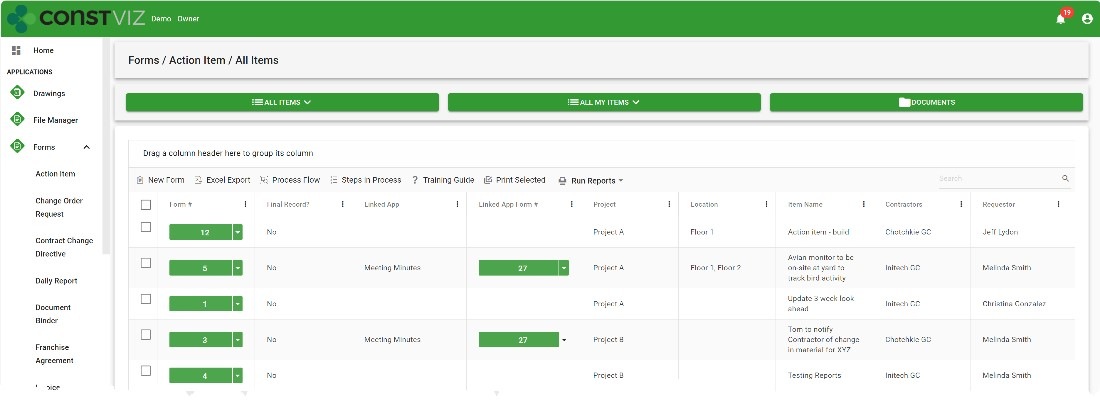
Construction Viz already includes configurable data views across all our apps. Users can group, sort, filter, reorganize, and search on form columns to get to meaningful data quickly. However, we wanted to provide more capabilities to allow users to create and save their personal and project data views. Since Construction Viz stores your data in your Microsoft SharePoint lists and libraries, we took inspiration from the view configuration options in SharePoint but further enhanced its capabilities for construction management.

New Construction Viz Saved Views UI

We had to make a few changes to our user interface to deliver the new saved views feature in Construction Viz. While maintaining most of our core structure, we re-designed the layouts to align with our Task Manager app for the ultimate flexibility when visualizing data in different configurations.
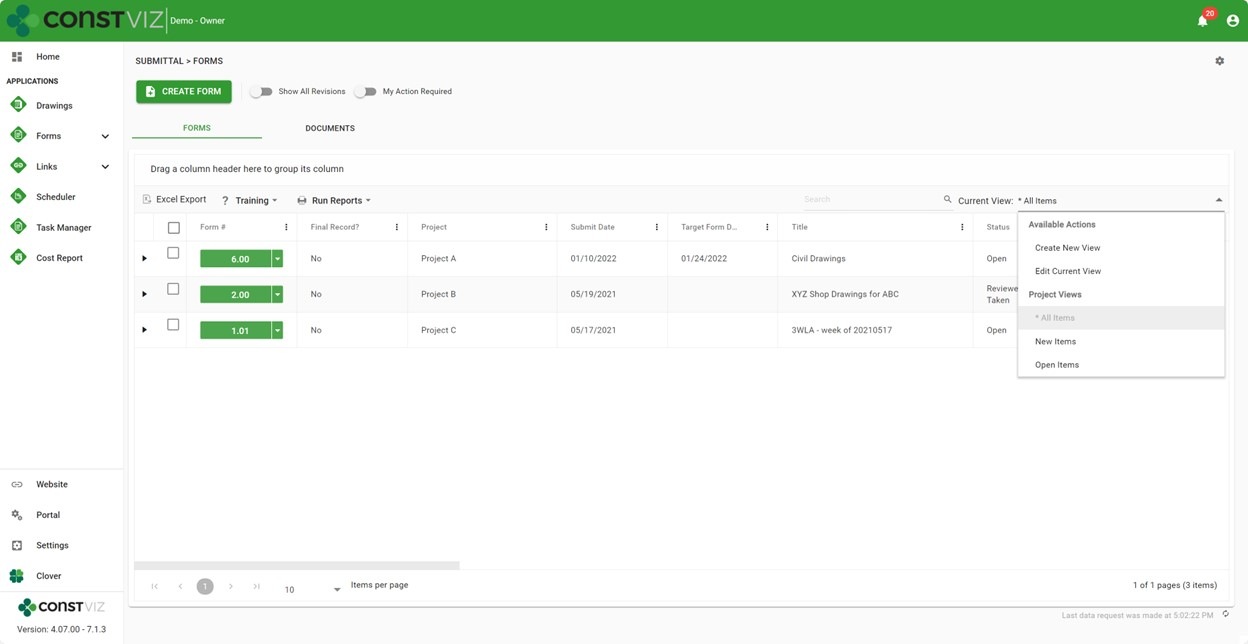
New Construction Viz Saved Views UI

Now, we can display different data configurations in grouped tabs, such as dashboards, lists, attachments, Gantts, geospatial maps, and calendars. The new tab structure lets users quickly move between different data configurations while keeping the filtering persistent.

We've also added an app-specific settings cog for saved views and future setting enhancements. Users can now create, edit, and save data views from within the app-specific settings or the data view selector.
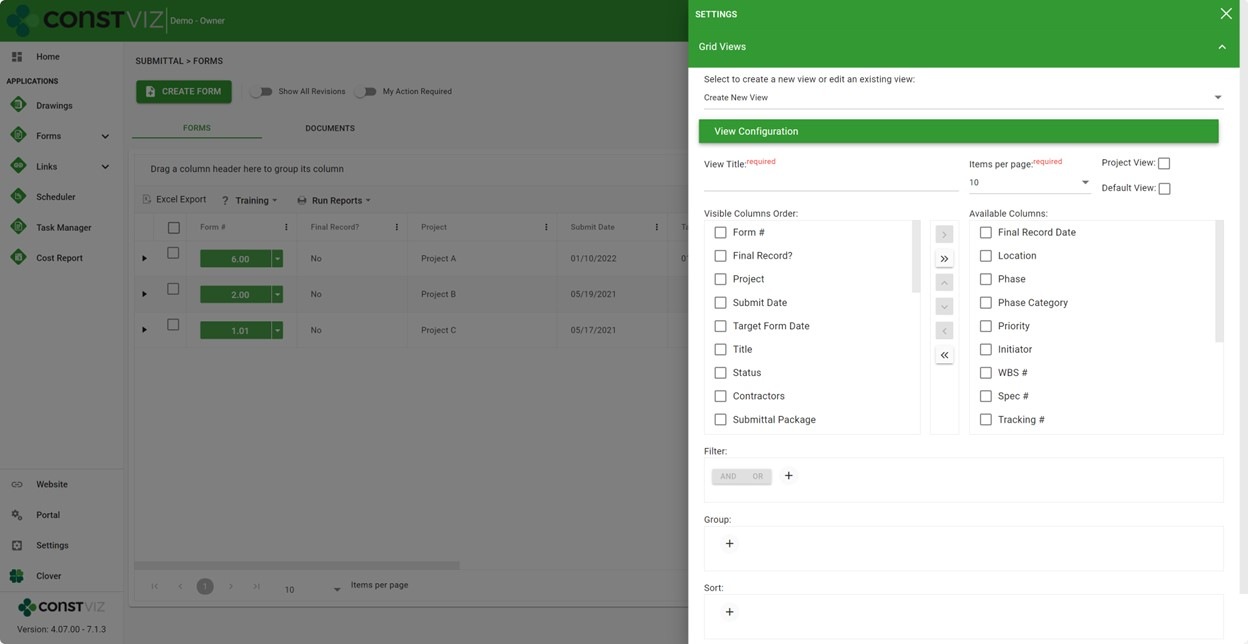
Construction Viz App-specific settings

In a future post, we will provide more insights into the benefits of this latest re-design. Exciting features to come 😊

Key Features of Construction Viz Saved Views

We packed many features in this latest Saved Views release, but some of the key highlights include the following:

  • Project vs. Personal Views. Quickly find the forms you seek by creating project views for all users or personal views for your own use.
  • Default views. Save time by assigning a default view to display when navigating to any app.
  • My Action Required. Quickly filter tasks assigned to you by clicking the "My Action Required" toggle.
  • Show All Revisions. By default, Construction Viz displays the latest revisions in form data views, but with this update, users can quickly toggle to see all form and related document revisions. This is a great feature for viewing the history of all forms and their attachments and exporting all records.
  • Available in form apps. The new UI and saved views feature are available in all form apps, such as RFIs, Submittals, or Daily Reports.

Construction Viz is a full-featured and enterprise-ready project management information system (PMIS) for Microsoft 365. To learn more about Construction Viz features and apps, check out our weekly blogs. You can request a demo of Construction Viz here. Also, if you need any Microsoft 365 support or have any suggestions for future blogs, you can submit a consultation request here. 
New eSignature Feature for Construction Viz 

Construction Viz, Project Management, Project Management Tools | December 20, 2023

As construction organizations move from paper processes to web-based project management tools, the adoption of electronic approvals has been mixed. Clicking an approved button that registers your account name and date is standard in most construction management systems. However, some organizations and specific forms still require digital or wet signatures. While several electronic signature tools are on the market, their ease of use and cost can be a deterrent. We added a free and easy-to-use digital signature feature to Construction Viz to capture signatures in any of our forms. Read on to discover how our simple signature feature might address your challenges. 

Several signature solutions are available for SharePoint, including the new built-in SharePoint eSignature subscription service that will be available soon. The benefit of these tools is that files that receive signatures never leave your Microsoft 365 tenant, ensuring your data remains secure and in your control.  

Leveraging these eSignatures through SharePoint is great but does require additional subscription costs and administration. What if you want something simpler and at no extra cost?  

Construction Viz eSignatures Feature for Construction Forms

Picture1

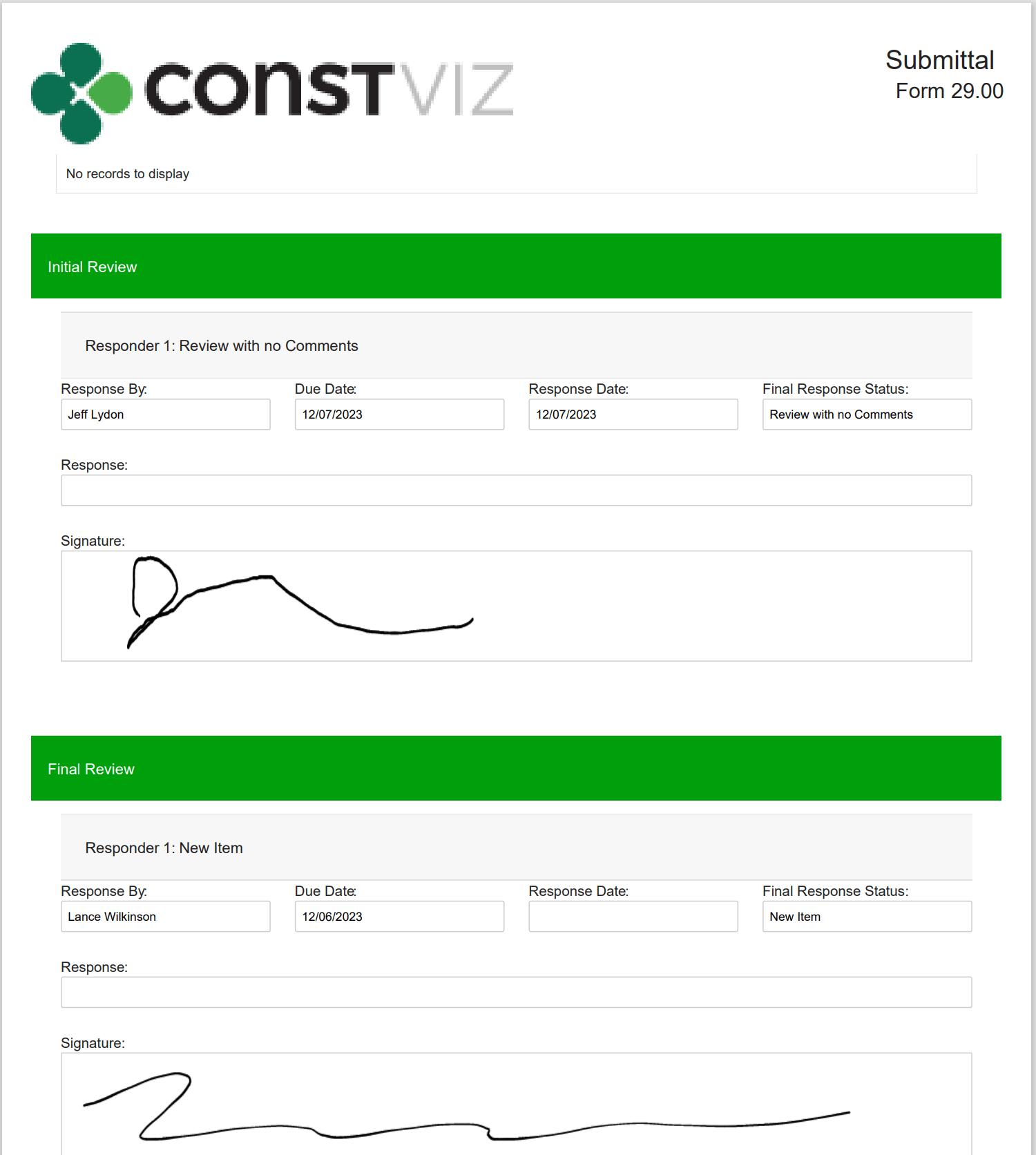
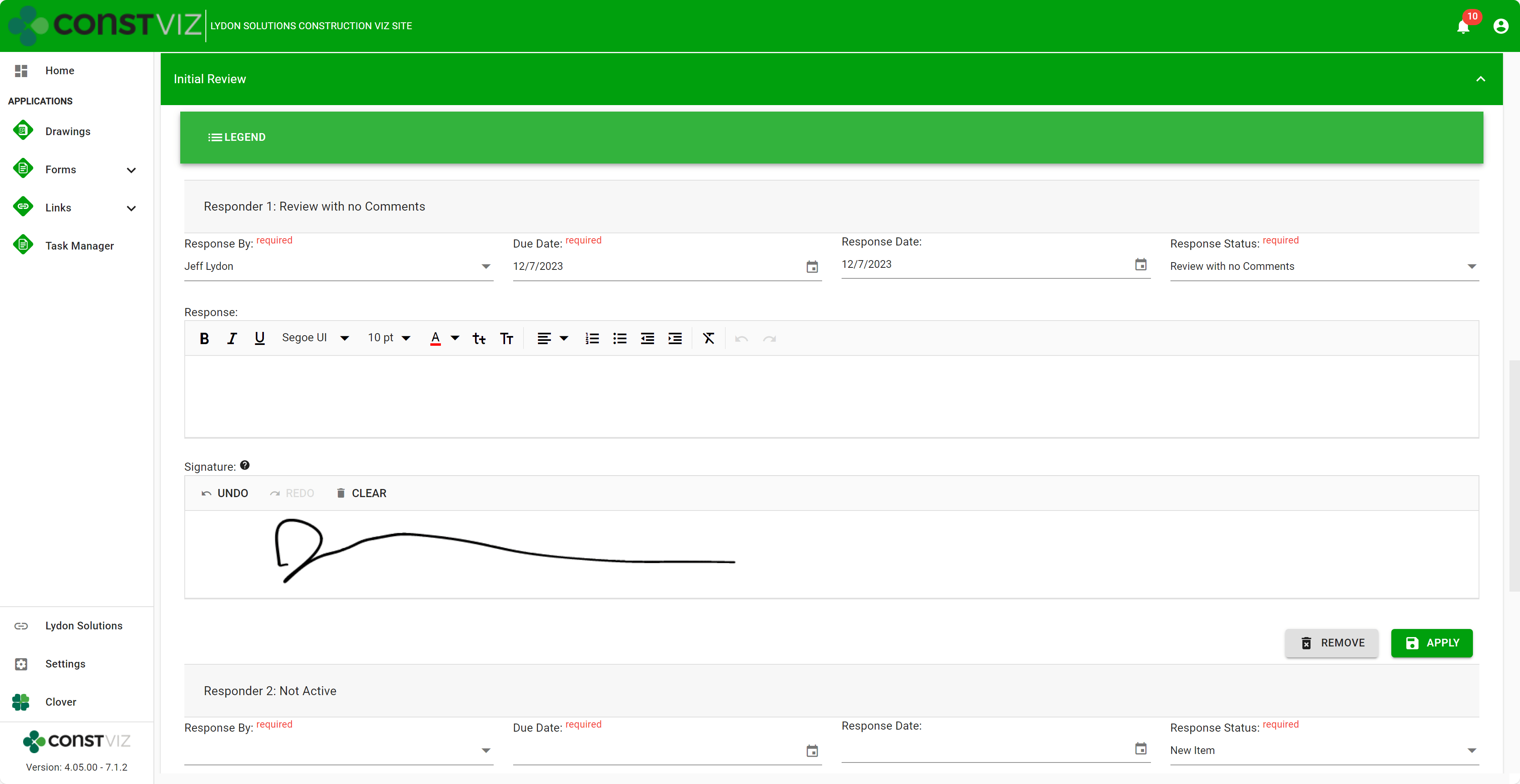
With the Construction Viz eSignature feature, signatures are available on any form in the review components. For example, say you want an inspector to sign a daily report digitally. We can activate eSignatures in your Construction Viz settings to automatically add eSignatures to all your daily report forms. 

Since this new eSignature feature is built into Construction Viz, we included additional controls such as: 

  • Only the user assigned the review can sign their signatures. 
  • If a user is removed from the reviewers, their signature is removed as well.  
  • Administrators are restricted from signing on behalf of a user.  
  • eSignatures are available on any Construction Viz form! 
  • eSignatures print in form reports! 
Picture2

Our new eSignature feature is perfect if you need a simple, free solution within Construction Viz. You can find out more about Construction Viz by requesting a demonstration here. 

Break Through the 5K Record Limit in SharePoint Online with Construction Viz 

Project Management | December 4, 2023

SharePoint Online lists and document libraries have a 5,000-item limit for filtering data. You could quickly reach that threshold if you want to use a single SharePoint site to house many projects or a large multi-year project.

Read on to discover how Construction Viz can overcome the 5K threshold, continue delivering robust analytics for your projects, and keep ticking regardless of the threshold limit.

SharePoint lists and libraries can store up to 30 million records. At 5,000 records, however, filtering views stop working. And with SharePoint Online, there is no way to change that threshold.

You could re-index the list or library, adding one or more indexes to the list columns, which will fix the error message. However, exceeding the threshold will still adversely impact SharePoint’s functionality. Specifically, column filtering is limited, and lookups can be adversely affected. Removing columns from views can help, but ultimately, you will have a different experience after you hit the threshold.

Picture1

Construction Viz Solves the 5K Item Limit in SharePoint Online

Since organizations may need to manage one or many projects in a single SharePoint site, with Construction Viz for Microsoft 365, we built controls to keep your projects running smoothly regardless of the threshold. So, even if you have not implemented indexing on the SharePoint list or library, Construction Viz can continue delivering analytics and reporting.

Picture2

With Construction Viz, we take the best of Microsoft 365, fill in any gaps, and deliver a second-to-none project management information system in your Microsoft environment.

Click here for a free demo and consultation to learn how Construction Viz can save you time and money while keeping your data safe in your Microsoft 365.

Archive Your Project Data in Three Clicks with the Construction Viz PDF Report Wizard 

Project Management, Project Management Tools, Reporting | October 26, 2023

Have you ever needed an easy way to archive PDF versions of all your project correspondence, such as RFIs and daily reports, including attachments (which could be in various file formats)?  

The new Construction Viz PDF report wizard aims to build on our existing technology with the ability to generate PDFs from multiple forms at the same time. Read on to find out more about this new feature. 

Introducing the Construction Viz PDF Report Wizard

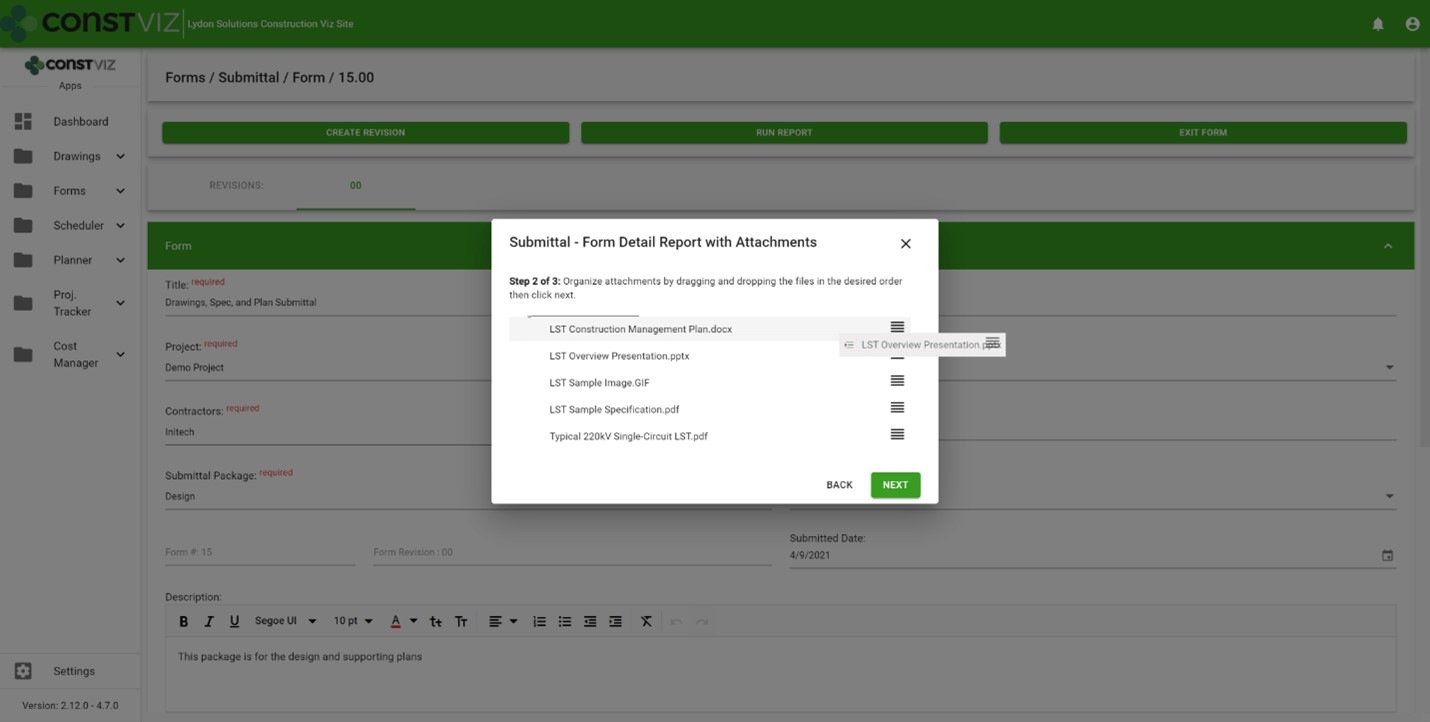
We built the Construction Viz PDF Report Wizard based on the Construction Viz Form archive wizard which is a powerful and heavily used feature in Construction Viz. It allows users to create PDF binders from any form, including the form attachments. The step-by-step wizard walks you through selecting a form, adding and ordering attachments, and naming the generated PDF binder.

Picture1

Form archiving wizard – re-ordering attachments 

The cool part is the archive wizard converts attached files from their native format (Excel, Word, etc.) to PDF and automatically provides a name for the PDF binder. So, if you want to send a contractor a PDF of an RFI with any relevant attachments, select the form, select which attachments they need to see, and follow the wizard to generate a PDF you can email.  

This feature is an excellent form-by-form solution, but what if you want a push-button way to choose more than one form? Let's say you want to archive all of the RFIs, submittals, and dailies on a project and include all the form attachments. And you want to do this in bulk. 

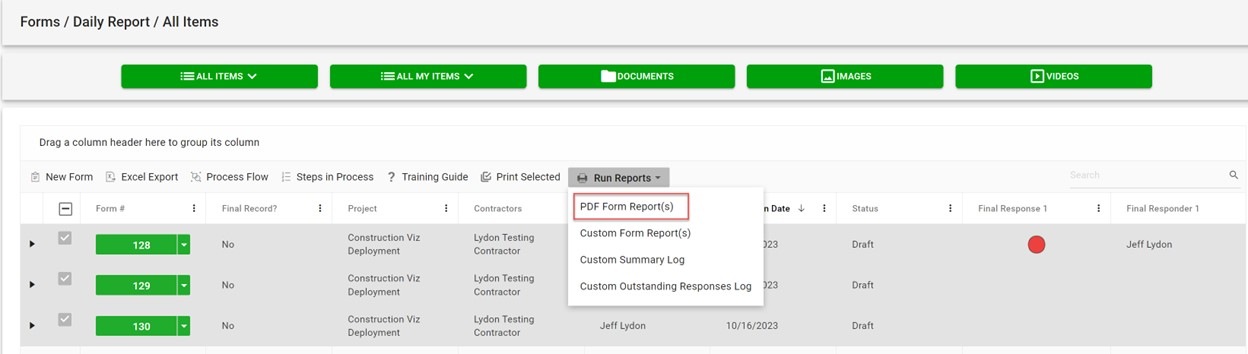
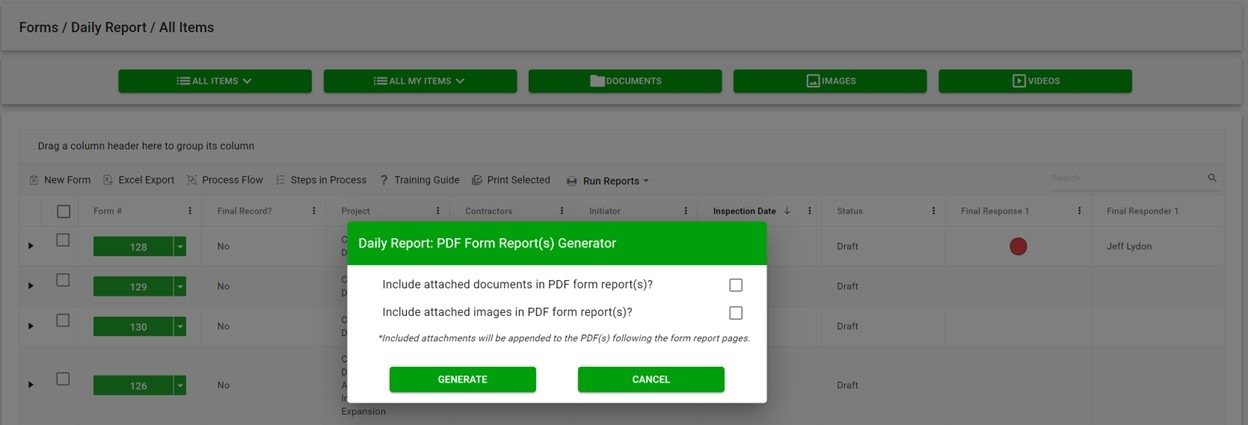
The new PDF report wizard leverages some of the same technology from our form archive wizard to create multi-form PDF binders of your project correspondence. Users select one or more forms, click the PDF Form Report(s) button, and have the option to include attachments, images, or both. And just like the form archive wizard, the attachments are automatically converted from their native format (Excel, Word, etc.) to PDF, including any images. 

Picture2

If you are wondering about file sizes impacting the system and preventing you from continuing your work, don't. While the file conversion runs, the tool prompts you to load another screen to continue working without interruption. Construction Viz will notify you when the processing is complete and the PDF files are downloaded locally.  

Picture3

Our development team at Lydon Solutions continues to drive innovations in your day-to-day workload with our Construction Viz product for Microsoft 365 so you can focus on what's important, delivering the project on time and within budget. You can request a demo of Construction Viz here, or if you need help with Microsoft 365, you can click here for a free one-hour consultation with our Microsoft technology experts. 

Why its Time to Rethink Where You Store Your Project Data

Storage | July 21, 2021

Over our years of working in and providing software solutions for the construction industry, we have seen dramatic shifts in how organizations deploy project management systems and where they store project data. The cloud over the last fifteen years replaced the "old way" of on-premise servers. Now, organizations have another emerging option that combines the best of on-premise and cloud servers. Read on to learn more about the benefits of client tenants and Microsoft 365.

The old way: on-premise deployments

WhereIsYourData_1

Before the last fifteen years or so, companies deployed their project management systems on client servers behind firewalls to prevent data from being accessible from the internet. While this approach ensured that the project management information systems (PMIS) and data were secure, it had several drawbacks, including:

  • extended owner IT approval process for new software
  • exorbitant capital costs to spin up and maintain physical servers
  • no access for third-party software providers and outside contractors

The new way: embracing the cloud

WhereIsYourData_2

With the rise of cloud computing over the last fifteen years, many companies moved to externally hosted solutions. The benefits of the cloud appeared to outweigh the security concerns that IT departments had with data residing outside of their firewall. Cost-conscious management pressured IT departments to outsource data hosting and software applications to save money and improve overall efficiency.

However, there are drawbacks to the cloud. Security breaches have become common, and owners have discovered that it is frustratingly difficult to get their data out of externally hosted systems for archiving and reporting. As a result, the pendulum is starting to shift away from externally hosted PMIS solutions and cloud data repositories.

Today's better solution: client tenants and Microsoft 365

WhereIsYourData_3

With today's cloud computing capabilities, owners can spin up their own data centers in AWS or Azure to manage their company's data. And with the rise of no-code/low-code development, owners have also started building custom solutions in their own Microsoft 365 tenant using the Power Platform and SharePoint. The owners that embrace this model like having their data readily available when and where they need it.

In many ways, this shift marks a return to the "old way" of owners having their systems and data behind their firewall.  But instead of maintaining physical servers, they have virtual machines (VMs) in their tenants in the cloud.

Like any other software provider, companies providing construction project management software will have to adjust to this shift to allow owners to decide where their data will ultimately reside.

Today's better solution: client tenants and Microsoft 365

WhereIsYourData_4

We saw the above shift occurring and developed our Construction Viz solution to be either externally hosted or deployed directly into a client's Microsoft 365. With the latter, now you can have the best of both worlds with your data residing in your Microsoft 365 tenant while the PMIS application runs securely in a Microsoft Azure certified app.

Construction Viz is designed for the future and provides the following benefits for a construction organization:

  • Verified Microsoft Azure app. Construction Viz utilizes Microsoft's app security technology. Apps need to be accepted into the tenant to run.
  • Data resides in SharePoint. When we deploy our Construction Viz apps, they automatically create associated SharePoint lists and libraries in the Microsoft 365 tenant. As a result, you can access and use the app data across all the Microsoft 365 services such as Power BI and Power Automate.
  • No need for Archiving. There is no need for archiving since the project data resides in your SharePoint sites.
  • Authentication. The entire solution leverages Microsoft authentication, so no additional login is required.
  • Contractor access. With Construction Viz's robust but simple access management controls, contractors can access the project data they need securely.
  • Microsoft 365 integrated. Construction Viz deeply integrates into Microsoft 365. That means if the owner wants to build a custom solution, we can easily access it inside Construction Viz.

Get a free demo and consultation

The technology journey, in a way, has come full circle with systems and data once again behind the owner's firewall. Is your PMIS keeping up with the times?

Construction Viz is a powerful and flexible construction project management solution optimized for YOU and your workflow. For maximum flexibility, Construction Viz is available in the cloud, on-premise, or as à la carte apps for Microsoft SharePoint and Microsoft 365.

Contact us today to schedule a free demo and consultation.

Construction Viz Profile Builder

Video | March 10, 2020

Customize your Construction Viz profile and interface with the Profile Builder. Profile Builder is included in the settings portion of Construction Viz and allows you to personalize the look and feel of the user interface. Adjust theme colors, company and project names, active forms, and the company logo. Change the look and feel of the navigation in just a few clicks.

See how easy it is to customize your profile and projects using the Construction Viz Profile Builder in the video below:

Use Construction Viz Profile Builder to:

• Create and save multiple project and program profiles
• Change the look and feel of your UI in real time with two clicks
• Activate or deactivate apps to change user navigation
• Switch configuration profiles depending on the project
• Configure each project in your program and updating your project's profile

Contact us today for a no-obligation demo and find out how you can get the project management features you need right in your SharePoint & Office 365 environments.


Footer

About Constructon Viz

Construction Viz is a flexible construction project management software solution powered by Microsoft SharePoint and SQL.
Read More >

Navigation

  • Home
  • About
  • Features
  • Apps
  • Blog
  • Contact
  • Login

Apps

  • Construction Viz Hub
  • Cost Report
  • Drawing Management
  • File Manager
  • GIS Maps
  • Oracle Primavera 6
  • Payment
  • Specification Management

–

  • Project Forms
  • Project Planner
  • Project Scheduler
  • Project Tracker
  • Task Manager

Connect with Us

  • This field is for validation purposes and should be left unchanged.
  • Sign up to receive helpful tips for construction project managers as well as updates about Construction Viz.

Lydon Solutions

© Lydon Solutions

  • Privacy
  • Cookies
  • Terms of Use
  • Disclaimer
  • End-user license

Click here to start a Microsoft Teams chat.

Click here to start a Microsoft Teams chat.

Contact Us
This field is for validation purposes and should be left unchanged.
Name(Required)
Join Our Newsletter

Sign up to receive helpful tips for project managers and updates about Construction Viz.

Get Started

Join Our Newsletter

Sign up to receive helpful tips for construction project managers as well as updates about Construction Viz.

  • This field is for validation purposes and should be left unchanged.
  • This site is protected by reCAPTCHA and the Google Privacy Policy and Terms of Service apply.