• Skip to primary navigation
  • Skip to main content
  • Skip to footer
Construction Viz

Construction Viz

Project Management Perfect

  • About
  • Features
  • Apps
  • Blog
  • Contact
  • Download Flyer
  • Get Started Today
  • Login
Hide Search

construction project management

Construction Viz Task Manager 2.0 – Gantt Charts Coming to Task Management

Project Management, Project Management Tools, Scheduling | November 28, 2023

The Construction Viz Task Manager app for Microsoft 365 delivers a simple yet powerful way to track and report on project tasks. It is a stand-alone application in Construction Viz but can be integrated into any other application, such as RFIs, Submittals, or Meeting Minutes. With the latest update, we’ve moved the needle significantly on project task management to include scheduling, checklists, and sub-tasks!

Read on to find out more about how our updated Task Manager app can help you organize and track tasks for your projects.

What is New in Construction Viz Task Manager 2.0

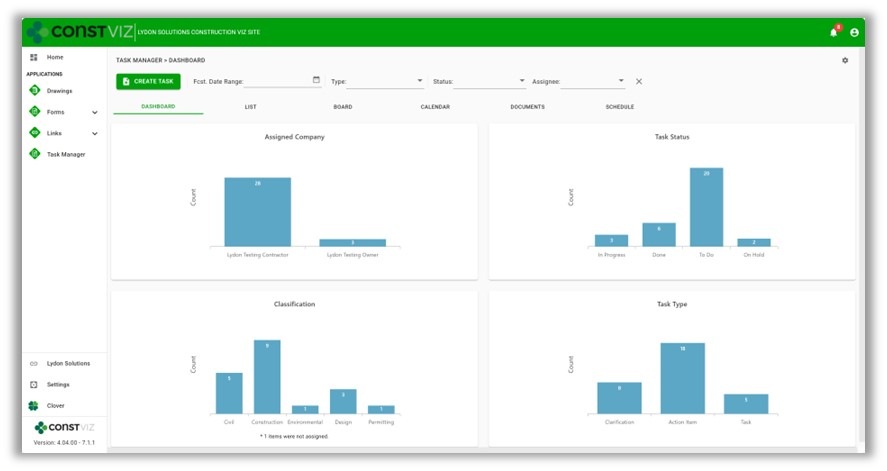
We built the Task Manager so that team members have a 360-degree view of project tasks. The Task Manager includes the following views:

  • Dashboard – Displays charts of key metrics with drill-down capability.
Picture1
  • List – Provides a log of all tasks with filtering, grouping, and search.
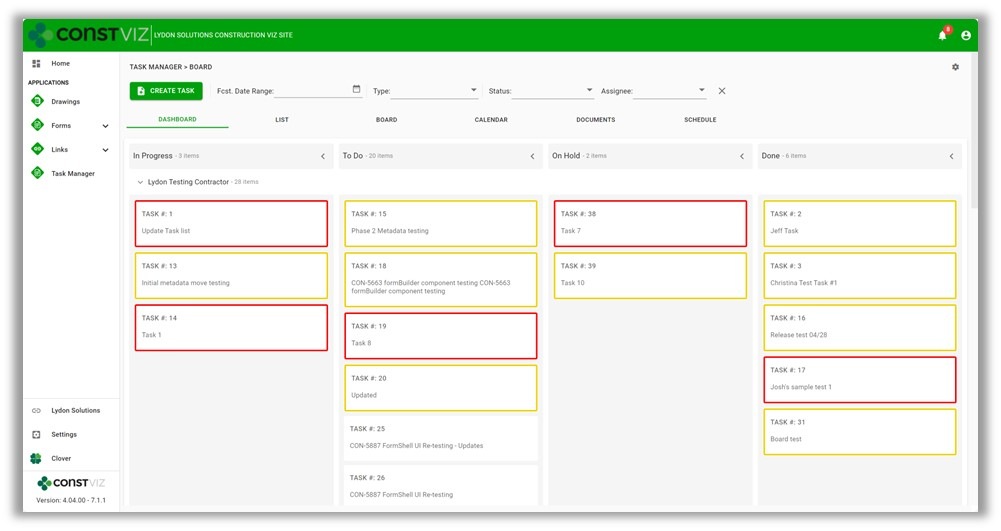
  • Board – Displays a Kanban view for updating the status of tasks.
  • Calendar – Plots tasks on a familiar calendar with today, day, week, month, and agenda views.

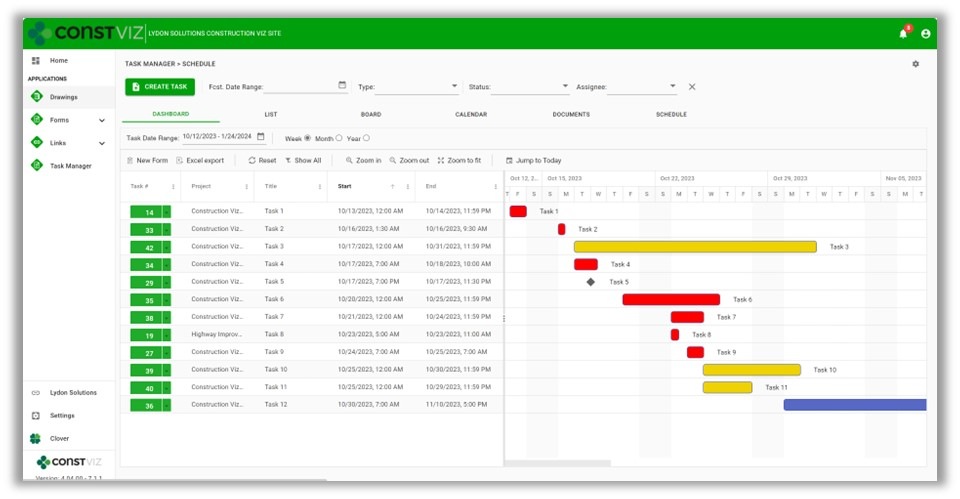
With the latest Task Manager release, we are extending the functionality to include lightweight scheduling. So, if you are looking for a three-week look ahead project schedule tool or prefer a Gantt chart-style view of your tasks, we’ve got you covered.

This release includes the following updates to the Task Manager app:

  • Schedule View – A new view that displays all tasks in a familiar Gantt chart schedule. The schedule includes scheduling controls to filter and change displays.
Picture2
  • Task Schedule component – We added a scheduling component to the task form for managing start and finish dates, times, all-day events, and durations.
  • Task Checklist component – We added a checklist component to the task form to track items needed to complete the overall task. The checklist allows for drag-and-drop ordering, auto-assign completed by, and completed dates.
  • Sub-task component – We added a component to the task form to add sub-tasks to a task. Sub-tasks include fields for the required by date, forecasted completion date, status, and percent complete.
  • Visual alerts – We updated the mouse-over tooltips and added color indicators across views to display late and incomplete tasks. These visual alerts will help project teams stay on track.
Picture3

While these updates are significant, we are just getting started. We plan on further extending the scheduling capabilities of the Construction Viz Task Manager app, including dependencies and resource management. Stay tuned as we continue to deliver a leading-edge task management solution with Construction Viz for Microsoft 365!

Sign up today for a no-obligation demo to learn how Construction Viz can help your organization manage your construction projects more efficiently.
 

Archive Your Project Data in Three Clicks with the Construction Viz PDF Report Wizard 

Project Management, Project Management Tools, Reporting | October 26, 2023

Have you ever needed an easy way to archive PDF versions of all your project correspondence, such as RFIs and daily reports, including attachments (which could be in various file formats)?  

The new Construction Viz PDF report wizard aims to build on our existing technology with the ability to generate PDFs from multiple forms at the same time. Read on to find out more about this new feature. 

Introducing the Construction Viz PDF Report Wizard

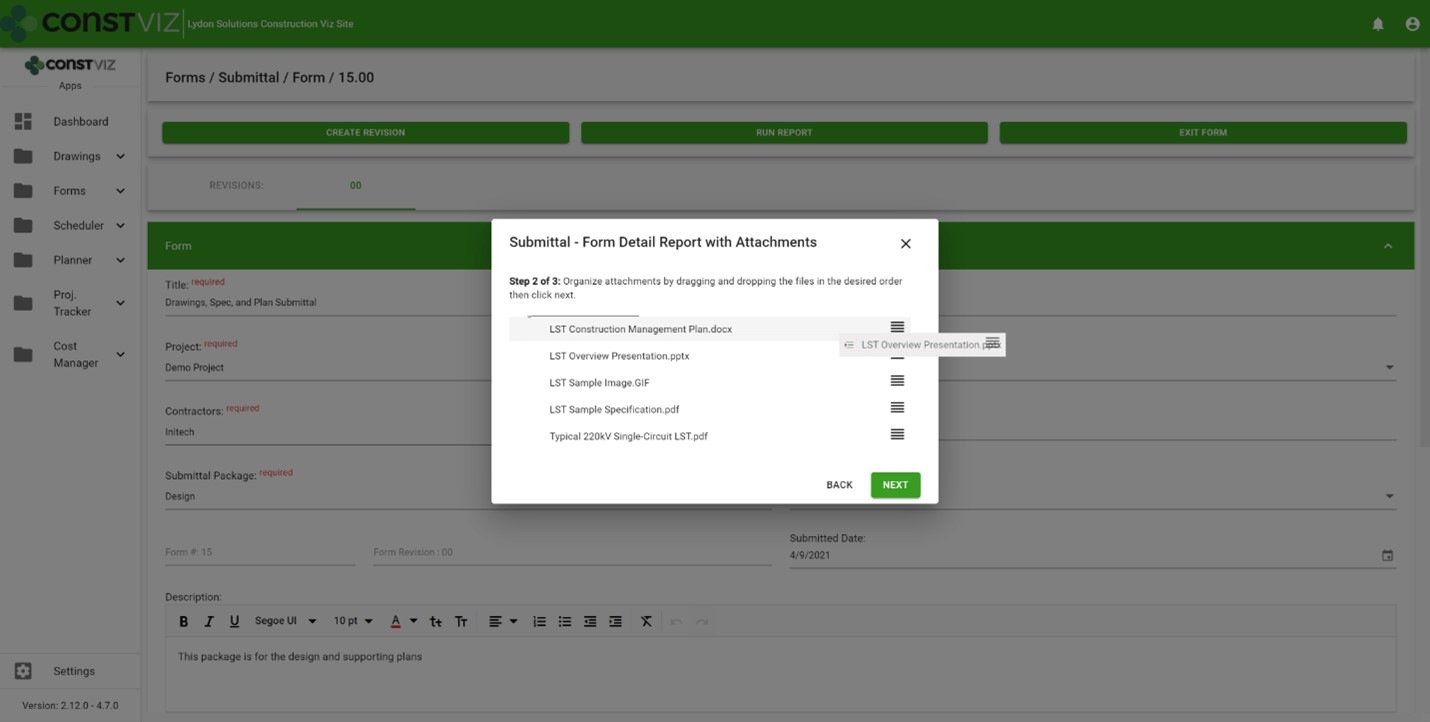
We built the Construction Viz PDF Report Wizard based on the Construction Viz Form archive wizard which is a powerful and heavily used feature in Construction Viz. It allows users to create PDF binders from any form, including the form attachments. The step-by-step wizard walks you through selecting a form, adding and ordering attachments, and naming the generated PDF binder.

Picture1

Form archiving wizard – re-ordering attachments 

The cool part is the archive wizard converts attached files from their native format (Excel, Word, etc.) to PDF and automatically provides a name for the PDF binder. So, if you want to send a contractor a PDF of an RFI with any relevant attachments, select the form, select which attachments they need to see, and follow the wizard to generate a PDF you can email.  

This feature is an excellent form-by-form solution, but what if you want a push-button way to choose more than one form? Let's say you want to archive all of the RFIs, submittals, and dailies on a project and include all the form attachments. And you want to do this in bulk. 

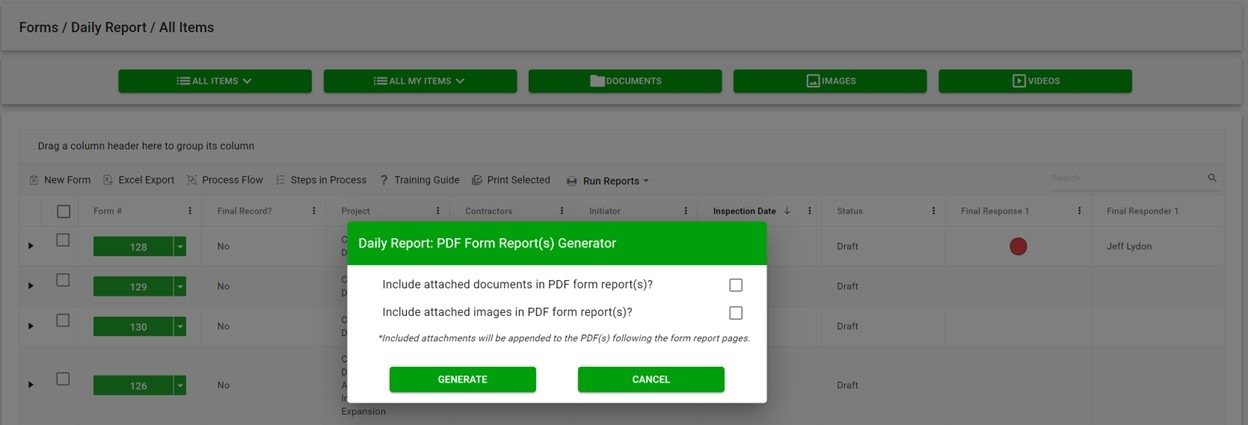
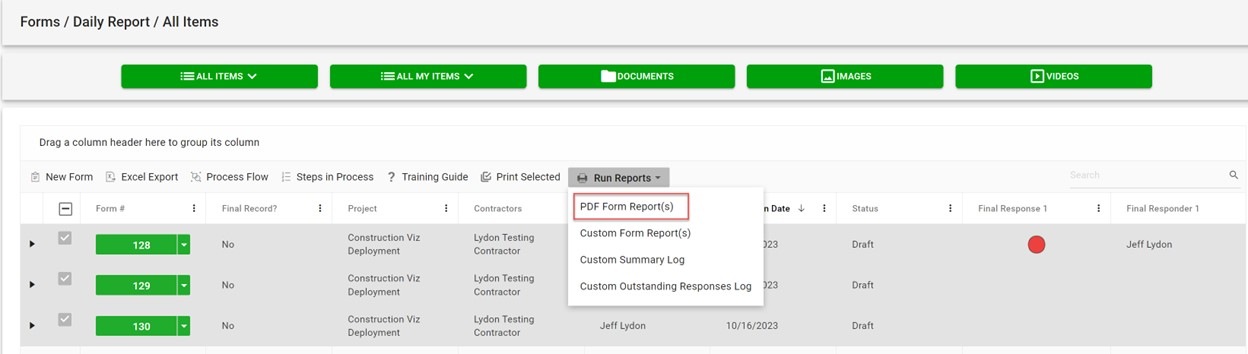
The new PDF report wizard leverages some of the same technology from our form archive wizard to create multi-form PDF binders of your project correspondence. Users select one or more forms, click the PDF Form Report(s) button, and have the option to include attachments, images, or both. And just like the form archive wizard, the attachments are automatically converted from their native format (Excel, Word, etc.) to PDF, including any images. 

Picture2

If you are wondering about file sizes impacting the system and preventing you from continuing your work, don't. While the file conversion runs, the tool prompts you to load another screen to continue working without interruption. Construction Viz will notify you when the processing is complete and the PDF files are downloaded locally.  

Picture3

Our development team at Lydon Solutions continues to drive innovations in your day-to-day workload with our Construction Viz product for Microsoft 365 so you can focus on what's important, delivering the project on time and within budget. You can request a demo of Construction Viz here, or if you need help with Microsoft 365, you can click here for a free one-hour consultation with our Microsoft technology experts. 

Linked apps, where have you been?

Forms | August 24, 2023

The new linked apps feature in Construction Viz allows creating any form within another form, like an action item within a meeting minute form or a change request in a risk form. Find out how this new feature can save time and improve your overall document control processes.

A need based on common real-world scenarios

If you think about the evolution of a change on a project, it might start with an issue, move to risk, get added to an RFI, and finally move to a change request to implement the change. Typically, these are all separate forms, but they are all part of an interrelated process to document and disposition a project change.

Taking a step back and looking at the entire change process, each form builds on the prior, from inception to implementation. Additional details, further justification, subsequent approvals, etc., are added at each stage of the change lifecycle.

If you can relate these separate processes together, project teams can streamline the process and build an audit trail to support the justification of the change.

Enter Construction Viz’s linked apps

With the new Construction Viz connected apps feature, you can create one or more form apps within another. For example, if you are filling out a risk form and want to generate a related change request, you can add the change request form linked component to the risk form settings.

When a user completes a risk form, the new component will show a window into the change request app where they can create one or more change requests without ever leaving the risk form. And the change request will automatically link back to the risk form and vice versa.

This functionality can be added to any form, creating a one-to-many relationship so that an entire process can be automatically related.

Linked apps are just one of the many features we have added to Construction Viz to enhance information management on a project further. You can request a demo of Construction here.

Not ready to move to an enterprise construction management system or need help with Microsoft 365? You can request a free 1-hour Microsoft 365 consultation request with our experts here.

CV-Product-Demo-Webinar (opens in new tab)

Construction Viz for Microsoft 365 Product Demo
Webinar - September 7, 2023, 11:00 AM PST
Participate in this interactive session to share your challenges and learn more about Construction Viz for Microsoft 365.
Learn More(opens in new tab)

Construction Viz for Managing Franchise Stores

News | July 10, 2023

Construction Viz is a unique enterprise construction PMIS fully configurable and customizable to your specific construction business. This flexibility makes it simple to add entirely new applications and functionalities to the source code to accommodate our customers’ needs. And on top of that, the entire solution can be deployed into your Microsoft 365 tenant, providing the ultimate control and security of your processes and data.

We recently were tasked with developing a solution for managing the construction of over 400 franchise stores nationwide. This effort included out-of-the-box functionality and custom applications to manage each store from initiation to closeout.

Here is a high-level overview of how we met our client’s needs for franchise store management with Construction Viz.

Construction Viz Hub Customized for Franchise Stores

With Construction Viz, a SharePoint site deployment can represent a single project or hundreds of projects, depending on the need. In this instance, we needed to accommodate 400 stores.

To do this, we rebuilt the Construction Viz projects, contacts, and company settings to capture additional store-specific information, such as owner, location, store type, insurance requirements, and the like. We then connected these settings to our construction-specific forms (e.g., RFI, submittals, etc.) and assigned them to specific stores and projects.

Repurposing out-of-the-box construction apps

The common wisdom is not to reinvent the wheel. We took this maxim to heart while adapting Construction Viz to the needs of franchise store management.

We started by leveraging our existing Construction Viz form apps, such as RFIs, submittals, and daily reports. Next, we configured these forms to capture store information so the client could get a bird’s-eye view of project information across all stores and be able to drill down into each specific store.

New custom apps specific to franchise store management

To capture the unique data needed to manage a portfolio of stores, we needed to build several new applications, including:

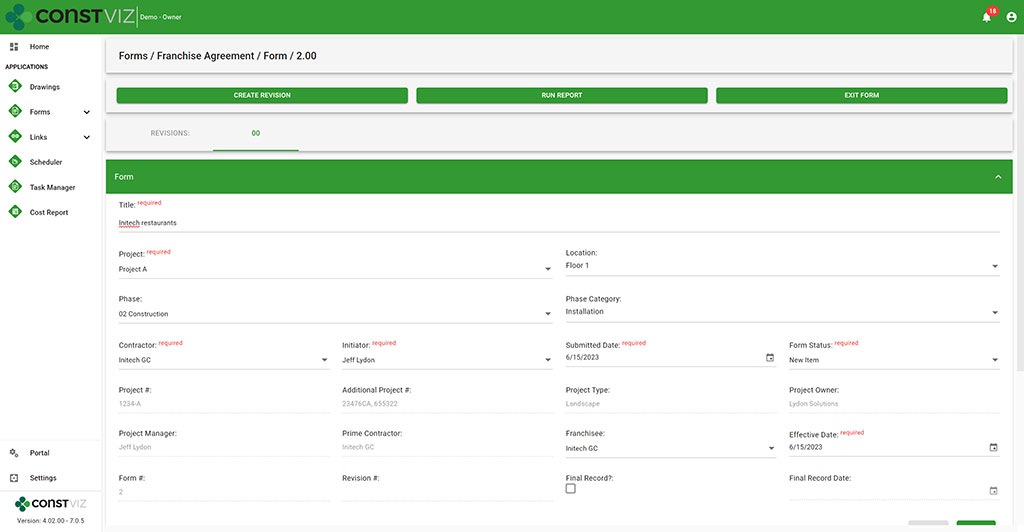
  • Franchise Agreement – This form tracks all of the information required to complete a franchise agreement between the franchise and the franchisee, such as contract terms and ongoing lease costs such as taxes, maintenance, and utilities.
Construction Viz Franchise Agreement form
  • Permits – We rebuilt our Permit form to capture the many types of permits required, from obtaining land to ongoing health services. Key reminder dates, such as permit expiration date, were included so email notifications could be automatically triggered when late.
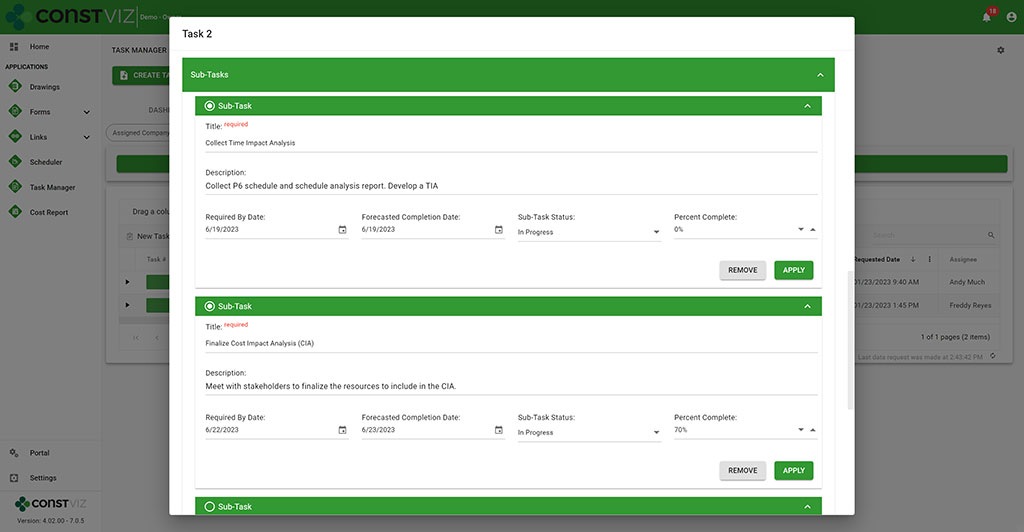
  • Work Performance – We rebuilt our Task Manager app to add subtask detail and percent complete so that every task across the portfolio of stores is centralized and reported on.
Construction Viz Task Manager with sub-task functionality

Discover How Construction Viz Can Meet Your Specific Project Management Needs

Designing and delivering solutions around how you work is one of the key advantages of Lydon Solutions services and how we developed Construction Viz.

Our construction and IT specialists will walk you through our proven step by step FOCUS software implementation methodology to ensure your projects are a success. Using out-of-the-box Construction Viz applications or building a custom solution, we can guide you from concept to delivery, so that your team will want to use the product at the end of the day.

Find out more about Construction Viz with a no-obligation demo and consultation. Or, if you need help with Microsoft 365, head over to LydonSolutions.com to learn about our entire lineup of construction technology services and solutions. 

ChatGPT (Microsoft CoPilot) for Construction Viz

News | June 19, 2023

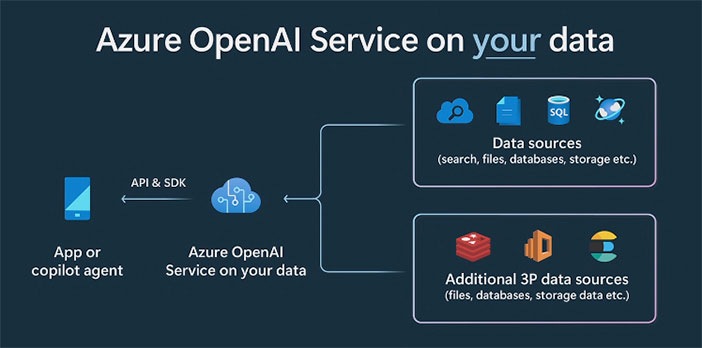
Microsoft Build 2023 was filled with AI Copilot (ChatGPT) features across the entire Microsoft 365 and Windows ecosystem. There is no question that AI has arrived and will change how we work going forward.

Co-Pilot_1

Times a changing with generative AI tools

“A recent report from Goldman Sachs estimates around 300 million jobs could be affected by generative AI, meaning 18% of work globally could be automated—with more advanced economies heavily impacted than emerging markets,” Jack Kelly via Forbes on March 31, 2023.

“The [Goldman Sachs] report also predicts two-thirds of jobs in the U.S. and Europe ‘are exposed to some degree of AI automation,’ and around a quarter of all jobs could be performed by AI entirely,” Adrianna Johnson via Forbes on March 30, 2023.

The impact of AI on construction

AI will have a significant impact on construction. The changes will be broad and far-reaching, from faster and more accurate designs to AI-controlled drones for mapping and inspections. AI will force organizations to change by adopting these cutting-edge technologies to compete in the world of tomorrow.

If you are on Microsoft 365 and Azure, you’re in luck. What once would take millions of dollars in R&D to develop AI models is now made available by Microsoft to integrate into your existing applications.

Co-Pilot_2

Construction Viz and Copilot AI (ChatGPT)

Lydon Solutions is excited to announce that we have started exploring this game-changing technology made available to us in Microsoft 365. We aim to revolutionize construction management by integrating Copilot (ChatGPT) with Construction Viz. Since Construction Viz uses your Microsoft 365 SharePoint lists and libraries, Microsoft Copilot (ChatGPT) allows us to incorporate AI naturally into our product.

No other construction management solution can boast what we will be able to do with AI using your data delivered securely in your Microsoft 365 tenant.

The Construction Viz AI gameplan

In the coming months, we will enhance Clover, our AI assistant bot you can activate in the Construction Viz Hub.

Our team will expand Clover to leverage your data stored in your Microsoft 365 SharePoint online and allow you, through a common language, to analyze your construction project data. For example, we are exploring enabling real-time analyses using simple language, including:

  • Scope change management lifecycle—Scoping documents, risk management, RFIs, change requests, change orders, and more.
  • Smart scheduling—What if analysis, time impact analysis, and schedule development.
  • Inspection—Inspection data analysis for delays, issues, log of vendors on site, and progress and productivity
  • Task management—Generate reports on your tasks, overdue tasks, and plan for the day

These are only some areas we will consider as part of this initiative. AI is a brave new world, and Lydon Solutions will bring this technology to a construction project near you soon.

Subscribe to our newsletter from our website footer to stay in the loop on this AI journey! Also, you can request a demo of Construction viz for Microsoft 365 here.

Improve Project Efficiency with New Schedule Views for Construction Viz

Forms | June 5, 2023

Construction forms such as submittals, RFIs, and daily reports are tightly integrated with project schedules but can get lost among the hundreds or thousands of potential activities. To manage forms effectively, it’s not enough to just see them included in a weekly schedule report. It is essential to evaluate inquiries promptly and efficiently in real-time to address any possible schedule disruptions.

These inquiries may include the following:

  • Did the contractor adhere to the contractual obligations by submitting their documents on time?
  • Was the review of Requests for Information (RFIs) conducted within the agreed-upon deadlines?
  • Were the daily inspections conducted as scheduled?

You need a simple and quick way to answer these questions and more in your construction project management software solution. The problem is that the typical form logs found in most PMISs allow you to sort and filter on due dates, but it lacks form-specific Gantt chart views to manage deliverables.

Our new form view feature for Construction Viz solves this shortcoming.

Construction Viz gives you a clear view of your form data

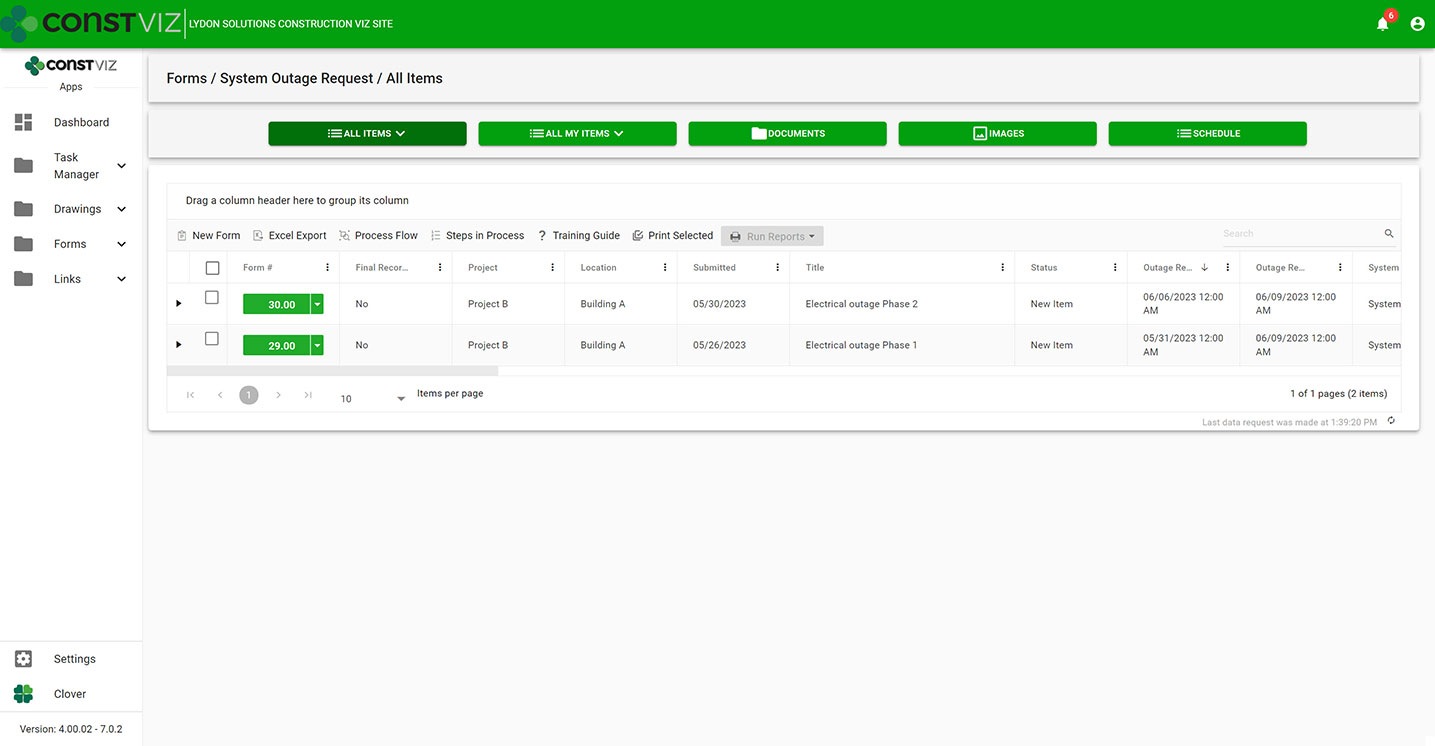
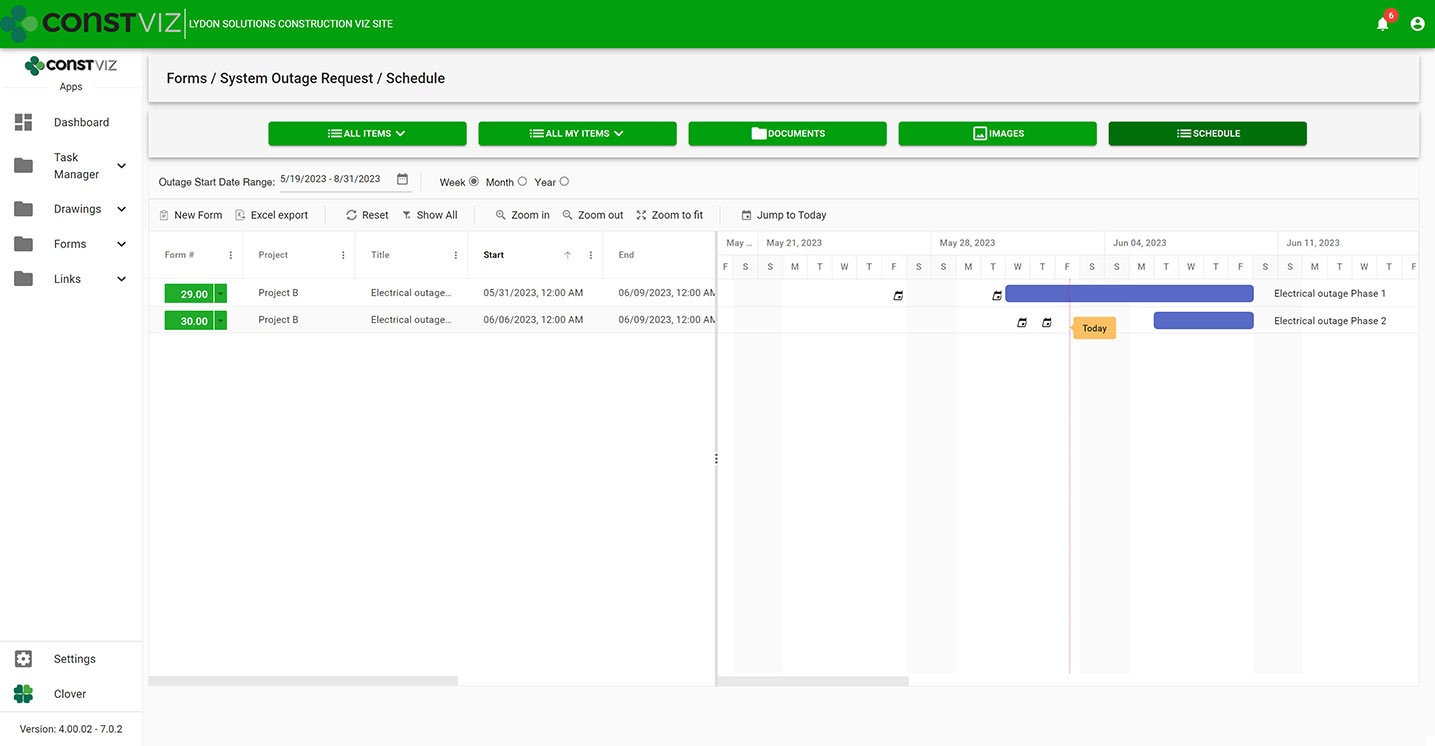
With the new Construction Viz schedule views, you can visualize any of our apps in a traditional Gantt chart view accessible from within the app itself. Now, you have the best of both worlds, the detailed analysis of form data in interactive logs and a Gantt chart focused specifically on the form.

Construction Viz System Outage Request app All Items List (“Form Log”) View
Construction Viz System Outage Request app with new schedule view

Construction Viz Scheduler view sample

Customizable form-specific schedules

You can further tailor Construction Viz’s new schedule views for a specific form. For example, baseline vs. the current schedule, resources assignment, and critical path could be added to the submittal form app while not adding those features to the daily report app. And you can roll up schedule data captured in each form app into an overall master schedule.

The new schedule view keeps team leads and members focused on meeting their specific deliverable dates using an intuitive and interactive Gantt chart.

Find out more about Construction Viz features and apps for Microsoft 365 here.

  • « Go to Previous Page
  • Page 1
  • Interim pages omitted …
  • Page 5
  • Page 6
  • Page 7
  • Page 8
  • Page 9
  • Interim pages omitted …
  • Page 13
  • Go to Next Page »

Footer

About Constructon Viz

Construction Viz is a flexible construction project management software solution powered by Microsoft SharePoint and SQL.
Read More >

Navigation

  • Home
  • About
  • Features
  • Apps
  • Blog
  • Contact
  • Login

Apps

  • Construction Viz Hub
  • Drawing Management
  • File Manager
  • Specification Management

–

  • Project Forms
  • Project Planner
  • Project Scheduler
  • Project Tracker
  • Task Manager

Connect with Us

This field is for validation purposes and should be left unchanged.

Sign up to receive helpful tips for construction project managers as well as updates about Construction Viz.

Lydon Solutions

© Lydon Solutions

  • Privacy
  • Cookies
  • Terms of Use
  • Disclaimer
  • End-user license

Click here to start a Microsoft Teams chat.

Click here to start a Microsoft Teams chat.

Contact Us
This field is for validation purposes and should be left unchanged.
Name(Required)
Join Our Newsletter

Sign up to receive helpful tips for project managers and updates about Construction Viz.

Get Started

Join Our Newsletter

Sign up to receive helpful tips for construction project managers as well as updates about Construction Viz.

This field is for validation purposes and should be left unchanged.