• Skip to primary navigation
  • Skip to main content
  • Skip to footer
Construction Viz

Construction Viz

Project Management Perfect

  • About
  • Features
  • Apps
  • Blog
  • Contact
  • Download Flyer
  • Get Started Today
  • Login
Show Search
Hide Search

Project Management

Introducing the New Construction Viz Daily Resource Tracking Component

Project Management | October 15, 2025

We are thrilled to announce the launch of our latest feature: the Daily Resource Tracking component. We designed this innovative tool to enhance the way you manage field resources with multiple cost codes, making productivity management in the field more efficient and effective.

Features of the Daily Resource Tracking Component

The Daily Resource Tracking component can be added to any form, allowing users to track resource productivity straightforwardly and intuitively. It simplifies the process of tracking resource hours with multiple cost codes, especially in the field and on mobile devices. This feature provides robust analytics for performance reporting, ensuring you have the insights you need to manage your projects successfully.

Key Features:

  • Ease of Use: The intuitive grid layout is familiar to users, making it easy to input data.
  • Efficiency: Minimizes data entry time by dynamically adding or deleting cost codes to every resource.
  • Flexibility: Responsive design ensures it works seamlessly on any device with a modern browser.
  • Comprehensive Reporting: Provides an interactive grid view of all resources by cost code for every day of the project. This detailed reporting is especially handy for contractor billing and ensuring your project stays on track, allowing you to see productivity by period, cost code, person, class, and project.

How Does It Work?

Once a project is set up with the correct companies, personnel, projects, and cost codes, users can fill out the Daily Resource Tracking component in any form. The process is simple:

  1. Select one or more people from a lookup.
  2. Choose one or more cost codes for the project.
  3. The component creates a row for every person and a column for every cost code.

Users can easily add hours for each resource in an interactive grid by cost code, similar to a spreadsheet. This method reduces data entry by dynamically adding or deleting cost codes and providing only one row per resource. It can also be combined with other components like equipment tracking and weather observations, creating a single form for all field data collection needs.

You can find out more about the Daily Resource Tracking component and many others by requesting a demo below.
Request a Free Demo

  • This field is for validation purposes and should be left unchanged.

How Can I Manage Project Emails?

Project Management | March 13, 2024

Many companies find managing project emails cumbersome in their existing Project Management Information System (PMIS) and prefer to use Microsoft Outlook for project correspondence. So, how can we accommodate this using Microsoft 365 and Construction Viz? Check out this article to find out more.

One of the questions we hear from construction organizations is: How can they use Microsoft 365 and/or Construction Viz to manage project emails? The process needs to be easy, and they need to have the ability to do this right from Outlook.

Easy Project Email Management with Construction Viz

With Construction Viz, you are in luck. Construction Viz uses Microsoft 365 SharePoint Online to store data so that we can leverage some out-of-the-box functionality to our advantage. Here are a few approaches:

  1. SharePoint sites have email addresses. With a SharePoint Team site, you can use a group email address as the project email to send and receive emails. With Construction Viz, we can ensure any system-generated emails automatically copy that unique email address. We can also send those emails to a SharePoint libraries and surface them in the File Manager app.
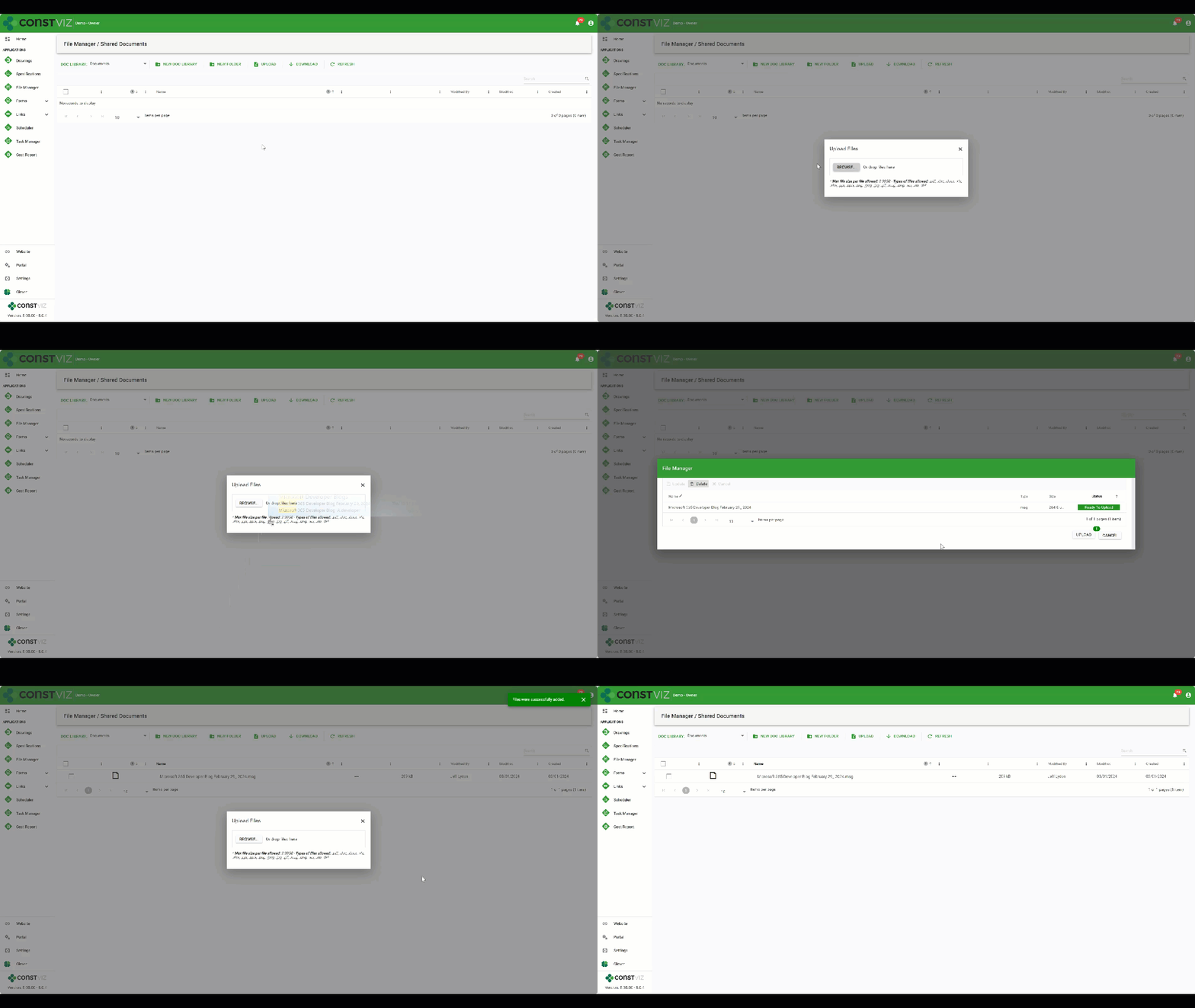
  2. Libraries and Folders for Project Emails. The Construction Viz File Manager app allows you to create one or more SharePoint document libraries and folders to manage project information. So, if you need to store emails from multiple projects, you can create separate document libraries and folders as needed. Once created, you can drag and drop emails from Outlook into the upload screen of the File Manager or any other Construction Viz app. You can then view those emails, send links to the emails to team members, and even include links to those emails in other applications.
Project_Emails_gif
  1. Upload to OneDrive, Teams, or SharePoint. Outlook emails can be dragged and dropped to OneDrive, Teams, or SharePoint. Since all of these applications are connected, the File Manager app can access the messages and display those emails in Construction Viz.

Construction Viz is a one-of-a-kind construction project management solution for Microsoft 365. You can use it out of the box, integrated with other Microsoft 365 apps, and/or customized to your unique needs. You can request a demo here to find out more.

SharePoint Importing Made Easy with the Construction Viz Mass Importer

Project Management | March 6, 2024

Importing SharePoint and Construction Viz records has never been easier!

Uploading more than one record with metadata (columns) into Microsoft SharePoint is a manual process that can be fraught with unknown errors. What if you could simply drop off an Excel file with your data, have the system notify you of any issues in detail, and then seamlessly update a SharePoint library with a push of a button? It sounds too good to be true. Our R&D team has built the new Construction Viz Mass Importer app for Microsoft 365 to make your life easier. Check out this article to find out more.

The New Construction Mass Importer for Microsoft 365

If you have tried to upload multiple records into a SharePoint library containing columns (metadata), you know how error-prone and time-consuming the process can be. While Microsoft provides an out-of-the-box Excel import tool for SharePoint lists, it only works in creating the initial list, and it can create issues with column field types.

Because Construction Viz utilizes Microsoft SharePoint as the data source, ensuring all of your data is safe in your Microsoft 365 tenant, we wanted to build a tool that you could use to upload Excel file data into SharePoint libraries easily.

Mass-Importer_1

Version 1.0 of the app imports data into SharePoint lists, where Construction Viz stores data for apps such as Drawings and Specifications. Future versions of the Mass Importer app will include any list or library in the SharePoint site. Beyond just importing the records from an Excel file, we added many features we have never seen in any other construction management software tool for importing records.

Features of the Construction Viz Mass Importer

The unique features of the Construction Viz Mass Importer app include:

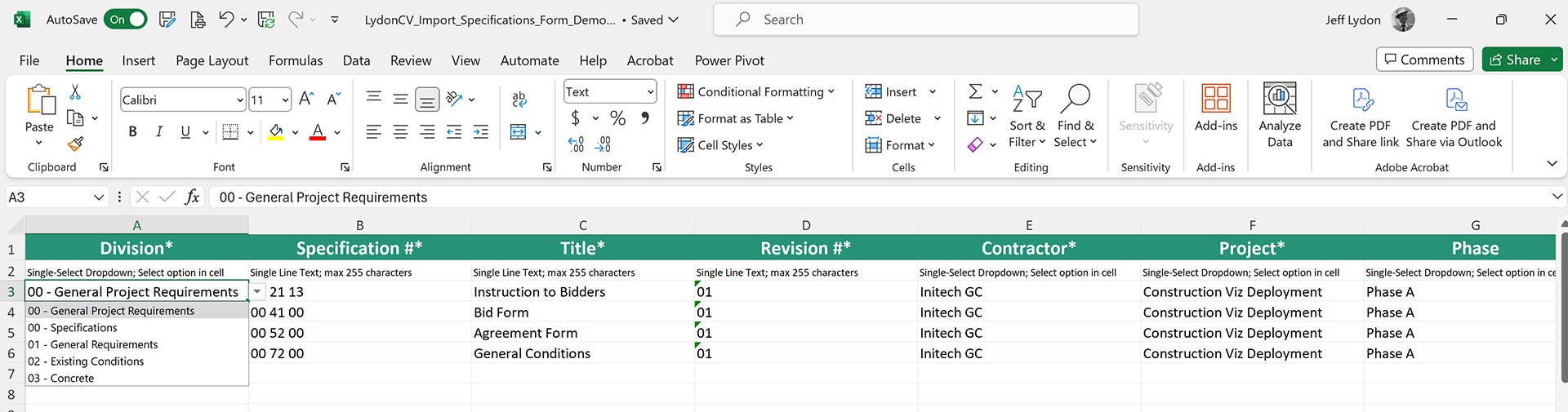
Format embedded into Excel templates

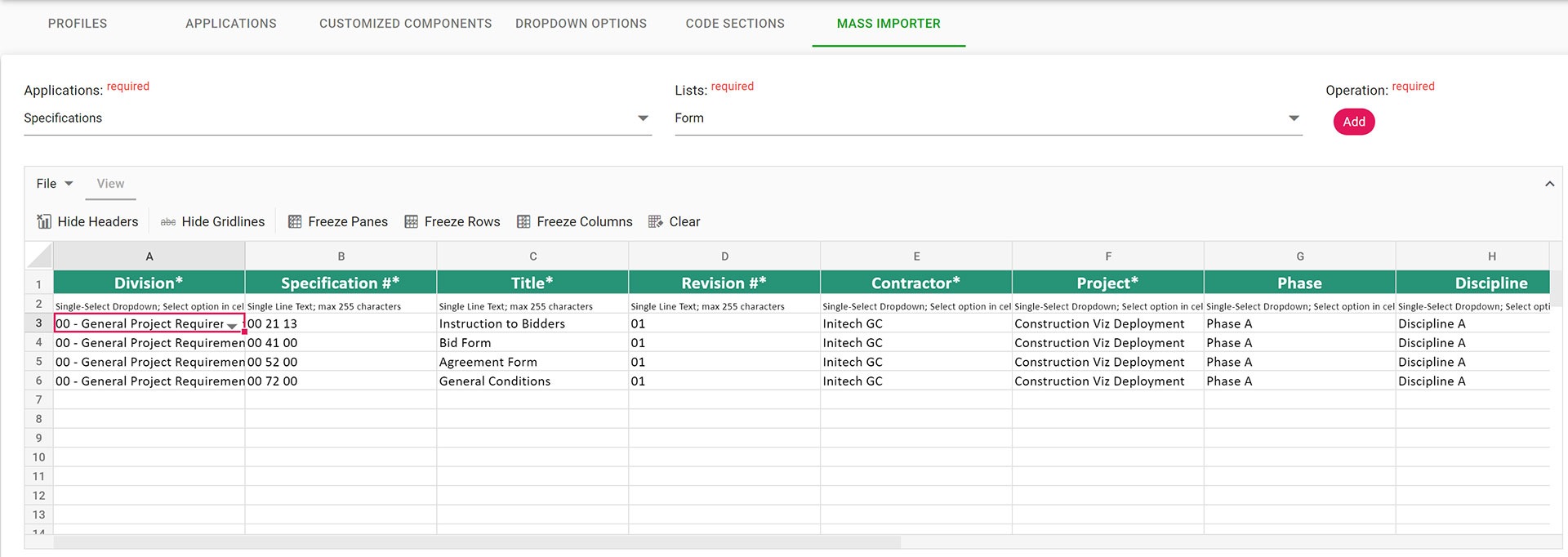
Field formats (dates, currency, numbers, etc.), single and multi-select lookup values, and choice values are embedded automatically into the Excel import template. This feature reduces errors and ensures the correct format is always used when importing records.

Mass-Importer_2

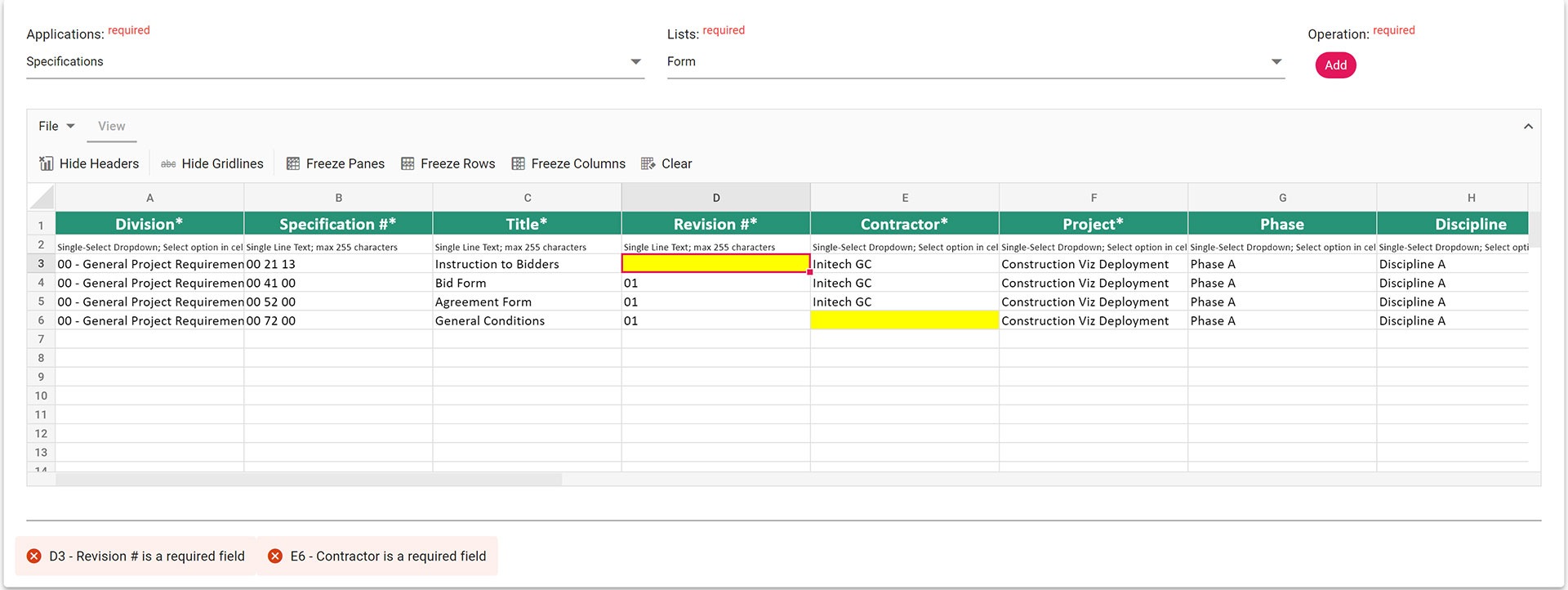
Web-based spreadsheet for changes

When imported, Excel files are displayed in an interactive spreadsheet where further changes can be made and saved before updating. Other systems require the user to return to the imported Excel file, make the changes, and re-import.

Robust error handling

The exact error messages are displayed in the Spreadsheet component so you can see the issues live and make the changes before saving. Other systems only tell you which column didn’t import. Our tool tells you the exact cell and what specifically needs to be fixed.

Mass-Importer_3

Archive of imports

All Excel files imported are saved to a SharePoint document library for archiving purposes. So, if you need to go back and see the Excel file you used previously, you can pull it up with the date and who imported the file.

More Construction Project Management Tools Coming for Microsoft 365

Keep an eye on this space for future releases, where we will continue to extend the Mass Importer functionality for Construction Viz and SharePoint.

If you are looking for a construction management Microsoft 365-based solution where your data stays with you and you only pay for the apps you need, check out Construction Viz and request a demo.

New eSignature Feature for Construction Viz 

Construction Viz, Project Management, Project Management Tools | December 20, 2023

As construction organizations move from paper processes to web-based project management tools, the adoption of electronic approvals has been mixed. Clicking an approved button that registers your account name and date is standard in most construction management systems. However, some organizations and specific forms still require digital or wet signatures. While several electronic signature tools are on the market, their ease of use and cost can be a deterrent. We added a free and easy-to-use digital signature feature to Construction Viz to capture signatures in any of our forms. Read on to discover how our simple signature feature might address your challenges. 

Several signature solutions are available for SharePoint, including the new built-in SharePoint eSignature subscription service that will be available soon. The benefit of these tools is that files that receive signatures never leave your Microsoft 365 tenant, ensuring your data remains secure and in your control.  

Leveraging these eSignatures through SharePoint is great but does require additional subscription costs and administration. What if you want something simpler and at no extra cost?  

Construction Viz eSignatures Feature for Construction Forms

Picture1

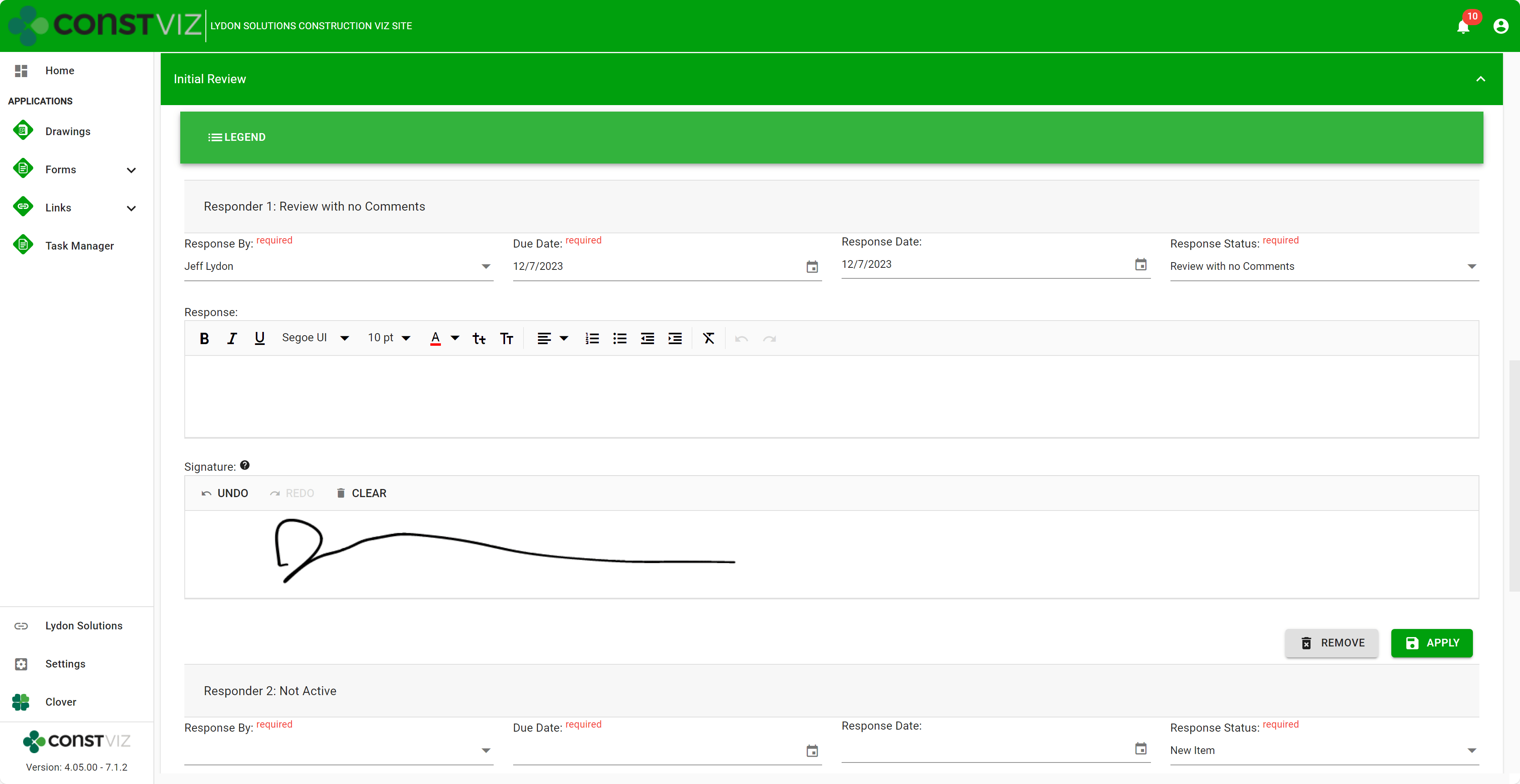
With the Construction Viz eSignature feature, signatures are available on any form in the review components. For example, say you want an inspector to sign a daily report digitally. We can activate eSignatures in your Construction Viz settings to automatically add eSignatures to all your daily report forms. 

Since this new eSignature feature is built into Construction Viz, we included additional controls such as: 

  • Only the user assigned the review can sign their signatures. 
  • If a user is removed from the reviewers, their signature is removed as well.  
  • Administrators are restricted from signing on behalf of a user.  
  • eSignatures are available on any Construction Viz form! 
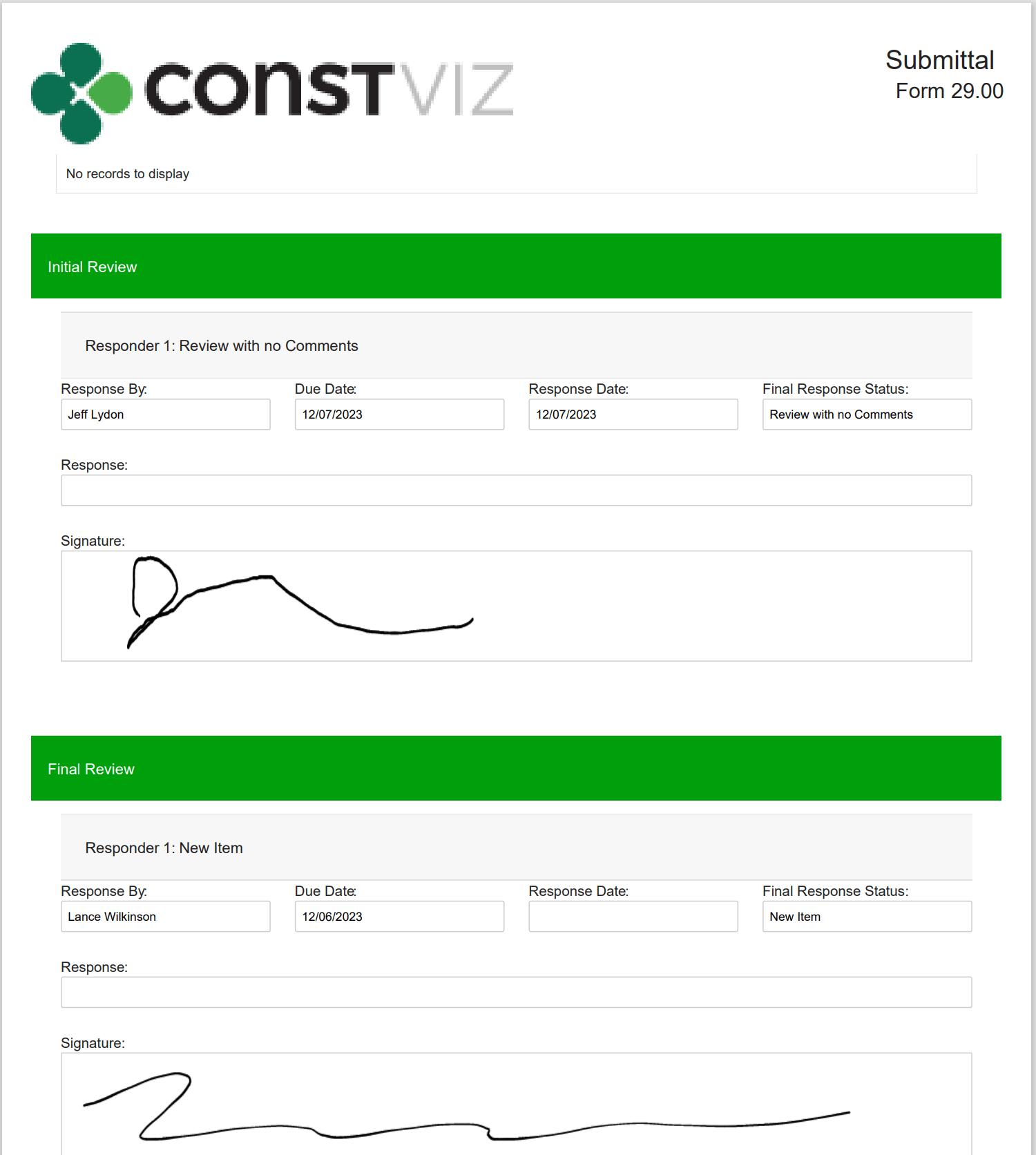
  • eSignatures print in form reports! 
Picture2

Our new eSignature feature is perfect if you need a simple, free solution within Construction Viz. You can find out more about Construction Viz by requesting a demonstration here. 

Break Through the 5K Record Limit in SharePoint Online with Construction Viz 

Project Management | December 4, 2023

SharePoint Online lists and document libraries have a 5,000-item limit for filtering data. You could quickly reach that threshold if you want to use a single SharePoint site to house many projects or a large multi-year project.

Read on to discover how Construction Viz can overcome the 5K threshold, continue delivering robust analytics for your projects, and keep ticking regardless of the threshold limit.

SharePoint lists and libraries can store up to 30 million records. At 5,000 records, however, filtering views stop working. And with SharePoint Online, there is no way to change that threshold.

You could re-index the list or library, adding one or more indexes to the list columns, which will fix the error message. However, exceeding the threshold will still adversely impact SharePoint’s functionality. Specifically, column filtering is limited, and lookups can be adversely affected. Removing columns from views can help, but ultimately, you will have a different experience after you hit the threshold.

Picture1

Construction Viz Solves the 5K Item Limit in SharePoint Online

Since organizations may need to manage one or many projects in a single SharePoint site, with Construction Viz for Microsoft 365, we built controls to keep your projects running smoothly regardless of the threshold. So, even if you have not implemented indexing on the SharePoint list or library, Construction Viz can continue delivering analytics and reporting.

Picture2

With Construction Viz, we take the best of Microsoft 365, fill in any gaps, and deliver a second-to-none project management information system in your Microsoft environment.

Click here for a free demo and consultation to learn how Construction Viz can save you time and money while keeping your data safe in your Microsoft 365.

Construction Viz Task Manager 2.0 – Gantt Charts Coming to Task Management

Project Management, Project Management Tools, Scheduling | November 28, 2023

The Construction Viz Task Manager app for Microsoft 365 delivers a simple yet powerful way to track and report on project tasks. It is a stand-alone application in Construction Viz but can be integrated into any other application, such as RFIs, Submittals, or Meeting Minutes. With the latest update, we’ve moved the needle significantly on project task management to include scheduling, checklists, and sub-tasks!

Read on to find out more about how our updated Task Manager app can help you organize and track tasks for your projects.

What is New in Construction Viz Task Manager 2.0

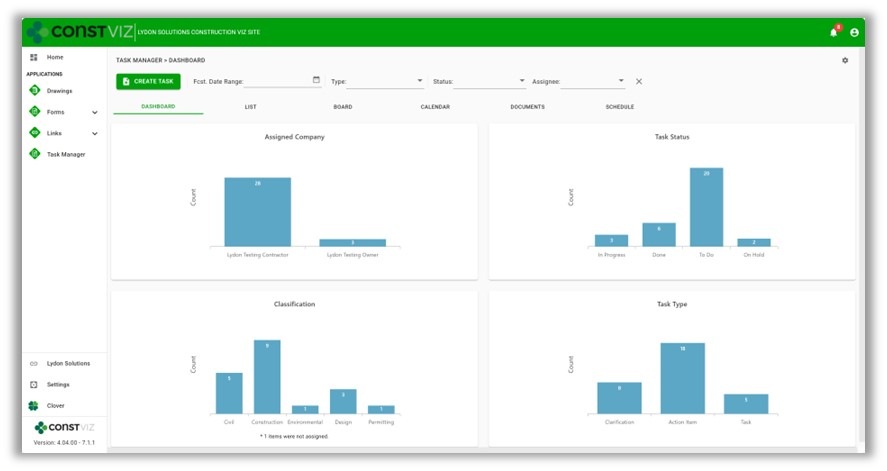
We built the Task Manager so that team members have a 360-degree view of project tasks. The Task Manager includes the following views:

  • Dashboard – Displays charts of key metrics with drill-down capability.
Picture1
  • List – Provides a log of all tasks with filtering, grouping, and search.
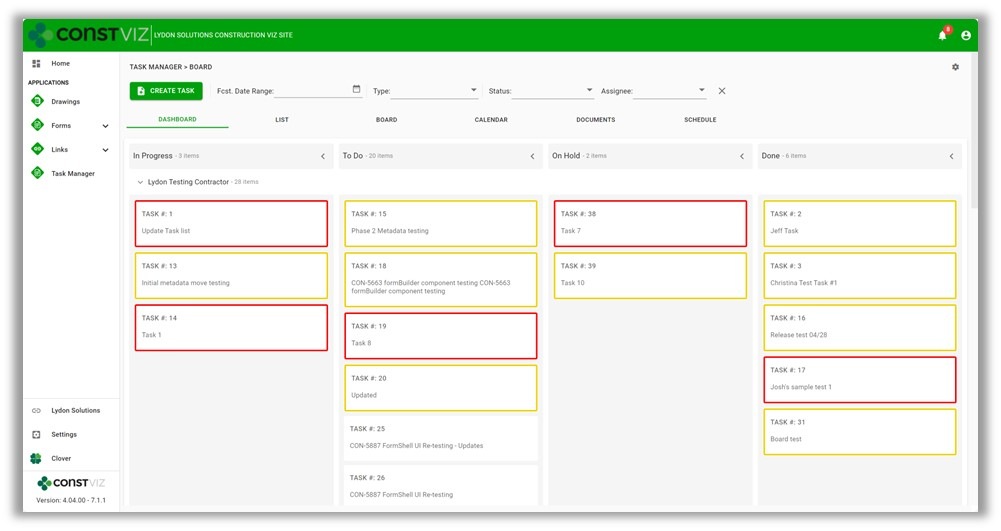
  • Board – Displays a Kanban view for updating the status of tasks.
  • Calendar – Plots tasks on a familiar calendar with today, day, week, month, and agenda views.

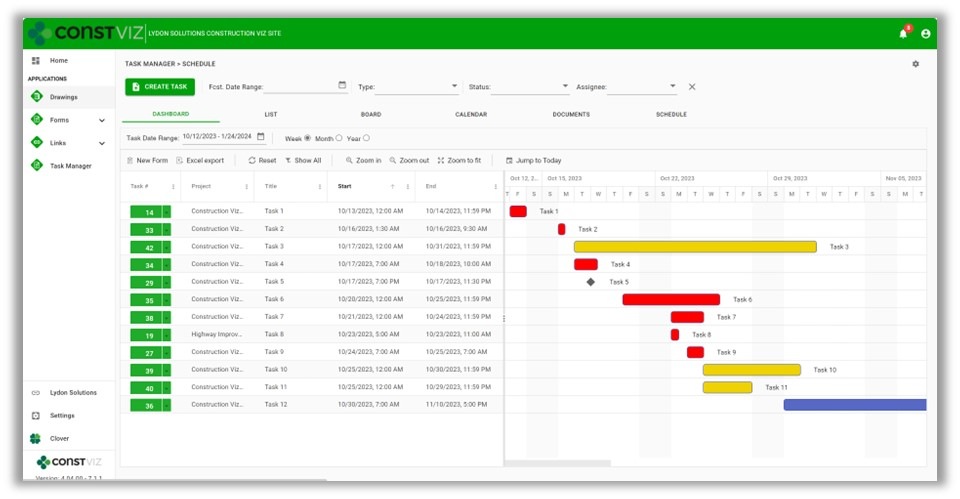
With the latest Task Manager release, we are extending the functionality to include lightweight scheduling. So, if you are looking for a three-week look ahead project schedule tool or prefer a Gantt chart-style view of your tasks, we’ve got you covered.

This release includes the following updates to the Task Manager app:

  • Schedule View – A new view that displays all tasks in a familiar Gantt chart schedule. The schedule includes scheduling controls to filter and change displays.
Picture2
  • Task Schedule component – We added a scheduling component to the task form for managing start and finish dates, times, all-day events, and durations.
  • Task Checklist component – We added a checklist component to the task form to track items needed to complete the overall task. The checklist allows for drag-and-drop ordering, auto-assign completed by, and completed dates.
  • Sub-task component – We added a component to the task form to add sub-tasks to a task. Sub-tasks include fields for the required by date, forecasted completion date, status, and percent complete.
  • Visual alerts – We updated the mouse-over tooltips and added color indicators across views to display late and incomplete tasks. These visual alerts will help project teams stay on track.
Picture3

While these updates are significant, we are just getting started. We plan on further extending the scheduling capabilities of the Construction Viz Task Manager app, including dependencies and resource management. Stay tuned as we continue to deliver a leading-edge task management solution with Construction Viz for Microsoft 365!

Sign up today for a no-obligation demo to learn how Construction Viz can help your organization manage your construction projects more efficiently.


  • Page 1
  • Page 2
  • Go to Next Page »

Footer

About Constructon Viz

Construction Viz is a flexible construction project management software solution powered by Microsoft SharePoint and SQL.
Read More >

Navigation

  • Home
  • About
  • Features
  • Apps
  • Blog
  • Contact
  • Login

Apps

  • Construction Viz Hub
  • Cost Report
  • Drawing Management
  • File Manager
  • GIS Maps
  • Oracle Primavera 6
  • Payment
  • Specification Management

–

  • Project Forms
  • Project Planner
  • Project Scheduler
  • Project Tracker
  • Task Manager

Connect with Us

  • This field is for validation purposes and should be left unchanged.
  • Sign up to receive helpful tips for construction project managers as well as updates about Construction Viz.

Lydon Solutions

© Lydon Solutions

  • Privacy
  • Cookies
  • Terms of Use
  • Disclaimer
  • End-user license

Click here to start a Microsoft Teams chat.

Click here to start a Microsoft Teams chat.

Contact Us
This field is for validation purposes and should be left unchanged.
Name(Required)
Join Our Newsletter

Sign up to receive helpful tips for project managers and updates about Construction Viz.

Get Started

Join Our Newsletter

Sign up to receive helpful tips for construction project managers as well as updates about Construction Viz.

  • This field is for validation purposes and should be left unchanged.
  • This site is protected by reCAPTCHA and the Google Privacy Policy and Terms of Service apply.