• Skip to primary navigation
  • Skip to main content
  • Skip to footer
Construction Viz

Construction Viz

Project Management Perfect

  • About
  • Features
  • Apps
  • Blog
  • Contact
  • Download Flyer
  • Get Started Today
  • Login
Show Search
Hide Search

News

Construction Viz Has Now Entered the Microsoft Dataverse!

News | January 7, 2025

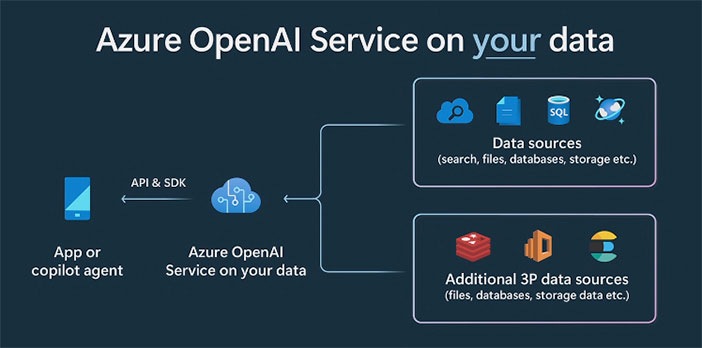
Our initial tests to deploy Construction Viz to the Dataverse have been successful. Find out how deploying Construction Viz to YOUR Dataverse opens up a whole new world of possibilities!

Construction Viz is an enterprise construction management solution deployed to a client’s Microsoft 365 SharePoint Online. While the code runs in the cloud, all client data remains stored in their SharePoint lists and libraries. It’s a revolutionary approach to deploying a construction management solution, but we are just getting started.

Dataverse, here we come in 2025!
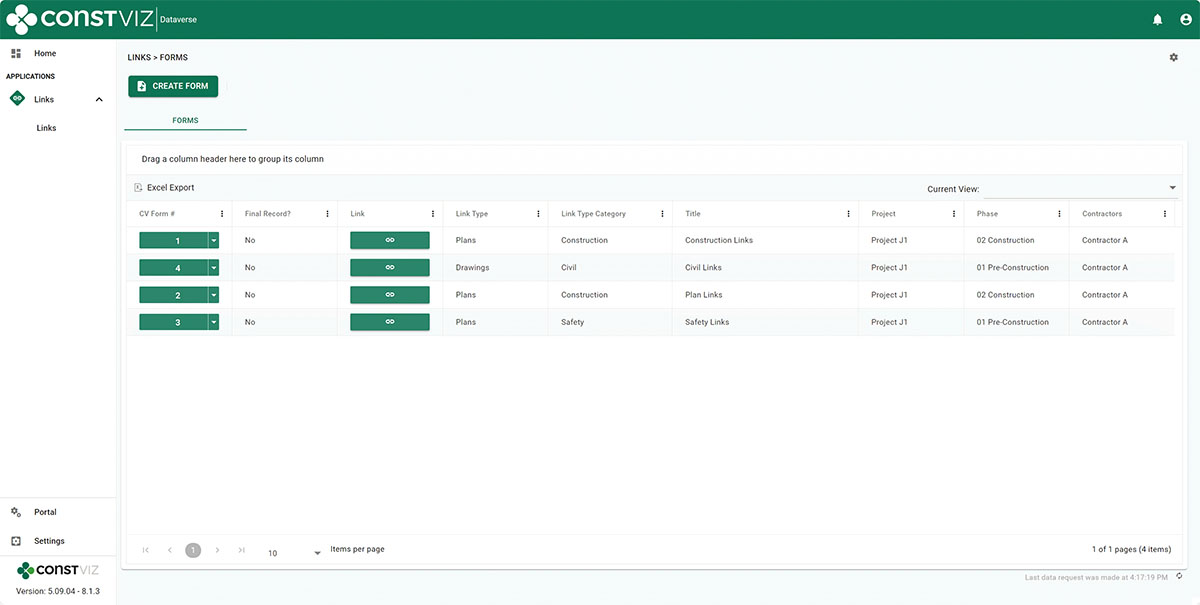
Dataverse_1

What’s Microsoft Dataverse?

Microsoft Dataverse is a secure cloud-based database in Microsoft 365 and so much more. It began as the Common Data Service for Microsoft Dynamics but is now a pillar for the modern Power Platform (Power Apps, Power Automate, and Virtual Agents) and Microsoft Project for the Web.

Microsoft Dataverse provides the following:

  • Power Platform Integration. It is the underlying data platform for Microsoft’s Power Platform.
  • Ability to leverage all data technologies. The Dataverse is designed to work with any data type and incorporates all the major categories of data technologies that your organization needs—relational, non-relational, file, image, search, and data lake.
  • Rapid app development. Citizen developers can rapidly develop and deploy applications using Power Apps. The platform abstracts much of the complexity of database design.
  • Simplifies application development. Dataverse reduces development efforts by offering pre-built connectors, data types, and relationships. This simplifies the creation of applications, as developers can leverage existing structures rather than starting from scratch.

How Will Combining Construction Viz and Microsoft Dataverse Benefit You?

Our integration of Construction Viz with Microsoft Dataverse opens up multiple powerful capabilities for our clients, including:

  • Build and integrate your own applications. You will be able to build your own Power Apps using the same data source and integrate applications and data into Construction Viz. For example, you could create an offline daily report in Power Apps and access it in Construction Viz or even update Microsoft Projects through the Construction Viz hub in real time.
  • Integrate with Dynamics. Many construction organizations use Dynamics as their ERP/CRM tool. Construction Viz will extend the capabilities of Dynamics for project-centric applications, and you can share Dynamics data with Construction Viz.
  • Data consolidation. Aggregate all your data into a single location, simplifying security, analytics, and application building.
  • Database-intensive applications. Need something custom on a large scale? Instead of building an SQL Server database, which can take considerable effort, you can quickly spin up a Dataverse environment with all of these considerations already baked in.
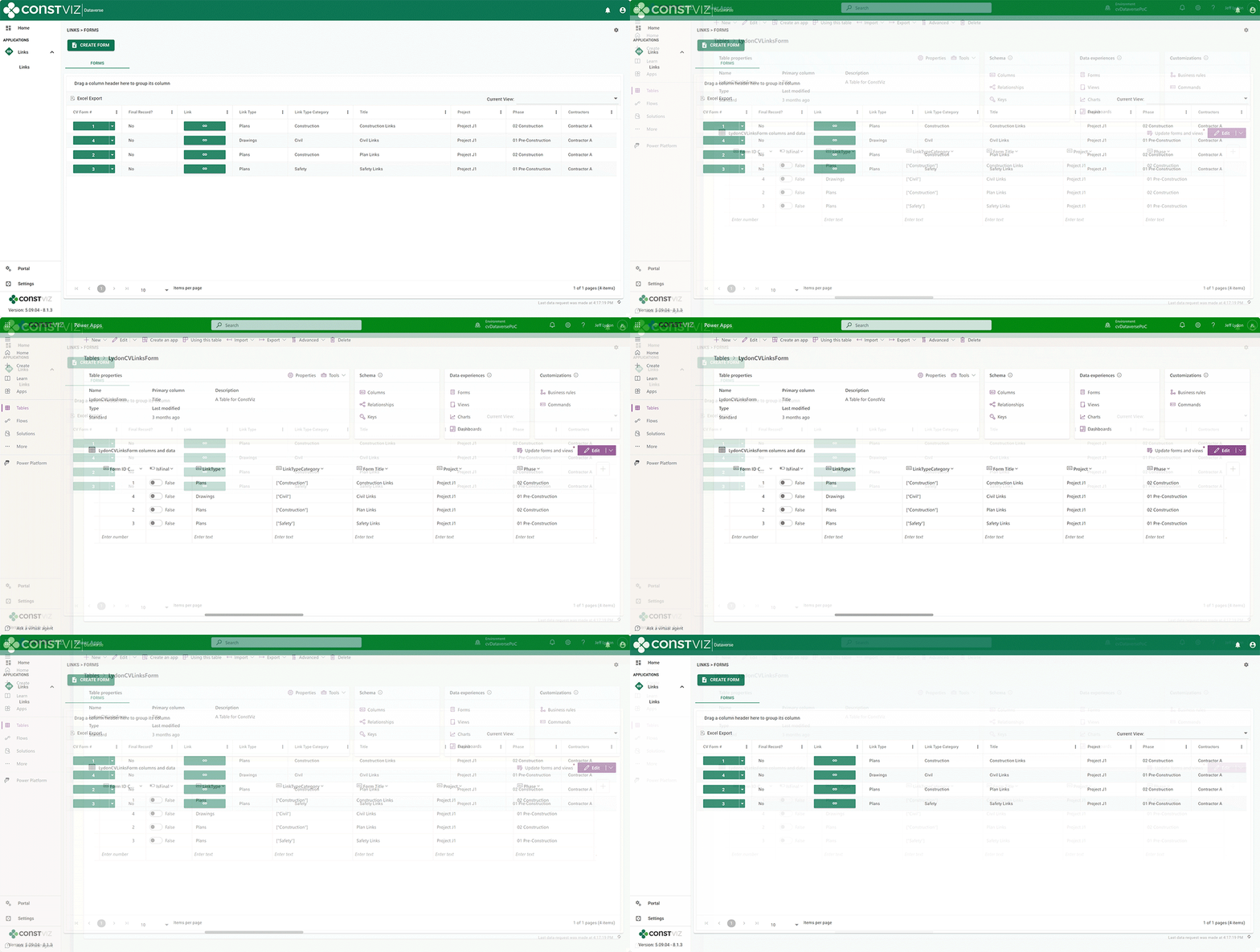
Dataverse_2

Ready to Harness the Full Power of Construction Viz and Microsoft Dataverse?

The integration of Construction Viz with Microsoft Dataverse is more than a game-changer—it’s your opportunity to transform how your organization manages construction projects. From rapid app development to seamless data integration, the possibilities are endless.

Take the next step toward a more efficient, connected, and innovative construction management solution. Contact us today to schedule a free demo and see how Construction Viz with Dataverse can elevate your operations in 2025 and beyond.
Get a Free Demo

Get a Free Consultation - Blog

  • This field is for validation purposes and should be left unchanged.

Construction Viz for Managing Franchise Stores

News | July 10, 2023

Construction Viz is a unique enterprise construction PMIS fully configurable and customizable to your specific construction business. This flexibility makes it simple to add entirely new applications and functionalities to the source code to accommodate our customers’ needs. And on top of that, the entire solution can be deployed into your Microsoft 365 tenant, providing the ultimate control and security of your processes and data.

We recently were tasked with developing a solution for managing the construction of over 400 franchise stores nationwide. This effort included out-of-the-box functionality and custom applications to manage each store from initiation to closeout.

Here is a high-level overview of how we met our client’s needs for franchise store management with Construction Viz.

Construction Viz Hub Customized for Franchise Stores

With Construction Viz, a SharePoint site deployment can represent a single project or hundreds of projects, depending on the need. In this instance, we needed to accommodate 400 stores.

To do this, we rebuilt the Construction Viz projects, contacts, and company settings to capture additional store-specific information, such as owner, location, store type, insurance requirements, and the like. We then connected these settings to our construction-specific forms (e.g., RFI, submittals, etc.) and assigned them to specific stores and projects.

Repurposing out-of-the-box construction apps

The common wisdom is not to reinvent the wheel. We took this maxim to heart while adapting Construction Viz to the needs of franchise store management.

We started by leveraging our existing Construction Viz form apps, such as RFIs, submittals, and daily reports. Next, we configured these forms to capture store information so the client could get a bird’s-eye view of project information across all stores and be able to drill down into each specific store.

New custom apps specific to franchise store management

To capture the unique data needed to manage a portfolio of stores, we needed to build several new applications, including:

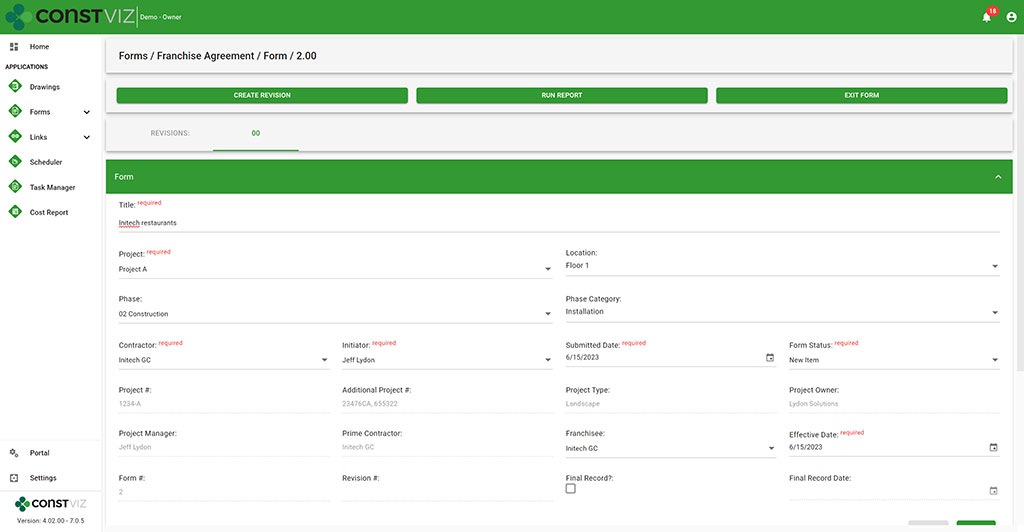
  • Franchise Agreement – This form tracks all of the information required to complete a franchise agreement between the franchise and the franchisee, such as contract terms and ongoing lease costs such as taxes, maintenance, and utilities.
Construction Viz Franchise Agreement form
  • Permits – We rebuilt our Permit form to capture the many types of permits required, from obtaining land to ongoing health services. Key reminder dates, such as permit expiration date, were included so email notifications could be automatically triggered when late.
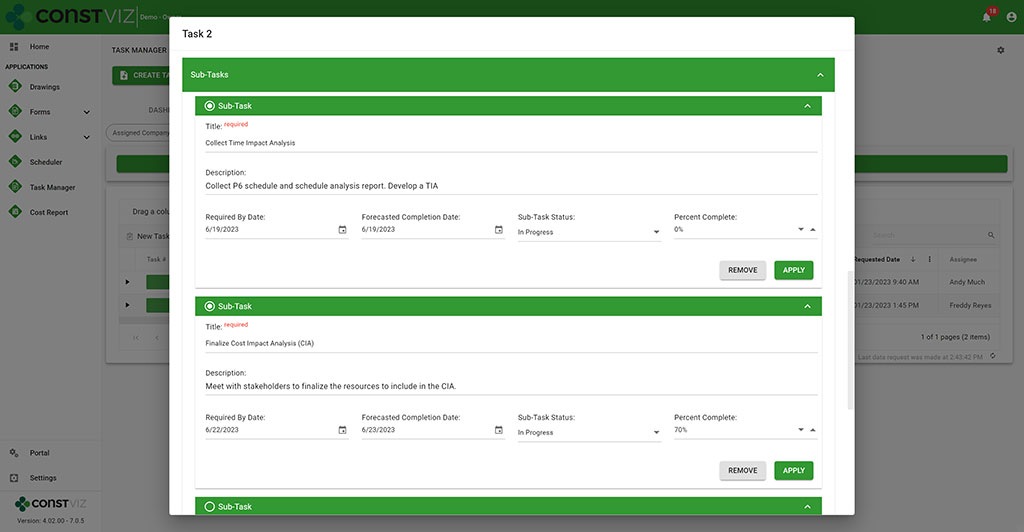
  • Work Performance – We rebuilt our Task Manager app to add subtask detail and percent complete so that every task across the portfolio of stores is centralized and reported on.
Construction Viz Task Manager with sub-task functionality

Discover How Construction Viz Can Meet Your Specific Project Management Needs

Designing and delivering solutions around how you work is one of the key advantages of Lydon Solutions services and how we developed Construction Viz.

Our construction and IT specialists will walk you through our proven step by step FOCUS software implementation methodology to ensure your projects are a success. Using out-of-the-box Construction Viz applications or building a custom solution, we can guide you from concept to delivery, so that your team will want to use the product at the end of the day.

Find out more about Construction Viz with a no-obligation demo and consultation. Or, if you need help with Microsoft 365, head over to LydonSolutions.com to learn about our entire lineup of construction technology services and solutions. 

ChatGPT (Microsoft CoPilot) for Construction Viz

News | June 19, 2023

Microsoft Build 2023 was filled with AI Copilot (ChatGPT) features across the entire Microsoft 365 and Windows ecosystem. There is no question that AI has arrived and will change how we work going forward.

Co-Pilot_1

Times a changing with generative AI tools

“A recent report from Goldman Sachs estimates around 300 million jobs could be affected by generative AI, meaning 18% of work globally could be automated—with more advanced economies heavily impacted than emerging markets,” Jack Kelly via Forbes on March 31, 2023.

“The [Goldman Sachs] report also predicts two-thirds of jobs in the U.S. and Europe ‘are exposed to some degree of AI automation,’ and around a quarter of all jobs could be performed by AI entirely,” Adrianna Johnson via Forbes on March 30, 2023.

The impact of AI on construction

AI will have a significant impact on construction. The changes will be broad and far-reaching, from faster and more accurate designs to AI-controlled drones for mapping and inspections. AI will force organizations to change by adopting these cutting-edge technologies to compete in the world of tomorrow.

If you are on Microsoft 365 and Azure, you’re in luck. What once would take millions of dollars in R&D to develop AI models is now made available by Microsoft to integrate into your existing applications.

Co-Pilot_2

Construction Viz and Copilot AI (ChatGPT)

Lydon Solutions is excited to announce that we have started exploring this game-changing technology made available to us in Microsoft 365. We aim to revolutionize construction management by integrating Copilot (ChatGPT) with Construction Viz. Since Construction Viz uses your Microsoft 365 SharePoint lists and libraries, Microsoft Copilot (ChatGPT) allows us to incorporate AI naturally into our product.

No other construction management solution can boast what we will be able to do with AI using your data delivered securely in your Microsoft 365 tenant.

The Construction Viz AI gameplan

In the coming months, we will enhance Clover, our AI assistant bot you can activate in the Construction Viz Hub.

Our team will expand Clover to leverage your data stored in your Microsoft 365 SharePoint online and allow you, through a common language, to analyze your construction project data. For example, we are exploring enabling real-time analyses using simple language, including:

  • Scope change management lifecycle—Scoping documents, risk management, RFIs, change requests, change orders, and more.
  • Smart scheduling—What if analysis, time impact analysis, and schedule development.
  • Inspection—Inspection data analysis for delays, issues, log of vendors on site, and progress and productivity
  • Task management—Generate reports on your tasks, overdue tasks, and plan for the day

These are only some areas we will consider as part of this initiative. AI is a brave new world, and Lydon Solutions will bring this technology to a construction project near you soon.

Subscribe to our newsletter from our website footer to stay in the loop on this AI journey! Also, you can request a demo of Construction viz for Microsoft 365 here.

Construction Viz Then, Now, and Tomorrow

News | October 27, 2022

I was cleaning up my office over the weekend and found an article in ENR that I wrote back in 2017 announcing Construction Viz to the world. Little did I know what the future would hold. If you ever have a dream, think the challenge is too hard, and want to give up, I hope this article helps inspire you.

Rewind to 2017 and the launch of Construction Viz

“The only time you should look back in life, is to see how far you have come.”
— Kevin Hart

Until 2017, when I wrote this advertisement article for ENR, we had been strictly developing and hosting SharePoint-based solutions for the construction industry. With Construction Viz, our goal was to create a flexible app-driven platform that we could host or deploy into a client’s SharePoint. We wanted to use the latest and greatest technology and speed up the development and implementation times.

We knew SharePoint, but this was new ground.

In the first iterations of Construction Viz, we built custom JavaScript and Angular components connected to SharePoint lists and libraries. At the time, we had to deploy client-side code into SharePoint sites for the functionality to work.

Going out of the gate was a little rough since we were developing a completely new system while still managing our existing SharePoint clients. We didn’t know where this whole thing would go, but we knew we needed to move away from custom SharePoint development and hosting and into more of a product for Microsoft 365. In 2017, Microsoft 365 started picking up steam with Teams and the Power Platform. We knew Microsoft 365 would be the future, and we needed to change our approach.

Fast forward five years

“Don’t look back unless you can smile; don’t look ahead unless you can dream.”
— Irish Saying

While we had many ups and downs over the years, we stuck it out with Construction Viz for Microsoft 365, which has paid off! We have deployed Construction Viz for our clients on muti billion-dollar programs across many construction sectors.

So, how did we get here?

LookingBackCV_2

Bet on our people

Everyone on our team brings a unique skillset from technical architecture, UI/UX, front-end and back-end developers, and product managers. Everyone played a significant role in the direction of the product. The key was to listen to everyone and let the best idea win. The teams managed themselves; they took ownership of the product and were vested in its success.

Stayed nimble

There have been many challenges along the way that make you want to throw your hands up, like when Microsoft restricted deploying code into Microsoft 365. It literally stopped us in our tracks. We had to completely change our deployment model and fast. Construction Viz’s code now runs in the cloud in Lydon Solutions’ Azure data center while the lists and libraries are deployed into SharePoint. It seemed like a curse at the time, but now, the entire solution can be deployed into a client’s Microsoft 365 or SharePoint on-premises or hosted in our Azure environment.

Allowed for continuous improvement

We continually leverage the latest and greatest technology to compete with the larger companies still stuck on ten-year-old technology. We switched our client-side code to React JS, which has provided many needed benefits and made the entire solution a progressive web app (PWA) so a user on any device with a modern browser can access Construction Viz online or offline. We also created a portal to manage projects and programs across a portfolio.

Focused on time to market

Our clients want products quickly, so we needed to remove as many barriers as possible. We needed to scale the solution so deployments could happen the same day. We built a deployment model that could run with a single line of code and include diagnostics to ensure successful implementations.

Offered an attractive price model

Other vendors charge exorbitant prices for project management information systems (PMIS), which were still on old technology and resisted any product changes. We changed our pricing to a per-user/month model based on the applications selected so that clients weren’t paying for a bloated system where they might only use 5%.

The Future of Construction Viz

“You can’t connect the dots looking forward, you can only connect them looking backwards.”
— Steve Jobs

Having an IT company that provides services and products means that you have to be ready to adjust to market conditions. Today, clients want solutions now and don’t want to wait.

Our roadmap for Construction Viz includes a marketplace to purchase our applications online. The game plan is to offer an affordable suite of apps that can deliver 80-90% of the market need. Clients will be able to buy apps using a credit card and deploy them into their Microsoft 365 tenant themselves. A touchless Construction Viz deployment model will allow clients to take advantage of the Microsoft 365 ecosystem they have already purchased.

Stay tuned…

Construction Viz Dynamic Profiles Lets You Create Targeted User Experiences

News | March 29, 2022

One of the many challenges to implementing an enterprise construction Project Management Information System (PMIS) is getting the entire project team to use the system. With Construction Viz dynamic profiles, we made it so every user can have their own unique system experience, as simple or complex as needed.

How do dynamic profiles work in Construction Viz?

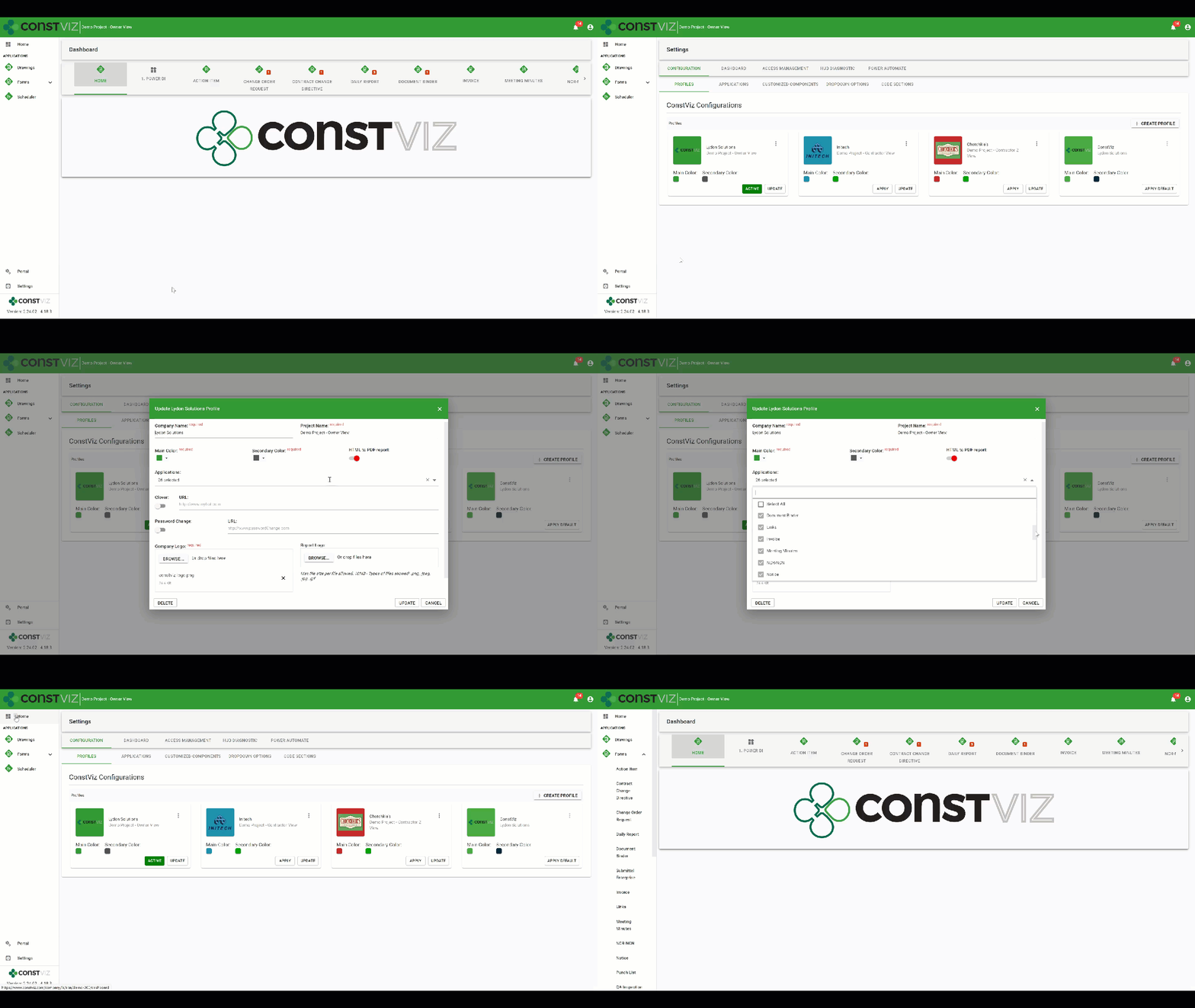
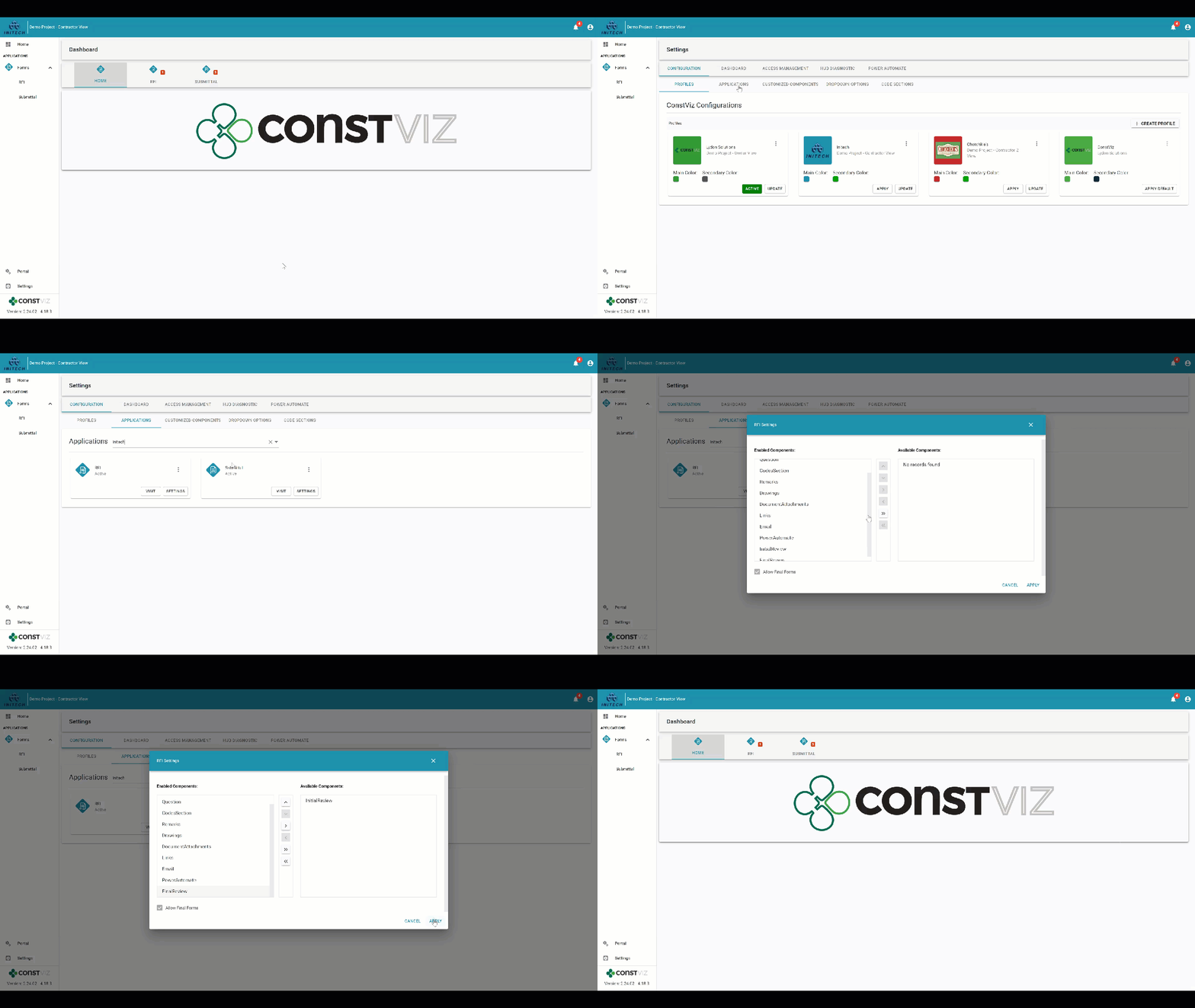
As a construction project owner, you might want to make two different instances of the Construction Viz interface: one for your internal team members with access to all of the project’s applications and a second for your contractor with access to only some applications. You would start by creating a new owner profile, customize the interface with your logo, project title, and a unique color scheme. Then you select all the applications you want to be activated for the owner profile.

Dynamic profile for the owner with 26 apps selected for a project

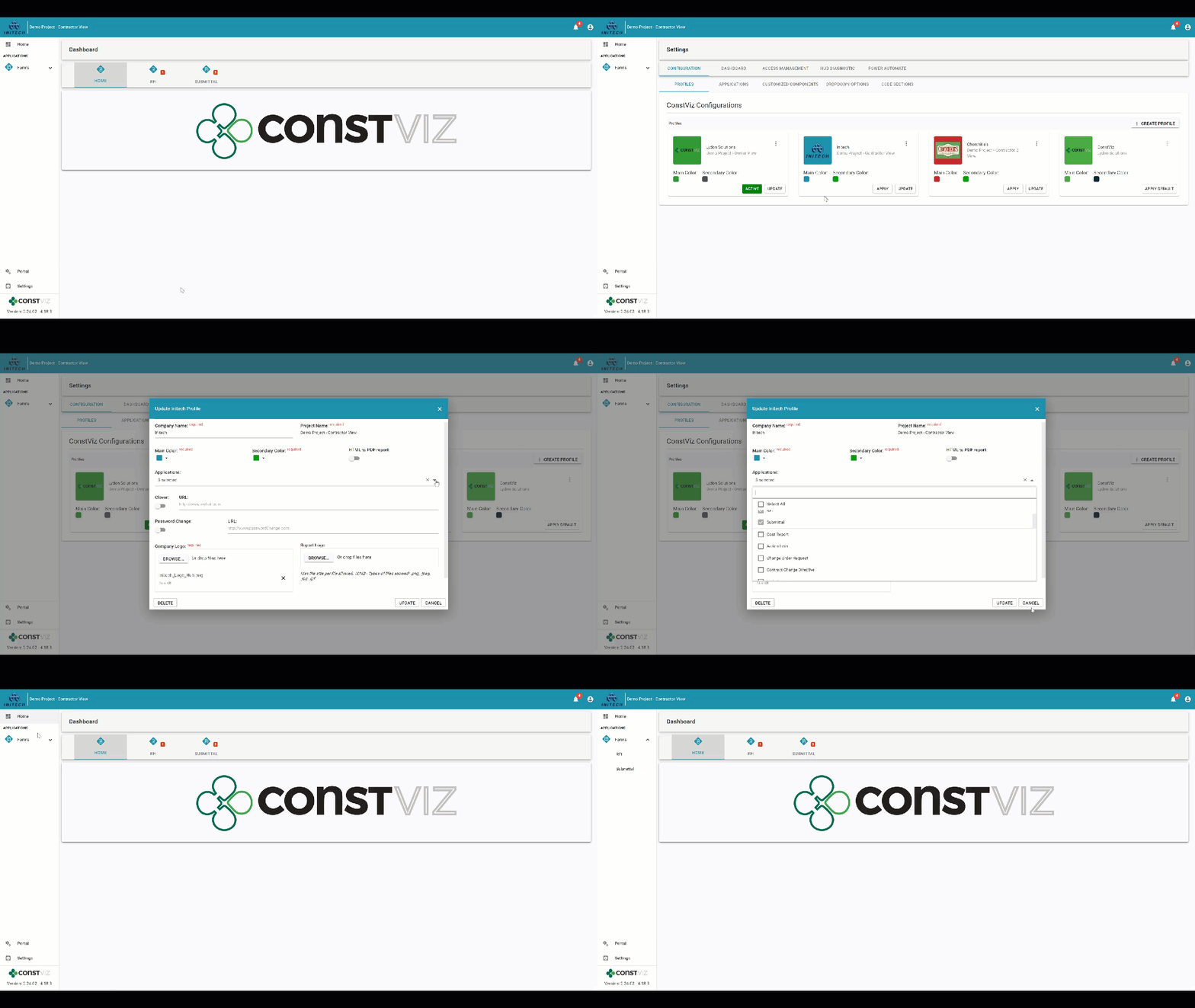
Once you complete the owner profile, you next create a new contractor profile (customizing the interface with their logo, project title, and a unique color scheme), selecting only the specific project applications you want to be active for them.

Dynamic profile for Initech contractor with only three applications selected: Dashboards, RFIs, and Submittals for the same project

You can further customize each profile by choosing what components (e.g., Initial Reviews, Attachments, Mapping, Images) to enable or disable within each activated application. Dynamic profiles let you target exactly what you need your team members to do in Construction Viz and create a truly custom experience depending on who is logging into your project.

Dynamic profile for Initech contractor with the RFI Initial Review by owner component disabled

With configurable dynamic profiles, you can change the entire user experience for every team member depending on their role, assignments, organization, department, or company.

How are Construction Viz dynamic profiles different than permissions?

Our dynamic profiles feature is unique because it works hand in hand with permissions. So, while you might create a dynamic profile for a contractor activating specific apps and components for them, you can still use permissions to assign team members with read or write access to content.

How can I find out more?

Construction Viz is the only enterprise-scale construction management solution for Microsoft 365. You can find out more about what makes Construction Viz different than its competitors and the available apps. To schedule a demo, click here.

VIZualize your Construction Projects with SharePoint Spaces and Construction Viz

News | March 5, 2021

Microsoft began rolling out SharePoint Spaces for Microsoft 365 users last year. SharePoint Spaces is an immersive, web-based platform that allows you to create and share secure and extensible mixed reality experiences.

Users can build interactive mixed reality pages inside SharePoint sites to share 360-degree images and video, 3D objects, 2D images, text, document libraries, and more. You can even play ambient sounds in the background when visitors view the site.

The functionality works best when used with a virtual reality or mixed reality (VR/MR) headset to navigate the 3D space, but this is not required. Users without a headset can navigate the SharePoint Spaces on any device with a modern browser and interact with the artifacts using their keyboard and mouse.

You can find more information about getting started with SharePoint Spaces here.

Using SharePoint Spaces with Construction Viz

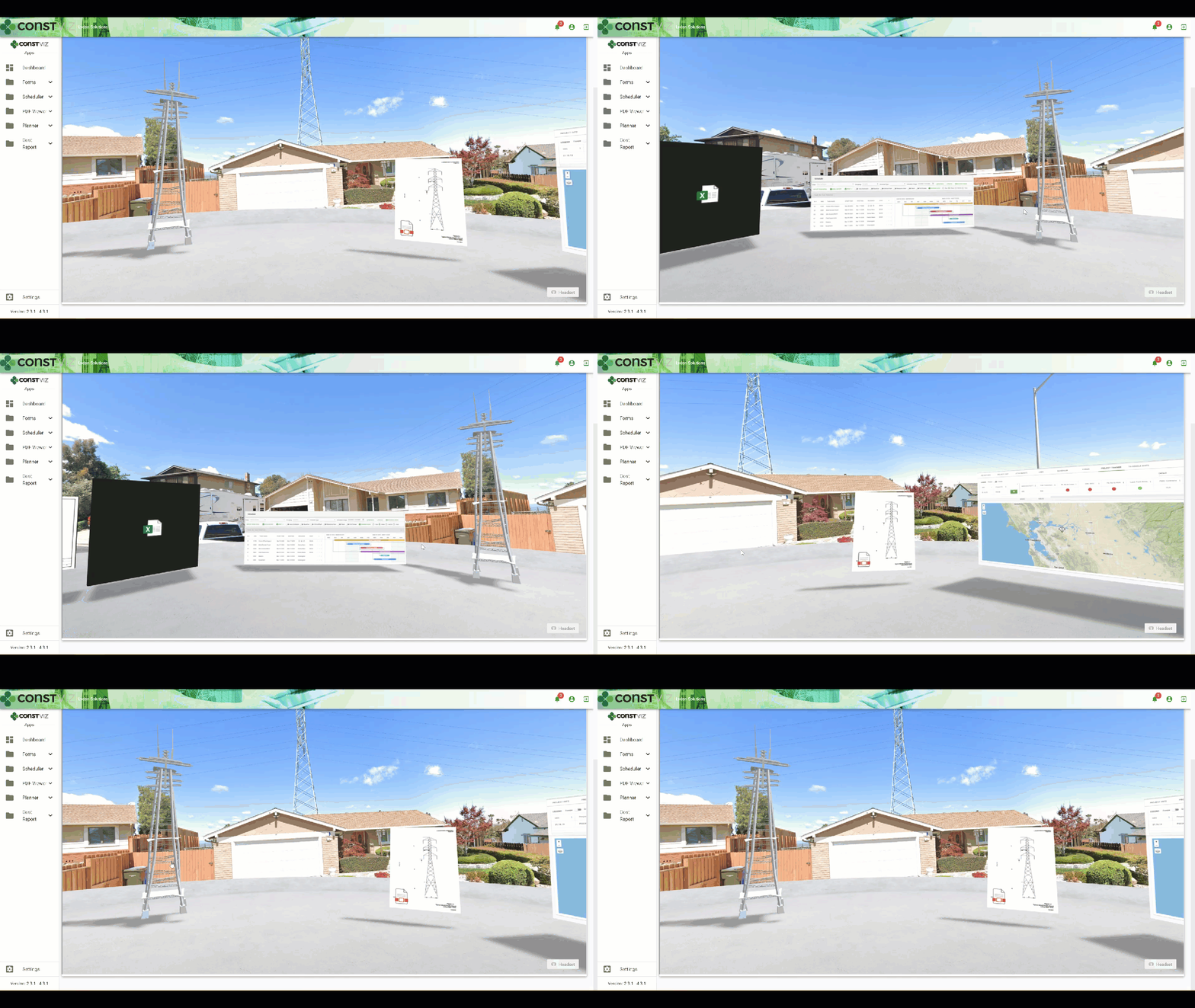
SharePoint Spaces' mixed reality features provide another way to navigate, share, and visualize project data. There are several benefits to using spaces for your construction organization beyond just a shared meeting room with project content. Below is a demo of how a construction project can benefit by integrating our Construction Viz apps with SharePoint Spaces. Examples integrations include:

  • Geospatial location data via the GIS Mapping app
  • Project progress using the Project Tracker app
  • Project Gantt chart scheduling using the Scheduler app
  • Document management using our Construction Form apps for submittals, transmittals, drawings, specs, and so on
VIZualize_1

Stay tuned as Spaces evolves, and we continue to integrate further and build VR/MR solutions for Construction Viz.

Do you want to add VR/MR to your construction project management toolkit?

Construction Viz and our full lineup of construction project management apps for Microsoft 365 can all integrate with this new technology from Microsoft. Schedule your free consultation and demo today to learn more about Construction Viz for your organization.

If you would like expert help using Microsoft 365 to manage your construction projects, we offer business consulting and managed services at LydonSolutions.com.

  • Page 1
  • Page 2
  • Go to Next Page »

Footer

About Constructon Viz

Construction Viz is a flexible construction project management software solution powered by Microsoft SharePoint and SQL.
Read More >

Navigation

  • Home
  • About
  • Features
  • Apps
  • Blog
  • Contact
  • Login

Apps

  • Construction Viz Hub
  • Cost Report
  • Drawing Management
  • File Manager
  • GIS Maps
  • Oracle Primavera 6
  • Payment
  • Specification Management

–

  • Project Forms
  • Project Planner
  • Project Scheduler
  • Project Tracker
  • Task Manager

Connect with Us

  • This field is for validation purposes and should be left unchanged.
  • Sign up to receive helpful tips for construction project managers as well as updates about Construction Viz.

Lydon Solutions

© Lydon Solutions

  • Privacy
  • Cookies
  • Terms of Use
  • Disclaimer
  • End-user license

Click here to start a Microsoft Teams chat.

Click here to start a Microsoft Teams chat.

Contact Us
This field is for validation purposes and should be left unchanged.
Name(Required)
Join Our Newsletter

Sign up to receive helpful tips for project managers and updates about Construction Viz.

Get Started

Join Our Newsletter

Sign up to receive helpful tips for construction project managers as well as updates about Construction Viz.

  • This field is for validation purposes and should be left unchanged.
  • This site is protected by reCAPTCHA and the Google Privacy Policy and Terms of Service apply.